Gurucan vs Knowmia
This comparison pits two very different content platforms against each other. Gurucan is built primarily for all-in-one courses and professional mobile app creation. Knowmia's successor, Screencast, focuses intensely on video hosting and ecosystem integration. You must choose between robust course selling or streamlined video sharing efficiency.
Best for: Solo entrepreneurs needing native mobile apps, Content creators prioritizing predictable, flat-rate pricing
Best for: Professionals intensely using Camtasia and Snagit daily, Teams needing AI assistance for fast video post-production tasks
Affordable native apps for content creators.
Gurucan focuses on solving the complex problem of launching branded mobile applications for creators without requiring coding expertise. We found the platform offers a powerful, all-in-one feature set at a very competitive price point. Overall, its unique value proposition of affordable mobile app accessibility makes it a powerful contender in the LMS market.
Pros
- Affordable creation of native iOS and Android applications.
- Mobile-first design ensures content is optimized for phone access.
- All-in-one features supporting courses, memberships, and webinars.
- Generous limits including unlimited users and video storage.
Cons
- The low 2.9 TrustScore suggests underlying reliability issues.
- UI/UX needs refinement in certain areas, like landing page creation.
- Cancellation of Stripe memberships is often a manual process.
- Conflicting reports on service delivery commitments (e.g., bandwidth updates).
Essential tools with enhanced AI features.
Knowmia Pro users benefit from a clear, feature-rich transition to the Screencast platform, complete with modern AI assistance and strong integration with Camtasia and Snagit. We noted that while the software is praised universally, current user satisfaction is mixed due to frustrating changes to the annual subscription model and licensing limits. Overall, this remains a powerful and intuitive solution for quick video creation and sharing.
Pros
- Supported transition path from Knowmia to the modern Screencast platform.
- Screencast features strong integration with the TechSmith platform (Snagit, Camtasia).
- Intuitive workflow makes creating screen-based videos simple and fast.
- Screencast Pro includes modern AI features like auto-generated captions and chapters.
Cons
- Recent shift to mandatory annual subscriptions caused widespread customer backlash.
- New licensing model requires constant sign-ins when switching between personal devices.
- Email-based customer service can be slow and unresponsive.
- The free tier strictly limits video storage to 25 videos with a 12-month expiration.
AboutGurucan
💡 Gurucan provides a straightforward service tailored for creators who need custom mobile applications. This platform specializes in delivering fully branded iOS and Android apps quickly. You get both web and mobile applications ready for placement in the major app stores. Crucially, the entire setup process requires absolutely no coding experience. This service is designed to help creatives establish a strong, professional mobile brand presence.
AboutKnowmia
Knowmia Pro officially retired in early 2025, but video producers still require a robust hosting solution. If you were a Knowmia user, Screencast is the recommended powerful successor. This tool provides features similar to what you trusted in the original platform. It ensures your video production remains reliable, and it includes the critical benefit of AI-assisted effortless workflows to help streamline your daily tasks. 💡
Highlights
Feature Comparison
Features Overview
We highlight the main differences and pick a winner for each feature.
Mobile Presence
Gurucan is focused on launching true professional mobile apps. Knowmia's successor is focused on web-based video sharing.
Gurucan offers branded iOS and Android applications starting with its Pro plan. They handle development to get your apps live in the stores within 30 days. This is great for boosting user retention among mobile-first audiences. Knowmia's successor, Screencast, is primarily a robust platform for embedding and sharing videos. It provides a reliable web presence for your content but cannot create native mobile apps. This difference is stark: Gurucan builds your mobile brand, while Knowmia (Screencast) hosts the media inside. If a branded native mobile app is a core need, the choice strongly favors Gurucan's specialized mobile solution.
Scaling Costs
Gurucan offers totally flat pricing with unlimited users. Knowmia's Pro successor is priced per user yearly.
Gurucan makes scaling simple by including unlimited users across every pricing tier. You also benefit from guaranteed 0% transaction fees on all sales revenue. Knowmia's successor, Screencast Pro, relies on a per-user annual subscription model. This means your operational costs increase directly as your team or collaborators grow. Gurucan provides cost certainty perfect for large audiences or fast growth. Screencast Pro links efficiency benefits to a direct per-seat cost. Entrepreneurs worried about per-seat fees dramatically benefit from Gurucan's unlimited user model and flat monthly rates.
Video Workflow & AI
Knowmia's successor, Screencast, wins on video creation automation. Gurucan focuses on LMS delivery tools.
Screencast Pro brings modern AI features to streamline your production workflow. These AI tools auto-generate captions, titles, and chapter markers instantly. Gurucan provides unlimited video storage for your courses but does not list any dedicated AI automation tools. Its focus is on content delivery and membership features. If you spend hours manually captioning and titling videos, the AI features in Screencast Pro save significant time. Knowmia's successor is essential for video creators who prioritize efficient post-production and publishing mechanics.
Ecosystem Integration
Knowmia’s replacement is built for seamless TechSmith integration. Gurucan offers standard API connections.
Screencast offers guaranteed full integration with TechSmith tools like Snagit and Camtasia. This ensures a friction-free workflow from recording to publishing. Gurucan supports standard connections using Zapier and Webhooks for external tool connectivity. This allows flexibility but doesn't offer deep creation tool integration. If you currently use Snagit or Camtasia, Screencast provides unmatched continuity and technical support. For power users already invested in the TechSmith stack, Knowmia's trusted successor, Screencast, is fundamentally a better fit.
Learning Curve
Both platforms are noted for having intuitive interfaces and easy setups. Neither requires complex coding skills.
Gurucan users frequently praise the user interface as simple and easy-to-use for online course selling. The zero-code app creation simplifies the mobile launch process. Knowmia’s successor, Screencast, is built on an intuitive workflow for screen-based video sharing. Users transitioning from Knowmia Pro find the feature similarity helpful. Overall, both platforms aim to skip frustrating technical complexity for their specific use cases. New creators should find a fast path to publishing on either site, depending on whether they host courses or share videos.
Storage Limits
Gurucan offers unlimited video storage on all plans. Knowmia has strict limits on the permanent Free plan.
Gurucan provides unlimited video storage and unlimited hosting capacity across all plans. This is ideal for creators with large or growing content libraries. Knowmia's Free tier limits you to 25 videos, which also expire after 12 months. Screencast Pro is needed for unlimited long-term storage. Users focused solely on sharing screenshots are fine with the Knowmia Free tier. Creators building expansive evergreen libraries should lean toward Gurucan or Screencast Pro. Gurucan offers greater peace of mind for creators concerned about hitting video hosting capacity limits quickly.
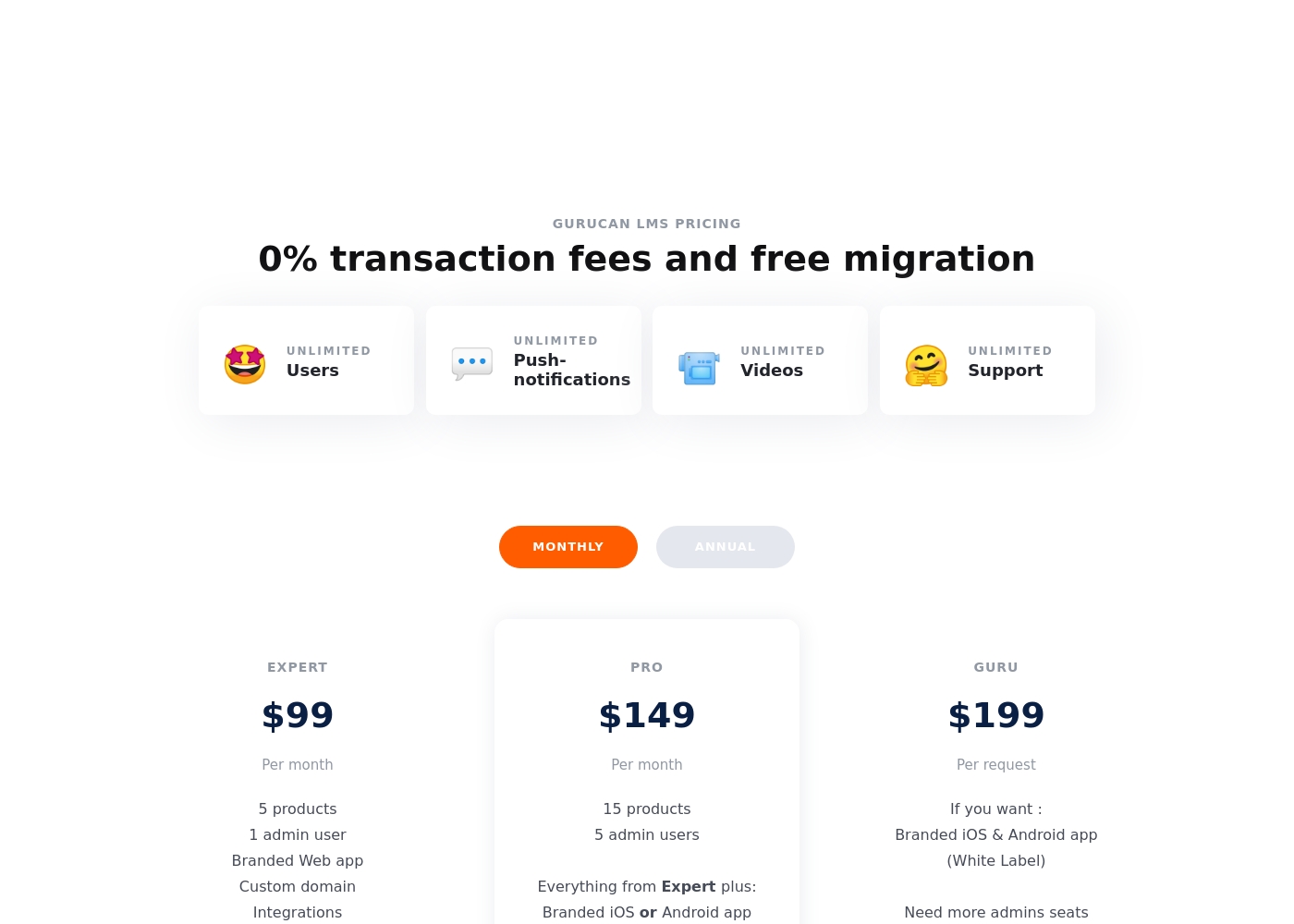
Gurucan costs between $99 and $199 per month across three plans: Expert at $99, Pro at $149, and Guru at $199. You'll find unlimited users, push notifications, video, and support are included with every plan here. The difference lies in features like admin users and mobile app access.
Let's get into the details of what each plan offers.
Expert
Price: $99 per month Best For: Solopreneurs and new creators Other Features:
- 5 products
- 1 admin user
- Branded Web app
- Custom domain
- Integrations
- 5 products
- 1 admin user
- Branded Web app
- Custom domain
- Integrations
- 15 products
- 5 admin users
- Everything from Expert plus
- Branded iOS or Android app
- Branded iOS & Android app (White Label)
- Designed for those who need more admin seats
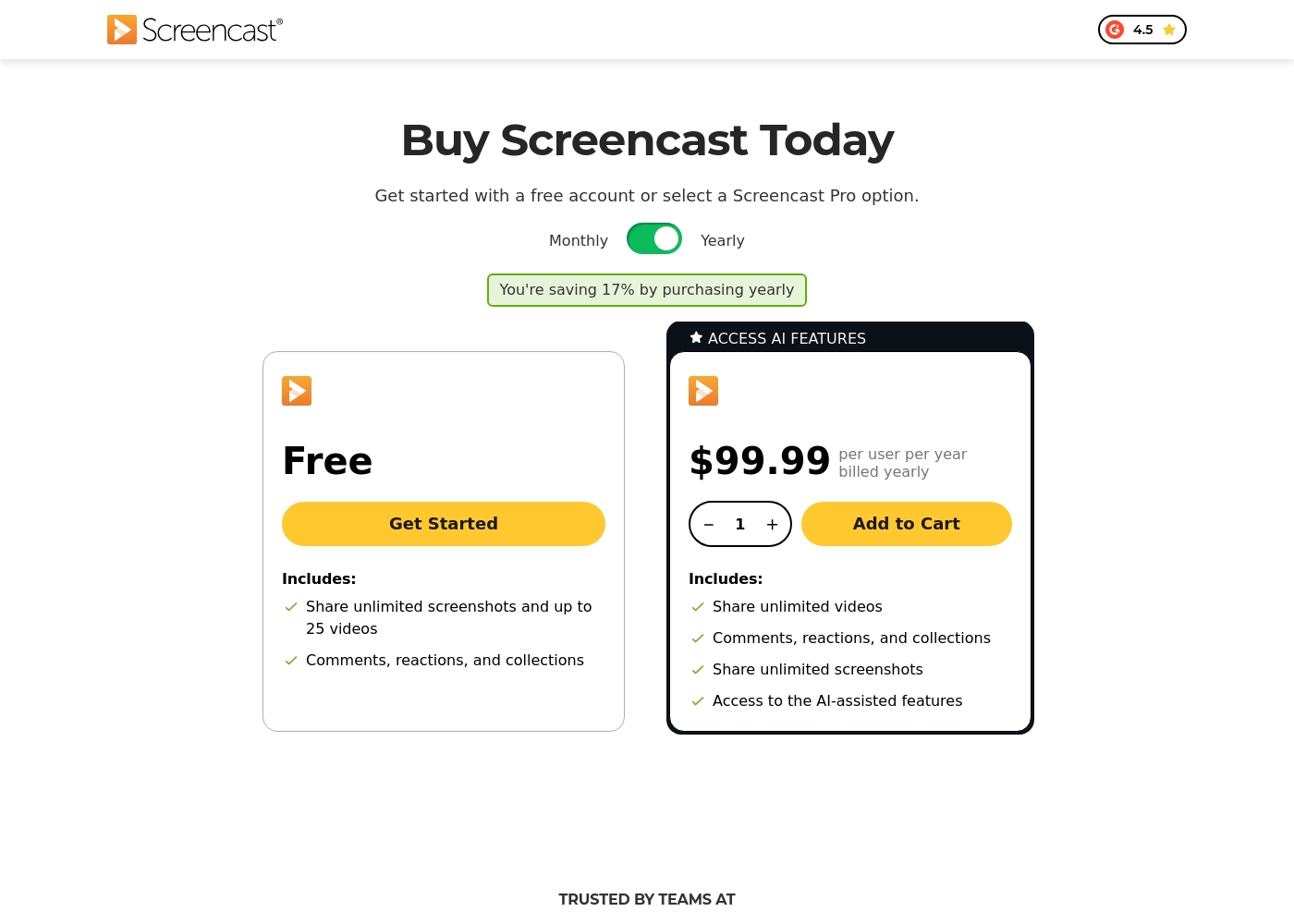
Screencast offers two tiers for knowledge sharing: a Free plan and the Screencast Pro plan, which costs $99.99 per user billed yearly.
Since Knowmia Pro was retired, the platform recommends Screencast as a similar product with integrated sharing features. We've organized the available Screencast tiers below to help you choose the best fit for your sharing needs.
Free
Price: Free Best For: Users who need to share screenshots and upload a limited quantity of video content (up to 25 videos). Refund Policy: Not applicable Other Features:
- Share unlimited screenshots
- Video storage for up to 25 videos
- Video storage limit of 12 months
- Includes Comments, reactions, and collections functionality
- Share unlimited screenshots
- Store up to 25 videos
- Includes Comments, reactions, and collections
- Share unlimited videos and screenshots
- Unlimited video and image storage
- Access to AI-assisted features (captions, titles, chapters)
- Access phrase protected media
- Custom logo and Collections organization
Pricing Notes
- Gurucan offers 0% transaction fees on all sales, ensuring creators keep their revenue.
- Knowmia Pro was retired, and its successor, Screencast Pro, uses mandatory per-user yearly billing ($99.99/user/year).
- Gurucan’s core plans include unlimited users and video storage, guaranteeing predictable scaling costs.
- Knowmia’s Free plan is permanent but strictly limited to 25 videos, which expire after 12 months.
- A credit card is required to begin the 14-day free trial offered by Gurucan.
Pricing Head-to-Head
User Reviews
Users frequently praise Gurucan as a powerful, mobile-first LMS solution that offers exceptional value for money, especially for creators needing a branded mobile presence without heavy development costs. Reviewers consistently highlight the platform's easy-to-use interface and impressive feature set, including built-in webinars, memberships, and fast video uploads, noting it saves significant time.
Customer support, particularly via Live Chat, also receives positive feedback for responsiveness and quality. The capability to launch truly branded Android and iOS apps affordably is frequently cited as a game-changer 🚀.
This is one of the most simple and easy-to-use tools for selling online courses. The user interface is well-designed, stable, and quick, which is a huge timesaver. Plus, the support provided over live chat is excellent.
Users reviewing TechSmith products like Snagit and Camtasia, which integrate closely with Screencast, consistently highlight a strong duality in their experience. On the one hand, the software itself receives overwhelmingly positive feedback for being highly useful, intuitive, and simpler than powerful competitors like DaVinci Resolve.
Many users celebrate the intuitive workflow, calling the software “awesome” and essential for daily tasks. However, the recent shift to a mandatory annual subscription model is a major source of frustration 😡.
This is a great product that is dramatically simpler than other complex tools like those from Adobe. It has a deep enough feature set to handle many complex projects easily. We find the product itself essential.
Our Verdict
Choosing between Gurucan and Knowmia comes down to your core business model: course sales or video sharing efficiency. If you are selling educational content and need rapid growth, Gurucan delivers the superior scaling solution. Gurucan's undisputed superpower is democratizing branded mobile apps for creators. For just $149/month, Gurucan launches a dedicated mobile app straight to the major app stores. Critically, Gurucan offers 0% transaction fees and unlimited users, guaranteeing a flat, predictable cost as you grow. Knowmia's successor, Screencast, is the expert solution for video professionals already in the TechSmith ecosystem. It integrates perfectly with your existing Camtasia and Snagit files for publishing. Screencast Pro also excels with modern AI features to automate captioning and generating chapter titles quickly. Your final deciding factor should be the pricing structure and intended audience. If you hate per-user fees and prioritize mobile brand building, Gurucan is the clear winner. However, if your team relies heavily on video creation tools for internal sharing, Knowmia’s successor, Screencast, reduces workflow friction significantly. We recommend Gurucan if you want an affordable, all-in-one LMS that puts your brand on mobile devices. Choose Knowmia—specifically its successor, Screencast—if you are a professional content producer needing powerful AI and seamless TechSmith integration.
Frequently Asked Questions
Which tool is better for launching branded mobile apps: Gurucan or Knowmia?
Gurucan is absolutely better for mobile apps, as it is designed for it. Gurucan builds and launches branded iOS and Android apps for you quickly. Knowmia’s successor, Screencast, is purely a video hosting and sharing platform.
Does Gurucan have AI features like Knowmia’s successor, Screencast?
Knowmia’s successor, Screencast Pro, includes dedicated AI tools for auto-captioning and chapter creation. Gurucan does not explicitly list comparable AI workflow automation features. Screencast Pro wins if AI video management is essential.
Which platform offers better financial predictability for scaling?
Gurucan offers better financial predictability for growth. All Gurucan plans include unlimited users and 0% transaction fees. Knowmia’s successor, Screencast Pro, requires mandatory yearly per-user billing, increasing costs as your team grows.
Does Knowmia (Screencast) integrate with video creation tools like Gurucan?
Knowmia’s successor, Screencast, integrates seamlessly and deeply with Camtasia and Snagit. The platform is designed by TechSmith itself for this ecosystem connection. Gurucan offers general integrations via Zapier and Webhooks.
Is Gurucan worth the higher monthly fee over Knowmia’s free plan?
Yes, Gurucan's starting price ($99/month) is for a full LMS with unlimited users and 0% fees. Knowmia’s Free plan is highly limited to only 25 videos with a 12-month expiration. They serve entirely different professional needs.
What happened to Knowmia Pro?
Knowmia Pro was officially retired in early 2025. The recommended and supported transition path for Knowmia users is to migrate their video projects to the modern Screencast platform.
Ready to Choose?
Both tools have their strengths. Choose based on your specific needs.