Getty Images vs Unsplash
Getty Images and Unsplash are both major visual platforms, but their business models are complete opposites. Getty Images sells exclusive, high-end assets and comprehensive global editorial coverage for a steep price. Unsplash offers millions of high-quality images completely free, with an optional low-cost premium tier.
Best for: Enterprise organizations with dedicated procurement budgets, Media and news agencies requiring breaking global editorial coverage

Best for: Bloggers, students, and content creators needing free, high-resolution visuals, Freelance designers requiring unlimited downloads for personal projects
Premium content, unacceptable customer practices.
We recognize Getty Images provides an unmatched library of exclusive editorial and creative assets, including modern AI features and flexible UltraPacks. However, we must heavily weigh the severe and consistent external complaints regarding billing dishonesty and non-existent customer support. Overall, the significant risk of billing issues and the failure to resolve customer concerns prevent us from recommending this platform despite its high-quality content.
Pros
- Access to exclusive creative photos, videos, and vectors unavailable elsewhere.
- Comprehensive editorial coverage across global news, sports, and entertainment.
- Ability to use Generative AI tools for commercially safe content creation.
- UltraPacks offer flexible, one-time credit bundles for versatile licensing.
Cons
- Extremely poor customer service responsiveness that fails to resolve disputes.
- Higher per-download prices ($130–$499) compared to standard stock photo sites.
- Reports of double-billing and failure to issue refunds for purchased assets or credits.
- Allegations of deceptive subscription renewal practices with complex cancellation requirements.

Best Free Visuals, Buyer Beware on Premium.
We find Unsplash offers an extensive, high-quality free image library that remains vital for creators worldwide. Overall, Unsplash is highly recommended for its free content, but we advise caution before subscribing to Unsplash+ due to recurring user reports of billing errors and unreliable customer support.
Pros
- Access to a massive library of professional, high-resolution visuals.
- The core content remains free and is available for commercial use.
- Unsplash+ provides enhanced legal protections and useful image editing tools.
- The platform is widely praised for its variety and good categorization.
Cons
- Reported failures in customer support and billing reliability for Plus subscribers.
- Recurring user reports of reduced content diversity and representation in search results.
- The perceived quality of the free image library has declined since the Unsplash+ plan launched.
- A lack of a required safe filter means explicit content can appear.
AboutGetty Images
Getty Images acts as your global resource for impactful visual content. You gain access to a massive library covering everything from creative stock art to up-to-the-minute editorial needs.
They provide royalty-free images, high-definition videos, illustrations, and vectors across all popular categories. You can also explore Getty Images Music, powered by Triple Scoop Music, for comprehensive audio and sound effects. Professionals rely on this service to access iconic moments and trending visuals that leave a lasting impact. 💡
AboutUnsplash
Unsplash is defined as the internet’s key source for visuals. It provides beautiful, free images and pictures across a wide range of topics. These categories cover subjects like Nature, Animals, Film, and 3D Renders. The entire extensive library is powered by creators worldwide who contribute their work. It's a vast platform for anyone needing stunning, accessible imagery for their projects. 💡
Highlights
Feature Comparison
Features Overview
We highlight the main differences and pick a winner for each feature.
Pricing & Value
Getty Images is extremely expensive per download; Unsplash is free for high-quality, unlimited access.
Getty Images relies on UltraPacks, requiring a minimum spend of $130 for a single low-resolution image. Users buy one-time credit bundles for flexible single-asset downloads. Unsplash gives you millions of professional images free of charge, available for instant commercial use. The Unsplash+ subscription adds premium content for individual users at a flat monthly cost. Unsplash provides exponentially higher initial value for budget-conscious creators and small businesses. Getty Images requires substantial upfront financial commitment for basic access.
Generative AI
Getty Images offers commercially safe AI image creation; Unsplash has no Generative AI tools.
Getty Images allows users to generate commercially safe, ready-to-license images using text prompts. Users can also modify creative images by adding or removing elements quickly within the platform. Unsplash does not currently provide any generative AI capabilities for its users. This gives Getty Images a huge edge for brands needing rapid, bespoke, and legally secure visual content generation. Custom AI models can also be fine-tuned using proprietary brand assets via Getty Images.
Editorial Content
Getty Images completely dominates global news and sports coverage; Unsplash offers zero editorial content.
Getty Images offers unmatched, up-to-the-minute coverage of global news, sports, and entertainment events. Professionals rely on its exclusive editorial imagery and video for time-sensitive, high-impact stories. Unsplash focuses solely on creative stock photography and niche content contributed by global creators. The platform lacks any dedicated sections for breaking news or commercial archival footage. For serious journalism or media publications, Getty Images is the only viable option.
Legal Protection
Getty Images provides professional indemnity; Unsplash offers enhanced legal protection only in its paid tier.
Getty Images licenses carry a higher degree of professional indemnity needed for enterprise publication and large firms. Unsplash's free license is permissive but lacks formal legal guarantees found in standard stock licenses. Unsplash+ provides enhanced legal protections, including model and property releases, for subscribers. This ensures single users have greater confidence when using Unsplash+ content commercially. For high-risk use cases or mandated corporate compliance, Getty Images is the safer default choice.
Team Management
Getty Images includes comprehensive DAM tools; Unsplash is strictly limited to single-user licensing.
Getty Images enterprise clients utilize the powerful Media Manager system for digital asset management (DAM). This tool organizes, controls, and streamlines asset distribution across large, global teams. Unsplash+'s license is explicitly restricted to a single user per account seat. Broad sharing or storage on external DAM systems is forbidden under the Unsplash+ terms. Any organization needing to share licensed assets across multiple users must choose Getty Images.
Video Capability
Getty Images supplies high-end 4K video clips; Unsplash is focused exclusively on still imagery.
Getty Images UltraPacks bundle high-definition and 4K video clips for broadcast and professional production. This makes it a full-service media solution, also offering licensed music and sound effects. Unsplash does not list video or motion graphics as part of its free or paid offerings. If your project requires any professional-grade motion asset, Getty Images is your necessary partner.
Customer Support
Both platforms receive extreme negative feedback on support reliability; neither service excels here.
Getty Images users report widespread issues with double-billing, lost credits, and non-existent support staff response. Unsplash+ subscribers also report difficulty reaching support regarding recurring billing issues and locked accounts. The negative experiences reported by Getty Images clients are often financially catastrophic due to the high prices. While neither is perfect, Unsplash's overall positive free community sentiment suggests less acute operational failure. The risks associated with Getty Images' customer service are financially significantly higher.
Creative Tools
Unsplash includes basic integrated editing tools; Getty Images focuses on AI design modifications.
Unsplash+ subscribers gain access to useful integrated features like image cropping and quick background removal. These tools speed up image preparation right inside the platform without external software. Getty Images' modification tools center on using Generative AI to edit existing licensed assets. For simple, common fixes needed by freelancers, Unsplash offers necessary usability enhancements.
Getty Images costs between $130 and $499 per download when purchasing UltraPacks, offering nine specific pack sizes across three image sizes: Small, Medium, and Large.
These UltraPacks let you mix and match royalty-free images, videos, and certain editorial content. Buying in bulk helps you achieve substantial savings on your per-download cost. You choose the resolution level that meets your project needs.
Large Images, 4K and HD Videos UltraPacks
Price: $499 per download (single) down to $300 per download (15-pack) Best For: High-resolution requirements like large print or premium video production. Other Features:
- Single download price is $499
- 5-pack cost is $1,750 total ($350 per download)
- 15-pack cost is $4,500 total ($300 per download)
- 1 download included
- Large creative images, 4K and HD videos
- 5 downloads included
- Price equivalent to $1,750 total
- Large creative images, 4K and HD videos
- 10 downloads included
- Price equivalent to $3,300 total
- Large creative images, 4K and HD videos
- 15 downloads included
- Price equivalent to $4,500 total
- Large creative images, 4K and HD videos
While the Unsplash platform maintains a massive free library, the paid subscription unlocks exclusive features and content. Let's explore what Unsplash+ includes for individual creators.
Unsplash+
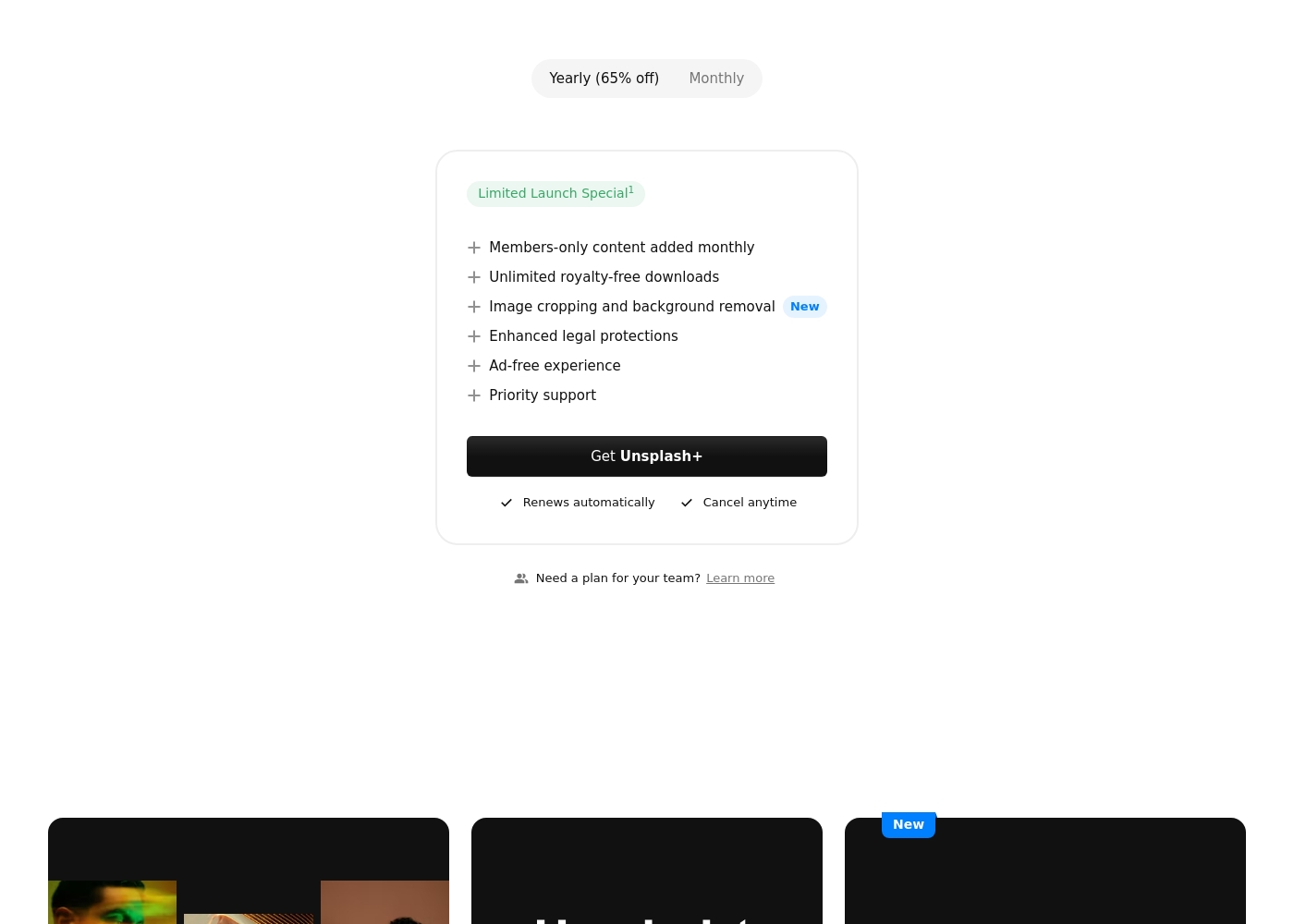
Best For: Individual creators needing enhanced legal protection and exclusive, unlimited stock content. Other Features:
- Members-only content added monthly
- Unlimited royalty-free downloads
- Image cropping and background removal
- Enhanced legal protections
- Ad-free experience
- Priority support
This subscription is designed for single users who frequently download stock images and require specialized content. If you prioritize solid legal protection and want access to powerful new tools like image cropping, Unsplash+ is a superb choice. Remember, this is a single seat license, meaning it is not intended for broad organizational sharing.
- Members-only content added monthly
- Unlimited royalty-free downloads
- Image cropping and background removal
- Enhanced legal protections
- Ad-free experience
Pricing Notes
- Getty Images utilizes expensive UltraPacks; a 15-pack of small images still costs $130 per visual.
- Buying UltraPacks from Getty Images offers up to 20% savings compared to single purchases.
- Unsplash provides millions of high-quality visuals free of charge globally, setting the value baseline.
- Unsplash+ offers significant savings via yearly payment plans, though the actual per-month price is not disclosed.
- Getty Images offers custom Premium Access subscriptions specifically for large enterprise organizations.
Pricing Head-to-Head
User Reviews
Getty Images receives exceptionally poor feedback across Trustpilot, holding a critical 1.3-star “Bad” rating based on over 100 reviews. The sentiment is almost universally negative, focusing heavily on billing practices and non-existent customer support. Users frequently report being charged twice for single images or losing credits immediately upon cancellation, stating the company often refused refunds, even for unused assets. Support responsiveness is described as "terrible" and "non-existent."
Pricing is consistently labeled as economic "highway robbery," with examples citing individual images that cost hundreds of dollars more than similar stock libraries. Customers also complain of deceptive subscription practices, noting there is no functional cancellation option on the website. Furthermore, contributing artists express major frustrations regarding extremely low royalty rates (15–20%) and a systemic lack of respect or communication. For these reasons, reliability and ethical business practice failures dominate the user experience narrative. 🚩
We bought one image for $499 but were charged twice on our card. After nearly a month and several emails, we received no refund and couldn't resolve the billing error with staff. Our credit card company thankfully overturned the unwarranted charges.
Users praise Unsplash for its high-quality, professional images and amazing variety, confirming it is an easy-to-use, commercial-free source for content creators and artists. The satisfaction level decreases substantially among those who utilized the new paid subscription, Unsplash+.
Many long-time users feel that the platform broke its promise to remain entirely free, leading to a noticeable decline in the quality of the non-paid content. The most serious complaints target customer support and reliability: several users report being charged monthly for Unsplash+ despite having locked accounts or being unable to access downloads.
I’ve been using Unsplash for a while now, and it’s honestly my go-to for high-quality, free stock images. The variety is amazing, helping me find the perfect photo for blog posts or social media campaigns. Plus, the fact that it’s free makes it a total win.
Our Verdict
Choosing between Getty Images and Unsplash is simple; it’s largely a decision based on budget and exclusivity needs. If you require zero visual costs and high quality, Unsplash is the clear and obvious winner. Getty Images is an expensive premium solution, costing hundreds of dollars per download. Getty Images' superpower is providing content you simply cannot find elsewhere. Need high-res, exclusive editorial images of a breaking global event? You must use Getty Images. Its cutting-edge Generative AI tool and comprehensive Media Manager also make it indispensable for large, high-end organizations. Unsplash's superpower is accessibility and unparalleled value—it has democratized high-quality stock photography. Unsplash gives individual creators and small businesses immediate, free access to millions of beautiful photos. The Unsplash+ subscription adds legal protection and basic editing tools for a strong monthly value. The decisive factor is the type of content you seek: Are you sourcing generic creative images or specific editorial coverage? If you need exclusivity, enterprise tools, and 4K video, you must accept the high price of Getty Images. If you just need beautiful images instantly, Unsplash delivers. Choose Getty Images if you run an Enterprise or major media company where only exclusive 4K media will suffice. Pick Unsplash if you are a freelance designer or small creator who needs unlimited, high-quality images without spending anything.
Frequently Asked Questions
Which platform is better for teams: Getty Images or Unsplash?
Getty Images is better for teams seeking comprehensive asset control and scalability. It offers the Media Manager system crucial for internal asset distribution. Unsplash+ is strictly a single-user license and is not designed for multi-user team environments.
Does Unsplash charge for commercial use, or is it completely free?
The main Unsplash library of millions of images is completely free for commercial use. The Unsplash+ subscription is optional and unlocks premium content and enhanced legal protection. You can use Unsplash content for commercial projects without paying anything.
What premium features does Getty Images offer that Unsplash does not?
Getty Images offers commercially safe Generative AI tools and comprehensive global editorial coverage, which Unsplash lacks entirely. Getty Images also provides 4K video clips, an extensive historical archive, and a licensed music library.
Why are the Trustpilot reviews for Getty Images so much worse than Unsplash reviews?
Getty Images receives a remarkably poor 1.3-star rating due to widespread complaints about deceptive billing and non-existent customer support. Unsplash generally achieves a higher rating, though their paid Unsplash+ service occasionally receives similar support complaints.
Which service offers enhanced legal protection for my projects?
Both offer legal protection, but for different audiences. Getty Images provides robust professional licensing suitable for enterprise. Unsplash offers enhanced legal protection, including model releases, specifically for individual Unsplash+ subscribers.
Is Getty Images much more expensive than Unsplash+?
Yes, Getty Images is significantly more expensive. The lowest per-image cost with Getty Images is $130, even when buying bulk packs. Unsplash offers millions of high-quality images for free before you even consider the affordable Unsplash+ subscription.
Ready to Choose?
Both tools have their strengths. Choose based on your specific needs.
