Freshservice by Freshworks vs ZeroWork
Freshservice by Freshworks and ZeroWork solve completely different problems. Freshservice by Freshworks unifies IT service and asset management for teams. ZeroWork automates web tasks and data scraping for individuals and businesses.
Best for: IT teams seeking to consolidate tools and streamline service delivery, Organizations wanting to deploy AI agents for common service requests
Best for: Individuals and small businesses automating web tasks, Marketers scraping and enriching social media lead data
Solid AI-powered ITSM platform.
We find Freshservice offers a powerful, unified platform for consolidating IT service and asset management. Its AI integration and ease of use are standout features for modernizing IT operations. Overall, it's a strong choice for teams seeking to move beyond legacy tools and work more proactively.
Pros
- Unified platform for ITSM, ITAM, and ESM reduces tool sprawl.
- AI agents automate repetitive tasks within the agent's workflow.
- Emphasizes a user-friendly interface and rapid deployment.
- Transparent, scalable pricing models help predict costs.
Cons
- Detailed public pricing page can be difficult to find for quick comparison.
- Complex custom integrations may require extensive marketplace setup.
- May include unnecessary enterprise features for very small businesses.
- More than a simple ticket-only tool, which adds some complexity.
Robust Automation for Non-Coders
We found ZeroWork to be an exceptional yet approachable RPA solution, delivering enterprise-grade features like advanced anti-bot detection and generous unlimited runtime. Overall, we confidently recommend ZeroWork for individuals and businesses seeking serious web automation capabilities without needing prior coding expertise.
Pros
- Highly intuitive visual builder; requires no coding experience.
- Exceptional reliability due to sophisticated anti-bot detection.
- Powerful integration features, including webhooks and HTTP requests.
- Generous plan features, including unlimited runtime and API calls.
Cons
- An initial time investment is required to master complex task creation.
- Priority customer support is reserved for the Business tier and above.
AboutFreshservice by Freshworks
Freshservice is an AI-powered platform for IT and enterprise service management. It’s built for organizations that want to streamline their service desk, manage assets, and automate operations in one place. The core idea is to unify service delivery and asset context, eliminating the need for disconnected tools. It targets businesses looking for a modern, intelligent alternative to traditional ITSM software. ✅
AboutZeroWork
ZeroWork is an incredibly powerful yet easy-to-use RPA tool designed for automating nearly any website interaction. It combines complex capabilities—like scraping data or enriching lists—with simple visual tools. You don't need to write code to get started. Instead, you create powerful automations using its visual drag-and-drop interface. It’s built for any user who needs a robust system without needing a heavy technical background. 💡
Highlights
Feature Comparison
Features Overview
We highlight the main differences and pick a winner for each feature.
User Interface
Freshservice by Freshworks offers a clean, modern ITSM dashboard. ZeroWork provides a visual drag-and-drop builder for bots.
Freshservice by Freshworks emphasizes a user-friendly interface designed for rapid adoption. The platform highlights simplicity, with built-in workflows that guide you. It aims to make complex IT capabilities feel intuitive for agents and end-users. ZeroWork's interface is centered on its visual automation builder. You create TaskBots by dragging and dropping actions without coding. Users report building their first functional bot within a few hours thanks to crash courses. Freshservice by Freshworks' UI is optimized for managing tickets and assets. ZeroWork's UI is optimized for designing step-by-step web automation flows. Your preference depends on whether you're managing a service desk or building bots.
Automation Engine
Freshservice by Freshworks automates IT workflows. ZeroWork automates any website interaction.
Freshservice by Freshworks uses AI agents and workflows to automate repetitive IT tasks. It resolves common queries like password resets and guides agents during resolution. This automation happens within your existing IT processes. ZeroWork's engine automates complex web tasks from scraping to data entry. It includes sophisticated anti-bot detection to avoid bans. You can schedule tasks frequently, up to every 5 minutes on higher plans. Freshservice by Freshworks automates internal service processes. ZeroWork automates external web actions. One streamlines IT operations; the other executes web-based chores.
Data Handling
Freshservice by Freshworks manages asset data in a CMDB. ZeroWork scrapes, enriches, and transforms external web data.
Freshservice by Freshworks provides an auto-updating Configuration Management Database (CMDB). It tracks hardware, software, and cloud assets in real-time. This gives you context for IT decisions and risk management. ZeroWork excels at scraping data from websites, including social media profiles. It enriches links from LinkedIn or Facebook with details like email and job title. You can auto-filter leads based on location or keywords. Freshservice by Freshworks is for managing your internal asset inventory. ZeroWork is for gathering and processing data from the public web. Their data goals are fundamentally different.
Integration Ecosystem
Freshservice by Freshworks has a broad IT marketplace. ZeroWork integrates via webhooks for flexibility.
Freshservice by Freshworks connects to popular tools through its marketplace. You can integrate with Slack, Microsoft Teams, and other apps for automation. This helps connect your ITSM platform to your existing stack. ZeroWork supports webhooks starting with the Pro plan. This allows triggers from Zapier, Make, or Pabbly. All plans also include unlimited API calls within TaskBot runs. Freshservice by Freshworks offers many pre-built connectors for IT tools. ZeroWork offers flexible, generic integration via webhooks. Both provide paths to connect with other software.
Security & Compliance
Freshservice by Freshworks focuses on data security and compliance. ZeroWork focuses on avoiding bot detection.
Freshservice by Freshworks highlights data hosted in secure, biometrically protected data centers. All plans include SSL encryption. The platform is EU-US Privacy Shield compliant. ZeroWork's security focus is on keeping your automations undetected. It uses fingerprint obfuscation and proxy support. This prevents accounts from being banned during web automation. Freshservice by Freshworks secures your organizational data. ZeroWork secures your automation activity from detection. They address different security concerns.
Scalability
Freshservice by Freshworks scales with IT team size. ZeroWork scales with automation volume and speed.
Freshservice by Freshworks scales by adding agents and upgrading plans (Starter to Enterprise). Pricing is predictable per agent. It's designed to grow with your organization's service needs. ZeroWork scales by increasing the number of TaskBots and scheduling frequency. The Business plan offers unlimited bots and 5-minute intervals. This suits high-volume automation needs. Freshservice by Freshworks scales for enterprise service management. ZeroWork scales for high-frequency, multi-account web automation. Each scales along its own primary dimension.
Learning Curve
Freshservice by Freshworks aims for rapid ITSM deployment. ZeroWork has a quick start but requires time for complex bots.
Freshservice by Freshworks emphasizes rapid deployment using built-in workflows. The goal is quick time-to-value and ROI. The platform is designed to be intuitive for IT teams. ZeroWork users report building first bots in hours. The visual builder and crash courses help. However, mastering complex task creation requires an initial time investment. Both tools aim to be accessible. Freshservice by Freshworks focuses on pre-built ITSM simplicity. ZeroWork focuses on guiding you through visual bot creation.
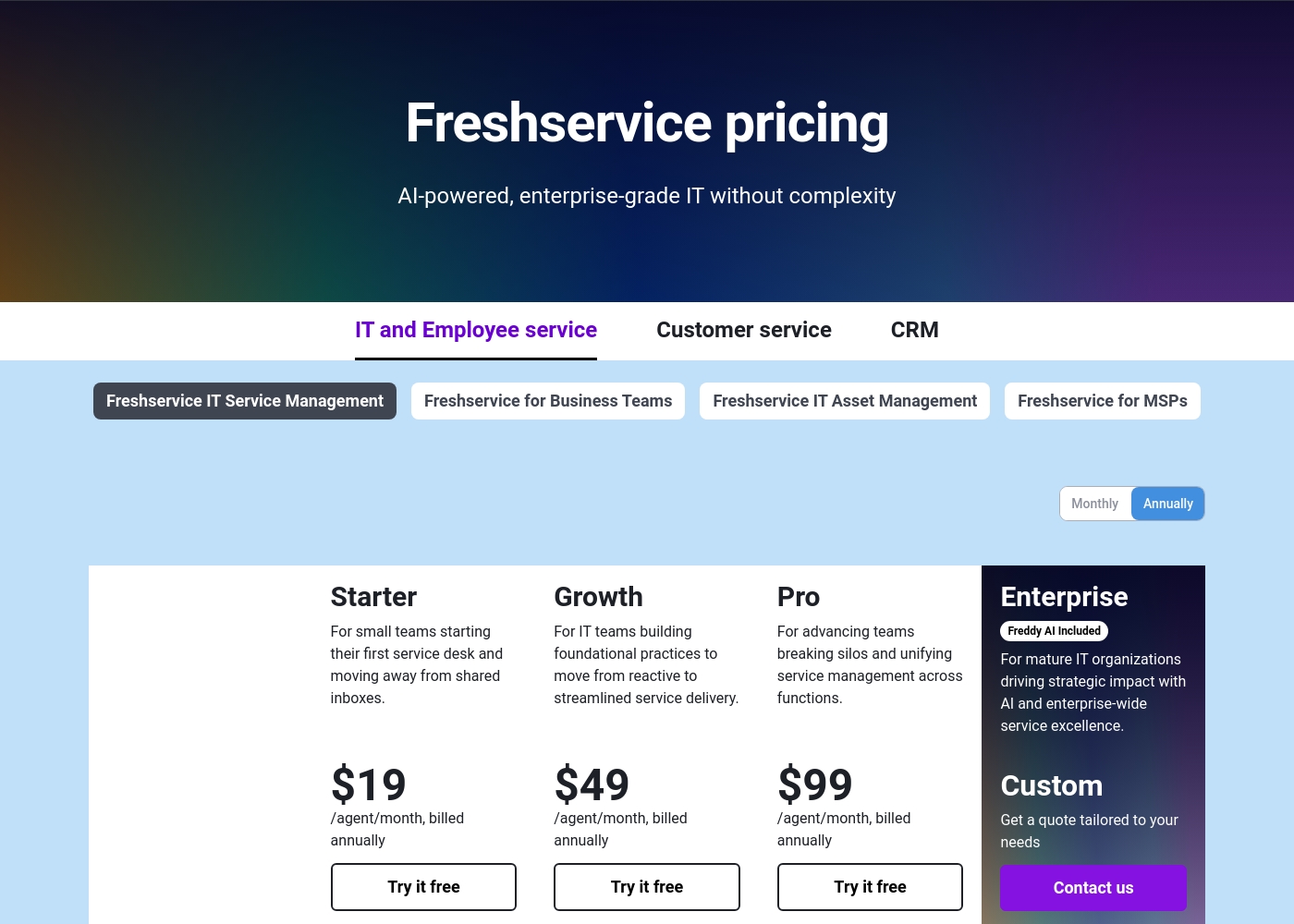
Freshservice by Freshworks pricing: Freshservice by Freshworks offers four scalable plans starting at $19 per agent, billed annually. Pricing is based on agent seats and advanced AI or management features, with both monthly and annual billing options available to fit different business sizes and needs.
ZeroWork costs between $15/month and Custom pricing, offering four paid plans: Starter at $15/month, Pro at $37/month, Business at $75/month, and Enterprise with Custom pricing.
Here is a clear breakdown of what you get with each zero-code automation plan.
Starter
Price: $15/month Best For: Users beginning their automation journey or handling basic daily tasks Other Features:
- Up to 20 TaskBots available
- Tasks schedule daily
- Unlimited runtime and parallel runs
- Unlimited API calls within TaskBot runs
- Community support on Discord
- Schedule daily
- Unlimited runtime
- Unlimited parallel runs
- Unlimited API calls within TaskBot runs
- Community support on Discord
- Everything in Starter
- Schedule every hour
- Webhooks to trigger TaskBot runs from Zapier, Make, Pabbly or other apps
- Everything in Pro
- Schedule every 5 minutes
- Priority email support
- Everything in Business
- Custom SLA
- Dedicated success manager
- Team training
- Custom invoicing

Pricing Notes
- Freshservice by Freshworks pricing is per agent and billed monthly or annually. It offers a free plan and a 14-day free trial.
- ZeroWork pricing is a flat monthly fee per account, based on TaskBot limits and scheduling speed. It offers a free trial to start.
- Freshservice by Freshworks has a separate Asset Unit metric for IT Asset Management, which could affect costs.
- ZeroWork's Business plan at $75/month removes TaskBot limits, offering the best value for high-volume automation.
Pricing Head-to-Head
User Reviews
Based on available external sources, we found a significant limitation in gathering public sentiment for this specific review. The Trustpilot link provided was inaccessible due to a verification error, and no Capterra data was supplied. Consequently, we cannot synthesize a balanced external review summary from real user feedback on platforms like Trustpilot or Capterra at this time. Our assessment is therefore based solely on the provided product information.
ZeroWork receives overwhelmingly positive external feedback from users, maintaining a high 4.7-star rating on Trustpilot. Reviewers consistently praise the platform's exceptional usability, noting that those with limited technical knowledge or no coding experience can quickly build advanced TaskBots.
Many users highlight the extensive help documentation and crash course videos, which help speed up the necessary learning curve. The tool is frequently described as super fast and highly reliable, with sophisticated anti-bot detection that allows for secure, simultaneous multi-account management.
I always used basic web scraper extensions, but ZeroWork is far more advanced. It is still very doable, even with my limited technical knowledge. I can now scrape highly sophisticated pages seamlessly and reliably.
Our Verdict
Freshservice by Freshworks and ZeroWork aren't really competitors—they solve different problems entirely. Freshservice by Freshworks' superpower is unifying IT service, asset, and operations management. Its AI agents work inside your existing IT workflows to resolve tickets faster. ZeroWork's superpower is making complex web automation accessible. Its anti-bot detection lets you scrape data and manage multiple accounts without getting banned. The deciding factor is your primary pain point. If your IT team is drowning in separate tools, Freshservice by Freshworks brings them together. If you're wasting hours on manual web tasks, ZeroWork automates them. Choose Freshservice by Freshworks to modernize your IT department and deploy AI for service requests. Choose ZeroWork to automate repetitive web chores and scale your data collection securely.
Frequently Asked Questions
Which is better for small teams: Freshservice by Freshworks or ZeroWork?
It depends on the task. Freshservice by Freshworks suits small IT teams needing a unified help desk. ZeroWork suits small businesses automating web tasks like lead scraping.
Does Freshservice by Freshworks have data scraping like ZeroWork?
No. Freshservice by Freshworks manages internal IT assets and services. ZeroWork specializes in scraping and enriching data from public websites.
Is ZeroWork worth the extra cost over Freshservice by Freshworks?
They serve different needs. ZeroWork's flat pricing offers high value for automation volume. Freshservice by Freshworks' cost is justified by its comprehensive ITSM suite.
Can I use both tools together?
Yes. For example, you could use ZeroWork to scrape data and then log it as a service request in Freshservice by Freshworks via webhooks.
Which tool is easier to learn?
ZeroWork's visual builder is often cited as easier for non-technical users. Freshservice by Freshworks, while user-friendly, has more IT-focused complexity.
Do both tools offer free trials?
Yes. Freshservice by Freshworks offers a 14-day free trial. ZeroWork allows you to start for free to explore its platform.
Ready to Choose?
Both tools have their strengths. Choose based on your specific needs.