Framer vs Webydo
Framer and Webydo both target designers who despise writing code, but they serve different masters. Framer prioritizes speed, performance, and integrated growth tools like A/B testing. Webydo is engineered for agency scale and pixel-perfect client management with white-label features. The reviews confirm both struggle with stability, making reliability the crucial deciding factor.
Best for: Startups needing to launch high-performance marketing sites rapidly and efficiently, Designers familiar with Figma seeking a handoff-free publishing platform
Best for: Web design agencies managing portfolios of 10-100 client sites, Designers who need full White Label experiences for professional client delivery
Powerful Design, Challenging User Experience.
Framer is pitched as a high-performance visual tool offering designers full creative control and rapid deployment capabilities. However, we note that the steep learning curve, combined with systemic issues like unhelpful support and reports of misleading pricing structures, creates a challenging user environment. Overall, we find that the foundational technology is impressive, but major user experience and customer service failures drastically undermine its claimed efficiency.
Pros
- Powerful visual tool favored by designers, especially those familiar with Figma.
- Enables handoff-free publishing and rapid site deployment.
- Built-in modern features like advanced CMS, SEO tools, and AI generation.
Cons
- Highly complicated and unintuitive user interface (UI/UX).
- Frequent reports of constant bugs and reliability issues.
- Pricing is often misleading, with unexpected, high costs for basic features like localization.
- Customer support is reportedly slow, difficult to access, and often relies on unhelpful AI bots.
Professional features, questionable stability.
We observe that Webydo provides unique features such as white labeling and advanced CMS tools specifically built for professional agencies and designers. However, we cannot recommend a product where frequent platform glitches, extremely unreliable support, and aggressive billing practices are consistently reported by users. Overall, designers should exercise extreme caution before committing to this platform, especially for critical client projects.
Pros
- No-code, pixel-perfect design capabilities available.
- Includes client-facing CMS functionality for easy content updates.
- Professional features like White Labeling and custom branding for agencies.
- Centralized dashboard simplifies management of multiple client projects.
Cons
- Users report frequent platform glitches and operational unreliability.
- Customer support is consistently described as poor, slow, or non-existent.
- Reports of unexpected billing, charges, and sudden price hikes.
- Fees to export sites create a feeling of being 'captive' designers.
AboutFramer
Framer is a powerful visual design tool made for crafting and publishing modern websites. It empowers you to build exactly what you imagine using smooth effects, animations, and interactions. You can craft responsive layouts visually, eliminating the need to write code.
The platform helps you skip the blank canvas entirely. Integrated AI can generate sophisticated page layouts and advanced components right away. Collaboration is built in, meaning updates are seamless, and the entire process is completely handoff-free. 💡
AboutWebydo
Webydo is a powerful professional platform built specifically for designers and agencies. It empowers you to design and publish complex websites without dealing with underlying code. The platform's editor allows drag and drop functionality directly onto the design canvas. ✅
This platform automatically handles code generation. This gives you the professional features you need to create custom websites down to the last pixel. Over 246,000 designers and agencies are already using Webydo to grow their businesses.
Highlights
Feature Comparison
Features Overview
We highlight the main differences and pick a winner for each feature.
AI Generation & Speed
Framer uses AI for complex layout generation; Webydo’s AI is primarily for a quick project starter. Framer focuses on rapid, handoff-free publishing.
Framer’s Wireframer AI generates full site components and sophisticated layouts instantly. This lets designers skip the blank canvas and focus on refinement. Publishing is handoff-free, allowing daily updates without relying on developers. Webydo utilizes the "Built by AI, Perfected by You" feature for a fast initial draft. This provides a speed boost so the designer can immediately start manual, pixel-perfect adjustments. Framer’s AI is integrated deep into the core design workflow, giving it an advantage on initial speed. Webydo requires more manual effort after the AI kickstart. Framer is better suited if you need to generate high volumes of marketing pages extremely quickly, leveraging built-in optimizations.
Design Precision
Webydo specializes in pixel-perfect results and specific breakpoint control; Framer focuses on fluid, visually crafted responsiveness.
Webydo allows designers to achieve truly pixel-perfect results within its editor, which acts like familiar design software. Designers can customize layouts for individual device breakpoints for maximum control. Framer provides full creative freedom to visually craft effects, interactions, and responsive layouts. The platform focuses on high performance but does not detail breakpoint-specific control. If maintaining exact visual consistency across every device size is your top priority, Webydo is built for that precision. Framer prioritizes ease and speed of creating fluid designs. Design agencies handling extremely particular client requirements may find Webydo's granular layout control invaluable.
Agency & Client Tools
Webydo offers strong agency-focused tools like White Label branding; Framer's collaboration is focused entirely on internal team design.
Webydo includes critical professional tools like a Central Dashboard and Client Billing for managing multiple projects. The Agency plan supports up to 10 designer accounts and 100 sites. Crucially, Webydo offers full White Label Branding capabilities. This allows agencies to present the platform and CMS to clients under their own company name. Framer's collaboration is internal and centered on seamless, handoff-free publishing for design teams. It does not offer client-facing agency tools like White Labeling. For a web design business that needs to look professional and streamline client management, Webydo is the clear choice.
Growth & Analytics
Framer offers integrated A/B testing and analytics; Webydo does not detail any integrated growth optimization features.
Framer integrates robust analytics to track traffic, performance, and key conversions internally. The Scale plan, via an add-on, offers A/B testing, click tracking, and conversion funnels. These growth tools allow Framer users to maximize performance based on detailed data. You can test multiple design variants to identify the highest conversion rate. Webydo only mentions its foundational architecture is "Very SEO Friendly." It does not provide built-in tools for data-driven optimization like A/B tests. If your goal is continuously optimizing a strong marketing site, Framer provides the necessary integrated testing infrastructure.
Core Platform Stability
Both tools receive widespread reports of poor stability, bugs, and clunky interfaces; Framer is rated slightly higher than Webydo.
Framer users often complain of a clunky, unintuitive UI/UX and frequent bugs that complicate simple tasks. Reliability issues are a strong counterpoint to its powerful features. Webydo users report severe reliability issues, including constant glitches and unprompted design changes on live sites. This suggests fundamental operational flaws. While both platforms struggle with stability, Webydo's extremely low external rating (1.5) indicates deeper problems than Framer's (2.5). For professional designers handling client work, the severe instability reported in both tools presents a major, project-critical risk.
Customer Support
Both Framer and Webydo are criticized for providing slow, unhelpful, and difficult-to-access customer support.
Framer users report getting stuck with unhelpful AI bots and slow response times when issues arise. Accessing human support is described as difficult. Webydo users consistently complain of response times exceeding 24 hours. Even when support responds, users feel their core issues are rarely solved effectively. Neither platform offers reliable or responsive customer support according to the majority of external user feedback. This increases the risk for new users significantly. If dedicated customer support is necessary for your operations, neither Framer nor Webydo appears to be a good fit today.
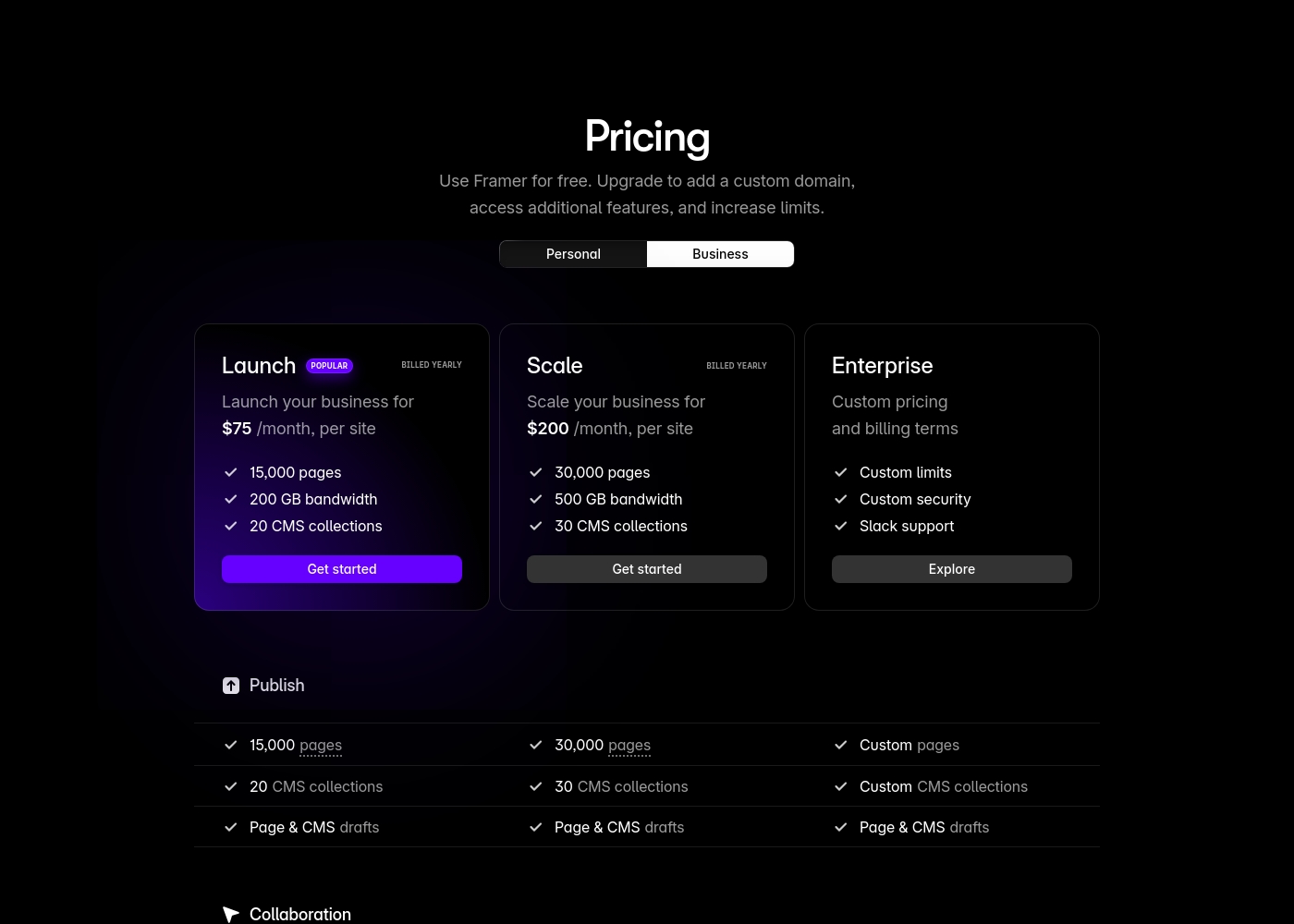
Framer costs between $75 and $200 per month (billed yearly) with two fixed-price plans: Launch at $75/month and Scale at $200/month, plus a custom Enterprise option.
Framer offers a Free plan to let you start designing right away. When you are ready to add a custom domain and access advanced features, you can choose from these paid business offerings.
Launch (Popular Business Plan)
Price: $75/month, per site (billed yearly) Websites Supported: Per site Best For: Launching a business site or marketing stack Refund Policy: 14-day refund eligible for EU and Turkey residents Other Features:
- 15,000 pages, 20 CMS collections
- 200 GB bandwidth, 50GB file storage
- Password protect, Custom code, Cookie banner
- Up to 10 editors (additional editors $40/month)
- 10 CMS collections
- 1,000 pages
- 5MB file uploads
- Free locale to try
- 15,000 pages
- 20 CMS collections
- 200 GB bandwidth
- 50GB storage
- 90 day version history
- 30,000 pages
- 30 CMS collections
- 500 GB bandwidth
- 100GB storage
- 120 day version history
- Custom limits and security
- Premium CDN and hosting
- Unlimited analytics and redirects
- Dedicated Slack support and team training
- SSO for editors and sites
Webydo offers subscription packages focusing on Designer Accounts, starting with a general site plan at $12 per month (billed annually).
Selecting the right Webydo plan depends on the number of sites you manage and the scope of features required for your agency or freelance business. All plans fully include hosting and the Content Management System (CMS) for your use and for your clients.
General Site Pricing
Price: $15/month or $12/month (billed annually) Websites Supported: 1 Best For: Individuals building and hosting one site effortlessly Other Features: Included hosting and CMS
- Ideal for individuals
- Build and host one site effortlessly
- Included hosting and CMS
- 1 Designer Account
- Free hosting & CMS included
- Email Support
- 1 Designer Account
- Chat & Email Support
- Client Billing
- Free hosting & CMS included
- 3 Designer Accounts
- Full Onboarding & Setup
- Client Billing
- White Label CMS & Branding
- Add Code to Site

Pricing Notes
- Framer's pricing range ($75-$200/month) is per site and does not include mandatory extra costs for editors or localization. Users report these quickly become substantial fees.
- Webydo's pricing is complex, requiring designers to pay for an account tier (pricing undisclosed) plus a recurring per-site hosting fee ($7.50 - $15/month).
- Both Framer and Webydo receive heavy criticism for non-transparent pricing and unexpected charges that mislead users upon signup.
- Framer offers an indefinite Free plan for exploration, whereas Webydo only offers a 14-day free trial.
Pricing Head-to-Head
User Reviews
Framer generates highly polarized feedback, reflected in its low Trustpilot standing. Users generally praise the platform’s powerful features and the impressive technical capabilities for designers, noting its potential as a beautiful site builder.
However, the external criticism mainly centers on poor User Experience (UX), which many describe as clunky, complicated, and unintuitive, making even simple tasks frustrating 😡. A significant number of reports highlight constant bugs and half-baked features impacting overall reliability.
The UI/UX is truly terrible, clunky, and overly complicated. I’ve been in web design for eight years, and this is the least intuitive platform I have ever used. Seriously, they need to hire a new designer quickly.
The public feedback available for Webydo is overwhelmingly negative, pointing to significant reliability and customer support issues. Users consistently describe the platform as glitchy and unstable; long-term users noted that it "makes changes on its own" and frequently "crashes a lot." The most consistent complaint concerns the extremely poor quality of customer service, described by multiple reviewers as "awful," "slow at best," and frequently non-existent.
Support response times often exceeded 24 hours without resolving the core problem. Furthermore, several reviews highlight major concerns regarding billing and platform lock-in.
Been using it for almost a decade, and it’s the worst web builder available. It glitches constantly and Webydo support is truly awful. I do not recommend this service at all; find an alternative.
Our Verdict
The choice between Framer and Webydo is a tough one, mostly because both platforms are plagued by poor user reviews. Framer’s overall rating is slightly better than Webydo's, which suggests a marginally lower user risk. Framer is the clear powerhouse for designers obsessed with site performance and deployment speed. Framer’s AI Wireframer feature instantly creates complex layouts, letting you skip the painful blank canvas step entirely. It uniquely integrates essential growth tools like A/B testing and conversion tracking, crucial for optimizing marketing funnels. Framer allows designers full control to publish daily changes without requiring slow developer handoffs. Webydo, conversely, is explicitly built for the professional web design agency or large freelancer. Webydo's strength lies in its dedicated White Label branding and comprehensive Client Billing/CMS tools. Webydo also promises true pixel-perfect design control by allowing customization for individual device breakpoints. However, Webydo's reported severe bugs and deeply criticized billing practices severely undermine its agency focus. The lack of transparent pricing and poor customer service are major deterrents for both Framer and Webydo. If you are mainly building a single, high-performance site and demand integrated growth features, Framer is the better feature investment. Choose Webydo only if White Label branding is a mandatory, non-negotiable requirement for your high-volume client business. We recommend caution with both Framer and Webydo due to recurring negative feedback on support and hidden costs.
Frequently Asked Questions
Which is better for agencies: Framer or Webydo?
Webydo is explicitly designed for agencies, offering White Label branding and Client Billing tools. Framer focuses more on internal designer collaboration and rapid site performance. Webydo's Agency plan supports up to 100 client sites, a much higher capacity than Framer's per-site model.
Does Framer have White Label branding like Webydo?
No, Framer does not offer full White Label branding capabilities specified in the data. Webydo features this prominently in its Team and Agency-level plans. Webydo lets agencies present the CMS and platform interface under their own name.
Which tool offers integrated A/B testing capabilities?
Framer offers integrated A/B testing, click tracking, and conversion funnels as part of its Advanced Analytics add-on. Webydo's feature list does not mention any built-in tools for A/B testing or detailed conversion tracking.
Is Framer or Webydo more reliable, according to user reviews?
Framer has a slightly better external rating (2.5) compared to Webydo (1.5). Both Framer and Webydo users report extensive complaints regarding constant bugs, glitches, and platforms making unprompted changes.
Does Webydo offer an ongoing free tier like Framer?
No, Webydo only offers a 14-day free trial before you must purchase a paid account plan. Framer provides an indefinite Free plan that allows you to explore the design environment and use basic features.
How do Framer and Webydo compare on customer support?
Customer support for both Framer and Webydo is heavily criticized by users. Framer users report slow support and reliance on AI bots. Webydo users complain of responses taking over 24 hours and frequently failing to solve issues.
Ready to Choose?
Both tools have their strengths. Choose based on your specific needs.