Framer vs Ucraft
Framer and Ucraft target very different site builders despite both being no-code focused. Framer is built for designers prioritizing visual control and lightning-fast deployment. Ucraft delivers robust, scalable eCommerce features and global sales capabilities. Which platform fits your ambition?
Best for: Design agencies requiring total creative control, Startups prioritizing site performance and loading speed
Best for: eCommerce businesses needing unlimited product capacity, Companies focused on global sales and multiple currency support
Powerful Design, Challenging User Experience.
Framer is pitched as a high-performance visual tool offering designers full creative control and rapid deployment capabilities. However, we note that the steep learning curve, combined with systemic issues like unhelpful support and reports of misleading pricing structures, creates a challenging user environment. Overall, we find that the foundational technology is impressive, but major user experience and customer service failures drastically undermine its claimed efficiency.
Pros
- Powerful visual tool favored by designers, especially those familiar with Figma.
- Enables handoff-free publishing and rapid site deployment.
- Built-in modern features like advanced CMS, SEO tools, and AI generation.
Cons
- Highly complicated and unintuitive user interface (UI/UX).
- Frequent reports of constant bugs and reliability issues.
- Pricing is often misleading, with unexpected, high costs for basic features like localization.
- Customer support is reportedly slow, difficult to access, and often relies on unhelpful AI bots.
Powerful Features, Inconsistent Reliability.
We find Ucraft Next offers robust eCommerce tools, including 0% transaction fees and great features for global scaling and deep customization. While the platform delivers high value, its widespread reports of critical support failures and data loss are concerning. Overall, the platform presents a strong, high-feature option that discerning users should approach cautiously due to issues with functional consistency.
Pros
- Access to a robust, scalable eCommerce platform.
- All paid plans include 0% transaction fees.
- Capability for extensive website customization and deep feature control.
- Specific support agents provide thoughtful, patient assistance.
Cons
- Severe reports of critical data loss and website disappearance.
- Customer support responsiveness is highly inconsistent and often relies on bots.
- Website builder can be tricky and difficult to use initially.
- Mobile representation of websites is sometimes unacceptable.
AboutFramer
Framer is a powerful visual design tool made for crafting and publishing modern websites. It empowers you to build exactly what you imagine using smooth effects, animations, and interactions. You can craft responsive layouts visually, eliminating the need to write code.
The platform helps you skip the blank canvas entirely. Integrated AI can generate sophisticated page layouts and advanced components right away. Collaboration is built in, meaning updates are seamless, and the entire process is completely handoff-free. 💡
AboutUcraft
Ucraft Next is fundamentally a cutting-edge website maker and B2B eCommerce platform. It’s designed to help anyone create a unique and high-conversion online store or website. You can begin quickly by viewing stunning templates designed by professionals for your specific industry. It even offers AI design assistance to help you speed up the creation process. This platform helps save you time; you can manage products, track orders, and view real-time insights from a single centralized dashboard. 💡
Highlights
Feature Comparison
Features Overview
We highlight the main differences and pick a winner for each feature.
Design Control
Framer offers pixel-perfect visual mastery; Ucraft provides deep template customization.
Framer is famous for giving designers total creative freedom with zero code limits. You can craft complex responsive layouts and smooth animations visually. Framer's environment is highly capable, especially for users familiar with tools like Figma. Ucraft offers extensive website customization and control over features, but within a more templated structure. It focuses on adapting professional designs to fit your brand identity fully. Framer is the superior choice for high-fidelity, unique visual experiences. Ucraft is better for getting a good looking, feature-rich site launched quickly. If your brand demands avant-garde visuals and complex interactions, Framer delivers that control immediately.
E-commerce Scale
Ucraft is built for sales volume, offering 0% transaction fees and unlimited products.
Ucraft is fundamentally an advanced B2B eCommerce platform designed for scaling commercial operations. Its top plan supports unlimited products and staff accounts. All paid Ucraft plans boast 0% transaction fees, saving massive money on volume sales. Framer is not an eCommerce platform and offers no built-in sales, inventory, or order management system. Its purpose is purely static marketing and informational site design. If you plan to sell anything, Ucraft is the required platform; Framer is simply incapable of handling typical retail transactions. Ucraft handles inventory management and global payment processing across 100+ markets. This difference is foundational; Ucraft targets merchants, while Framer targets pure visual creators.
Pricing Clarity
Ucraft prices scale predictably; Framer’s high usage and editor fees can result in financial shock.
Ucraft's pricing is transparent, mostly scaling based on the number of products you sell. The range is lower, topping out at $125/month for maximum capacity. Ucraft provides excellent value, especially with 0% transaction fees on sales. Framer’s costs scale based on editor seats ($40/extra user) and usage limits like locales ($40/extra locale). Users frequently report unexpected, high costs for basic scaling needs. Ucraft subscribers know what they are getting and how much growth costs. Framer users often feel trapped by hidden, misleading fees tacked onto base subscriptions. For predictable budgeting and lower costs related to team growth, Ucraft is the friendlier option.
AI Functionality
Framer's AI builds structure instantly; Ucraft's AI assists with content and templates.
Framer features the highly powerful 'AI Wireframer,' which instantly generates full site layouts and components. This function is designed to bypass the blank canvas problem rapidly. Framer uses AI for foundational structural creation. Ucraft utilizes AI assistance primarily to refine content and speed up adjustments to existing templates. It helps in populating the site data effectively. Framer provides a superior, more creative AI kickstart to the design process. Ucraft's AI is more of a practical helper for marketing copy. If you want the AI to handle the heavy lifting of initial layout structure, Framer is significantly more capable.
Global Reach
Ucraft offers unlimited languages and logistic tools; Framer focuses on design localization like RTL layouts.
Ucraft supports unlimited multilingual capacity on its higher-tier plans, which aids massive global expansion. It also simplifies international sales logistics, handling multicurrency and automated tax compliance. Framer primarily focuses on the design needs of localization, such as automatically flipping layouts for Right-to-Left (RTL) reading directions. Note that Framer charges high fees per additional locale. Ucraft is tailored for the complexity of global sales and market logistics. Framer is built for ensuring visual fidelity across different languages. If selling globally is your objective, Ucraft’s localized commerce tools are essential for expansion.
Usability & Learning
Both have a tricky learning curve; Framer is criticized for an unintuitive and buggy UI/UX.
Framer receives widespread criticism for its highly complicated and unintuitive user interface design. Many professional designers find the learning curve steep, making simple tasks frustratingly difficult. Ucraft is also reported to be tricky and challenging during the initial setup period. Its deep customization adds complexity for novice users. Neither Framer nor Ucraft are true entry-level builders; both demand user investment. Framer's UX friction seems severe and ongoing for many users. If ease of use is your primary concern, be wary; you may find building sites frustrating with both Framer and Ucraft.
Support & Reliability
Both platforms have inconsistent support; Ucraft has fast response times but critical data loss reports.
Framer users widely report customer support as slow, difficult to access, and often relies on unhelpful AI bots. Framer also suffers from frequent bugs and reliability issues. Ucraft offers 24/7 multilingual support via live chat, often responding quickly (within five minutes). However, Ucraft users report severe issues like critical data loss and website disappearance. Both platforms struggle with service consistency, making this factor a significant risk assessment. Framer's issues are frustrating bugs; Ucraft's issues are potential catastrophes. Always back up your work regardless of platform, as neither Framer nor Ucraft guarantees perfect stability/support.
Speed & Performance
Framer prioritizes site speed with premium hosting; Ucraft focuses on scalable Google Cloud hosting.
Framer provides blazing-fast hosting and uses a premium CDN network designed for high performance. The platform includes integrated SEO and detailed performance metrics. Framer is designed to deploy high-speed sites rapidly. Ucraft relies on secure, scalable hosting via Google Cloud to ensure operational dependability. Its focus is on handling high traffic and large inventory loads safely. Testing and optimization features like A/B testing are available in Framer (as an add-on) to maximize site performance. Ucraft focuses on sales performance metrics. For raw site speed and core web vitals optimization focused on marketing, Framer is the powerful choice.
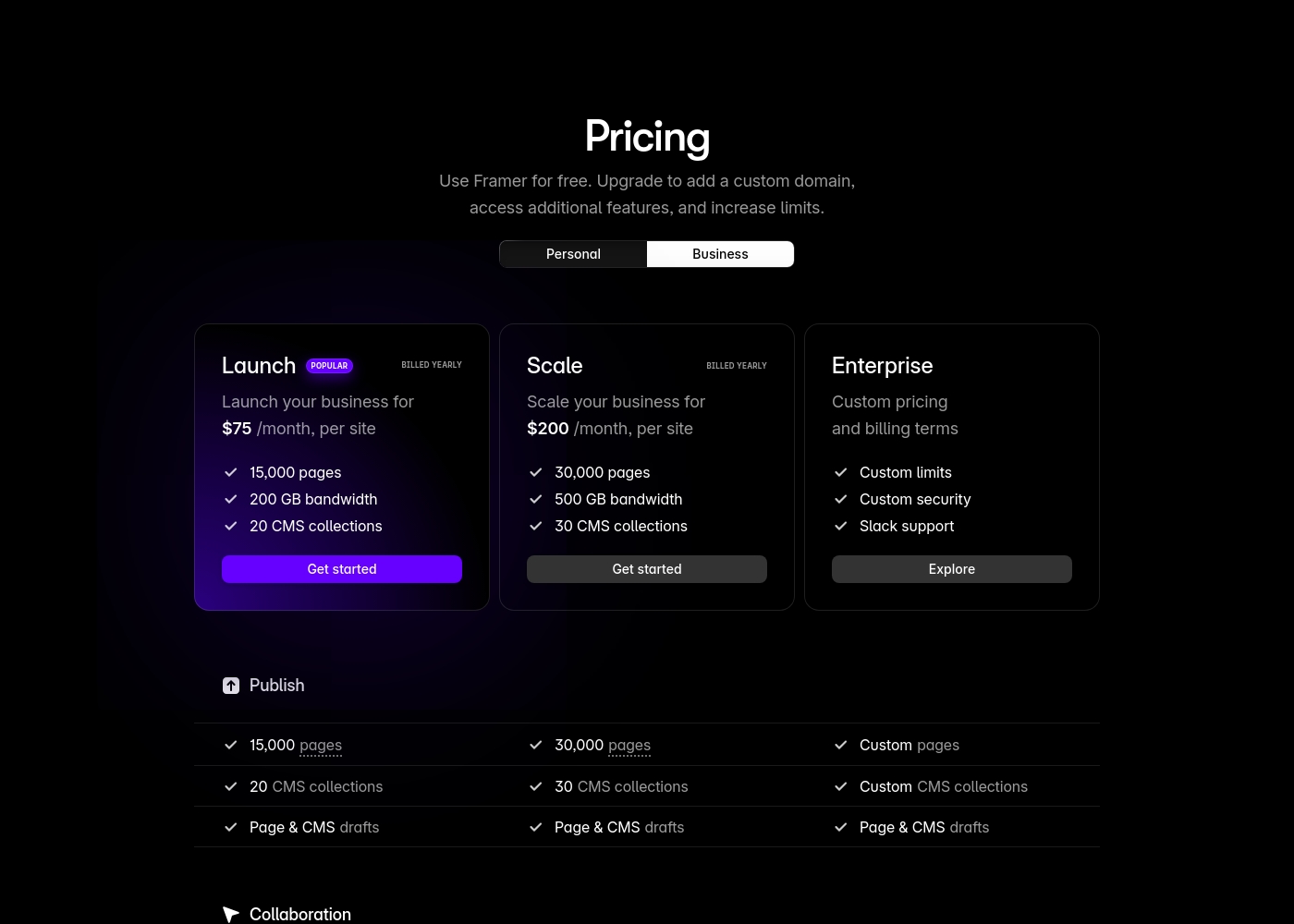
Framer costs between $75 and $200 per month (billed yearly) with two fixed-price plans: Launch at $75/month and Scale at $200/month, plus a custom Enterprise option.
Framer offers a Free plan to let you start designing right away. When you are ready to add a custom domain and access advanced features, you can choose from these paid business offerings.
Launch (Popular Business Plan)
Price: $75/month, per site (billed yearly) Websites Supported: Per site Best For: Launching a business site or marketing stack Refund Policy: 14-day refund eligible for EU and Turkey residents Other Features:
- 15,000 pages, 20 CMS collections
- 200 GB bandwidth, 50GB file storage
- Password protect, Custom code, Cookie banner
- Up to 10 editors (additional editors $40/month)
- 10 CMS collections
- 1,000 pages
- 5MB file uploads
- Free locale to try
- 15,000 pages
- 20 CMS collections
- 200 GB bandwidth
- 50GB storage
- 90 day version history
- 30,000 pages
- 30 CMS collections
- 500 GB bandwidth
- 100GB storage
- 120 day version history
- Custom limits and security
- Premium CDN and hosting
- Unlimited analytics and redirects
- Dedicated Slack support and team training
- SSO for editors and sites
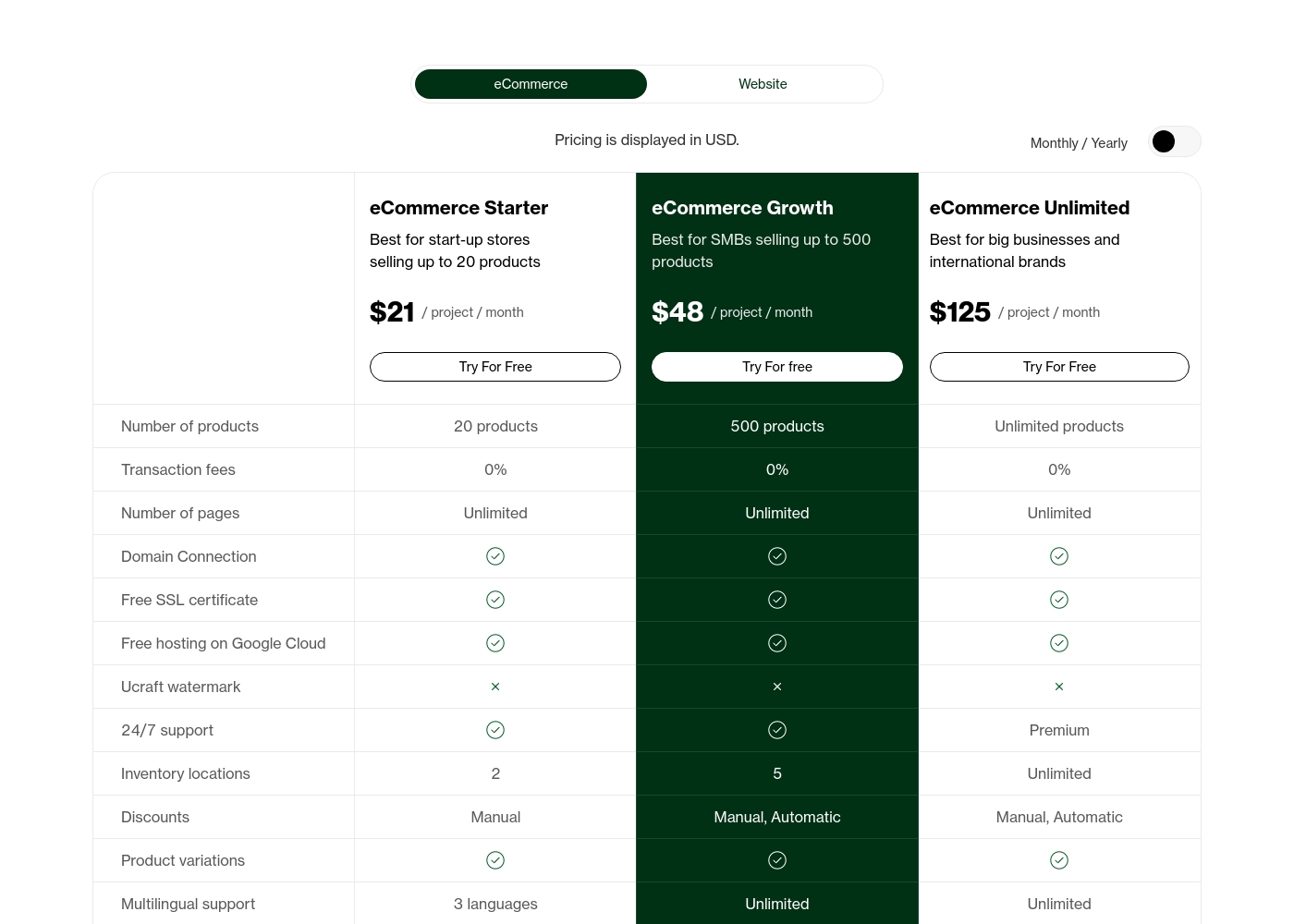
Ucraft's eCommerce plans cost between $21 and $125 per month with three primary options: eCommerce Starter at $21, eCommerce Growth at $48, and eCommerce Unlimited at $125. All prices are displayed in USD, and you can get 20% off if you choose to pay annually.
Now, let's look closer at what each of these powerful eCommerce packages includes for your business.
eCommerce Starter
Price: $21 / project / month Best For: Start-up stores selling up to 20 products Other Features:
- 20 products max, 0% transaction fees
- 2 inventory locations
- 3 languages for multilingual support
- 5 staff accounts
- 24/7 support included
- 20 products
- 0% transaction fees
- Unlimited pages
- 2 inventory locations
- Manual discounts
- 500 products
- 0% transaction fees
- Unlimited pages
- 5 inventory locations
- Manual, Automatic discounts
- Unlimited products
- 0% transaction fees
- Unlimited pages
- Unlimited inventory locations
- Manual, Automatic discounts
Pricing Notes
- Ucraft offers significantly lower starting prices than Framer, which begins at $75/month (annual).
- Framer’s costs frequently surprise users with high add-on fees for localization, editors, and analytics.
- Ucraft uses sales capacity (product count) as the primary scaling metric, offering predictable costs.
- All Ucraft paid plans include 0% transaction fees, providing exceptional long-term value for high-volume stores.
Pricing Head-to-Head
User Reviews
Framer generates highly polarized feedback, reflected in its low Trustpilot standing. Users generally praise the platform’s powerful features and the impressive technical capabilities for designers, noting its potential as a beautiful site builder.
However, the external criticism mainly centers on poor User Experience (UX), which many describe as clunky, complicated, and unintuitive, making even simple tasks frustrating 😡. A significant number of reports highlight constant bugs and half-baked features impacting overall reliability.
The UI/UX is truly terrible, clunky, and overly complicated. I’ve been in web design for eight years, and this is the least intuitive platform I have ever used. Seriously, they need to hire a new designer quickly.
The user feedback for Ucraft is highly divided, creating a substantial dichotomy in user experiences. On one hand, many users praise the platform's customizable features, affordable pricing, and capability to produce professional pages.
Specific feedback mentions patient and swift customer support, especially when dealing with initial learning curves or complex feature setups. Users appreciate the ability to connect a custom domain during the trial, highlighting good value.
I truly enjoy Ucraft. The ability to customize my site goes beyond what other builders offer, which helps me push my creative content limits. Staff is knowledgeable and always willing to find efficient solutions, and the prices are very reasonable.
Our Verdict
Choosing between Framer and Ucraft is a classic build versus sell decision. Framer is strictly a design tool, while Ucraft is a robust eCommerce platform. If deep, custom visual branding is your absolute priority, Framer is the champion. Framer gives designers unmatched creative freedom and publishing speed, instantly generating layouts using the AI Wireframer. Framer eliminates developer handoffs, making creative daily updates simple, fast, and easy. However, be wary of Framer’s complicated UI and its hidden, high usage-based prices for localization or extra editors. Framer excels only at building stunning, fast, static marketing pages. Ucraft is the clear winner for anyone needing a heavy-duty shopping cart solution that can scale. Ucraft supports unlimited products and charges 0% transaction fees, which boosts your profit margins substantially. It shines when selling globally, handling multicurrency sales and localized tax compliance effortlessly. Choose Framer if you are a visually driven design company prioritizing performance and creative control above all else. Choose Ucraft if you are an eCommerce founder or agency planning to scale internationally and maximize sales volume. Ucraft offers much better value for money, despite the mixed reliability reports.
Frequently Asked Questions
Which platform is better for launching an online store: Framer or Ucraft?
Ucraft is significantly better, as it is a dedicated eCommerce platform. Ucraft supports unlimited products, manages inventory, and charges 0% transaction fees. Framer is built only for visual design and lacks native sales functionality.
How does Framer's pricing structure compare to Ucraft?
Framer uses usage-based pricing that scales heavily on editors ($40/month) and localization features. Ucraft’s pricing is more predictable, scaling based primarily on the number of products you sell. Ucraft offers a lower starting price than Framer's business plans.
Does Ucraft offer multilingual or multi-currency support like Framer?
Yes, Ucraft offers unlimited multilingual support on Growth and Unlimited plans. It also includes multi-currency support on the top tier. Framer supports localization but charges high fees ($40 per locale) for extra languages.
Which tool has the easier user interface: Framer or Ucraft?
Neither Framer nor Ucraft is reported to be easy or intuitive initially; both have steep learning curves. Framer receives more criticism for its complicated UI/UX, frustrating many experienced designers when performing simple tasks.
Can I use AI to help build my site in Framer and Ucraft?
Yes, Framer uses 'AI Wireframer' to generate full site layouts and components instantly. Ucraft offers AI design assistance primarily for content creation and template refinement. Framer's AI is stronger for structural creation.
Which platform is better for large teams: Framer or Ucraft?
Ucraft scales better for large teams, offering unlimited staff accounts on its Enterprise plan. Framer limits staff to 10 editors on paid plans, charging an expensive $40 per user for every additional editor.
Ready to Choose?
Both tools have their strengths. Choose based on your specific needs.