Framer vs Squarespace
Framer and Squarespace target very different builders despite both making modern websites. Framer is the designer's choice for ultimate creative control and speed. Squarespace is the classic all-in-one solution handling domains, hosting, and commerce easily. The key difference is maximum control versus complete, predictable convenience.
Best for: Professional web designers and design agencies, Startups focused on optimizing site performance metrics

Best for: Solo entrepreneurs launching an online store, Service providers needing simple scheduling and invoicing
Powerful Design, Challenging User Experience.
Framer is pitched as a high-performance visual tool offering designers full creative control and rapid deployment capabilities. However, we note that the steep learning curve, combined with systemic issues like unhelpful support and reports of misleading pricing structures, creates a challenging user environment. Overall, we find that the foundational technology is impressive, but major user experience and customer service failures drastically undermine its claimed efficiency.
Pros
- Powerful visual tool favored by designers, especially those familiar with Figma.
- Enables handoff-free publishing and rapid site deployment.
- Built-in modern features like advanced CMS, SEO tools, and AI generation.
Cons
- Highly complicated and unintuitive user interface (UI/UX).
- Frequent reports of constant bugs and reliability issues.
- Pricing is often misleading, with unexpected, high costs for basic features like localization.
- Customer support is reportedly slow, difficult to access, and often relies on unhelpful AI bots.

Great design, fatally flawed support.
We find that the platform offers elegant design and powerful integrated tools for entrepreneurs. Overall, we must assign a low rating due to pervasive issues with unresponsive customer support, frustrating technical bugs, and major concerns regarding billing transparency.
Pros
- A good all-in-one platform for rapid website building and commerce.
- The dedicated AI Blueprint Builder assists in quick site generation.
- Provides integrated features like payments, scheduling, and inventory.
- Offers an intuitive drag-and-drop editing experience.
Cons
- Customer support is widely criticized as unresponsive and reliant on ineffective chatbots.
- Frequent reports of unexpected charges and aggressive billing practices.
- Website editor performance is often reported as slow and prone to errors.
- Users struggle with critical issues due to a lack of human phone support.
AboutFramer
Framer is a powerful visual design tool made for crafting and publishing modern websites. It empowers you to build exactly what you imagine using smooth effects, animations, and interactions. You can craft responsive layouts visually, eliminating the need to write code.
The platform helps you skip the blank canvas entirely. Integrated AI can generate sophisticated page layouts and advanced components right away. Collaboration is built in, meaning updates are seamless, and the entire process is completely handoff-free. 💡
AboutSquarespace
Squarespace is an integrated platform built for the modern entrepreneur and creator. It helps you design and manage a website that truly supports your business goals. Whether you’re selling physical products, booking appointments, or launching a blog, the core system delivers the tools you need. It proudly supports over 14 million entrepreneurs globally. You don't need any complex coding skills to create a fully customized, professional site. 💡
Highlights
Feature Comparison
Features Overview
We highlight the main differences and pick a winner for each feature.
Creative Freedom
Framer offers deep, pixel-perfect visual control for designers. Squarespace uses structured templates for rapid deployment.
Framer provides a powerful visual canvas with zero code limits. You can craft complex animations and responsive layouts visually. This allows designers to achieve immersive, custom-built experiences easily. Squarespace relies on designer-crafted professional templates and a simpler drag-and-drop editor. It’s excellent for rapid deployment but restricts deep customization. If total creative mastery is your goal, Framer cannot be beaten by Squarespace's template-based approach. You trade simplicity for granular control here. Design agencies needing total control over brand presentation will strongly prefer the flexibility of Framer's environment.
Setup & Ease of Use
Squarespace offers a very shallow learning curve for beginners. Framer requires significant design experience and patience.
Squarespace is renowned for its all-in-one simplicity and accessible drag-and-drop editor. Users can launch a polished site quickly, often within a few hours. This streamlined process minimizes frustration for non-technical users. Framer is considered highly complicated and unintuitive, often reported as having a steep learning curve. Even experienced designers note frustration with its complex UI/UX. Squarespace manages the setup burden for you, combining hosting, security, and domains effortlessly. Framer demands higher technical engagement upfront. New business owners should pick Squarespace to avoid the major complexity hurdles associated with Framer.
E-commerce Integration
Squarespace offers integrated payments and inventory management for stores. Framer completely requires external integrations for selling online.
Squarespace is a full commerce platform, supporting invoicing, shipping, payments, and gift cards. You can sell physical goods, subscriptions, and digital downloads directly. This native integration reduces complexity significantly. Framer is primarily built for marketing and portfolio sites, lacking built-in commerce tools. Functionality for selling requires third-party components or plugins. Squarespace is clearly the better choice if generating revenue via online sales is necessary. Framer offers zero core commerce functionality. An entrepreneur launching a small online boutique should undoubtedly choose Squarespace for its complete toolkit.
Performance & Hosting
Framer is engineered for blazing-fast sites and high SEO performance scores. Squarespace offers reliable, fully managed hosting.
Framer uses premium CDN and hosting optimized for incredible speed and high SEO performance scores. It focuses heavily on integrated SEO settings and metadata management. This attention results in very quick page load times. Squarespace provides core managed hosting with security like SSL and DDoS protection. User reviews occasionally cite the editor and published sites as being slow and unresponsive. Framer gives you granular control over elements that affect performance, appealing to speed obsessives and agencies. Squarespace is stable but less optimized. If core site speed and performance metrics are critical for your business success, Framer holds a strong technical advantage.
Team Workflow
Framer excels at handoff-free publishing, letting designers ship instantly. Squarespace offers functional but standard team collaboration.
Framer supports seamless in-app collaboration, eliminating the painful designer-to-developer handoff process. Designers can publish daily updates without staging cycles. Framer supports up to 10 project editors included in base plans. Squarespace is an all-in-one site builder, but the focus is often on the solo entrepreneur or small team. Collaboration features are functional but not highlighted as crucial workflow advantages. Framer is explicitly designed to accelerate the team process and reduce friction between design and engineering. Squarespace feels more like a shared static workspace. Agencies managing many client sites will save substantial time using Framer's handoff-free publishing model.
AI Website Tools
Both platforms integrate AI for rapid site creation and content generation. Framer focuses on layout, Squarespace focuses on content.
Framer uses AI Wireframer to instantly generate full site layouts and advanced components. This instantly transforms a blank slate into a functional page structure. The AI jump-starts the design process effectively. Squarespace uses Blueprint AI to generate tailored design ideas, helpful images, and brand-aligned copy. This powerful feature assists beginners with content generation. Both tools use AI to bypass the intimidating starting phase, but Framer helps the designer visually, and Squarespace helps the content owner. A user needing a visually structured starting point will appreciate Framer's Wireframer more than Squarespace's Blueprint content generation tools.
Hidden Costs & Pricing
Framer charges per seat and usage, leading to cost surprises. Squarespace uses simpler, modular subscription tiers.
Framer's scaling costs can be unpredictable due to mandatory fees for extra editors ($40/month per seat). Users report very high, unexpected fees for features like localization and add-ons. The Launch plan starts at $75/month if billed annually. Squarespace uses clear subscription pricing starting lower, covering hosting and domains in the base fee. Costs are easier to budget month-to-month, though add-ons exist. Framer requires careful monitoring of editor seats, bandwidth, and localization to avoid unexpected bills. Squarespace is far simpler to predict. If cost predictability for a small business is essential, the straightforward Squarespace pricing model is a safer bet.
Framer costs between $75 and $200 per month (billed yearly) with two fixed-price plans: Launch at $75/month and Scale at $200/month, plus a custom Enterprise option.
Framer offers a Free plan to let you start designing right away. When you are ready to add a custom domain and access advanced features, you can choose from these paid business offerings.
Launch (Popular Business Plan)
Price: $75/month, per site (billed yearly) Websites Supported: Per site Best For: Launching a business site or marketing stack Refund Policy: 14-day refund eligible for EU and Turkey residents Other Features:
- 15,000 pages, 20 CMS collections
- 200 GB bandwidth, 50GB file storage
- Password protect, Custom code, Cookie banner
- Up to 10 editors (additional editors $40/month)
- 10 CMS collections
- 1,000 pages
- 5MB file uploads
- Free locale to try
- 15,000 pages
- 20 CMS collections
- 200 GB bandwidth
- 50GB storage
- 90 day version history
- 30,000 pages
- 30 CMS collections
- 500 GB bandwidth
- 100GB storage
- 120 day version history
- Custom limits and security
- Premium CDN and hosting
- Unlimited analytics and redirects
- Dedicated Slack support and team training
- SSO for editors and sites
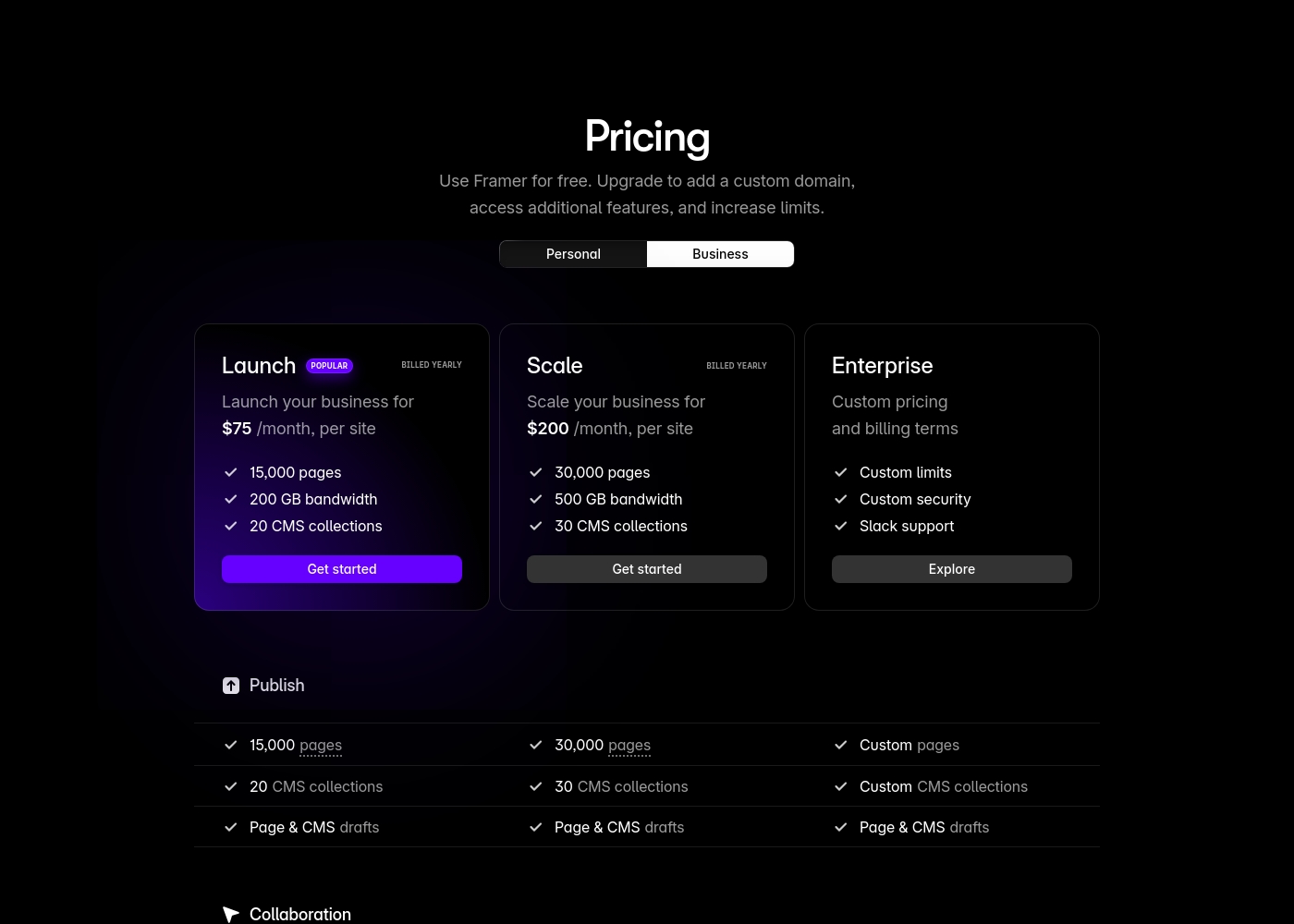
Pricing is flexible to grow with your website needs, whether you're just starting out or running a robust online store.
Starting Plan
Best For: Users who need a custom website and basic selling tools. Other Features:
- Access to your own custom website.
- Includes selling tools.
- Free 14-day trial is available.
This is the perfect entry point if you want to professionalize your presence online. You get core access to the platform, including their drag-and-drop editor and useful design tools. It's a great choice for individuals or small businesses establishing their digital foundation.
- Access to your own custom website
- Includes selling tools
- Free 14-day trial available
- State-of-the-art ecommerce features
- Lower payment processing fees
- More robust selling tools

Pricing Notes
- Framer's minimum paid plan starts at $75/month (billed annually) for the Launch tier.
- Squarespace offers a more accessible entry point with lower starting subscription tiers.
- Framer frequently generates high unexpected fees for basic needs like extra languages or editors beyond the 10-seat limit.
- Squarespace's pricing includes mandatory core services like hosting, domains, and security in the base cost.
- Framer offers a 30-day free trial specifically for their Advanced Analytics add-on.
- Squarespace provides a free 14-day trial without requiring any credit card details to start.
Pricing Head-to-Head
User Reviews
Framer generates highly polarized feedback, reflected in its low Trustpilot standing. Users generally praise the platform’s powerful features and the impressive technical capabilities for designers, noting its potential as a beautiful site builder.
However, the external criticism mainly centers on poor User Experience (UX), which many describe as clunky, complicated, and unintuitive, making even simple tasks frustrating 😡. A significant number of reports highlight constant bugs and half-baked features impacting overall reliability.
The UI/UX is truly terrible, clunky, and overly complicated. I’ve been in web design for eight years, and this is the least intuitive platform I have ever used. Seriously, they need to hire a new designer quickly.
External reviews paint a deeply concerning picture of the user experience, highlighted by an extremely low Trustpilot score. The most significant recurring theme is the abysmal customer support 😬.
Users frequently describe support as non-existent or unhelpful, relying heavily on frustrating chatbots and refusing to offer necessary human or phone contact for critical issues. Reliability is another key problem, with numerous reports of slow website performance, unresponsive editors, and critical login failures or sudden account suspensions.
The customer service is woeful. I only received links to articles I had already read instead of actual help. They made it very difficult to get clear answers, and the entire service was appalling.
Our Verdict
Choosing between Framer and Squarespace means deciding what you prioritize: creative control or integrated convenience. If you are a designer who demands pixel-perfect fidelity and absolute control, Framer is built specifically for you. Framer allows you to ship blazing-fast websites instantly, eliminating friction and developer handoffs altogether. Squarespace is the undisputed champion of the all-in-one ecosystem for the time-strapped entrepreneur. It flawlessly integrates managed hosting, domains, and a robust e-commerce platform. Squarespace ensures you can start selling goods and services quickly with minimum technical hassle. The deciding factor is sales: If you need to sell products online easily, Squarespace is mandatory and has native tools. If site performance and deep, code-free customization are critical marketing metrics, Framer is the technical winner. Ultimately, if you're selling anything, choose Squarespace for total business integration and simplicity. If you’re a professional designer focused purely on high-performance marketing sites, Framer provides the superior building environment.
Frequently Asked Questions
Which is better for launching an online store: Framer or Squarespace?
Squarespace is far superior for e-commerce needs. It offers integrated shipping, inventory, payment processing, and subscriptions natively. Framer is built for visual sites and requires external, complex integrations to handle sales.
Does Framer have a steeper learning curve than Squarespace?
Yes, Framer requires significant design or technical skill, with many users calling the UI overly complicated. Squarespace is designed for simplicity and has one of the easiest drag-and-drop editors to use.
Which platform provides better site performance and speed?
Framer is engineered for speed with premium CDN networks and optimized hosting. Framer sites consistently score highly on performance metrics. Squarespace hosting is reliable, but its sites are often reported to load slower.
Is Squarespace truly an 'all-in-one' solution compared to Framer?
Yes, Squarespace bundles hosting, security, domain registration, e-commerce, and marketing tools. Framer focuses on the design and publishing tool, often requiring separate management for domains.
What kind of unexpected costs exist when using Framer?
Framer has complex pricing based on usage and editors. Users often cite high, unexpected fees for exceeding the 10-editor limit or adding necessary features like localization/extra languages.
Can I use AI tools in both Framer and Squarespace?
Yes, both offer AI assistance. Framer uses AI Wireframer to instantly generate advanced layouts and components. Squarespace uses Blueprint AI to help generate content and initial design ideas.
Ready to Choose?
Both tools have their strengths. Choose based on your specific needs.
