Framer vs SitesGPT
Framer and SitesGPT both leverage AI for site building, but they target different users. Framer is built for professional designers demanding total control and high performance. SitesGPT focuses purely on speed, offering 1-Click creation for lightning-fast launches.
Best for: Professional designers familiar with Figma workflows, Agencies needing handoff-free daily publishing and version control
Best for: Solo entrepreneurs needing an online presence immediately, Users prioritizing absolute cost-efficiency ($0 entry point)
Powerful Design, Challenging User Experience.
Framer is pitched as a high-performance visual tool offering designers full creative control and rapid deployment capabilities. However, we note that the steep learning curve, combined with systemic issues like unhelpful support and reports of misleading pricing structures, creates a challenging user environment. Overall, we find that the foundational technology is impressive, but major user experience and customer service failures drastically undermine its claimed efficiency.
Pros
- Powerful visual tool favored by designers, especially those familiar with Figma.
- Enables handoff-free publishing and rapid site deployment.
- Built-in modern features like advanced CMS, SEO tools, and AI generation.
Cons
- Highly complicated and unintuitive user interface (UI/UX).
- Frequent reports of constant bugs and reliability issues.
- Pricing is often misleading, with unexpected, high costs for basic features like localization.
- Customer support is reportedly slow, difficult to access, and often relies on unhelpful AI bots.
Rapid Website Builder, High Operational Risk.
We found SitesGPT delivers on its promise of exceptionally rapid, AI-driven website creation with a strong $0 entry point. Overall, while the core technology is impressive for speed and ease of use, we caution prospective users about serious operational red flags, including reported data loss and accusations of illegal spamming practices.
Pros
- Exceptionally fast 1-Click website generation.
- Highly user-friendly and guided for beginners.
- Generates modern, responsive, and professional templates.
- No initial financial commitment (implied $0 entry).
Cons
- Multiple user reports regarding sudden loss of access to completed work.
- Serious and repeated accusations regarding illegal spam text messages.
- Pricing tiers or feature limitations for the free version are unclear.
- Significant reliability and ethical concerns raised by polarized feedback.
AboutFramer
Framer is a powerful visual design tool made for crafting and publishing modern websites. It empowers you to build exactly what you imagine using smooth effects, animations, and interactions. You can craft responsive layouts visually, eliminating the need to write code.
The platform helps you skip the blank canvas entirely. Integrated AI can generate sophisticated page layouts and advanced components right away. Collaboration is built in, meaning updates are seamless, and the entire process is completely handoff-free. 💡
AboutSitesGPT
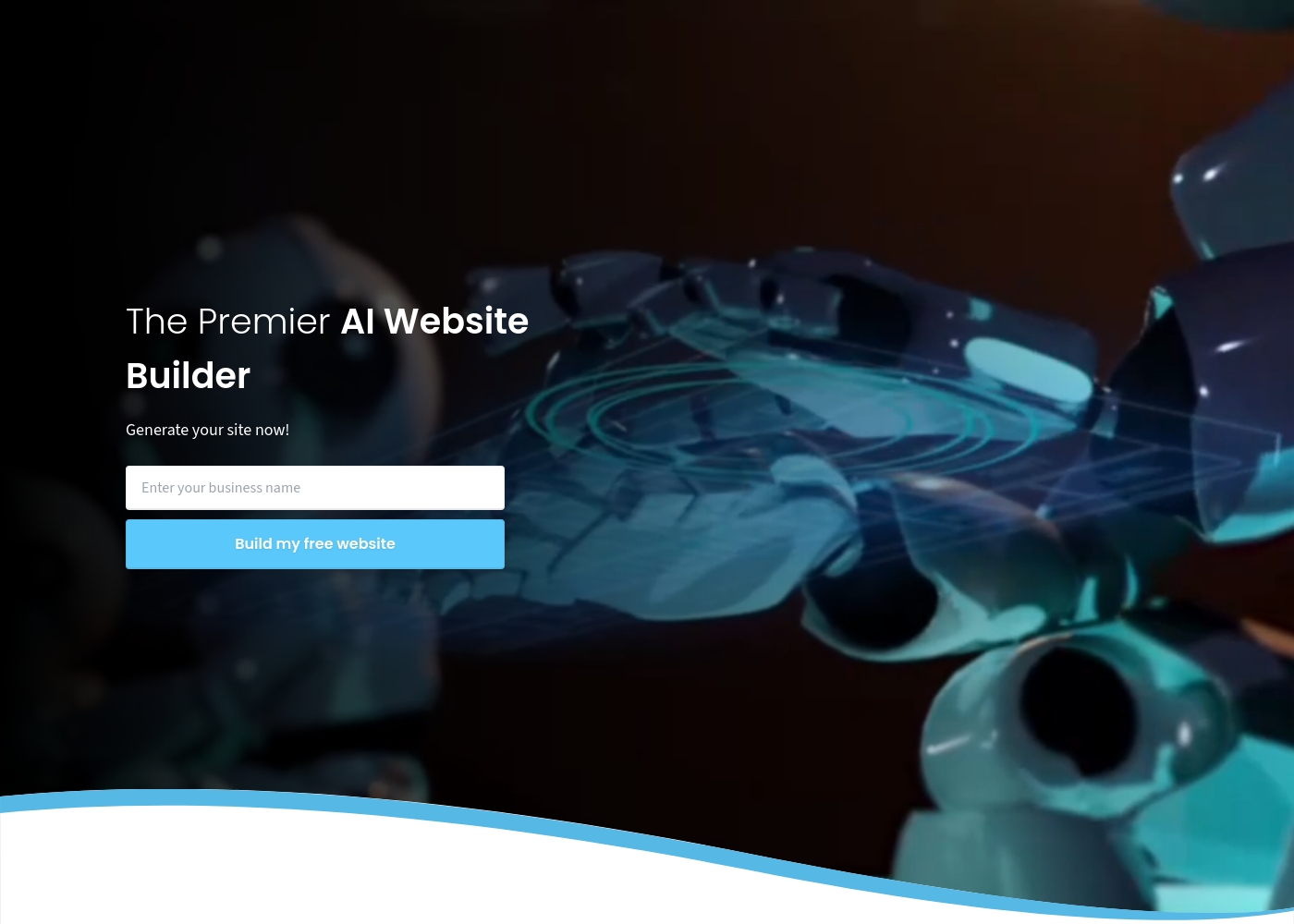
SitesGPT is acknowledged as a premier AI Website Builder, pioneering the innovative wave of digital transformation. It leverages Artificial Intelligence to make professional web creation simple and exceptionally fast. This platform offers a glimpse into a future where high-quality website creation is accessible to everyone. You can get your FREE stunning website built in just 1-Click. 💡
Highlights
Feature Comparison
Features Overview
We highlight the main differences and pick a winner for each feature.
AI Functionality
SitesGPT is pure 1-Click creation; Framer’s AI aids component design. SitesGPT wins on raw initial speed.
SitesGPT uses AI for a unique 1-Click website generation system. It instantly creates a complete, professional, stunning website structure. This approach sets new industry benchmarks for rapid initial deployment. Framer uses AI Wireframer to skip the usual blank canvas design stage. It generates sophisticated components and basic page layouts in seconds. Framer's AI jumpstarts the underlying design work immediately. SitesGPT is significantly faster for generating an entire site from scratch. Framer's AI is geared towards assisting experienced designers maintain momentum. Both use AI, but the goal is different. Need to launch right now? SitesGPT gets you there fastest, while Framer focuses on refining the AI output.
Creative Control
Framer offers total creative freedom; SitesGPT focuses on customizing the AI output.
Framer provides total creative mastery with absolutely no code limits. Designers can craft complex, immersive designs entirely visually. This platform is perfect for uncompromising design execution. SitesGPT promises 'Limitless Customization' after the initial build phase. Users maintain control to modify the dynamic layout and content structure. The focus is modifying the AI's foundation. SitesGPT provides strong customization tools after the initial AI foundation is set. Framer is built specifically for designers who need granular, pixel-perfect control. Framer supports advanced effects and interactions. If your brand demands a unique, high-fidelity experience, Framer gives you the tools to build exactly that.
Pricing Structure
SitesGPT is currently $0 entry; Framer has clear paid tiers but hidden costs.
SitesGPT strongly promotes its Free Website Builder option for $0 entry. No premium paid tiers or scaling costs are publicly disclosed yet. This provides maximum cost efficiency for initial projects. Framer’s paid plans range from $75 to $200 per month when billed annually. Be aware that extra editors cost $40 monthly, and localization can lead to large, unexpected fees. Users report the pricing can be misleading. SitesGPT is the obvious choice if you need a zero-cost path to launching immediately. Framer requires significant budget planning, especially concerning usage metrics and staff scaling. Check Framer’s limits carefully; costs skyrocket quickly if you need many users or languages.
Team Collaboration
Framer is built for design teams; SitesGPT provides no explicit collaboration tools.
Framer is engineered for seamless team collaboration, which leads to handoff-free publishing. Paid plans include up to ten project editors. This means designers can ship daily updates rapidly. The platform allows seamless editing directly on the canvas, notifying teammates of changes. Designers bypass slow development handoffs and complicated staging processes entirely. SitesGPT focuses primarily on single-user, rapid creation speed using its 1-Click tool. There is no public information regarding shared workspaces or editor roles. SitesGPT likely focuses on solo operators. If your business is a growing agency or team, Framer supports your internal workflow far better.
Integrated Growth
Framer offers full A/B testing and analytics; SitesGPT features focus solely on creation.
Framer features integrated Analytics and optimization tools essential for growth. This includes functionality for comprehensive A/B testing and conversion funnel tracking. You monitor key metrics right within the platform. This integrated approach helps designers make data-driven decisions constantly. It lets you optimize page performance without needing external software. Tracking traffic volume and impressions is seamless. SitesGPT does not advertise or list any integrated analytics, A/B testing, or growth funnel features. Its core value proposition is launching a site quickly and easily. Choose Framer if you value post-launch optimization and want to perform complex marketing tasks in one integrated suite.
Learning Curve
SitesGPT is exceptionally easy for beginners; Framer requires a steep learning investment.
SitesGPT champions accessibility and exceptional user-friendliness right out of the box. Its intuitive interface simplifies complex web creation for non-technical users. Users praise the platform's overall simplicity. Framer has a steep learning curve and frequently receives complaints about its clunky UI/UX. Experienced designers familiar with tools like Figma may adapt better. Simple tasks can become frustrating on Framer. SitesGPT allows you to build a professional site in minutes without prior technical training. Framer demands time and commitment before its full power can be unlocked. Beginners will find SitesGPT immediately usable, whereas Framer requires dedication to overcome its initial complexity.
Reliability and Trust
Framer is established but buggy; SitesGPT is fast but has serious operational and ethical risks.
Framer has issues like frequent bugs and frustrating usability but offers clear security compliance standards. Enterprise users can access SOC 2 and ISO 27001 compliance. It’s an established, if frustrating, system. SitesGPT has highly serious operational red flags raised by users. Multiple reviewers report completely losing access to their finished websites completely. This indicates significant data security risk. Framer’s reliability issues are mostly related to feature polish and UI problems. SitesGPT risks include losing all of your valuable work and numerous illegal spam accusations. If you prioritize data security and long-term hosting stability, Framer is the considerably safer choice, despite its flaws.
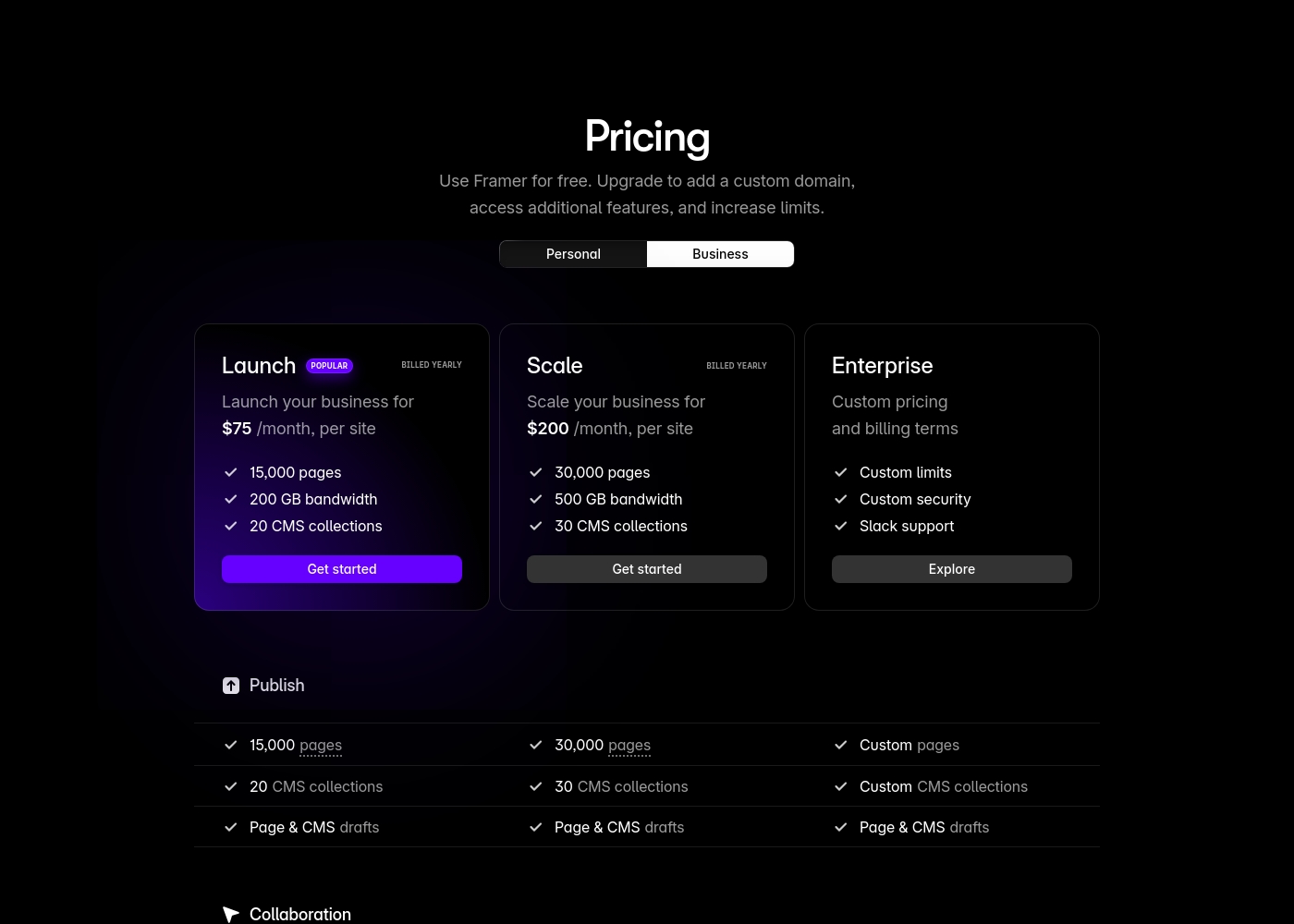
Framer costs between $75 and $200 per month (billed yearly) with two fixed-price plans: Launch at $75/month and Scale at $200/month, plus a custom Enterprise option.
Framer offers a Free plan to let you start designing right away. When you are ready to add a custom domain and access advanced features, you can choose from these paid business offerings.
Launch (Popular Business Plan)
Price: $75/month, per site (billed yearly) Websites Supported: Per site Best For: Launching a business site or marketing stack Refund Policy: 14-day refund eligible for EU and Turkey residents Other Features:
- 15,000 pages, 20 CMS collections
- 200 GB bandwidth, 50GB file storage
- Password protect, Custom code, Cookie banner
- Up to 10 editors (additional editors $40/month)
- 10 CMS collections
- 1,000 pages
- 5MB file uploads
- Free locale to try
- 15,000 pages
- 20 CMS collections
- 200 GB bandwidth
- 50GB storage
- 90 day version history
- 30,000 pages
- 30 CMS collections
- 500 GB bandwidth
- 100GB storage
- 120 day version history
- Custom limits and security
- Premium CDN and hosting
- Unlimited analytics and redirects
- Dedicated Slack support and team training
- SSO for editors and sites
The information below details the currently known access options for SitesGPT.
Free Website Builder
Best For: Users looking to launch a new business, showcase a portfolio, or start a blog quickly. Other Features:
- Your stunning website is built in 1-Click
- Uses AI integration for creation
- Supports dynamic and responsive design
- User-friendly interface
This option is excellent if you want to immediately see the power of the AI Website Builder without any financial commitment. It's a risk-free way to test the platform's speed and ease of use for your initial project. Go ahead and try it out! 🤖
- 1-Click website generation
- AI-driven design
- Dynamic and responsive website creation
Pricing Notes
- SitesGPT currently offers extreme cost efficiency with a promoted $0 Free Website Builder option.
- Framer's basic professional plans start at $75/month (annual billing required).
- Framer charges $40 per additional editor after the initial limit of ten is reached.
- Framer users report high, unexpected fees for basic needs like adding extra languages/locales.
- Framer features a 30-day trial for its Advanced Analytics add-on, which includes A/B testing.
Pricing Head-to-Head
User Reviews
Framer generates highly polarized feedback, reflected in its low Trustpilot standing. Users generally praise the platform’s powerful features and the impressive technical capabilities for designers, noting its potential as a beautiful site builder.
However, the external criticism mainly centers on poor User Experience (UX), which many describe as clunky, complicated, and unintuitive, making even simple tasks frustrating 😡. A significant number of reports highlight constant bugs and half-baked features impacting overall reliability.
The UI/UX is truly terrible, clunky, and overly complicated. I’ve been in web design for eight years, and this is the least intuitive platform I have ever used. Seriously, they need to hire a new designer quickly.
Users are highly impressed by SitesGPT's ease of use and remarkable speed. Many reviewers note that the AI builder is incredibly simple, allowing them to create a professional, stunning website in just a few minutes, avoiding the complexity of traditional builders like Wix.
Users praise the user-friendly interface, responsive, and modern templates, making it accessible even for beginners who lack coding skills. However, the user feedback environment is sharply divided.
I spent months building a website on Wix. I found SitesGPT and got a great website in a few minutes! This is truly unbelievable technology and an amazing website generator.
Our Verdict
Choosing between Framer and SitesGPT is deciding between control and cost for your project. If you are a professional designer or agency with ample funds, Framer is the superior, necessary investment. If speed and zero cost entry are your only priorities, SitesGPT is temporarily unbeatable. Framer’s superpower is providing total creative control and maximizing performance features. It offers high-end tools like integrated A/B testing, a powerful CMS, and seamless team collaboration. Designers publish daily without developer handoffs, making Framer ideal for rapid iteration. SitesGPT shines with its unparalleled 1-Click creation speed and exceptional cost efficiency. Non-technical users can launch a professional, dynamic site in minutes for essentially $0. It’s perfect for testing concepts or establishing a minimum viable presence instantly. The deciding factor is reliability versus risk. Framer is an established—though often confusing—professional platform that provides security standards. SitesGPT carries severe operational risks, including repeated reports of users losing all their work and ethical concerns. If you require a stable, feature-rich tool for a team, choose Framer and study the pricing carefully. If you need a free, ultra-fast temporary launch and accept the high risk of data loss, SitesGPT will satisfy your need for speed.
Frequently Asked Questions
Which tool is better for professional design agencies, Framer or SitesGPT?
Framer is designed specifically for professional agencies and design teams. It supports handoff-free publishing and includes shared features for 10+ editors. SitesGPT lacks explicit collaboration tools and carries too much operational risk for client work.
Does SitesGPT offer A/B testing and analytics like Framer?
Framer offers comprehensive, integrated A/B testing and conversion funnel analytics. SitesGPT does not publicly list any integrated growth or optimization tools. Framer is built specifically for data-driven site optimization.
Is SitesGPT really free, or are there hidden costs compared to Framer?
SitesGPT heavily promotes a $0 Free Website Builder option, with no paid tiers published. Framer starts at $75/month (annual price) and has hidden costs. Framer users report unexpected high fees for localization and extra editors.
Which has a steeper learning curve, Framer or SitesGPT?
Framer has a steep learning curve and a notoriously complicated user interface. SitesGPT is repeatedly praised for its simplicity and exceptional user-friendliness. SitesGPT is easier for beginners to master quickly.
Which tool is safer, given the reliability reports about both Framer and SitesGPT?
Framer is the safer tool, despite complaints about bugs and slow support. SitesGPT has serious user reports of complete loss of access to sites. Framer offers clear security standards like SOC 2, minimizing catastrophic operational risk.
Is Framer better for non-technical users starting a blog or small business?
SitesGPT is much better for non-technical users due to its 1-Click speed and easy interface. Framer is visually powerful but requires deep familiarity with design concepts. Framer's complexity often frustrates non-designers trying to perform simple tasks.
Ready to Choose?
Both tools have their strengths. Choose based on your specific needs.