Filmora 14 vs Vyond
Filmora 14 and Vyond both use powerful AI but serve completely different masters. Filmora 14 rapidly enhances and edits real-world video footage on the desktop. Vyond focuses on instant, scalable animated content for corporate training and communication. Your choice depends entirely on whether you need dynamic editing or fast animation creation.
Best for: Individual video creators and YouTubers editing real-world footage., Mac users prioritizing optimized performance via Metal rendering technology.
Best for: Corporate Learning & Development (L&D) departments., HR teams needing fast, standardized onboarding and policy videos.
Powerful AI Editor, Buyer Beware.
We find Filmora 14 offers a powerful suite of AI editing tools and an accessible interface perfect for creators across all skill levels. While the feature set and performance are top-tier, we cannot overlook the severe, verified reports of deceptive billing and poor customer support from the vendor. Overall, this is a technically impressive editor marred by critical issues related to trust and operational transparency.
Pros
- Exceptionally easy to use interface suitable for all skill levels.
- Robust AI feature set simplifies complex edits like object removal and background cutting.
- Access to a massive 2.9M+ library of creative assets, music, and templates.
- Optimized performance with GPU acceleration, even on modest hardware.
Cons
- Severe billing issues and reported difficulties canceling auto-renewals.
- Support is often automated, unresponsive, and unhelpful via chat or email.
- Lack of transparency regarding hidden costs and AI credit consumption per feature.
- Perpetual license holders report forced migration to the newest version.
Powerful AI. Scaling Content. Poor Support.
Vyond offers an industry-leading AI video creation platform perfect for scaling secure, on-brand content quickly, trusted by numerous Fortune 500 companies. However, we found recurring issues regarding customer support responsiveness and problematic changes to subscription terms, undermining value for individual users. Overall, Vyond is a powerful tool best suited for high-budget corporate teams needing secure, high-volume production.
Pros
- Industry-standard quality for animated and explainer content.
- Fast video creation using AI (Vyond Go) from simple prompts or URLs.
- Excellent speech synchronization and audio generation from text scripts.
- UI is perfect and the animation assets are deemed top-notch and beautiful.
Cons
- Limited or non-existent customer support; help relies heavily on automation.
- Unethical practices reported, including automatic renewals and forced plan upgrades.
- Frequent removal or capping of features (e.g., community forums, themes) for paying users.
- Limited or 'screwed' free trial experience (e.g., maximum of three videos).
AboutFilmora 14
Filmora 15 is an award-winning video editor designed for both beginners and experts alike. It aims to help you edit as an expert with Filmora AI by streamlining the entire creative process.
The interface is intuitive and clean, making video editing simple even for those without prior experience. You can literally type, drop, or sketch ideas into the platform, and Filmora helps bring them to life with AI-driven effects. The platform provides a connected experience; it's available across desktop, tablet, and mobile, allowing you to create exactly as you wish. 💡
AboutVyond
Vyond is the all-in-one AI video creation platform that helps teams generate effective videos from simple prompts in multiple styles. It includes Vyond Go, which instantly turns your idea, document, or URL into a video, and an instant editor or studio for quick tweaks. Thousands of businesses and millions of users rely on Vyond, and 65% of the Fortune 500 rely on Vyond. 🎬
Highlights
Feature Comparison
Features Overview
We highlight the main differences and pick a winner for each feature.
Core Video Focus
Filmora 14 edits footage; Vyond creates rapid corporate animation.
Filmora 14 is a robust video editor designed for high-resolution real-world footage. It excels at timeline editing and enhancing visual quality quickly. Filmora 14 offers professional tools, including the powerful Magnetic Timeline and Multi-Camera editing. Vyond is a specialized video creation platform built for animated explainers and training. It’s tailored for business use cases like L&D, HR, and sales communications. Vyond provides instant video creation by focusing completely on stylized animation. If your workflow involves traditional filming and cutting, Filmora 14 is the definitive choice. If you require zero-filming explainers, Vyond is much faster and more efficient. Vyond's ability to create animated avatars and storyboards instantly suits corporate communication needs perfectly. Filmora 14 is better for personalized creative storytelling using real assets.
AI Content Generation
Vyond Go converts documents instantly; Filmora 14 focuses on editing assists.
Filmora 14 uses AI for editing tasks like Idea to Video, which generates scripts and visuals. It heavily features AI enhancers, including AI Portrait Cutout and Video Enhancer. Filmora 14's AI assists the traditional video editing process for efficiency. Vyond Go is designed for full, instant video creation from scratch. It converts policy documents, URLs, or prompts directly into animated video drafts in just seconds. This capability eliminates storyboarding and complex manual assembly entirely. Vyond is the clear winner for teams needing extreme speed and turning text documents into visual explainers. Filmora 14 is better for creators who want AI to assist professional editing tasks. Vyond is invaluable overseas for content managers converting large knowledge bases into easily consumable video training.
Video Quality & Enhancement
Filmora 14 can fix poor footage; Vyond relies on animation quality.
Filmora 14 offers the AI Video Enhancer, a cloud-based solution that fixes graininess, lighting, and detail in one click. Users can utilize the AI Color Palette to replicate cinematic color schemes quickly. Filmora 14 is specifically designed to make real video look professional and polished. Vyond automatically provides industry-standard animation quality through its comprehensive asset libraries. However, it does not process or enhance traditional video footage or raw clips. Vyond focuses on consistency using its diverse set of customizable visual styles. If your source material consists of raw video footage, Filmora 14 provides critical tools to restore and improve quality. Vyond starts with a perfect digital canvas every time. Filmora 14's specialized AI tools ensure that poorly shot videos can still look excellent and be ready for professional use.
Pricing & Transparency
Filmora 14 provides clear costs; Vyond requires contacting sales for pricing.
Filmora 14 offers transparent annual subscriptions ranging from $69.99 to $119.99 per year. It also provides budget flexibility through a perpetual license option for individuals wanting a one-time purchase. Filmora 14 protects purchases with a convenient 30-day money-back guarantee. Vyond does not list specific monthly or annual costs for its standard paid tiers publicly. Users must contact sales for quotes, especially for the specialized Enterprise tier. Vyond uses a per-seat licensing model ideal for corporate budgets. Filmora 14 wins easily on transparency and affordability for the individual user market. Vyond's opaque pricing structure is a significant point of user frustration. If you are working with a tight, fixed budget, the clear, budget-friendly plans of Filmora 14 provide superior financial predictability.
Commercial & Enterprise Fit
Vyond caters to Enterprise security; Filmora 14 targets individual creators.
Vyond is built for scaling production in large organizations, trusted by 65% of the Fortune 500. Its Enterprise solution provides complete privacy, dedicated support, and necessary security compliance controls. Vyond facilitates standardized, on-brand content production across multiple large corporate teams. Filmora 14’s plans are primarily single-user licenses designed for individual creators and professionals. Filmora 14 supports commercial use of its non-AI assets. It lacks the dedicated internal security structure required by large global businesses. If strong security guarantees and scaling video creation across hundreds of employees are required, Vyond is the established choice. Filmora 14 licenses are not meant for corporate-level sharing or management. Vyond's ability to accelerate HR onboarding and L&D training with secure video makes it indispensable for corporate clients.
Platform Optimization
Filmora 14 excels on the desktop; Vyond is a cloud animation tool.
Filmora 14 is a desktop application optimized for high-speed performance and efficiency. It supports GPU acceleration to boost editing and rendering speeds significantly. Filmora 14 also specifically uses Mac Metal rendering for superior performance on Apple devices. Vyond is a cloud platform built for accessibility and instantaneous creation, usable across any modern browser. Its focus is on fast generation via Vyond Go rather than maximizing local hardware performance. Vyond offers screen recording and mobile capture within the platform. For demanding editing tasks using 4K or high-resolution footage, Filmora 14 offers superior hardware integration and speed. Vyond's performance is tied to internet connectivity and cloud processing speed. Filmora 14 is the better option for editors who need maximum control over their hardware resources during intensive rendering jobs.
Customer Support Sentiment
Filmora 14 reviews are better; Vyond users complain about zero support.
Filmora 14 states clear support guidelines, including a promised 24-hour response time via email support. While some users report issues with automated bots, the overall sentiment is contained and manageable. Filmora 14's user rating is a strong 4.1. Vyond users frequently complain about automated or non-existent customer service from their support team. Reviewers describe severe difficulty reaching human help, especially during billing disputes or technical errors. Vyond's low 3.2 rating significantly reflects this support dissatisfaction. Filmora 14 wins because users generally feel they have avenues for resolution, even if flawed. Vyond's support issues severely frustrate their paying customers. Trustpilot ratings strongly indicate that Vyond users feel abandoned, while Filmora 14 users mainly complain about aggressive upselling, not complete support failure.
International Reach
Both tools offer translation, opening content to global viewers.
Filmora 14 includes the powerful AI Video Translation feature to instantly translate and dub videos for a global audience. This capability breaks down major language barriers quickly. The software also provides Auto Caption functionality for increased accessibility globally. Vyond also features an Instant Translation capability, enabling teams to personalize content for various markets. This feature is crucial for sales teams expanding outreach into different regions. Vyond helps create multilingual training content efficiently. Both Filmora 14 and Vyond recognize the importance of global reach and provide robust, AI-driven solutions. Neither tool holds a distinct advantage in this key area. This feature ensures that both Filmora 14 creators and Vyond corporate teams can maximize audience engagement worldwide.
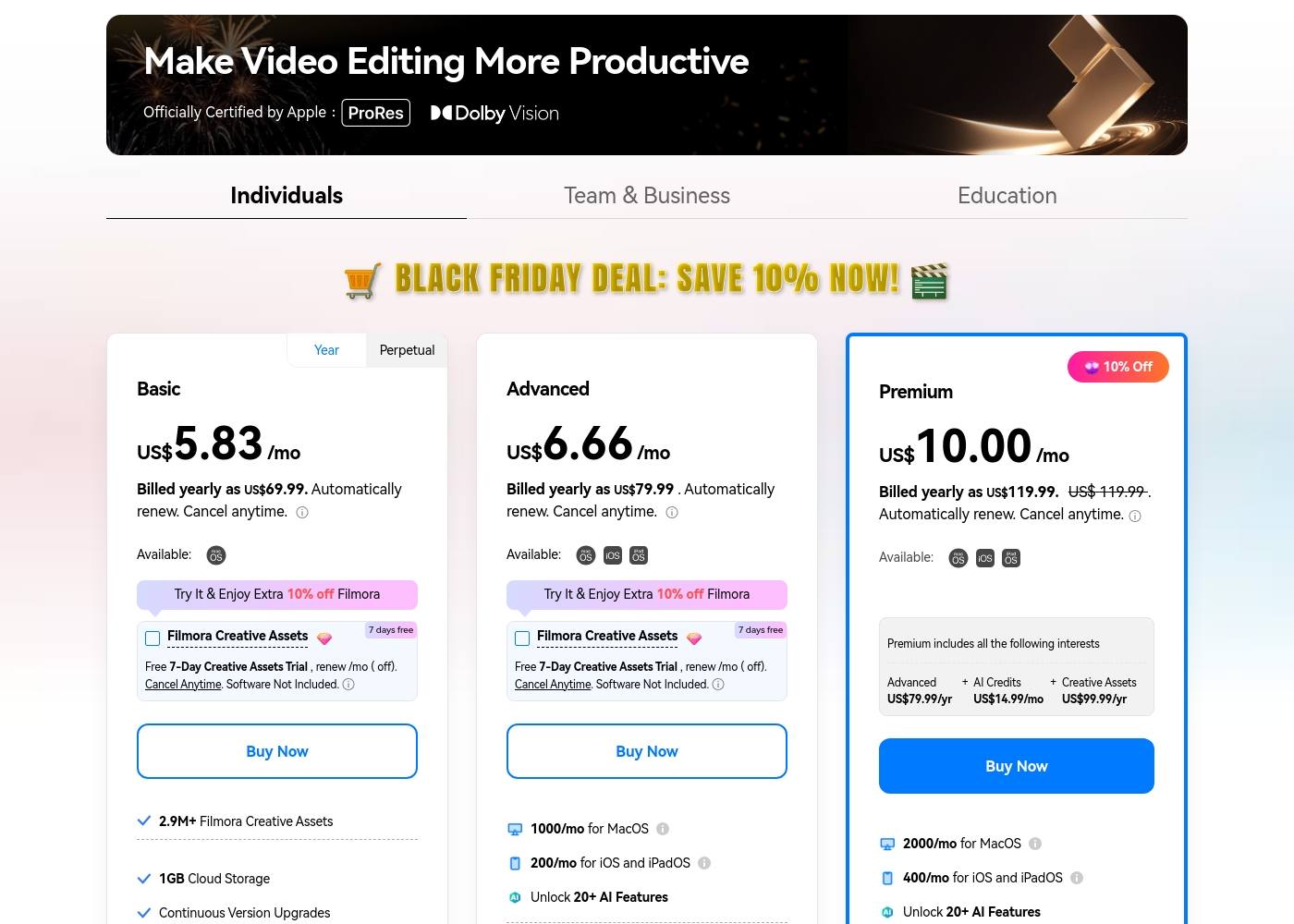
Filmora 14 costs between US$69.99 and US$119.99 per year with three individual annual plans: Basic at US$69.99, Advanced at US$79.99, and Premium at US$119.99.
These individual tiers offer flexible subscription options designed to fit different creator needs, from casual editing to advanced AI-enabled projects. All plans are billed annually and allow you to cancel renewal automatically at any time.
Basic
Price: Billed yearly as US$69.99 (US$5.83/mo) Refund Policy: 30-day money-back guarantee Other Features:
- 2.9M+ Filmora Creative Assets
- 1GB Cloud Storage
- Export without Watermark
- Continuous Version Upgrades
- 2.9M+ Filmora Creative Assets
- 1GB Cloud Storage
- Continuous Version Upgrades
- Export without Watermark
- 4K HD Export
- All Basic Features
- Apple Sync: macOS, iOS, iPadOS
- 10GB Cloud Storage
- 1000 AI Credits/mo for MacOS
- 200 AI Credits/mo for iOS and iPadOS
- All Advanced Features
- 2000 AI Credits/mo for MacOS
- 400 AI Credits/mo for iOS and iPadOS
- 100GB Cloud Storage
- Premium includes advanced bundle and creative assets
- One-time payment structure
- Enjoy Filmora 14 updates only (no major upgrades)
- 1,000 Filmora AI Credits (one-time grant)
- 2.9M+ Filmora Creative Assets
- 1GB Cloud Storage
You can explore Vyond's flexible options tailored to individual users and large organizations through these principal offerings.
Free Trial
Best For: Users wanting to test the platform's diverse video creation tools. Other Features:
- Instant, effortless video creation
- Access to AI avatars and Gen AI features
- Use of the comprehensive template library
- Ability to convert URLs or documents into video (Vyond Go)
If you're new to Vyond, starting with the free trial is the perfect way to explore its unique features without commitment. This allows you to evaluate practical tools like the instant editor and test Vyond Go's powerful text-to-video conversion before settling on a paid plan.
- Instant, effortless video for everyone
- Access to AI avatars, Gen AI, and Photorealistic styles
- Screen recording and mobile capture tools
- Instant creation using Vyond Go (text, document, or URL conversion)
- Efficiently create on-brand content at scale
- Complete privacy and security
- Supports rigorous security requirements of enterprise organizations

Pricing Notes
- Filmora 14 offers transparent annual subscriptions and one-time perpetual licenses for individuals.
- Vyond forces users to contact sales for specific pricing; expect high per-seat costs for corporate solutions.
- Filmora 14 provides a guaranteed 30-day money-back policy, which Vyond does not explicitly offer.
- Users widely report that Vyond’s cost is high, especially when pushed toward specialized Enterprise or Agency plans.
Pricing Head-to-Head
User Reviews
Users consistently praise Filmora for its excellent ease of use and intuitive, simple interface. Many editors, from hobbyists to long-term users, find the built-in features helpful, noting the software performs well even on modest hardware.
However, external feedback sharply pivots when discussing company operations. A significant volume of criticism focuses intensely on deceptive billing practices and poor customer service.
I love using Wondershare’s video editor, Filmora! It’s so easy to use and really fun too. This program keeps up with my creativity every step of the way.
Vyond faces a highly polarized reception, reflecting an extreme split between feature satisfaction and corporate practices. Many users praise the core animation tool, noting its industry-standard quality, ideal speech synchronization, and the simple creation of explainer videos quickly.
They appreciate the robust library of ready-to-use character assets, making the platform fantastic for increasing marketing engagement. However, the negative sentiment, particularly on Trustpilot (where the score is 2.0), focuses heavily on pricing and support.
There’s a wonderful selection of ready-to-use characters and environments to get started quickly. The animations are top-notch, and incorporating a text script for generated audio is effortless. I am really happy with this tool overall.
Our Verdict
This isn't a simple fight; Filmora 14 and Vyond are built for different creative goals. Filmora 14 wins if you film real things; Vyond wins if you create animation from zero. Filmora 14 is the master of high-speed editing for traditional footage. Its AI Video Enhancer instantly fixes poor lighting and messy graininess with one click. Professional editorial tools like the Magnetic Timeline and Multi-Camera editing simplify complex tasks efficiently. Compared to Vyond, Filmora 14 is highly affordable and offers clear, upfront pricing. Vyond is the king of instant, scalable corporate animated content creation. Vyond Go is revolutionary, converting entire documents or links into full videos in mere seconds. It excels for L&D, sales, and HR teams needing standardized, secure content creation. Large global organizations depend on Vyond for its Enterprise-grade security assurance. The user’s budget is often the ultimate deciding factor here. Filmora 14 offers transparent pricing starting under $70 per year for individuals and perpetual licenses. Vyond requires contacting sales and is known for very high per-seat corporate costs. Final Verdict: Pick Filmora 14 if you are an individual needing budget-friendly, high-performance timeline editing for real clips. Go only with Vyond if you are a corporate team prioritizing instant animation, security compliance, and have a substantial departmental budget.
Frequently Asked Questions
Which tool is better for editing high-resolution video footage?
Filmora 14 is the definitive choice for editing raw footage efficiently. It offers GPU acceleration and unique tools like the AI Video Enhancer to restore poor quality video. Vyond is strictly an animation creation platform.
Does Vyond offer a cheaper perpetual license like Filmora 14?
No. Filmora 14 offers a flexible perpetual license option with a single upfront payment. Vyond operates on a 'Per Seat' subscription model primarily targeting corporate budgets and recurrent billing.
Which software is better for creating corporate training videos quickly?
Vyond is much faster for corporate training using its Vyond Go feature. It instantly converts documents and URLs into animated explainers. Filmora 14 requires more manual timeline assembly, even with AI assistance.
Is Filmora 14 compatible with the security requirements of large enterprises?
Filmora 14 offers standard security but does not have a dedicated solution for enterprise scale. Vyond offers a high-security Enterprise tier specifically designed for rigorous corporate requirements and privacy demands.
How do AI features differ between Filmora 14 and Vyond?
Filmora 14's AI assists traditional editing (enhancement, tracking, dubbing, reframe). Vyond's AI (Vyond Go, AI Avatars) is focused on instantly generating character-based animated scenes from text input.
Does the free trial include exports without a watermark in Filmora 14?
No. The free version of Filmora 14 permanently adds watermarks to all exported videos. You must purchase an annual plan starting at $69.99/year to export videos without a watermark.
Ready to Choose?
Both tools have their strengths. Choose based on your specific needs.