FamiSafe vs Umobix
FamiSafe and Umobix both guard families online, but they approach it differently. FamiSafe leans on AI monitoring and device controls; Umobix nails real-time visibility. This guide helps you pick based on device count, setup, and alert speed.
Best for: Large families needing up to 40 devices on a single plan, Parents prioritizing AI-based detection across 14+ social platforms
Best for: Parents who want real-time, cross-device visibility on Android and iOS, Families tracking 41 apps and media in one dashboard
Advanced parental controls, reliability needed.
We recognize FamiSafe's exceptionally comprehensive feature set, including AI monitoring and affordable plans that cover up to 40 devices. External feedback raises serious concerns regarding installation frustration, technical glitches, and overall reliability, especially on iOS devices. Overall, we recommend FamiSafe primarily for users who value advanced monitoring features and are comfortable managing potential technical challenges.
Pros
- Flexible subscription tiers covering up to 40 devices ($4.99/mo annual rate).
- Features include AI-powered monitoring for social media, chats, and content safety.
- Robust physical safety tools like real-time location tracking and Geofence alerts.
- Customer support, when reached, is often highly professional and technically focused.
Cons
- Users report significant issues with technical instability and app reliability.
- Setup process can be challenging, leading some users to report system disruption.
- Required iOS features/companion apps sometimes crash frequently upon opening.
- Initial refund procedures may be frustrating, requiring extensive troubleshooting and logs.
Powerful monitoring, excellent user support.
We find that uMobix offers powerful and highly detailed monitoring capabilities, which users praise for providing considerable oversight, particularly regarding location tracking and social media activity. Overall, while the core functionality and supporting team are excellent, prospective users must proceed with caution regarding the reported persistent issues with billing transparency and unexpected charges.
Pros
- Comprehensive tracking system supports 41 popular apps, calls, and messages.
- Highly responsive and helpful customer support team assists with difficult installations.
- Accurate and reliable GPS location tracking and keylogging functions.
- Provides highly detailed tracking data often missing in competitor applications.
Cons
- Frequent, serious complaints regarding unauthorized charges and unexpected billing practices.
- Users often report difficulty canceling trials or subscriptions and securing refunds.
- Real-time data and updates can sync slowly, especially during the initial setup phase.
- Some reports indicate the application can negatively impact the target device’s battery life or internet efficiency.
AboutFamiSafe
FamiSafe is a next-generation parental control application designed by Wondershare. It empowers families to establish positive digital habits together. The platform lets you see and guide your child's activities, balancing freedom with necessary protection. It is built for all parents who want reliable tools to manage screens, monitor device activity, and protect loved ones in real life. You’ll receive detailed reports on daily device usage and app activities effortlessly. 💡
AboutUmobix
uMobix is a powerful cell phone tracker designed for modern parents. It lets you manage and monitor everything happening on your child's smartphone or tablet. This comprehensive tool supports a wide range of devices, including all iPhones, iPads, and Android OS 4+. You can easily check if your specific model is compatible on the website. uMobix provides real-time access to crucial digital activities and communications. 💡
Highlights
Feature Comparison
Features Overview
We highlight the main differences and pick a winner for each feature.
Real-time visibility
Both tools promise live data, but Umobix often emphasizes real-time dashboards.
FamiSafe uses AI to monitor calls, chats, and 14+ platforms in real time. Umobix provides real-time updates for location, calls, and messages on Android and iOS. The trade-off is that some users report slower full-sync with Umobix. In practice, parents get quicker alerts from FamiSafe and broad visibility from Umobix.
Location tracking
Both offer precise location with history, but Geonection encryption centers FamiSafe.
FamiSafe offers real-time location with Geonection encryption and geofencing. Umobix provides live GPS and visited places history with remote access. The trade-off is FamiSafe adds security layers to location sharing. Real-world, you’ll know where kids are with either tool.
App & web monitoring breadth
Umobix covers more apps; FamiSafe focuses on social and YouTube/TikTok history.
FamiSafe monitors over 14 social platforms and YouTube/TikTok histories. Umobix tracks 41 apps and social platforms, plus a keylogger and deleted message view. The difference is breadth versus depth in social/video history. If you want wide coverage, Umobix edges ahead.
Remote control capabilities
Umobix offers more remote controls, including app blocking and Wi-Fi control.
FamiSafe provides App Rules to block/allow apps and SOS alerts. Umobix supports remote settings, app blocking, Wi-Fi control, and device blocking. Trade-off: Umobix is stronger on live control tasks. For hands-on management, Umobix wins.
Safety features & emergencies
FamiSafe leads with SOS and driving safety features.
FamiSafe includes SOS alerts and Driving Reports for teen drivers. Umobix focuses on continuous monitoring rather than safety alerts. If emergencies matter most, FamiSafe has the edge. In daily safety, both help, but FamiSafe shines here.
Setup & migration ease
Umobix provides migration details and quick installation.
Umobix advertises one-click installation and migration details with support. FamiSafe setup can be more involved, and users report some friction. If you want fastest start, Umobix is preferable. Yet both offer solid onboarding with support.
Pricing & value
FamiSafe shows clear device-based pricing; Umobix lacks public pricing data.
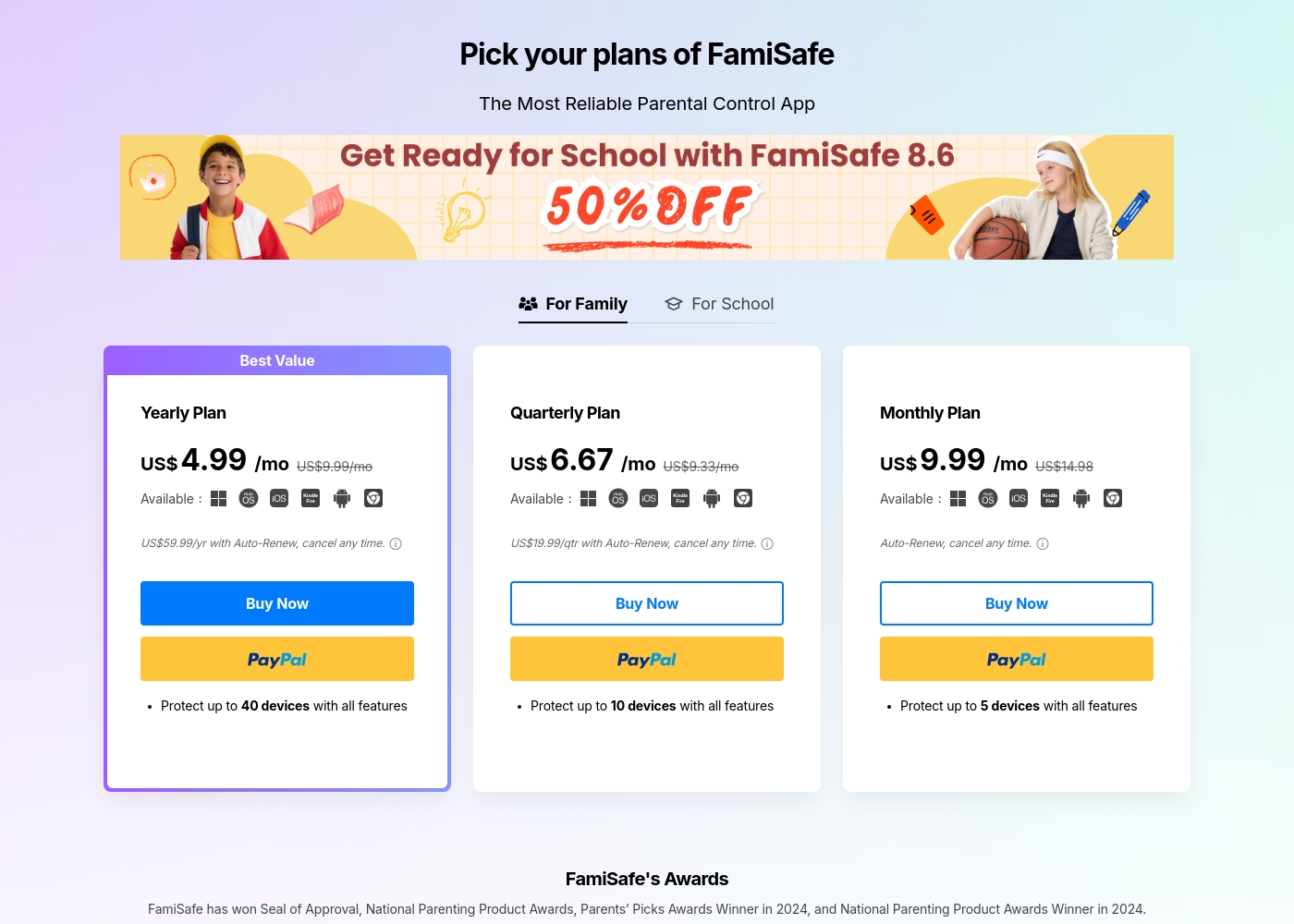
FamiSafe ranges US$4.99–US$9.99/month, with up to 40 devices in the yearly plan. Umobix pricing isn’t disclosed publicly; check with sales. Clear value for device coverage makes FamiSafe the safer bet on price visibility. In unknown pricing, you’ll want quotes from Umobix.
Customer support
Both have responsive support, but Umobix often earns praise for quick help.
FamiSafe support is praised for professionalism when it works, though outages occur. Umobix support is noted as prompt and effective at resolving issues. For consistently reliable help, Umobix tends to win. In tricky refunds, FamiSafe agents shine too.
Cross-platform scope
Both run on Android and iOS; FamiSafe adds Windows/mac compatibility.
FamiSafe supports iOS, Android, Windows, Chrome, Mac, and Kindle Fire. Umobix supports Android and iOS with a universal dashboard. If you need broad OS coverage, FamiSafe has the edge. If you’re on mobile-first, Umobix remains strong.
Data retention & reporting
FamiSafe provides daily Activity Reports; Umobix offers broader history.
FamiSafe delivers daily Activity Reports and Screen Viewer data. Umobix includes history viewing and media capture. The choice hinges on daily snapshots versus long-term history. For ongoing trends, Umobix trends ahead; for daily checks, FamiSafe stays strong.
FamiSafe costs between US$4.99 and US$9.99 per month with three main plans: Yearly Plan at US$59.99/year, Quarterly Plan at US$19.99/quarter, and Monthly Plan at US$9.99/month.
FamiSafe provides simple, device-based plans for family monitoring. Here is a closer look at what each subscription offers.
Yearly Plan
Price: US$59.99 per year (effective US$4.99/mo) Websites Supported: Up to 40 devices Best For: Families needing comprehensive, long-term coverage Refund Policy: 7-day money-back guarantee Other Features:
- Includes all premium features
- Auto-Renews, cancel any time
- Protection for the highest number of devices
While the exact prices aren't currently displayed, Umobix is designed to be a comprehensive mobile monitoring solution featuring cross-platform compatibility. uMobix works seamlessly on all Android devices running OS 4+ and all iPhones and iPads. This broad compatibility ensures that most modern parental devices are supported immediately.
Comprehensive Monitoring Package (Details Not Stated)
Best For: Parents or guardians seeking absolute, real-time activity monitoring across a child's mobile device. Other Features:
- Access to all incoming and outgoing calls, messages, and deleted content.
- Keylogger functionality capturing keystrokes and passwords.
- Real-time and historic GPS location tracking features.
- Total monitoring capability for 41 popular apps and social media platforms.
- Remote control settings (e.g., blocking apps, Wi-Fi, or the device).
This package appears to provide truly extensive surveillance and control tools for monitoring modern Android and iOS devices. If you are prioritizing robust oversight across text communication, social media, and physical location tracking, this feature set is ideal for your needs. The advanced remote controls allow parents to actively manage the device environment, which often provides significant peace of mind. Key features like deleted message recovery and explicit handling of dating apps offer crucial capabilities for proactive parents.
Pricing Notes
- FamiSafe Yearly Plan covers up to 40 devices; price is US$59.99/year.
- Umobix pricing is not publicly disclosed; contact sales for details.
- FamiSafe auto-renews; you can cancel anytime.
- Umobix migration details are provided by support for device upgrades.
- FamiSafe free trial supports one device; paid plans unlock full history data.
Pricing Head-to-Head
User Reviews
FamiSafe holds a “Poor” 2.5 TrustScore, reflecting significant user frustration despite the company actively replying to 100% of negative feedback. The central issues revolve around technical operation and reliability. Users frequently cite major compatibility problems, including slow download speeds, app crashes—especially with the required “Wondershare Connect” tool for iPhone features—and reports of the application improperly installing or “ruining” device setup. The process to secure a refund can also be bureaucratic initially; customers sometimes had to “jump through hoops” by providing log files before the engineering team was convinced the product failed.
Conversely, nearly all positive feedback is centered on specific customer support agents, who are often described as outstanding, patient, fast, and technically competent (e.g., Mojoe, John, Angelo C). When a user successfully contacts a live agent, the problem is frequently resolved quickly or a full refund is processed, even covering taxes and VAT requested by European users. Overall, while the individual support experience is high-quality, the underlying product stability and the initial difficulty getting help contribute to the low external rating. 🤔
Mojoe was outstanding. He was technically competent, patient, and analytical, taking the time to walk me through every step. However, getting to a live person took too long, and I waited 30 minutes after being told it would be 13.
uMobix has a Trustpilot rating of 3.5/5, reflecting a balanced mix of strong praise and serious complaints from over 500 users. Reviewers frequently emphasize the app’s comprehensive monitoring capabilities, noting its reliability for accurate location tracking, accessing messages, and social media oversight. Many users say it provides essential peace of mind. Customer support receives consistently high marks, described as prompt, patient, and knowledgeable, with agents like Nicky Brown and Julia frequently mentioned for their helpfulness during installation and troubleshooting. 👍
However, the platform faces recurring issues related to billing and transparency, which impact overall user satisfaction. We noted significant complaints alleging unauthorized charges following low-cost trials, difficulty canceling subscriptions, and refusal to process refunds. While the core features are robust, some users report slow syncing or delayed real-time updates, particularly right after installation. Successful implementation depends heavily on careful setup and reliance on the praised technical support staff, but prospective customers must be wary of the potential financial friction.
This helped me gain clarity in my relationship. Info came in slow at first but after like a day it started syncing fine. The support team was super helpful when I had issues.
Our Verdict
FamiSafe vs Umobix comes down to needs. If you want broad AI monitoring and upside of a long-standing device plan, FamiSafe wins for many families. If you crave real-time, cross-device visibility and quick setup, Umobix often stands out. Consider your priority: comprehensive safety or instant insight. For most households, start with FamiSafe for depth, or Umobix for speed and live data. FamiSafe and Umobix both protect what matters, just differently.
Frequently Asked Questions
Does FamiSafe offer a free trial or money-back guarantee?
Yes. FamiSafe offers a free trial for one device. Paid plans include a 7-day money-back guarantee.
Is Umobix priced per-device, or can I monitor multiple devices under one subscription?
Umobix pricing isn’t publicly disclosed. The data implies separate subscriptions are needed per device; confirm with sales.
What kind of response time can I expect if I contact customer support?
FamiSafe and Umobix both offer support; Umobix is frequently praised for prompt help. Response times vary by issue.
How quickly do data updates synchronize, given the product claims 'real-time' monitoring?
Umobix aims for real-time updates, but some users report sync delays up to a day. FamiSafe emphasizes real-time alerts.
What measures does FamiSafe use to protect my data and privacy?
FamiSafe uses bank-level encryption for location sharing via Geonection and GDPR/COPPA compliance.
Are there limits on how much data FamiSafe or Umobix can store?
FamiSafe historical data is available on paid plans; Umobix storage policies aren’t fully detailed publicly.
Ready to Choose?
Both tools have their strengths. Choose based on your specific needs.