Dreamstime vs Unsplash
Dreamstime and Unsplash serve visual creators but use fundamentally different cost models. Dreamstime gives you 314 million paid multi-media assets with great customer care. Unsplash is famous for its massive free library, but its paid Plus plan faces criticism.
Best for: Marketing agencies needing reliable, high-volume multimedia assets (video/audio)., Organizations requiring formal multi-seat licenses and guaranteed usage rights management.

Best for: Creative individuals or bloggers needing occasional, high-quality, free images., Users prioritizing simple, royalty-free licensing for personal projects.
Great Value with Excellent Support
We found Dreamstime excels in offering a massive asset library paired with highly responsive customer service, often resolving thorny issues like accidental double charges instantly. However, we caution new users about the automatic renewal practices and a growing prevalence of AI-generated images that clutter search results. Overall, the platform delivers strong value for high-volume content creators who prioritize helpful human support.
Pros
- High quality and vast selection of stock photos, videos, and audio.
- Exceptional and responsive customer service that promptly handles refunds.
- Simple and efficient image uploading process for contributors.
- User-friendly platform that is easy for most users to navigate.
Cons
- Subscription system lacks clarity regarding automatic renewals and cancellation.
- High volume of difficult-to-filter, low-quality AI-generated content.
- Search functionality sometimes struggles to return relevant results.
- Photographers report significant recent drops in sales and high payout threshold ($100).

Best Free Visuals, Buyer Beware on Premium.
We find Unsplash offers an extensive, high-quality free image library that remains vital for creators worldwide. Overall, Unsplash is highly recommended for its free content, but we advise caution before subscribing to Unsplash+ due to recurring user reports of billing errors and unreliable customer support.
Pros
- Access to a massive library of professional, high-resolution visuals.
- The core content remains free and is available for commercial use.
- Unsplash+ provides enhanced legal protections and useful image editing tools.
- The platform is widely praised for its variety and good categorization.
Cons
- Reported failures in customer support and billing reliability for Plus subscribers.
- Recurring user reports of reduced content diversity and representation in search results.
- The perceived quality of the free image library has declined since the Unsplash+ plan launched.
- A lack of a required safe filter means explicit content can appear.
AboutDreamstime
Dreamstime is known as the world's largest stock photography community. It was established in 2000 and has since grown immensely. Talented contributors worldwide enrich the vast collection daily. This resource is perfect for everyone, from large corporations to small magazines and personal blogs. You'll find professional assets regardless of your budget. 💡
AboutUnsplash
Unsplash is defined as the internet’s key source for visuals. It provides beautiful, free images and pictures across a wide range of topics. These categories cover subjects like Nature, Animals, Film, and 3D Renders. The entire extensive library is powered by creators worldwide who contribute their work. It's a vast platform for anyone needing stunning, accessible imagery for their projects. 💡
Highlights
Feature Comparison
Features Overview
We highlight the main differences and pick a winner for each feature.
Pricing Model & Value
Unsplash wins on zero cost, but Dreamstime offers clearer, structured paid scaling. Be wary of Unsplash+'s silent pricing.
Dreamstime offers flexible pricing with one-time credits or subscription plans. Costs range from $25/month up to high-volume 750 monthly downloads. Dreamstime is a reliable paid stock service with predictable scaling for businesses. Unsplash provides millions of high-quality visuals for free, which is its primary appeal. The paid Unsplash+ plan grants unlimited downloads and enhanced features. Pricing information is not publicly displayed for Unsplash+. The key difference is budget vs. structure. Dreamstime helps high-volume users budget costs accurately. Unsplash is ideal for budget-conscious creators who demand amazing free content. Unused Dreamstime downloads often roll over, ensuring you never lose value during slow months.
Asset Variety (Media Type)
Dreamstime provides a full multimedia suite including video and audio. Unsplash focuses almost exclusively on superior still imagery.
Dreamstime holds 314 million multi-media assets, including photos, vectors, illustrations, and editorial content. Dreamstime also offers essential high-quality 4K video clips and royalty-free audio tracks. This supports comprehensive content needs. Unsplash is known for its beautiful free images across diverse categories like 3D Renders and Film. It does not list video or audio assets in its core paid or free offerings. This keeps its focus narrow. The key difference is media integration. Dreamstime supports complex multimedia projects with integrated video and audio. Unsplash is the dominant choice for superb image-only needs. If your project requires sound effects or motion graphics, Dreamstime is the platform to choose.
Customer Support
Dreamstime is widely praised for responsive and efficient customer service. Unsplash receives severe complaints about poor reliability and support access.
Users consistently praise Dreamstime's staff for being professional and quick to respond. They efficiently process full refunds quickly if downloads haven't been used. Their support is a standout strength for Dreamstime subscribers. Unsplash receives many bad reports linked to the Unsplash+ paid plan. Users report being charged monthly even with locked accounts. They also receive no responsive contact from support staff. Reliability and fast problem resolution are core advantages for Dreamstime. Customer support seems almost nonexistent for paying Unsplash+ subscribers often left vulnerable to billing errors. Trusting Dreamstime with your recurring bill is a safer bet due to their proven customer service track record.
Team Licensing & Scaling
Dreamstime offers clear multi-seat licensing for organizations. Unsplash+ is strictly limited to a single user per subscription.
Dreamstime provides formal, scalable multi-seat licenses starting around $59 per month. This allows large teams to manage usage rights confidently and efficiently. Subscriptions also feature easy organizational rights management. The Unsplash+ paid license is strictly single-user, limiting team sharing capability. Content also cannot be stored on a Digital Asset Management (DAM) system for broad dissemination. This is a critical distinction for business use. Dreamstime is designed for large-scale enterprise rollouts and collaboration. Unsplash+ is only suited for solo creators or freelancers. If you run a team or an agency, Dreamstime provides the licenses you need to stay compliant.
Creative Tools & AI
Dreamstime uses AI to improve asset discovery. Unsplash+ provides essential, built-in post-download editing tools.
Dreamstime leverages AI for smart classification, keyword suggestions, and object detection. Tools like PhotoEye™ streamline the search process for high-volume users. This helps you find assets faster. Unsplash+ includes valuable creative tools like instant image cropping and background removal. This allows quick preparation of visuals without external graphics software. The approaches differ: Dreamstime focuses on efficient finding; Unsplash focuses on efficient editing. Neither platform completely dominates the utilities available. Unsplash+ is handy if you need to quickly isolate a subject without opening Photoshop.
Mobile Accessibility
Dreamstime provides dedicated mobile apps for flexibility and access anywhere. Unsplash relies heavily on its mobile-friendly website browsing experience.
Dreamstime has dedicated mobile applications available on both the Apple App Store and Google Play Store. You can easily access, search, and manage your assets while away from your desk. The experience is optimized for smaller screens. Unsplash does not explicitly list an official mobile application for downloading assets. Access is primarily browser-based, which may limit functionality. They offer less integrated flexibility. The crucial difference is dedicated app integration versus mobile website. Dreamstime clearly supports professionals traveling or working on the go. Unsplash is slightly less integrated for mobile work. Using the Dreamstime app allows uninterrupted productivity straight from your mobile device.
Dreamstime costs between $14.99 (one-time) and $219 per month with several plans available: 5 images at $25, 10 images at $39, up to 750 images at $219 per month, or $2,028 billed annually.
Dreamstime offers flexible pricing through credit packages or standard time-based subscriptions. Let's explore the best fit for your content needs.
Credit Packages (Pay per Download)
Price: Starts at $14.99 (for 3 credits) Best For: Users who need images occasionally or high-value media Other Features:
- Credits are the site currency for all downloads.
- Credits are valid for one full year from purchase.
- Use credits for RF, EL images, videos, and professional audio.
- Prices differ depending on media size, level, format, or license.
- Pay per download (using site currency)
- Used for RF, EL images, videos, audio
- Valid for 1 Year
- 5 total downloads per month
- Unused downloads roll over
- Automatic renewal
- Includes lifetime license
- 200 downloads per month
- Unused downloads roll over
- Includes lifetime license and unlimited online usage
- Gives unlimited printed and electronic copies
- 750 downloads per month
- Automatic renewal
- Downloads roll over
- Includes lifetime license and unlimited online usage

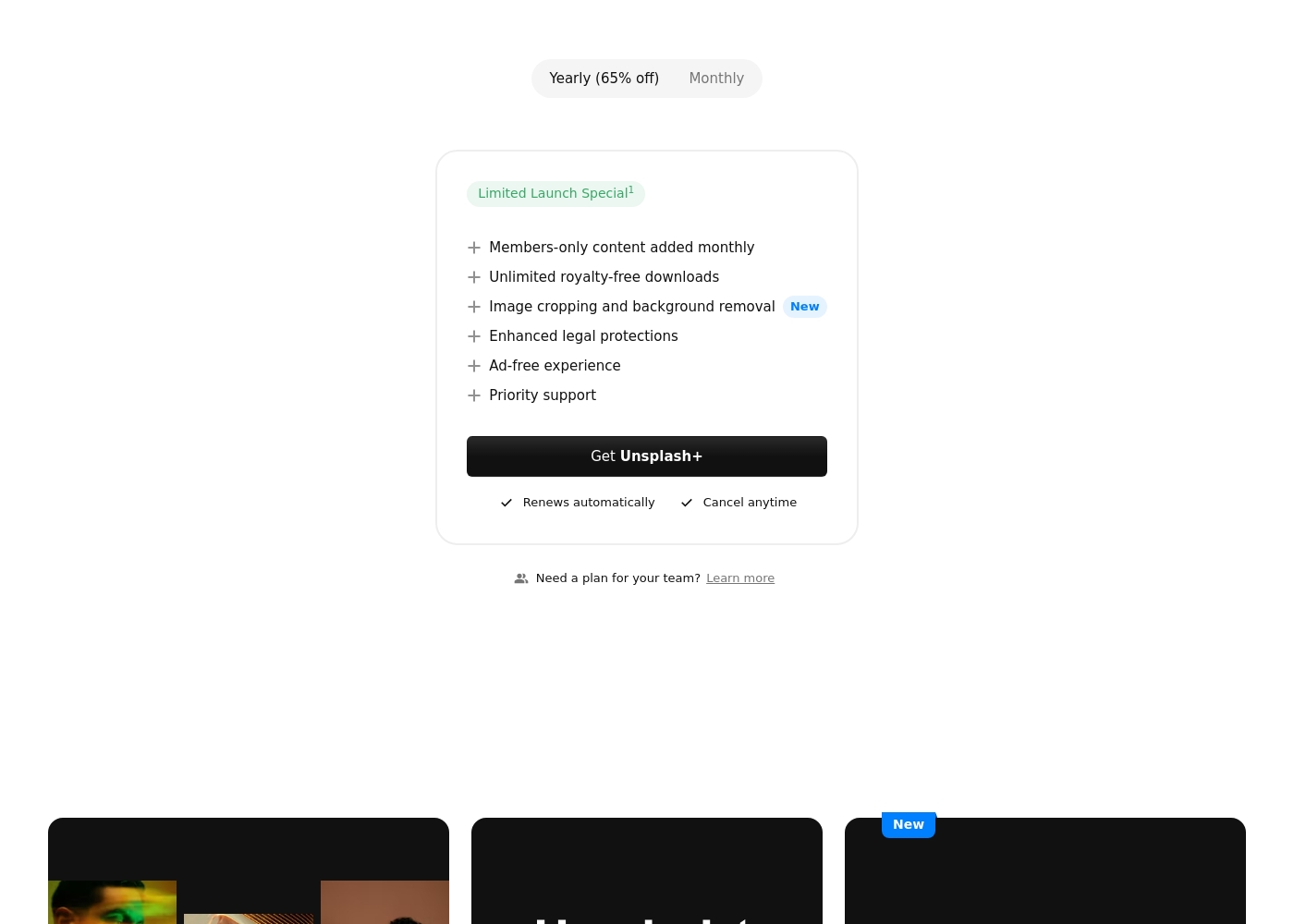
While the Unsplash platform maintains a massive free library, the paid subscription unlocks exclusive features and content. Let's explore what Unsplash+ includes for individual creators.
Unsplash+
Best For: Individual creators needing enhanced legal protection and exclusive, unlimited stock content. Other Features:
- Members-only content added monthly
- Unlimited royalty-free downloads
- Image cropping and background removal
- Enhanced legal protections
- Ad-free experience
- Priority support
This subscription is designed for single users who frequently download stock images and require specialized content. If you prioritize solid legal protection and want access to powerful new tools like image cropping, Unsplash+ is a superb choice. Remember, this is a single seat license, meaning it is not intended for broad organizational sharing.
- Members-only content added monthly
- Unlimited royalty-free downloads
- Image cropping and background removal
- Enhanced legal protections
- Ad-free experience
Pricing Notes
- Dreamstime offers clear, tiered pricing based on download volume, plus flexible credit packages.
- Unsplash’s core library is free, but the price for the Unsplash+ plan is not publicly disclosed on their pricing text.
- Dreamstime subscriptions include rollover downloads, preventing loss of value during slower months.
- Unsplash+ offers unlimited downloads, but it is strictly a single-user license, limiting team use.
Pricing Head-to-Head
User Reviews
Dreamstime generally receives positive feedback from its large user base, scoring a 3.6/5 on Trustpilot. Customers frequently praise the high quality of the images available and the platform's user-friendly nature, noting that uploading and navigating the site is straightforward and easy.
Exceptional customer support is a standout feature; reviewers often highlight the staff's professionalism, quick response times, and efficiency in handling issues like accidental double billing or subscription problems. Contributors enjoy the strong sense of community and the fast approval process for their work.
I accidentally upgraded my free trial and was charged immediately. Dreamstime customer service efficiently processed my cancellation and provided a full refund quickly since I hadn't used any downloads. I really appreciate their prompt support!
Users praise Unsplash for its high-quality, professional images and amazing variety, confirming it is an easy-to-use, commercial-free source for content creators and artists. The satisfaction level decreases substantially among those who utilized the new paid subscription, Unsplash+.
Many long-time users feel that the platform broke its promise to remain entirely free, leading to a noticeable decline in the quality of the non-paid content. The most serious complaints target customer support and reliability: several users report being charged monthly for Unsplash+ despite having locked accounts or being unable to access downloads.
I’ve been using Unsplash for a while now, and it’s honestly my go-to for high-quality, free stock images. The variety is amazing, helping me find the perfect photo for blog posts or social media campaigns. Plus, the fact that it’s free makes it a total win.
Our Verdict
This debate boils down to paying for security and volume versus relying on an amazing free resource. For reliable, professional volume work and team collaboration, Dreamstime is the clear industrial winner. Unsplash remains the reigning champion for individual creators seeking high-quality images without opening their wallet. You choose your model: structured subscription or incredible free-tier flexibility. Dreamstime's superpower is its sheer depth and accountability, boasting 314 million multi-media assets. If you need 4K video, audio clips, or formal multi-seat licensing, Dreamstime delivers a full multimedia solution. Users consistently praise Dreamstime's customer support, which means billing errors get fixed quickly and professionally. Unsplash's superpower is simply being the internet’s best source for free, high-resolution visuals. For zero dollars, you get millions of stunning images ready for commercial use. The paid Unsplash+ plan adds unlimited downloads, legal protection, and handy editing tools like background removal. The deciding factor is your budget and your reliance on customer service. If you are running an agency, the strong support and organizational features of Dreamstime are invaluable. If you are an individual and only need photos, stick with the free tier of Unsplash. Be wary of serious billing complaints regarding the paid Unsplash+ service. Choose Dreamstime if you buy 200+ assets/month or require specific video and audio capabilities. Choose Unsplash if you only need free images for a blog or small business website.
Frequently Asked Questions
Which platform is better for high-volume content sourcing and agencies?
Dreamstime is much better suited for high-volume demands and team use. They offer subscription tiers up to 750 monthly downloads with rollover features. Dreamstime also provides required multi-seat licenses for agencies.
Does Dreamstime offer free images like Unsplash?
Unsplash has millions of high-quality images completely free for immediate use. Dreamstime offers a free image of the week and a 7-day free trial for 15 images. For consistent free access, Unsplash is the undisputed choice.
Can large teams manage licenses easily on Dreamstime and Unsplash?
Dreamstime offers formal multi-seat licenses starting around $59/month for team collaboration. The paid Unsplash+ plan is strictly for single users only. Dreamstime is clearly superior for efficient team management and legality.
Which service offers better customer support reliability?
Dreamstime is highly rated for its responsive customer support team, often resolving billing issues instantly. Unsplash+ subscribers often report severe difficulties reaching support staff or resolving account problems. Dreamstime provides much more reliable service.
Which platform is better for finding video and audio assets?
Dreamstime is a full multimedia platform offering millions of 4K video clips and royalty-free audio tracks. Unsplash focuses primarily on still images and offers no video or audio assets.
Is Unsplash+ worth the payment risk compared to Dreamstime?
Unsplash+ offers unlimited downloads but has frequent customer complaints about billing errors. Dreamstime provides a more structured and transparent paid experience. Dreamstime offers better value and reliability if you need a paid service.
Ready to Choose?
Both tools have their strengths. Choose based on your specific needs.
