Dreamstime vs Flaticon
Dreamstime and Flaticon serve two very different visual needs. Dreamstime is your comprehensive source for high-quality stock photos and video footage. Flaticon dominates the hyper-specific world of scalable vector icons. Your final choice depends entirely on the primary asset type your projects require.
Best for: Marketing agencies needing diverse photo and video content, Large publishers producing 500+ pieces of content monthly
Best for: Web designers and UI/UX developers, Professionals requiring scalable vector formats (SVG, PSD, EPS)
Great Value with Excellent Support
We found Dreamstime excels in offering a massive asset library paired with highly responsive customer service, often resolving thorny issues like accidental double charges instantly. However, we caution new users about the automatic renewal practices and a growing prevalence of AI-generated images that clutter search results. Overall, the platform delivers strong value for high-volume content creators who prioritize helpful human support.
Pros
- High quality and vast selection of stock photos, videos, and audio.
- Exceptional and responsive customer service that promptly handles refunds.
- Simple and efficient image uploading process for contributors.
- User-friendly platform that is easy for most users to navigate.
Cons
- Subscription system lacks clarity regarding automatic renewals and cancellation.
- High volume of difficult-to-filter, low-quality AI-generated content.
- Search functionality sometimes struggles to return relevant results.
- Photographers report significant recent drops in sales and high payout threshold ($100).
Unmatched Icon Library for Design Workflow.
We find Flaticon delivers unmatched variety and highly usable format flexibility for visual assets. The platform excels with its extensive 18-million icon library and highly functional free tier, making it useful for both professionals and casual users like teachers or students. Overall, this is a necessary resource for streamlining nearly any graphic design workflow.
Pros
- Access to a vast library of over 18 million vector icons and stickers.
- High-quality icons available in multiple styles (flat, line, colorful, and 3D).
- Excellent, robust free plan provides professional-grade resources.
- Intuitive interface, efficient search function, and quick customization tools.
Cons
- Free plan requires strict attribution for all downloads.
- Isolated complaints noted concerning difficult account and content deletion processes.
AboutDreamstime
Dreamstime is known as the world's largest stock photography community. It was established in 2000 and has since grown immensely. Talented contributors worldwide enrich the vast collection daily. This resource is perfect for everyone, from large corporations to small magazines and personal blogs. You'll find professional assets regardless of your budget. 💡
AboutFlaticon
Flaticon is an enormous resource catalog built for creativity. It holds over 18 million vector icons and versatile stickers.
These resources are proudly made by and for designers just like you. You can find more than standard static images here.
Look for various resource types, including Animated icons and essential Interface icons. It truly is a comprehensive library for all your visual needs.
Highlights
Feature Comparison
Features Overview
We highlight the main differences and pick a winner for each feature.
Asset Scope
Dreamstime offers a full media library; Flaticon focuses strictly on icons.
Dreamstime provides 314 million assets, covering photos, vectors, videos, and audio. It's a true all-in-one resource for complex multimedia projects. You can get stock footage up to 4K resolution directly from Dreamstime. Flaticon maintains a very specialized library. It focuses exclusively on professional vector icons and stickers. With 18.1 million items, its depth in this niche is unmatched globally. If you require video or audio, Dreamstime is the clear winner for media scope. If you require scalable interface design elements, Flaticon is the specialist. Using Dreamstime simplifies licensing if you need both photography and video clips in one campaign.
Vector Format Access
Flaticon requires Premium for vectors; Dreamstime's vectors are part of the subscription.
Dreamstime subscriptions include vectors and illustrations alongside photos and videos. You get all media types bundled under standard licensing terms. Flaticon's free tier only allows downloads in PNG format (up to 512px). Professional formats like SVG, EPS, and PSD are strictly reserved for Premium subscribers. This separation targets casual vs. pro users. If vector scalability is critical, Flaticon forces conversion to a paid plan. Dreamstime handles vectors more broadly in its standard offerings. For UI/UX designers, Flaticon's ready-to-use vector formats are essential for production workflow speed.
Pricing Structure
Flaticon is cheaper for designers; Dreamstime supports massive high-volume needs.
Dreamstime pricing scales based on asset size, offering large plans up to 750 images/month. It also features flexible credit packages for occasional usage. The plans start higher because the assets (photos/video) are more complex. Flaticon's paid subscription is very cost-effective, starting at $8.25/month billed annually. This affordable entry point unlocks full commercial rights and vector access. Dreamstime provides better value if you need hundreds of diverse stock assets monthly. Flaticon provides premium features at a lower entry price. Flaticon’s low annual price makes it ideal for freelancers needing consistent, budget-friendly icon access for client work.
Integrated Editing
Flaticon offers integrated quick edits; Dreamstime requires external software.
Dreamstime is primarily a delivery platform, providing files to download and use. Editing needs must be handled externally in Photoshop or Premiere. Flaticon features a specific utility for quick asset customization. You can instantly rotate, flip, or precisely move icons before downloading the final file. This saves time. This integrated editor makes Flaticon superior for rapid adjustments. Designers waste less time opening external programs for minor tweaks. Imagine adjusting an icon's orientation for a dashboard button—Flaticon handles this in seconds without leaving the browser.
Search Technology
Dreamstime uses advanced AI tools; Flaticon relies on standard filtering.
Dreamstime employs AI and Machine Learning for enhanced discovery. Features like PhotoEye™ streamline searches for better relevance. This helps manage their 314 million asset library. Flaticon facilitates filtering over 18 million icons efficiently. However, it does not detail advanced AI features like image classification or smart cropping tools. If you struggle to find the exact image, Dreamstime's AI assistance provides a crucial edge. Flaticon's search is robust but less technologically advanced. For instance, Dreamstime's automated tools help you quickly filter out low-quality content, though users report some issues with AI-generated content still appearing.
Commercial Licensing
Dreamstime subscriptions grant broad commercial rights; Flaticon commercial use is Premium only.
Dreamstime generally includes lifetime licenses and unlimited online usage rights with subscriptions. High volume plans cover unlimited printed copies as well. For Flaticon free users, attribution is strictly mandatory for commercial use. You need the affordable Premium plan to remove author credit requirements. Flaticon offers commercial rights cheaply but locks them behind a paywall. Dreamstime includes broader usage rights in its subscription tiers. Agencies using Dreamstime appreciate the peace of mind knowing large printing runs are covered legally under their plan.
Developer Support
Flaticon offers direct web integration tools; Dreamstime does not focus on this area.
Dreamstime is focused on delivering high-resolution media files for creative use. It doesn't offer specialized tools for routine web development integration. Flaticon excels here, providing Base 64 encoded data instantly. This allows developers to embed icons directly into HTML or CSS documents without hosting separate files. Flaticon significantly speeds up development and deployment for web projects. Dreamstime assets require standard image embedding processes. Using Base 64 encoded data via Flaticon minimizes HTTP requests, resulting in faster website loading times.
Free Access
Flaticon has a robust free tier; Dreamstime only offers a brief free trial.
Dreamstime provides a 7-day free trial allowing 15 asset downloads. Be careful; this trial rolls into an automatic subscription renewal if not canceled. Flaticon offers a permanently free tier with access to all 18.1 million icons. You can download these high-quality PNGs, requiring only attribution. The Flaticon free option is far more useful for students or casual users. Dreamstime's free trial is primarily a marketing tool. If you're testing ideas and want to keep your budget zero, Flaticon is the undisputed champion due to its massive free library.
Dreamstime costs between $14.99 (one-time) and $219 per month with several plans available: 5 images at $25, 10 images at $39, up to 750 images at $219 per month, or $2,028 billed annually.
Dreamstime offers flexible pricing through credit packages or standard time-based subscriptions. Let's explore the best fit for your content needs.
Credit Packages (Pay per Download)
Price: Starts at $14.99 (for 3 credits) Best For: Users who need images occasionally or high-value media Other Features:
- Credits are the site currency for all downloads.
- Credits are valid for one full year from purchase.
- Use credits for RF, EL images, videos, and professional audio.
- Prices differ depending on media size, level, format, or license.
- Pay per download (using site currency)
- Used for RF, EL images, videos, audio
- Valid for 1 Year
- 5 total downloads per month
- Unused downloads roll over
- Automatic renewal
- Includes lifetime license
- 200 downloads per month
- Unused downloads roll over
- Includes lifetime license and unlimited online usage
- Gives unlimited printed and electronic copies
- 750 downloads per month
- Automatic renewal
- Downloads roll over
- Includes lifetime license and unlimited online usage
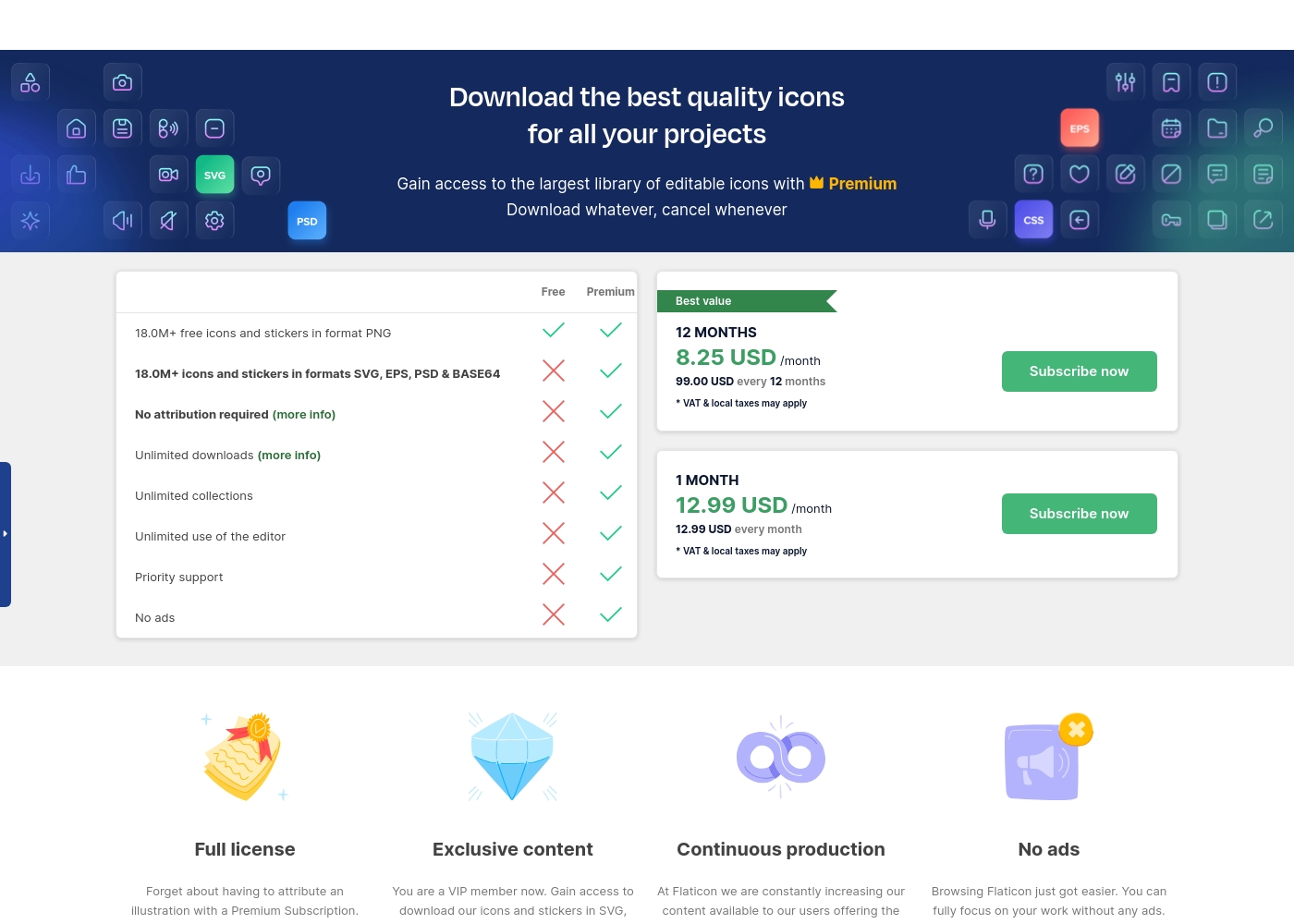
Flaticon costs between $8.25 and $12.99 per month with three plans: Free at $0, Premium (12 Months) at $99.00 yearly, and Premium (1 Month) at $12.99 monthly.
Here is a detailed look at the available subscription levels and what they include.
Free
Price: $0 Best For: Personal projects and basic graphic needs Refund Policy: Not applicable Other Features:
- Access to 18.0M+ free icons and stickers in PNG format
- Limited download access
- Limited to 3 collections (50 icons limit per collection)
- 18.0M+ free icons and stickers in format PNG
- Attribution required
- Limited to 3 collections (50 icons each)
- Access 18.0M+ icons in SVG, EPS, PSD & BASE64 formats
- No attribution required
- Unlimited downloads (up to 2000 daily)
- Unlimited collections (256 icons limit each)
- Unlimited use of the editor
- Access 18.0M+ icons in SVG, EPS, PSD & BASE64 formats
- No attribution required
- Unlimited downloads (up to 2000 daily)
- Unlimited collections (256 icons limit each)
- Unlimited use of the editor
Pricing Notes
- Flaticon has a Free plan, whereas Dreamstime offers a 7-day trial that requires attention regarding automatic renewal.
- Dreamstime's annual subscriptions (like 750 images/month) are geared toward large enterprises with high media demand.
- Flaticon’s Premium plan costs only $8.25/month billed annually, making it highly affordable for professional designers.
- Dreamstime is unique in offering credit packages that remain valid for a full year for highly flexible, occasional usage.
- Dreamstime offers specialized All-in-one plans covering photos, video, and audio clips under one unified subscription.
Pricing Head-to-Head
User Reviews
Dreamstime generally receives positive feedback from its large user base, scoring a 3.6/5 on Trustpilot. Customers frequently praise the high quality of the images available and the platform's user-friendly nature, noting that uploading and navigating the site is straightforward and easy.
Exceptional customer support is a standout feature; reviewers often highlight the staff's professionalism, quick response times, and efficiency in handling issues like accidental double billing or subscription problems. Contributors enjoy the strong sense of community and the fast approval process for their work.
I accidentally upgraded my free trial and was charged immediately. Dreamstime customer service efficiently processed my cancellation and provided a full refund quickly since I hadn't used any downloads. I really appreciate their prompt support!
Flaticon enjoys an overwhelmingly positive reception across thousands of reviews, holding a near-perfect score on Trustpilot. Users consistently praise the platform's extensive library, which contains over 18 million high-quality icons in diverse styles, including flat, line, and 3D options.
Recurring themes highlight the exceptional user experience (UX) and the intuitive, efficient search functionality. Reviewers, ranging from graphic designers and developers to students and teachers, find the platform essential for their daily workflow.
I love using these icons because they are so fun and cute. They make my presentations much more personalized. They are very easy to use and access, and I appreciate the different styles available for fresh looks.
Our Verdict
Choosing between Dreamstime and Flaticon is easy: it depends on your asset format. If you need dynamic photos, videos, and professional audio, Dreamstime is your solution. If your project is an app dashboard and requires scalable vector icons, Flaticon wins easily. Dreamstime is a powerhouse for large media needs. Their plans support up to 750 monthly photo or media downloads, perfect for agencies. You get 4K video and audio clips bundled alongside 314 million stock photos. Plus, Dreamstime’s customer support is often described as industry-leading for quick resolution. Flaticon is the unchallenged king of interface graphics. It provides over 18.1 million dedicated vector icons and useful developer tools. The Premium plan is incredibly budget-friendly at $8.25/month for full commercial rights. Flaticon also includes a helpful integrated editor for quick icon modifications. The key deciding factor is professional designer formats. Flaticon offers essential SVG/PSD downloads and smart Base 64 integration for developers. Dreamstime offers broader variety, using AI to help you search its massive photo library. Choose Dreamstime if you are a high-volume publisher needing diverse multimedia assets. If you are a designer needing limitless access to affordable, professional, and scalable icons, Flaticon is the superior and obvious choice.
Frequently Asked Questions
Which service is better for video and audio content: Dreamstime or Flaticon?
Dreamstime is significantly better for multimedia assets. Dreamstime offers millions of 4K video clips and high-quality royalty-free audio tracks. Flaticon focuses exclusively on static and animated icons, not video or sound.
Does Flaticon have a better free option than Dreamstime?
Yes, Flaticon offers a robust, perpetually free tier of 18.1 million PNG icons. Dreamstime only provides a conditional 7-day free trial for 15 images. Flaticon is far better for budget-conscious users.
Which tool provides the professional file formats needed by web developers?
Flaticon is designed for professional developers and UI/UX designers. Premium Flaticon users gain access to scalable SVG, EPS, and PSD formats. Flaticon also provides Base 64 encoded data for faster web integration.
Can I get a money-back guarantee with Dreamstime or Flaticon?
Flaticon offers a conditional 30-day money-back guarantee if no assets were downloaded. Dreamstime lacks a formal policy but is often praised for excellent customer support that quickly processes refunds when issues arise.
Which service should I choose if I need high-volume photo downloads?
Choose Dreamstime for high-volume photo downloads. Dreamstime’s subscription plans go up to 750 image downloads per month. Your unused downloads also conveniently roll over to the next month.
Is Flaticon truly 'unlimited' or are there download caps?
Flaticon Premium access is labeled as 'unlimited' but has a known daily limit. Subscribers are capped at 2,000 icon downloads per 24-hour period. This should be sufficient for even heavy professional use.
Ready to Choose?
Both tools have their strengths. Choose based on your specific needs.