DigitalOcean vs VMmanager
DigitalOcean and VMmanager serve very different cloud needs. DigitalOcean is a developer's cloud for deploying apps and AI workloads. VMmanager is a platform for hosting providers to automate VPS rentals. The choice is clear based on your role.
Best for: Developers launching web apps or APIs, Startups needing quick, scalable cloud infrastructure
Best for: Hosting providers automating VPS rental businesses, IT teams building internal IaaS or private clouds
Predictable Pricing, Powerful Dev Tools, Excellent Support
We find DigitalOcean excels by combining powerful Linux virtual machines and advanced AI infrastructure with remarkable ease of use and developer-centric pricing. The service consistently earns high marks for its stellar, quick customer support, strong reliability, and clear usage-based billing practices that prevent bill surprises. Overall, DigitalOcean is highly recommended for developers and businesses requiring predictable, high-value cloud services.
Pros
- Customer support is exceptionally quick, helpful, and provides detailed solutions.
- The platform is highly reliable with consistent performance and minimal reported downtime.
- Intuitive control panel and great guides make server setup very easy and clear.
- Overs a $200 free credit to new users for testing services over 60 days.
Cons
- The company strictly states that it does not offer refunds for utilized services.
- Occasional reports from long-time users concerning unexpected hardware failures.
- Users have noted an occasional lack of specific advanced features, often requiring workarounds.
Pros
Cons
AboutDigitalOcean
DigitalOcean provides core infrastructure, focusing on versatile Linux cloud architecture. It’s the right choice for developers who need robust cloud services and specialized platforms. The service supports everything from fundamental system setup, like installing Docker on Ubuntu, to sophisticated deployments. If you're exploring open source AI platforms, or need the muscle of H100 GPUs for models like Ollama, this platform delivers. 💡
AboutVMmanager
Highlights
Feature Comparison
Features Overview
We highlight the main differences and pick a winner for each feature.
User Interface
DigitalOcean's panel is simple and intuitive. VMmanager's interface is built for complex administration.
DigitalOcean offers a clean, straightforward control panel. Users praise its ease of use for deploying and managing cloud resources. You can launch a Droplet in seconds. VMmanager provides a feature-rich administrative interface. It's designed for managing clusters, virtual networks, and automation rules. The learning curve is steeper. The key difference is simplicity vs. control. DigitalOcean is quick for standard tasks. VMmanager gives granular control for complex setups.
Scalability
DigitalOcean scales infinitely in the cloud. VMmanager scales massively on your own hardware.
DigitalOcean scales seamlessly as a managed cloud. You add more Droplets or upgrade resources with a few clicks. The limit is your budget. VMmanager is engineered for massive on-premise scale. A single installation manages over 22,000 VMs across 350 physical servers. It auto-distributes load. The trade-off is cloud convenience vs. controlled scale. DigitalOcean removes infrastructure headaches. VMmanager lets you scale your own hardware efficiently.
Pricing Model
DigitalOcean has transparent, usage-based pricing. VMmanager requires custom quotes.
DigitalOcean lists clear starting prices. Droplets start at $4/month. You pay only for what you use, with a $200 free trial credit. VMmanager pricing is not public. You must request a custom quote based on physical core count. This lack of transparency is a concern. The deciding factor is predictability. DigitalOcean offers upfront cost clarity. VMmanager's costs are hidden until you talk to sales.
Customer Support
DigitalOcean support is consistently praised. VMmanager support gets mixed feedback.
DigitalOcean reviews rave about support. Users report fast, helpful responses often under 24 hours. The team is knowledgeable. VMmanager support reviews are more varied. Some praise helpful staff. Others report slow responses and issues with price changes. Reliability is key. DigitalOcean's support is a proven strength. VMmanager's support experience can be inconsistent.
Target Audience
DigitalOcean is for developers building apps. VMmanager is for hosts selling VMs.
DigitalOcean is perfect for developers and startups. You need reliable cloud servers, managed databases, and AI tools. It's a one-stop shop. VMmanager is built for hosting providers. You need to automate VPS sales, manage billing, and offer self-service portals. It's a business management tool. The core difference is use case. DigitalOcean is infrastructure-as-a-service. VMmanager is a platform to run an IaaS business.
Automation
VMmanager automates entire hosting workflows. DigitalOcean automates cloud resource provisioning.
VMmanager excels at business automation. It can provision a VPS in 4 seconds and integrate with billing systems. Self-service portals are included. DigitalOcean automates infrastructure tasks. The API and CLI let you script deployments. Managed services handle scaling and updates. The scope differs. VMmanager automates client management and sales. DigitalOcean automates server management and scaling.
High Availability
VMmanager has built-in failover clusters. DigitalOcean offers managed load balancers.
VMmanager is designed for fault tolerance. It uses failover clusters and automated load distribution (DRS) to keep VMs running. DigitalOcean provides managed load balancers and droplet snapshots. You can build HA setups, but it's not the core focus. The difference is depth. VMmanager has HA as a central feature. DigitalOcean offers HA as one of many cloud options.
AI & Developer Tools
DigitalOcean has dedicated AI platforms. VMmanager focuses on traditional virtualization.
DigitalOcean offers a Gradient AI Platform. You can run LLMs, use H100 GPUs, and deploy AI apps. It's built for modern dev work. VMmanager manages virtual machines and containers. There are no special AI tools or GPU integrations. It's for general virtualization. The gap is clear. DigitalOcean leads in AI infrastructure. VMmanager is for traditional server hosting.
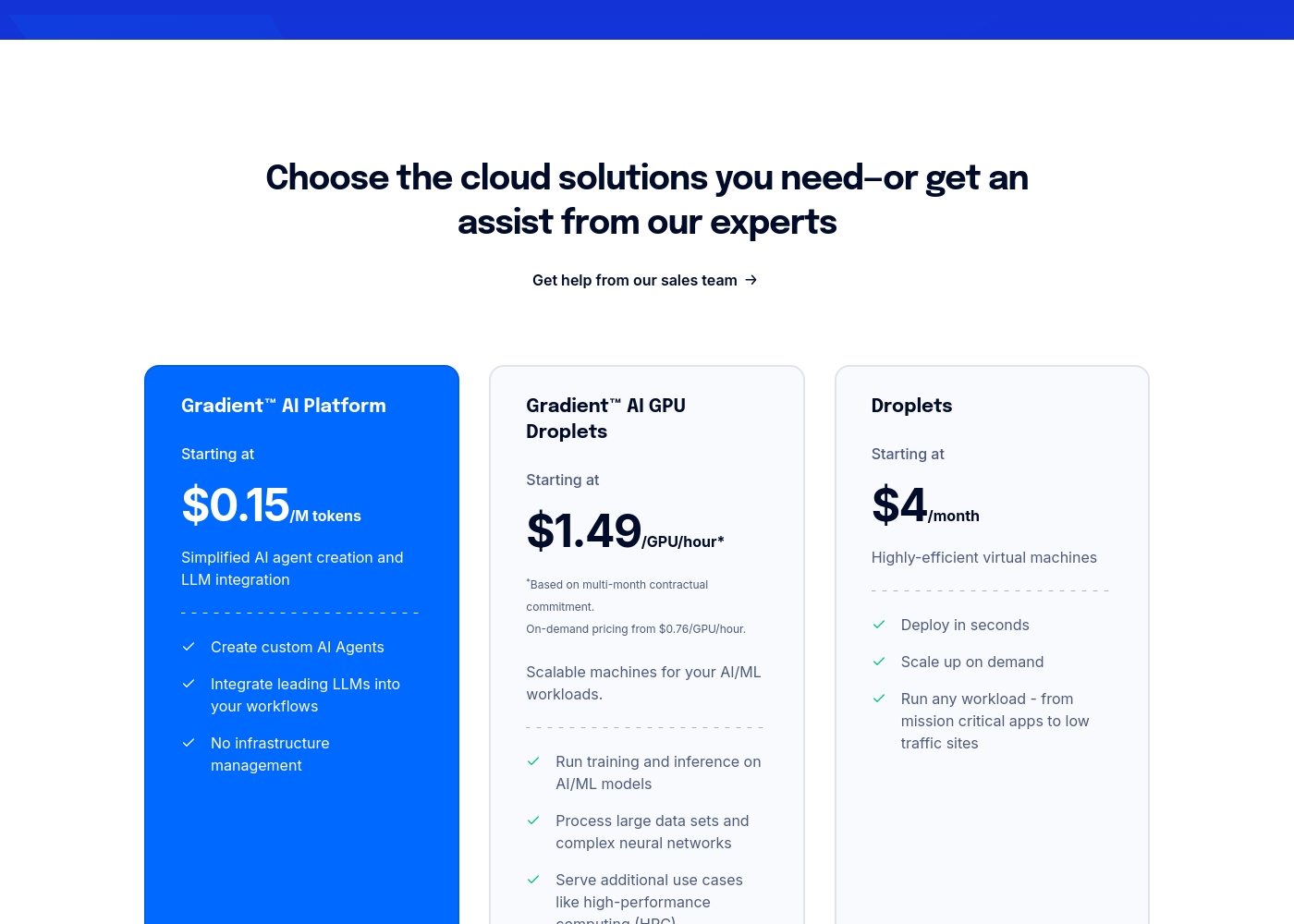
DigitalOcean costs between $0 and $15 per month with 13 core services, including App Platform at $0/month, Droplets at $4/month, and Databases starting at $15/month.
DigitalOcean offers simple, predictable pricing for all its core cloud solutions. Here are the starting costs and key features for some of the most popular infrastructures available.
Gradient™ AI Platform
Price: Starting at $0.15 /M tokens Best For: Simplified AI agent creation and LLM integration Refund Policy: We do not offer refunds. Other Features:
- Create custom AI Agents
- Integrate leading LLMs into your workflows
- No infrastructure management
- Highly-efficient virtual machines
- Deploy in seconds
- Scale up on demand
- Simple, managed Kubernetes
- Includes load balancing and networking
- Fully managed and maintained
- High availability and scaling
- Simple, fully-managed infrastructure solution
- Zero base cost for basic usage
- Automatic application deployment
Pricing Notes
- DigitalOcean's pricing is transparent and listed on their site. Many services start at $0.
- VMmanager does not publish prices. You must contact sales for a custom quote.
- DigitalOcean offers a $200 credit for 60 days. VMmanager offers a 30-day trial on your own hardware.
- DigitalOcean billing is automated monthly. VMmanager licensing is based on physical core count.
- VMmanager pricing transparency is a common complaint in user reviews.
Pricing Head-to-Head
User Reviews
DigitalOcean consistently receives overwhelming praise across external review platforms, reflected in its impressive 4.6-star rating on Trustpilot. Customers frequently highlight the exceptional quality and responsiveness of the customer support team. Users often report that the support staff is helpful, patient, and provides detailed, clear explanations, frequently responding much quicker than the published 24-hour service level agreement (SLA). Many consumers state that DigitalOcean offers the best combination of pricing, value, and support in the cloud computing sector. The platform is described as straightforward and easy to use, featuring an intuitive control panel and extensive documentation that simplifies complex server configurations.
Reliability is a major selling point. Many long-term users report consistent performance and minimal, or even zero, downtime over several years, ensuring smooth project operation. Furthermore, the pricing structure is seen as economical, fair, and transparent, preventing unexpected monthly charges. Whether users are deploying simple web apps or handling advanced AI/ML workloads on beefy GPUs, the general sentiment confirms DigitalOcean provides a powerful, reliable hosting environment with excellent service delivery. 🤩
I have been using DigitalOcean for more than seven years now. I never experienced any downtime during this period, which is essential for our business continuity. Their support team has always been quick and helpful when I needed assistance.
Our Verdict
For most developers and businesses, DigitalOcean is the clear winner. It offers simple, powerful cloud infrastructure you can start using today. VMmanager solves a different problem entirely. DigitalOcean's superpower is making cloud computing accessible. You get instant VMs, managed databases, and even AI platforms. Everything is priced clearly, with a $200 free trial to test it. VMmanager's superpower is automating a hosting business. It turns your server farm into a sellable VPS service. It handles provisioning, billing, and client self-service portals. The deciding factor is your goal. Choose DigitalOcean if you need to *use* cloud servers to build something. Choose VMmanager if you need to *sell* virtual machines as your business. Final verdict: Pick DigitalOcean for standard cloud needs. It's faster to start, cheaper to predict, and better supported. Only choose VMmanager if you're running a hosting company that needs this specific automation platform.
Frequently Asked Questions
Which is better for small teams: DigitalOcean or VMmanager?
DigitalOcean is much better for small teams. Its simple interface and clear pricing let you deploy apps quickly. VMmanager is complex and designed for large hosting operations.
Is VMmanager worth the extra cost over DigitalOcean?
It's not a direct cost comparison. DigitalOcean is for using cloud servers. VMmanager is for selling virtual machines. They solve different business problems.
Can I migrate from DigitalOcean to VMmanager easily?
Migration isn't straightforward. They serve different purposes. You'd be moving from using cloud services to managing your own physical servers with new software.
Which has better customer support?
DigitalOcean has significantly better and more consistent customer support according to user reviews. VMmanager's support receives mixed feedback.
Do I need technical skills to use DigitalOcean vs VMmanager?
Both require technical skills, but different kinds. DigitalOcean needs basic server admin knowledge. VMmanager needs advanced virtualization and network expertise.
Can I use DigitalOcean for my hosting business?
You can host client sites on DigitalOcean Droplets. However, it lacks built-in client management portals and automated billing integration that VMmanager provides.
Ready to Choose?
Both tools have their strengths. Choose based on your specific needs.