Depositphotos vs Unsplash
This comparison pits the king of paid licensing against the champion of free stock images. Depositphotos offers a comprehensive 321 million file library with guaranteed legal clarity. Unsplash built its reputation on beautiful, free photos, but now offers a premium paid tier.
Best for: Marketing agencies needing legally licensed stock content, including video and music., Businesses that need consistent, audited multimedia assets across different departments.

Best for: Bloggers, students, and individual creators operating on a zero budget., Users who only need high-resolution, beautiful photography (not video or music).
Affordable stock media with superior support.
We found Depositphotos delivers exceptional value through its expansive, licensed content library and flexible pricing. The commitment to superior customer support is clear, with representatives often going above and beyond to assist users with account issues. Overall, Depositphotos is a highly reliable choice for consistent, high-quality visual and audio assets.
Pros
- Access to a vast library of 321 million licensed files (photos, vectors, video, music).
- Excellent, professional, and prompt customer service.
- Flexible subscription models, including low-commitment Packs and discounted annual plans.
- User-friendly interface with very effective search filters.
Cons
- Auto-renewal policies for image packs and subscriptions are often confusing or unwanted.
- Pricing breakdown lacks clarity regarding sole trader versus company user status.
- Image pack downloads can sometimes have expiration limitations, such as one year.
- AI image generation tools occasionally produce repetitive models or inaccurate results.

Best Free Visuals, Buyer Beware on Premium.
We find Unsplash offers an extensive, high-quality free image library that remains vital for creators worldwide. Overall, Unsplash is highly recommended for its free content, but we advise caution before subscribing to Unsplash+ due to recurring user reports of billing errors and unreliable customer support.
Pros
- Access to a massive library of professional, high-resolution visuals.
- The core content remains free and is available for commercial use.
- Unsplash+ provides enhanced legal protections and useful image editing tools.
- The platform is widely praised for its variety and good categorization.
Cons
- Reported failures in customer support and billing reliability for Plus subscribers.
- Recurring user reports of reduced content diversity and representation in search results.
- The perceived quality of the free image library has declined since the Unsplash+ plan launched.
- A lack of a required safe filter means explicit content can appear.
AboutDepositphotos
Depositphotos is a comprehensive online source for royalty-free stock media. You’ll find a massive 321 million files available for your creative needs. This library includes many different content types crucial for any project. You can discover large thematic collections of stock photography, vector images, illustrations, videos, and music. Leading international companies already trust this library for their visual and audio content needs. 💡
AboutUnsplash
Unsplash is defined as the internet’s key source for visuals. It provides beautiful, free images and pictures across a wide range of topics. These categories cover subjects like Nature, Animals, Film, and 3D Renders. The entire extensive library is powered by creators worldwide who contribute their work. It's a vast platform for anyone needing stunning, accessible imagery for their projects. 💡
Highlights
Feature Comparison
Features Overview
We highlight the main differences and pick a winner for each feature.
Library Scope
Depositphotos features massive 321 million assets across all media; Unsplash focuses primarily on high-quality photographs.
Depositphotos offers a huge library of 321 million files for any project need. This vast collection includes photos, vectors, videos, and professional music tracks. Depositphotos is built for users needing complete multimedia content libraries in one place. Unsplash focuses on a vast collection of beautiful, high-resolution visual assets. Its strength is photography, with specialized categories like 3D Renders and Film. Unsplash prioritizes high visual quality within its photography offerings. The key difference is media type: Depositphotos provides full audio and video support. Unsplash focuses almost exclusively on still images and renders. If your project requires mixed media, like stock footage or backing tracks, Depositphotos is the dedicated solution.
Pricing Model
Unsplash has a massive free tier; Depositphotos offers clear, highly competitive paid licensing.
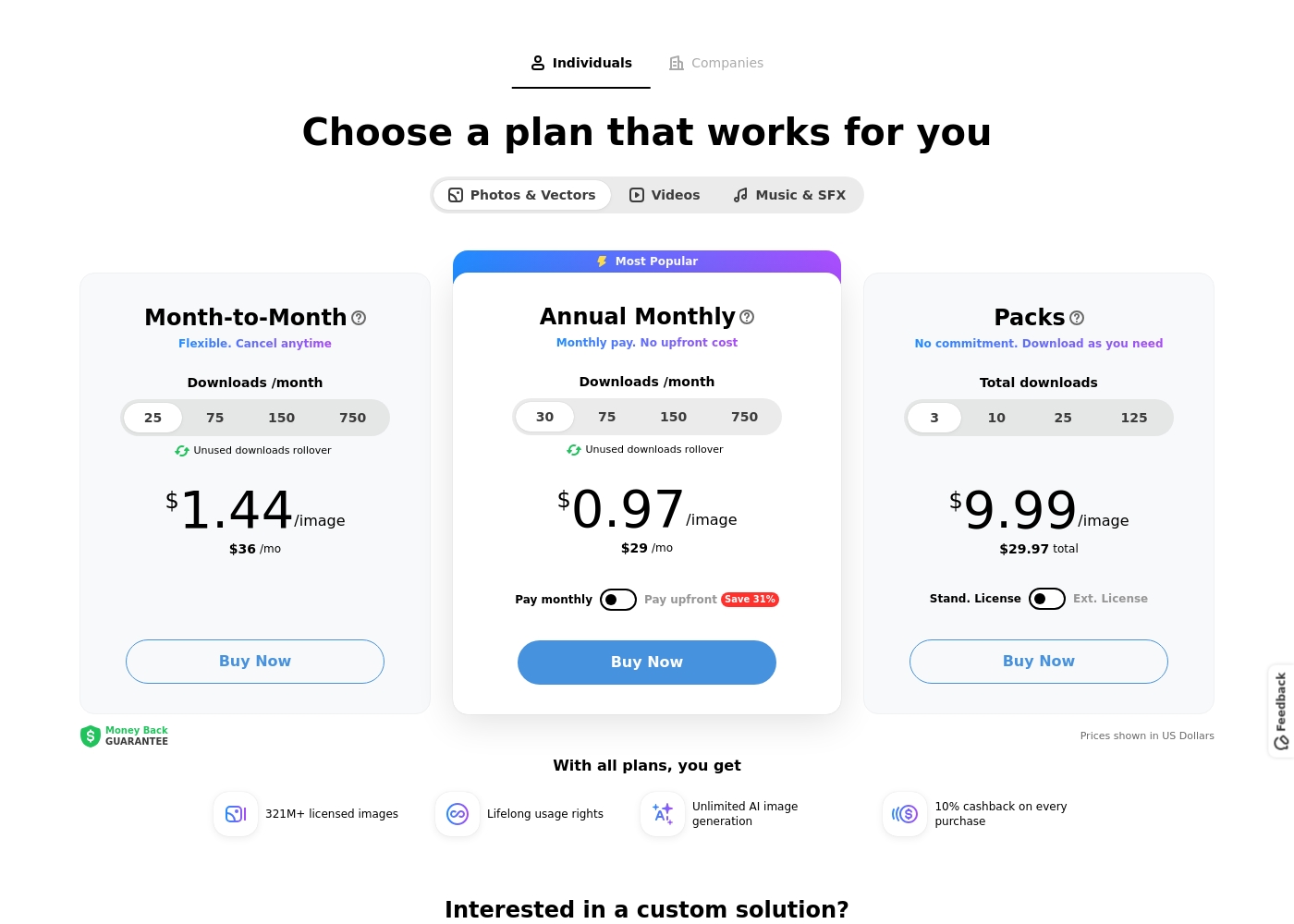
Depositphotos uses clear subscription and pack pricing, starting as low as $29/month. Users get rollover downloads and pay around $0.97 per image on the Annual Monthly plan. This provides excellent value for legally licensed content. Unsplash's main value proposition is its core library, which is completely free for commercial use. The price for the paid Unsplash+ subscription is not explicitly stated in the provided data. The choice is between zero-cost photography (Unsplash) or highly affordable, multi-media licensed content (Depositphotos). For consistent business use and predictable costs, Depositphotos is more transparent and reliable.
Legal Assurance
Depositphotos provides perpetual usage rights; Unsplash+ offers explicit enhanced legal protection and indemnity.
All licensed files downloaded from Depositphotos come with perpetual usage rights. This means you can use the content forever without worrying about license expiry. Depositphotos guarantees the legality of its licensed files. Unsplash+ explicitly guarantees that images are model and property released for commercial use. It offers Unsplash+ Protection for enhanced legal security and peace of mind. While both guarantee legality, Unsplash+ focuses more heavily on indemnity and specific legal protection guarantees for subscribers. For users prioritizing absolute commercial safety above all else, Unsplash+ makes a compelling case.
Creative Tools
Depositphotos includes unlimited AI generation; Unsplash+ integrates practical tools like cropping and background removal.
Depositphotos grants unlimited access to its AI image generation tools with every paid plan. This capability helps users create new, unique visuals instantly within the platform. Users can also access a built-in background remover. Unsplash+ subscribers gain access to new creative tools for image preparation and editing. This includes built-in image cropping and quick background removal capabilities. Depositphotos focuses on using AI for unique content creation. Unsplash focuses on simplifying post-download image preparation. Both platforms offer useful tools, depending on whether you value creation (Depositphotos) or editing (Unsplash+).
Team & Scaling
Depositphotos directly supports businesses and teams; Unsplash+ is strictly limited to a single user per license.
Depositphotos mentions specific purchasing options and plans tailored for 'Companies.' Its licensing is structured to scale easily with a growing business. This makes Depositphotos suitable for commercial operations. Unsplash+ is sold explicitly as a strict single-user license only. Furthermore, the content cannot be stored on a DAM system for broad sharing among colleagues. Unsplash requires contacting them separately for team plans, while Depositphotos integrates this immediately. Depositphotos is the immediate choice for enterprise users. Solo creators needing absolute legal security should look at Unsplash+, but any team must choose Depositphotos.
Download Flexibility
Depositphotos guarantees unused download rollover; Unsplash+ offers unlimited downloads to paid users.
Depositphotos allows unused subscription downloads to automatically roll over monthly. This ensures that customers don't lose value if they have a slow usage month. They also offer flexible, non-recurring image Packs. Unsplash+ simplifies usage by offering unlimited royalty-free downloads to paid subscribers. This removes the need for limits or rollovers entirely. The rollover feature from Depositphotos offers tangible protection for your investment, especially on tiered plans. Winner selection depends on preference: protection against loss (Depositphotos) or absolute freedom (Unsplash+).
Support Reliability
Depositphotos receives praise for prompt support; Unsplash+ users cite significant issues with billing and contact failures.
Depositphotos users frequently praise the support team as friendly, professional, and quick. They reliably resolve billing issues and account disputes quickly. This consistent quality builds high user confidence. Unsplash+ subscribers report terrible service, including being charged monthly for locked accounts. Many attempts to contact support via official channels result in no response or bouncing emails. Reliable customer support is vital for stock media license issues. Depositphotos clearly excels in delivering this necessary service. Depositphotos's commitment to customer satisfaction makes it a safer bet for managing paid subscriptions.
Depositphotos costs between $29 and $36 per month with three main user options: Month-to-Month at $36/month, Annual Monthly at $29/month, and Packs starting at $29.97.
Let’s explore the individual plans for Photos & Vectors to help you decide which option fits your workflow best.
Month-to-Month
Price: $36/mo Best For: Users needing ultimate flexibility or those with short-term project needs. Refund Policy: Money Back Guarantee (duration not stated) Other Features:
- Flexible agreement; cancel anytime
- Unused downloads rollover
- Cost per image is $1.44 (25 downloads tier)
- Flexible. Cancel anytime
- Unused downloads rollover
- Access to 321M+ licensed images
- Lifelong usage rights
- Unlimited AI image generation
- Most Popular Plan
- Monthly pay. No upfront cost
- Unused downloads rollover
- Access to 321M+ licensed images
- Lifelong usage rights
- One-time purchase; No commitment
- Download as you need
- Standard and Extended Licenses available
- Access to 321M+ licensed images
- Lifelong usage rights
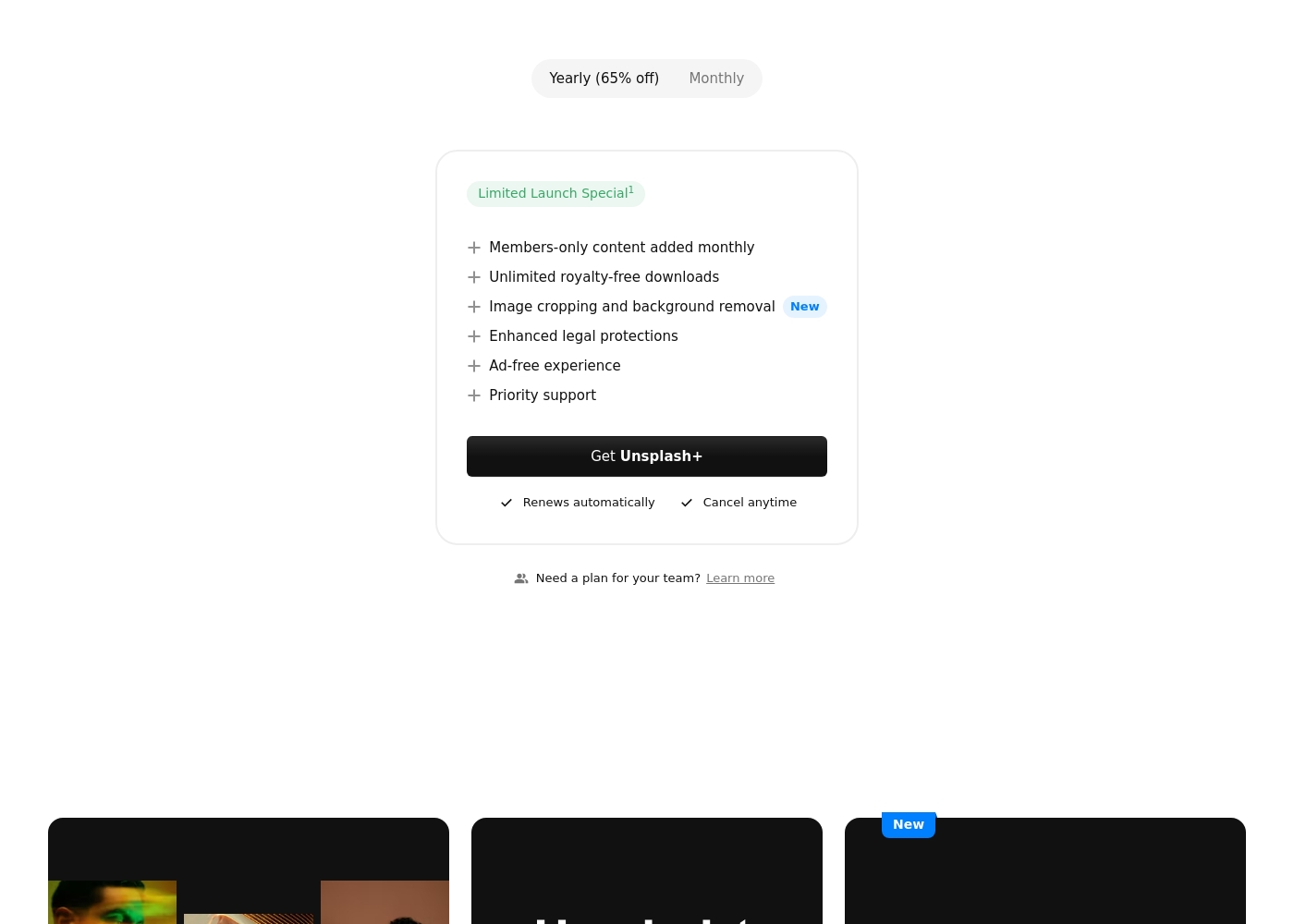
While the Unsplash platform maintains a massive free library, the paid subscription unlocks exclusive features and content. Let's explore what Unsplash+ includes for individual creators.
Unsplash+
Best For: Individual creators needing enhanced legal protection and exclusive, unlimited stock content. Other Features:
- Members-only content added monthly
- Unlimited royalty-free downloads
- Image cropping and background removal
- Enhanced legal protections
- Ad-free experience
- Priority support
This subscription is designed for single users who frequently download stock images and require specialized content. If you prioritize solid legal protection and want access to powerful new tools like image cropping, Unsplash+ is a superb choice. Remember, this is a single seat license, meaning it is not intended for broad organizational sharing.
- Members-only content added monthly
- Unlimited royalty-free downloads
- Image cropping and background removal
- Enhanced legal protections
- Ad-free experience
Pricing Notes
- Unsplash maintains a massive free tier, which is its primary offering for high-quality visuals for individuals.
- Depositphotos provides very clear, transparent pricing starting at $29/month with an annual commitment for licensed content.
- The price for Unsplash+'s paid subscription is not explicitly stated, making accurate budgeting difficult for new subscribers.
- Depositphotos offers a cheaper cost per image ($0.97) on its annual plan than its individual Packs ($9.99 per image).
- Unsplash+ offers unlimited downloads, making the cost per image technically zero once the single user fee is paid.
Pricing Head-to-Head
User Reviews
Depositphotos boasts a strong overall rating (4.4 stars from over 10,000 reviews), demonstrating high user satisfaction. Customers consistently praise the wide variety and high quality of media available, noting that pricing is reasonable and often provides great deals.
Service stands out significantly; reviewers frequently describe customer representatives as friendly, professional, and prompt, often resolving disputes or clarifying account details quickly (like managing auto-renewal preferences). User experience is generally positive, highlighting the user-friendly interface and sophisticated search filters that help speed up content discovery.
I had an unexpected issue arise with the auto-renewal feature. Their customer service was wonderful, resolving my dispute quickly and providing added benefits just to help me out. I really loved their friendly, professional handling of the situation.
Users praise Unsplash for its high-quality, professional images and amazing variety, confirming it is an easy-to-use, commercial-free source for content creators and artists. The satisfaction level decreases substantially among those who utilized the new paid subscription, Unsplash+.
Many long-time users feel that the platform broke its promise to remain entirely free, leading to a noticeable decline in the quality of the non-paid content. The most serious complaints target customer support and reliability: several users report being charged monthly for Unsplash+ despite having locked accounts or being unable to access downloads.
I’ve been using Unsplash for a while now, and it’s honestly my go-to for high-quality, free stock images. The variety is amazing, helping me find the perfect photo for blog posts or social media campaigns. Plus, the fact that it’s free makes it a total win.
Our Verdict
The core choice between Depositphotos and Unsplash is simple: licensed multimedia solutions versus free photography access. If you need robust content variety, Depositphotos is your clear winner. Unsplash remains the world’s unparalleled champion for accessing free, high-quality photos and visuals. Depositphotos’s superpower is its sheer scale and guaranteed legality for companies. It provides 321 million files including videos, music, photos, and vectors. Depositphotos is built for comprehensive commercial needs and offers reliable, professional customer support. Its pricing is transparent, starting at just $29/month. Unsplash’s core value is its massive free photo library, accessible to everyone without cost. The imagery is often more artistic and unique than traditional stock providers. Unsplash+ offers enhanced legal protection, ensuring commercial peace of mind for individual users. The deciding factor is your need for diverse media and team licensing. If you need video content, music, or scalable corporate plans, Depositphotos is essential. If your requirement is solely for high-quality, zero-cost photographs, Unsplash fits the bill perfectly. Choose Depositphotos if you run an agency needing guaranteed licensing and diverse media types. Opt for Unsplash if you are a frugal individual creator who relies heavily on beautiful free photography for personal or startup projects.
Frequently Asked Questions
Which is better for team use: Depositphotos or Unsplash?
Depositphotos is much better for teams and scalable businesses. Unsplash+ offers a strict single-user license which restricts broad sharing and DAM storage. Depositphotos clearly offers separate plans designed specifically for companies and agencies.
Does Unsplash offer video and music content like Depositphotos?
No, Unsplash focuses exclusively on photos and visual assets like 3D Renders. Depositphotos is a full media library, providing stock photos, vectors, videos, and music/audio files. You must use Depositphotos if you require integrated multimedia content.
Which platform has better customer support for paid subscribers?
Depositphotos is the clear winner for customer support reliability. Users widely praise Depositphotos's support for being fast, professional, and helpful. Unsplash+ subscribers often report significant issues and a notable lack of responsiveness.
Can I rollover unused downloads with Unsplash+?
Unsplash+ does not offer download rollovers because the paid plan provides unlimited downloads. Depositphotos offers rollover benefits on its Month-to-Month and Annual Monthly subscription plans. This prevents you from losing paid, unused credits.
Is Unsplash truly free for commercial use?
Yes, the core Unsplash photo library is widely available for free commercial use. However, the paid Unsplash+ tier is required for features like enhanced legal protection and specific members-only content.
Does Depositphotos include AI image generation tools?
Yes, Depositphotos includes unlimited access to its AI image generation tools standard with all consumption plans. Unsplash+ focuses on integrated editing tools like image cropping and background removal instead.
Ready to Choose?
Both tools have their strengths. Choose based on your specific needs.
