DemoCreator vs Komodo Decks
DemoCreator and Komodo Decks both leverage powerful AI, but they aim for completely different outcomes. DemoCreator is built for polished content creators needing advanced editing and visual effects. Komodo Decks focuses purely on automated, quick documentation and turning recorded videos into ready-to-share SOPs instantly.
Best for: Solo content creators and YouTubers needing comprehensive editing., Educators and trainers prioritizing professional delivery (teleprompter, avatars).
Best for: Teams focused on rapid internal documentation and SOP creation., Sales and support teams needing fast, branded video guides.
Affordable, AI-Powered Recording and Editing Mastery.
We found DemoCreator to be an incredibly comprehensive and accessible solution that effectively integrates high-quality screen recording and AI-driven editing tasks. It provides exceptional value, especially with its affordable perpetual plan and professional recording capabilities. Overall, this is one of the strongest all-in-one video creation tools available for educators and content creators today.
Pros
- Excellent value due to affordable pricing and a strong $79.99 one-time payment option.
- Combines recording, editing, and AI tools in an intuitive, beginner-friendly interface.
- Advanced features like text-based video editing and 4K/120 FPS recording are standard.
- Supports separate recording tracks for audio, video, and screen, simplifying post-production control.
Cons
- AI functionalities (like advanced speech-to-subtitle) are occasionally noted as quirky or unreliable for some users.
- The software sometimes requires significant computing resources during operation.
- The free version is heavily limited by watermarking and a short five-minute recording cap.
Pros
Cons
AboutDemoCreator
DemoCreator is an all-encompassing screen recorder and video editor, uniquely powered by next-generation AI. It simplifies your entire content creation process in one singular, intuitive package.
The software offers six different recording modes to perfectly optimize your content capture. These options include standard screen capture and dedicated modes for gameplay, virtual avatars, and video presentations. It records your screen, webcam, system audio, and microphone onto separate tracks for streamlined post-production. 💡
This robust solution adapts easily to many specialized requirements. It is the perfect choice for educators, corporate trainers, marketers, and emerging gaming content creators alike.
AboutKomodo Decks
Komodo Decks is an AI-powered screen recorder that works right in your browser. 💡 It's built for teams in sales, education, and customer success who need more than just a video file. The platform automatically transcribes recordings and can generate SOPs, summaries, and action items from your sessions.
Highlights
Feature Comparison
Features Overview
We highlight the main differences and pick a winner for each feature.
SOP & Documentation
Komodo Decks instantly creates structured SOPs; DemoCreator requires the user to manually edit and structure content.
DemoCreator relies on text-based editing to help finalize content after transcription. You still have to manually structure your guides and documentation. It focuses on delivering high-quality video content. Komodo Decks automatically tracks on-screen actions while you record your process. Its AI instantly slices steps and writes the instructional text for you. This outputs a professional, ready-to-share SOP guide immediately. Komodo Decks offers automation that DemoCreator simply doesn't have in this niche. Komodo Decks is a powerful workflow tool designed specifically for efficiency. DemoCreator is a robust creative video editor. This makes Komodo Decks essential for teams frequently documenting software workflows or complex procedures. It eliminates hours of manual transcription work.
AI Meeting Automation
Komodo Decks automates summaries and shares action items; DemoCreator focuses on visual polish.
DemoCreator does not include dedicated calendar synchronization or meeting recording features. Its AI focus is centered on video polish like the teleprompter and background removal. It’s designed for individual content presentation, not team meetings. Komodo Decks syncs with Google Calendar using the AI meeting recorder for automatic call capture. The powerful AI notetaker generates summaries, crucial action items, and weekly recaps. These notes can be shared immediately to Slack or Jira. Komodo Decks is perfectly geared for internal team communication efficiency and knowledge management. DemoCreator is better suited for YouTube or teaching content presentation. If your workflow involves numerous virtual meetings, Komodo Decks drastically cuts down on manual post-meeting transcription and note organization.
Pricing Flexibility
DemoCreator provides clear pricing with a one-time fee; Komodo Decks pricing structure is opaque.
DemoCreator is transparent with its pricing, offering an annual subscription at $59.99/year. It also features a $79.99 Perpetual Plan for lifetime access to the current major version. This one-time fee is attractive to creators seeking low long-term cost commitment. Komodo Decks offers a wildly generous Free tier with unlimited recording duration. Specific pricing for its Pro/Premium features like 4K exports is not numerically published. Paid users must contact their sales team. If you want certainty in your long-term cost, DemoCreator wins easily with its Perpetual Plan. Komodo Decks makes it difficult to budget for premium team features without contacting sales. Creators looking for continuous updates should choose the DemoCreator Yearly Plan, but the low cost of the Perpetual option is a huge advantage.
Creative Editing
DemoCreator offers a deep, creative editing suite; Komodo Decks uses a basic, functional editor.
DemoCreator provides an extensive editing toolkit with transitions, effects, and 50,000+ creative assets. It supports precise controls like text-based video editing and multi-track separation. Users can achieve extremely professional polish with these tools. Komodo Decks offers a fully browser-based quick editor mainly for trimming guides and version control. It lacks the deep creative features and robust asset library of DemoCreator. It is built for speed and updating guides. DemoCreator is clearly designed for complex creative projects requiring visual mastery and effects. Komodo Decks prioritizes speed and documentation functionality over cinematic output. If you are aiming for high-quality, polished YouTube or marketing videos, DemoCreator is the definitive tool here.
Recording Limits
Komodo Decks offers truly unlimited video length for free; DemoCreator's free plan is capped at five minutes.
The Free DemoCreator plan limits export length to five minutes and applies a required watermark. Paid plans support high-end recording up to 4K UHD and 120 FPS. This produces excellent results for visually demanding content. Komodo Decks guarantees truly unlimited free screen recording with no limit on video length. This applies even on the free tier, ideal for long tutorials or class lectures. Premium exports also support up to 4K resolution. For quick, polished clips or gameplay, DemoCreator paid is great. For long, high-volume, unedited recordings, Komodo Decks's free offering provides unbeatable flexibility. Users often prefer Komodo Decks for capturing lengthy training sessions because they never risk hitting a frustrating time limit.
Advanced Presentation
DemoCreator provides AI delivery tools; Komodo Decks offers options for professional branding.
DemoCreator includes an AI Teleprompter to scroll scripts for confident, smooth delivery. Users can also utilize 30 distinct Virtual Avatars to create content without appearing on camera. The AI Background Remover cleans up webcam visuals instantly. Komodo Decks’s tools focus on the professional viewing experience and institutional branding. Paid tiers offer Custom Branding Pro and custom landing pages. It lacks automated delivery aids like teleprompters or avatars. DemoCreator focuses on optimizing the presenter's performance and on-screen appearance. Komodo Decks focuses on the professional corporate packaging of the final guide or video. Educators or marketers requiring precise, scripted delivery should strongly prefer DemoCreator’s built-in AI supports.
Audio Refinement
DemoCreator offers deep AI audio tools; Komodo Decks focuses on basic system capture only.
DemoCreator includes powerful AI tools like AI Denoise to remove distracting background noise instantly. It also features an AI Voice Changer and AI Text-to-Speech generation. These tools are crucial for post-production polish. Komodo Decks supports standard system audio capture without needing extra drivers. The focus is on documentation speed, and it lacks the advanced audio cleaning or transformation features of DemoCreator. Audio editing is minimal. If audio quality is critical for your content, DemoCreator is the superior choice. Its AI features ensure your speech is crisp and clear every time. For creators making podcasts or tutorials where noise reduction is required, DemoCreator saves significant time without needing specialized software.
Intelligent Knowledge Library
Komodo Decks creates a searchable, centralized knowledge base; DemoCreator offers secure sharing links.
DemoCreator allows you to share via secure DemoAir links with password protection and expiration dates. Paid plans include 1 GB of cloud storage. It does not index content into a searchable knowledge assistant. Komodo Decks uses its centralized AI assistant to query the entire video library. It accurately extracts precise answers from guides and videos instantly. The AI always links back to the original source material. DemoCreator offers strong security for sharing files individually. Komodo Decks offers an organizational asset for scalable institutional knowledge retrieval. Teams with large volumes of instructional videos will find Komodo Decks's intelligent search feature invaluable for fast information retrieval.
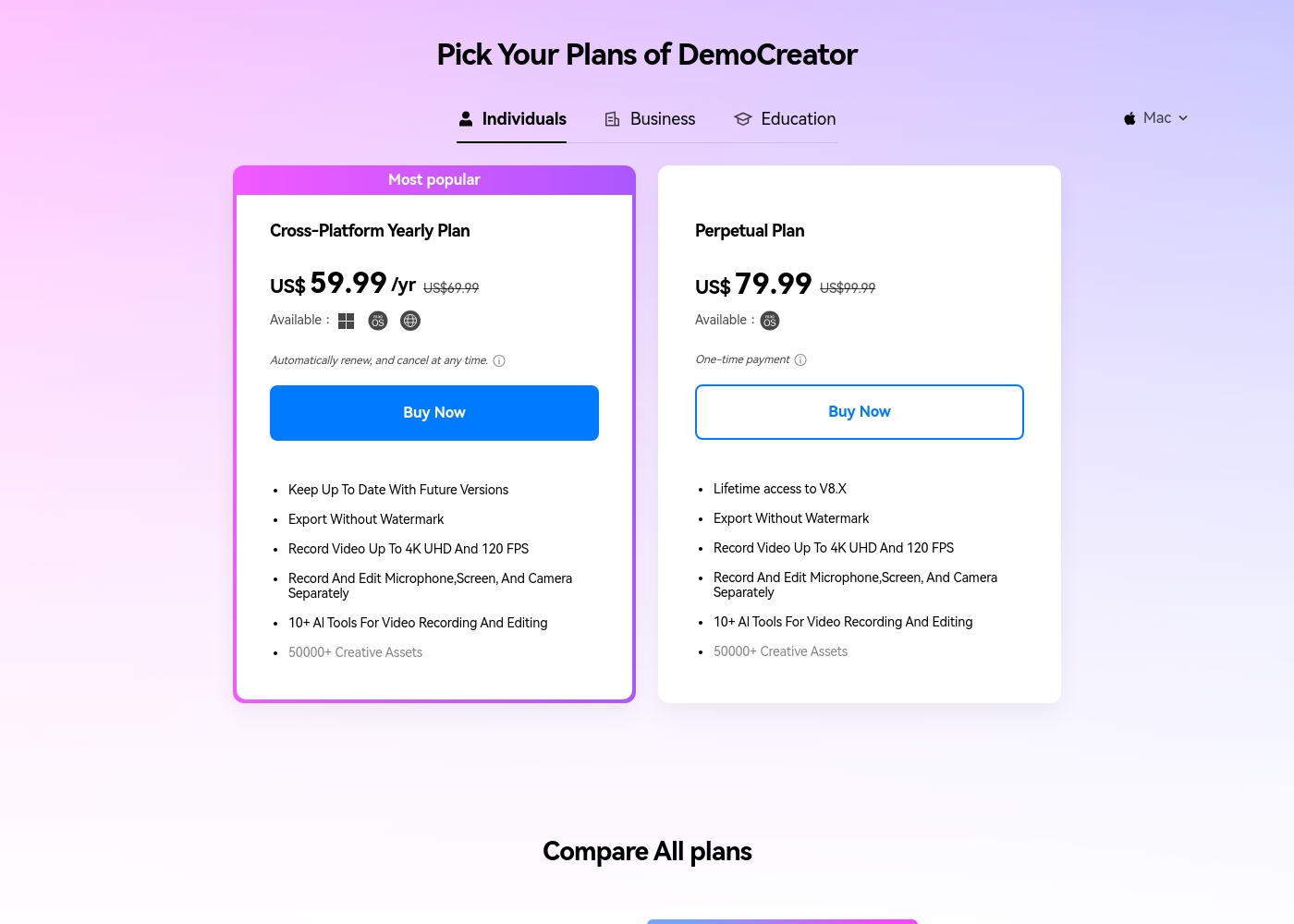
DemoCreator costs between $0 and $79.99 (One-time payment) covering three main options: a Free plan, the Cross-Platform Yearly Plan at $59.99 per year, and the Perpetual Plan at $79.99.
We offer a selection of flexible options so you can choose the right feature set for your video creation needs, whether you prefer a subscription or a one-time purchase.
Free Plan
Price: Free Best For: Trying the core screen recording and editing features. Refund Policy: Not applicable Other Features:
- 1080P export quality
- Basic video editing toolset
- 100 AI credits (one-time)
- 300+ templates and limited visual assets
- Remove Watermark: No
- Recording Export Quality: 1080P
- Frame Rate: 30FPS
- AI Credits: 100 credits
- Export Without Watermark
- Keep Up To Date With Future Versions
- Record Video Up To 4K UHD And 120 FPS
- 500 AI Credits/ Month
- 50,000+ Creative Assets
- Export Without Watermark
- Lifetime access to V8.X
- Record Video Up To 4K UHD And 120 FPS
- 2000 AI Credits (one-time)
- 50,000+ Creative Assets
Komodo Decks pricing: Komodo Decks offers a comprehensive free plan with no time limits or watermarks, making it easy to start recording immediately. Paid subscription options are available for users needing advanced AI features and team collaboration tools.
Solo tiers typically range from $7 to $12 per month, though specific price points may vary based on active promotions or specific seat requirements for teams. All plans are designed to help you document workflows without a credit card to start.
To get the most accurate and current pricing based on your team's size and needs, it's best to check their checkout page or billing dashboard after signing up for a free account. Some users may also find specific bundle options or enterprise quotes available through direct contact with their sales team.

Pricing Notes
- DemoCreator offers highly competitive pricing, including a popular $79.99 Perpetual Plan for long-term ownership.
- Komodo Decks utilizes an incredibly generous Free tier that provides truly unlimited recording length.
- DemoCreator's Free plan is heavily restricted by watermarks and a limiting five-minute export cap.
- Komodo Decks lacks transparent pricing details for its Pro/Premium tiers, unlike DemoCreator's posted rates.
- The Yearly Plan in DemoCreator includes ongoing updates, whereas the Perpetual Plan limits current major version access.
Pricing Head-to-Head
User Reviews
Users are overwhelmingly pleased with Wondershare DemoCreator, awarding it an excellent 4.7-star Trustpilot rating. Reviewers frequently highlight the software's intuitive user experience, calling it surprisingly easy for beginners to start recording and editing quickly.
The all-in-one nature—combining high-quality screen recording, live streaming, and robust editing—is a major time-saver for creators and educators. Specifically, users praise the product quality, noting the precise accuracy of the AI auto captioning and the useful text-based editing tools.
I’m not a professional editor, but DemoCreator made it surprisingly easy to record and cut my first tutorial. The interface is clean, and I figured out the basics within an hour. It’s perfect for someone new to editing.
Our Verdict
This comparison is a clear battle between high-quality creation polish and operational automation. You need to decide if you primarily film videos or document complex processes. For most solo creators and educators, DemoCreator provides the best, most comprehensive toolset. Komodo Decks, however, completely dominates the team documentation space. DemoCreator’s superpower is making advanced creation accessible and extremely affordable. It’s an all-in-one editor providing multi-track recording and 4K/120 FPS capture. Features like the AI Teleprompter and Virtual Avatars ensure your final product looks highly professional. The $79.99 Perpetual Plan means you own a powerful editor forever without recurring costs. DemoCreator stands out for its deep creative control and advanced audio fixes. Komodo Decks shines brightest for teams needing instant organizational efficiency. Its unique AI watches your screen recording and instantly generates detailed SOPs in under two minutes. Komodo Decks also excels with meeting management, automatically summarizing discussions and integrating action items into Slack or Jira. Plus, the Komodo Decks Free plan truly offers unlimited recording length, which is incredibly generous. The deciding factor is your primary workflow: editing rigor versus documentation speed. If you need 90+ language subtitles and advanced audio cleanup, pick DemoCreator. If you spend hours turning recordings into text guides for new employees, Komodo Decks will save you massive time. Don't overlook the clear pricing of DemoCreator either. Ultimately, internal teams needing documentation should choose Komodo Decks for automation. Content creators focused on visual results and high production value should choose DemoCreator. DemoCreator wins for individual polish and long-term affordability, while Komodo Decks is superior for streamlined enterprise and team knowledge sharing.
Frequently Asked Questions
Which tool provides the best creative control and video editing suite?
DemoCreator offers a comprehensive, multi-track editing suite with 50,000+ assets. It includes advanced AI tools like text-based editing and 90+ language subtitles. Komodo Decks provides a quick, browser-based editor primarily for trimming.
Is Komodo Decks or DemoCreator better for automatically creating Standard Operating Procedures?
Komodo Decks is explicitly designed for SOP creation. It watches your workflow and instantly generates a text guide and sliced steps. DemoCreator supports recording but requires you to structure and write the guide manually.
Does Komodo Decks offer a perpetual license like the one available with DemoCreator?
DemoCreator famously offers a Perpetual Plan for a single payment of $79.99. Komodo Decks uses a freemium model but does not disclose a one-time purchase option. Komodo Decks paid tiers seem to be subscription based.
Which software is better suited for corporate or online presentations?
DemoCreator offers dedicated presentation tools for confident delivery. This includes the AI Teleprompter and Virtual Avatars. Komodo Decks focuses on professional outward branding features like Custom Branding Pro.
How does the free plan of DemoCreator compare to the free plan of Komodo Decks?
Komodo Decks offers truly unlimited video length for free, which is very powerful. DemoCreator's Free plan is capped at five minutes and uses a heavy watermark on all exports. Komodo Decks is better for long, unedited content creation.
Can either DemoCreator or Komodo Decks automate meeting summaries?
Komodo Decks provides superior meeting automation features. It syncs with your calendar, records the call, and uses AI to generate summaries and action items. DemoCreator does not offer this specific integration or feature.
Ready to Choose?
Both tools have their strengths. Choose based on your specific needs.