Crossplag vs Sapling
People argue over free speed versus higher accuracy. Crossplag is fast and free; Sapling scores on accuracy and scale. Here’s a practical side-by-side to decide.
Best for: Solo writers on a strict budget needing quick, free AI checks, Educators validating student submissions without paying credits
Best for: Small teams needing long-form checks (up to 100k chars), Developers integrating AI-detection into apps via a Metered API
Accuracy concerns make it unreliable.
We find that while Crossplag offers a free and fast AI detection tool, the reported severe accuracy problems detailed by users cannot be ignored. Overall, we cannot recommend relying on this product until major improvements are made to its core detection algorithm, despite the attractive zero price point.
Pros
- Completely free to use with no hidden fees or subscriptions.
- Fast, almost instant, real-time text analysis.
- Simple interface; easy to use (paste text and check).
- User data is not stored, ensuring high privacy.
Cons
- Reliability is severely inconsistent according to user reports.
- Fails to accurately detect AI-generated text, defeating its purpose.
- Incorrectly flags human-written text as highly AI-generated.
- Character limit for checks is restricted to 3,000 characters.
Powerful Writing Assistant, Unreliable Detector.
We found Sapling offers powerful tools for improving grammar and making written text more concise, features that users often praise above competitors. Overall, the reported serious issues regarding the AI content detector's high false positive rate significantly undermine confidence in its primary specialized function.
Pros
- Offers significant savings with an annual discounted Pro plan ($12/month).
- Writing suggestions frequently cited as superior to Grammarly for corrections.
- High claimed detection accuracy (97%) for longer AI-generated texts.
- Identifies and highlights sentence segments indicative of simplistic phrasing.
Cons
- AI detector frequently reports significant false positives on human-written content.
- Citations of rigid or inconsistent detection results.
- Reports of high memory usage specifically for the browser extension.
- Interface described by some users as clunky.
AboutCrossplag
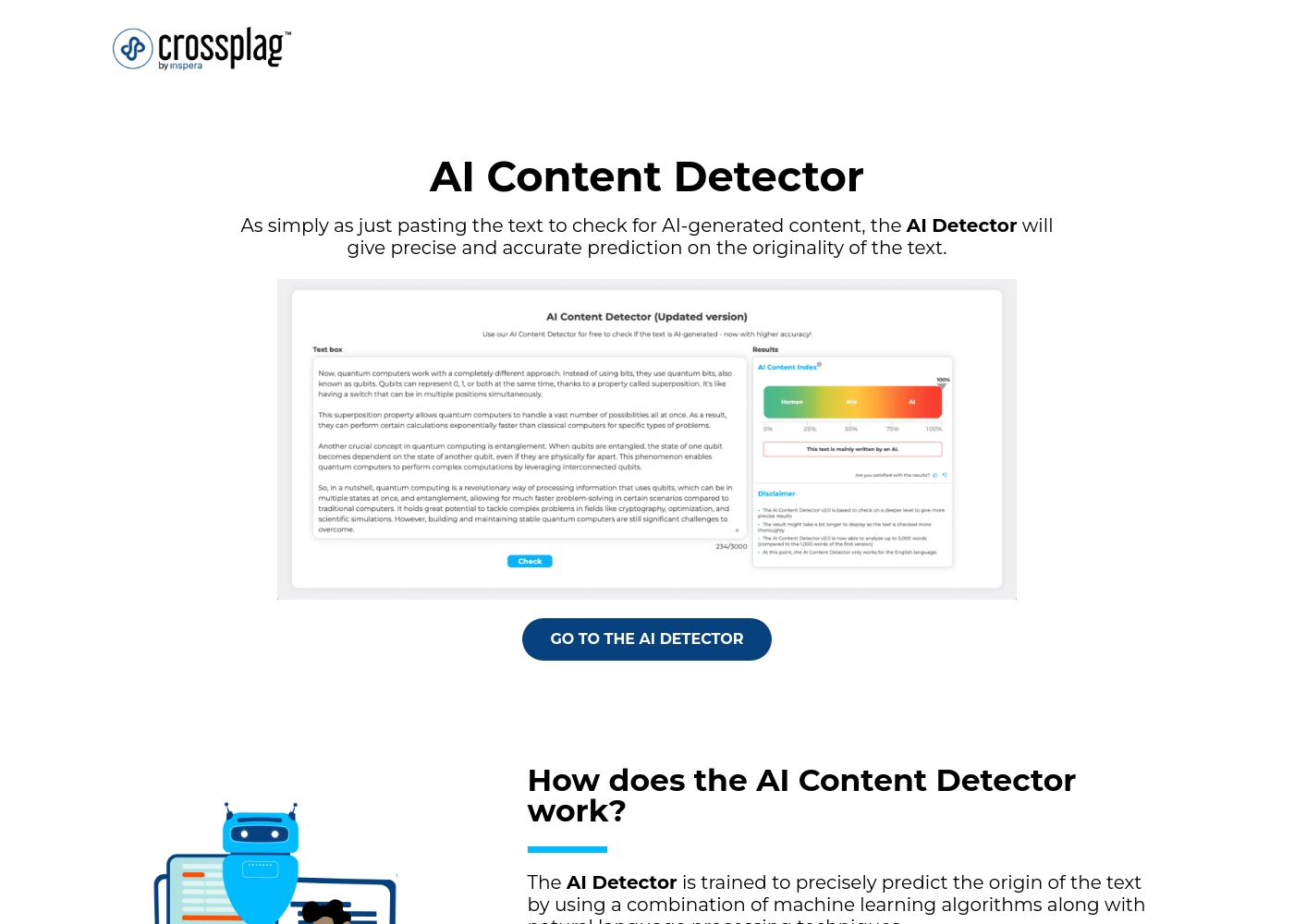
The Crossplag AI Content Detector is a tool designed to determine the origin of your text. It tells you whether content was genuinely human-written or created using an AI chatbot, like platforms generating emails, articles, or product descriptions. This detector uses a blend of sophisticated machine learning algorithms and natural language processing techniques 💡.
It analyzes text patterns based on training data that includes over 1.5 billion parameters for precise results. Since the model is trained with English language datasets, currently, that's the only language that is supported. However, they are planning on adding more languages as the detector develops further.
AboutSapling
The Sapling AI Content Detector is a powerful tool designed to check the probability that text was written by models such as ChatGPT or Gemini. It uses a specialized machine learning system—a Transformer—to analyze the input. This system specifically estimates the probability that each word or token is machine-generated. 💡
This utility is especially useful for educators concerned about learning integrity, or for practitioners reviewing large volumes of synthetic content. You're guided by visual results, seeing both the overall text score and highlighted portions. The detector also flags individual sentences with low perplexity, helping you catch simplistic or cliché phrasing.
Highlights
Feature Comparison
Features Overview
We highlight the main differences and pick a winner for each feature.
AI Detection Engine
Crossplag uses ML + NLP with a large model; Sapling uses Transformer-based detection.
Crossplag combines ML and NLP with a large training base to predict origin. Sapling relies on a Transformer to estimate machine-generated content. The trade-off is depth vs speed. In practice, Crossplag offers quick checks; Sapling aims for stronger accuracy over longer texts.
Results & Confidence
Instant results with a confidence percentage guide accuracy.
Crossplag provides real-time feedback with a confidence score. Sapling also shows a text score and per-sentence cues. The trade-off favors Sapling for longer texts where accuracy matters more. Real-world use shows confidence helps triage content quickly.
Workflow & Ease
Three-step check with quick paste-and-check flow.
Crossplag emphasizes a simple three-step workflow: paste, analyze, review. Sapling offers browser extensions and plugins, expanding where you check text. The core difference is workflow depth versus ubiquity. For fast checks, Crossplag is often simpler.
Data Privacy
Privacy is a spotlight for Crossplag; Sapling encrypts data in transit.
Crossplag claims submitted text isn’t stored, emphasizing privacy. Sapling uses AES-256 and TLS encryption for data in transit. The key trade-off is storage clarity vs encryption strength. In practice, Crossplag’s approach feels more private for short checks.
Language & Scope
Crossplag targets English-only detection; Sapling aims for broader confidence.
Crossplag supports English language checks only. Sapling’s detector targets English; other languages lack formal guarantees. The trade-off: Crossplag is precise for one language; Sapling offers broader applicability with caveats.
Length & Capacity
Longer text checks matter for large content teams.
Crossplag caps at 3,000 characters per check. Sapling enables up to 100,000 characters for paid users. The difference drives scalability for editors and researchers. Real-world impact: larger documents get evaluated faster with Sapling.
Platform & Access
Crossplag is web-focused; Sapling adds extensions and API.
Crossplag runs in a web interface with real-time results. Sapling offers a Chrome extension and a Metered API. The choice depends on workflow: in-browser vs integrated apps. If you need programmatic checks, Sapling wins.
Use-Case Breadth
Both target integrity and content quality, but focus differs.
Crossplag centers on authenticity checks for educators and publishers. Sapling focuses on writing quality, with detection plus editing help. The broader use-case is Sapling when you care about writing quality and large-scale checks.
Reliability Signals
External feedback paints a mixed picture for Crossplag and Sapling.
Crossplag faces notable reliability concerns from users. Sapling’s detector shows strong longer-text performance but mixed detector feedback. The real-world impact is risk assessment: expect variance with both.
Integration Readiness
API access and extensions enable workflow automation.
Sapling offers API access for developers. Crossplag provides basic web checks with no clear API path. For teams automating checks, Sapling is the better fit.
Privacy & Compliance
Different privacy assurances shape risk posture.
Crossplag emphasizes no storage of submitted text. Sapling relies on strong encryption for data in transit. Teams prioritizing strict privacy may lean Crossplag for short checks.
Crossplag's AI Content Detector is available for free with 1 plan: Free AI Content Detector at $0.00.
Here’s a breakdown of the single, accessible option for checking your content's originality.
Free AI Content Detector
Price: $0.00 Best For: Anyone needing fast, accurate verification of text authenticity (e.g., bloggers, educators, recruiters) Refund Policy: Not applicable (Free service) Other Features:
- Fast and almost instant verification
- Accurate prediction using machine learning
- Easy to use: paste text and click "Check"
- Supports the English language
- Submitted text is not stored by the detector
- Fast, almost instant authenticity verification
- Accurate prediction using machine learning
- Easy to use: paste text and click 'Check'
- Real-time analysis
- Submitted data is not stored
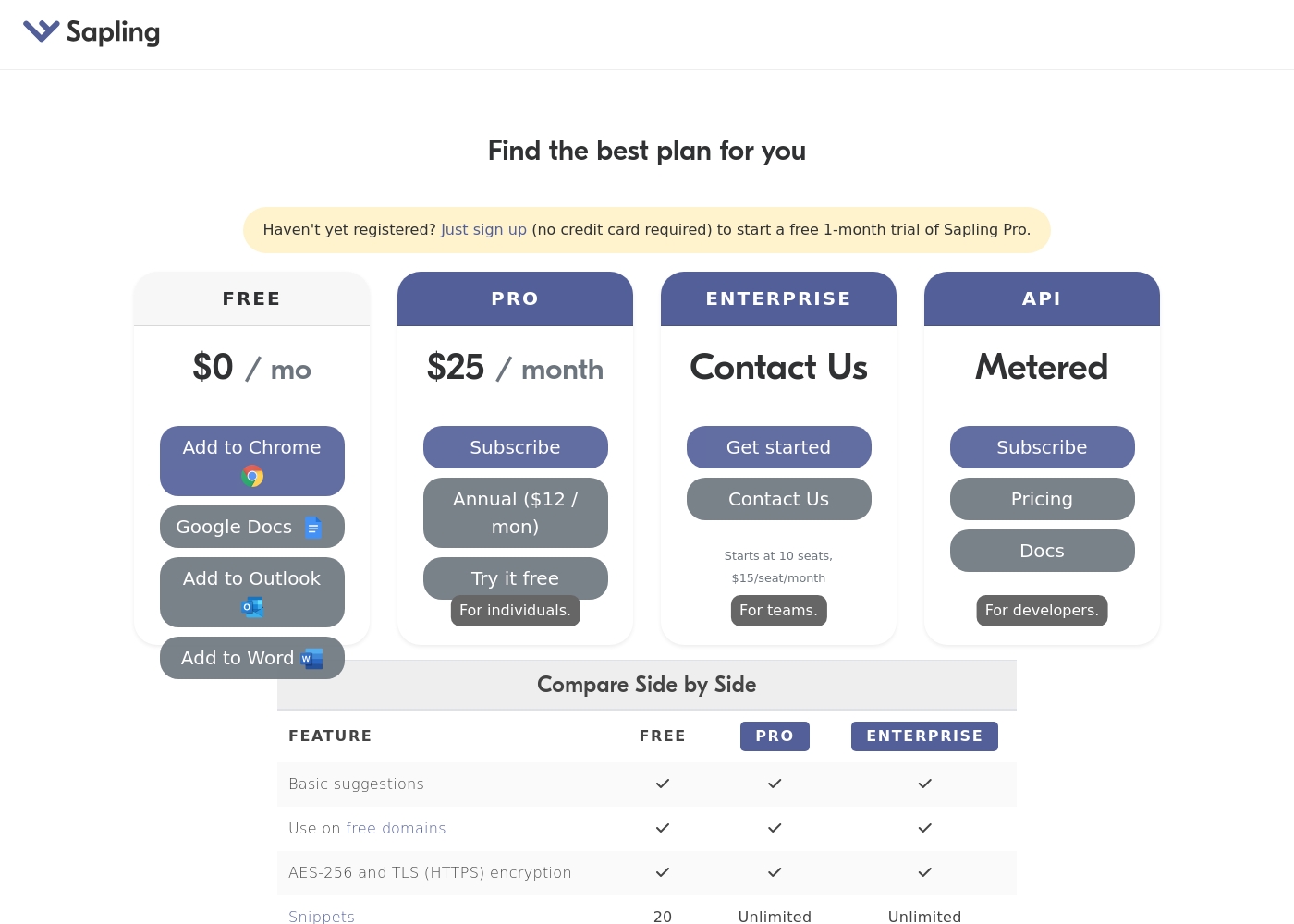
Sapling costs between $0 and $25 per month with four plans: Free at $0/month, Pro at $12/month (annual rate), Enterprise, and API.
You can compare the different options below to find the best fit for your precise writing needs.
Free
Price: $0 / month Best For: Basic individual use Other Features:
- Basic suggestions
- Use on free domains
- AES-256 and TLS (HTTPS) encryption
- 20 Snippets
- Basic suggestions
- Use on free domains
- AES-256 and TLS (HTTPS) encryption
- Basic suggestions
- Use on free domains
- AES-256 and TLS (HTTPS) encryption
- Unlimited Snippets
- Starts at 10 seats
- Priced at $15/seat/month
- Unlimited Snippets
- Basic suggestions and security features included
- Metered pricing structure
- For developers
- Access to full documentation
Pricing Notes
- Crossplag's AI Content Detector is completely free with a 3,000-character per check limit and no required credits.
- Sapling offers a Free plan plus Pro ($25/month), Enterprise (starts at 10 seats, $15/seat/month), and API; a 30-day free trial is available for Pro.
Pricing Head-to-Head
User Reviews
The external feedback for Crossplag is currently very limited and overwhelmingly negative. The most serious concern reported by early users relates to the severe lack of reliability and accuracy in the AI detection service.
While the tool is offered for free and promotes fast processing, user reports indicate fundamental flaws in its core function. Specifically, users report that content written entirely by a human was consistently and incorrectly flagged as 100% AI-generated.
This tool returned very poor results for me. I recently checked content written entirely without AI, and Crossplag flagged it as 100% AI-generated. If the results are not accurate and reliable, I simply cannot use it for professional work.
Sapling's AI Detector generates starkly contrasting feedback across external platforms, resulting in an overall poor rating on Trustpilot, largely due to major concerns regarding its accuracy. Several users report extreme false positives, where 100% human-written content was flagged as AI-generated 🤯.
This recurring reliability issue is a significant pain point for writers and editors. However, the reviews are not entirely negative.
I was a longtime Grammarly user but grew annoyed by missed basic corrections. I switched to Sapling and was pleasantly surprised by the improvement. It’s just much better at catching mistakes and suggesting concise edits that refine my messaging.
Our Verdict
For most users, Sapling takes the lead, especially when accuracy and scale matter. Crossplag shines as a free, fast option for quick checks with privacy defaults. If you need long-form checks, API access, or writing-accuracy features, Sapling is the safer bet. Still, if cost is the top constraint, start with Crossplag and pilot Sapling Pro later. In many teams, a hybrid approach works: quick screens with Crossplag, then deep-dive checks with Sapling on critical content.
Frequently Asked Questions
Which is better for small teams: Crossplag or Sapling?
If cost is king, Crossplag’s free AI detector helps. For reliability and longer checks, Sapling wins. Start free with Crossplag, then pilot Sapling Pro if needed.
Does Crossplag have an API like Sapling?
The Crossplag data here doesn’t mention an API. Sapling offers a Metered API for developers.
Is Sapling worth the extra cost over Crossplag?
Sapling delivers longer checks, higher accuracy, and extensions. If those matter, Sapling is worth it; otherwise, Crossplag’s free option suffices.
Can I migrate from Crossplag to Sapling easily?
Migration specifics aren’t stated. Both are standalone tools; expect manual content transfer when needed.
How do I sign up for the Crossplag AI detector?
You need to create a Crossplag account to use the AI Detector. Paste text and check instantly.
What languages do these detectors support?
Crossplag currently supports English-only input. Sapling’s language coverage isn’t guaranteed beyond English.
Ready to Choose?
Both tools have their strengths. Choose based on your specific needs.