CorelDRAW vs Stencil
This is a classic power versus speed comparison for graphic design tools. CorelDRAW is a deep, robust professional suite for vector experts and advanced layout work. Stencil is built specifically for rapid, high-volume visual content creation and pure simplicity. We break down which philosophy best suits your immediate content needs.
Best for: Design agencies needing professional vector illustration tools, Users requiring complex multi-page document layout capabilities
Best for: Bloggers and content creators needing daily social media visuals, Small businesses requiring quick, high-volume graphic output
Powerful design suite with unstable support.
We find CorelDRAW Graphics Suite offers a comprehensive, professional design experience coupled with a competitive annual price point equivalent to $22.42 per month. However, external feedback consistently highlights serious concerns about software stability and abysmal customer support responsiveness. Overall, the powerful feature set is hampered by reliability issues and questionable transparency in feature delivery.
Pros
- Complete suite for professional vector illustration, layout, and photo editing.
- Considered user-friendly and approachable for a powerful design tool.
- Highly flexible platform with customizable workspaces and toolbars.
- Competitive annual subscription cost for a complete software suite.
Cons
- Reports of extremely poor, non-existent customer support.
- Frequent software instability and crashing, especially with large files.
- Lack of backward compatibility and issues managing older licenses.
- Concerns regarding false advertising of included features (AI, cloud sharing) that require extra cost.
Fast, simple, powerful visual creation.
We found Stencil perfectly lives up to its promise of being the quickest way to create appealing visual content. It is exceptionally straightforward to master and offers a powerful suite of high-quality, royalty-free assets at a competitive price point. Overall, Stencil is an essential resource for authors, founders, and content publishers seeking reliable, high-volume graphic creation.
Pros
- Super simple and highly intuitive user experience.
- Recognized as the quickest way to create social media graphics swiftly.
- Access to huge libraries of assets (5M+ photos, 3M+ icons).
- Exceptional pricing model provides great value for resources.
Cons
- A dedicated mobile application is not yet available.
- Templates and photo organization could be clearer for some users.
- Paid plans are targeted and designed primarily for single users.
AboutCorelDRAW
CorelDRAW Graphics Suite is a professional resource designed to push the boundaries of visual communication. It serves as your comprehensive go-to toolbox for creative projects involving graphics. The suite provides specialized capabilities covering professional vector illustration and effective page layout. Users also gain powerful tools for typography, font management, and advanced photo editing. 💡 Plus, subscribers now get exclusive access to CorelDRAW Web Online graphic design features.
AboutStencil
Stencil is an acclaimed tool dedicated to rapid visual content creation. Users consistently describe it as a "super simple tool" that significantly reduces workload complexities. The platform is designed for professionals like strategic speakers, authors, and founders who need to produce high-quality images consistently. For many active users, it functions truly as an incredibly powerful business tool. 💡
Highlights
Feature Comparison
Features Overview
We highlight the main differences and pick a winner for each feature.
Scope & Depth
CorelDRAW is a deep professional suite; Stencil is optimized for graphical velocity.
CorelDRAW is a complete professional suite for graphic design tasks. It includes vector illustration, page layout, and advanced photo editing features. CorelDRAW is highly flexible for demanding and diverse creative needs. Stencil is laser-focused on rapid visual content creation. It is a "super simple tool" for quickly producing attractive images. Stencil excels specifically at high-volume social media visuals. The key trade-off is technical depth versus output speed. Only CorelDRAW offers the technical controls needed for print design. Stencil offers unparalleled creation velocity for content marketing and blogging. CorelDRAW is for artists designing complex vectors or technical illustrations. Stencil is for marketers who need effective, attractive visuals fast.
Asset Library Access
Stencil includes millions of assets; CorelDRAW expects you to import your own.
CorelDRAW relies on the user providing specific design assets. Its focus is on the tools needed to manipulate complex objects and layouts. CorelDRAW does not advertise a massive, included stock library size. Stencil boasts a massive asset library included free with paid plans. You get over 5 million photos and 3.1 million icons right inside the editor. This dramatically speeds up the overall design workflow. Stencil’s asset access eliminates external sourcing delays completely. You never need to leave the platform to find high-quality images. The richness of Stencil's library is a huge time-saver. CorelDRAW provides powerful tools for using your imported assets. Stencil provides the assets and tools for rapid creation simultaneously.
Ease of Use
Stencil is quick and simple for non-designers; CorelDRAW requires design expertise.
CorelDRAW is described as user-friendly only for a powerful professional tool. Mastering full vector illustration and layout skills takes significant time. The learning curve is steep because of the professional scope. Stencil is consistently praised by users as a “super simple tool.” Its design is optimized for quick, reliable image creation by non-designers. The application reduces complex operational steps significantly. Stencil allows staff without advanced graphic skills to quickly whip up customized images. CorelDRAW requires dedicated, extensive time invested in mastering the complete suite. A founder creating a polished social graphic will favor Stencil's simplicity. A dedicated graphic designer performs better and deeper work in CorelDRAW.
Pricing & Value
Stencil is affordable freemium; CorelDRAW requires a high annual professional investment.
CorelDRAW is a high-cost annual commitment totaling $269.00 per year. It operates on a single-tier professional subscription model. CorelDRAW provides only a short 15-day trial, not a permanent free use option. Stencil operates on a freemium model, offering a Free plan permanently available. Paid tiers are highly affordable, with the Pro plan starting at $9 per month annually. The top tier is only $12 per month. CorelDRAW represents a substantial business investment for the full suite access. Stencil is a low-cost, high-value utility tool for content marketers. Stencil offers up to 40% savings on annual billing. For individuals and small operations, Stencil offers far superior value for money. CorelDRAW's price point demands professional-level use to justify the expense.
Support & Stability
Stencil's support is excellent; CorelDRAW users report abysmal support and crashing issues.
CorelDRAW is unfortunately plagued by reports of “extremely poor, non-existent customer support.” Users also frequently report software instability and crashing, especially with large files. This lack of reliability hinders professional work. Stencil's customer support is consistently reported as “excellent and highly responsive.” One user received a refund resolution within 15 minutes. Stencil itself is reported to run smoothly and reliably. Reliability and responsive support are crucial for production environments. CorelDRAW scores very poorly in user feedback critical metrics. Stencil sets a benchmark for rapid customer satisfaction. You can rely on getting quick help if you encounter issues with Stencil. CorelDRAW users report prolonged frustration when seeking technical assistance.
Vector Capabilities
CorelDRAW is a true vector editor; Stencil is raster-focused simple graphics software.
CorelDRAW is purpose-built for vector illustration and design professionals. It includes advanced tools like object symmetry capabilities built into the workflow. Vector output ensures perfect scalability for any size. Stencil is optimized for quick, web-ready graphic output, primarily in raster formats. It focuses on integrating photos and text into branded visuals. Stencil contains no specific professional vector editing features. If your final output requires intricate, scalable vectors for logos or signage, CorelDRAW is non-negotiable. Stencil simply cannot perform this specialized technical work effectively. Stencil is the wrong tool for designing scalable brand elements. CorelDRAW manages all aspects of vector design and manipulation in one suite.
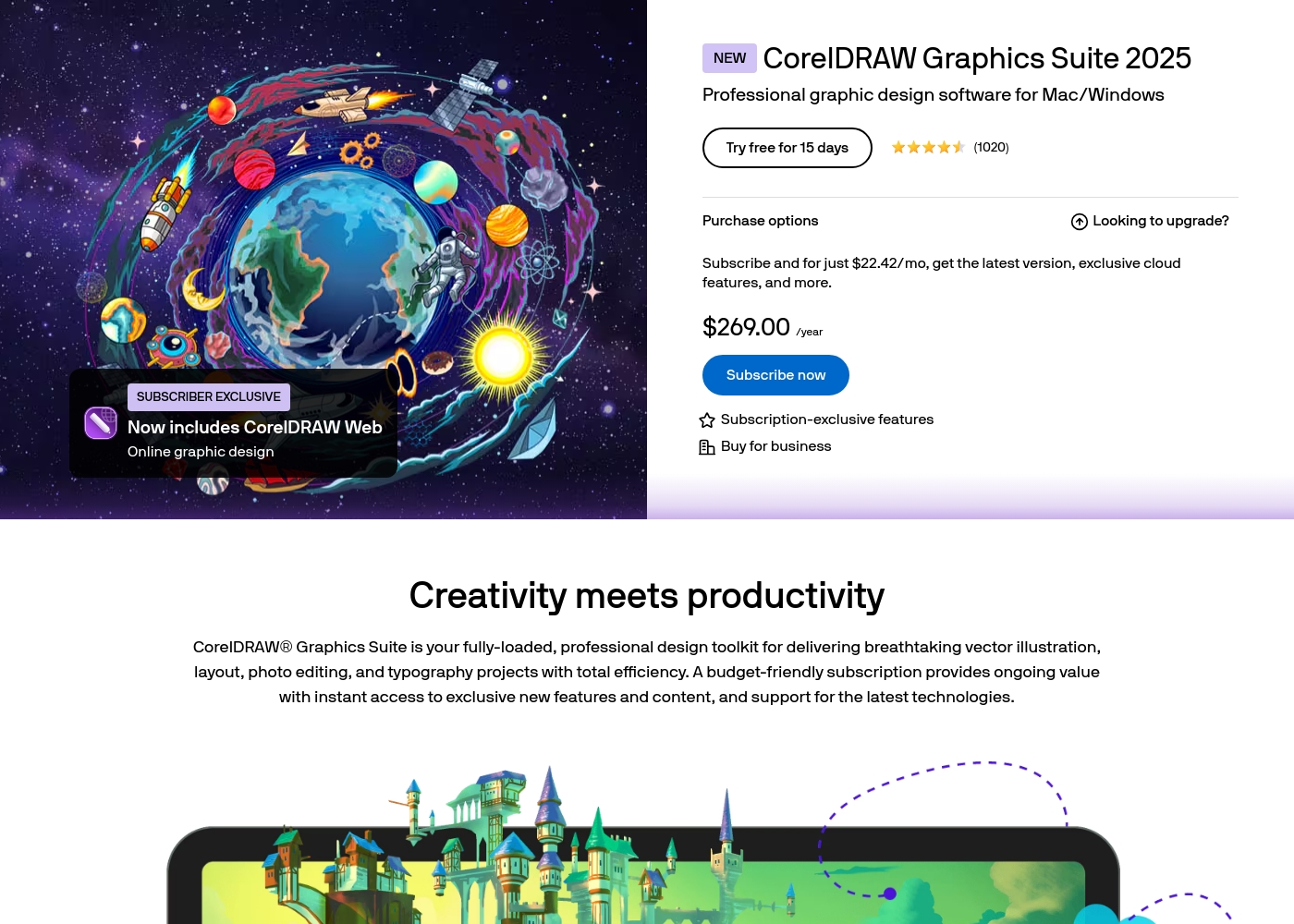
CorelDRAW costs $269.00 per year with 1 advertised plan: CorelDRAW Graphics Suite 2025 Subscription at $269.00 annually (or $22.42 per month equivalent).
Let's look closer at the subscription options available for this professional graphics suite, which is designed for Mac and Windows.
CorelDRAW Graphics Suite 2025 Subscription
Price: $269.00 annually ($22.42/mo equivalent) Best For: Professional graphic design software for Mac/Windows Other Features:
- Latest software version
- Exclusive cloud features
- Includes CorelDRAW Web (Online graphic design)
- Subscription-exclusive features
- Latest version of CorelDRAW Graphics Suite
- Exclusive cloud features
- Includes CorelDRAW Web (Online graphic design)
- Subscription-exclusive features
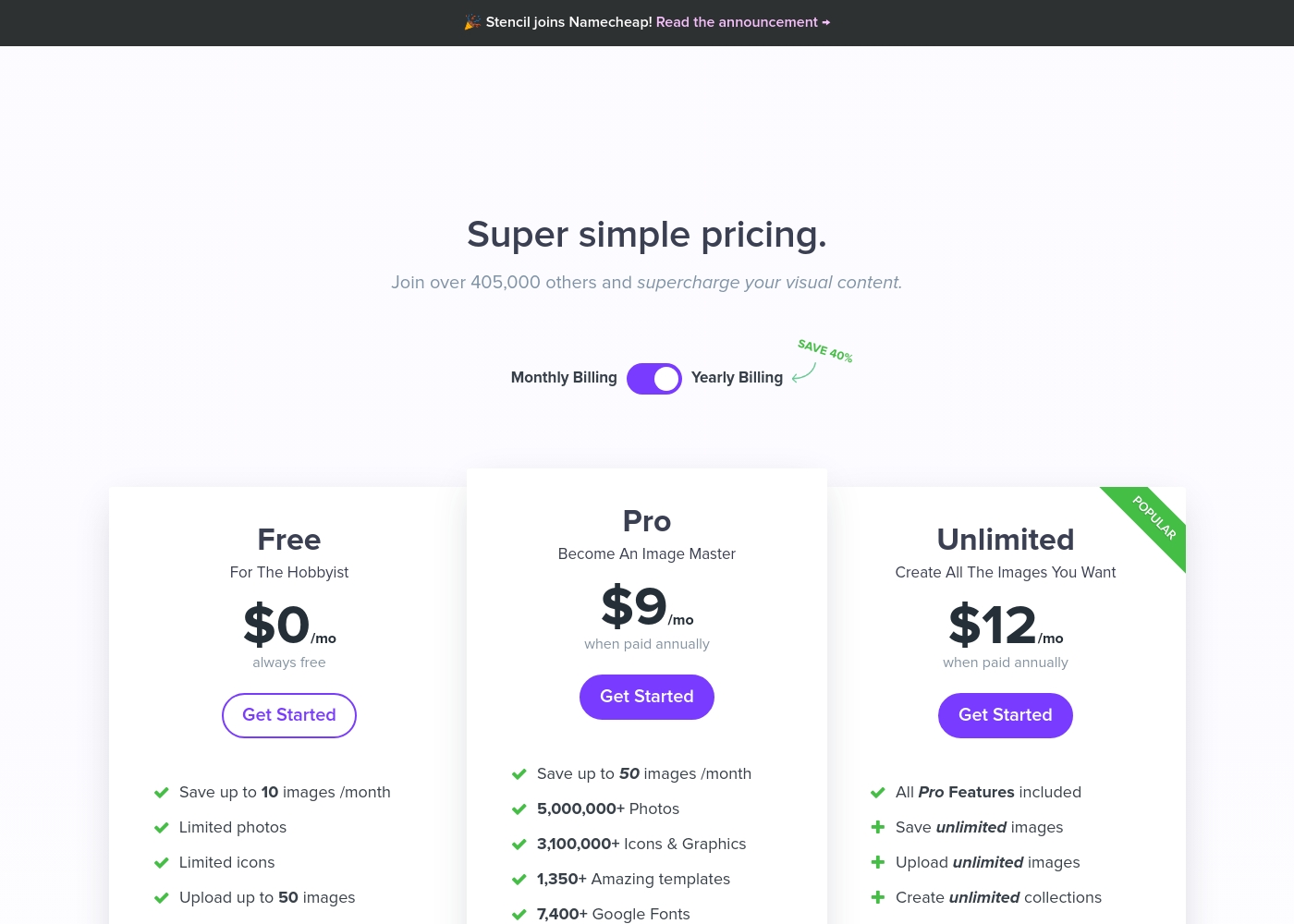
Stencil costs between $0 and $12 per month (billed annually) with three plans: Free at $0/month, Pro at $9/month, and Unlimited at $12/month.
Let's break down exactly what you get with each tier.
Free
Price: $0/month (always free) Best For: The Hobbyist Refund Policy: Not applicable Other Features:
- Save up to 10 images/month
- Limited access to photos and icons
- Upload maximum 50 images
- Save up to 10 images /month
- Limited photos
- Limited icons
- Upload up to 50 images
- Save up to 50 images /month
- 5,000,000+ Photos
- 3,100,000+ Icons & Graphics
- 1,350+ Amazing templates
- 7,400+ Google Fonts
- All Pro Features included
- Save unlimited images
- Upload unlimited images
- Create unlimited collections
Pricing Notes
- Stencil offers a permanent Free plan for hobbyists and testers, unlike CorelDRAW’s limited 15-day trial.
- CorelDRAW requires a high annual investment ($269.00) for its complete professional suite.
- Stencil’s top-tier Unlimited plan is only $12/month when billed annually, offering immense asset value.
- Stencil provides a 7-day money-back guarantee on annual plans; CorelDRAW's refund policy details are not explicitly stated.
Pricing Head-to-Head
User Reviews
The combined sentiment from Trustpilot (2.5/5) and Capterra reviews presents a stark dichotomy. On one hand, loyal, long-time users praise CorelDRAW’s powerful functionality, stating it performs exactly what they need for professional vector work.
This high praise confirms the software's core feature accuracy and utility. However, the overwhelmingly negative majority sentiment focuses on three critical areas: customer service, reliability, and pricing transparency.
I just love CorelDRAW. I’ve been working happily with it for over 10 years, and I truly don’t want to switch to any of the newer tools. It still does exactly what I need on a daily basis, and I really like it.
Users across Trustpilot universally praise Stencil for its simplicity and efficiency, frequently calling it the “best app” in their marketing arsenal. The dominant theme is ease of use; Stencil enables users without advanced graphic skills to "whip out a customised image" in minutes, saving significant time and money.
Customers are highly satisfied with the massive library of assets, including over 5 million photos and 3.1 million icons, noting the quality is better than higher-priced alternatives. Value is strong, especially as premium subscriptions cover all assets.
I use Stencil every single day. The selection and quality of stock photos are much better than expensive alternatives. Organizing images into my own collections is my favorite feature. It's an indispensable tool.
Our Verdict
This comparison boils down to professional depth versus market speed. CorelDRAW and Stencil are excellent tools, but they cater to completely different users. For most content creators and small businesses, Stencil offers far better value and reliability. CorelDRAW's superpower is its complete, professional-grade desktop suite. It provides advanced vector illustration, integrated photo editing, and extensive page layout tools. If your project involves complex technical drawings or high-fidelity print, CorelDRAW delivers the required power. However, CorelDRAW suffers from reports of poor stability and non-existent customer support. Stencil's superpower is its speed, simplicity, and affordable access to assets. It allows users to consistently whip up appealing visuals quickly using its massive 5M+ asset library. Stencil is affordable, includes a Free plan, and its customer support team is highly responsive and praised. The deciding factor is your required file output. If you deal solely with complex vectors or sophisticated printing, you must choose CorelDRAW. If you need 50 social media posts quickly and reliably every month, Stencil is the clear and superior choice. Choose Stencil for content marketing, rapid blogging, and volume-based graphic creation, starting as low as $9/month. We recommend CorelDRAW only for committed design professionals who require its deep vector toolset and accept the reported limitations.
Frequently Asked Questions
Which tool is better for creating high volumes of social media posts quickly?
Stencil is explicitly built for high-volume, rapid visual output. Stencil is nicknamed the “super simple tool” and provides 1,350+ templates. CorelDRAW is focused on detailed, professional work, making it slower for simple social graphics.
Is Stencil powerful enough to replace CorelDRAW for professional designers?
No, Stencil cannot replace CorelDRAW for professional vector work. CorelDRAW offers advanced vector illustration, page layout, and specialized typography features. Stencil is primarily a raster graphic tool optimized for speed.
Does CorelDRAW offer a free version like Stencil does?
Stencil offers a permanent Free plan with limited features for hobbyists. CorelDRAW does not offer a free version. Instead, CorelDRAW provides a 15-day free trial of its complete, professional suite.
How do the asset libraries compare between CorelDRAW and Stencil?
Stencil includes a massive library of 5 million photos and 3.1 million icons with paid plans. CorelDRAW is a tool suite; users must source and import their own design assets.
Which software has the better reputation for customer support?
Stencil has an excellent reputation for highly responsive customer support according to user reviews. CorelDRAW has a poor reputation, with users reporting support is frequently non-existent or unhelpful.
Is CorelDRAW or Stencil better primarily for vector graphics?
CorelDRAW is specifically designed as a professional vector graphics editor. Stencil’s capabilities are centered on making attractive, quick-turnaround raster images. Choose CorelDRAW for any vector needs.
Ready to Choose?
Both tools have their strengths. Choose based on your specific needs.