Canopy vs iKeyMonitor
Canopy and iKeyMonitor both aim for digital safety, but their monitoring philosophies diverge greatly. Canopy excels at aggressive, AI-powered visual filtering and anti-tampering measures. iKeyMonitor focuses on deep surveillance visibility like keylogging and remote ambient capture features. You must decide whether you prioritize blocking explicit content or recording every digital interaction.
Best for: Families primarily concerned with blocking pornography and sexting activity in real time., Mixed-OS homes needing coverage for iOS, Android, Windows, and Chromebooks.
Best for: Parents requiring maximum surveillance using universal keylogging and ambient audio capture., Users who want a permanent Free plan for ongoing, basic GPS and call tracking.
Potent Protection, Crippling Performance Issues
We recognize Canopy's sophisticated AI engine provides industry-leading filtration for explicit material across various devices, making it a powerful tool by design. Overall, while the core technology is advanced, significant user reports of unresponsive support, device lockouts, and severe performance degradation necessitate a low cautionary rating.
Pros
- Highly effective at blocking explicit and pornographic content using AI/machine learning.
- Comprehensive coverage across major operating systems (IOS, Android, Windows, Mac, Chromebooks).
- Includes aggressive anti-tampering/removal prevention features.
- Offers a risk-free 7-day trial and a 30-day money-back guarantee.
Cons
- Dramatically decreases internet speed and overall device performance for many users.
- Customer support is widely cited as unresponsive, unreliable, or non-existent.
- Difficulty removing the application once its protection is fully enabled.
- Inconsistent content blocking, sometimes failing to filter suggestive images or social media.
Robust monitoring with variable reliability.
We find iKeyMonitor offers extensive monitoring tools, including unique features like remote camera activation and surrounding audio capture. The user experience is generally smooth, thanks to the very intuitive cloud dashboard. Overall, while the feature list is impressive, we note recurring user complaints regarding inconsistent log updates and occasional app detection, suggesting reliability can be inconsistent compared to the premium pricing.
Pros
- Extensive monitoring features, including specific keylogging across all apps.
- Intuitive and user-friendly eCloud control panel for easy navigation.
- Offers a permanently Free plan for basic tracking functions.
- Supports remote features like capturing photos and listening to surroundings.
Cons
- Potential for high cost given reported inconsistencies in log delivery.
- Key features like audio recording and GPS tracking can occasionally be unreliable.
- The application sometimes becomes detectable, alerting the target user.
- Customer support response times are reportedly long for complex issues.
AboutCanopy
Canopy is a powerful digital parenting app built to keep children safer across their devices. It uses advanced computing technology, including artificial intelligence and machine learning. This technology instantly recognizes and filters out sensitive or pornographic content, even on your child’s smartphone camera. Setting up Canopy is simple: you download the Canopy App to manage settings and install the Shield App on each device you want to protect. ✅
AboutiKeyMonitor
iKeyMonitor is known as the best parental control app available for Android, iPhone, and iPad devices. It offers an all-in-one solution for keeping your children safe online. This powerful app helps you monitor phone activities to fully understand what your child is doing. ✅ Over 400,000 parents in 100 countries rely on iKeyMonitor to discover the truth and protect their kids from potential online threats.
Highlights
Feature Comparison
Features Overview
We highlight the main differences and pick a winner for each feature.
Core Monitoring Approach
Canopy prevents explicit content visibility; iKeyMonitor logs keystrokes for forensic level data.
Canopy uses AI/ML for real-time blocking of pornography on every single website. It aims to filter visual and sensitive content before it is even seen. iKeyMonitor focuses on logging everything the child types in virtually any app on the device. This comprehensive keylogger provides maximal visibility into communication context. The trade-off is focused prevention (Canopy) versus deep surveillance logging (iKeyMonitor). iKeyMonitor captures what Canopy tries to shield completely.
Content Filtering & Blocking
Canopy’s AI filter is specialized and aggressive; iKeyMonitor uses standard limits and logging.
Canopy boasts unmatched blocking capabilities, targeting suggestive content like certain images. This instant, visual filtration works across all device types seamlessly. iKeyMonitor offers standard features like blocking inappropriate apps and scheduling device limits. It does not advertise aggressive real-time visual content filtering like Canopy does. Canopy is the superior choice if strong, specialized content blocking is your primary concern. This feature is Canopy's major differentiator in the market.
Remote Surveillance
iKeyMonitor offers powerful features like ambient audio capture, where Canopy only tracks location.
iKeyMonitor allows parents to remotely capture live screenshots of the device screen or take live photos. You can also record and listen to the ambient audio surrounding the monitored phone in real-time. Canopy focuses entirely on content filtering, location tracking, and setting device limits. It completely lacks any features allowing remote or ambient audio/visual capture. iKeyMonitor provides a much higher level of real-time remote surveillance capability. Its range of capture tools gives parents total situational awareness.
Real-Time Alerts
Canopy provides unique instant sexting alerts; iKeyMonitor relies on keylogging and keyword triggers.
Canopy is uniquely engineered to send immediate alerts upon detecting risky photo sharing or sexting activity. This alert capability even protects against images taken with the device camera. iKeyMonitor alerts you instantly via email, but only if custom trigger keywords are used in conversation. Both tools offer dependable location alerts when a child enters or leaves a set area. Canopy’s very specific focus on sexting and timely photo detection makes its alerts uniquely valuable. iKeyMonitor alerts are broader, based on text inputs.
Performance Impact
Canopy severely slows devices; iKeyMonitor is criticized for inconsistent log delivery.
User reports consistently warn that Canopy dramatically decreases internet speed and overall device performance. Many users cite major application malfunctions or slow internet speeds after installing Canopy. iKeyMonitor users report issues with inconsistent log delivery and features like surroundings recording being unreliable. iKeyMonitor's performance issues are feature failures; Canopy's impact the device usability entirely. We find iKeyMonitor less disruptive to crucial device function.
Anti-Tampering Features
Both prevent removal, but Canopy's aggressive security has led to more reports of user lockouts.
Canopy uses aggressive Removal Prevention technology to ensure the Shield App cannot be disabled by the child. Unfortunately, this feature often causes serious issues, including locking parents out of work devices completely. iKeyMonitor secures its app with a password/custom code and can be set as an Android system app to resist deletion attempts. Both applications are designed to be extremely difficult to remove once they are fully activated. Choose iKeyMonitor for slightly less problematic removal protection.
Pricing Model & Access
iKeyMonitor has a permanent Free plan; Canopy only offers a limited-time 7-day trial.
iKeyMonitor offers a Cloud Free Basic plan permanently, which includes simple tracking and location monitoring. Canopy provides a full-feature 7-day trial but requires a paid subscription afterward. The full-feature Cloud plan access for iKeyMonitor starts at $16.66 per month. Canopy’s highest monthly tier is slightly lower at $15.99 for 10 devices. iKeyMonitor offers far lower cost risk with its perpetual free option.
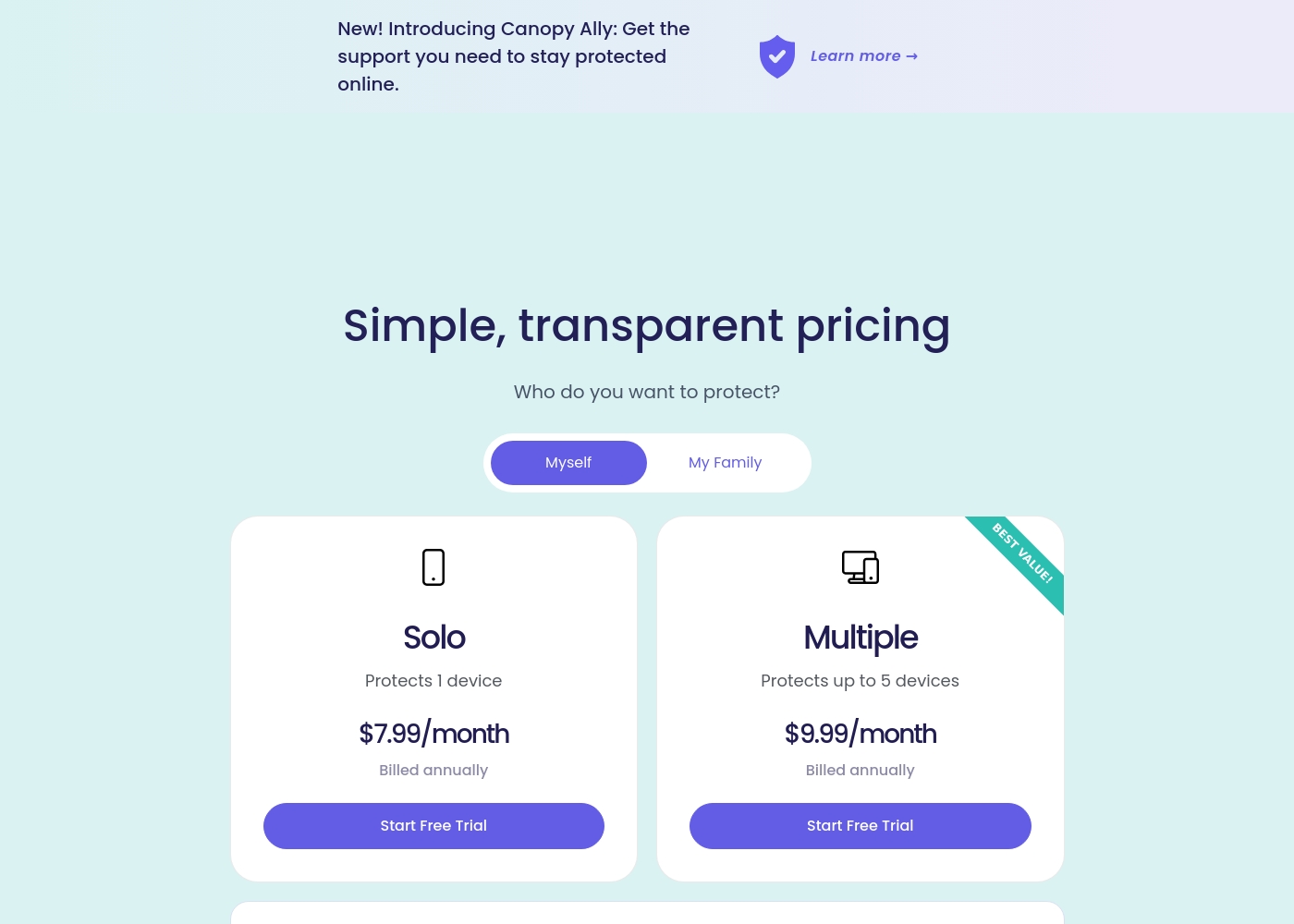
Canopy costs between $9.99 and $15.99 per month with three main monthly device plans: Up to 3 devices at $9.99/month, Up to 5 devices at $11.99/month, and Up to 10 devices at $15.99/month.
Canopy offers clear, device-based pricing designed to fit your family's needs. You can easily select the minimum number of devices required for full protection.
Up to 3 Devices
Price: $9.99 per month Best For: Small families or protecting a few critical devices Refund Policy: 30-day money-back guarantee Other Features:
- Access to all great features
- Email & phone support included
- Instant safety peace of mind
- Protects 1 device
- Access to all features
- Email & phone support
- Protects up to 5 devices
- Access to all features
- Email & phone support
- Access to all features
- Email & phone support
- Access to all features
- Email & phone support
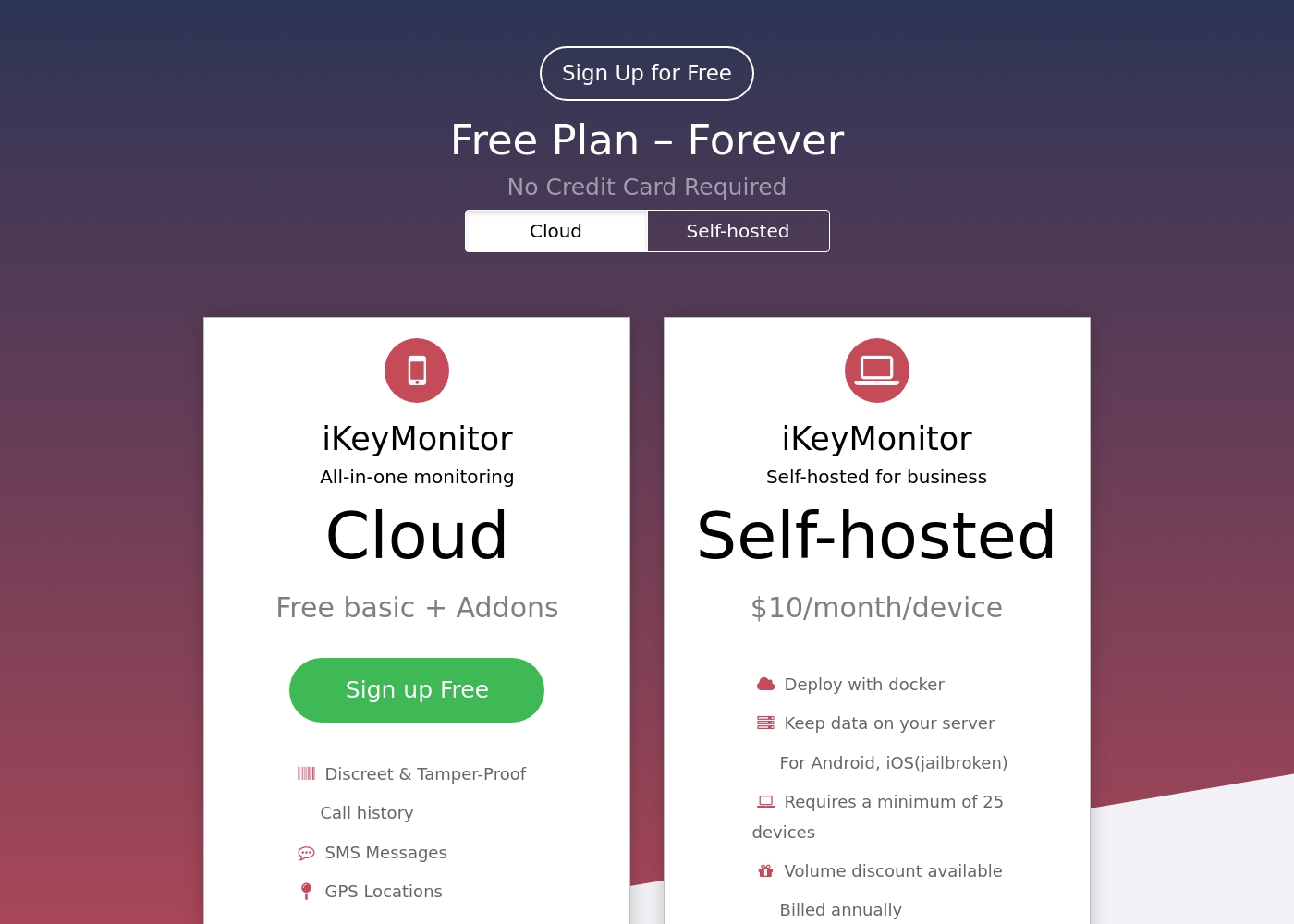
iKeyMonitor offers personalized monitoring solutions ranging from Free to around $16.66 per month for individual use, alongside a specialized Self-hosted Business Plan.
You have three ways to use the service, depending on your needs for features and data control. Review the options below to find the best fit for you.
Cloud Free Basic
Price: Free, Forever Best For: Basic family monitoring and testing the service Refund Policy: Not applicable (Free) Other Features:
- Discreet & Tamper-Proof protection
- Tracks Call history and SMS Messages
- Monitors GPS Locations and Geo-fencing
- Includes Contacts, Calendars, Notes, Reminders, and Voice Memos
- Call history
- SMS Messages
- GPS Locations
- Geo-fencing
- Contacts
- Input Logger
- Capture Screenshots
- SMS Messages
- Websites visited
- Social media monitoring (WhatsApp, Facebook, Skype, etc.)
- Deploy with docker
- Keep data on your server
- For Android, iOS(jailbroken)
Pricing Notes
- Canopy offers device-based pricing, supporting up to 10 devices for $15.99 monthly.
- iKeyMonitor provides a perpetual Free Basic plan, though logs are strictly limited to 20 items.
- iKeyMonitor’s full Cloud plan starts at $16.66/month, slightly higher than Canopy's max monthly plan.
- iKeyMonitor is the only one offering a Self-hosted Business plan requiring a 25-device minimum commitment.
- Canopy offers a 7-day full-feature trial; iKeyMonitor charges $9.99 for a 3-day full-feature trial.
Pricing Head-to-Head
User Reviews
Canopy receives critically mixed but predominantly negative feedback from users, resulting in a low 2.3-star Trustpilot rating. A major point of praise is its accuracy; several users confirm it is the most effective application they have found for blocking explicit/pornographic content using its specialized AI. However, this functionality comes at a severe cost to reliability and performance. The most recurring complaints center on the app dramatically slowing down internet speeds (in some cases dropping connection speeds by over 80%) and causing other legitimate applications or software to malfunction. 😔
Support responsiveness is also deeply criticized; users repeatedly report unresponsive customer service, difficulties contacting staff, or complete silence after submitting detailed troubleshooting information. Functionality issues include inconsistent blocking (failing to filter suggestive content or social media as requested) and, critically, inability to remove the app easily due to its anti-tamper protection. Multiple accounts reported being locked out of essential work devices for days while waiting for updates or support. The consensus suggests that while the core filtering technology is powerful, the crippling performance slowdowns and unacceptable support failures severely undermine its value.
This is a great app. I’ve had it for years and it’s the most effective one for blocking objectionable sites I've tried. Their tech support is superior and always willing to help.
The external sentiment for iKeyMonitor is significantly mixed, leading to a moderate overall TrustScore of 3.8. Many parents describe the tool as a "life saver," praising its comprehensive feature set, including the powerful keylogger, accurate GPS tracking, and discreet operation.
Users frequently highlight the platform's intuitive and easy-to-use eCloud dashboard. 😌 However, technical reliability is a critical point of friction.
Ikeymonitor is by far the best monitoring app I’ve came across. I’ve tested quite a few competitors over time. The ecloud panel is super easy to navigate and you don’t sit there hitting ten different buttons trying to find the information you need.
Our Verdict
Choosing between Canopy and iKeyMonitor is a choice between AI-driven prevention and exhaustive surveillance. iKeyMonitor is the overall favorite due to its expansive feature set and superior reliability. The user experience with iKeyMonitor is smooth and its customer reviews are much stronger than Canopy’s. Canopy's superpower is its unmatched AI filtering, ensuring aggressive blocking of pornography and providing instant sexting alerts. If your top requirement is stopping harmful visual content, Canopy performs this task well. Sadly, this power comes at a cost, as Canopy frequently slows down devices and offers poor support. iKeyMonitor offers maximal visibility through tools like its all-app keylogger and remote ambient audio recording. If you need forensic data and remote insight into surroundings, iKeyMonitor delivers. Plus, iKeyMonitor provides a permanent free tracking plan, something Canopy does not offer. The decisive element is performance impact; Canopy risks making the targeted device unusable due to severe lag. iKeyMonitor’s features, though not flawless, function without crippling system stability. If you are hyper-focused on content filtering, try Canopy’s 7-day trial cautiously. But for superior functional reliability, better feature depth, and a permanent free option, iKeyMonitor is the clear and safer recommendation.
Frequently Asked Questions
Which is better for aggressive content blocking: Canopy or iKeyMonitor?
Canopy is the clear winner for content blocking due to its utilization of AI and machine learning. Canopy is designed to detect and block explicit visual content on every single website. iKeyMonitor focuses more on logging communications than filtering visual content in real-time.
Can I monitor keystrokes on any app with Canopy like I can with iKeyMonitor?
No, Canopy does not offer a universal keylogging feature like iKeyMonitor. iKeyMonitor’s input logger records keystrokes typed in virtually any application on the device. Canopy focuses instead on providing alerts for sensitive topics in social media messages.
Which software has a permanent free option for monitoring?
iKeyMonitor offers a permanent Free Basic Cloud plan, which includes essential GPS and call tracking. Canopy does not have a free plan, offering only a 7-day full-feature trial before requiring payment.
Are there reported performance or stability issues with Canopy or iKeyMonitor?
Yes, Canopy has severe negative reviews citing crippling performance; users report massive internet speed slowdowns. iKeyMonitor’s stability complaints are less severe, mainly concerning inconsistent log updates or unreliable surroundings audio capture.
Which tool is better for remote audio recording and photo capture?
iKeyMonitor is significantly better in this area, offering powerful tools like remote photo capture and ability to record ambient audio. Canopy does not provide any features for remote audio or visual capture of the surroundings.
Does Canopy cover devices like Chromebooks?
Yes, Canopy advertises support for a wide range of devices, including iOS, Android, Windows, Mac, and Chromebooks. iKeyMonitor focuses primarily on mobile devices and Windows, lacking explicit Chromebook coverage.
Ready to Choose?
Both tools have their strengths. Choose based on your specific needs.