Canopy vs Hoverwatch
Canopy is designed for proactive digital parenting using strong AI filtering and active protection. Hoverwatch is built for discreet, invisible activity logging, primarily on Android devices. Your choice depends on whether you demand real-time filtering or silent monitoring. Canopy is visible boundary setting; Hoverwatch is stealthy logging.
Best for: Families prioritizing mandatory, real-time explicit content blocking across all devices., Parents requiring unique instant alerts for high-risk activity like sexting.
Best for: Users needing completely invisible surveillance and discreet activity log harvesting., Organizations or users monitoring a large volume of devices (above 10 devices).
Potent Protection, Crippling Performance Issues
We recognize Canopy's sophisticated AI engine provides industry-leading filtration for explicit material across various devices, making it a powerful tool by design. Overall, while the core technology is advanced, significant user reports of unresponsive support, device lockouts, and severe performance degradation necessitate a low cautionary rating.
Pros
- Highly effective at blocking explicit and pornographic content using AI/machine learning.
- Comprehensive coverage across major operating systems (IOS, Android, Windows, Mac, Chromebooks).
- Includes aggressive anti-tampering/removal prevention features.
- Offers a risk-free 7-day trial and a 30-day money-back guarantee.
Cons
- Dramatically decreases internet speed and overall device performance for many users.
- Customer support is widely cited as unresponsive, unreliable, or non-existent.
- Difficulty removing the application once its protection is fully enabled.
- Inconsistent content blocking, sometimes failing to filter suggestive images or social media.
Pros
Cons
AboutCanopy
Canopy is a powerful digital parenting app built to keep children safer across their devices. It uses advanced computing technology, including artificial intelligence and machine learning. This technology instantly recognizes and filters out sensitive or pornographic content, even on your child’s smartphone camera. Setting up Canopy is simple: you download the Canopy App to manage settings and install the Shield App on each device you want to protect. ✅
AboutHoverwatch
Hoverwatch is a monitoring application for Android devices. 💡 It’s designed for parents who want to ensure their children’s safety, and for employers managing company devices. The software runs quietly in the background, tracking activity without disrupting the user. It works by recording data from the device itself.
Highlights
Feature Comparison
Features Overview
We highlight the main differences and pick a winner for each feature.
Core Purpose & Visibility
Canopy is visible and focuses on active prevention; Hoverwatch is invisible and records logs silently.
Canopy is an active digital parenting app requiring a visible Shield app installation. It uses visibility to enforce rules and set boundaries. Hoverwatch is designed to be completely invisible on the target device. It prioritizes discreet activity logging and silent oversight. This is the main design difference you need to consider. Choose Canopy if you are rule setting; choose Hoverwatch if you need hidden activity insight. Canopy helps set boundaries; Hoverwatch tracks activity unnoticed.
Content Filtering Power
Canopy offers unmatched real-time AI filtering; Hoverwatch provides logging but no active blocking.
Canopy uses powerful AI to instantly detect and block pornography across all websites. It even filters suggestive content, like specific images or swimsuits. Hoverwatch focuses on harvesting logs like internet history for review later. It does not actively block explicit or harmful content in real time. If real-time prevention of harmful visuals is your goal, Canopy is the clear and powerful winner. Hoverwatch waits for you to review logs after the content has been viewed.
Sexting/Photo Alerts
Canopy gives instant, unique sexting alerts; Hoverwatch captures general front-camera shots.
Canopy is uniquely engineered to provide instant alerts when risky photos are viewed or shared. This specific feature covers sexting and smartphone camera use for immediate intervention. Hoverwatch captures front-camera photos when the device screen is unlocked. It focuses on passive context gathering, not immediate preventative alerts. Canopy's specialized, real-time preventative alerts are invaluable for high-risk situations. Hoverwatch is great for evidence, but Canopy is better for prevention.
Performance & Stability
Canopy is known for severe device slowdowns; Hoverwatch is designed to be quiet and lightweight.
Canopy users widely report that the app dramatically decreases internet speed and device performance. This is a severe and recurring stability complaint. Hoverwatch's core promise is remaining invisible and silent on the device. Data suggests it doesn't suffer the crippling performance issues reported by Canopy users. Canopy's powerful filtering comes at a high cost to device usability and internet speed. If speed is critical, the known performance flaws of Canopy must be avoided.
iOS and Cross-Platform
Canopy supports all major systems; Hoverwatch is heavily focused on Windows, Mac, and Android monitoring.
Canopy supports a wide range of devices: iOS, Android, Windows, macOS, and Chromebooks. This makes Canopy ideal for modern families with various tech products. Hoverwatch supports Android, Windows PC, and Mac, but comprehensive iOS support is not listed. Crucially, iPhones and iPads are likely unsupported or limited by Hoverwatch. Canopy is the safer bet for comprehensive, mixed-device family coverage. Hoverwatch is better suited if you only need to monitor Android devices and personal computers.
Data Logging Depth
Hoverwatch logs deeply and captures screenshots; Canopy focuses on alerting, not conversation logging.
Hoverwatch excels at harvesting comprehensive device logs, including full text messages, calls, apps, and media attachments. It also captures Android screenshots and tracks ToDo lists. Canopy focuses on alerting parents to sensitive *topics* found in messages, like bullying. It doesn't promise deep conversation logging or system screenshots. If you need complete forensic data and passive screen capturing, Hoverwatch delivers superior visibility. Canopy filters content but reviews much less raw communication data.
Anti-Tampering Features
Canopy prevents app removal; Hoverwatch alerts you if SIM cards are potentially swapped.
Canopy features aggressive Removal Prevention to stop children from disabling the Shield App. This ensures the protection cannot be terminated easily. Hoverwatch monitors the device status and alerts you if the SIM card is changed. This signals a potential attempt to evade tracking or monitoring. Canopy’s method focuses on strict physical barrier to removal. Hoverwatch provides notice of a digital change on the device. Canopy is better at enforcement.
Pricing & Trial
Canopy offers a low-risk trial and guarantee; Hoverwatch provides clear monthly pricing but no explicit trial.
Canopy offers a clear 7-day free trial and a generous 30-day money-back guarantee. Standard family plans (5 devices) cost $11.99 monthly. Hoverwatch plans span a huge range up to $499.95/month for large scale needs. A free trial is not explicitly guaranteed for Hoverwatch customers. Canopy provides greater financial confidence and lower risk for new family users. Hoverwatch scales higher but lacks the consumer-friendly financial guarantees Canopy provides.
Canopy costs between $9.99 and $15.99 per month with three main monthly device plans: Up to 3 devices at $9.99/month, Up to 5 devices at $11.99/month, and Up to 10 devices at $15.99/month.
Canopy offers clear, device-based pricing designed to fit your family's needs. You can easily select the minimum number of devices required for full protection.
Up to 3 Devices
Price: $9.99 per month Best For: Small families or protecting a few critical devices Refund Policy: 30-day money-back guarantee Other Features:
- Access to all great features
- Email & phone support included
- Instant safety peace of mind
- Protects 1 device
- Access to all features
- Email & phone support
- Protects up to 5 devices
- Access to all features
- Email & phone support
- Access to all features
- Email & phone support
- Access to all features
- Email & phone support
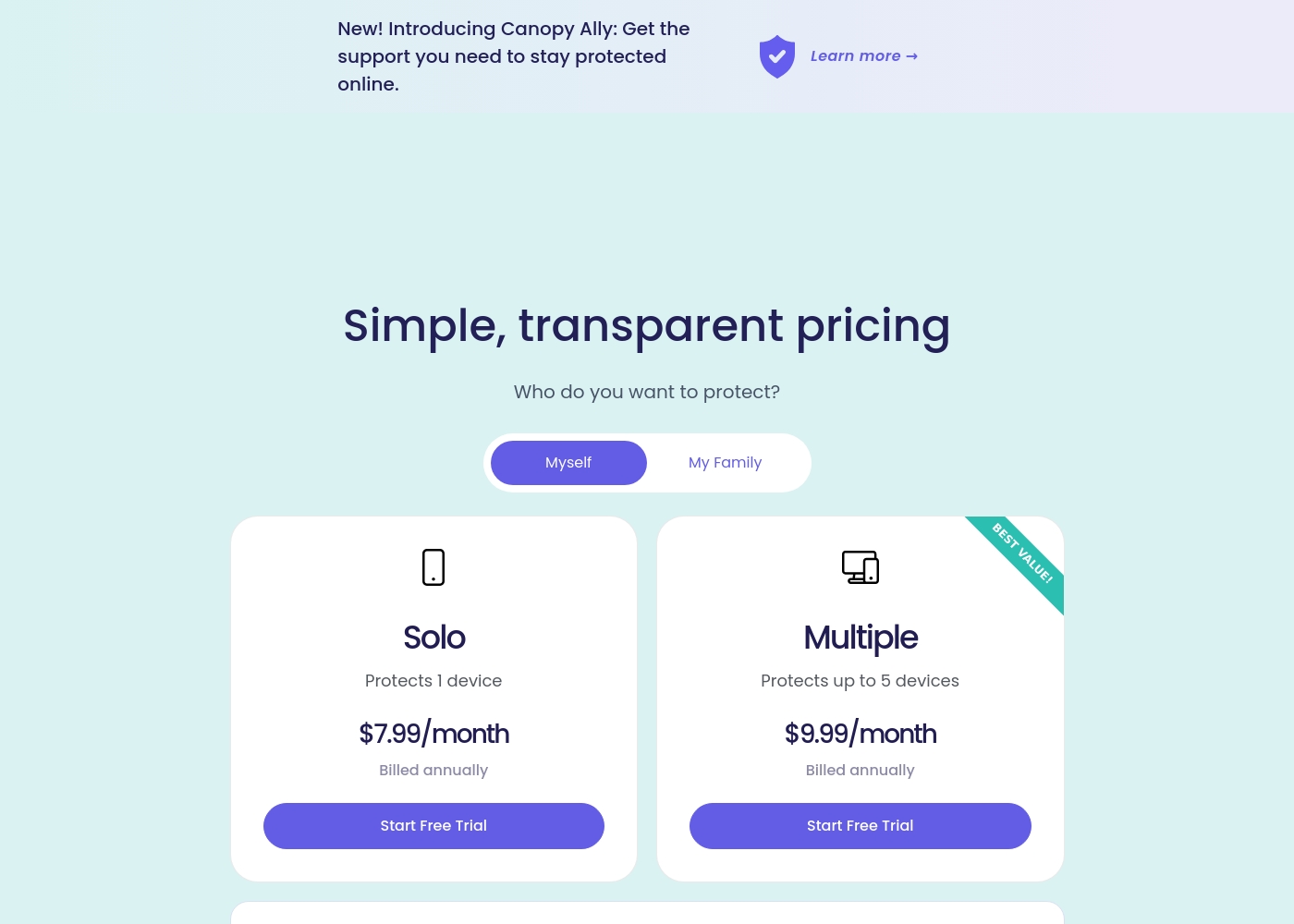
Hoverwatch pricing: Plans from $0/month Plans range: $0–$499.95/month Billing options: Monthly subscription

Pricing Notes
- Canopy offers clear, device-based pricing focused on small-to-midsize families (max 10 devices).
- Hoverwatch offers far greater scalability, supporting up to 25 devices, reflected in its higher maximum price point.
- Canopy offers a 7-day free trial and a 30-day money-back guarantee for low risk entry.
- Hoverwatch does not explicitly state a money-back guarantee or free trial duration in the available data.
Pricing Head-to-Head
User Reviews
Canopy receives critically mixed but predominantly negative feedback from users, resulting in a low 2.3-star Trustpilot rating. A major point of praise is its accuracy; several users confirm it is the most effective application they have found for blocking explicit/pornographic content using its specialized AI. However, this functionality comes at a severe cost to reliability and performance. The most recurring complaints center on the app dramatically slowing down internet speeds (in some cases dropping connection speeds by over 80%) and causing other legitimate applications or software to malfunction. 😔
Support responsiveness is also deeply criticized; users repeatedly report unresponsive customer service, difficulties contacting staff, or complete silence after submitting detailed troubleshooting information. Functionality issues include inconsistent blocking (failing to filter suggestive content or social media as requested) and, critically, inability to remove the app easily due to its anti-tamper protection. Multiple accounts reported being locked out of essential work devices for days while waiting for updates or support. The consensus suggests that while the core filtering technology is powerful, the crippling performance slowdowns and unacceptable support failures severely undermine its value.
This is a great app. I’ve had it for years and it’s the most effective one for blocking objectionable sites I've tried. Their tech support is superior and always willing to help.
Our Verdict
The decision between Canopy and Hoverwatch comes down to philosophy: aggressive prevention versus silent recording. If you want active, protective boundaries established, Canopy is the intended choice. If your goal is stealthy, deep data logging, choose Hoverwatch instead. Most families will initially gravitate toward Canopy’s powerful features. Canopy's superpower is its AI-driven, real-time content filtering across every website. Canopy blocks pornography instantly, a protective feature completely absent in Hoverwatch. Canopy also sends unique, instant alerts when risky photo sharing or sexting is detected. This makes Canopy unmatched for maximum, proactive protection and boundary setting. Hoverwatch's superpower is its completely invisible, passive device monitoring, specifically on Android. Hoverwatch captures extensive logs like messages, media, and app usage data quietly in the background. Hoverwatch also scales better, supporting up to 25 devices compared to Canopy's maximum of 10. Hoverwatch is ideal for discreet oversight or organizational asset tracking. The deciding factor is device performance versus filtering capability. Canopy delivers outstanding filtering but is notorious for severely slowing down devices and having poor support interaction. If you cannot tolerate significant performance lag, choose Hoverwatch despite its lack of active protection. Canopy guarantees safety but risks usability; Hoverwatch guarantees discretion. Choose Canopy if unparalleled real-time filtering and cross-platform support outweigh severe speed concerns. Pick Hoverwatch if you need invisible monitoring of primarily Android devices and value stability over proactive AI blocking.
Frequently Asked Questions
Which is better for active, real-time safety: Canopy or Hoverwatch?
Canopy is definitively better for active safety due to AI-driven, real-time content filtering. It instantly blocks pornography and sends alerts for sexting. Hoverwatch only records activity logs, meaning it provides oversight after the fact.
Does Hoverwatch support iOS devices like Canopy does?
Canopy supports all major systems, including iOS, Android, Windows, and Mac. Hoverwatch primarily focuses on Android, Windows, and Mac computers. If you need to monitor iPhones or iPads, Canopy is the appropriate choice.
Which tool is more discreet and invisible: Canopy or Hoverwatch?
Hoverwatch is built for complete invisibility on the device, making monitoring discreet. Canopy requires a visible Shield app to be installed to enforce its rules and limits. Canopy is visible boundary setting; Hoverwatch is stealthy logging.
Is Canopy worth the performance issues reported by users?
Canopy offers unmatched protective features but users widely report severe lagging and slow internet speed. It is worth it if instant, AI content blocking is absolutely mandatory. Otherwise, Hoverwatch provides a smoother, quieter experience.
How does Canopy’s anti-tampering compare to Hoverwatch?
Canopy uses Removal Prevention to physically stop the app from being uninstalled by the user. Hoverwatch alerts the manager when the SIM card is changed. Canopy enforces protection; Hoverwatch tracks evasion attempts.
Which software supports more devices, Canopy or Hoverwatch?
Hoverwatch is better for large scaling needs, supporting up to 25 devices on its highest tier. Canopy is capped at a maximum of 10 devices for family plans.
Ready to Choose?
Both tools have their strengths. Choose based on your specific needs.