Blueink vs PandaDoc
People often compare Blueink and PandaDoc for robust, secure e-signatures. Blueink wins on specialized compliance and streamlined signing speed, especially via SMS delivery. PandaDoc offers a full agreement creation suite, including a powerful editor and embedded payment tools. This breakdown helps you decide which workflow focus is right for your business needs.
Best for: Regulated industries (healthcare, government) needing 21 CFR Part 11 certification., Organizations prioritizing cost savings (50% less) and guaranteed included premium support.
Best for: Sales teams needing comprehensive management from proposal creation to embedded payment collection., Businesses requiring professional notarization services and robust CPQ functionality.
Top Value and Service Leader
We find Blueink offers an extremely compelling e-signature platform, driven by significant cost savings and a strong focus on compliance and robust API features. Overall, its commitment to included premium customer support makes it a top value choice, particularly for highly-regulated businesses.
Pros
- Highly competitive pricing, often 50% cheaper than major alternatives.
- Regulatory compliance for regulated industries (HIPAA, GDPR, 21 CFR Part 11).
- Premium US-based customer support is included across plans.
- Unlimited envelope tier available for high-volume users.
Cons
- Limited public feedback makes external validation challenging.
- Features like Teams and Signing Brands are restricted to annual plans.
- Trustpilot review base is currently too small to be reliable.
Fast document creation meets essential e-signature.
We find PandaDoc excels at creating professional, high-impact sales proposals and contracts that speed up the entire signature process. Users report unmatched ease of use and significant time savings through powerful template automation. Overall, it is a highly efficient document tool, though teams should meticulously track subscription details and potential support delays.
Pros
- Extremely user-friendly and highly intuitive interface.
- Fast, reliable e-signing process and real-time document tracking.
- Powerful templates and editing save significant time (up to 92% reduction).
- Strong integration capabilities, especially with major CRM systems.
Cons
- Inconsistent customer support responsiveness for urgent issues.
- Reports of confusing billing and unexpected large usage charges.
- Minor technical stability issues (e.g., elements shifting position in documents).
AboutBlueink
Blueink provides advanced, value-packed eSignature software for businesses that need both robust security and streamlined efficiency. This solution is flexible, catering to enterprises and companies across multiple sectors, including government, healthcare, and financial services.
It offers comprehensive compliance protocols, adhering to stringent standards like HIPAA, GDPR, and 21 CFR Part 11. Blueink ensures your documents and processes meet complex industry requirements without compromising ease of use. The platform is truly adaptive and aims to serve highly regulated industries and growing businesses equally. ✅
AboutPandaDoc
PandaDoc is a top-rated, comprehensive agreement management solution. Think of it as a 360-degree tool designed to handle every step of the document lifecycle. It's built for teams who need to create, manage, track, and ultimately eSign agreements seamlessly. 💡
This solution is trusted to be safe, secure, and legally binding. It is E-SIGN, UETA, and HIPAA compliant, and it boasts SOC 2 certification. The platform provides robust security using SSO and a powerful API for granular control over permissions and workspaces, so your sensitive data stays protected.
Highlights
Feature Comparison
Features Overview
We highlight the main differences and pick a winner for each feature.
Full Workflow Scope
PandaDoc manages creation, signing, and payment end-to-end. Blueink focuses primarily on fast, secure e-signature execution.
PandaDoc is a 360-degree agreement management platform for all document stages. Teams create, collaborate, sign, and collect revenue using PandaDoc. Blueink is optimized as a scalable, compliant eSign platform. It excels at getting signatures quickly and legally once the document is finalized. PandaDoc handles document creation and iteration better, replacing several disparate tools. Blueink perfects the signature process itself and is perfect for pre-made document flows.
Specialized Compliance
Blueink meets stricter, specialized industry standards like 21 CFR Part 11. PandaDoc meets general compliance like HIPAA and SOC 2.
Blueink is built specifically for regulated fields like healthcare or government signing. It supports HIPAA, GDPR, and the strict 21 CFR Part 11 requirements for life sciences. PandaDoc also offers strong security alignment, including E-SIGN, UETA, HIPAA, and SOC 2. Blueink has deeper roots in critical regulated sectors, which is vital for compliance audits. Blueink is the clear choice if 21 CFR Part 11 or exceptional cost savings are mandatory.
Signer Engagement Methods
Blueink boosts engagement via SMS delivery with high open rates. PandaDoc relies on traditional email delivery and internal collaboration tools.
Blueink includes SMS delivery, which yields a reported 94% open rate in 9 minutes. This speeds up overall signer engagement significantly, crucial for urgent documents; Blueink also supports signers without traditional email addresses. PandaDoc enforces key signing features like signing order, verification, and optional notarization capabilities. Choosing Blueink prioritizes speed and accessibility for high-volume, rapid-response document transactions. Blueink reported a 45% boost in response rates by using SMS.
Document Drafting Tools
PandaDoc provides a robust drag-and-drop editor and real-time redlining. Blueink treats the document primarily as a reusable template container.
PandaDoc users utilize the drag-and-drop editor for quickly tailoring proposals and agreements. Collaboration features like redlining, comments, and approvals happen directly inside PandaDoc. Blueink focuses on reusing templates and routing established documents most efficiently. Blueink is less concerned with the document's structure and more with its secure, compliant execution. For teams that draft and iterate documents constantly, PandaDoc offers superior collaborative editing tools.
Monetization Features
PandaDoc integrates embedded payments and professional notarization services. Blueink focuses purely on validating signatures and compliance audit trails.
PandaDoc allows you to embed trusted payment gateways directly into documents and invoices. This helps teams get paid faster right upon signing completion. PandaDoc also includes Notarization as part of its secure signature capabilities on applicable plans. Blueink does not offer these advanced monetization or professional third-party validation features. If collecting money immediately upon signing is crucial, PandaDoc is the superior, integrated platform solution.
Customer Support Quality
Blueink includes premium support and migration help, receiving consistently positive feedback. PandaDoc support responsiveness is mixed in user reviews.
Blueink’s plans include Premium Support, migration help, and training, leading to positive user testimonials about responsiveness. One Blueink testimonial noted, 'The US-based support is great; they answered questions quickly.' PandaDoc offers 24/7 chat and email support but user feedback varies significantly regarding speed and issue resolution. PandaDoc users sometimes report frustration with support or inconsistencies in pricing resolutions. Blueink provides more reliable support continuity for regulated customers.
Blueink costs between $15 and $40 per user per month (billed annually) with four main plans: Standard at $15/month, Business Pro at $30/month, Blueink Unlimited at $40/month, and Enterprise (Contact Sales).
The platform pricing is clear and designed to be cost-effective compared to competitors.
Standard
Price: $15/user/month ($180 billed annually) Best For: Small teams or individuals needing reliable e-signatures. Other Features:
- 120 Envelopes / User / Year (10 per month)
- 5 Reusable Templates / User
- Blueink Payments and Auto Detect Fields
- SMS Pin / Selfie / ID Authentication
- Email and Chat Support
- 120 Envelopes/User/Year
- 5 Templates/User
- Blueink Payments
- Auto Detect Fields
- Real-time audit trail
- All Standard features
- 1800 Envelopes/User/Year
- 12 Templates/User
- SMS Delivery Reminder Emails
- Custom Messaging
- All Business Pro features
- Unlimited Envelopes/User/Year
- Unlimited Templates
- Teams (annual plans only)
- Signing Brands (annual plans only)
- Unlimited Users and Templates
- Bulk Send
- Smart Link Forms
- Custom Reporting
- Customer Success Team

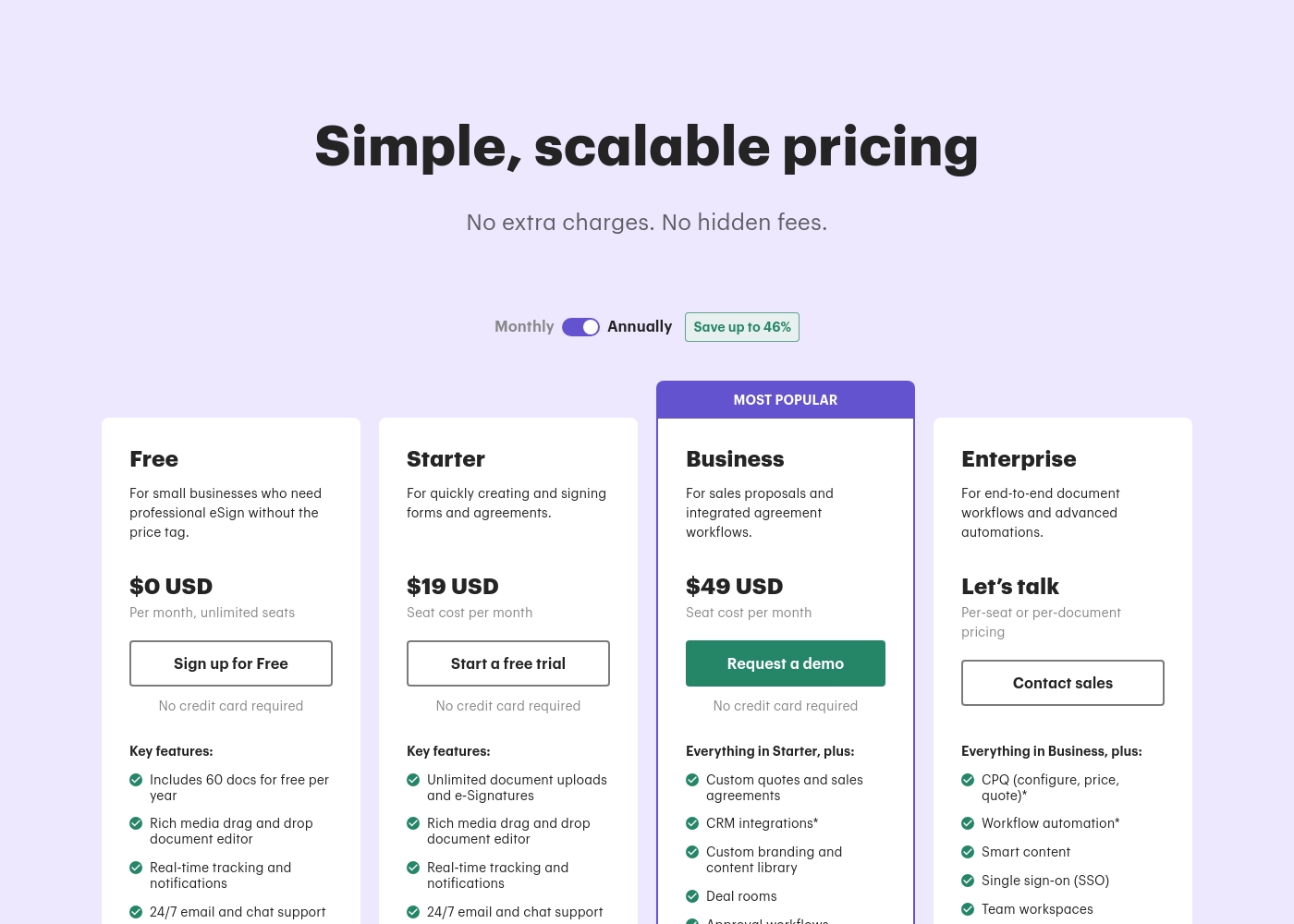
PandaDoc costs between $0 and $49 per month with five plans: Free at $0/month, Launch at $9/month, Starter at $19/seat/month, Business at $49/seat/month, and Enterprise (Custom Pricing).
PandaDoc offers simple, scalable pricing with no extra charges or hidden fees. Prices shown reflect the rate when billed annually, which offers significant savings. Let's look closer at the options available.
Free
Price: $0 USD Per month, unlimited seats Best For: Small businesses who need professional e-signatures without the price tag Other Features:
- Includes 60 documents for free per year
- Rich media drag and drop document editor
- Real-time tracking and notifications
- 24/7 email and chat support
- Includes 60 docs per year
- Rich media document editor
- Real-time tracking and notifications
- 24/7 email and chat support
- Unlimited seats
- Pay-as-you-go pricing
- Real-time tracking and notifications
- 24/7 email and chat support
- Unlimited document uploads and e-Signatures
- Rich media drag and drop document editor
- Real-time tracking and notifications
- 24/7 email and chat support
- Custom quotes and sales agreements
- CRM integrations
- Custom branding and content library
- Deal rooms, Approval workflows, Web forms, Bulk send
Pricing Notes
- PandaDoc offers a Free plan, making it accessible for quick, basic signing needs or very small teams.
- Blueink advertises 50% cost savings compared to competitors like DocuSign, highlighting its strong budget appeal.
- PandaDoc utilizes 'Usage Credits' for API, Web Forms, and Bulk Send features on higher plans, which can incur extra costs.
- Enterprise pricing for Blueink can be per envelope, which is ideal when controlling transaction volume is a key requirement.
- PandaDoc users have occasionally reported billing disputes or unexpected pricing changes in external feedback reviews.
Pricing Head-to-Head
User Reviews
We can only draw limited conclusions from the publicly available feedback as external user reviews are scarce, making it difficult to fully assess recurring themes like ease of use or overall reliability. The current Trustpilot account shows a 3.7-star rating based on very few submissions.
One specific point of praise highlighted by users is related to support responsiveness, noting that the US-based team is 'great.' This aligns well with Blueink's internal claims of providing premium customer service as a standard feature, differentiating them from competitors. Without more input regarding integrations, onboarding complexity, or long-term value, we rely heavily on the company's detailed pricing structure, which appears significantly cheaper than alternatives.
The US-based customer support team is extremely helpful and effective. Whenever we run into questions, they respond quickly and resolve issues on the first attempt.
PandaDoc users largely praise the platform for its exceptional ease of use and intuitive interface. Many reviewers highlight how simple it is to create custom designs, templates, and send documents for signatures quickly, making it a reliable tool that saves significant time daily.
The platform is often called faster and better than competitors like DocuSign and Zoho. It also integrates smoothly with other applications, streamlining workflows across multiple departments.
I’ve used DocuSign and Zoho in the past, but PandaDoc is frankly the best among them. The platform is incredibly easy to use, highly customizable, and gives you many options to create clean, professional documents. I’m genuinely impressed.
Our Verdict
The choice between Blueink and PandaDoc ultimately hinges on whether you need document creation or signature specialization. Blueink is the clear winner for organizations focused on extreme compliance and exceptional cost savings. Blueink includes strict controls like 21 CFR Part 11 and offers premium support at a price 50% lower than competitors. Its SMS and mobile delivery solutions guarantee the fastest signature turnaround times possible. PandaDoc is essential if you need a true 360-degree agreement management platform centered around sales. PandaDoc provides a robust drag-and-drop editor, crucial for drafting proposals quickly. It also allows you to integrate complex CPQ, notarization, and critical payment collection right into the document flow. The deciding factor is your internal workflow stage: PandaDoc provides sophisticated tools for document collaboration and creation. Blueink provides the most cost-effective and compliant execution for finalized documents. Choose Blueink if you are a regulated enterprise prioritizing budget and execution speed. Select PandaDoc if your sales or legal team needs end-to-end management, editing, and payment functionality in one comprehensive tool.
Frequently Asked Questions
Which is cheaper for high volume usage: Blueink or PandaDoc?
Blueink is often cheaper and advertised as 50% below competitor pricing. Blueink includes premium support and migration help in its plans. PandaDoc requires paying per-seat, and usage credits may increase costs on advanced features. Blueink generally offers better value for high-volume, regulated signing.
Which platform is better for deep compliance like 21 CFR Part 11?
Blueink is the superior choice for deep compliance needs. Blueink explicitly supports 21 CFR Part 11, HIPAA, and GDPR standards. PandaDoc supports HIPAA and SOC 2, but does not specify 21 CFR Part 11 adherence.
Can I take payments directly inside Blueink or PandaDoc documents?
Yes, you can take payments directly inside PandaDoc documents. PandaDoc supports embedding trusted payment gateways for quick collections during signing. Blueink focuses solely on signature validation and does not offer embedded payment features.
Does Blueink offer real-time document collaboration and redlining?
No, Blueink is primarily an eSignature execution tool focused on templates and routing. PandaDoc is built for collaboration, offering real-time redlining, comments, and a drag-and-drop editor. Blueink assumes the document is already finalized.
Which tool offers a Free plan: Blueink or PandaDoc?
PandaDoc offers a Free forever plan for basic functionality. Blueink does not offer a Free plan, but it provides a 14-day risk-free trial. PandaDoc is better for starting small or occasional personal use.
Does PandaDoc offer notarization services?
Yes, PandaDoc includes notarization as part of its secure signing capabilities on applicable plans. Blueink does not currently offer a built-in notarization feature. PandaDoc is better if legally verified signing is a common requirement.
Ready to Choose?
Both tools have their strengths. Choose based on your specific needs.