BLACKBOX AI vs FlowMattic
BLACKBOX AI and FlowMattic serve different worlds: AI coding agents vs WordPress automation. BLACKBOX AI automates the entire development lifecycle. FlowMattic streamlines business workflows right inside WordPress. It's a clear choice between speed for coders and efficiency for site managers.
Best for: Software development teams needing AI-driven automation, Developers wanting to speed up coding, testing, and deployment
Best for: WordPress site owners wanting to automate business processes, Agencies managing multiple client websites (5-100 sites)
Powerful automation with unproven reliability.
We find BLACKBOX AI to be a feature-rich platform with ambitious automation for the full development lifecycle. Its multi-agent approach and broad integration options are compelling. Overall, we see strong potential for teams seeking AI-driven speed, but we await broader user validation to confirm its real-world support and value.
Pros
- Comprehensive automation from scaffolding to deployment.
- Multi-agent system for parallel task execution and evaluation.
- Wide accessibility via CLI, IDE, cloud, and API.
- Built-in safety features like security checks and schema validation.
Cons
- Lack of verified user reviews for real-world reliability assessment.
- Complex multi-agent workflows may have a steep learning curve.
- Enterprise pricing and onboarding details are not fully transparent.
WordPress automation with budget-friendly power.
We found FlowMattic to be a highly competitive WordPress automation tool, offering deep integration and powerful features like unlimited task execution. Overall, it delivers exceptional value backed by highly personalized support, making it an excellent choice for businesses aiming to reduce reliance on expensive SaaS platforms.
Pros
- Unlimited task executions included in all annual pricing tiers.
- Outstanding and highly responsive developer support team.
- Cost-effective replacement for usage-based SaaS automation tools.
- Deep, native integration within the WordPress ecosystem.
Cons
- Some reports of instability and bugs noticed on production sites.
- Limited structured public documentation or manuals available.
- Relies heavily on developer personal involvement for complex troubleshooting.
AboutBLACKBOX AI
💡 BLACKBOX AI is an enterprise-grade agent platform for software development. 🤖 It lets you run autonomous coding agents from a single API, your terminal, IDE, or the cloud.
Whether you use Claude Code, Codex, or its own models, the platform orchestrates them to compete, collaborate, and complete tasks like refactoring, testing, and deployment.
AboutFlowMattic
FlowMattic is a powerful automation tool trusted by over 7,582 WordPress professionals worldwide. It helps businesses manage their vital operations effortlessly. The platform acts as an essential, reliable, and future-proof tool for anyone running a business on WordPress. Users find that it easily replaces other complex automation systems thanks to its seamless integration. ✅
Whether you run an agency, an e-commerce store, a SaaS platform, or an educational platform, FlowMattic provides the dedicated automated workflows needed for sustainable growth.
Highlights
Feature Comparison
Features Overview
We highlight the main differences and pick a winner for each feature.
Core Functionality
BLACKBOX AI automates coding tasks with AI agents. FlowMattic automates business workflows on WordPress.
BLACKBOX AI is an enterprise-grade agent platform. It lets you run autonomous coding agents from your terminal, IDE, or the cloud. Tasks like refactoring, testing, and deployment are handled automatically. FlowMattic is a WordPress automation plugin trusted by over 7,582 professionals. It helps manage operations like client onboarding and order fulfillment. You automate critical workflows right inside your site. The key difference is domain: BLACKBOX AI builds software, FlowMattic runs your business. BLACKBOX AI is for developers, FlowMattic is for site managers. Choose based on whether you're writing code or managing a website.
Pricing Model
BLACKBOX AI uses usage-based pricing. FlowMattic uses a fixed annual fee per website.
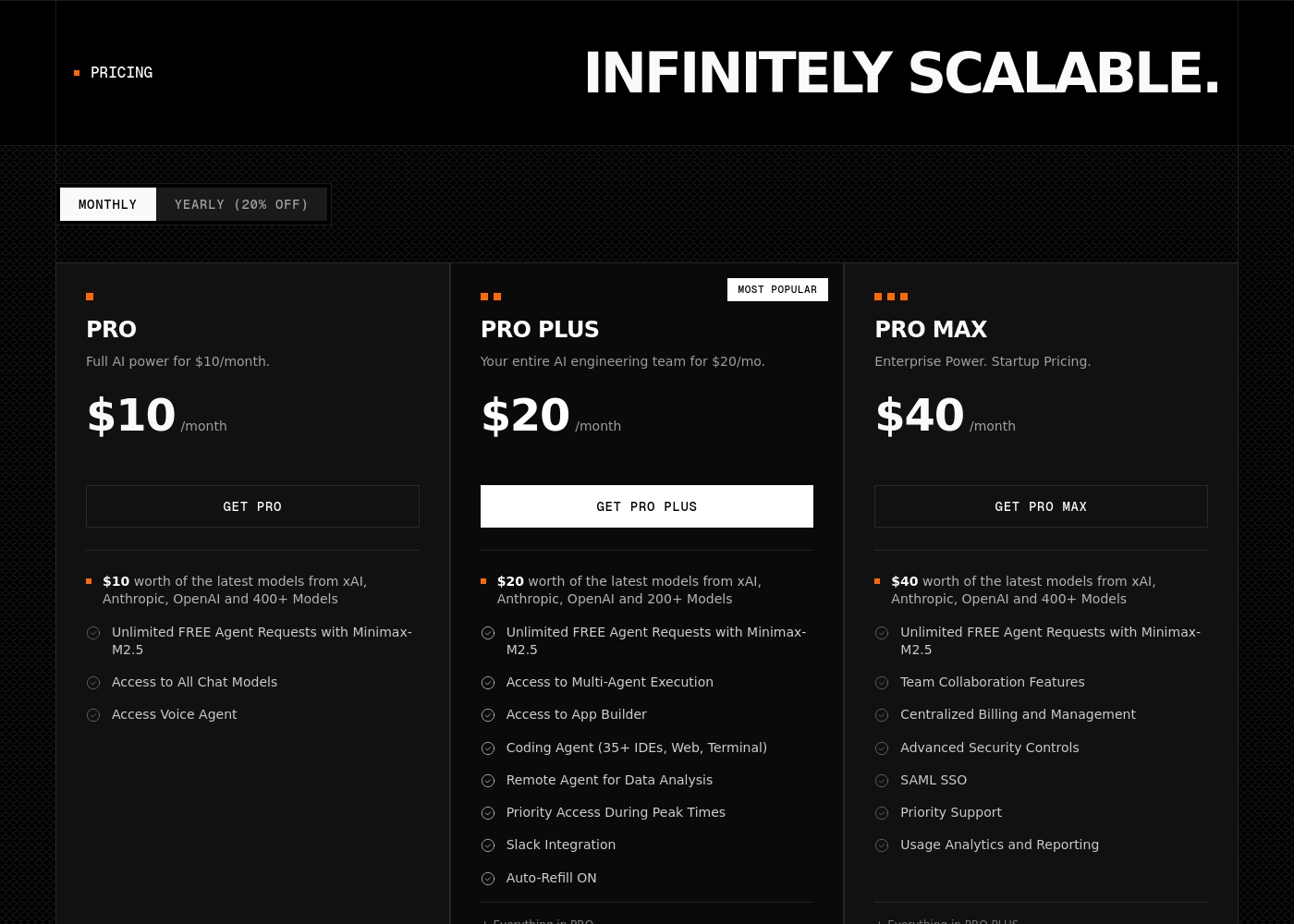
BLACKBOX AI pricing ranges from $2-35. It's usage-based, with plans starting at $8/month for individuals. You pay for what you use, with real-time cost tracking. FlowMattic offers annual subscriptions from $129 to $449. Pricing is per website, not per task. The Personal plan covers 1 website, the Ultimate plan covers 100 sites. All plans include unlimited task executions. BLACKBOX AI's model is better for unpredictable usage. FlowMattic's model is better for predictable, high-volume automation. FlowMattic's per-site pricing can be very cheap for agencies running many WordPress sites.
User Interface & Access
BLACKBOX AI offers multiple interfaces including CLI and IDE. FlowMattic is accessed through WordPress admin.
BLACKBOX AI provides six connected surfaces. You can use the CLI for quick tasks, the VS Code extension for inline work, or the cloud dashboard for always-on agents. An OpenAI-compatible API is also available. FlowMattic is a WordPress plugin. You access everything through the WordPress admin dashboard. It's designed to feel native to WordPress users. BLACKBOX AI offers more flexibility for developers. FlowMattic offers simplicity for WordPress users. If you live in an IDE, BLACKBOX AI is better. If you manage WordPress sites, FlowMattic is better.
Automation Capabilities
BLACKBOX AI runs autonomous code agents. FlowMattic builds multi-step business workflows.
BLACKBOX AI agents handle end-to-end tasks. They can scaffold services, write tests, run security audits, and even perform production rollbacks. The system can dispatch the same task to multiple AI models and pick the best result. FlowMattic focuses on business process automation. It supports multi-step workflows with AI generation. Features include data transformation, scheduled runs, and CSV/webpage parsing. It's built for managing business operations. BLACKBOX AI is more advanced for software development. FlowMattic is more practical for business automation. Neither tool does the other's job well. They're built for entirely different use cases.
Integration Ecosystem
BLACKBOX AI integrates with 35+ IDEs and developer tools. FlowMattic integrates via WordPress and webhooks.
BLACKBOX AI supports over 35 IDEs including VS Code. It also works with Slack, Figma, and offers a full REST API. Enterprise plans include custom integration support. FlowMattic integrates directly into WordPress. It connects to external services using Webhooks and an API module. The team frequently releases new integrations based on user feedback. It also offers custom development services for specialized tools. BLACKBOX AI is better for development tool integration. FlowMattic is better for WordPress and business service integration. The best choice depends on whether you're integrating development tools or business software.
Customer Support
BLACKBOX AI offers tiered support. FlowMattic provides responsive developer support.
BLACKBOX AI has Pro and Pro Max plans with standard and priority support. Enterprise plans offer dedicated support with custom SLAs. Response times can be as fast as 4 hours for Enterprise. FlowMattic provides support from the development team. Users praise its responsiveness and personal touch. However, there's no published SLA for response times. Support is described as top-notch but sometimes slow on complex fixes. BLACKBOX AI offers more structured support tiers. FlowMattic offers more personal, developer-led support. If you need guaranteed response times, BLACKBOX AI Enterprise is better. If you prefer direct developer contact, FlowMattic may be better.
Security & Data Privacy
BLACKBOX AI offers enterprise security features. FlowMattic keeps data on your WordPress server.
BLACKBOX AI has enterprise-grade security. Pro Plus plans include end-to-end chat encryption. Enterprise plans add SSO, on-premise deployment, and advanced controls. You can run the platform within your own infrastructure. FlowMattic stores all data on your own WordPress server. This gives you full ownership and control. It's self-hosted, which can be appealing for privacy. The plugin also allows custom log history ranges. BLACKBOX AI provides more advanced enterprise security. FlowMattic offers more data sovereignty through self-hosting. For maximum control, FlowMattic's self-hosted model is attractive. For managed enterprise security, BLACKBOX AI is better.
Pricing & Value
BLACKBOX AI is usage-based and scalable. FlowMattic is a fixed annual fee with unlimited tasks.
BLACKBOX AI costs start at $8/month and scale up. Pricing is based on usage, so you pay for what you consume. This can be cost-effective for light users but expensive at scale. FlowMattic costs $129-$449 per year. All plans include unlimited task executions. For an agency managing 100 sites, the Ultimate plan is only $449/year, about $5 per site annually. No per-task charges. FlowMattic offers better value for high-volume automation. BLACKBOX AI offers better flexibility for variable usage. If you run many automations, FlowMattic is more predictable and cheaper. If you use automation sporadically, BLACKBOX AI might save you money.
Learning Curve
BLACKBOX AI has a steep learning curve for multi-agent workflows. FlowMattic is simpler for WordPress users.
BLACKBOX AI involves complex multi-agent workflows. Learning to dispatch tasks, evaluate outputs, and manage parallel execution takes time. The system is powerful but not beginner-friendly. FlowMattic is designed for WordPress users. The interface is integrated into the WordPress admin. Setting up workflows requires understanding WordPress and the plugin's features. It's moderate difficulty. BLACKBOX AI is harder to learn but offers more powerful capabilities. FlowMattic is easier to pick up for WordPress users. Choose based on your technical background. Developers will handle BLACKBOX AI better. WordPress site managers will find FlowMattic more intuitive.
Reliability & Stability
BLACKBOX AI has a 99.997% uptime SLA. FlowMattic has some reports of bugs on production sites.
BLACKBOX AI is built on enterprise-grade infrastructure. It features a 99.997% uptime SLA and low-latency global edges. Real-time monitoring provides full visibility into operations. FlowMattic has received some reports of instability and bugs. Users mention issues on high-traffic production sites. The plugin is constantly evolving, which can sometimes affect stability. Support is responsive but may take time for fixes. BLACKBOX AI is more reliable with a formal uptime guarantee. FlowMattic has room for improvement in stability. If reliability is critical, BLACKBOX AI's SLA is reassuring. For most WordPress sites, FlowMattic is stable enough for typical use cases.
Team Collaboration
BLACKBOX AI supports team workflows with shared agent access. FlowMattic supports multi-site management for agencies.
BLACKBOX AI allows teams to run agents from a shared platform. You can dispatch tasks from CLI, IDE, or cloud, with real-time monitoring. Enterprise plans include custom integration support for teams. FlowMattic supports agencies managing multiple websites. Plans range from 1 to 100 websites. It's designed for team collaboration across WordPress sites. Features like multi-step workflows and data transformation help manage client work. Both tools support teams but in different ways. BLACKBOX AI is better for development teams collaborating on code. FlowMattic is better for agencies managing multiple WordPress sites. The best choice depends on whether your team builds software or manages websites.
BLACKBOX AI pricing: BLACKBOX AI offers scalable subscription plans starting at $8/month (billed annually) for individual developers and teams. Professional tiers vary by feature access, with custom enterprise solutions available for larger organizations needing on-premise deployment and advanced security controls. Plans range: 2–35 Billing options: Usage-based pricing
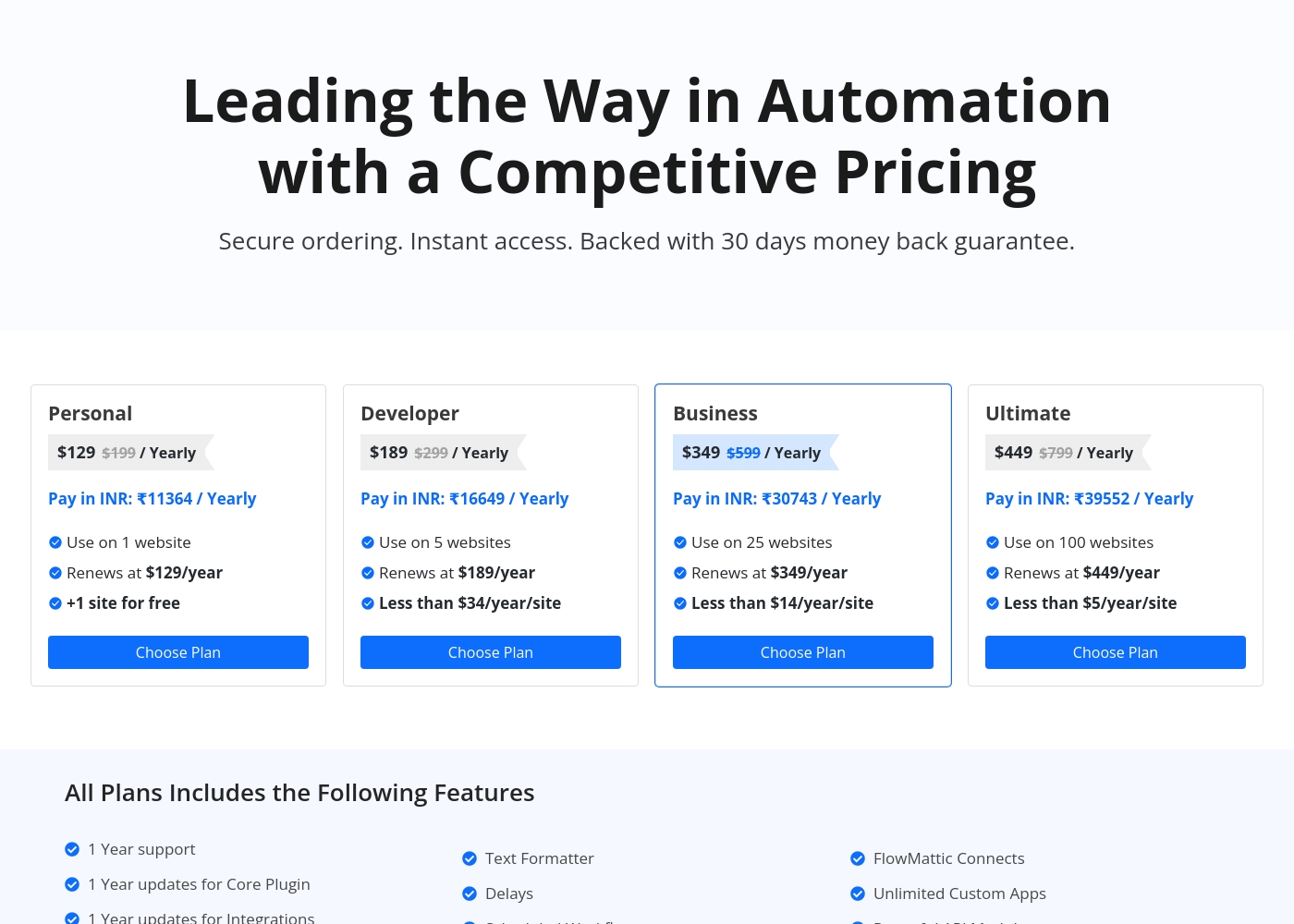
FlowMattic costs between $129 and $449 per year with four plans: Personal at $129, Developer at $189, Business at $349, and Ultimate at $449.
Let's explore what each plan offers for your automation needs.
Personal
Price: $129 / Yearly (Renews at $129/year) Websites Supported: 1 website (+1 site for free) Refund Policy: 30-day money-back guarantee Other Features: 1 year support and updates, Unlimited Custom Apps, Powerful API Module, Unlimited Task Executions, Powerful MCP Server
- Use on 1 website (+1 site for free)
- 1 Year support
- 1 Year updates for Core Plugin and Integrations
- Unlimited Task Executions
- Powerful MCP Server
- Use on 5 websites
- Renews at $189/year
- Instant Webhook Iterator
- Multi-Step Workflows
- AI Workflow Generator
- Use on 25 websites
- Renews at $349/year
- FlowMattic Connects
- Webpage Parser
- CSV Parser
- Use on 100 websites
- Renews at $449/year
- Unlimited AI Assistants
- Powerful API Module
- Custom Database Tables
Pricing Head-to-Head
User Reviews
Based on the available Trustpilot review snippet, the sentiment is currently inconclusive due to a verification error preventing full access to user feedback. ⚠️ This means we cannot synthesize specific recurring themes about accuracy, ease of use, or support. Our final rating will therefore rely primarily on our assessment of the platform's features and stated value proposition, as external review data is not accessible for a balanced analysis.
FlowMattic maintains an excellent 4.6-star rating on Trustpilot based on dozens of reviews, with users consistently praising its value and exceptional customer support. Many reviewers highlight the responsiveness and dedication of the development team, noting that suggestions are often implemented quickly.
A key competitive advantage frequently mentioned is the pricing structure: FlowMattic offers unlimited task executions for a fixed annual fee or lifetime deal, making it extremely cost-effective and a great replacement for usage-based automation tools like Zapier or Pabbly. Users find the plugin powerful, intuitive, and constantly evolving with new integrations.
The support and the product are absolutely amazing. We appreciate that you don’t pay per task execution, and their available one-time purchase option makes FlowMattic incredibly valuable for the price.
Our Verdict
BLACKBOX AI and FlowMattic are built for entirely different worlds. If you're a developer, BLACKBOX AI is the clear winner. It automates the full software development lifecycle with powerful AI agents. BLACKBOX AI's superpower is its multi-agent system. It can dispatch the same task to multiple AI models, compare their outputs, and select the best solution automatically. This is perfect for teams wanting to ship code faster with less manual effort. FlowMattic's superpower is its WordPress integration. It automates business workflows like client onboarding, e-commerce, and invoicing. With unlimited task executions and a fixed annual price, it's a cost-effective alternative to tools like Zapier. The deciding factor is your use case. If you write code and deploy software, choose BLACKBOX AI. If you manage WordPress sites and want to automate business processes, choose FlowMattic. Final verdict: Pick BLACKBOX AI if you're a developer or team needing AI-powered coding automation. Pick FlowMattic if you're a WordPress business or agency wanting to automate workflows and save time. They're both excellent, but for very different people.
Frequently Asked Questions
Which is better for small teams: BLACKBOX AI or FlowMattic?
It depends on your focus. If your team writes code, BLACKBOX AI offers AI agents for development tasks. If your team manages WordPress sites, FlowMattic automates business workflows with unlimited tasks. Choose based on whether you're building software or running a website.
Does BLACKBOX AI have WordPress automation like FlowMattic?
No, BLACKBOX AI focuses on software development automation, not WordPress workflows. FlowMattic is built specifically for WordPress business automation. They serve entirely different purposes and don't overlap in functionality.
Is FlowMattic worth the extra cost over BLACKBOX AI?
FlowMattic's cost depends on your needs. For WordPress automation, FlowMattic's fixed annual pricing with unlimited tasks is excellent value. BLACKBOX AI is usage-based and can be cheaper for light use. For heavy WordPress automation, FlowMattic is often more cost-effective.
Can I migrate from BLACKBOX AI to FlowMattic easily?
They're different tools, so migration isn't direct. BLACKBOX AI handles code automation, FlowMattic handles WordPress workflows. You'd be switching use cases, not just tools. Consider your primary need: coding or business automation.
Which tool has better support: BLACKBOX AI or FlowMattic?
FlowMattic is known for responsive developer support with frequent updates. BLACKBOX AI offers structured tiers with priority and dedicated support. Both have strengths, but FlowMattic's personal, hands-on support is often praised by users.
Is there a free trial for BLACKBOX AI?
The provided data doesn't mention a free trial for BLACKBOX AI. FlowMattic offers a free test site to try the full version before buying. Check BLACKBOX AI's signup process for any introductory offers.
Ready to Choose?
Both tools have their strengths. Choose based on your specific needs.