Bigstock vs Unsplash
Unsplash and Bigstock represent completely different approaches to visual content sourcing. Unsplash built its name on high-quality, free content for individual creators. Bigstock is a powerful paid option offering vectors and videos with specific download limits. We will help you decide which stock library fits your exact project needs.
Best for: Marketing agencies needing predictable high-volume assets (300 downloads/month), Graphic designers requiring vector files (AI or EPS format)

Best for: Solo content creators operating on a zero budget requirement, Bloggers and social media managers needing unlimited, beautiful still images
Affordable stock media with highly flexible plans.
We found that Bigstock offers competitive tiered pricing and flexible daily or monthly subscription models for both images and videos. Overall, users praise the selection and value, but we noticed serious, recurring concerns about confusing cancellation processes and unresponsive customer support that potential buyers must carefully review.
Pros
- Massive library of royalty-free images, vectors, and videos.
- Flexible pricing plans ($79–$99 per month) with daily or monthly limits.
- Offers high-value plans, reducing the cost per asset to $0.33.
- Includes vectors (AI or EPS) in high-volume subscription tiers.
Cons
- Frequent, severe complaints about unauthorized charges post-free trial cancellation.
- Customer support is often unresponsive to billing inquiries and refund requests.
- Users report difficulty logging in or accessing accounts to cancel memberships.
- Support frequently refuses refunds, citing non-refundable terms of service.

Best Free Visuals, Buyer Beware on Premium.
We find Unsplash offers an extensive, high-quality free image library that remains vital for creators worldwide. Overall, Unsplash is highly recommended for its free content, but we advise caution before subscribing to Unsplash+ due to recurring user reports of billing errors and unreliable customer support.
Pros
- Access to a massive library of professional, high-resolution visuals.
- The core content remains free and is available for commercial use.
- Unsplash+ provides enhanced legal protections and useful image editing tools.
- The platform is widely praised for its variety and good categorization.
Cons
- Reported failures in customer support and billing reliability for Plus subscribers.
- Recurring user reports of reduced content diversity and representation in search results.
- The perceived quality of the free image library has declined since the Unsplash+ plan launched.
- A lack of a required safe filter means explicit content can appear.
AboutBigstock
Bigstock offers a wide library of Stock Photos, Images, Vectors, Stock Videos, and Footage. It's designed to provide "Images and Video for everyone." They focus on providing royalty-free media across a stunning array of top categories. This gives you plenty of legally safe options for any visual project you might be tackling. 💡
AboutUnsplash
Unsplash is defined as the internet’s key source for visuals. It provides beautiful, free images and pictures across a wide range of topics. These categories cover subjects like Nature, Animals, Film, and 3D Renders. The entire extensive library is powered by creators worldwide who contribute their work. It's a vast platform for anyone needing stunning, accessible imagery for their projects. 💡
Highlights
Feature Comparison
Features Overview
We highlight the main differences and pick a winner for each feature.
Cost & Free Access
Unsplash has a massive, high-quality, completely free photo library. Bigstock operates solely as a paid, subscription-only platform.
You must pay $79–$99 monthly to access Bigstock's extensive content library. A free 7-day trial is available to test assets before committing to payment. Bigstock is geared towards predictable, paid enterprise usage. Unsplash's core library is massive and entirely free for commercial use worldwide. Unlimited downloads of beautiful, high-resolution photos cost nothing to the user. Unsplash built its reputation on this zero-cost model. Unsplash is the clear winner if you operate on a strict zero budget for visual assets. Bigstock is exclusively paid, although its cost per asset can drop significantly. Use Unsplash for all basic visual needs without worrying about complicated licensing or surprise credit card charges.
Media Variety
Bigstock provides essential vectors and videos; Unsplash offers photos, images, and 3D Renders only.
Bigstock includes extensive libraries of professional stock video footage in parallel plans. Higher-tier Bigstock image plans also include scalable vector files (AI or EPS formats). This makes Bigstock a complete media solution. Unsplash excels at high-resolution images, photos, and high-quality 3D Renders. Dedicated video or professional vector stock files are not listed as available assets on Unsplash. Bigstock provides a comprehensive media solution for designers needing vectors and video editors needing footage. Unsplash is solely image-centric. Agencies and multi-format production teams should strongly prefer Bigstock for utility and variety. Unsplash cannot serve dynamic media needs.
Pricing Models & Limits
Bigstock uses fixed download limits; Unsplash+ offers unlimited downloads for individual subscribers.
Bigstock plans enforce strict daily limits (5 or 10) or flexible bulk limits (50/month). Pricing is transparently listed, ranging from $79 to $99 monthly. This model suits predictable, steady consumption patterns. Unsplash+ pricing is not explicitly public but offers unlimited royalty-free downloads to an individual user. Subscribers face no daily or monthly download caps once paid. This encourages bulk usage. Bigstock requires users to carefully plan consumption based on fixed quotas. Unsplash+ allows for immediate, high-volume downloading once the monthly fee is paid. Choose Bigstock if you need precise tracking of asset costs per download. Select Unsplash+ for burst usage flexibility.
Legal Protection
Unsplash+ offers enhanced legal guarantees; Bigstock offers standard royalty-free licensing only.
Bigstock provides a standard royalty-free license across all assets and plans. They back their service with a general 'Worldwide Satisfaction Guaranteed' policy. All assets are designed for safe commercial use. Unsplash's paid Plus plan guarantees enhanced legal protection, including Unsplash+ Protection. All Plus images are guaranteed model and property released. This provides crucial legal confidence for commercial designers. Unsplash+ specifically addresses legal peace of mind with concrete guarantees for commercial client work. Bigstock's protection feels less explicit and comprehensive. Commercial users should utilize the Unsplash+ Protection if they want maximum legal security for their still image usage.
Creative Tools
Unsplash+ integrates editing tools; Bigstock focuses only on download delivery.
The Bigstock platform operates primarily as an asset repository for downloads. No image manipulation or editing features are listed for any plan. Users must rely on external design software. Unsplash+ includes powerful creative tools like image cropping and background removal capabilities. These features streamline image preparation within the platform. Users can prep images instantly. Unsplash helps you prepare the image for use immediately after downloading the asset. Bigstock requires an external workflow for all necessary edits. An individual creator saves crucial time by using the Unsplash+ background removal tool without opening Photoshop.
Scalability & Teams
Bigstock excels at high-volume usage; Unsplash+ is limited strictly to single users.
Bigstock plans are usage-based, accommodating high daily consumption up to 300 assets monthly. Licensing seems geared toward production scale without specific seat restrictions. Team usage is implied. Unsplash+'s license is strictly for a single user seat only. It also prohibits storing content on Digital Asset Management (DAM) systems for broad sharing. Bigstock provides clearer and higher-volume paths for organizational production teams. Unsplash+ is completely unsuitable for sharing content widely in a business. Large agencies or internal corporate teams must select Bigstock to maintain proper access and high download volumes.
Customer Support & Billing
Bigstock has severe billing complaints; Unsplash offers priority support but also has billing issues.
Bigstock users widely report unauthorized charges post-free trial cancellation and refund refusals. Support is limited to weekdays 9 am–5 pm EST only. This represents a major risk. Unsplash+ includes Priority Support in its paid plan for subscribers. However, Unsplash+ users also report billing errors and unresponsive support when problems arise. Bigstock's toxic billing sentiment is a major red flag that potential users cannot ignore. Unsplash's paid service has fewer, less severe documented issues. Always meticulously document all cancellation attempts when signing up for Bigstock's free trial to prevent auto-renewal charges.
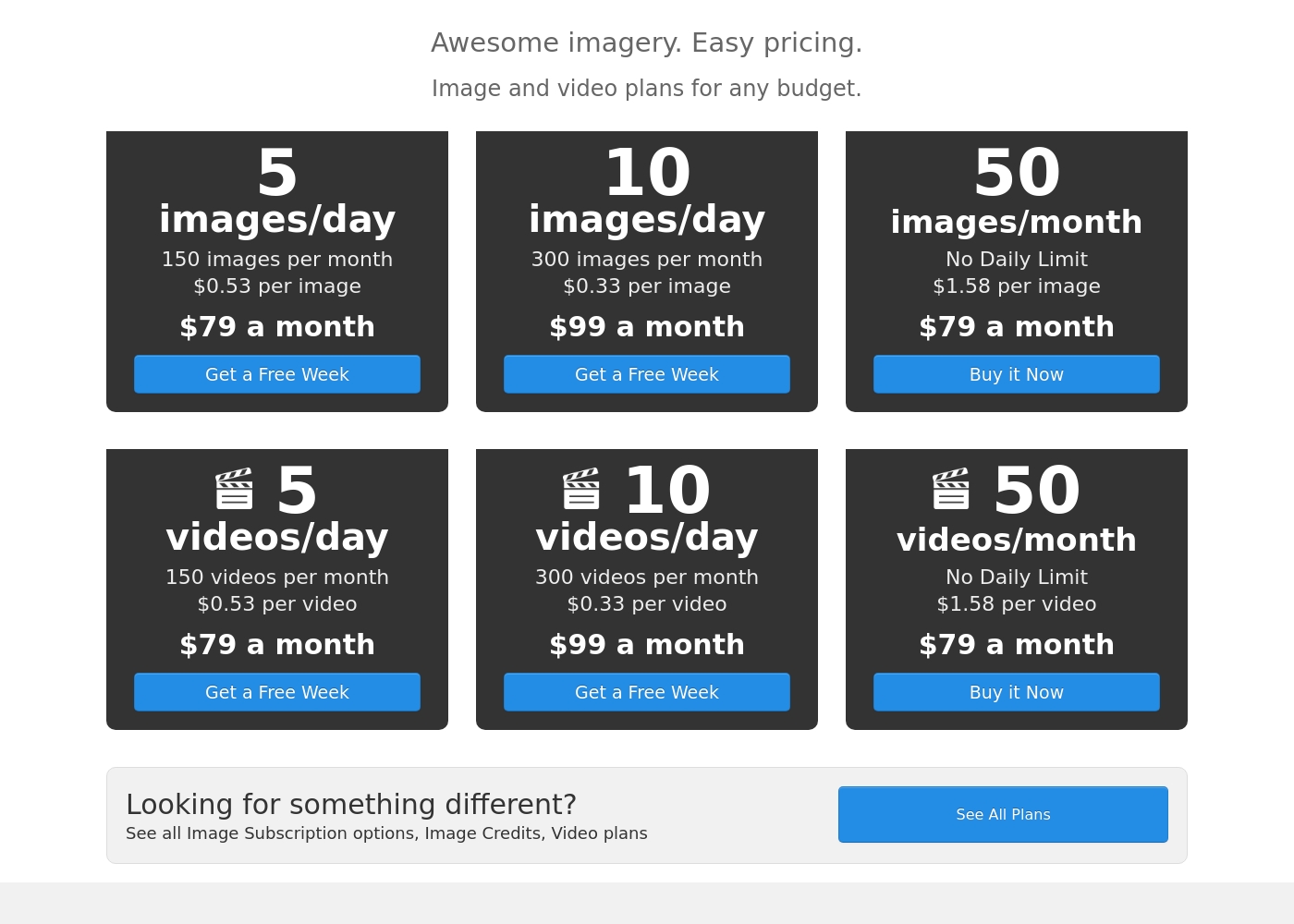
Bigstock costs between $79 and $99 per month with six plans: 5 images/day at $79, 10 images/day at $99, 50 images/month at $79, 5 videos/day at $79, 10 videos/day at $99, and 50 videos/month at $79.
Bigstock provides several popular subscription options tailored for both image and video content creators. These plans are identical in structure and price, letting you select the exact assets you need for your projects.
5 images/day (Most Popular)
Price: $79 a month Best For: Users needing consistent, daily image access Other Features:
- 150 images included per month
- Cost is about $0.53 per image
- Includes a free week trial
- Assets are provided under a royalty-free license
- 150 images per month
- $0.53 per image
- Get a Free Week Trial
- Royalty-free license
- 300 images per month
- $0.33 per image
- Get a Free Week Trial
- Includes vector files (AI or EPS)
- 50 images per month
- $1.58 per image
- No Daily Limit applies
- All sizes included (JPG, Vectors)
- 150 videos per month
- $0.53 per video
- Get a Free Week Trial
- Royalty-free license
While the Unsplash platform maintains a massive free library, the paid subscription unlocks exclusive features and content. Let's explore what Unsplash+ includes for individual creators.
Unsplash+
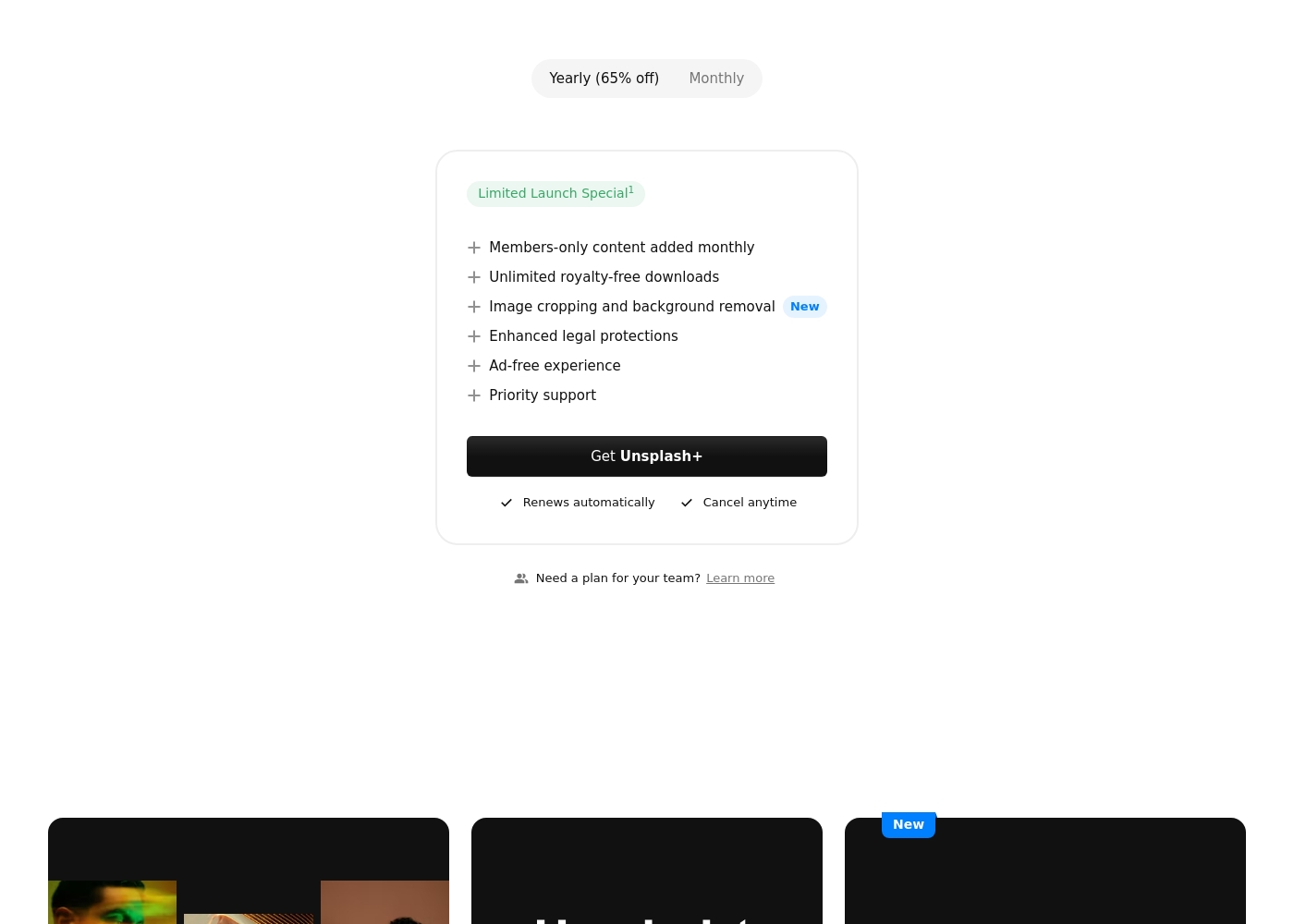
Best For: Individual creators needing enhanced legal protection and exclusive, unlimited stock content. Other Features:
- Members-only content added monthly
- Unlimited royalty-free downloads
- Image cropping and background removal
- Enhanced legal protections
- Ad-free experience
- Priority support
This subscription is designed for single users who frequently download stock images and require specialized content. If you prioritize solid legal protection and want access to powerful new tools like image cropping, Unsplash+ is a superb choice. Remember, this is a single seat license, meaning it is not intended for broad organizational sharing.
- Members-only content added monthly
- Unlimited royalty-free downloads
- Image cropping and background removal
- Enhanced legal protections
- Ad-free experience
Pricing Notes
- Bigstock offers dedicated plans for both images and video footage at the same price points ($79 or $99).
- Bigstock’s lowest cost per asset is $0.33 on the $99/month plan (300 assets included).
- Unsplash+ pricing is not publicly disclosed but advertises a significant discount for yearly billing.
- Unsplash+ offers unlimited downloads to a single user, making the cost per asset effectively zero for high-volume users.
- Bigstock users report severe post-trial billing issues and support refusal to provide refunds.
Pricing Head-to-Head
User Reviews
Bigstock holds a 3.5-star average on Trustpilot, but the user feedback is heavily polarized. A primary concern revolves around the cancellation process and billing accuracy, especially related to the 7-day free trial.
Many users report being charged the $79 monthly subscription even after canceling immediately or weeks in advance, leading to unexpected recurring charges for months. Reports of subsequent refusal to refund, often citing strict non-refundable terms, are common.
I thought I didn't cancel my free trial correctly and expected to be charged. I contacted them, and they immediately promised a full refund even though it was my fault. I was relieved and grateful for their quick service resolution.
Users praise Unsplash for its high-quality, professional images and amazing variety, confirming it is an easy-to-use, commercial-free source for content creators and artists. The satisfaction level decreases substantially among those who utilized the new paid subscription, Unsplash+.
Many long-time users feel that the platform broke its promise to remain entirely free, leading to a noticeable decline in the quality of the non-paid content. The most serious complaints target customer support and reliability: several users report being charged monthly for Unsplash+ despite having locked accounts or being unable to access downloads.
I’ve been using Unsplash for a while now, and it’s honestly my go-to for high-quality, free stock images. The variety is amazing, helping me find the perfect photo for blog posts or social media campaigns. Plus, the fact that it’s free makes it a total win.
Our Verdict
Are you willing to pay for certainty, or do you prefer free quality? Bigstock and Unsplash answer this question differently for every creator. Unsplash offers millions of free, stunning assets right away. Bigstock provides a robust paid subscription service with crucial utility. Decide based on your specific media needs and your available budget. Bigstock is the clear utility choice for production teams and high-volume users. Bigstock offers professional stock video footage and vector files (AI/EPS) in its system. Their $99 plan gives you 300 downloads monthly at a great per-asset cost. Teams needing diverse media types must rely heavily on Bigstock. Unsplash’s superpower is its phenomenal, free core image library. Individual creators get unlimited, beautiful stock photos at zero cost with Unsplash. Unsplash+ provides single users with enhanced legal protection and cool editing tools. Unsplash focuses purely on delivering inspiring, artistic photography easily. The deciding factor is media type and scalability versus budget. Choose Bigstock if you require video, vectors, or high-volume team usage. Pick Unsplash if your budget is zero and you only need still photographs. Bigstock has serious, recurring complaints about billing support. If you need utility and scale, pay careful attention when using Bigstock's service. For unlimited quality photos with low stress, the free Unsplash library wins every time. Unsplash offers better user sentiment despite some paid plan service faults.
Frequently Asked Questions
Which is truly free: Bigstock or Unsplash?
Unsplash provides millions of high-resolution images completely free for commercial use. Bigstock requires a paid monthly subscription starting at $79 per month. Bigstock only offers a free 7-day trial before automatically charging you. Unsplash is the default choice for budget-conscious creators.
Which platform includes stock video or vector files?
Bigstock explicitly offers dedicated plans for professional stock video footage starting at $79. Bigstock also includes vectors (AI/EPS formats) in its image subscription tiers. Unsplash focuses primarily on photos, images, and 3D Renders only.
Which is better for teams and large business scaling?
Bigstock is better suited for high-volume organizational use among teams. Bigstock offers usage plans providing up to 300 assets monthly. Unsplash+ is explicitly a single-user license and restricts sharing assets via DAM systems.
How does the legal protection compare between Bigstock and Unsplash?
Both Bigstock and Unsplash provide standard royalty-free licensing on all content. Unsplash+ enhances this with specific guarantees called Unsplash+ Protection. Bigstock provides a more general 'Worldwide Satisfaction Guaranteed' promise.
Does Unsplash offer specialized creative tools like Bigstock?
Unsplash+ provides subscribers with built-in creative tools for image preparation. These tools include easy background removal and image cropping abilities. Bigstock does not list any unique platform-specific image editing features.
What should I know about customer support and billing for Bigstock and Unsplash?
Bigstock users have filed widespread, severe complaints regarding unauthorized recurring charges. Unsplash also reports billing errors regarding its paid Unsplash+ service. Be extremely cautious and meticulously document all cancellation attempts for both Bigstock and Unsplash.
Ready to Choose?
Both tools have their strengths. Choose based on your specific needs.
