Bigstock vs Shade
Bigstock and Shade solve different problems entirely. One is your go-to stock media library, the other is a creative team's organized hub. Choosing between them depends on whether you need new assets or better management of your own.
Best for: Content marketers and bloggers needing regular new visuals, Designers seeking high-quality vectors and stock photos
Best for: Creative and marketing teams managing large file libraries, Video production teams handling 4K/8K footage
Affordable stock media with highly flexible plans.
We found that Bigstock offers competitive tiered pricing and flexible daily or monthly subscription models for both images and videos. Overall, users praise the selection and value, but we noticed serious, recurring concerns about confusing cancellation processes and unresponsive customer support that potential buyers must carefully review.
Pros
- Massive library of royalty-free images, vectors, and videos.
- Flexible pricing plans ($79–$99 per month) with daily or monthly limits.
- Offers high-value plans, reducing the cost per asset to $0.33.
- Includes vectors (AI or EPS) in high-volume subscription tiers.
Cons
- Frequent, severe complaints about unauthorized charges post-free trial cancellation.
- Customer support is often unresponsive to billing inquiries and refund requests.
- Users report difficulty logging in or accessing accounts to cancel memberships.
- Support frequently refuses refunds, citing non-refundable terms of service.
Smart search, but pricing is opaque.
We find Shade offers a compelling centralized hub for media teams, with standout AI search and intelligent file streaming. Overall, it's a strong workflow tool, but the lack of public pricing for team plans is a significant drawback for prospective buyers.
Pros
- All-in-one platform for storage, review, and approval
- Intelligent file streaming for fast access to large files
- Powerful AI search and automated metadata
- Secure archiving for long-term project storage
Cons
- Team and enterprise pricing is not publicly disclosed
- Requires a sales demo for detailed quotes and scalability
- Limited external review data for deep validation
AboutBigstock
Bigstock offers a wide library of Stock Photos, Images, Vectors, Stock Videos, and Footage. It's designed to provide "Images and Video for everyone." They focus on providing royalty-free media across a stunning array of top categories. This gives you plenty of legally safe options for any visual project you might be tackling. 💡
AboutShade
💡 Shade is an all-in-one platform for media storage and management. It's designed for creative and media teams who handle large files daily. It combines intelligent file streaming, review tools, and smart search in a single place.
Highlights
Feature Comparison
Features Overview
We highlight the main differences and pick a winner for each feature.
Core Function
Bigstock is a stock media library. Shade is a creative team's file manager.
Bigstock provides millions of new royalty-free images and videos. It's a source for fresh visual content for your projects. Shade is an all-in-one platform for teams to store, search, and share their own media files. It organizes existing assets, not new ones. The key difference is acquisition vs. management. Bigstock helps you get new content. Shade helps you find and use what you already have. For example, an agency needs new blog images (Bigstock). The same agency's design team needs to find a specific logo (Shade).
AI Search
Shade offers AI-powered search. Bigstock uses traditional keyword search.
Bigstock relies on traditional keyword and category search to find assets in its library. Shade uses AI to automatically generate metadata. This lets you find files with descriptive searches, even if you don't know the name. Shade's approach is smarter for large, personal libraries. Bigstock's search is fine for browsing a public catalog. If you manage thousands of files, Shade's AI saves real time. If you're browsing stock, Bigstock's filters work well.
File Handling
Shade streams large files instantly. Bigstock downloads files.
Bigstock provides standard file downloads in various sizes after purchase. Shade's intelligent file streaming lets you preview and work with massive 4K/8K files directly in your browser. No full download needed. This makes Shade superior for handling large video files. Bigstock is for acquiring standard-sized stock assets. A video editor can start reviewing a large project file instantly in Shade. In Bigstock, you download a stock clip.
Collaboration
Shade has built-in review tools. Bigstock is for individual use.
Bigstock is designed for individual creators or small teams to download assets. It lacks collaborative features. Shade includes built-in review and approval tools. Stakeholders can leave time-stamped comments directly on media. Shade is built for team workflows. Bigstock is a personal utility. A marketing team can get client approval on a video within Shade. Bigstock only provides the raw video clip.
Pricing Transparency
Bigstock has clear public pricing. Shade's pricing is custom.
Bigstock lists all plans clearly: $79-$99/month for images or videos. You know the cost upfront. Shade offers a free tier, but its paid 'Team/Enterprise' plan requires contacting sales for a custom quote. Bigstock's pricing is simpler to understand and compare. Shade's model is opaque until you talk to them. For budgeting, Bigstock is straightforward. For Shade, you need to engage their sales team.
Onboarding & Ease
Shade is noted for low learning curve. Bigstock is straightforward stock shopping.
Bigstock is a familiar stock site experience: search, preview, download. The process is simple. Reviews consistently praise Shade's intuitive interface. Teams can adopt it quickly without extensive training. Both are easy to use for their purposes. Shade's UI is frequently highlighted as a strength. A new team member can learn Shade's search in minutes. A new user can learn Bigstock's download process just as fast.
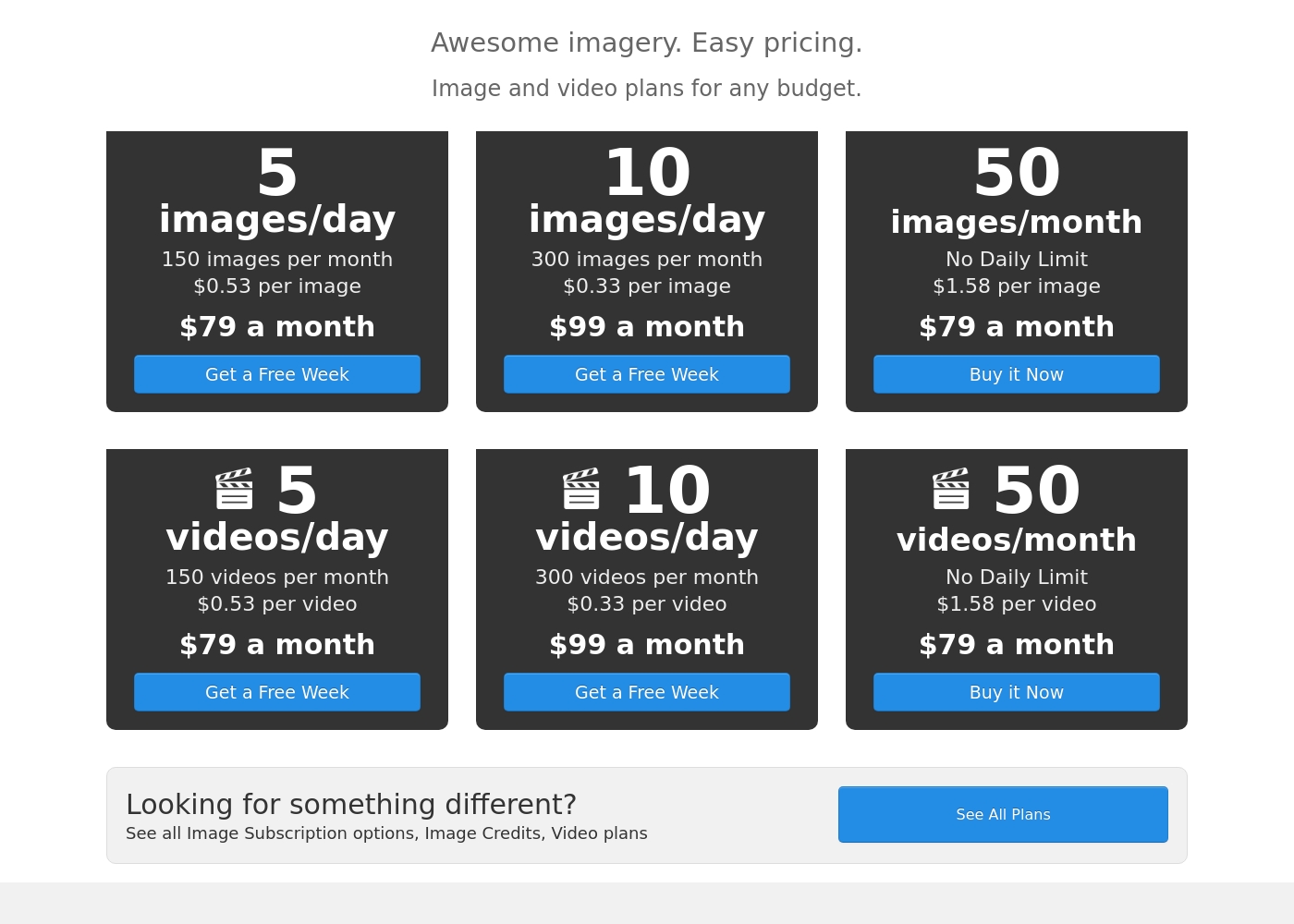
Bigstock costs between $79 and $99 per month with six plans: 5 images/day at $79, 10 images/day at $99, 50 images/month at $79, 5 videos/day at $79, 10 videos/day at $99, and 50 videos/month at $79.
Bigstock provides several popular subscription options tailored for both image and video content creators. These plans are identical in structure and price, letting you select the exact assets you need for your projects.
5 images/day (Most Popular)
Price: $79 a month Best For: Users needing consistent, daily image access Other Features:
- 150 images included per month
- Cost is about $0.53 per image
- Includes a free week trial
- Assets are provided under a royalty-free license
- 150 images per month
- $0.53 per image
- Get a Free Week Trial
- Royalty-free license
- 300 images per month
- $0.33 per image
- Get a Free Week Trial
- Includes vector files (AI or EPS)
- 50 images per month
- $1.58 per image
- No Daily Limit applies
- All sizes included (JPG, Vectors)
- 150 videos per month
- $0.53 per video
- Get a Free Week Trial
- Royalty-free license
Shade costs an undisclosed amount with at least 1 plan: Start for Free at $0.
Finding the right plan depends on your team's specific media storage and workflow needs.
Start for Free
Price: $0 Best For: Individuals or small teams exploring AI search Other Features: Intelligent file streaming, review and approval, automated metadata, AI search, media archiving
- Intelligent file streaming
- Review and approval
- Automated metadata
- AI search
- Archive
Pricing Notes
- Bigstock's pricing is transparent and public, with clear daily/monthly download limits.
- Shade's free plan has no explicitly stated limits, making it a true risk-free starting point.
- Bigstock's paid plans are for consuming new stock media. Shade's paid plans are for team features on your own media.
- The value comparison is apples-to-oranges: one buys content, the other buys a management tool.
Pricing Head-to-Head
User Reviews
Bigstock holds a 3.5-star average on Trustpilot, but the user feedback is heavily polarized. A primary concern revolves around the cancellation process and billing accuracy, especially related to the 7-day free trial.
Many users report being charged the $79 monthly subscription even after canceling immediately or weeks in advance, leading to unexpected recurring charges for months. Reports of subsequent refusal to refund, often citing strict non-refundable terms, are common.
I thought I didn't cancel my free trial correctly and expected to be charged. I contacted them, and they immediately promised a full refund even though it was my fault. I was relieved and grateful for their quick service resolution.
External reviews for Shade show a generally positive sentiment, though the sample size appears small. Users on Capterra highlight the platform's ease of use and its strong AI-powered search functionality, which helps teams quickly find files.
Some reviewers note that the onboarding process was smooth and the customer support was responsive. A few mentions point to the value of the centralized media hub for collaboration.
The AI search is a game-changer. We can locate any footage in seconds without digging through endless folders. It has saved our team so much time on projects.
Our Verdict
There's no single winner here. Bigstock and Shade solve completely different problems for creative people. Bigstock's superpower is its massive library of new, royalty-free content. You can find almost any image or video clip you need for a project. Plans start at $79/month. Shade's superpower is organizing and finding your *own* files. Its AI search and streaming tools save creative teams hours. It even has a free plan to start. The deciding factor is your need. Do you need to *acquire* new visual assets? Go with Bigstock. Do you need to *manage* and collaborate on the assets you already own? Choose Shade. For most individuals needing stock, Bigstock is the choice. For teams drowning in their own files, Shade is the smarter investment. Pick the tool that matches your specific pain point.
Frequently Asked Questions
Can I use Bigstock and Shade together?
Yes, absolutely. They serve complementary purposes. You can download new stock media from Bigstock. Then, you can upload and organize those files in Shade for your team to find and use later.
Which is cheaper, Bigstock or Shade?
Shade has a free plan, making it the cheaper starting point. Bigstock's plans start at $79/month. However, they buy different things: one buys stock content, the other buys a management platform.
Is Shade better for video teams than Bigstock?
Yes, for managing your own videos. Shade streams large files and has review tools. Bigstock is better for *purchasing* new stock video footage to use in your projects.
Does Bigstock have AI search like Shade?
No. Bigstock uses traditional keyword search for its stock library. Shade's AI search is designed to find files within your own uploaded media archives.
Which has better customer support?
Reviews for both are mixed. Bigstock has complaints about unresponsive billing support. Shade's support is frequently noted as slow. Neither has a stellar reputation for speed.
Can I get a refund from Bigstock if I don't like it?
Bigstock's refund policy is not clearly stated, though they mention 'Satisfaction Guaranteed.' Reviews show many users struggled to get refunds, especially after free trial charges. Document everything.
Ready to Choose?
Both tools have their strengths. Choose based on your specific needs.