AVS4YOU vs Vyond
AVS4YOU and Vyond are fundamentally different video tools solving unique problems. AVS4YOU is a permanent desktop multimedia editor focused on conversion and utility. Vyond is a cloud AI tool designed for instant, scalable animated video communication. Your choice depends entirely on your video type and working style requirements.
Best for: Individuals needing a reliable video conversion and utility toolkit, Users who require a strict one-time, low-cost purchase for software ownership
Best for: Learning and Development (L&D) teams creating training videos, Enterprise organizations needing secure, scalable, on-brand video production
Functional suite with restrictive licensing.
We assessed the AVS4YOU suite as a highly functional and simple solution for diverse multimedia editing and conversion needs. While the array of tools is excellent and priced competitively, we found the single-device licensing policy highly restrictive, especially for the popular “Unlimited Subscription.” Overall, the product delivers quality output but requires clearer communication regarding license portability.
Pros
- Excellent value for the comprehensive multimedia software suite.
- Software is highly versatile for video, audio, and conversion tasks.
- Simple, intuitive, and user-friendly interface design.
- Technical support staff is consistently praised for quick responses.
Cons
- The "Unlimited" license is strictly limited to a single PC/device.
- License transfer or reactivation is often complex after a computer crash.
- Software can become slow when processing very large video files.
- Screen capture feature sometimes records without accompanying audio.
Powerful AI. Scaling Content. Poor Support.
Vyond offers an industry-leading AI video creation platform perfect for scaling secure, on-brand content quickly, trusted by numerous Fortune 500 companies. However, we found recurring issues regarding customer support responsiveness and problematic changes to subscription terms, undermining value for individual users. Overall, Vyond is a powerful tool best suited for high-budget corporate teams needing secure, high-volume production.
Pros
- Industry-standard quality for animated and explainer content.
- Fast video creation using AI (Vyond Go) from simple prompts or URLs.
- Excellent speech synchronization and audio generation from text scripts.
- UI is perfect and the animation assets are deemed top-notch and beautiful.
Cons
- Limited or non-existent customer support; help relies heavily on automation.
- Unethical practices reported, including automatic renewals and forced plan upgrades.
- Frequent removal or capping of features (e.g., community forums, themes) for paying users.
- Limited or 'screwed' free trial experience (e.g., maximum of three videos).
AboutAVS4YOU
AVS4YOU is rightly called the “Ultimate multimedia editing family.” It is a collection of tools designed for anyone looking to produce high-quality video and audio content, and even more. Whether you need to convert files, trim a video, or apply engaging effects like Chroma key, this family of software has you covered. Users consistently highlight that it's very convenient, user friendly, and functional ✨.
AboutVyond
Vyond is the all-in-one AI video creation platform that helps teams generate effective videos from simple prompts in multiple styles. It includes Vyond Go, which instantly turns your idea, document, or URL into a video, and an instant editor or studio for quick tweaks. Thousands of businesses and millions of users rely on Vyond, and 65% of the Fortune 500 rely on Vyond. 🎬
Highlights
Feature Comparison
Features Overview
We highlight the main differences and pick a winner for each feature.
AI Video Generation
Vyond uses powerful AI to generate videos instantly; AVS4YOU requires full manual editing.
All video creation within AVS4YOU is based on manual editing of source footage or screen captures. You must cut, trim, and apply effects yourself. The Vyond Go feature converts simple text prompts, documents, or URLs into finished videos quickly. Vyond speeds up the initial video draft immensely. If speed and scalable content are key, Vyond's AI functionality is revolutionary. AVS4YOU offers a traditional software workflow. Vyond helps large teams pump out quick explainers, while AVS4YOU helps individuals polish specific clips.
Licensing & Cost
AVS4YOU offers a single, one-time lifetime purchase; Vyond uses recurring, per-seat subscriptions.
You can buy the AVS4YOU Unlimited Subscription for a low, one-time payment of $79. This grants permanent access and free upgrades. Vyond pricing is not publicly listed; it operates on a 'Per seat' model which implies high, recurring costs. Vyond targets Enterprise budgets. AVS4YOU is the clear budget and long-term value choice for individual users. However, the AVS4YOU license is tied rigidly to one PC only. Vyond’s cost demands high-volume, continuous usage to justify the required subscription fees.
Customer Support
AVS4YOU support is highly praised for being rapid and effective; Vyond support is notoriously poor and often automated.
AVS4YOU users consistently report prompt, effective service that quickly resolves technical issues. Customer service is seen as an asset. Reviewers widely criticize Vyond support, frequently reporting automated, generic responses instead. You rarely get accessible human help. For stability, reliability, and peace of mind, AVS4YOU wins easily in the support category. Vyond’s lack of support frustrates many loyal users. If you value human contact when a technical issue arises, AVS4YOU is the safer choice for reliability.
Platform & Access
AVS4YOU is restrictive Windows desktop software; Vyond is a flexible, any-OS cloud application.
AVS4YOU is a suite of dedicated Windows programs, meaning Mac users are fully excluded. It requires installation but functions without internet. Being cloud-based, Vyond works on any operating system, including Mac, via a web browser. Collaboration and sharing are seamless. AVS4YOU ownership is permanent but device-locked and Windows-only. Vyond is accessible everywhere but requires a constant expensive subscription. Vyond is better positioned for modern, geographically dispersed teams needing access flexibility.
Video Utility Functions
AVS4YOU excels at physical media creation and file conversion; Vyond focuses only on online animated output.
AVS4YOU includes tools to handle all key video formats and even create customized Blu-ray and DVD menus. It's a true utility suite. Vyond's core strength is generating animated presentation videos, not managing live video file formats or physical disc outputs. AVS4YOU also features a Video ReMaker tool that allows editing without time-consuming full reconversion. Vyond does not have this utility. If your workflow involves digitizing camcorder footage or preparing videos for specific devices, AVS4YOU is mandatory.
Target User
AVS4YOU is focused on general personal utility; Vyond targets corporate and enterprise teams needing scale.
AVS4YOU is marketed toward individuals wanting powerful but easy-to-use editing and conversion tools. Licensing reinforces the single-user focus. Vyond is used by 65% of the Fortune 500, designed for L&D, HR, and marketing teams. It offers strict enterprise security features. AVS4YOU is a personal toolbox for managing existing media. Vyond is a solution for generating high-volume, on-brand communication content. If you need collaboration tools or scalability across multiple departments, Vyond is the appropriate framework.
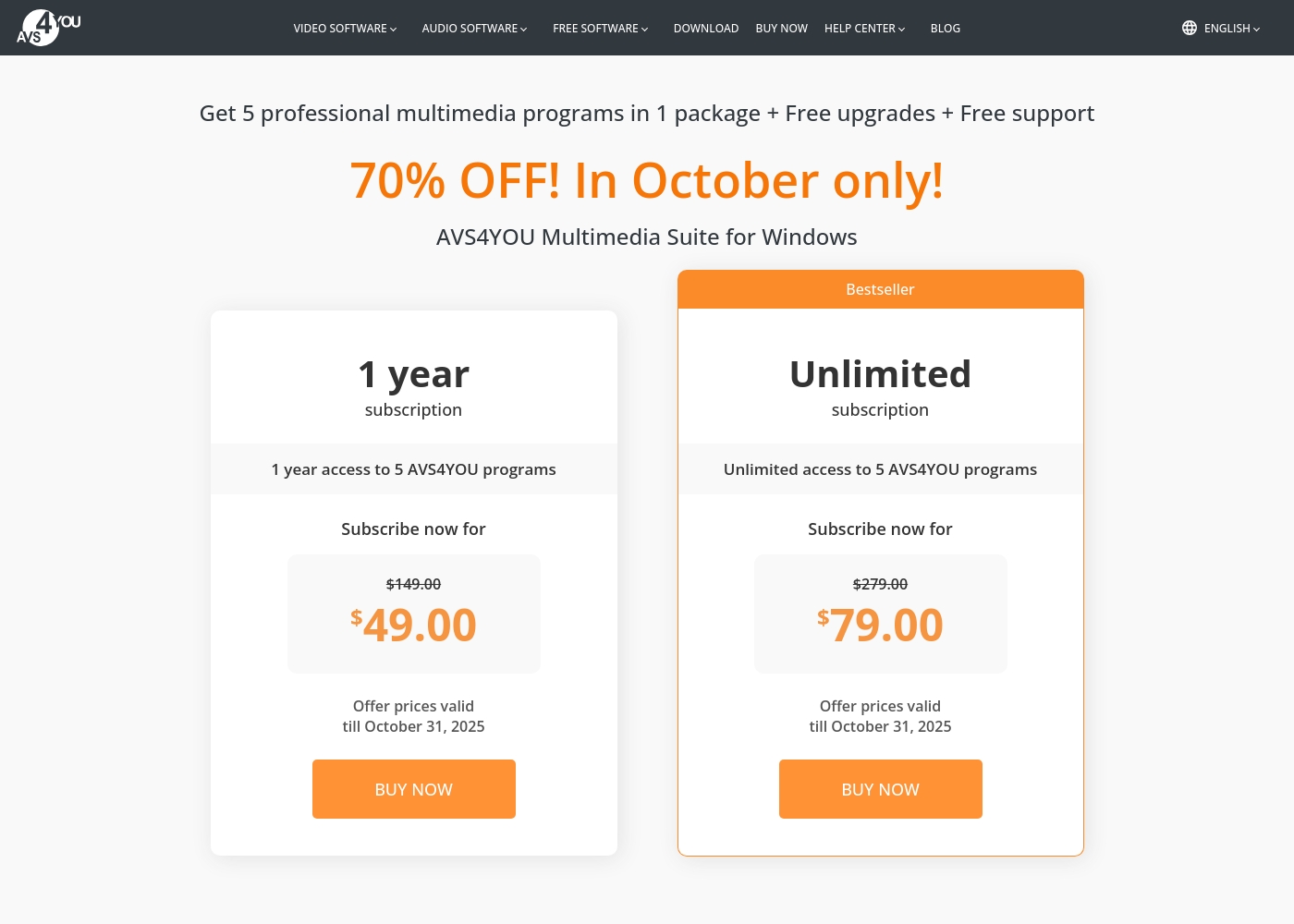
AVS4YOU costs between $49.00 and $79.00 per purchase with 2 main plans: 1 Year Subscription at $49.00/year and Unlimited Subscription at $79.00 one-time.
The simple pricing structure focuses on giving you total access to the AVS4YOU Multimedia Suite. Here is a breakdown of the two options currently available.
1 Year Subscription
Price: $49.00 per year (discounted from $149.00) Best For: Users who want flexibility or prefer annual budgeting Refund Policy: 30-day money-back guarantee Other Features:
- 1 year access to 5 AVS4YOU programs
- Includes free upgrades and free support
- No watermark on output files while active
- 1 year access to 5 AVS4YOU programs
- Free upgrades
- Free support
- One license key per computer
- Unlimited lifetime access to 5 AVS4YOU programs
- One-time payment (no yearly renewals)
- Free upgrades for programs
- Free support
- Bestseller
You can explore Vyond's flexible options tailored to individual users and large organizations through these principal offerings.
Free Trial
Best For: Users wanting to test the platform's diverse video creation tools. Other Features:
- Instant, effortless video creation
- Access to AI avatars and Gen AI features
- Use of the comprehensive template library
- Ability to convert URLs or documents into video (Vyond Go)
If you're new to Vyond, starting with the free trial is the perfect way to explore its unique features without commitment. This allows you to evaluate practical tools like the instant editor and test Vyond Go's powerful text-to-video conversion before settling on a paid plan.
- Instant, effortless video for everyone
- Access to AI avatars, Gen AI, and Photorealistic styles
- Screen recording and mobile capture tools
- Instant creation using Vyond Go (text, document, or URL conversion)
- Efficiently create on-brand content at scale
- Complete privacy and security
- Supports rigorous security requirements of enterprise organizations

Pricing Notes
- AVS4YOU offers unparalleled long-term value with its $79 Unlimited plan for permanent access.
- The AVS4YOU Unlimited license is strictly limited to one PC, which is a major drawback for modern users.
- Vyond’s specific pricing is opaque for standard tiers, requiring sales contact for accurate subscription costs.
- Vyond reviews indicate high, recurring costs, whereas AVS4YOU’s price is transparent and often discounted.
- AVS4YOU provides a 30-day money-back guarantee for initial risk-free evaluation.
Pricing Head-to-Head
User Reviews
Users generally recommend AVS4YOU for its user-friendly interface and reliable functionality across a comprehensive suite of multimedia tools. Reviewers frequently emphasize the software's excellent versatility for tasks like video editing, audio conversion, and DVD copying, stressing that it offers exceptional value for the price point.
The technical support team also receives high praise for its accessibility, promptness, and effectiveness in quickly resolving various technical issues. Many long-time customers affirm that the company consistently updates its software, honoring its commitments over many years.
I am a long time user of both AVS VIDEO and AUDIO editors. These tools are remarkably easy to use and produce high quality content with minimal effort! I recommend the full suite highly.
Vyond faces a highly polarized reception, reflecting an extreme split between feature satisfaction and corporate practices. Many users praise the core animation tool, noting its industry-standard quality, ideal speech synchronization, and the simple creation of explainer videos quickly.
They appreciate the robust library of ready-to-use character assets, making the platform fantastic for increasing marketing engagement. However, the negative sentiment, particularly on Trustpilot (where the score is 2.0), focuses heavily on pricing and support.
There’s a wonderful selection of ready-to-use characters and environments to get started quickly. The animations are top-notch, and incorporating a text script for generated audio is effortless. I am really happy with this tool overall.
Our Verdict
Selecting between AVS4YOU and Vyond is not a matter of quality, but which video job you need done. AVS4YOU is a low-cost, permanent utility suite for desktop video management. Vyond is a dynamic, high-volume animation platform driven by powerful artificial intelligence. AVS4YOU’s greatest strength is its unmatched individual value and comprehensive utility. For a one-time $79 purchase, AVS4YOU gives you five tools, including an editor and converter. If you handle live footage, need easy file conversion, and require Blu-ray creation, AVS4YOU is perfect. Plus, AVS4YOU guarantees highly-rated, responsive support when you need help. Vyond dominates the creation of instant, scalable animated content for large teams. Vyond Go instantly creates videos from text or documents using advanced AI. Vyond is the ideal system for L&D, HR, and marketing teams scaling on-brand communications. Its Enterprise tier handles high volume necessities. The key trade-off is licensing and customer experience. AVS4YOU is cheap but rigidly desktop-locked to one computer, a limitation frustrating many users. Vyond is powerful in the cloud but comes with high, opaque costs and notoriously poor customer support. Final verdict: Pick AVS4YOU if you are a Windows user seeking a permanent, low-cost replacement for video utility software. Choose Vyond if you are a corporate team using animated visuals to rapidly train or communicate at scale.
Frequently Asked Questions
Which is better for small teams: AVS4YOU or Vyond?
Vyond is explicitly designed for team creation, collaboration, and cloud access. AVS4YOU is restricted to a single user on one Windows PC. Vyond allows multiple team members to access assets and scale production easily.
Does AVS4YOU offer AI video generation like Vyond Go?
No. AVS4YOU relies on traditional desktop editing processes to create and modify videos. Vyond excels because Vyond Go transforms documents or prompts directly into functional animated video drafts.
Is Vyond worth the extra potential cost over AVS4YOU?
If you need scalable, secure, animated content generation, Vyond is worth the investment. AVS4YOU gives better long-term value for utility but cannot generate AI animation. The cost reflects the move from individual utility software to an enterprise platform.
Can I use AVS4YOU on a Mac or other non-Windows device?
No, the AVS4YOU Multimedia Suite is strictly designed for Windows operating systems only. Vyond is a cloud-based application that can be accessed and used on any operating system, including Mac.
Which tool is best for converting live video file formats?
AVS4YOU is specifically designed for file conversion and handles all key video formats easily. Vyond focuses on generating animated output rather than managing diverse live video file types. AVS4YOU includes GPU acceleration for speed.
Which software has safer or more flexible licensing?
AVS4YOU offers permanent ownership for a one-time fee, which is great long-term value. However, the AVS4YOU license is tied strictly to one computer. Vyond uses flexible cloud-based subscription access.
Ready to Choose?
Both tools have their strengths. Choose based on your specific needs.