Auphonic vs Software B
Auphonic uses powerful AI to automate post-production, saving massive production time. Soundop Audio Editor offers maximum manual control in a comprehensive Windows desktop DAW. Choosing between them means picking hands-off consistency versus hands-on precision.
Automated sound engineering for pros.
We found Auphonic provides a robust, AI-driven solution for achieving consistent broadcast quality across various media types, supported by features like advanced leveling and noise reduction. Overall, we recommend Auphonic for creators and professionals needing reliable, automated post-production workflow.
Pros
- Trusted by 1M+ users for reliable, professional audio quality.
- Highly effective noise and reverb reduction features (complete and correct elimination).
- Intuitive design and easy user interface.
- Flexible processing time options (permanent free plan, recurring, and one-time credits).
Cons
- Processing speed can be slow according to external user feedback.
- Pricing tiers are based on credits; official currency costs are not published upfront.
- Recurring monthly credits do not roll over.
Pros
Cons
AboutAuphonic
Auphonic is designed to be your dedicated AI sound engineer ✨. It handles the post-production work for many different types of media files. This smart service specifically supports processing for audiobooks, radio broadcasts, and educational videos. If you are a podcaster, this tool can easily simplify your entire production workflow. It combines powerful intelligence with ease of use to deliver professional sound every time.
AboutSoftware B
Highlights
Feature Comparison
Features Overview
We highlight the main differences and pick a winner for each feature.
Core Workflow
Auphonic focuses on powerful automation; Soundop Audio Editor demands deep manual input.
Auphonic is designed as an AI sound engineer for simplifying post-production. You upload raw files, and Auphonic handles the technical cleanup automatically. Auphonic is perfect for linear content like podcasts and audiobooks. Soundop Audio Editor functions as a traditional, professional desktop Digital Audio Workstation (DAW). It provides tools for recording, editing, and mixing with maximum user control. Soundop Audio Editor requires the user to manage every processing step. If speed and consistency are your priority, choose Auphonic. If you require deep, hands-on control over your mix, Soundop Audio Editor is necessary. The choice depends entirely on your production style. Use Auphonic to process your weekly podcast to broadcast specs in minutes. Use Soundop Audio Editor to mix a 60-track music piece using VST plugins.
Loudness Automation
Auphonic automatically guarantees compliance; Soundop Audio Editor requires manual or plugin configuration.
Auphonic uses its Intelligent Leveler to provide consistent volume throughout your files. It automatically adheres to professional loudness standards for various platforms. This automation ensures broadcast quality with zero effort. Soundop Audio Editor supports high-fidelity audio but leaves loudness standards to the user. You must apply normalization and compression manually within the multitrack editor. You will need VST plugins to achieve automatic loudness compliance in Soundop Audio Editor. Auphonic saves you significant compliance time and complexity. Soundop Audio Editor provides the building blocks but demands the user's expertise. Auphonic is clearly superior for consistent loudness standards. This is crucial for podcasters who must meet specific platform requirements like Spotify or Apple Podcasts standards.
Pricing Structure
Auphonic uses consumable credits; Soundop Audio Editor offers a powerful one-time purchase option.
Auphonic bills based on processed audio duration using credit bundles or recurring monthly credits. Costs fluctuate based on the volume of audio you finish each month. Unused recurring credits on Auphonic do not roll over. Soundop Audio Editor offers maximum value via its $99 Perpetual License with Lifetime Updates. Once purchased, you own the full software suite permanently. Soundop Audio Editor also offers highly affordable annual plans at about $2.99 per month. Soundop Audio Editor is far more economical if you expect heavy, long-term audio engineering use. Auphonic works better for variable workloads or users prioritizing automation. If you are processing 5+ hours of audio monthly for years, the Soundop Audio Editor lifetime purchase will save you much money.
Detailed Audio Control
Soundop Audio Editor allows spectral editing; Auphonic processes the entire file with AI.
Soundop Audio Editor features precise spectral editing and sample-level waveform control. This allows surgical removal of clicks, hums, or specific noise artifacts visually. Users can record audio up to 24-bit precision and 192 kHz sample rate. Auphonic applies global AI algorithms like Intelligent Leveling and broad noise reduction. You choose the flavor of processing, but Auphonic controls the underlying execution. You don’t get access to the spectral or sample-level editing views. For detailed correction or complex mastering, Soundop Audio Editor is non-negotiable. Auphonic focuses solely on consistent, fast, automated results. Soundop Audio Editor gives professional editors the control they demand. Soundop Audio Editor is ideal when you need to specifically fix a door slam mid-interview without affecting other frequencies.
Integration & Platform
Auphonic integrates with cloud storage; Soundop Audio Editor utilizes VST plugins locally.
Auphonic is cloud-based and integrates seamlessly with SFTP, Dropbox, and Google Drive. Paid plans support Watch Folders for automation based on file uploads. Auphonic runs on any operating system via a web browser. Soundop Audio Editor is strictly a Windows desktop application. Audio engineers gain massive flexibility through VST and VST3 plugin support. The Soundop Audio Editor mixing system fully supports external plugin automation. Auphonic is better for decentralized teams and integrated upload workflows. Soundop Audio Editor is necessary for those who rely heavily on plugins and local power. Auphonic handles file transfer efficiency globally. If your workflow uses specific third-party EQ or reverb plugins, VST support in Soundop Audio Editor is essential.
Creative Automation
Auphonic generates metadata and chapters; Soundop Audio Editor offers better technical batch processing.
Auphonic utilizes multilingual speech recognition in paid plans. This generates automatic shownotes and chapter markers for content creators. Auphonic's Watch Folders automate the processing pipeline when new files appear. Soundop Audio Editor excels at technical automation like concurrent batch processing of folders. It can apply normalization and format conversion across thousands of files quickly. Soundop Audio Editor can also generate speech from text. Auphonic's automation focuses on simplifying the final steps for podcasters and content distributors. Soundop Audio Editor streamlines bulk file preparation. Auphonic wins for automating creative content delivery. Example: Auphonic makes generating podcast chapters simple after processing the final audio file.
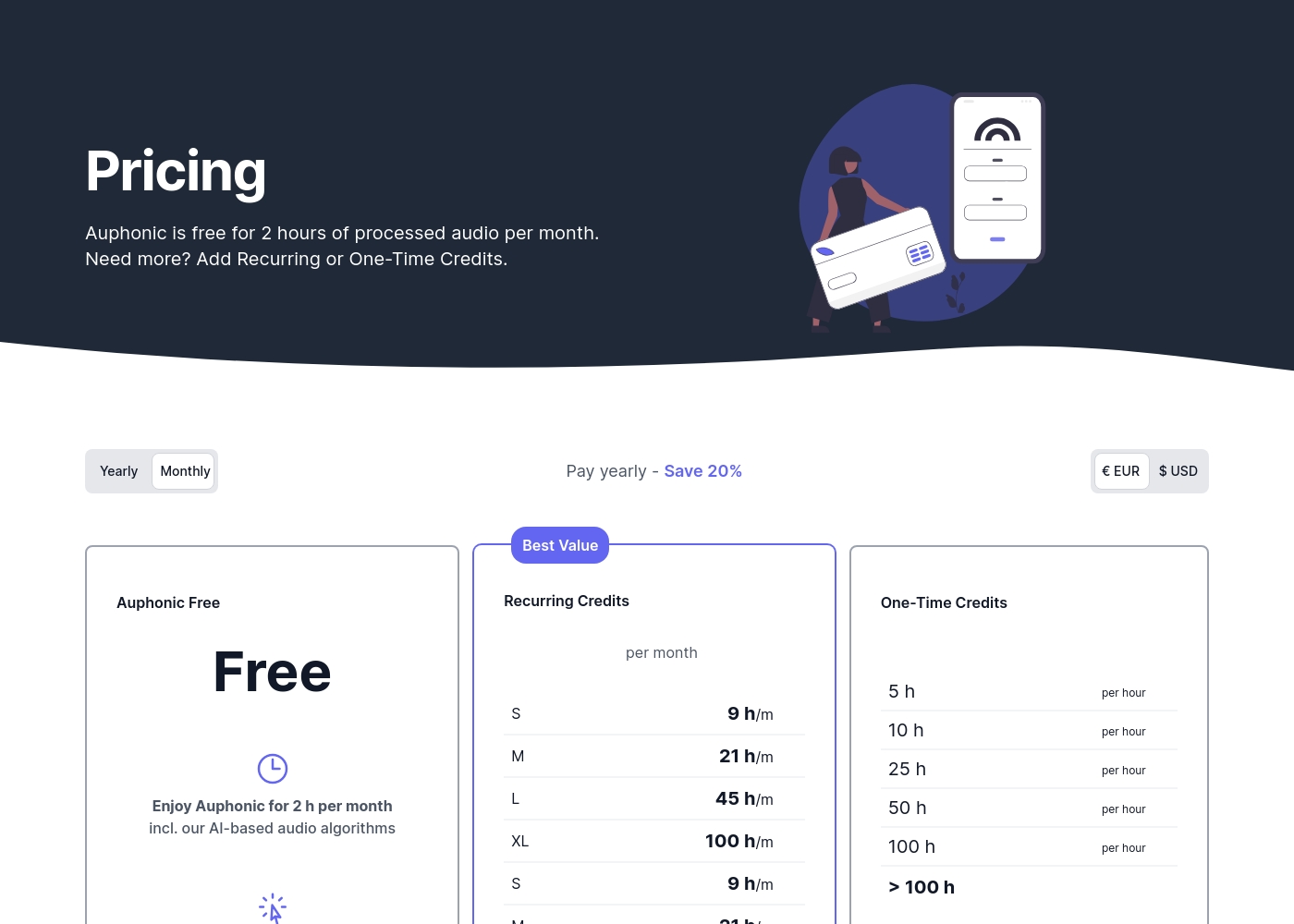
Auphonic costs are based on processing credits, offering a Free plan up to 2 hours per month, or flexible Recurring and One-Time Credit bundles where prices are not explicitly stated.
Now let's review the details for these credit options and available features.
Auphonic Free
Price: Free Websites Supported: Not explicitly stated Best For: Exploring the core features and processing limited, occasional content. Refund Policy: Not explicitly stated Other Features: Intelligent Leveler, Noise & Reverb Reduction, 2 hours of processed audio per month, production includes Auphonic jingle.
- 2 hours of processed audio per month
- AI-based audio algorithms
- Intelligent Leveler
- Noise & Reverb Reduction
- Loudness specifications
- Full access to advanced workflow features
- Standard support
- Multilingual speech recognition
- Automatic shownotes and chapters
- Watch folders
Pricing Notes
- Auphonic pricing is credit-based, calculated strictly by the duration of the processed output audio.
- Soundop Audio Editor offers outstanding long-term value with a $99 one-time Perpetual License.
- Auphonic offers a permanent Free plan with 2 hours of processing time monthly, acting as a trial.
- Auphonic recurring credits (Monthly Plan) do not roll over; unused time is lost each month.
- Soundop Audio Editor annual plans average out to a very affordable rate of $2.99 per month.
Pricing Head-to-Head
User Reviews
While Auphonic is trusted by over a million users, available external user feedback is currently summarized by a single 5-star review found on Trustpilot. This reviewer offered strong praise, confirming the service delivers exactly what they needed.
The primary sentiment centered on ease of use, describing the interface as intuitive and simple. Crucially, the reviewer confirmed the high effectiveness of the core noise reduction technology: it eliminates background audio noise completely and correctly.
This tool was exactly what I needed. It functions very well and is genuinely intuitive to use. It manages to completely and correctly eliminate background sound.
Our Verdict
Choosing between Auphonic and Soundop Audio Editor is choosing between automation and comprehensive control. If your goal is lightning-fast consistency for podcasts, Auphonic is the winner. It automates leveling, noise reduction, and even creates shownotes instantly. This AI workflow is a massive time saver for regular content creators. Auphonic's superpower is making professional quality accessible and reproducible effortlessly. It handles all the technical standards required for broadcast without manual intervention. Your raw audio goes in, and broadcast-ready audio comes out, every time. Soundop Audio Editor shines where manual precision and complexity are paramount. It offers unlimited tracks, VST support, and critical spectral editing for surgical noise removal. The Soundop Audio Editor Perpetual License provides immense long-term value for serious producers. The deciding factor is your need for control versus speed. If you need a fully-featured DAW for complex music mixing, Soundop Audio Editor is the only choice. If you primarily produce spoken word content and value efficiency, you must choose Auphonic. Pick Auphonic if you process audio weekly and hate manual post-production. Choose Soundop Audio Editor if you rely on VST plugins and need precise control over every single audio sample.
Frequently Asked Questions
Which tool is better for professional music mixing: Auphonic or Soundop Audio Editor?
Soundop Audio Editor is vastly better for music mixing professionals. It supports unlimited tracks, VST plugins, and complex routing like side-chaining. Auphonic focuses on automated post-production for linear content.
Does Auphonic support VST plugins like Soundop Audio Editor does?
No, Auphonic is a cloud-based automated processing service and does not support VST plugins. Soundop Audio Editor is a desktop DAW offering full VST/VST3 compatibility for effects chains. If you use external plugins, you must choose Soundop Audio Editor.
Which software offers better long-term monetary value?
Soundop Audio Editor offers a $99 one-time Perpetual License with lifetime updates. This provides superior value for heavy, long-term users. Auphonic uses a credit system, meaning costs scale perpetually with your monthly usage volume.
Can I perform precise spectral editing in Auphonic?
No, Auphonic processes audio using global AI algorithms like Intelligent Leveler. Soundop Audio Editor allows detailed, precise spectral editing, letting you visually fix specific audio problems. Spectral editing is a key feature missing in Auphonic.
How do Auphonic's credits work compared to Soundop Audio Editor's licensing?
Auphonic charges credits based on the length of the processed audio output. Soundop Audio Editor licenses are for the software itself, granting unlimited local use once purchased. Your usage volume directly impacts Auphonic's cost.
Which tool is easier to use for beginners interested in clean audio?
Auphonic is much easier for beginners because the AI handles sound cleanup automatically. You upload your raw file and receive a professionally mastered result. Soundop Audio Editor requires significant audio engineering knowledge.
Ready to Choose?
Both tools have their strengths. Choose based on your specific needs.