Assembly vs PandaDoc
Assembly and PandaDoc solve very different business headaches. Assembly is a client portal for service firms, while PandaDoc is a document powerhouse for sales teams. The right pick depends on whether you need to manage relationships or close deals faster.
Best for: Accounting, law, and consulting firms seeking a unified client hub., Marketing and creative agencies wanting a branded client portal.
Best for: Sales teams creating high-volume proposals, Operations teams managing contract lifecycles
Solid all-in-one client portal
Overall, we find Assembly to be a strong, user-friendly platform for professional firms aiming to centralize client management and present a polished brand. It delivers on its core promise of a modern portal but may require consideration for specific integration needs or advanced customization.
Pros
- Intuitive, modern interface that is easy for clients and staff to navigate.
- Comprehensive all-in-one platform replacing scattered emails, files, and invoices.
- Strong branding and white-labeling options, especially on higher-tier plans.
- Includes key features like invoicing, messaging, and eSignatures without add-ons.
Cons
- Pricing escalates significantly for team seats and advanced features like HIPAA.
- Some users report navigation friction or layout issues when accessing specific features under time pressure.
- Integration options may require setup work if your specific software isn't listed.
- Not ideal for very simple or infrequent client interactions due to pricing structure.
Fast document creation meets essential e-signature.
We find PandaDoc excels at creating professional, high-impact sales proposals and contracts that speed up the entire signature process. Users report unmatched ease of use and significant time savings through powerful template automation. Overall, it is a highly efficient document tool, though teams should meticulously track subscription details and potential support delays.
Pros
- Extremely user-friendly and highly intuitive interface.
- Fast, reliable e-signing process and real-time document tracking.
- Powerful templates and editing save significant time (up to 92% reduction).
- Strong integration capabilities, especially with major CRM systems.
Cons
- Inconsistent customer support responsiveness for urgent issues.
- Reports of confusing billing and unexpected large usage charges.
- Minor technical stability issues (e.g., elements shifting position in documents).
AboutAssembly
💡 Assembly is a client portal and back-office platform for professional service firms. It's built for businesses in accounting, law, marketing, real estate, and tech. The goal is to replace clutter with a single, client-friendly hub.
AboutPandaDoc
PandaDoc is a top-rated, comprehensive agreement management solution. Think of it as a 360-degree tool designed to handle every step of the document lifecycle. It's built for teams who need to create, manage, track, and ultimately eSign agreements seamlessly. 💡
This solution is trusted to be safe, secure, and legally binding. It is E-SIGN, UETA, and HIPAA compliant, and it boasts SOC 2 certification. The platform provides robust security using SSO and a powerful API for granular control over permissions and workspaces, so your sensitive data stays protected.
Highlights
Feature Comparison
Features Overview
We highlight the main differences and pick a winner for each feature.
User Interface
Both tools prioritize ease of use but for different tasks. Assembly's UI is a clean client portal, while PandaDoc's is a powerful document editor.
Assembly offers a modern, intuitive interface designed for clients and staff to navigate easily. It centralizes communication, files, and billing in one branded hub. PandaDoc features an extremely user-friendly drag-and-drop editor. Users praise its simplicity for creating professional, custom documents quickly. The key difference is focus: Assembly's UI is for relationship management, PandaDoc's is for document creation speed. For a firm wanting to impress clients, Assembly's clean portal wins. For a sales team cranking out proposals, PandaDoc's editor is unmatched.
Document Creation
PandaDoc is a dedicated document machine. Assembly includes proposals and contracts as part of its broader platform.
Assembly provides essential proposal and contract features within its all-in-one platform. It's good for standard service agreements and client onboarding. PandaDoc offers a rich-media editor with CPQ (Configure, Price, Quote) for automated sales quotes. It reports a 92% reduction in proposal creation time. PandaDoc is the clear specialist here with advanced templates, variables, and content libraries for high-volume document needs. If your main goal is to create complex, branded sales proposals, PandaDoc is the more powerful tool.
eSignature Workflow
Both provide legally binding eSignatures. PandaDoc emphasizes speed and scale, while Assembly integrates it into client onboarding.
Assembly includes eSignatures as a built-in feature for contracts and agreements. It's part of streamlining the client experience from start to finish. PandaDoc claims its eSign process is 46x faster than alternatives. It supports signing groups, recipient verification, and notarization for complex deals. For occasional client contracts, Assembly's included feature is sufficient. For sales teams needing rapid, high-volume signatures, PandaDoc's specialized engine is superior.
Client Management
Assembly is built for this. PandaDoc offers deal rooms for internal team collaboration on documents.
Assembly's core is a client portal and CRM. It gives your team a single view of every interaction, contract, and invoice for each client. PandaDoc focuses on document-centric collaboration with Deal Rooms and Workspaces. It's for internal teams to collaborate on documents, not for managing external client relationships. Assembly is the definitive winner for managing ongoing client relationships. PandaDoc is for managing document workflows within your company.
Automation & Integrations
PandaDoc offers deeper native automation for documents. Assembly connects via API and Zapier for broader workflow automation.
Assembly provides API access and Zapier/Make integrations on the Professional plan. This connects your portal to tools like accounting or project management software. PandaDoc offers native CRM integrations (like HubSpot) and advanced workflow automation. Its API allows for granular control over document creation and permissions. PandaDoc has more powerful document-specific automation. Assembly offers more flexibility to integrate with your existing tech stack.
Pricing Value
PandaDoc offers a free plan and lower entry points. Assembly's value is in replacing multiple tools for service firms.
PandaDoc has a free plan (60 docs/year) and starts at $9/month. Per-seat pricing kicks in at $19/month for unlimited documents. Assembly starts at $39/month for up to 50 clients. Higher tiers add team seats and features like HIPAA compliance. For pure document needs, PandaDoc is more affordable. For firms needing a portal, CRM, and invoicing, Assembly replaces several tools, which can be better value.
Customer Support
User reviews highlight mixed experiences with support for both tools, especially for urgent issues.
Assembly offers tiered support, from standard to a dedicated success manager on Enterprise. Users praise its responsiveness but note occasional friction. PandaDoc provides 24/7 email and chat on all plans. However, reviews frequently mention slow or inconsistent support for urgent billing or technical issues. Neither tool has perfect support reviews. PandaDoc's 24/7 access is a plus, but its responsiveness is a noted concern among users.
Security & Compliance
Both are secure and compliant, but Assembly offers specific HIPAA plans for healthcare.
Assembly provides SOC2 compliance and HIPAA compliance with a BAA on the Advanced plan. This is critical for healthcare, legal, or financial firms. PandaDoc is SOC2 certified and compliant with E-SIGN, UETA, and HIPAA. It offers data residency options in the US or EU. Both are strong. Assembly's explicit HIPAA BAA is a key differentiator for regulated industries. PandaDoc's compliance is broader for general business use.
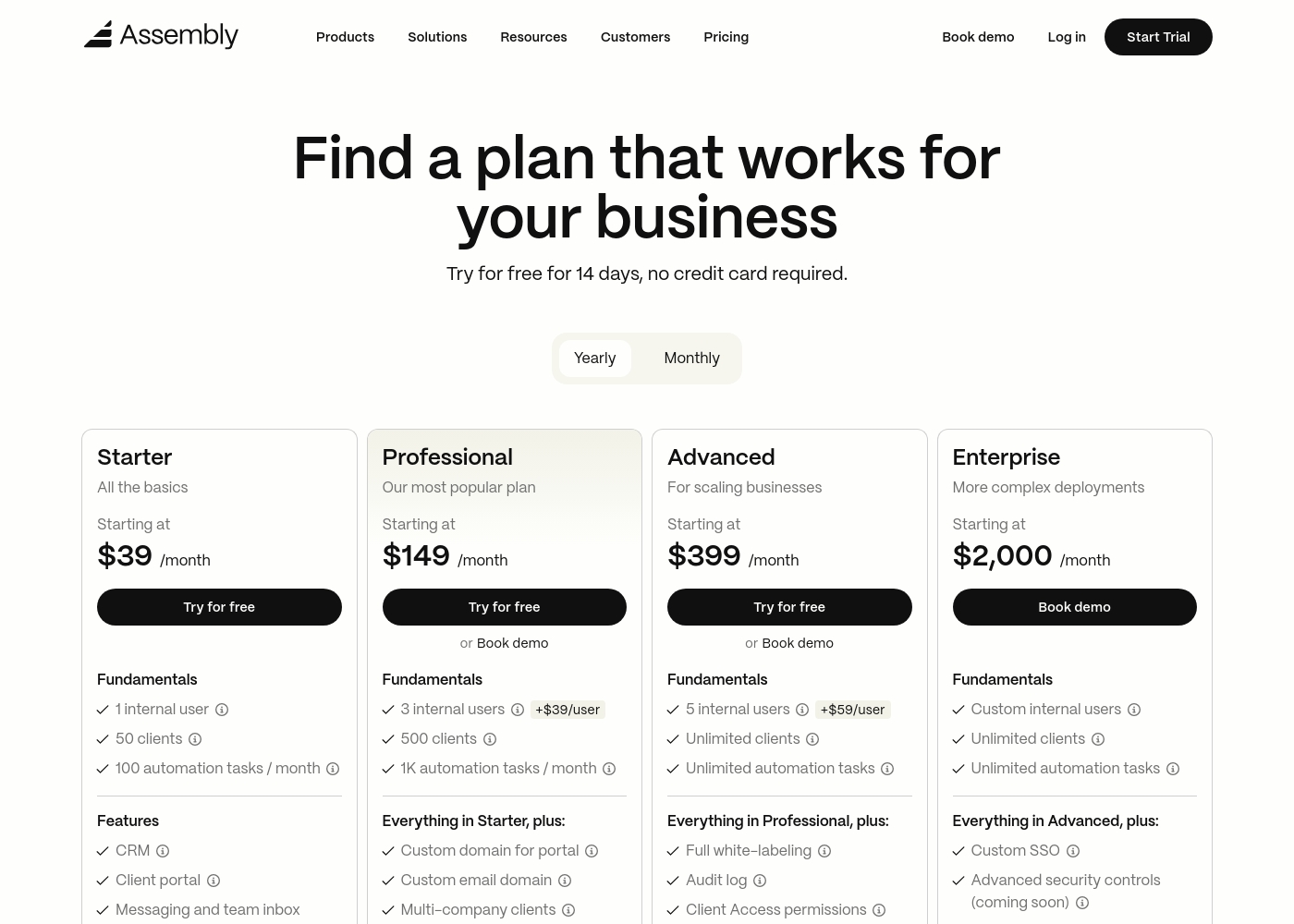
Assembly costs between $39 and $2,000 per month with 4 plans: Starter at $39, Professional at $149, Advanced at $399, and Enterprise at $2,000.
Take a look at the feature breakdown for each tier below.
Starter
Price: $39 / month Best For: Solo entrepreneurs and small service providers Refund Policy: 30-day satisfaction guarantee Other Features: CRM, white-labeled client portal, messaging, invoicing, and task management.
- CRM
- Client portal
- Messaging & inbox
- Invoices & pay links
- Proposals & contracts
- Custom domain
- API & Zapier/Make
- Multi-company clients
- Low payment fees
- Full white-labeling
- Audit log
- HIPAA compliance
- Client access permissions
- Custom SSO
- Sandbox workspace
- Dedicated success manager
- Technical advisor
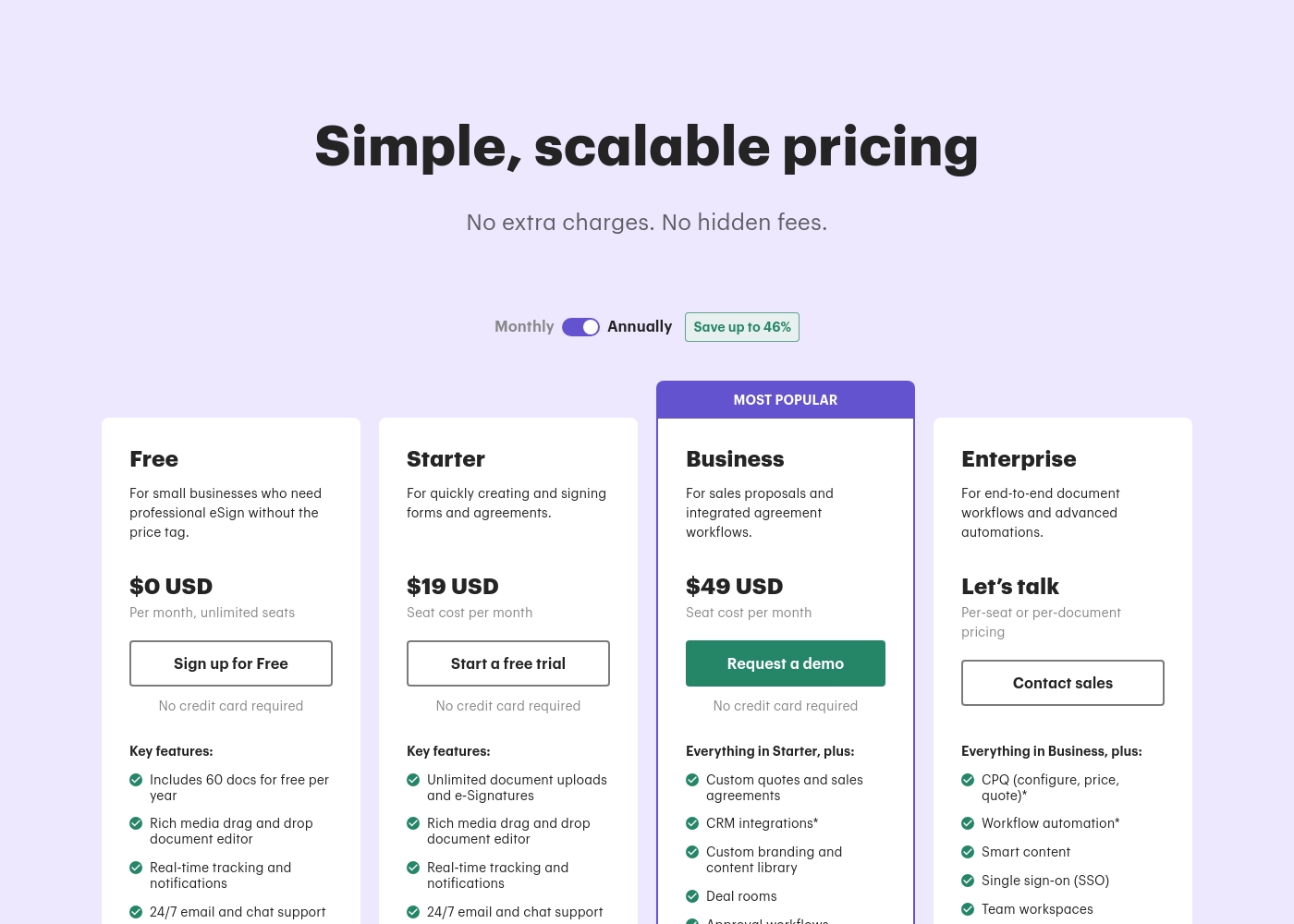
PandaDoc costs between $0 and $49 per month with five plans: Free at $0/month, Launch at $9/month, Starter at $19/seat/month, Business at $49/seat/month, and Enterprise (Custom Pricing).
PandaDoc offers simple, scalable pricing with no extra charges or hidden fees. Prices shown reflect the rate when billed annually, which offers significant savings. Let's look closer at the options available.
Free
Price: $0 USD Per month, unlimited seats Best For: Small businesses who need professional e-signatures without the price tag Other Features:
- Includes 60 documents for free per year
- Rich media drag and drop document editor
- Real-time tracking and notifications
- 24/7 email and chat support
- Includes 60 docs per year
- Rich media document editor
- Real-time tracking and notifications
- 24/7 email and chat support
- Unlimited seats
- Pay-as-you-go pricing
- Real-time tracking and notifications
- 24/7 email and chat support
- Unlimited document uploads and e-Signatures
- Rich media drag and drop document editor
- Real-time tracking and notifications
- 24/7 email and chat support
- Custom quotes and sales agreements
- CRM integrations
- Custom branding and content library
- Deal rooms, Approval workflows, Web forms, Bulk send
Pricing Notes
- Assembly's pricing scales with team size and client count. Adding users increases cost significantly.
- PandaDoc offers a forever-free plan with 60 documents per year, making it very accessible.
- PandaDoc's Launch plan charges $3 per document after the annual limit, which can surprise users.
- Both offer 14-day free trials without a credit card. Assembly also has a 30-day satisfaction guarantee.
- PandaDoc's annual billing offers savings of up to 46%. Assembly also offers annual options.
Pricing Head-to-Head
User Reviews
From our research on Trustpilot and Capterra, users consistently praise Assembly for its modern, intuitive interface and the ease with which it centralizes client communication. The platform is frequently described as a clean, all-in-one hub that simplifies operations.
However, some users on Capterra note occasional friction in navigation under time pressure and desire more robust customization. Support responsiveness and the value of included features like invoicing and portals are highlighted as major positives, while pricing for higher tiers is seen as a consideration for scaling firms.
Assembly's interface is quick to navigate and simple to operate. It has been great for keeping our client recognition tasks organized in one place without a steep learning curve.
PandaDoc users largely praise the platform for its exceptional ease of use and intuitive interface. Many reviewers highlight how simple it is to create custom designs, templates, and send documents for signatures quickly, making it a reliable tool that saves significant time daily.
The platform is often called faster and better than competitors like DocuSign and Zoho. It also integrates smoothly with other applications, streamlining workflows across multiple departments.
I’ve used DocuSign and Zoho in the past, but PandaDoc is frankly the best among them. The platform is incredibly easy to use, highly customizable, and gives you many options to create clean, professional documents. I’m genuinely impressed.
Our Verdict
There's no single winner here—these tools solve different problems. Assembly is your client relationship command center. PandaDoc is your document closing machine. Assembly's superpower is turning chaotic client interactions into a sleek, professional experience. It gives clients a single portal to connect, pay, and share files, replacing scattered emails. PandaDoc's superpower is speed. It slashes proposal creation time by 92% and gets signatures 46x faster, making it ideal for sales teams under pressure to close deals. The deciding factor is your main pain point. Choose Assembly if client management feels fragmented and you need a unified portal. Choose PandaDoc if documents are bottlenecking your sales cycle. For a professional service firm wanting to impress clients, Assembly is the clear choice. For a sales or ops team focused on document efficiency, PandaDoc is the tool to beat.
Frequently Asked Questions
Which is better for small teams: Assembly or PandaDoc?
It depends on your work. PandaDoc's free or Launch plan is great for small teams needing occasional documents. Assembly's Starter plan ($39/mo) is better for a small service firm managing up to 50 clients.
Does Assembly have a free plan like PandaDoc?
No, Assembly does not offer a free plan. It provides a 14-day free trial and a 30-day satisfaction guarantee. PandaDoc offers a free forever plan with 60 documents per year.
Is PandaDoc worth the extra cost over Assembly?
If your primary need is document creation and eSignatures, yes. PandaDoc's specialized features and lower entry price make it better value for that specific task. Assembly is for broader client management.
Can I use PandaDoc for client portals?
No. PandaDoc offers Deal Rooms for internal team collaboration, not client-facing portals. Assembly is designed specifically as a branded client portal for external communication.
Which tool has better CRM integrations?
PandaDoc has stronger, native CRM integrations (like HubSpot) on its Business plan. Assembly connects to CRMs via API or Zapier, which may require more setup on the Professional plan.
Are both tools secure for sensitive data?
Yes, both are SOC2 certified. Assembly offers HIPAA compliance with a BAA on the Advanced plan, ideal for healthcare. PandaDoc is also HIPAA, E-SIGN, and UETA compliant.
Ready to Choose?
Both tools have their strengths. Choose based on your specific needs.