Albato vs Sender
Albato and Sender solve different problems, making this an interesting comparison. Albato connects apps to automate workflows. Sender focuses on affordable email marketing. Your choice depends on whether you need to link systems or grow an email list.
Best for: Teams needing to connect multiple SaaS tools (CRM, ads, support), Businesses automating complex, multi-step processes across platforms
Best for: Small businesses and startups on a tight budget, Bloggers and creators sending newsletters to under 2,500 subscribers
Reliable No-Code Automation with Exceptional Support.
We find Albato to be a highly effective no-code iPaaS solution, notably excelling in customer support and ease of use compared to key competitors. Overall, this platform provides reliable, flexible synchronization and workflow automation at a competitive price point for businesses of all sizes.
Pros
- Exceptional, highly responsive, and human customer support (a major strength).
- Significantly improved cost-effectiveness compared to market alternatives.
- Intuitive, clean, and easy-to-use interface and drag-and-drop builder.
- Handles complex webhooks and multi-step automations effortlessly.
Cons
- The Free plan severely limits automations to just two steps.
- Some niche or specific tools may occasionally be missing initially.
- No explicit money-back guarantee is advertised.
Simple, free, and effective for basics.
We found Sender to be a solid, no-frills tool for core email marketing tasks. Its free plan is a major draw for startups and small businesses. Overall, it delivers good value with a straightforward interface, though it may lack some advanced features for power users.
Pros
- Extremely generous free plan (2,500 contacts, 15k emails/month).
- Clean, user-friendly interface that's easy to learn.
- Transparent, affordable pricing with no hidden fees.
- Includes essential automation features from the start.
Cons
- Advanced features and segmentation are limited on lower tiers.
- Some users report occasional email deliverability issues.
- Integrations can be inconsistent with certain platforms.
- Free plan lacks SMS marketing capabilities.
AboutAlbato
Albato is an AI-driven Integration Platform as a Service (iPaaS). This platform is designed to make your existing tools work together faster, easier, and smarter. It focuses entirely on no-code automation, which means technical skills are not necessary to build complex setups. Albato already connects to over 1,000 popular apps, making it a robust solution for businesses of any size. It is currently trusted by more than 200,000 users looking for powerful integration capabilities. 💡
AboutSender
Sender is an email marketing platform designed for businesses of all sizes. It helps you build, automate, and send email campaigns that people actually want to read. Think of it as your straightforward tool for staying in touch with your audience and driving sales. 🚀
Highlights
Feature Comparison
Features Overview
We highlight the main differences and pick a winner for each feature.
Core Function
Albato is an automation hub. Sender is an email sender.
Albato's superpower is connecting over 1,000 apps to build complex workflows. It acts as the glue between your tools. Sender's focus is clear: helping you create and send email campaigns. It includes automation for email sequences, not cross-app data syncing. The key difference is scope. Albato automates your entire tech stack. Sender automates your communication with subscribers. If your main pain is data stuck in different apps, Albato is the answer. If it's sending emails manually, choose Sender.
Integrations
Albato connects almost everything. Sender connects to a few basics.
Albato offers one-click integrations for over 1,000 popular apps like Facebook, Google Sheets, and CRMs. It can also connect via any standard API. Sender lists a handful of key integrations, including WordPress, WooCommerce, and Zapier. This covers core e-commerce and website needs. Albato provides a vast integration ecosystem for complex setups. Sender offers just enough for simple marketing tasks. If you use 10+ different tools, Albato is essential. If you mainly use WordPress and a CRM, Sender might suffice.
Automation Depth
Build complex logic in Albato. Set up email sequences in Sender.
Albato supports unlimited steps, routers, filters, and over 20 built-in logic tools. You can create branching workflows based on data. Sender's automation is focused on email sequences, like welcome series or abandoned cart reminders. It's powerful for its specific purpose. Albato enables sophisticated, logic-driven processes across many platforms. Sender enables effective, linear email nurture campaigns. Albato is for the process architect. Sender is for the email marketer.
Free Plan Value
Sender's free plan is generous. Albato's is a test drive.
Albato's free plan gives 100 transactions and 5 active automations. It's limited to 2-step flows and lasts 7 days. Sender's Free Forever plan includes 15,000 emails monthly for 2,500 subscribers. It has email automation and 24/7 support, with no time limit. Sender wins for long-term, free email marketing. Albato's free offering is mainly for testing its capabilities. For a startup needing a free email tool, Sender is the clear choice. Albato's free plan won't support ongoing business operations.
Ease of Use
Sender is simpler to start. Albato is easier for complex tasks.
Albato features a clean, intuitive drag-and-drop builder. Users praise its UX for making complex automations feel simple. Sender is designed for speed. You can set up your first campaign in about 5 minutes with a straightforward interface. Both are user-friendly but for different audiences. Sender is simpler for beginners learning email marketing. Albato simplifies the complexity of connecting multiple systems. If you're non-technical and need emails, Sender is faster. If you're linking apps, Albato's design is a relief.
Customer Support
Albato's support is legendary. Sender's is reliably available.
Albato users rave about support, citing agents who go 'above and beyond.' It's frequently called out as a primary reason for subscribing. Sender offers 24/7 live support on all plans, including the free one. Users generally find it helpful and responsive. Albato's support quality is a major differentiator and competitive advantage. Sender provides necessary, reliable access. When facing a tricky integration issue, Albato's expert help is a safety net. For basic email questions, Sender's support is sufficient.
Pricing Model
Albato charges for tasks. Sender charges for subscribers.
Albato's cost scales with transaction volume (from $0 to $141/mo). Extra tasks can be purchased on higher tiers. Sender's cost scales with subscriber count (from $0 to custom Enterprise). SMS credits are an additional cost. Albato's model aligns with automation usage. Sender's model aligns with audience growth. If your workflow volume is predictable, Albato's pricing is clear. If your list size grows steadily, Sender's path is straightforward.
Email Marketing Tools
Sender is built for this. Albato can send emails via others.
Sender includes a drag-and-drop email builder, 100+ templates, and transactional email support. It's an all-in-one email platform. Albato can trigger emails by integrating with services like Gmail or SendGrid within a workflow. It doesn't have its own email designer. Sender provides a complete, native toolkit for email creation and sending. Albato leverages external email tools as part of a larger process. For direct email marketing and design, Sender is purpose-built. For email as one step in a bigger automation, Albato facilitates it.
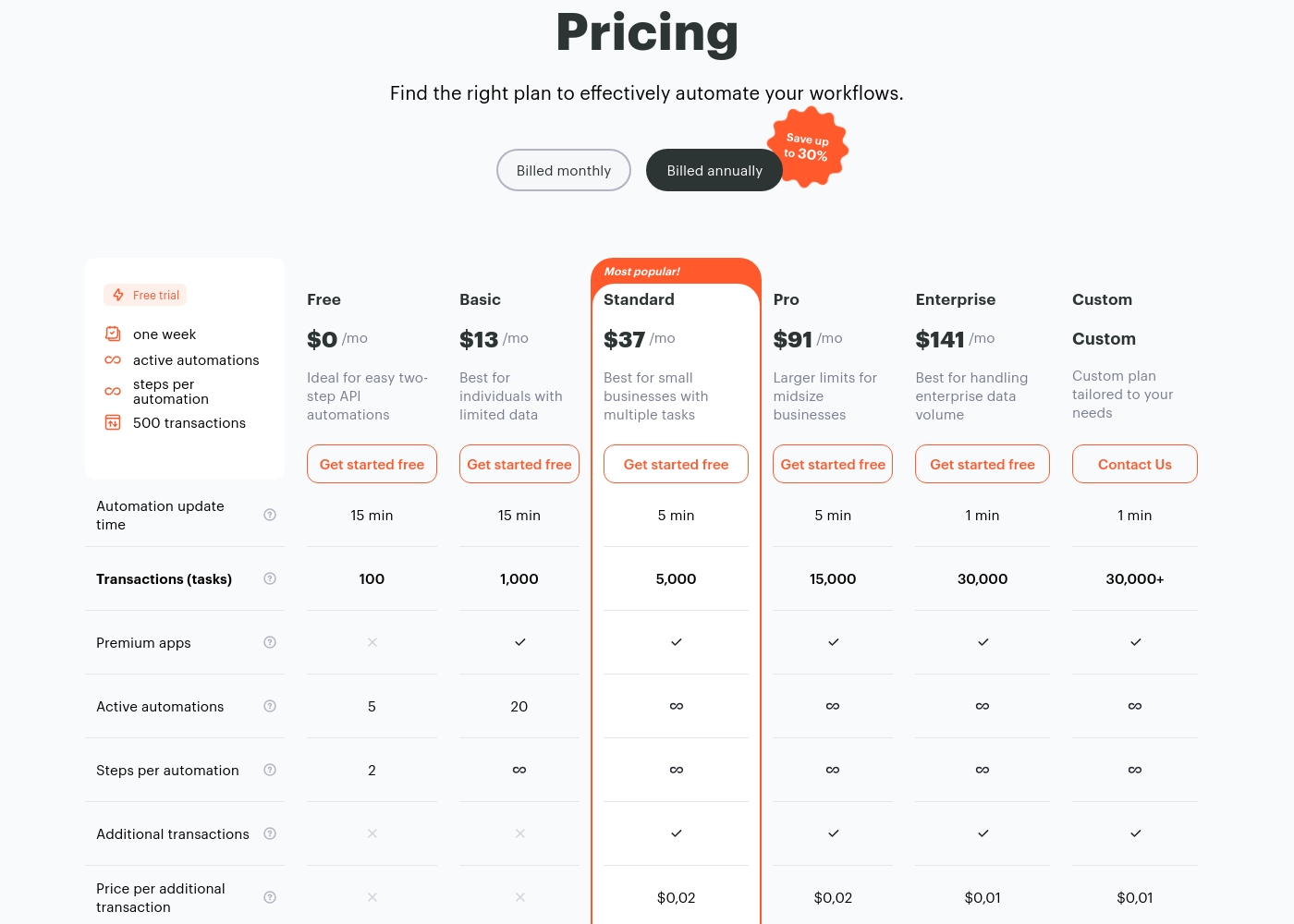
Albato costs between $0 and $141 per month with six available planning options: Free at $0, Basic at $13, Standard at $37, Pro at $91, and Enterprise at $141.
Let’s explore the details of each tier to help you find the perfect fit for your integration needs.
Free
Price: $0 /mo Best For: Ideal for easy two-step API automations Other Features:
- 100 transactions
- 5 active automations
- 2 steps per automation
- 100 transactions
- 5 active automations
- 2 steps per automation
- 15 min automation update time
- 1,000 transactions
- 20 active automations
- Unlimited steps per automation
- Access to premium apps
- 5,000 transactions
- Unlimited steps per automation
- 5 min automation update time
- Can purchase additional transactions ($0.02/task)
- 15,000 transactions
- Unlimited steps per automation
- 5 min automation update time
- Can purchase additional transactions ($0.02/task)
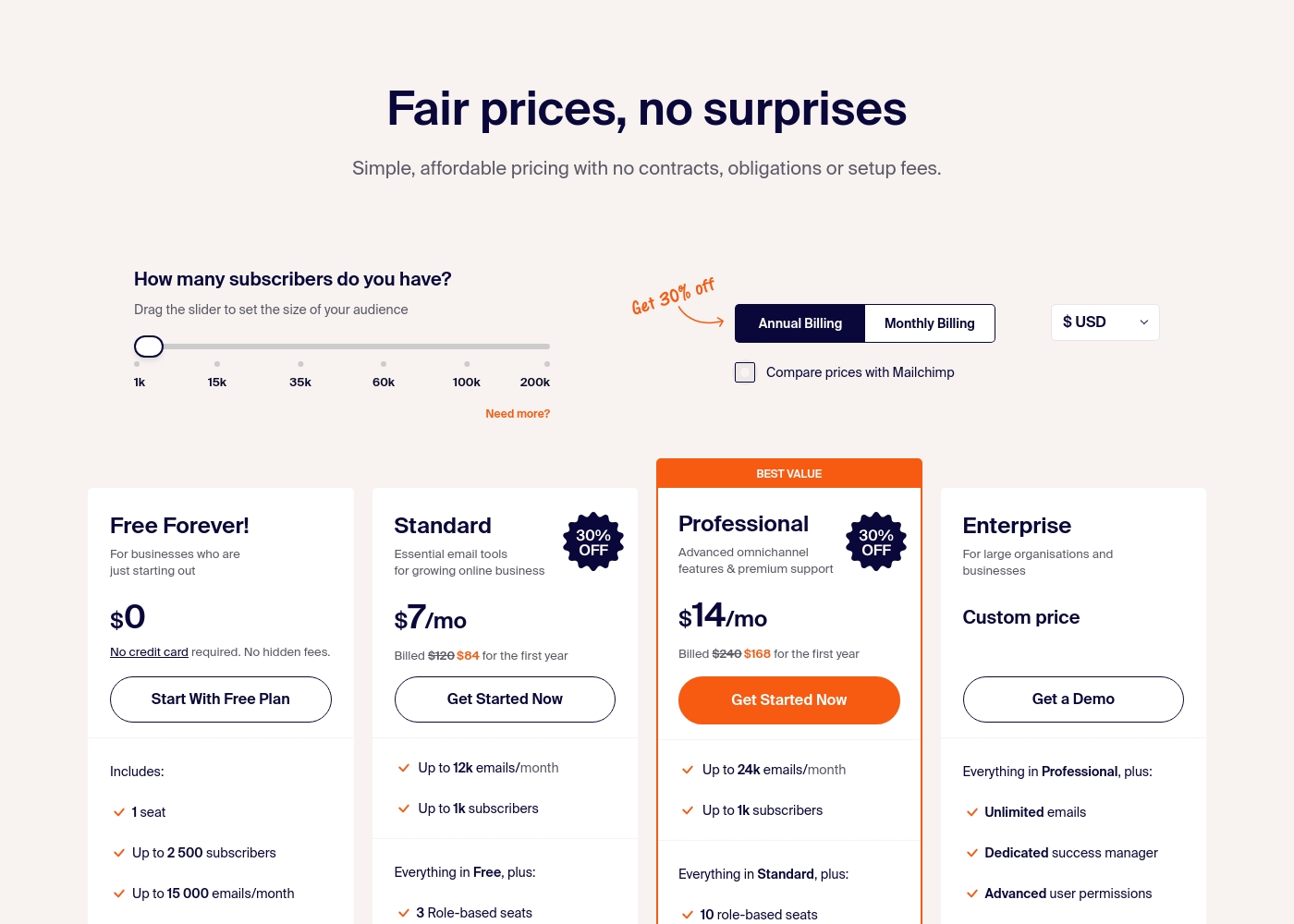
Sender costs between $0 and a custom price per month with 4 plans: Free Forever at $0, Standard at $7, Professional at $14, and Enterprise at Custom price.
Take a look at the specific features and limits included in each plan tier below.
Free Forever!
Price: $0 monthly Best For: Businesses who are just starting out Other Features: 1 seat, up to 2,500 subscribers, 15,000 emails/month, 24/7 live support, email automation.
- 1 seat
- Up to 2,500 subscribers
- Up to 15,000 emails/month
- 24/7 live support
- Email automation
- Up to 12k emails/month
- Up to 1k subscribers
- 3 Role-based seats
- Automated sequences
- Up to 24k emails/month
- Up to 1k subscribers
- 10 role-based seats
- Premium support
- Unlimited emails
- Dedicated success manager
- Advanced user permissions
Pricing Notes
- Albato's paid plans start at $13/month for 1,000 transactions. Extra tasks cost $0.02 each.
- Sender's paid plans start at $7/month annually for up to 1,000 subscribers.
- Sender's Free Forever plan is a permanent option, not a limited trial.
- Albato includes a 7-day free trial with 500 transactions to test fully.
Pricing Head-to-Head
User Reviews
Users consistently praise Albato as an excellent, cost-effective alternative to platforms like Zapier and Make, noting that its transparent pricing offers far better value. The platform excels in user experience, featuring an intuitive interface with a clean drag-and-drop builder that makes complex, multi-step automations accessible, even for non-technical users.
The most frequently celebrated aspect, however, is Albato’s truly outstanding customer support. Numerous reviewers call out specific agents like Pedro and Alex for being patient, technical, prompt, and going 'above and beyond' to solve complex workflows; this high support level often cements the decision to subscribe.
I find Albato to be the best in class for automation. The UX design for implementing webhooks and mapping data makes the process simple and intuitive. This ensures analyzing potential bugs is a breeze, operating reliably every time.
User sentiment on Trustpilot and Capterra highlights Sender's generous free plan and ease of setup as major positives. Many praise the intuitive interface and reliable automation.
😊 However, some note occasional deliverability hiccups and a learning curve for advanced features. Customer support is frequently mentioned as responsive, though a few users report slow responses during peak times.
The free plan is unbeatable for a new business. I set up my first automation in minutes. The platform is simple and gets the job done without fuss.
Our Verdict
There's no single winner here. Albato and Sender are built for different jobs. Albato's superpower is connection. It links over 1,000 apps into automated workflows, saving teams from manual data entry and sync issues. Sender's superpower is simplicity. It delivers a powerful, free email marketing platform that lets you start sending campaigns in minutes. The deciding factor is your primary need. Do you need to make your existing tools talk to each other? Choose Albato. Do you need to talk directly to your audience via email? Choose Sender. Pick Albato if you're a tech-savvy team automating operations. Pick Sender if you're a small business building your first email list.
Frequently Asked Questions
Which is better for small teams: Albato or Sender?
It depends on the team's goal. A small team needing to automate tasks between their CRM, forms, and spreadsheet would benefit from Albato. A small team focused solely on sending newsletters and automated emails would prefer Sender's simplicity and free plan.
Does Albato have email marketing like Sender?
Albato doesn't have its own email builder. Instead, it integrates with email services like Gmail and SendGrid. You can use Albato to trigger emails within a complex workflow, but Sender is a dedicated platform for creating and sending marketing campaigns.
Is Sender worth the extra cost over Albato?
This question may be based on a misunderstanding. Their pricing models are different. Albato's plans start at $13 for automation transactions. Sender's free plan is generous, and its paid plans start at $7 for email subscribers. Compare based on what you need to automate, not just the sticker price.
Can I use Sender for workflow automation like Albato?
Not in the same way. Sender's automation is for email sequences—like a welcome series or cart reminders. It cannot connect to your CRM, billing software, or support desk to automate cross-platform tasks like Albato can.
Which tool has better customer support?
Albato consistently receives exceptional praise for its human, proactive support. Sender offers reliable 24/7 live support on all plans, but it is less frequently highlighted as a standout feature in reviews.
If I'm starting a new blog, which should I pick?
For a new blog focused on building an audience, Sender is the better choice. Its free plan gives you a robust starting point for email newsletters. Albato would be overkill unless you need to automatically sync subscriber data to a complex CRM.
Ready to Choose?
Both tools have their strengths. Choose based on your specific needs.