AfterShip Email vs Sender
AfterShip Email and Sender are both email marketing tools, but they serve very different masters. AfterShip Email is laser-focused on eCommerce recovery and personalization. Sender is a straightforward, budget-friendly platform for general email campaigns.
Best for: eCommerce stores on Shopify or WooCommerce, Merchants focused on automated cart recovery and win-back campaigns
Best for: Small businesses, bloggers, and startups on a budget, Beginners needing simple, quick email marketing setup
Feature-rich, but buyer beware of support.
The platform offers impressive specialized eCommerce automation features and supports robust AI-powered segmentation. However, we identified significant, widespread user complaints regarding poor operational reliability and extremely slow, unhelpful customer support organizationally. Overall, the powerful feature set is clearly offset by notable business practice and service risks.
Pros
- Specialized tools built for eCommerce (abandoned carts, unique coupon codes).
- Robust AI features available for predictive demographics and customer segmentation.
- Clear, flexible pricing tiers that include a helpful free plan.
- Intuitive drag-and-drop editor simplifies creating personalized email campaigns.
Cons
- Widespread user reports of extremely unresponsive and ineffective customer support.
- System reliability issues cited, particularly concerning data accuracy (tracking service).
- Recurring user complaints about unauthorized charges and difficulties canceling subscriptions.
Simple, free, and effective for basics.
We found Sender to be a solid, no-frills tool for core email marketing tasks. Its free plan is a major draw for startups and small businesses. Overall, it delivers good value with a straightforward interface, though it may lack some advanced features for power users.
Pros
- Extremely generous free plan (2,500 contacts, 15k emails/month).
- Clean, user-friendly interface that's easy to learn.
- Transparent, affordable pricing with no hidden fees.
- Includes essential automation features from the start.
Cons
- Advanced features and segmentation are limited on lower tiers.
- Some users report occasional email deliverability issues.
- Integrations can be inconsistent with certain platforms.
- Free plan lacks SMS marketing capabilities.
AboutAfterShip Email
AfterShip Email is an agile email automation tool built specifically for eCommerce needs. It helps you design and execute targeted campaigns that boost sales and improve customer engagement. This software works well with major platforms like Shopify, WooCommerce, and Klaviyo, ensuring you can leverage existing data easily. 💡
The platform provides well-designed templates for various scenarios, allowing you to create relevant content without excessive complications. By integrating seamlessly with other AfterShip systems, you can achieve full visibility and engagement throughout the customer lifecycle.
AboutSender
Sender is an email marketing platform designed for businesses of all sizes. It helps you build, automate, and send email campaigns that people actually want to read. Think of it as your straightforward tool for staying in touch with your audience and driving sales. 🚀
Highlights
Feature Comparison
Features Overview
We highlight the main differences and pick a winner for each feature.
Core Purpose & Focus
AfterShip Email is built for eCommerce recovery and personalization. Sender is a general-purpose, easy-to-use email platform.
AfterShip Email specializes in automated flows for abandoned carts, browse abandonment, and win-backs. It reports a 4.2% recapture rate on lost sales. Sender focuses on straightforward newsletters, promotions, and basic automation sequences. It's designed for easy setup and general audience engagement. The key trade-off is specialization versus simplicity. AfterShip Email offers deep eCommerce tools, while Sender offers broader, easier-to-use marketing features.
Ease of Use
Sender promises a 5-minute setup with a clean interface. AfterShip Email offers a powerful but more complex drag-and-drop editor.
AfterShip Email provides a zero-coding drag-and-drop editor for building personalized emails and complex automation flows. It has pre-built templates for common scenarios. Sender emphasizes extreme simplicity, claiming you can set up your first campaign in 5 minutes. The interface is clean and designed for beginners. Sender likely wins for pure ease of getting started. AfterShip Email is intuitive but has more advanced options to learn for eCommerce-specific campaigns.
Pricing & Value
Sender's free plan is incredibly generous. AfterShip Email's free plan is limited, but paid plans offer deep eCommerce value.
Sender offers a Free Forever plan with 2,500 subscribers and 15,000 emails/month. Paid plans start at $7/month and scale with subscriber count. AfterShip Email has a free plan with basic features, but paid plans start at $9/month for just 500 contacts. The Premium plan at $149 unlocks AI features. For budget-conscious users or those with large lists, Sender offers incredible value. For eCommerce stores, AfterShip Email's specialized tools may justify the higher cost.
Email Automation
Both offer automation, but AfterShip Email's is deeply tied to eCommerce events. Sender's is more general-purpose.
AfterShip Email automates sequences based on shipping events, cart actions, and purchase history. It includes advanced splits and AI triggers. Sender provides standard email automation sequences for welcome series and nurture campaigns. This is included even on the free plan. AfterShip Email's automation is more powerful for converting shoppers. Sender's automation is sufficient for general engagement and simpler workflows.
Integrations
AfterShip Email integrates deeply with eCommerce platforms. Sender integrates with common website and e-commerce tools.
AfterShip Email has one-click integrations with Shopify, WooCommerce, and Klaviyo. It also offers data migration from other ESPs. Sender integrates with WordPress, PrestaShop, WooCommerce, and Zapier for connecting various tools. AfterShip Email's integrations are more tailored to a complete eCommerce stack. Sender's integrations cover the basics for general website owners.
Customer Support
Sender offers 24/7 live support on all plans. AfterShip Email's support is widely reported as a major weakness.
AfterShip Email includes standard support, with premium Silver/Gold plans offering faster SLAs. However, user reviews report extreme unresponsiveness and ineffective support. Sender provides 24/7 live support across all plans, including the free tier. User reviews generally mention responsive and helpful support. Based on user sentiment, Sender's support is a clear advantage. AfterShip Email's support is a significant risk factor.
Advanced Features
AfterShip Email offers advanced AI, segmentation, and unique coupon codes. Sender's advanced features are more limited.
AfterShip Email includes AI Predicted Demographics, advanced customer segmentation, unique single-use coupon codes, and A/B testing. Sender's advanced features on paid plans include more automation triggers and premium support, but lack AI or eCommerce-specific tools. For marketers needing deep personalization and optimization, AfterShip Email is more capable. Sender is strong on essentials but lacks these high-end features.
Scalability
Both scale with your business, but after different limits. AfterShip scales by contact count, Sender by subscriber count and includes team seats.
AfterShip Email plans scale up to 95,000+ contacts for Enterprise. Multi-user access is an added per-seat cost. Sender plans scale to 200,000 subscribers. Higher tiers include multiple user seats (up to 10) for team collaboration. Sender offers more inclusive team features as you grow. AfterShip Email's scalability is focused on contact volume for large eCommerce lists.
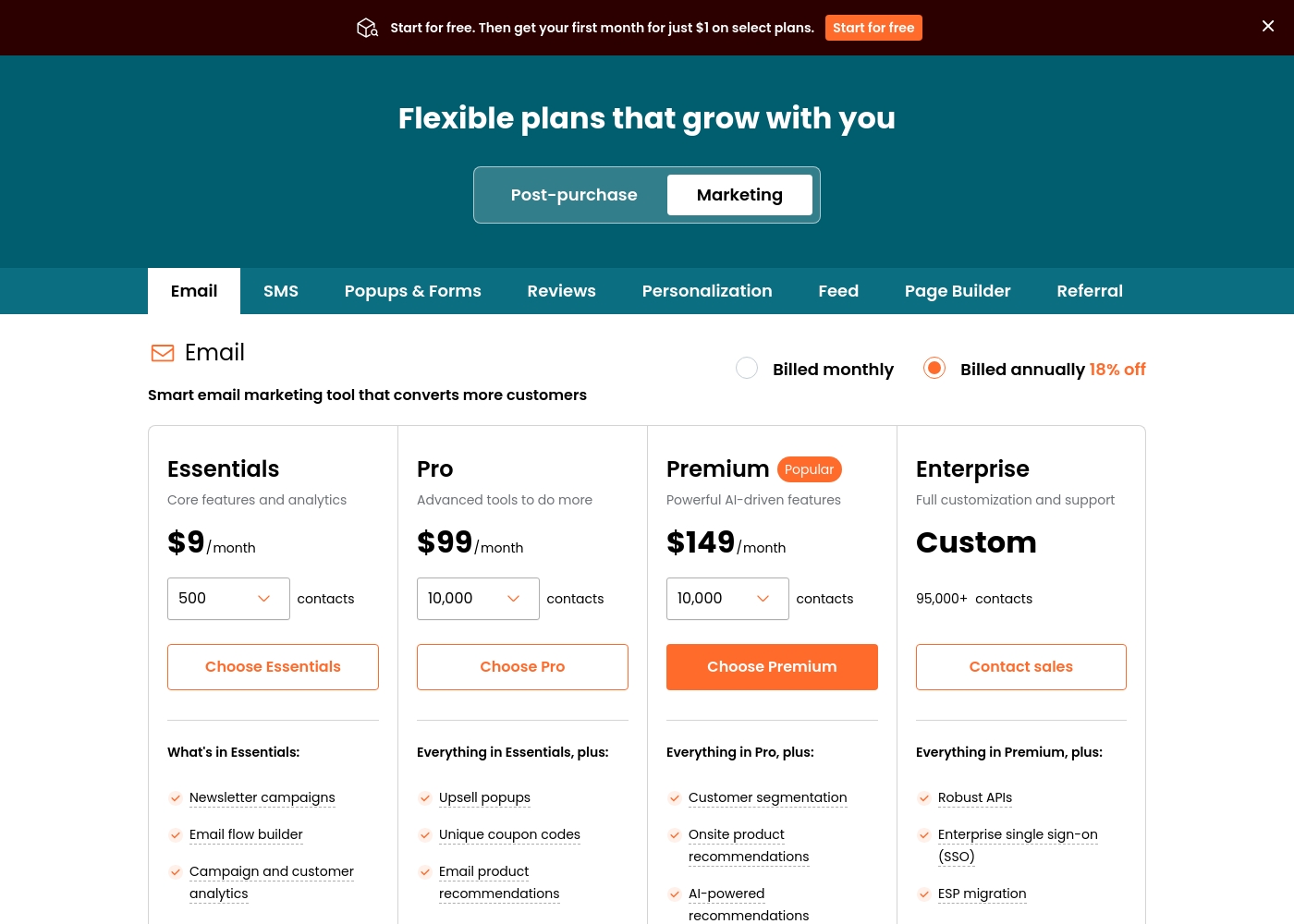
AfterShip Email costs between $9 and Custom per month with 4 main paid plans: Essentials at $9/month, Pro at $99/month, Premium at $149/month, and Enterprise at Custom pricing.
These flexible plans are designed to accommodate your growing business needs, with pricing based on your number of contacts. If you choose to be billed annually instead of monthly, you save 18%.
Essentials
Price: $9/month Best For: Core features and analytics Other Features:
- Newsletter campaigns
- Email flow builder
- Campaign and customer analytics
- Remove AfterShip branding
- Includes all basic features
- Newsletter campaigns
- Email flow builder
- Campaign and customer analytics
- eCommerce and ESP integrations
- Remove AfterShip branding
- Everything in Essentials, plus:
- Upsell popups
- Unique coupon codes
- Email product recommendations
- Countdown timers
- Everything in Pro, plus:
- Customer segmentation
- Onsite product recommendations
- AI-powered recommendations
- Advanced automated email flows
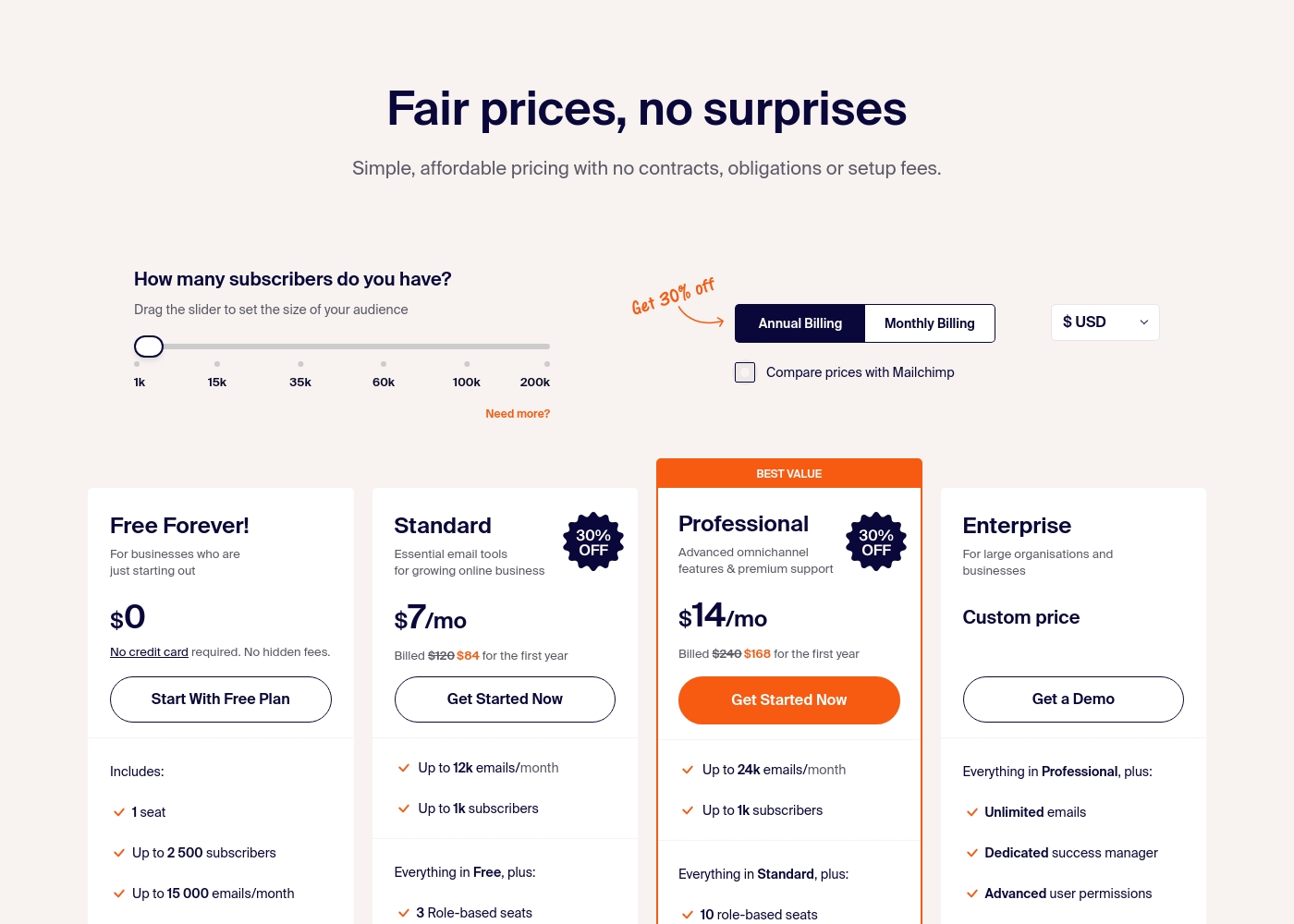
Sender costs between $0 and a custom price per month with 4 plans: Free Forever at $0, Standard at $7, Professional at $14, and Enterprise at Custom price.
Take a look at the specific features and limits included in each plan tier below.
Free Forever!
Price: $0 monthly Best For: Businesses who are just starting out Other Features: 1 seat, up to 2,500 subscribers, 15,000 emails/month, 24/7 live support, email automation.
- 1 seat
- Up to 2,500 subscribers
- Up to 15,000 emails/month
- 24/7 live support
- Email automation
- Up to 12k emails/month
- Up to 1k subscribers
- 3 Role-based seats
- Automated sequences
- Up to 24k emails/month
- Up to 1k subscribers
- 10 role-based seats
- Premium support
- Unlimited emails
- Dedicated success manager
- Advanced user permissions
Pricing Notes
- Sender's Free Forever plan is a standout, offering 2,500 subscribers and 15,000 emails monthly at no cost.
- AfterShip Email's paid plans start at $9/month but for only 500 contacts, making it potentially costlier for growing lists.
- AfterShip Email charges extra for team members ($12/member/month), while Sender includes multiple seats in paid plans.
- Sender's pricing is more transparent and straightforward, with no hidden fees mentioned.
Pricing Head-to-Head
User Reviews
The external feedback available mostly targets AfterShip’s core logistics and tracking product, not the dedicated Email marketing tool. However, the consistent negative sentiment raises significant concerns about the company's overall operational reliability and customer support structure.
Users frequently cite major issues with tracking accuracy, noting packages are often shown as "still on the way" even after delivery, or that logs are contradictory. More alarmingly, the review volume heavily criticizes the customer service experience.
This is some of the worst business support I’ve received. Agents refuse to read the context in the thread and just copy-paste answers that don't address the core question. Getting a simple reply often takes over a month to process.
User sentiment on Trustpilot and Capterra highlights Sender's generous free plan and ease of setup as major positives. Many praise the intuitive interface and reliable automation.
😊 However, some note occasional deliverability hiccups and a learning curve for advanced features. Customer support is frequently mentioned as responsive, though a few users report slow responses during peak times.
The free plan is unbeatable for a new business. I set up my first automation in minutes. The platform is simple and gets the job done without fuss.
Our Verdict
For most general email marketing needs, Sender is the smarter choice. It offers a fantastic free plan, simple setup, and reliable support. AfterShip Email's superpower is its deep eCommerce focus. It excels at automated cart recovery, with a reported 4.2% recapture rate, and offers AI-powered personalization. Sender's superpower is accessibility. You can start for free with 15,000 emails per month and have 24/7 live support from day one. The deciding factor is your primary need. If you run an online store and need to recover lost sales, AfterShip Email is built for that. If you need simple, affordable email marketing, Sender wins. Choose AfterShip Email if you're an eCommerce business prioritizing automated sales recovery. Choose Sender if you're a small business or beginner prioritizing simplicity and budget.
Frequently Asked Questions
Which is better for small teams: AfterShip Email or Sender?
Sender is generally better for small teams. Its paid plans include multiple user seats (3-10) at no extra cost. AfterShip Email charges $12 per team member per month as an add-on.
Is Sender's free plan really free forever?
Yes. Sender's Free Forever plan requires no credit card and has no time limit. You get up to 2,500 subscribers and 15,000 emails per month with automation and support included.
Does AfterShip Email have better automation than Sender?
It depends on your use case. AfterShip Email has advanced eCommerce automation for carts and shipping events. Sender offers strong general-purpose automation sequences for newsletters and nurturing.
Which tool has better customer support?
Based on user reviews, Sender has significantly better support. It offers 24/7 live chat on all plans. AfterShip Email's support is widely reported as slow and unhelpful.
Can I use AfterShip Email if I don't have an online store?
You can, but it's not ideal. AfterShip Email's core features are built for eCommerce. You'd get better value and simpler tools with Sender if you just need basic newsletters and marketing.
Is Sender good for transactional emails?
Yes. Sender explicitly supports transactional emails alongside marketing campaigns. This can simplify your tech stack by handling both in one platform.
Ready to Choose?
Both tools have their strengths. Choose based on your specific needs.