Norton Family vs Xnspy
Norton Family 和 Xnspy 都是强大的设备监督工具,但它们针对的需求不同。Norton Family 来自一个值得信赖的品牌,专注于设定界限,强调透明的家长控制。Xnspy 是一款专门的监控软件,侧重于对通信和应用的隐蔽、深度调查。选择哪一个取决于您需要的是监督和限制,还是隐秘和数据提取。
Best for: 优先考虑透明监督和开放界限的家庭, 已在使用或计划购买 Norton 360 安全软件捆绑包的用户
Best for: 需要完全隐蔽或不可检测的监控功能的用户, 需要按键捕获和录制环境声音进行调查性监控的用户
Effective Monitoring, Comprehensive Customer Support.
We find Xnspy delivers robust remote monitoring capabilities, offering comprehensive tracking of communications and social media for both Android and iPhone devices. While the setup can be tricky, the powerful 24/7 live customer support team earns significant praise for assisting users through installation hurdles. Overall, Xnspy provides strong feature value for its price, but users should be aware of potential data synchronization delays and the limiting partial refund policy.
优点
- Runs discreetly in the background, minimizing detection.
- Comprehensive social media and communication monitoring features.
- Professional and quick 24/7 live customer support available.
- Effective for parental control and providing peace of mind.
缺点
- Reports of data synchronization delays, particularly on iPhone.
- Setup process is noted as tricky or difficult for average users.
- Strict 10-day partial refund policy is widely criticized.
- Compatibility limitations restrict features (e.g., GPS) on older Android phones.
关于Norton Family
关于Xnspy
XNSPY is designed as an accessible monitoring solution. It helps you stay informed and provides necessary visibility. The platform works specifically with key mobile systems. You can easily explore compatibility for both Android and iPhone devices before committing. Get instant access to the Live Demo to see the system in action. ✅
亮点
功能比较
功能概览
我们强调主要差异并为每个功能选择获胜者。
监控理念
Norton Family 提倡透明的界限和讨论;Xnspy 启用隐蔽、深入的监控,且不被发现。
Norton Family 旨在家庭环境中实现可见的家长控制。 “即时锁定”和“上课时间”等功能促进了关于限制的公开沟通。 Xnspy 的重点是 100% 隐身运行,尤其是在较旧的 Android 版本上。 这种隐身方法适合在用户不知情的情况下进行调查。 如果您需要透明度,请选择 Norton Family;如果您需要隐身,请选择 Xnspy。
高级数据捕获
Xnspy 捕获按键和录制环境声音;Norton Family 则侧重于搜索和视频历史记录。
Norton Family 提供对网络内容和视频片段的清晰监督。 它会提供关于孩子搜索和观看内容的详细报告。 Xnspy 提供了强大的 Android 设备按键记录功能。 这会捕获所有按键,包括登录信息和草稿。 此外,Xnspy 高级版可以远程录制设备的周围环境。 Norton Family 不具备这些侵入性的调查收集功能。
屏幕时间管理
Norton Family 专注于计划和限制;Xnspy 只提供被动数据监控。
Norton Family 提供强大的“时间监督”功能,可设定每日限制和计划。 它还有一个“上课时间”模式,用于限制远程学习期间的分心。 Xnspy 不提供排定的时间管理或对设备使用时间的限制。 它纯粹是一个信息收集工具,而非控制工具。 要建立健康的数字习惯和界限,Norton Family 是必需的。
社交媒体覆盖范围
Xnspy 为 10 多个社交应用提供明确监控;Norton Family 提供一般应用监督。
Norton Family 使用“应用监督”来显示已安装的应用并监控一般网络流量。 它提供 YouTube 和 Hulu 内容片段的视频监督。 Xnspy 高级版可跟踪 10 多个社交平台上的聊天和媒体。 这包括对 Snapchat、Instagram 和 Tinder 活动的深入了解。 如果目标是深度社交媒体监督,Xnspy 在这方面远超对手。
远程设备控制
Xnspy 提供强大的远程安全控制;Norton Family 将远程操作限制在“即时锁定”。
Norton Family 提供“即时锁定”功能,可立即暂停设备使用。 此远程锁定适用于 Windows、Android 和 iOS 设备。 Xnspy 高级版(仅限 Android)提供远程擦除和远程锁定功能。 如果手机丢失,这能让您通过擦除手机内容来保护敏感数据。 两者都提供即时控制,但 Xnspy 提供了关键的数据安全选项。
定价和捆绑
Norton Family 可能非常实惠,甚至免费;Xnspy 需要支付专用订阅费用。
Norton Family 起步价格很低,并且经常作为 Norton 360 捆绑包的一部分包含在内。 这意味着许多用户可以免费获得 Norton Family,无需额外单独付费。 Xnspy 的价格在每年支付时为 4.99 美元到 7.49 美元不等。 它有基础版和高级版两个级别,但没有免费计划或捆绑选项。 尤其如果您还需要防病毒保护,Norton Family 在价值上胜出。
客户支持和设置
Xnspy 提供 24/7 在线支持,通常会帮助解决设置问题;Norton Family 使用标准帮助渠道。
Norton Family 使用标准的 Norton 支持和会员服务渠道。 大多数家庭用户报告设置简单明了。 相反,Xnspy 的安装通常被描述为对普通用户来说很棘手。 Xnspy 以全天候在线聊天支持为荣,以协助解决棘手的安装问题。 如果您不太懂技术,Xnspy 的专业支持可能会是救星。
Xnspy costs between $4.99 and $7.49 per month (when billed annually) with 2 plans: XNSPY Basic Edition at $59.99 annually, and XNSPY Premium Edition at $89.99 annually.
These plans offer flexible billing options, including monthly, quarterly, and yearly subscriptions, allowing you to choose the commitment that works best for you.
XNSPY Basic Edition
Price: $59.99 billed annually (equivalent to $4.99/month) Best For: Users who need fundamental call, message, and location monitoring on a budget. Refund Policy: Partial refund within the first 10 days Other Features:
- View full call history and record calls (Android 4-9)
- Read all incoming and outgoing text messages
- Monitor WhatsApp chats and photos
- View internet browsing history and bookmarks
- Monitor keystrokes via Keylogger (Android)
- Call History & Recording (Android 4-9)
- Read All SMS & iMessages
- WhatsApp Chat & Photo Monitoring
- Real-Time Location Lookup
- Keylogger (Android)
- All Basic features included
- Monitor 10+ Social Media Apps (Facebook, Snapchat, Viber, etc.)
- Remotely Record Surroundings (Android)
- Remote Wipe Phone Data & Lock Phone (Android)
- Monitor Gmail App (Android)
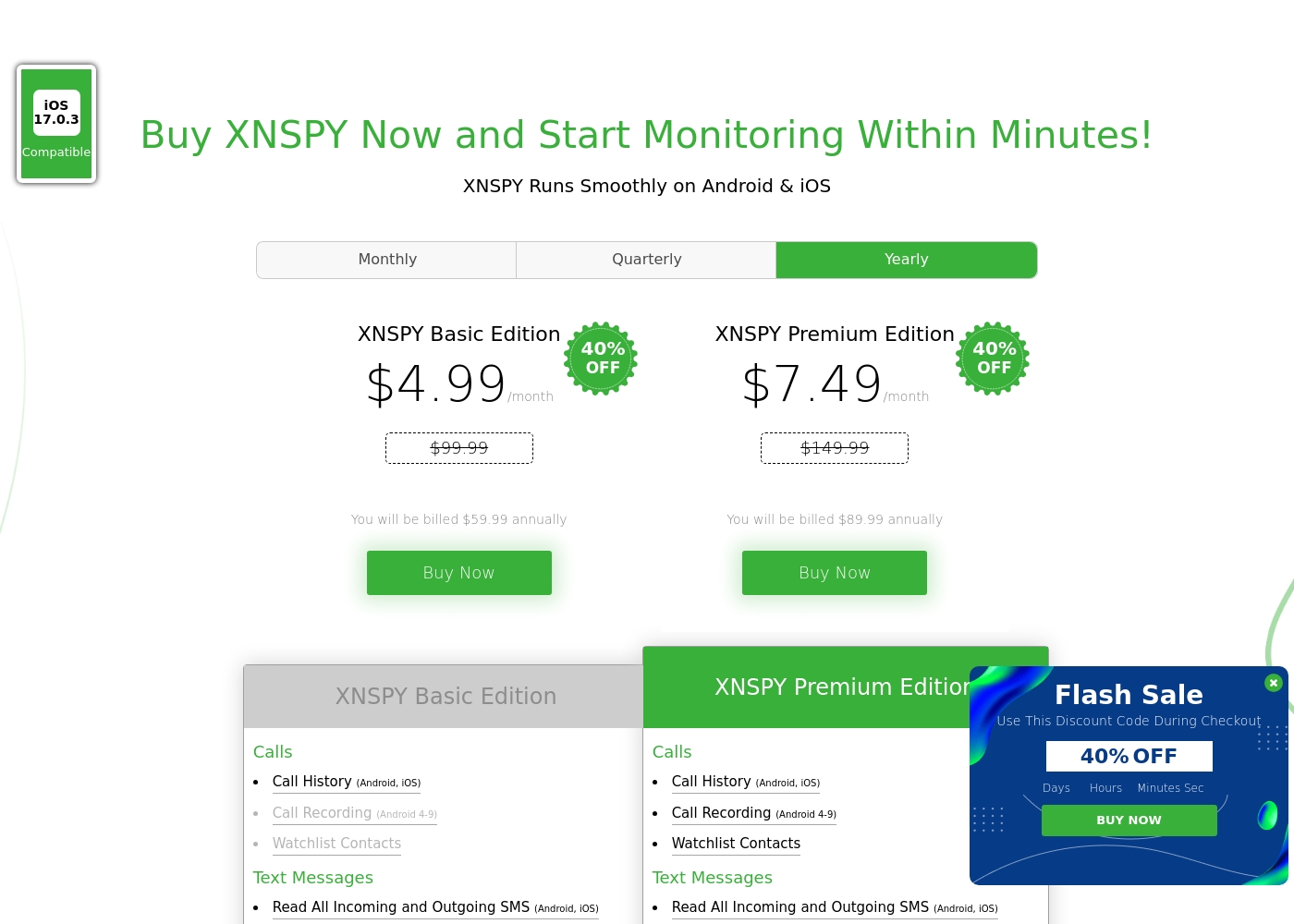
Pricing Head-to-Head
用户评论
The general sentiment for Xnspy is mixed, reflected in its cumulative Trustpilot score of 3.3/5. Users commonly praise its core capabilities, noting that the app runs discreetly and is effective for monitoring calls, texts, location, and social media activity.
Many parents appreciate the peace of mind it offers, finding the system more straightforward than complex rival monitoring software. A major strength cited frequently across reviews is the responsiveness and professionalism of the 24/7 customer support team.
I’m not very tech-savvy, so I reached out to live support for help with the setup. They opened a support ticket and completed everything for me quickly. The team was professional and really helpful.
准备好选择了?
这两个工具都有各自的优点。根据您的具体需求进行选择。