HelpDesk vs Techinline
HelpDesk and Techinline solve different problems. HelpDesk organizes customer tickets; Techinline connects you to remote computers instantly. One is for support desks, the other for IT support.
Best for: Support teams managing customer inquiries from multiple channels, Growing businesses needing structured ticketing and automation
Best for: IT professionals and managed service providers (MSPs), Teams providing remote support to clients or internal users
直观的工单处理,出色的支持,清晰的价值。
优点
- 干净、直观的界面使系统易于采用和使用。
- 客户支持快捷、友好且响应及时。
- 设置快速,可立即提高客户支持速度。
- 实惠的定价结构包含宝贵的无限免费查看者席位。
缺点
- 宏定义定制等高级功能目前受到限制。
- 从以前的集成产品(如 LiveChat)过渡可能会产生费用/令人沮丧。
Solid remote support with scalable pricing.
We found Techinline SetMe to be a capable and secure remote access solution, especially for IT professionals and small teams needing reliable unattended and on-demand support. Its tiered pricing offers flexibility, but the lack of a clear refund policy is a notable gap for potential buyers.
优点
- Simple, instant client connections via a set.me link.
- Scalable plans from individual use to enterprise-level team management.
- Stable connections with auto-reconnect and multi-monitor support.
- Centralized dashboard for managing all devices and permissions.
缺点
- Limited public user reviews made independent sentiment analysis impossible.
- No explicit refund policy is detailed on the website.
- Advanced team features require upgrading to higher-tier, per-seat plans.
- The 'Core' plan for individual use lacks on-demand support features.
关于HelpDesk
HelpDesk 是一款全面的软件,旨在管理各种客户支持活动。本质上,它充当您支持团队的中心枢纽,或单点联系人 (SPC)。
该工具通过将所有通信转换为标准化的工单 🎟️ 来组织消息并提供及时的帮助。无论用户是通过电子邮件、电话还是网络表单联系,系统都能确保每项请求都被捕获、确定优先级并得到跟踪。它适用于刚起步的成长型团队,也适用于拥有复杂运营需求的大型企业。
关于Techinline
SetMe is a remote support and management tool 🛠️ designed for IT professionals, support teams, and managed service providers. It lets you instantly connect to any computer, whether you’re providing live help or managing unattended servers and desktops from a central dashboard.
亮点
功能比较
功能概览
我们强调主要差异并为每个功能选择获胜者。
Core Purpose
HelpDesk organizes customer support tickets. Techinline provides remote computer access.
HelpDesk turns all customer messages into standardized tickets. It's a central hub for support teams managing requests from email, phone, and web forms. Techinline lets you connect to any computer remotely. You can provide live support or manage unattended servers and desktops from a central dashboard. The key difference is fundamental: HelpDesk manages conversations, Techinline manages machines. If your job is answering customer questions, HelpDesk is the tool. If your job is fixing computers remotely, Techinline is the tool.
User Interface
HelpDesk is praised for its clean, intuitive design. Techinline focuses on a functional remote dashboard.
Users consistently praise HelpDesk's interface. They call it clean, intuitive, and easy to set up, which speeds up adoption. Techinline's interface is a centralized dashboard for managing devices and sessions. It's designed for functionality, prioritizing control over aesthetics. The trade-off is clarity vs. utility. HelpDesk's UI is built for ticket flow; Techinline's is built for device management. For a support agent, HelpDesk's clean UI reduces training time. For an IT admin, Techinline's dashboard provides the controls they need.
Automation
HelpDesk offers powerful ticket automation. Techinline focuses on remote connection stability.
HelpDesk automates the entire ticketing process. Its rules handle creation, assignment, and prioritization, cutting manual work significantly. Techinline's automation is different. It focuses on connection stability, like auto-reconnect after network drops and maintaining sessions on low-speed internet. The difference is in the automation target. HelpDesk automates workflows; Techinline automates connections. For a high-volume support team, HelpDesk's rules save hours. For a field technician, Techinline's stability ensures they can finish the job.
Security
Both prioritize security. HelpDesk emphasizes data compliance; Techinline focuses on session encryption.
HelpDesk complies with GDPR and has Privacy Shield certification. It uses 256-bit SSL encryption for all data transmission. Techinline uses end-to-end encryption for all remote sessions. This protects the remote connection itself, ensuring data isn't intercepted. The security focus differs: HelpDesk protects the data in your system; Techinline protects the data in transit. For businesses handling sensitive customer data, HelpDesk's compliance is key. For remote access, Techinline's encryption is essential.
Pricing & Value
HelpDesk is per-user with free viewers. Techinline scales by user/admin and plan tier.
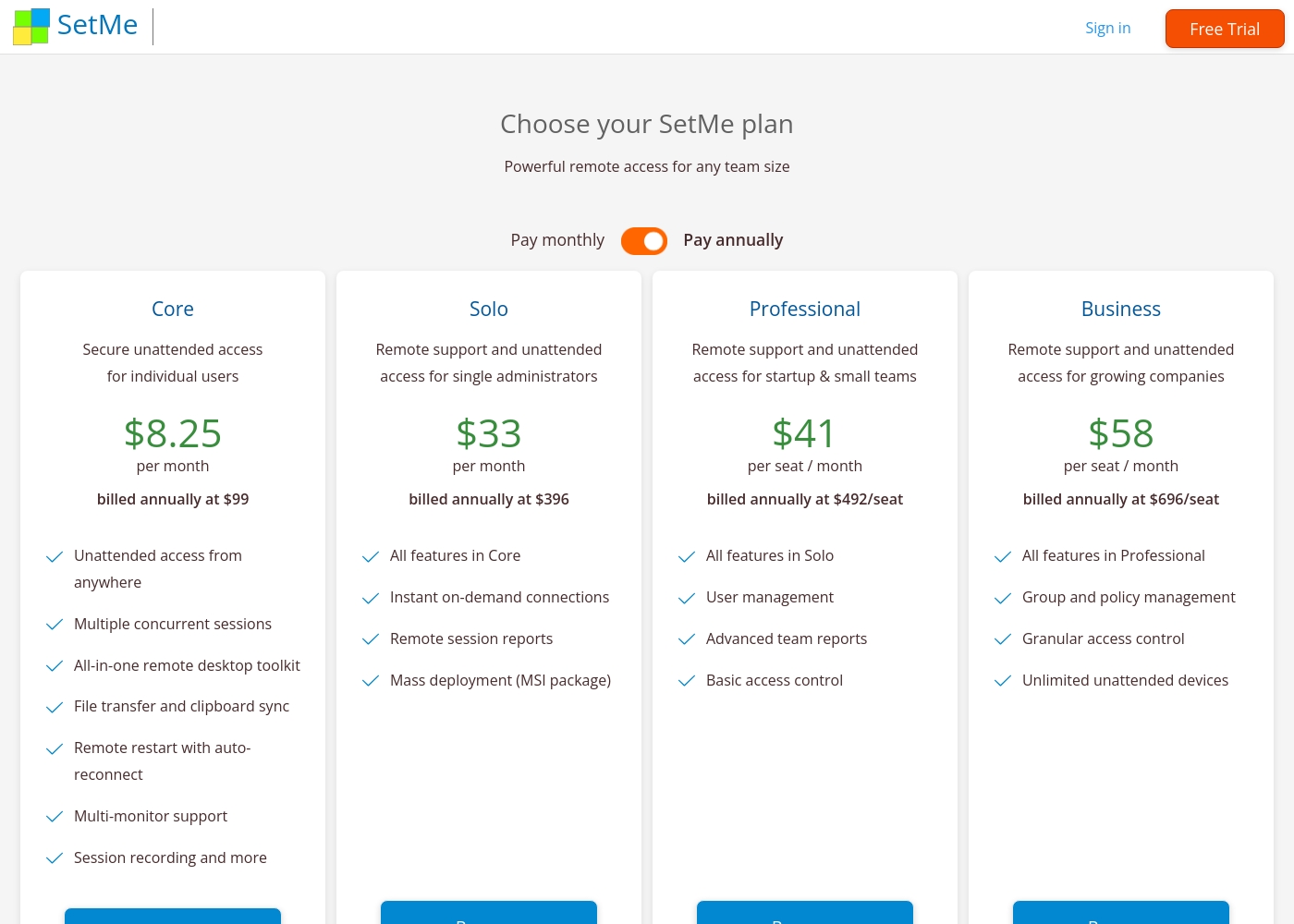
HelpDesk charges $29-50 per user/month. Admins and Agents pay; viewers are free. Annual billing saves 15%. Techinline starts at $8.25/month for solo access. Team plans are $41-58 per seat/month. Pricing scales with features and seats. HelpDesk offers clear value with unlimited free viewers. Techinline offers flexible tiers from solo to enterprise. For a team of 10 agents, HelpDesk's per-agent model is straightforward. For a solo IT consultant, Techinline's Core plan is cheaper.
Customer Support
HelpDesk offers 24/7 support with high user praise. Techinline's support details are limited.
HelpDesk provides 24/7/365 support. Users rave about quick, friendly responses that go the extra mile. Techinline's support is mentioned but not detailed in reviews. The site suggests contacting support for questions about response times. The difference is in transparency. HelpDesk's support is a highlighted strength; Techinline's is not. If you need immediate help, HelpDesk's proven support is a big plus. For Techinline, you'll need to test their support during the trial.
Integration Ecosystem
HelpDesk integrates with popular apps. Techinline has limited integrations.
HelpDesk connects to HubSpot, Salesforce, Jira, Zapier, and more. It has a marketplace for adding integrations. Techinline's integrations are not well-documented. Users may need to check for specific PSA or ticketing system compatibility. The difference is ecosystem size. HelpDesk has a broad integration network; Techinline is more standalone. For a team using Salesforce and Jira, HelpDesk's integrations are a major advantage. For pure remote support, Techinline may be sufficient.
Learning Curve
HelpDesk is easy to adopt with a clean interface. Techinline requires understanding remote access concepts.
HelpDesk is frequently described as easy to set up and use. Its clean UI helps new agents get started quickly. Techinline requires knowledge of remote access, unattended devices, and permissions. The dashboard is functional but technical. The trade-off is simplicity vs. specialization. HelpDesk is for general support; Techinline is for IT specialists. A new hire could be productive in HelpDesk in hours. Techinline might require a day of training for remote support basics.
HelpDesk 的价格在每年通过年度账单支付时,每位用户每月 29 美元到 50 美元之间,分为三个计划:“团队版”29 美元/月、“商务版”50 美元/月,以及“企业版”(定制定价)。
定价清晰,结构旨在帮助您选择最适合您运营需求的方案。
团队版 (Team)
价格:每年支付 29 美元/用户/月,或每月支付 34 美元/用户/月 支持的网站:未明确说明 最适合:具有入门级需求(成长中)的团队 退款政策:由支持团队单独审核 其他功能:
- 无限免费查看者角色
- 5 个团队和可自定义的工单视图
- 5 个电子邮件模板和 5 条活跃的自动化规则
- 一个自定义域名
- 5 个激活的自定义字段
- 具有管理员或座席角色的付费用户
- 无限免费查看者
- 5 个团队
- 5 个转发地址
- 5 个回复地址
- 具有管理员或座席角色的付费用户
- 无限免费查看者
- 100 个团队
- 100 个转发地址
- 100 个回复地址
- 包含“商务版”的所有功能,无限制
- 专属客户经理
- 产品培训
- 软件工程师支持
- 安全协助
Techinline pricing: Techinline offers four SetMe plans starting at $8.25 per month (billed annually) for individual unattended access. Pricing scales based on features like on-demand support, seat count, and team management tools, with both monthly and yearly billing available for most tiers.
Core
Price: $8.25 per month (billed annually at $99) Best For: Individual users needing secure unattended access Other Features: Multiple concurrent sessions, File transfer and clipboard sync, Remote restart with auto-reconnect, Multi-monitor support, Session recording
This plan is perfect for individuals who only need to manage their own remote machines. It's a reliable choice if you don't need to provide instant on-demand support to new clients.
Pricing Head-to-Head
用户评论
然而,反馈并非全是积极的。一些从公司旧的集成 LiveChat 系统迁移过来的用户对强制分离和订阅费用增加表示沮丧,称新系统对微型企业“贵得多”。一些用户还提到,虽然该系统能很好地处理基本工单功能,但它缺乏高级功能的深度,特别是提到了宏定义功能的限制。总体而言,对于专注于可靠核心支持功能的企业来说,该平台被广泛认为价格合理且物有所值。
从 Zendesk 切换到 HelpDesk 为我们节省了资金。这个聊天小部件非常实惠,而且用户界面/用户体验现在好多了。该工具非常易于使用,并为我们提供了更多的数据访问权限。
External reviews for Techinline SetMe were not accessible during this review. The provided Trustpilot URL returned a 403 error, preventing access to user feedback. Consequently, the review relies solely on the product's website information and our independent analysis of its features and pricing structure.
我们的判断
HelpDesk and Techinline are different tools for different jobs. HelpDesk is a ticketing system. Techinline is a remote access tool. They don't compete directly. HelpDesk's superpower is organizing customer support. It turns emails and calls into tickets. Its clean interface and 24/7 support get high praise. Techinline's superpower is remote connectivity. It connects you to any computer instantly. Its stable connections on bad Wi-Fi are a lifesaver. The deciding factor is your core need. If you're answering customer questions, choose HelpDesk. If you're fixing computers remotely, choose Techinline. For most support teams, HelpDesk is the clear winner. For IT pros needing remote access, Techinline is the right choice. Pick the tool that matches your daily work.
常见问题
Which is better for small teams: HelpDesk or Techinline?
It depends on your need. HelpDesk is better for small support teams managing customer tickets. Techinline is better for small IT teams providing remote support. HelpDesk starts at $29/user/month; Techinline at $8.25/month for solo access.
Does HelpDesk have remote access features like Techinline?
No. HelpDesk is a ticketing system, not a remote access tool. It manages customer support conversations. Techinline is designed for remote computer control and support sessions.
Is Techinline worth the extra cost over HelpDesk?
The cost comparison isn't apples-to-apples. HelpDesk charges per user for ticketing. Techinline charges for remote access. If you need remote support, Techinline is worth it. If you need ticketing, HelpDesk is better value.
Can I migrate from HelpDesk to Techinline easily?
No, these are different tools. You can't migrate tickets to remote access software. You might use both, but they serve separate purposes.
Which has better customer support: HelpDesk or Techinline?
HelpDesk offers 24/7 support with high user praise. Techinline's support is not well-documented. Based on reviews, HelpDesk has better support.
Do both tools offer free trials?
Yes. HelpDesk has a 14-day free trial. Techinline offers a 15-day free trial. Both are risk-free to test.
准备好选择了?
这两个工具都有各自的优点。根据您的具体需求进行选择。