Hiver vs Techinline
Hiver and Techinline solve completely different problems. Hiver turns email into a support desk, while Techinline provides remote computer access. The right choice depends entirely on what your team does day-to-day.
Best for: Customer service teams managing email, chat, and phone support, IT and HR departments handling internal employee requests
Best for: IT professionals providing remote support to clients, Managed Service Providers (MSPs) managing desktop fleets
Hộp thư chia sẻ đơn giản, Hợp đồng thuê bao phức tạp.
Chúng tôi nhận thấy lời hứa của Hiver về việc biến Gmail thành một hệ thống tổng đài liền mạch rất hấp dẫn và hiệu quả cho sự cộng tác nhóm. Tuy nhiên, chúng tôi phải nêu bật các báo cáo đáng kể và lặp đi lặp lại của người dùng liên quan đến các chính sách hủy bỏ gay gắt và giá trị cảm nhận thấp so với giá tiền. Nhìn chung, Hiver cung cấp các tính năng tổng đài mạnh mẽ trong một giao diện quen thuộc, nhưng các hành vi kinh doanh liên quan làm giảm đáng kể trải nghiệm người dùng.
Ưu điểm
- Tích hợp liền mạch vào Gmail, cung cấp giao diện người dùng quen thuộc.
- Triển khai nhanh chóng và dễ sử dụng (bắt đầu nhanh chóng chỉ trong dưới 5 phút).
- Kế hoạch Miễn phí mạnh mẽ hỗ trợ số lượng người dùng không giới hạn.
- Các công cụ cộng tác (Shared Drafts, Notes nội bộ) loại bỏ việc chuyển tiếp email lộn xộn.
Nhược điểm
- Người dùng liên tục phàn nàn mạnh mẽ về giá cao hoặc bị tính phí quá đắt.
- Các khiếu nại nghiêm trọng liên quan đến độ khó cực độ hoặc không thể hủy đăng ký.
- Các mô-đun phân tích trước đây đã bị đánh giá là rất hạn chế và thiếu rõ ràng.
- Các báo cáo trước đây cho thấy phần mềm có lỗi và sự cố đồng bộ không nhất quán.
Solid remote support with scalable pricing.
We found Techinline SetMe to be a capable and secure remote access solution, especially for IT professionals and small teams needing reliable unattended and on-demand support. Its tiered pricing offers flexibility, but the lack of a clear refund policy is a notable gap for potential buyers.
Ưu điểm
- Simple, instant client connections via a set.me link.
- Scalable plans from individual use to enterprise-level team management.
- Stable connections with auto-reconnect and multi-monitor support.
- Centralized dashboard for managing all devices and permissions.
Nhược điểm
- Limited public user reviews made independent sentiment analysis impossible.
- No explicit refund policy is detailed on the website.
- Advanced team features require upgrading to higher-tier, per-seat plans.
- The 'Core' plan for individual use lacks on-demand support features.
VềHiver
Hiver là nền tảng dịch vụ khách hàng ưu tiên AI sáng tạo. Nó biến hộp thư điện tử hiện có của bạn thành một hệ thống ticketing hoàn chỉnh, mạnh mẽ. Điều này có nghĩa là bạn đã biết cách sử dụng nó, cho phép các nhóm bắt đầu nhanh chóng, thường chỉ trong vòng chưa đầy năm phút. Hiver được xây dựng cho bất kỳ nhóm nào—từ dịch vụ khách hàng và tài chính đến Nhân sự và CNTT—cần quản lý giao tiếp qua các kênh như email, trò chuyện trực tiếp, WhatsApp và điện thoại ở một nơi đơn giản. 💡
VềTechinline
SetMe is a remote support and management tool 🛠️ designed for IT professionals, support teams, and managed service providers. It lets you instantly connect to any computer, whether you’re providing live help or managing unattended servers and desktops from a central dashboard.
So sánh tính năng
Tổng quan về tính năng
Chúng tôi làm nổi bật những khác biệt chính và chọn người chiến thắng cho từng tính năng.
Core Purpose
Hiver manages communication. Techinline manages remote connections. They're built for different jobs.
**What Hiver does:** Hiver transforms your Gmail inbox into a multi-channel ticketing system. Teams handle email, live chat, WhatsApp, and phone calls from one place. Over 10,000 teams use it for support. **What Techinline does:** Techinline SetMe is a remote support tool. It lets IT professionals connect instantly to any computer. They manage unattended servers or provide live help via a simple web link. **Key difference:** Hiver is for managing conversations. Techinline is for accessing and controlling computers remotely. You need to pick based on your primary workflow.
Ease of Use
Hiver feels like your inbox. Techinline uses a simple link. Both aim for low friction.
**What Hiver does:** Hiver's main strength is familiarity. It works right inside Gmail. Teams get started in under 5 minutes. The interface is designed to look like email. **What Techinline does:** Techinline's SetMe uses a simple set.me link. Clients just visit a URL to start a support session. The dashboard is centralized for managing devices. **Key difference:** Hiver is easy because you already know email. Techinline is easy because it removes complex setup for end-users. Both reduce learning curves, but for different tasks.
Collaboration
Hiver's collaboration is internal and conversational. Techinline's is about permissions and team access.
**What Hiver does:** Hiver shines with internal tools. Use Shared Drafts to write replies together. Add @mentions and internal Notes to loop in teammates without messy email forwards. **What Techinline does:** Techinline offers team management for remote access. You can assign technicians to groups and set granular access controls. It's about who can control which machine. **Key difference:** Hiver helps teams talk to each other about customer issues. Techinline helps teams share control over remote devices. Choose Hiver for support collaboration; choose Techinline for IT team coordination.
Automation
Hiver automates ticket workflows. Techinline automates reconnection and session logging.
**What Hiver does:** Hiver automates repetitive support work. It routes conversations to the right person and categorizes tickets. You can set up round-robin assignments and approval workflows. **What Techinline does:** Techinline automates connection stability. Sessions auto-reconnect if the network drops. You can also record sessions automatically for documentation. **Key difference:** Hiver's automation reduces manual work for support agents. Techinline's automation ensures seamless remote access. The value depends on whether you need to automate tasks or connections.
Scalability
Hiver scales by adding users. Techinline scales by adding devices or seats.
**What Hiver does:** Hiver's Free plan supports unlimited users. Paid plans add more shared inboxes and automation rules. It scales with team size and feature needs. **What Techinline does:** Techinline scales from individual use to enterprise. The Business plan offers unlimited unattended devices. Team plans add user management and policy controls. **Key difference:** Hiver scales horizontally with users and communication channels. Techinline scales vertically with device access and team permissions. Both can grow, but the growth metrics differ.
Reporting & Analytics
Hiver offers detailed performance metrics. Techinline provides session reports.
**What Hiver does:** Hiver tracks resolution times, support volume, and team performance. Growth and Pro plans add custom reports and advanced analytics to measure SLA success. **What Techinline does:** Techinline provides remote session reports. You can monitor connection activity. The Business plan adds advanced team reports and access logs. **Key difference:** Hiver's analytics are deeper for customer service metrics. Techinline's reporting focuses on remote access activity. Choose based on whether you need support KPIs or IT access logs.
Pricing Model
Hiver uses per-user pricing with a free plan. Techinline uses per-admin or per-seat pricing with no free tier.
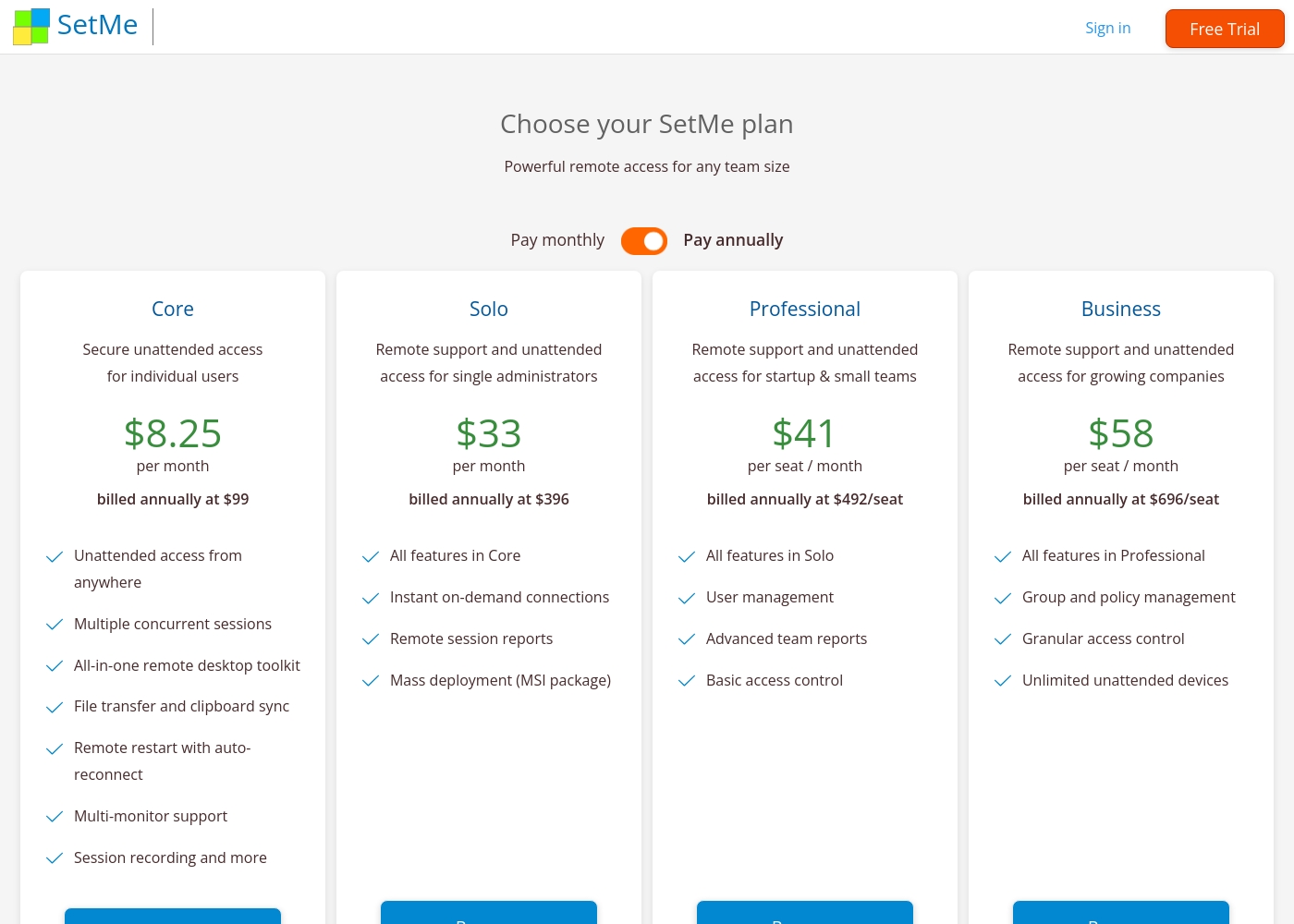
**What Hiver does:** Hiver starts at $0 for unlimited users. Paid plans range from $19 to $49 per user/month (annual). There's a 7-day free trial. **What Techinline does:** Techinline starts at $8.25/month for individual unattended access. Team plans are per-seat ($41-$58/seat/month). There's a 15-day free trial. **Key difference:** Hiver is more accessible for small teams with its free plan. Techinline is more targeted for IT professionals who need remote access. Hiver's per-user model can get expensive for large teams.
Security & Compliance
Hiver offers major certifications. Techinline focuses on encryption.
**What Hiver does:** Hiver is compliant with GDPR, SOC 2 Type II, ISO 27001, and CCPA. HIPAA compliance is available in the Elite plan for health data. **What Techinline does:** Techinline uses end-to-end encryption for all remote sessions. It protects data in transit during remote control. **Key difference:** Hiver has a broader set of formal certifications. Techinline focuses on session-level encryption. Hiver is better for regulated industries; Techinline is sufficient for general remote security.
Customer Support
Hiver provides 24/7 support on all plans. Techinline's support details are less clear.
**What Hiver does:** Hiver offers 24/7 email and live chat support on every plan, including Free. The Elite plan adds a dedicated success manager. **What Techinline does:** Techinline mentions customer support but doesn't detail response times or SLAs. You may need to contact them for specifics. **Key difference:** Hiver's support is explicitly available 24/7 across all tiers. Techinline's support offerings are not detailed in the provided data. This gives Hiver an edge for teams needing reliable assistance.
Integration Ecosystem
Hiver integrates with 100+ apps. Techinline's integrations are not detailed.
**What Hiver does:** Hiver connects with over 100 applications. Lite plans include Slack, Asana, Jira. Growth adds Zapier. Pro includes premium integrations and API access. **What Techinline does:** The data does not specify integration capabilities for Techinline. You should check product documentation for details. **Key difference:** Hiver has a robust, documented integration ecosystem. Techinline's integration capabilities are unclear from the provided data. For teams needing to connect with existing tools, Hiver offers more transparency.
Mobile Experience
Neither tool's mobile experience is detailed in the data.
**What Hiver does:** The provided data does not include information about Hiver's mobile app or experience. **What Techinline does:** The provided data does not include information about Techinline's mobile app or experience. **Key difference:** Without specific data, we cannot compare their mobile offerings. You may need to check their websites for mobile app details. **Real-world impact:** For teams needing to manage support or remote access on the go, this is a gap in the comparison. You should verify mobile capabilities separately.
Hiver có giá từ $0 đến $49 mỗi người dùng mỗi tháng (thanh toán hàng năm) với năm gói: MIỄN PHÍ ở mức $0, LITE ở mức $19, GROWTH ở mức $29, PRO ở mức $49, và ELITE (Liên hệ chúng tôi).
Hãy cùng tìm hiểu gói nào phù hợp nhất với nhu cầu riêng của nhóm bạn.
MIỄN PHÍ
Giá: $0 (Miễn phí trọn đời) Website được hỗ trợ: Không được nêu rõ Phù hợp nhất cho: Các nhóm muốn có khả năng phân loại cơ bản cho giao tiếp đa kênh. Chính sách hoàn tiền: Không được nêu rõ Các tính năng khác: Hộp thư chia sẻ đa kênh, Ticketing, Trò chuyện trực tiếp/WhatsApp/Thoại, Cơ sở kiến thức, Cộng tác nhóm, Tích hợp Slack, Hỗ trợ qua email và trò chuyện trực tiếp 24/7.
- Hộp thư chia sẻ đa kênh
- Ticketing
- Trò chuyện trực tiếp, WhatsApp & Thoại
- Cơ sở kiến thức
- Cộng tác nhóm
- Cổng thông tin khách hàng
- Tự động hóa quy trình làm việc
- Tự động gán theo Round-robin
- Thỏa thuận mức dịch vụ (SLA)
- Trường tùy chỉnh
- Phân tích hiệu suất nhóm
- Báo cáo tùy chỉnh
- Tích hợp nâng cao (ví dụ: Zapier)
- Chatbot
- Khảo sát CSAT
- Giờ làm việc
- Phân tích nâng cao
- Xuất dữ liệu theo lịch trình
Techinline pricing: Techinline offers four SetMe plans starting at $8.25 per month (billed annually) for individual unattended access. Pricing scales based on features like on-demand support, seat count, and team management tools, with both monthly and yearly billing available for most tiers.
Core
Price: $8.25 per month (billed annually at $99) Best For: Individual users needing secure unattended access Other Features: Multiple concurrent sessions, File transfer and clipboard sync, Remote restart with auto-reconnect, Multi-monitor support, Session recording
This plan is perfect for individuals who only need to manage their own remote machines. It's a reliable choice if you don't need to provide instant on-demand support to new clients.
Pricing Head-to-Head
Đánh giá của người dùng
Phản hồi bên ngoài cho thấy trải nghiệm người dùng bị phân cực mạnh, dẫn đến điểm hài lòng tổng thể thấp. Trong khi một số người dùng đánh giá cao chức năng cốt lõi của Hiver là "tổng đài đơn giản nhất bên trong email", mang lại trải nghiệm hỗ trợ liền mạch ngay trong Gmail, các khiếu nại quan trọng tập trung nặng nề vào giá cả và các hoạt động kinh doanh.
Một số đánh giá gần đây cáo buộc dịch vụ này bị tính phí quá cao và đặc biệt khuyên không nên sử dụng do những khó khăn cực độ trong việc hủy đăng ký hoặc tài khoản hiện có. Những sự cố hành chính lặp đi lặp lại này cho thấy sự thiếu tập trung vào việc giữ chân khách hàng và tôn trọng quyền tự chủ của người dùng.
Hiver cung cấp giải pháp tổng đài đơn giản nhất mà chúng tôi tìm thấy hoạt động ngay trong giao diện email. Điều này làm cho quy trình tiếp nhận của nhóm chúng tôi cực kỳ nhanh chóng. Chúng tôi đánh giá cao mức độ đơn giản của hệ thống khi sử dụng hàng ngày.
External reviews for Techinline SetMe were not accessible during this review. The provided Trustpilot URL returned a 403 error, preventing access to user feedback. Consequently, the review relies solely on the product's website information and our independent analysis of its features and pricing structure.
Phán quyết của chúng tôi
Hiver and Techinline aren't direct competitors. They solve completely different problems, so the best tool depends entirely on your job. Hiver's superpower is turning your email into a powerful support desk. It centralizes communication across email, chat, and phone. Teams report up to 90% productivity gains using it. It's built for anyone who manages conversations, not computers. Techinline's superpower is instant, stable remote access. It lets IT pros connect to any computer with a simple set.me link. Sessions stay connected even on bad internet. It's perfect for fixing issues or managing servers without being there. The deciding factor is your workflow. If you need to manage customer or internal support tickets, choose Hiver. If you need to remotely control and manage computers, choose Techinline. They're built for different jobs. Final verdict: Pick Hiver if you're a support team managing conversations across channels. Pick Techinline if you're an IT professional needing remote access. Don't try to use one for the other's job—they're not interchangeable.
Câu hỏi thường gặp
Which is better for small teams: Hiver or Techinline?
It depends on your needs. Hiver is better for small support teams because it has a free plan with unlimited users. Techinline is better for small IT teams needing remote access. Choose Hiver for customer communication; choose Techinline for computer control.
Does Hiver have remote access like Techinline?
No. Hiver is a communication platform for managing support tickets. It does not provide remote computer access. Techinline SetMe is specifically designed for remote desktop connections and unattended access.
Is Techinline worth the extra cost over Hiver?
The cost comparison isn't direct because they serve different purposes. Techinline starts at $8.25/month for individual access. Hiver has a free plan but charges per user for paid tiers. The value depends on whether you need remote access or support ticketing.
Can I migrate from Hiver to Techinline easily?
Migration isn't straightforward because they're different tools. Hiver manages email-based tickets. Techinline manages remote connections. You can't transfer ticket data to a remote access tool. Each tool needs to be set up separately for its specific purpose.
Which tool has better customer support: Hiver or Techinline?
Hiver offers 24/7 email and live chat support on all plans, including the free tier. Techinline's support details aren't provided in the data. For guaranteed around-the-clock assistance, Hiver is the clearer choice.
What are the main security differences between Hiver and Techinline?
Hiver has major certifications like GDPR, SOC 2, and HIPAA compliance. Techinline focuses on end-to-end encryption for remote sessions. Hiver is better for regulated industries; Techinline is sufficient for general remote security.
Sẵn sàng chọn?
Cả hai công cụ đều có điểm mạnh riêng. Chọn dựa trên nhu cầu cụ thể của bạn.