Notion

Notion

Your AI everything app. More productivity. Fewer tools.

#12 dans Project Management
2 เวลาอ่าน · อัปเดตแล้ว 10/3/2025
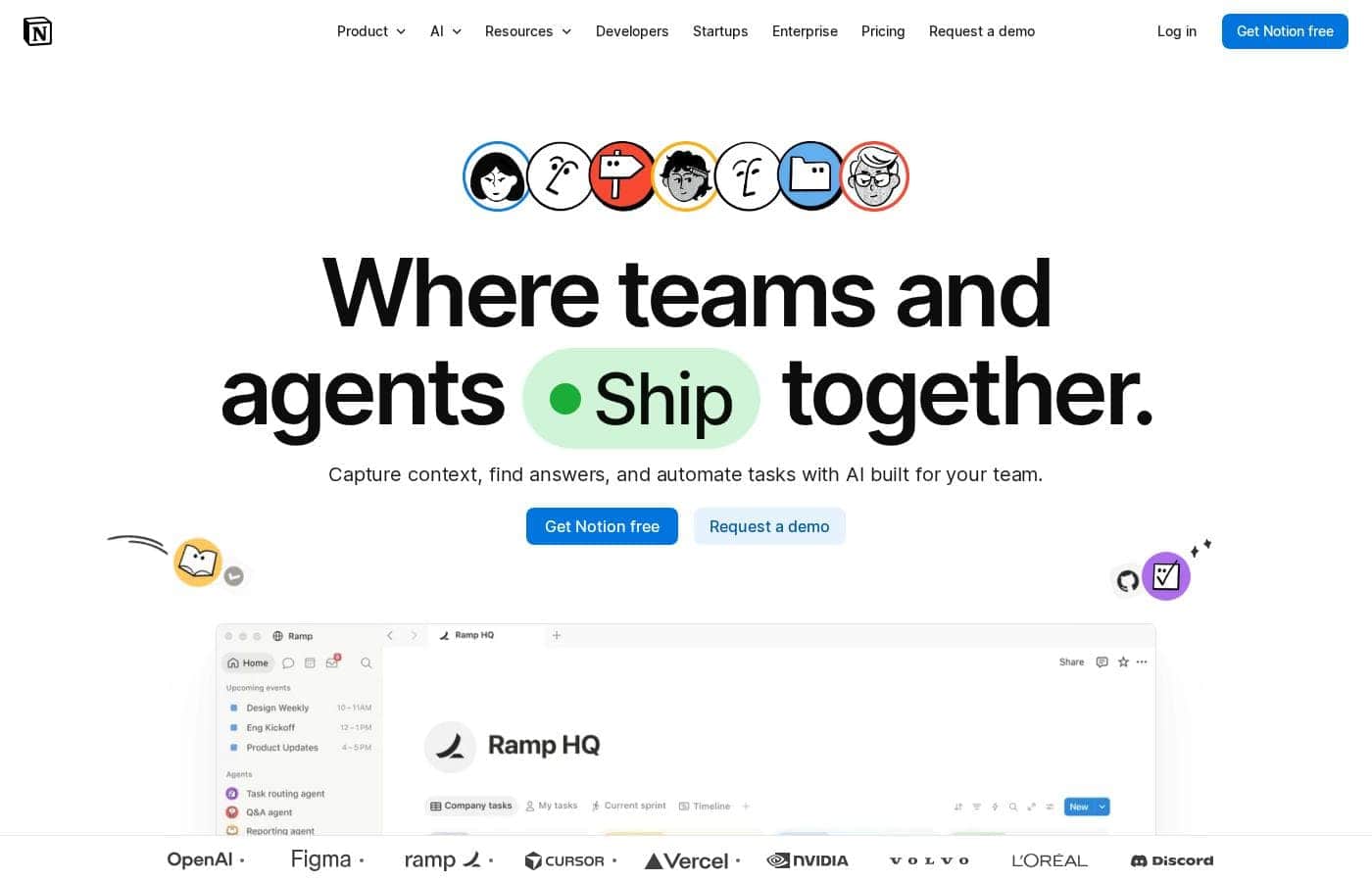
ภาพหน้าจอหลักของ Notion

At a glance

Quick overview for Notion: rating, pricing summary, key features, and highlights.

รีวิว Ciroapp

2.9
Powerful software, risky provider.

We found Notion is an exceptionally flexible and powerful productivity tool, praised globally for its block-based editor and ability to consolidate diverse workflows. However, external evidence highlights significant failures in subscription management and support responsiveness. Overall, we advise extreme caution regarding billing procedures due to recurring reports of unauthorized charges and cancellation difficulties.

ข้อดี

  • Pro:Exceptionally powerful and versatile block-based editor.
  • Pro:Effective for personal knowledge management and team use.
  • Pro:Consolidates multiple specialized tools (wikis, CRMs, project management).
  • Pro:Strong native AI assistance integrated throughout the workspace.

ข้อเสีย

  • Con:Widespread reports of deceptive or confusing billing practices.
  • Con:Extremely poor and unresponsive customer support experiences.
  • Con:Users report app is often slow and unreliable.
  • Con:Difficulty canceling subscriptions and obtaining timely refunds.
ทดลองใช้ฟรี
Yes
รับประกันคืนเงิน
Yes — 30 วัน
ช่วง: $0–$20/monthFree plan, Monthly subscription, Yearly subscription, Per seat pricing, Quote based
This section is a summary. Detailed sections about features, use cases, pricing, and reviews follow below.

รีวิว Notion ราคา ฟีเจอร์ ข้อดีข้อเสีย

Managing your work across many disconnected applications is frustrating. Tools for AI search, CRMs, and project management often live separately.

Notion addresses this pain by providing a single platform where you can do all your work. It seeks to give you more productivity and helps you use fewer tools. ✨

Notion คืออะไร?

Notion is your dedicated AI workspace and everything app. It is built to replace multiple specialized tools with one powerful platform. This centralized space lets teams consolidate project management, internal wikis, and basic CRM functions.

Notion is trusted broadly; over 100 million users worldwide use it, and 62% of the Fortune 100 are customers. You can use it right in your browser or download specialized tools like Notion Mail and Notion Calendar to keep time and work together. ✅

Notion คุณสมบัติหลัก

✨ AI Built for Everyone

Every person on your team gets an AI assistant built right into Notion. This powerful feature provides more productivity while requiring fewer specialty tools. G2 recognizes Notion as the top-rated AI writing tool available today.

You can confidently rely on its intelligence to handle various workplace tasks. For large organizations, Notion AI offers zero data retention with LLM providers on Enterprise plans. This focus on security helps ensure your sensitive data remains protected while still benefiting from powerful intelligent tools.

✨ Your Single Source of Truth

Eliminate the frustration of managing work across many disconnected applications. Notion is designed as a single platform where you can do all your work. This centralized space helps teams consolidate project management, internal wikis, and basic CRM functions.

Teams have successfully moved from using six specialized applications down to just one cohesive system. This consolidation boosts efficiency and allows your operations to scale quicker across all departments. Streamlining your workflows can help reduce project timelines by up to three times (3x).

✨ Unified Knowledge and Search

Instantly find company knowledge and critical data using Notion's powerful unified search function. You can search across your company knowledge and other connected apps, all right inside the platform. This saves time and ensures teams always have access to current information.

Notion has been rated the number one knowledge base for three years running on G2. When knowledge is organized and accessible, it helps teams streamline workflows effectively. This cohesive system enables new hires to efficiently onboard themselves without needing constant guidance.

✨ Connect Your Essential Services

Notion works seamlessly with the essential tools your team already relies on every day. You can integrate popular communication, development, and storage systems directly into your workspace. This capability ensures your data and documentation remain connected and secure.

The platform currently integrates smoothly with established services, including:

✨ Dedicated Productivity Applications

While Notion is always accessible right in your web browser, dedicated specialized tools are also available for download. These applications enhance how you manage external communications and coordinate your time. Using these components helps you naturally keep time and work together seamlessly.

You can download Notion Mail, which is an email inbox designed to think like you. Notion Calendar helps you integrate time management directly with your overall workflow. Notion is also available as a dedicated download for Windows users.

กรณีการใช้งาน

🧠 Centralizing the Company Knowledge Base

Your company uses too many tools, making documentation scattered and hard to find. Notion solves this by becoming your single source of truth for all internal procedures and knowledge. It has been rated the #1 knowledge base for three years running.

Teams successfully move mission-critical documents from six specialized apps down to just one. This cohesive system allows fast scaling across all departments. Some companies even noted that new hires could effectively onboard themselves without ever talking to anybody.

🚀 Boosting Project Management Efficiency

Teams often struggle with stalled projects when communication and tasks live separately. Notion consolidates your Project Management Tool, basic CRM, and communication links like Jira and GitHub.

Tracking tasks, dependencies, and overall timelines becomes clear right inside your workspace. When teams adopt this streamlined workflow, they’ve seen powerful improvements, including reducing project timelines by up to 3x.

Tip: Focus on integrating essential tools like Jira and GitHub for a complete project view.

✨ Deploying an Integrated AI Assistant to Every Team Member

Why purchase separate subscriptions for AI writing, research, and meeting notes? Notion integrates a powerful AI assistant right into every workspace. Every person on your team has an AI assistant built in, ready to help.

Notion is independently recognized by G2 as the #1 rated AI writing tool. You can use it to instantly generate drafts, summarize long documents, or quickly find information across the company using AI Search. This powerful feature eliminates costly steps in content creation and research.

💵 Managing Your Basic Customer Interactions

You don't need a heavy, expensive system for simple tracking of customers or leads. Notion includes the capability to act as a Basic CRM and Forms tool. You can quickly deploy custom forms to capture data directly into a dedicated database.

This simple setup helps your teams streamline initial sales tracking and customer data management swiftly. It’s an effective way to manage customer data without juggling additional costly subscriptions.

🗓️ Harmonizing Time Management and Work Output

Your calendar and critical documents shouldn't live in isolation. Notion helps you put your time and work together seamlessly.

Process Flow:

  1. Use Notion Calendar to track all your meetings and deadlines.
  2. Ensure Notion Mail synchronization keeps your inbox and workspace aligned.
  3. Capture meeting notes directly within Notion pages.
  4. Easily link calendar events to related projects and documents.

🔎 Finding Any Information Instantly

When institutional knowledge is difficult to locate, productivity slows down significantly. Notion offers robust AI Search features designed to cut through the clutter.

Problem: You spend too much time searching for key reports or strategy documents across Slack and Google Drive. Approach: Use Notion’s unified search function, which searches across your internal knowledge base and integrated apps like Slack, Google Drive, and MS Teams. Expected outcome: Find anything across your company knowledge with one single, powerful search.

ภาพรวมราคาของ Notion

ช่วงราคา
$0–$20/month
ประเภทราคา
Free plan, Monthly subscription, Yearly subscription, Per seat pricing, Quote based
รับประกันคืนเงิน
ใช่ — 30 วัน

Notion offers four simple plans starting with a robust $0 Free option designed for individuals. Paid plans start at $10 per seat per month, scaling based on the security features, administrative controls, and AI functionality your team needs.

แผนและราคา

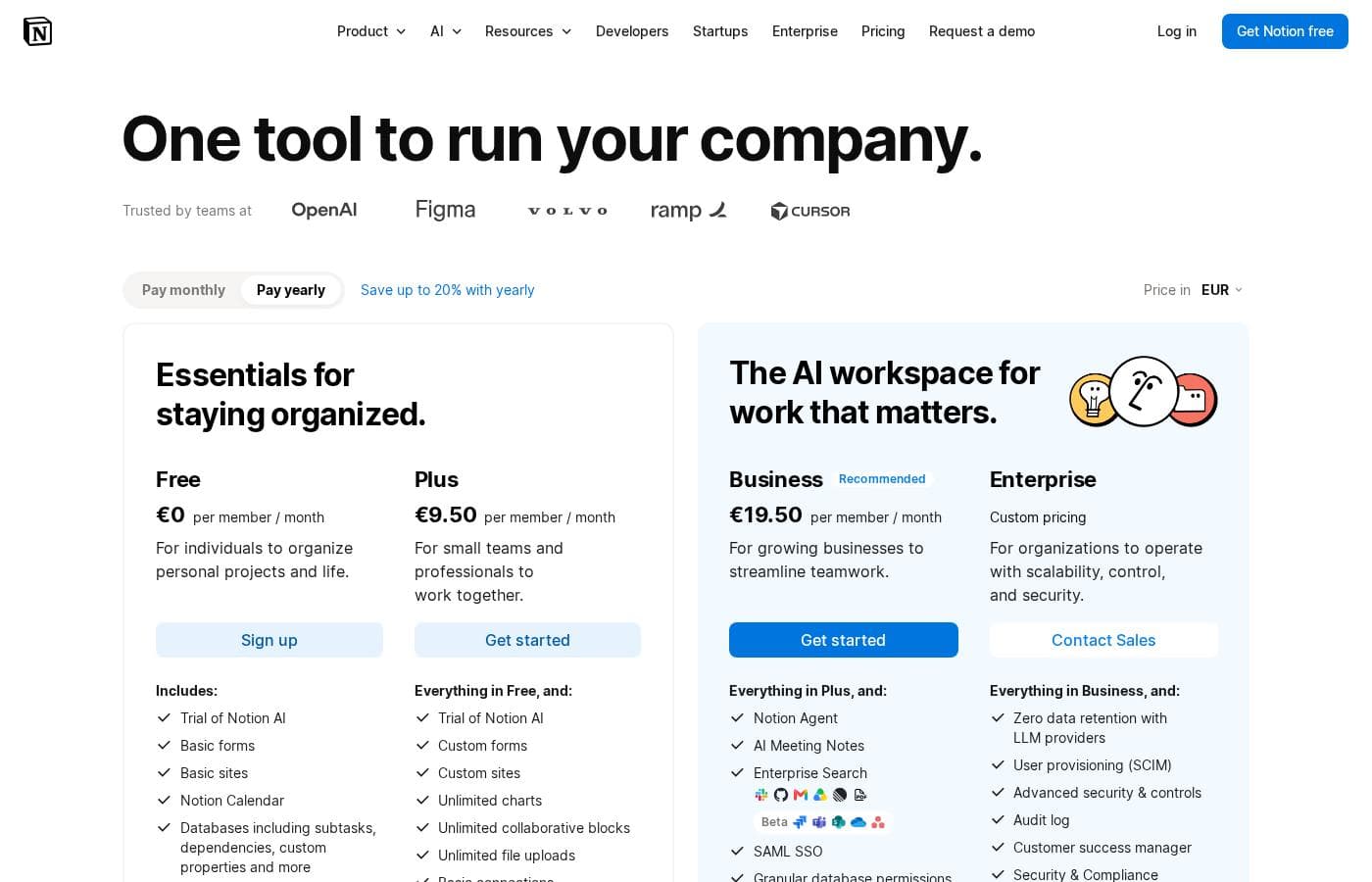
Free

รายเดือน$0
Pages are limited for 2+ members; file uploads up to 5MB each; 7 days of page history; 10 guest seats.
  • Unlimited pages and blocks for individuals
  • Web publishing with 1 custom subdomain
  • Basic forms and sites
  • Notion Calendar and Mail synchronization
  • Databases with subtasks and dependencies

Plus

รายเดือน$10
100 guest seats; 5 custom notion.site domains.
  • Unlimited blocks and file uploads
  • 30 days of page history
  • Basic SAML SSO
  • Granular database permissions
  • Access to unlimited charts

Business

รายเดือน$20
250 guest seats; 5 custom notion.site domains.
  • 90 days of page history
  • Advanced security controls and Audit log
  • Conditional forms logic
  • Domain verification
  • Advanced page analytics (includes editor list)

Enterprise

รายเดือนContact us
Starting at 250 guest seats; 5 custom notion.site domains.
  • Unlimited page history and workspace analytics
  • SCIM user provisioning
  • Zero data retention with LLM providers for Notion AI
  • Customer Success Manager support
  • Security & Compliance integrations (DLP, SIEM)

Notion costs between $0 and $20 per seat/month with four plans: Free at $0/seat/month, Plus at $10/seat/month, Business at $20/seat/month, and Enterprise (custom pricing).

Here’s a detailed look at the core features included in each subscription level.

รีวิวผู้ใช้

Trustpilot feedback paints a sharply divided picture of Notion. While many users praise the platform as a terrific tool—highlighting its power, versatility, and unique block-based editor for personal and professional organization—these compliments are often eclipsed by grave concerns regarding management and billing practices.

A recurring major theme across many reviews details frustrating experiences with unexpected charges, deceptive auto-upgrades (especially relating to annual plans and new members), and significant challenges when trying to cancel subscriptions or obtain timely refunds. Furthermore, support responsiveness is frequently described as unsatisfactory, unhelpful, or even condescending, often failing to resolve billing errors or login issues.

Users also report performance regression, citing the app is now “SLOW” and “UNUSABLE,” leading to reliability concerns. The recent strategy of moving desired AI features to higher-tier business plans has also caused palpable frustration among existing customers 😠.

Despite the product's functional excellence, the transactional experience needs urgent improvement.

ผู้ใช้พูดอะไรที่อื่น

Ted D.
· Trustpilot
5.0 / 5

Enjoy using Notion a lot for my daily work interface. It helps me set up my employees and assign tasks with no issue at all. We upgraded from the free plan and will absolutely continue using the platform.

Jane P.
· Trustpilot
1.0 / 5

I really loved using Notion, but now they charged double for a seat I never confirmed. Customer support stubbornly insists that the unexpected charge is correct instead of helping me resolve this issue.

ยังไม่มีรีวิว

เขียนรีวิว

เขียนรีวิวสำหรับ Notion
0/100 ตัวอักษร
0/2000 ตัวอักษร

ทำไมต้องใช้ Notion?

Why juggle multiple subscriptions for simple workplace functions when Notion offers a single powerhouse solution? Choosing this platform allows you to streamline operations and focus on results. 💡

  • Streamlined Workflows: Users have seen powerful improvements, including reducing project timelines by up to 3x.
  • AI Integration: With Notion, every person on your team has an AI assistant built in. G2 recognizes Notion as the #1 rated AI writing tool.
  • Single Source of Truth: Teams have successfully moved from six specialized apps down to just one. This allows fast scaling across all teams running on the platform.
  • Proven Knowledge Base: Notion has been rated the #1 knowledge base for three years running on G2.
  • Seamless Onboarding: The cohesive system is so complete that some companies noted new hires could effectively onboard themselves without ever speaking to anybody.
  • Easy Connections: Notion integrates with essential tools you already use, including Slack, GitHub, Jira, Google Drive, and MS Teams.

พร้อมที่จะเปลี่ยนแปลงกระบวนการทำงานของคุณด้วย Notion หรือยัง?

Notion เครื่องมือทางเลือก

เครื่องมืออื่นๆ ในหมวดหมู่ Project Management

คำถามที่พบบ่อย

If I add new members to a paid plan mid-cycle, how are the charges calculated?

When you add a new member, the additional cost is prorated immediately based on the remaining time in your current billing cycle. You will receive an invoice for these prorated charges on your chosen payment method that day.

What happens if I remove a paid member from my workspace before the billing cycle renews?

You will not receive a credit for the removed member during that cycle. Instead, you retain the paid seat until your next renewal, allowing you to swap in a different user without extra cost.

What is the official refund policy for Notion subscriptions?

You can request a full refund within three days of signing up for monthly billing or within 30 days of signing up for annual billing. Customers in regions like the EU or UK may have mandatory refund policies extending this period to 14 days for monthly plans.

Are guests charged the same per-seat rate as full members?

No. Guests invited to specific pages in your workspace are always free of charge. They cannot, however, see all team pages or global workspace resources.

How are integrations categorized across the different plan levels?

The Free plan includes 'Basic integrations' like Slack and Google Drive. The Plus plan introduces 'Premium integrations.' The Enterprise plan provides 'Advanced integrations' for comprehensive connectivity.

How does Notion AI protect my data, and is my content used for model training?

Notion follows standard data protection practices, ensuring your data is encrypted and private. Your data is not used to train Notion's AI models unless you explicitly opt in to share it.

Which plan provides the strongest security and compliance features like SCIM or Audit Logs?

The Business plan includes comprehensive security features like the Audit log and Advanced Security controls. The Enterprise plan adds SCIM user provisioning, DLP/SIEM integrations, and zero data retention for Notion AI usage.

What are the key limitations of the Free plan regarding file uploads and collaboration?

File uploads are limited to 5MB per file, unlike paid plans which offer unlimited uploads up to 5GB each. Also, teams using the Free plan have a limited number of collaborative blocks available before requiring an upgrade.

Does Notion offer a dedicated free trial for business teams, or just the free individual plan?

While individuals can use the robust free plan indefinitely, Notion also offers a 'limited trial for teams' to test collaborative features before committing to a paid subscription.

What happens to my account access if my payment fails repeatedly?

Notion will notify you after each failed payment and will retry up to eight times within a month. If payment still fails, your workspace will eventually be restricted or fully downgraded to the Free plan.

How do I cancel my monthly or annual subscription?

Subscriptions auto-renew until cancelled. You can cancel by navigating to Settings in the desktop app, selecting Billing, and then choosing Change Plan. You retain access to paid features until the end of that billing cycle.

Which plans include a dedicated Customer Success Manager for support?

The Customer Success Manager resource is exclusively included as a feature starting at the Enterprise tier. This plan also receives 'Premium support' tailored for specialized needs.

Is there a special academic discount available for students and educators?

Yes, Notion offers the Plus plan for free to students and educators. Signing up with a valid school email grants access to features like unlimited file uploads and extended page history.

What is the difference between basic and workspace analytics?

Basic analytics (Free/Plus) show page viewers and views over time. Workspace analytics (Enterprise only) includes user-level data, analytics on all workspace content, and search behavior visibility across the organization.

พร้อมทดลองใช้ Notion หรือยัง? ดูเว็บไซต์ทางการหรือราคา