HelpDesk เทียบกับ Techinline
HelpDesk and Techinline solve different problems. HelpDesk organizes customer tickets; Techinline connects you to remote computers instantly. One is for support desks, the other for IT support.
Best for: Support teams managing customer inquiries from multiple channels, Growing businesses needing structured ticketing and automation
Best for: IT professionals and managed service providers (MSPs), Teams providing remote support to clients or internal users
การจัดการตั๋วที่ใช้งานง่าย การสนับสนุนที่ยอดเยี่ยม และความคุ้มค่าที่ชัดเจน
HelpDesk มีความโดดเด่นในการนำเสนอระบบจัดการตั๋วที่มีประโยชน์และคล่องตัวซึ่งเหมาะสำหรับทีมที่กำลังเติบโตซึ่งต้องการการจัดระเบียบ เราพบว่า UI สะอาดตา และชื่นชมการบริการลูกค้าที่ได้รับการยกย่องอย่างสม่ำเสมอและตอบสนองตลอด 24/7 โดยรวมแล้ว นี่คือโซลูชันที่เชื่อถือได้และราคาไม่แพงสำหรับธุรกิจที่เน้นคุณสมบัติการสนับสนุนหลักที่แข็งแกร่ง
ข้อดี
- อินเทอร์เฟซที่สะอาดตาและใช้งานง่าย ทำให้ระบบนำไปใช้และใช้งานได้ง่าย
- ฝ่ายสนับสนุนลูกค้าตอบสนองรวดเร็ว เป็นมิตร และตอบสนองได้ดีมาก
- การตั้งค่าทำได้อย่างรวดเร็ว ส่งผลให้ความเร็วในการสนับสนุนลูกค้าดีขึ้นทันที
- โครงสร้างราคาที่เข้าถึงได้ง่าย รวมถึงที่นั่งผู้ดูฟรีแบบไม่จำกัดที่มีค่า
ข้อเสีย
- ฟีเจอร์ขั้นสูง เช่น การปรับแต่งมาโคร ยังมีข้อจำกัดในปัจจุบัน
- การเปลี่ยนจากผลิตภัณฑ์ที่ผสานรวมก่อนหน้านี้ (เช่น LiveChat) อาจมีค่าใช้จ่ายสูง/สร้างความยุ่งยาก
Solid remote support with scalable pricing.
We found Techinline SetMe to be a capable and secure remote access solution, especially for IT professionals and small teams needing reliable unattended and on-demand support. Its tiered pricing offers flexibility, but the lack of a clear refund policy is a notable gap for potential buyers.
ข้อดี
- Simple, instant client connections via a set.me link.
- Scalable plans from individual use to enterprise-level team management.
- Stable connections with auto-reconnect and multi-monitor support.
- Centralized dashboard for managing all devices and permissions.
ข้อเสีย
- Limited public user reviews made independent sentiment analysis impossible.
- No explicit refund policy is detailed on the website.
- Advanced team features require upgrading to higher-tier, per-seat plans.
- The 'Core' plan for individual use lacks on-demand support features.
เกี่ยวกับHelpDesk
HelpDesk เป็นซอฟต์แวร์ที่ครอบคลุมซึ่งออกแบบมาเพื่อจัดการกิจกรรมสนับสนุนลูกค้าที่หลากหลาย โดยพื้นฐานแล้ว มันทำหน้าที่เป็นศูนย์กลางหลักสำหรับทีมสนับสนุนของคุณ หรือจุดติดต่อเดียว (SPC)
เกี่ยวกับTechinline
SetMe is a remote support and management tool 🛠️ designed for IT professionals, support teams, and managed service providers. It lets you instantly connect to any computer, whether you’re providing live help or managing unattended servers and desktops from a central dashboard.
ไฮไลต์
การเปรียบเทียบคุณสมบัติ
ภาพรวมคุณสมบัติ
เราเน้นความแตกต่างหลักและเลือกผู้ชนะสำหรับแต่ละคุณสมบัติ
Core Purpose
HelpDesk organizes customer support tickets. Techinline provides remote computer access.
HelpDesk turns all customer messages into standardized tickets. It's a central hub for support teams managing requests from email, phone, and web forms. Techinline lets you connect to any computer remotely. You can provide live support or manage unattended servers and desktops from a central dashboard. The key difference is fundamental: HelpDesk manages conversations, Techinline manages machines. If your job is answering customer questions, HelpDesk is the tool. If your job is fixing computers remotely, Techinline is the tool.
User Interface
HelpDesk is praised for its clean, intuitive design. Techinline focuses on a functional remote dashboard.
Users consistently praise HelpDesk's interface. They call it clean, intuitive, and easy to set up, which speeds up adoption. Techinline's interface is a centralized dashboard for managing devices and sessions. It's designed for functionality, prioritizing control over aesthetics. The trade-off is clarity vs. utility. HelpDesk's UI is built for ticket flow; Techinline's is built for device management. For a support agent, HelpDesk's clean UI reduces training time. For an IT admin, Techinline's dashboard provides the controls they need.
Automation
HelpDesk offers powerful ticket automation. Techinline focuses on remote connection stability.
HelpDesk automates the entire ticketing process. Its rules handle creation, assignment, and prioritization, cutting manual work significantly. Techinline's automation is different. It focuses on connection stability, like auto-reconnect after network drops and maintaining sessions on low-speed internet. The difference is in the automation target. HelpDesk automates workflows; Techinline automates connections. For a high-volume support team, HelpDesk's rules save hours. For a field technician, Techinline's stability ensures they can finish the job.
Security
Both prioritize security. HelpDesk emphasizes data compliance; Techinline focuses on session encryption.
HelpDesk complies with GDPR and has Privacy Shield certification. It uses 256-bit SSL encryption for all data transmission. Techinline uses end-to-end encryption for all remote sessions. This protects the remote connection itself, ensuring data isn't intercepted. The security focus differs: HelpDesk protects the data in your system; Techinline protects the data in transit. For businesses handling sensitive customer data, HelpDesk's compliance is key. For remote access, Techinline's encryption is essential.
Pricing & Value
HelpDesk is per-user with free viewers. Techinline scales by user/admin and plan tier.
HelpDesk charges $29-50 per user/month. Admins and Agents pay; viewers are free. Annual billing saves 15%. Techinline starts at $8.25/month for solo access. Team plans are $41-58 per seat/month. Pricing scales with features and seats. HelpDesk offers clear value with unlimited free viewers. Techinline offers flexible tiers from solo to enterprise. For a team of 10 agents, HelpDesk's per-agent model is straightforward. For a solo IT consultant, Techinline's Core plan is cheaper.
Customer Support
HelpDesk offers 24/7 support with high user praise. Techinline's support details are limited.
HelpDesk provides 24/7/365 support. Users rave about quick, friendly responses that go the extra mile. Techinline's support is mentioned but not detailed in reviews. The site suggests contacting support for questions about response times. The difference is in transparency. HelpDesk's support is a highlighted strength; Techinline's is not. If you need immediate help, HelpDesk's proven support is a big plus. For Techinline, you'll need to test their support during the trial.
Integration Ecosystem
HelpDesk integrates with popular apps. Techinline has limited integrations.
HelpDesk connects to HubSpot, Salesforce, Jira, Zapier, and more. It has a marketplace for adding integrations. Techinline's integrations are not well-documented. Users may need to check for specific PSA or ticketing system compatibility. The difference is ecosystem size. HelpDesk has a broad integration network; Techinline is more standalone. For a team using Salesforce and Jira, HelpDesk's integrations are a major advantage. For pure remote support, Techinline may be sufficient.
Learning Curve
HelpDesk is easy to adopt with a clean interface. Techinline requires understanding remote access concepts.
HelpDesk is frequently described as easy to set up and use. Its clean UI helps new agents get started quickly. Techinline requires knowledge of remote access, unattended devices, and permissions. The dashboard is functional but technical. The trade-off is simplicity vs. specialization. HelpDesk is for general support; Techinline is for IT specialists. A new hire could be productive in HelpDesk in hours. Techinline might require a day of training for remote support basics.
HelpDesk มีค่าใช้จ่ายระหว่าง $29 ถึง $50 ต่อผู้ใช้ต่อเดือน (เรียกเก็บรายปี) ด้วยสามแผน: Team ที่ $29/เดือน, Business ที่ $50/เดือน และ Enterprise (ราคาที่กำหนดเอง
โครงสร้างราคาชัดเจนและจัดทำขึ้นเพื่อช่วยให้คุณเลือกสิ่งที่เหมาะสมกับความต้องการในการดำเนินงานของคุณที่สุด
Team
ราคา: $29/เดือน ต่อผู้ใช้ (เรียกเก็บรายปี) หรือ $34/เดือน ต่อผู้ใช้ (เรียกเก็บรายเดือน) เว็บไซต์ที่รองรับ: ไม่ได้ระบุไว้ เหมาะสำหรับ: ทีมที่กำลังเติบโตที่มีความต้องการระดับเริ่มต้น นโยบายคืนเงิน: ตรวจสอบเป็นรายบุคคลโดยฝ่ายสนับสนุน ฟีเจอร์อื่นๆ:
- บทบาทผู้ดูฟรีไม่จำกัด
- 5 ทีมและมุมมองตั๋วที่ปรับแต่งได้
- เทมเพลตอีเมล 5 ฉบับ และกฎอัตโนมัติที่ใช้งานอยู่ 5 รายการ
- หนึ่งโดเมนที่กำหนดเอง
- ฟิลด์ที่กำหนดเองที่เปิดใช้งาน 5 รายการ
- ผู้ใช้ที่ต้องชำระเงินพร้อมบทบาทผู้ดูแลระบบหรือตัวแทน
- ผู้ดูฟรีไม่จำกัด
- 5 ทีม
- 5 ที่อยู่สำหรับส่งต่อ
- 5 ที่อยู่สำหรับตอบกลับ
- ผู้ใช้ที่ต้องชำระเงินพร้อมบทบาทผู้ดูแลระบบหรือตัวแทน
- ผู้ดูฟรีไม่จำกัด
- 100 ทีม
- 100 ที่อยู่สำหรับส่งต่อ
- 100 ที่อยู่สำหรับตอบกลับ
- ทุกอย่างจากแผน Business โดยไม่มีข้อจำกัด
- ผู้จัดการบัญชีเฉพาะ
- การฝึกอบรมผลิตภัณฑ์
- การสนับสนุนจากวิศวกรซอฟต์แวร์
- ความช่วยเหลือด้านความปลอดภัย
Techinline pricing: Techinline offers four SetMe plans starting at $8.25 per month (billed annually) for individual unattended access. Pricing scales based on features like on-demand support, seat count, and team management tools, with both monthly and yearly billing available for most tiers.
Core
Price: $8.25 per month (billed annually at $99) Best For: Individual users needing secure unattended access Other Features: Multiple concurrent sessions, File transfer and clipboard sync, Remote restart with auto-reconnect, Multi-monitor support, Session recording
This plan is perfect for individuals who only need to manage their own remote machines. It's a reliable choice if you don't need to provide instant on-demand support to new clients.
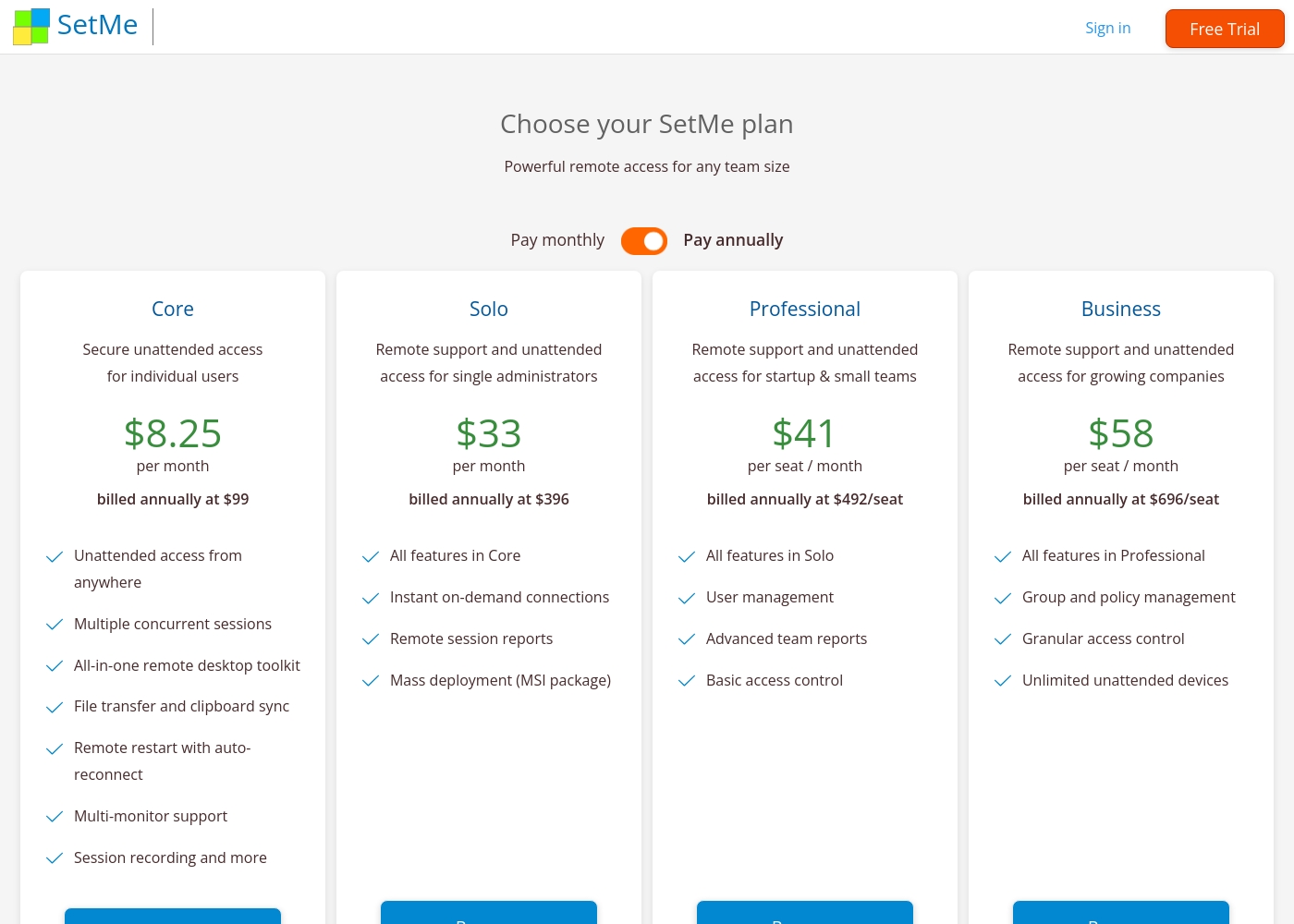
Pricing Head-to-Head
รีวิวจากผู้ใช้
การย้ายจาก Zendesk ไปยัง HelpDesk ช่วยประหยัดเงินให้เรา วิดเจ็ตแชทนี้มีราคาไม่แพงและ UI/UX ดีขึ้นมาก เครื่องมือนี้ใช้งานง่ายมากและให้ข้อมูลแก่เรามากขึ้น
External reviews for Techinline SetMe were not accessible during this review. The provided Trustpilot URL returned a 403 error, preventing access to user feedback. Consequently, the review relies solely on the product's website information and our independent analysis of its features and pricing structure.
คำตัดสินของเรา
HelpDesk and Techinline are different tools for different jobs. HelpDesk is a ticketing system. Techinline is a remote access tool. They don't compete directly. HelpDesk's superpower is organizing customer support. It turns emails and calls into tickets. Its clean interface and 24/7 support get high praise. Techinline's superpower is remote connectivity. It connects you to any computer instantly. Its stable connections on bad Wi-Fi are a lifesaver. The deciding factor is your core need. If you're answering customer questions, choose HelpDesk. If you're fixing computers remotely, choose Techinline. For most support teams, HelpDesk is the clear winner. For IT pros needing remote access, Techinline is the right choice. Pick the tool that matches your daily work.
คำถามที่พบบ่อย
Which is better for small teams: HelpDesk or Techinline?
It depends on your need. HelpDesk is better for small support teams managing customer tickets. Techinline is better for small IT teams providing remote support. HelpDesk starts at $29/user/month; Techinline at $8.25/month for solo access.
Does HelpDesk have remote access features like Techinline?
No. HelpDesk is a ticketing system, not a remote access tool. It manages customer support conversations. Techinline is designed for remote computer control and support sessions.
Is Techinline worth the extra cost over HelpDesk?
The cost comparison isn't apples-to-apples. HelpDesk charges per user for ticketing. Techinline charges for remote access. If you need remote support, Techinline is worth it. If you need ticketing, HelpDesk is better value.
Can I migrate from HelpDesk to Techinline easily?
No, these are different tools. You can't migrate tickets to remote access software. You might use both, but they serve separate purposes.
Which has better customer support: HelpDesk or Techinline?
HelpDesk offers 24/7 support with high user praise. Techinline's support is not well-documented. Based on reviews, HelpDesk has better support.
Do both tools offer free trials?
Yes. HelpDesk has a 14-day free trial. Techinline offers a 15-day free trial. Both are risk-free to test.
พร้อมที่จะเลือกแล้วหรือยัง?
ทั้งสองเครื่องมือมีจุดแข็งของตัวเอง เลือกตามความต้องการเฉพาะของคุณ