GitLab เทียบกับ Hive
GitLab and Hive solve very different problems. GitLab is an all-in-one DevSecOps platform for building and deploying software. Hive is a connected workspace for managing projects across tools like Slack and Salesforce. Your choice depends entirely on whether you need to build software or manage work.
Best for: Software development teams of all sizes, DevOps engineers needing unified CI/CD and security

Best for: Marketing teams coordinating campaigns, Agencies managing multiple client projects
Comprehensive DevSecOps, but complex.
GitLab is a powerful, all-in-one platform that unifies the entire software lifecycle. We find it delivers on its promise of acceleration and unified security, though its depth can create a steep learning curve for smaller teams. Overall, it's an excellent choice for organizations seeking a single, scalable solution for planning, building, and deploying software securely.
ข้อดี
- Single platform for the entire DevSecOps lifecycle
- Built-in security scanning accelerates vulnerability detection
- AI-powered workflows (Duo Agent) enhance productivity
- Offers a functional Free tier for individuals and small projects
ข้อเสีย
- Learning curve can be steep due to platform breadth
- Enterprise features like advanced security require costly Ultimate tier
- Compute and storage limits on lower tiers may require paid add-ons
- Annual billing commitment for paid plans
ข้อดี
ข้อเสีย
เกี่ยวกับGitLab
GitLab is an end-to-end DevSecOps platform for teams of all sizes, from startups to large enterprises. It’s the single place to plan, build, test, secure, and deploy your software. You get all your projects, releases, and code in one data plane, so both your team and AI agents work from the same information. 💡
เกี่ยวกับHive
ไฮไลต์
การเปรียบเทียบคุณสมบัติ
ภาพรวมคุณสมบัติ
เราเน้นความแตกต่างหลักและเลือกผู้ชนะสำหรับแต่ละคุณสมบัติ
Core Platform & Purpose
GitLab is a full software lifecycle platform. Hive is a connected project hub.
GitLab unifies planning, coding, testing, security, and deployment. It's a single platform for the entire DevSecOps lifecycle. This eliminates the need for separate CI/CD, security, and planning tools. Hive centralizes work from apps like Slack, email, and Salesforce. It's designed for task management and collaboration across departments. The focus is on organizing workflows, not building software. The key difference is scope. GitLab is for building and shipping software products. Hive is for managing projects and work across business tools.
AI & Automation
GitLab's AI builds code. Hive's AI organizes work.
GitLab's Duo Agent Platform can turn issues into merge requests and review code. It's AI designed to accelerate development tasks. Teams report saving 4 hours per engineer weekly. Hive's Buzz AI searches across connected apps. It summarizes meetings and turns conversations into action items. It's an AI assistant for project clarity. GitLab's AI is deep and technical. Hive's AI is broad and organizational. Your choice depends on whether you need coding automation or work summarization.
Security & Compliance
GitLab has security built-in. Hive focuses on project security.
GitLab includes SAST, SCA, Secret Detection, and DAST scanners. Security findings appear in merge requests. This helps find vulnerabilities 50% faster. Compliance controls are automated. Hive's security focuses on workspace access and data handling. It offers an 'adoption guarantee' but doesn't include code scanning. It's about keeping project data secure, not source code. For software supply chain security, GitLab is the clear choice. For general project data security, both offer standard protections.
User Interface & Views
GitLab shows code pipelines. Hive shows flexible project boards.
GitLab's UI is built around code repositories, merge requests, and pipelines. It's powerful for developers but has a steep learning curve. The interface is information-dense. Hive offers multiple views for the same project. You can switch between Kanban, Gantt, Calendar, and Table. This flexibility helps non-technical teams visualize work their way. GitLab's UI optimizes for technical workflows. Hive's UI optimizes for collaborative visibility. One is a powerhouse, the other is a chameleon.
Collaboration for Non-Technical Teams
GitLab is for developers. Hive is for everyone else.
GitLab collaboration happens through code reviews, issues, and merge requests. It's highly effective for engineering teams. Marketing or sales teams would find it overwhelming. Hive is built for cross-functional collaboration. It pulls emails, chats, and CRM data into task contexts. Teams like agencies and non-profits can manage approvals and updates in one place. If your team writes code, GitLab. If your team manages client projects or campaigns, Hive.
Pricing & Value
GitLab scales with your team size. Hive scales with your project complexity.
GitLab's paid plans start at $29/user/month. Advanced security requires the $99/user/month Ultimate tier. This can get expensive for large teams needing enterprise features. Hive's paid plans start at $5/user/month. The Teams plan at $12/user/month is the sweet spot. This is more accessible for growing business teams. GitLab offers high value for software teams. Hive offers high value for business project teams. Both have free tiers for small-scale use.
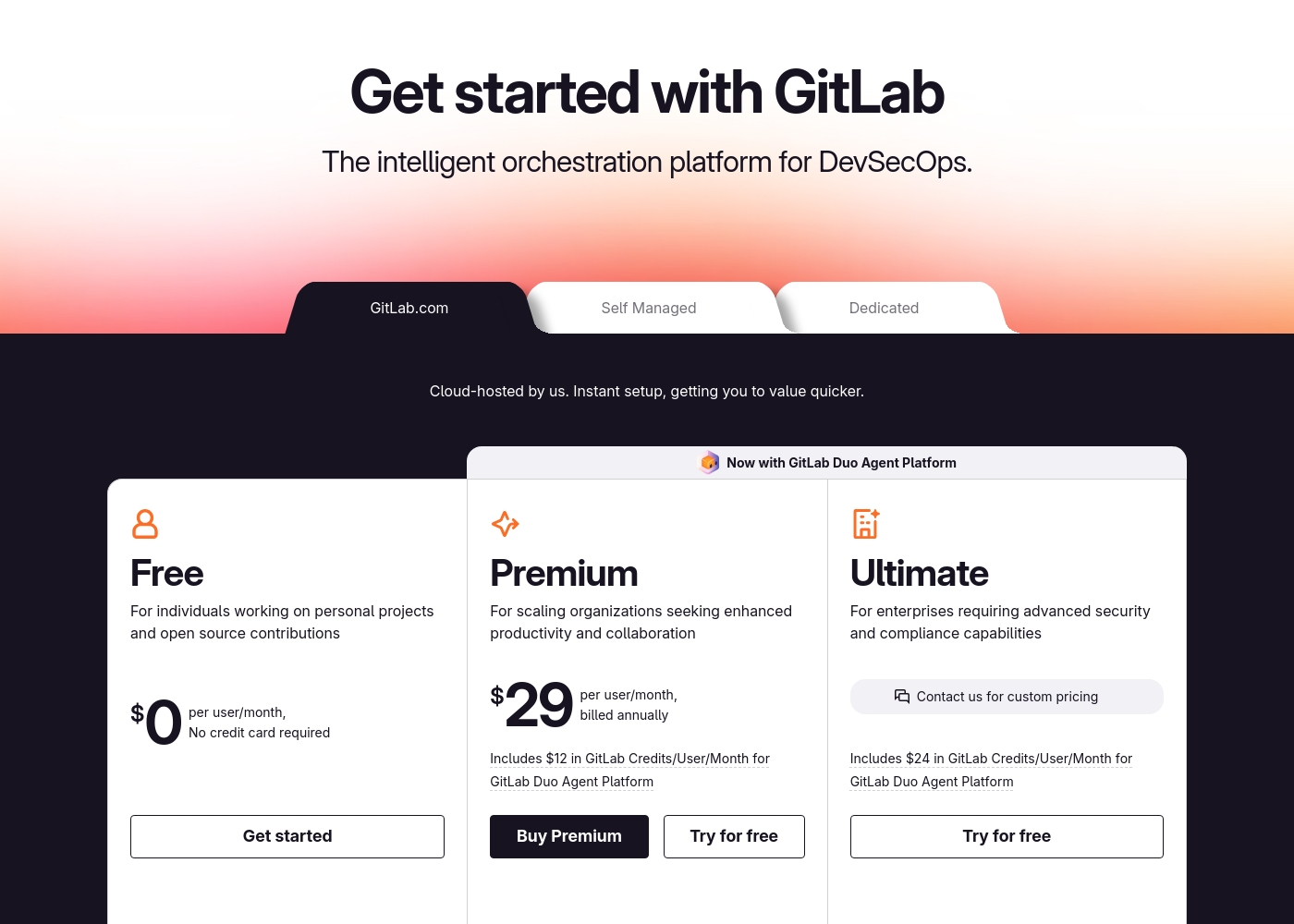
GitLab pricing: GitLab offers a range of DevSecOps plans from a free tier for individuals to an Ultimate enterprise solution for $99/month. Subscriptions include various compute minutes, storage allocations, and security features to fit different team sizes and needs.
Please note: the provided screenshot shows $29/user/month for Premium, while the text mentions $99 for Ultimate elsewhere; we have prioritized the current primary source values below for clarity. Actually, the provided text includes $0, $29 annually, and custom pricing options depending on the deployment method (SaaS or Self-Managed).
Overall it is a per-seat annual subscription model with usage-based add-ons for credits and compute time. For current SaaS pricing: Free $0, Premium $29/mo annually, Ultimate $99/mo annually (implied for custom).
Pricing Notes
- GitLab's free tier allows 5 private users. Hive's free tier allows 10 workspace members.
- GitLab requires annual billing for paid plans. Hive offers monthly billing for flexibility.
- GitLab's highest tier ($99/user) includes advanced security. Hive's top tier ($12/user) focuses on project features.
- Both offer free trials without a credit card to start.
Pricing Head-to-Head
รีวิวจากผู้ใช้
External user reviews for GitLab are currently inaccessible for a full synthesis, as both Trustpilot and Capterra returned security verification errors. 📄 Therefore, we cannot provide a balanced, specific summary of recurring user themes on accuracy, ease of use, support, or pricing at this time. We recommend checking these sources directly for up-to-date sentiment.
GitLab streamlined our entire development pipeline. Having CI/CD, security, and planning in one place saves our team significant time each week.
คำตัดสินของเรา
This isn't a fair fight—it's a choice between two completely different tools. GitLab wins for software teams, and Hive wins for business project teams. GitLab's superpower is building and shipping software securely. It replaces your CI/CD, security, and planning tools with one platform. Teams report 80x faster builds and 50% faster vulnerability detection. Hive's superpower is connecting your existing work apps. It pulls Slack, email, and Salesforce data into a single view. One team saved 810 hours in their first month using Hive. The deciding factor is your primary work. If you write code and deploy software, choose GitLab. If you manage projects across different business tools, choose Hive. For software developers and DevOps teams, GitLab is the all-in-one solution. For marketing, agencies, and cross-functional teams, Hive provides the connected workspace you need. Pick the tool that matches how your team actually works.
คำถามที่พบบ่อย
Can I use GitLab for general project management like Hive?
GitLab has issue boards and planning tools, but it's optimized for software development workflows. Hive is better for non-technical project management. GitLab's interface may be too complex for business teams.
Does Hive have CI/CD capabilities like GitLab?
No, Hive is not a software delivery platform. It focuses on task management, collaboration, and connecting business tools. For CI/CD pipelines, you need a tool like GitLab.
Which is cheaper for a team of 20 people?
Hive is likely cheaper. Its Teams plan costs $12/user/month ($240 total). GitLab's Premium plan costs $29/user/month ($580 total). GitLab becomes more expensive if you need advanced security.
Can I connect Salesforce to GitLab?
GitLab doesn't have a native Salesforce integration. It focuses on developer tools like Jira and Jenkins. Hive has a direct Salesforce integration for syncing sales data into projects.
Which tool has a better free plan?
Both free plans are limited but useful. GitLab allows 5 private users and basic CI/CD. Hive allows 10 workspace members and project management. Your choice depends on your team's primary work.
Do both tools offer mobile apps?
Yes, both GitLab and Hive have mobile apps. GitLab's app is for monitoring pipelines and reviewing code. Hive's app is for managing tasks and collaborating on projects while mobile.
พร้อมที่จะเลือกแล้วหรือยัง?
ทั้งสองเครื่องมือมีจุดแข็งของตัวเอง เลือกตามความต้องการเฉพาะของคุณ