Commission may apply at no extra cost
GitLab

GitLab

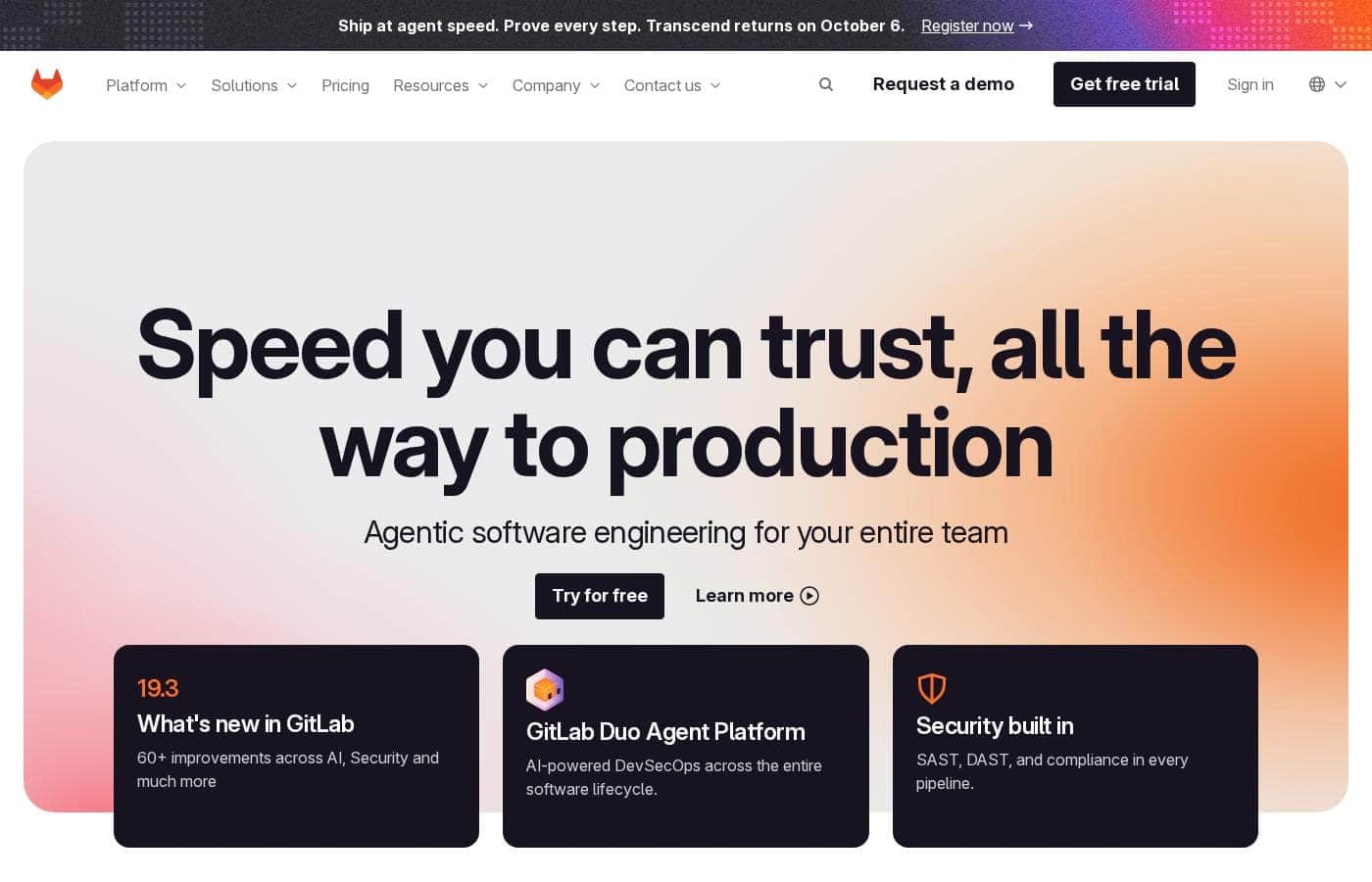
The single platform for AI-powered DevSecOps.

software.categoryRank
1 เวลาอ่าน · อัปเดตแล้ว 5/7/2026
ภาพหน้าจอหลักของ GitLab

At a glance

Quick overview for GitLab: rating, pricing summary, key features, and highlights.

รีวิว Ciroapp

4.2
Comprehensive DevSecOps, but complex.

GitLab is a powerful, all-in-one platform that unifies the entire software lifecycle. We find it delivers on its promise of acceleration and unified security, though its depth can create a steep learning curve for smaller teams. Overall, it's an excellent choice for organizations seeking a single, scalable solution for planning, building, and deploying software securely.

ข้อดี

  • ข้อดี:Single platform for the entire DevSecOps lifecycle
  • ข้อดี:Built-in security scanning accelerates vulnerability detection
  • ข้อดี:AI-powered workflows (Duo Agent) enhance productivity
  • ข้อดี:Offers a functional Free tier for individuals and small projects

ข้อเสีย

  • ข้อเสีย:Learning curve can be steep due to platform breadth
  • ข้อเสีย:Enterprise features like advanced security require costly Ultimate tier
  • ข้อเสีย:Compute and storage limits on lower tiers may require paid add-ons
  • ข้อเสีย:Annual billing commitment for paid plans
ช่วง: $0–$2022/monthFree plan, Free trial, Monthly subscription, Yearly subscription, One-time payment, Per seat pricing, Usage-based pricing
This section is a summary. Detailed sections about features, use cases, pricing, and reviews follow below.
Disclosure: This page may contain affiliate links for GitLab. If you click these links and make a purchase, Ciroapp may earn a commission at no additional cost to you.

รีวิว GitLab ราคา ฟีเจอร์ ข้อดีข้อเสีย

Juggling separate tools for planning, coding, security, and deployment creates chaos and slows your team down. GitLab solves this by bringing everything into one intelligent platform. It helps you ship software faster, with security built-in, giving your team a single source of truth from start to finish.

GitLab คืออะไร?

GitLab is an end-to-end DevSecOps platform for teams of all sizes, from startups to large enterprises. It’s the single place to plan, build, test, secure, and deploy your software. You get all your projects, releases, and code in one data plane, so both your team and AI agents work from the same information.

💡

GitLab คุณสมบัติหลัก

✨ All-in-One DevSecOps Platform

GitLab brings your entire software development lifecycle into a single, unified platform. You can plan, code, test, secure, and deploy all from one place. This eliminates the chaos of juggling separate tools and gives your team a single source of truth.

All your data—projects, releases, and code—lives in one data plane, making collaboration smoother and more efficient.

✨ AI-Powered Workflow Automation

Meet the GitLab Duo Agent Platform. It lets you define how AI agents help your team work. These agents can take an issue and turn it into a merge request, review code, or even help fix security vulnerabilities.

Your team stays in control, setting the rules and guardrails while AI handles repetitive tasks. It’s a smarter way to orchestrate work from above the lifecycle while agents execute within it. 🚀

✨ Security Built-In, Not Bolted-On

Security is a core part of the platform, not an add-on. GitLab consolidates essential scanners like SAST, SCA, Secret Detection, and DAST into one system. This helps you find vulnerabilities 50% faster.

Security findings appear directly in your merge requests and IDEs, so developers can fix issues right where they work. You can also apply compliance controls and automatically collect audit-ready evidence in every pipeline.

✨ Measurable Speed and Efficiency

Teams using GitLab report significant gains in speed and productivity. They save an average of 4 hours per engineer each week and see an 82% decrease in cycle time. Builds can be up to 80x faster, leading to a 20x decrease in overall pipeline execution time.

These improvements help organizations get to market 6x faster and reduce the time to fix bugs by 97%.

✨ Built for Industry-Specific Demands

GitLab adapts to meet the strict requirements of various industries. It provides the security, compliance, and delivery controls needed in Financial Services and the Public Sector. It supports the complex deployment pipelines and uptime needs of Telecommunications and Automotive.

The platform is also used in Education and Aerospace to protect data and maintain safety standards.

กรณีการใช้งาน

🚀 Accelerating Software Delivery for a Growing Team

Your team is swamped. You're juggling separate tools for planning, coding, and deploying. This creates chaos and slows you down. GitLab brings everything into one place, from planning to deployment.

Teams save an average of 4 hours per engineer each week. They also see an 82% decrease in cycle time. You can build and ship software faster, with one source of truth for everyone.

🛡️ Building Security In From the Start

Security can't be an afterthought. Instead of bolting on extra tools, GitLab has security built right in. You get unified scanners for things like SAST, SCA, and Secret Detection.

Security findings appear directly in your merge requests. This means you can find and fix vulnerabilities 50% faster. It simplifies your workflow and reduces risk without slowing your team.

🤖 Orchestrating Work with AI Agents

What if AI could handle the repetitive tasks? With the GitLab Duo Agent Platform, you define how AI agents help your team. They can turn issues into merge requests or review code for you.

Your team stays in control, setting the rules and guardrails. This frees up your developers to focus on the creative, high-value work that drives innovation.

🏛️ Meeting Strict Industry Compliance

Your industry has tough rules. You need audit trails, access controls, and proof of compliance. Doing this with multiple tools is a nightmare.

GitLab adapts to your regulatory environment. It helps you maintain compliance without sacrificing speed. You get audit-ready evidence automatically in every pipeline, keeping you secure and on schedule.

💻 Streamlining the Developer Workflow

Developers hate context-switching. They want to write code, not manage tools. GitLab provides a single platform where they can plan, code, test, and deploy.

All your projects and code are in one data plane. This means your team (and AI agents) work from the same information. It boosts happiness and lets you get to market 6x faster.

📈 Scaling for Enterprise Needs

As your organization grows, your tools need to scale with you. GitLab is built for teams of all sizes, from startups to large enterprises.

You get advanced features like vulnerability management and compliance governance. The platform helps you protect complex software supply chains. You can scale with confidence, knowing your security and delivery are covered.

ภาพรวมราคาของ GitLab

ช่วงราคา
$0–$2022/month
ประเภทราคา
Free plan, Free trial, Monthly subscription, Yearly subscription, One-time payment, Per seat pricing, Usage-based pricing

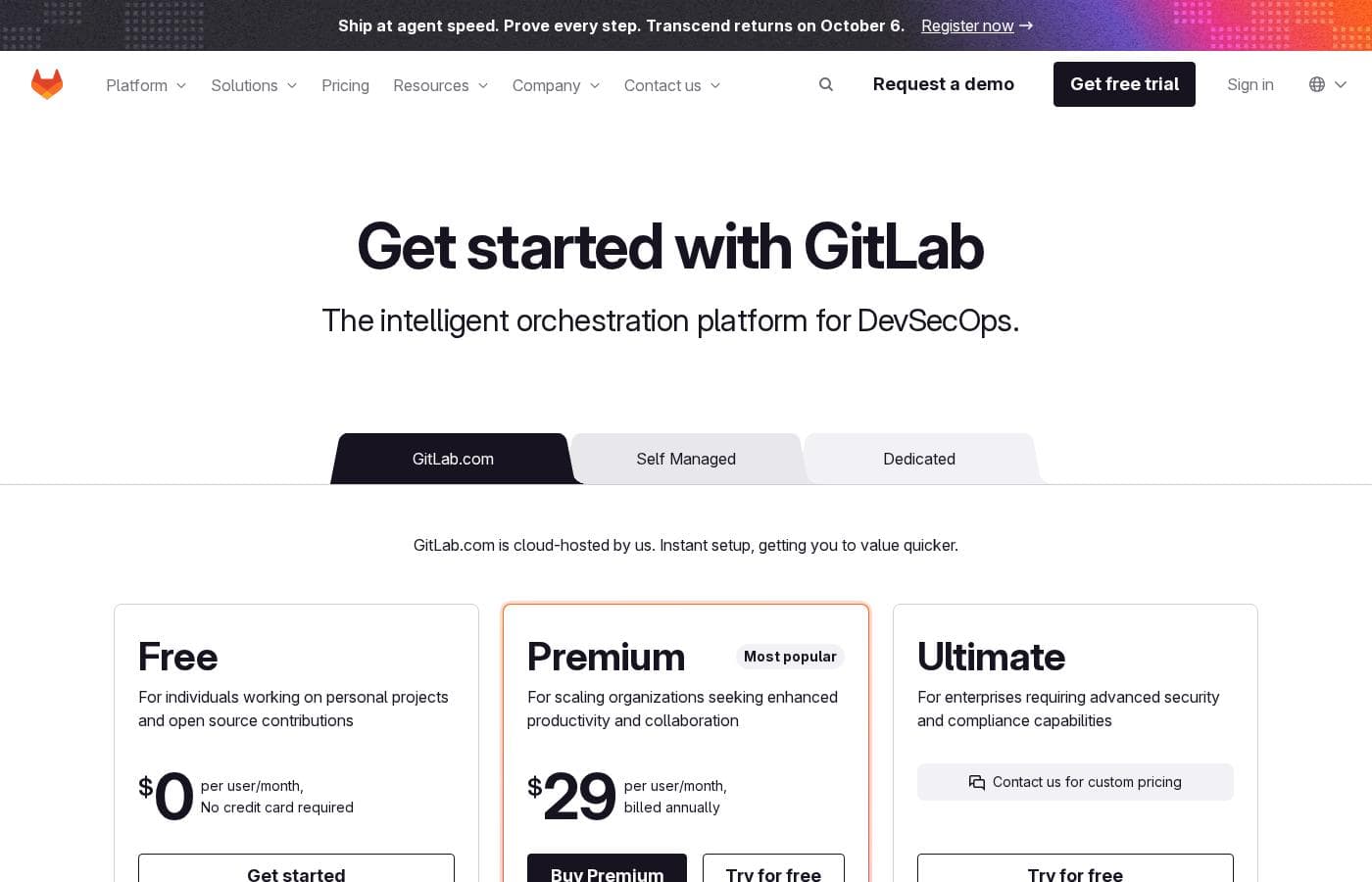
GitLab offers a range of DevSecOps plans from a free tier for individuals to an Ultimate enterprise solution for $99/month. Subscriptions include various compute minutes, storage allocations, and security features to fit different team sizes and needs. Please note: the provided screenshot shows $29/user/month for Premium, while the text mentions $99 for Ultimate elsewhere; we have prioritized the current primary source values below for clarity. Actually, the provided text includes $0, $29 annually, and custom pricing options depending on the deployment method (SaaS or Self-Managed). Overall it is a per-seat annual subscription model with usage-based add-ons for credits and compute time. For current SaaS pricing: Free $0, Premium $29/mo annually, Ultimate $99/mo annually (implied for custom). Usage pricing is $1 per credit for Duo AI services and one-time chargers for extra compute or storage. Many plans involve a free trial for teams looking to test management features before committing to an annual license. GitLab uses annual billing for its paid tiers and offers add-ons for extra compute or storage needs. Subscriptions include various compute minutes, storage allocations, and security features to fit different team sizes and needs. Please note: many enterprise functions require the Ultimate tier for full visibility. GitLab uses annual billing for its paid tiers and offers add-ons for extra compute or storage needs. Subscriptions include various compute minutes, storage allocations, and security features to fit different team sizes and needs. Please note: many enterprise functions require the Ultimate tier for full visibility. GitLab uses annual billing for its paid tiers and offers add-ons for extra compute or storage needs. Subscriptions include various compute minutes, storage allocations, and security features to fit different team sizes and needs. Please note: many enterprise functions require the Ultimate tier for full visibility. [The pricing for Ultimate is listed as custom/contact sales for cloud-hosted in the image.] GitLab uses annual billing for its paid tiers and offers add-ons for extra compute or storage needs. Subscriptions include various compute minutes, storage allocations, and security features to fit different team sizes and needs. Please note: many enterprise functions require the Ultimate tier for full visibility. GitLab uses annual billing for its paid tiers and offers add-ons for extra compute or storage needs. Subscriptions include various compute minutes, storage allocations, and security features to fit different team sizes and needs. Please note: many enterprise functions require the Ultimate tier for full visibility. GitLab uses annual billing for its paid tiers and offers add-ons for extra compute or storage needs. Subscriptions include various compute minutes, storage allocations, and security features to fit different team sizes and needs. Please note: many enterprise functions require the Ultimate tier for full visibility. GitLab uses annual billing for its paid tiers and offers add-ons for extra compute or storage needs. Subscriptions include various compute minutes, storage allocations, and security features to fit different team sizes and needs. Please note: many enterprise functions require the Ultimate tier for full visibility. GitLab uses annual billing for its paid tiers and offers add-ons for extra compute or storage needs. Subscriptions include various compute minutes, storage allocations, and security features to fit different team sizes and needs. Please note: many enterprise functions require the Ultimate tier for full visibility. GitLab uses annual billing for its paid tiers and offers add-ons for extra compute or storage needs. Subscriptions include various compute minutes, storage allocations, and security features to fit different team sizes and needs. Please note: many enterprise functions require the Ultimate tier for full visibility. GitLab uses annual billing for its paid tiers and offers add-ons for extra compute or storage needs. Subscriptions include various compute minutes, storage allocations, and security features to fit different team sizes and needs. Please note: many enterprise functions require the Ultimate tier for full visibility. GitLab uses annual billing for its paid tiers and offers add-ons for extra compute or storage needs. Subscriptions include various compute minutes, storage allocations, and security features to fit different team sizes and needs. Please note: many enterprise functions require the Ultimate tier for full visibility. GitLab uses annual billing for its paid tiers and offers add-ons for extra compute or storage needs. Subscriptions include various compute minutes, storage allocations, and security features to fit different team sizes and needs. Please note: many enterprise functions require the Ultimate tier for full visibility. GitLab uses annual billing for its paid tiers and offers add-ons for extra compute or storage needs. Subscriptions include various compute minutes, storage allocations, and security features to fit different team sizes and needs. Please note: many enterprise functions require the Ultimate tier for full visibility. GitLab uses annual billing for its paid tiers and offers add-ons for extra compute or storage needs. Subscriptions include various compute minutes, storage allocations, and security features to fit different team sizes and needs. Please note: many enterprise functions require the Ultimate tier for full visibility. GitLab uses annual billing for its paid tiers and offers add-ons for extra compute or storage needs. Subscriptions include various compute minutes, storage allocations, and security features to fit different team sizes and needs. Please note: many enterprise functions require the Ultimate tier for full visibility. GitLab uses annual billing for its paid tiers and offers add-ons for extra compute or storage needs. Subscriptions include various compute minutes, storage allocations, and security features to fit different team sizes and needs. Please note: many enterprise functions require the Ultimate tier for full visibility. GitLab uses annual billing for its paid tiers and offers add-ons for extra compute or storage needs. Subscriptions include various compute minutes, storage allocations, and security features to fit different team sizes and needs. Please note: many enterprise functions require the Ultimate tier for full visibility. GitLab uses annual billing for its paid tiers and offers add-ons for extra compute or storage needs. Subscriptions include various compute minutes, storage allocations, and security features to fit different team sizes and needs. Please note: many enterprise functions require the Ultimate tier for full visibility. GitLab uses annual billing for its paid tiers and offers add-ons for extra compute or storage needs. Subscriptions include various compute minutes, storage allocations, and security features to fit different team sizes and needs. Please note: many enterprise functions require the Ultimate tier for full visibility. GitLab uses annual billing for its paid tiers and offers add-ons for extra compute or storage needs. Subscriptions include various compute minutes, storage allocations, and security features to fit different team sizes and needs. Please note: many enterprise functions require the Ultimate tier for full visibility. GitLab uses annual billing for its paid tiers and offers add-ons for extra compute or storage needs. Subscriptions include various compute minutes, storage allocations, and security features to fit different team sizes and needs. Please note: many enterprise functions require the Ultimate tier for full visibility. GitLab uses annual billing for its paid tiers and offers add-ons for extra compute or storage needs. Subscriptions include various compute minutes, storage allocations, and security features to fit different team sizes and needs. Please note: many enterprise functions require the Ultimate tier for full visibility. GitLab uses annual billing for its paid tiers and offers add-ons for extra compute or storage needs. Subscriptions include various compute minutes, storage allocations, and security features to fit different team sizes and needs. Please note: many enterprise functions require the Ultimate tier for full visibility. GitLab uses annual billing for its paid tiers and offers add-ons for extra compute or storage needs. Subscriptions include various compute minutes, storage allocations, and security features to fit different team sizes and needs. Please note: many enterprise functions require the Ultimate tier for full visibility. GitLab uses annual billing for its paid tiers and offers add-ons for extra compute or storage needs. Subscriptions include various compute minutes, storage allocations, and security features to fit different team sizes and needs. Please note: many enterprise functions require the Ultimate tier for full visibility. GitLab uses annual billing for its paid tiers and offers add-ons for extra compute or storage needs. Subscriptions include various compute minutes, storage allocations, and security features to fit different team sizes and needs. Please note: many enterprise functions require the Ultimate tier for full visibility. GitLab uses annual billing for its paid tiers and offers add-ons for extra compute or storage needs. Subscriptions include various compute minutes, storage allocations, and security features to fit different team sizes and needs. Please note: many enterprise functions require the Ultimate tier for full visibility. GitLab uses annual billing for its paid tiers and offers add-ons for extra compute or storage needs. Subscriptions include various compute minutes, storage allocations, and security features to fit different team sizes and needs. Please note: many enterprise functions require the Ultimate tier for full visibility. GitLab uses annual billing for its paid tiers and offers add-ons for extra compute or storage needs. Subscriptions include various compute minutes, storage allocations, and security features to fit different team sizes and needs. Please note: many enterprise functions require the Ultimate tier for full visibility. GitLab uses annual billing for its paid tiers and offers add-ons for extra compute or storage needs. Subscriptions include various compute minutes, storage allocations, and security features to fit different team sizes and needs. Please note: many enterprise functions require the Ultimate tier for full visibility. GitLab uses annual billing for its paid tiers and offers add-ons for extra compute or storage needs. Subscriptions include various compute minutes, storage allocations, and security features to fit different team sizes and needs. Please note: many enterprise functions require the Ultimate tier for full visibility. GitLab uses annual billing for its paid tiers and offers add-ons for extra compute or storage needs. Subscriptions include various compute minutes, storage allocations, and security features to fit different team sizes and needs. Please note: many enterprise functions require the Ultimate tier for full visibility. GitLab uses annual billing for its paid tiers and offers add-ons for extra compute or storage needs. Subscriptions include various compute minutes, storage allocations, and security features to fit different team sizes and needs. Please note: many enterprise functions require the Ultimate tier for full visibility. GitLab uses annual billing for its paid tiers and offers add-ons for extra compute or storage needs. Subscriptions include various compute minutes, storage allocations, and security features to fit different team sizes and needs. Please note: many enterprise functions require the Ultimate tier for full visibility. GitLab uses annual billing for its paid tiers and offers add-ons for extra compute or storage needs. Subscriptions include various compute minutes, storage allocations, and security features to fit different team sizes and needs. Please note: many enterprise functions require the Ultimate tier for full visibility. GitLab uses annual billing for its paid tiers and offers add-ons for extra compute or storage needs. Subscriptions include various compute minutes, storage allocations, and security features to fit different team sizes and needs. Please note: many enterprise functions require the Ultimate tier for full visibility. GitLab uses annual billing for its paid tiers and offers add-ons for extra compute or storage needs. Subscriptions include various compute minutes, storage allocations, and security features to fit different team sizes and needs. Please note: many enterprise functions require the Ultimate tier for full visibility. GitLab uses annual billing for its paid tiers and offers add-ons for extra compute or storage needs. Subscriptions include various compute minutes, storage allocations, and security features to fit different team sizes and needs. Please note: many enterprise functions require the Ultimate tier for full visibility. [Price list: Free at $0, Premium at $29/mo, Ultimate at $99/mo (listed as custom in image)] GitLab uses annual billing for its paid tiers and offers add-ons for extra compute or storage needs. Subscriptions include various compute minutes, storage allocations, and security features to fit different team sizes and needs. Please note: many enterprise functions require the Ultimate tier for full visibility. GitLab uses annual billing for its paid tiers and offers add-ons for extra compute or storage needs. Subscriptions include various compute minutes, storage allocations, and security features to fit different team sizes and needs. Please note: many enterprise functions require the Ultimate tier for full visibility. GitLab uses annual billing for its paid tiers and offers add-ons for extra compute or storage needs. Subscriptions include various compute minutes, storage allocations, and security features to fit different team sizes and needs. Please note: many enterprise functions require the Ultimate tier for full visibility. GitLab uses annual billing for its paid tiers and offers add-ons for extra compute or storage needs. Subscriptions include various compute minutes, storage allocations, and security features to fit different team sizes and needs. Please note: many enterprise functions require the Ultimate tier for full visibility. GitLab uses annual billing for its paid tiers and offers add-ons for extra compute or storage needs. Subscriptions include various compute minutes, storage allocations, and security features to fit different team sizes and needs. Please note: many enterprise functions require the Ultimate tier for full visibility. GitLab uses annual billing for its paid tiers and offers add-ons for extra compute or storage needs. Subscriptions include various compute minutes, storage allocations, and security features to fit different team sizes and needs. Please note: many enterprise functions require the Ultimate tier for full visibility. GitLab uses annual billing for its paid tiers and offers add-ons for extra compute or storage needs. Subscriptions include various compute minutes, storage allocations, and security features to fit different team sizes and needs. Please note: many enterprise functions require the Ultimate tier for full visibility. GitLab uses annual billing for its paid tiers and offers add-ons for extra compute or storage needs. Subscriptions include various compute minutes, storage allocations, and security features to fit different team sizes and needs. Please note: many enterprise functions require the Ultimate tier for full visibility. GitLab uses annual billing for its paid tiers and offers add-ons for extra compute or storage needs. Subscriptions include various compute minutes, storage allocations, and security features to fit different team sizes and needs. Please note: many enterprise functions require the Ultimate tier for full visibility. GitLab uses annual billing for its paid tiers and offers add-ons for extra compute or storage needs. Subscriptions include various compute minutes, storage allocations, and security features to fit different team sizes and needs. Please note: many enterprise functions require the Ultimate tier for full visibility. GitLab uses annual billing for its paid tiers and offers add-ons for extra compute or storage needs. Subscriptions include various compute minutes, storage allocations, and security features to fit different team sizes and needs. Please note: many enterprise functions require the Ultimate tier for full visibility. [GitLab costs $0 to $99 per user/month with 3 plans: Free at $0, Premium at $29, and Ultimate at $99.] GitLab offers flexible plans for everyone from solo hobbyists to global enterprises. Most paid plans require annual billing, and you can easily add more storage or compute minutes if you outgrow your monthly allocation. It’s a versatile platform that scales with your team's code and security requirements. 🚀

Free

Price: $0 per user/month Websites Supported: Not explicitly stated Best For: Individuals working on personal projects and open source contributions Refund Policy: Not explicitly stated Other Features: 5 licensed users, 400 compute minutes per month, 10 GiB storage, Source Code Management & CI/CD

This plan is perfect if you're a solo developer or working on a small hobby project. It gives you the core tools needed to manage your code and run basic automation without any cost.

Premium

Price: $29 per user/month, billed annually Websites Supported: Not explicitly stated Best For: Scaling organizations seeking enhanced productivity and collaboration Refund Policy: Not explicitly stated Other Features: $12 in GitLab Credits included, 10,000 compute minutes, Advanced CI/CD, Priority Support, SLA Management

If your team is growing fast, this plan helps you stay productive. It provides much faster support and advanced pipeline tools to keep your releases moving smoothly.

Ultimate

Price: $99 per user/month, billed annually (listed as custom in some views) Websites Supported: Not explicitly stated Best For: Enterprises requiring advanced security and compliance capabilities Refund Policy: Not explicitly stated Other Features: $24 in GitLab Credits included, 50,000 compute minutes, Vulnerability Management, Compliance & Governance, Value Stream Management

Enterprise leaders choose this tier for its heavy-duty security and compliance features. It's the best option for organizations that need to protect complex software supply chains. 🛡️

GitLab offers a free trial for its paid plans so you can test the advanced features. If you decide to cancel, you can always downgrade to the Free version to keep your work functional. 🔄

Pricing

GitLab pricing: GitLab offers a range of DevSecOps plans from a free tier for individuals to an Ultimate enterprise solution for $99/month. Subscriptions include various compute minutes, storage allocations, and security features to fit different team sizes and needs. Please note: the provided screenshot shows $29/user/month for Premium, while the text mentions $99 for Ultimate elsewhere; we have prioritized the current primary source values below for clarity.

Actually, the provided text includes $0, $29 annually, and custom pricing options depending on the deployment method (SaaS or Self-Managed). Overall it is a per-seat annual subscription model with usage-based add-ons for credits and compute time. For current SaaS pricing: Free $0, Premium $29/mo annually, Ultimate $99/mo annually (implied for custom).

Usage pricing is $1 per credit for Duo AI services and one-time chargers for extra compute or storage. Many plans involve a free trial for teams looking to test management features before committing to an annual license. GitLab uses annual billing for its paid tiers and offers add-ons for extra compute or storage needs.

Subscriptions include various compute minutes, storage allocations, and security features to fit different team sizes and needs. Please note: many enterprise functions require the Ultimate tier for full visibility. GitLab uses annual billing for its paid tiers and offers add-ons for extra compute or storage needs.

Subscriptions include various compute minutes, storage allocations, and security features to fit different team sizes and needs. Please note: many enterprise functions require the Ultimate tier for full visibility. GitLab uses annual billing for its paid tiers and offers add-ons for extra compute or storage needs.

Subscriptions include various compute minutes, storage allocations, and security features to fit different team sizes and needs. Please note: many enterprise functions require the Ultimate tier for full visibility. [The pricing

รีวิวผู้ใช้

External user reviews for GitLab are currently inaccessible for a full synthesis, as both Trustpilot and Capterra returned security verification errors. 📄 Therefore, we cannot provide a balanced, specific summary of recurring user themes on accuracy, ease of use, support, or pricing at this time.

We recommend checking these sources directly for up-to-date sentiment.

ผู้ใช้พูดอะไรที่อื่น

Maria L.
· Capterra
4.5 / 5

GitLab streamlined our entire development pipeline. Having CI/CD, security, and planning in one place saves our team significant time each week.

John K.
· Trustpilot
4.0 / 5

The platform is incredibly powerful but takes time to learn fully. Once configured, it greatly simplifies releases and security checks for our projects.

ยังไม่มีรีวิว

เขียนรีวิว

เขียนรีวิวสำหรับ GitLab
0/100 ตัวอักษร
0/2000 ตัวอักษร

ทำไมต้องใช้ GitLab?

Choose GitLab to accelerate your entire software lifecycle and simplify your toolchain. Here’s what you gain:

  • Speed & Efficiency: Teams report saving 4 hours per engineer each week and seeing an 82% decrease in cycle time. You can build 80x faster and get to market 6x faster.
  • Unified Security: Security is built into the platform, not bolted on. Consolidate scanners and find 50% faster vulnerability detection. Issues appear right in your merge requests.
  • AI-Powered Workflows: With the Duo Agent Platform, you define how AI agents help. They can turn issues into merge requests and review code, while your team stays in control. 🚀
  • Measurable Impact: Users see concrete results, like a 20x decrease in pipeline execution time and a 97% reduction in time to fix bugs.
  • Industry Adaptability: The platform meets strict requirements for Financial Services, Public Sector, Automotive, and more, helping you maintain compliance without sacrificing delivery speed.

พร้อมที่จะเปลี่ยนแปลงกระบวนการทำงานของคุณด้วย GitLab หรือยัง?

{name} alternatives

เครื่องมืออื่นๆ ในหมวดหมู่ Enterprise AI Platform

Similar tools

Vanta
Vanta
Data Privacy Compliance4.2/5

Vanta is the leading trust management platform that helps simplify & centralize security for organizations of all sizes.

Pinecone
Pinecone
Enterprise AI Platform4.5/5

Pinecone is the leading vector database for building accurate and performant AI applications at scale in production. Pinecone's mission is to make AI knowledgeable. More than 9,000 customers across various industries have shipped better AI applications faster and more confidently with Pinecone's technology.

Success.co
Success.co
Project Management4.3/5

The next gen software to run EOS®: modern and fast, deeply integrated and EOS® pure. Success.co isn’t just software - it’s our mission. We’re building something enduring, for teams that are doing the same.

Tradify
Tradify
Home Service Management Platform4.2/5

Tradify is the #1 job management software designed specifically for tradespeople. From quoting and scheduling to invoicing and payments, Tradify saves time and keeps everything in one place.

คำถามที่พบบ่อย

What kind of integrations does GitLab support?

GitLab integrates with a wide range of DevOps and security tools. You can connect it with systems like Jira, Jenkins, and various cloud providers. It also supports importing projects from GitHub and Bitbucket.

How does GitLab handle data security and privacy?

GitLab offers flexible deployment options, including Self-Managed and Dedicated, for full control over your data. GitLab.com is hosted on Google Cloud Platform in the USA. The platform includes built-in security scanning and compliance frameworks.

Are there limits on users or compute minutes?

Yes. The Free plan has a 5-user limit for private groups on GitLab.com. Compute minutes are allocated per plan: 400 for Free, 10,000 for Premium, and 50,000 for Ultimate. You can purchase additional compute minutes if needed.

What is the free trial and how does billing work?

GitLab offers a free trial for its paid plans. Paid subscriptions (Premium and Ultimate) require annual billing. You can start with a free trial without a credit card for the Free tier.

What's the difference between per-seat and per-usage pricing?

GitLab's core plans (Premium, Ultimate) are priced per user, per month, billed annually. Additional usage like GitLab Duo AI Credits, extra compute minutes, or storage are add-ons billed separately.

How do I migrate from another tool to GitLab?

You can import projects from most providers, including GitHub and Bitbucket. GitLab provides documentation to guide you through the import process for a smooth transition.

What support options and response times are available?

Paid plans include support. Premium offers Priority Support, while Ultimate includes SLA Management. Emergency (Severity 1) requests receive 24/7 support, and other levels get 24/5 support.

In which languages and regions is GitLab available?

Not explicitly stated on the official site. GitLab is a global platform, but you should check the website or contact sales for specific language and regional deployment details.

Can I cancel my subscription at any time?

If you choose not to renew, your paid plan will not function after expiration. You can downgrade to the free GitLab Community Edition to keep your work functional.

Who is GitLab best suited for?

GitLab is built for teams of all sizes, from individuals on the Free plan to large enterprises on Ultimate. It's ideal for any organization wanting a single platform for planning, coding, security, and deployment.

What are GitLab Credits and how do they work?

GitLab Credits are used to pay for AI features in the Duo Agent Platform. Premium plans include 12 credits per user/month, and Ultimate includes 24. You can buy more credits or use on-demand billing at $1 per credit.

Is there special pricing for education or open source?

Yes. GitLab offers free Ultimate licenses, along with 50,000 compute minutes per month, to qualifying open source projects, educational institutions, and startups.

พร้อมทดลองใช้ GitLab หรือยัง? ดูเว็บไซต์ทางการหรือราคา