WP Time Capsule

WP Time Capsule

Incremental, Real-Time Backup and Staging for WordPress.

#1 dans WordPress Backup Plugin
2 min read · Updated 11/21/2025
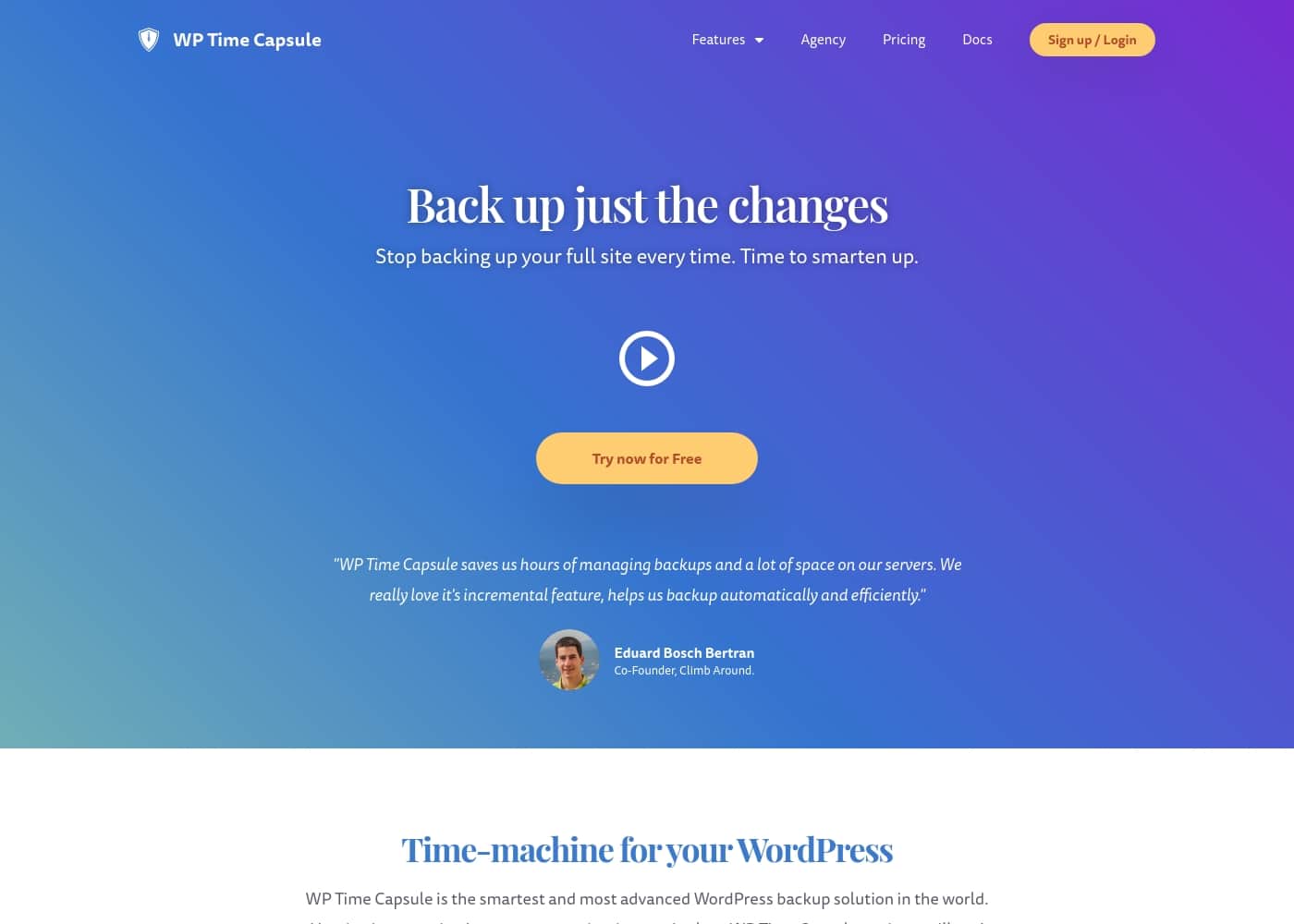
WP Time Capsule homepage screenshot

At a glance

Quick overview for WP Time Capsule: rating, pricing summary, key features, and highlights.
Free trial
Yes — 30 days
Range: $49–$199/yearFree trial, Yearly subscription, One-time payment
This section is a summary. Detailed sections about features, use cases, pricing, and reviews follow below.

WP Time Capsule review, pricing, features, pros & cons

Dealing with endless full site backups is frustrating. They clog your server and waste valuable time. WP Time Capsule offers a much smarter solution to site protection.

It only backs up your changes immediately, saving huge amounts of space and effort. You get an always up-to-date backup, ready for a lightning-fast restore if disaster strikes. ✨

What is WP Time Capsule?

WP Time Capsule is the smartest way to protect your WordPress site. It acts as a digital time-machine for business owners, agencies, and those running e-commerce stores. This plugin avoids cumbersome scheduled backups entirely.

It uses automatic, incremental backing up instead. When changes happen, they are backed up immediately and automagically. Your website protection is always current and ready to go.

You can even revert your site to its status from just an hour ago if needed. ✅

WP Time Capsule Key Features

✨ Automatic Real-Time Incremental Backups

Stop wasting time and space dealing with cumbersome full site backups. WP Time Capsule offers a much smarter and more advanced protection solution. Any change to your site's files or database immediately triggers a backup automagically. You never have to remember to schedule backups.

This system is incremental, meaning only the specific changes you make are backed up every time. Unchanged files remain untouched. Since only changes are saved, the load on your server is minimal, barely higher than a regular visitor's visit. This methodology keeps space usage infinitesimal and saves significantly on storage bills.

✨ Instant Disaster Recovery

No matter if you face a hack, malware infection, server crash, or human error, WP Time Capsule has you protected. You can quickly restore your website to a point back in time with just a single click of a button. Files are selectively moved back to the live site immediately without any manual effort or unzipping.

Because we back up in real-time, you gain maximum flexibility during an emergency. You can leverage the time-machine capability to revert your website to exactly how it was just an hour ago. This speed and precision ensure you are back online instantly.

💡 One-Click Staging Environment

Set up a secured testing ground simply and safely before making critical modifications. Our one-click Staging feature creates an independent, clone copy of your live production site. You can test updates, changes, and new ideas safely away from the public view.

Testing is vital when your website is critical to your business performance. You can test complex updates, like those for WooCommerce, to ensure they do not cause any site breakage. Once you are confident, you can move the Staging site changes to your Live site easily.

✨ Safer Updates and Vulnerability Management

Update your WordPress core, themes, and plugins with true confidence. The cutting-edge backup and restore system forms a strong foundation for safer website management. WP Time Capsule creates a backup automatically right before any update is applied.

If an update causes your site to break, a quick restore is immediately available to make your site operational. You can also utilize the staging environment to preview all updates before applying them to the live environment.

✨ Data Control and Cloud Privacy

Your data privacy is guaranteed because your files are truly yours and controlled by you. All files and the database are stored securely in your own preferred cloud app account. We do not handle your file versioning.

This system lets you connect to major storage providers including Google Drive, Dropbox, Backblaze B2, or Amazon S3. By storing files in your own cloud, WP Time Capsule offers an affordable, efficient solution that keeps you independent of your web host for backups.

✨ E-commerce Real-Time Order Protection

If you run an online store, ensuring you capture every sale is mandatory. Orders are the lifeline of your business, and losing recent data is unacceptable. WP Time Capsule provides tailored protection for your web store.

Every order that arrives is backed up immediately as it comes in. This guarantees that your critical business data remains current and fully protected from potential damage or technical issues.

✨ Centralized Management and White Labeling

Agencies and freelancers managing multiple client sites gain efficiency using our central dashboard. Our Eagle-eye view allows you to oversee and manage backups across all your managed websites from a single place. You can view problems and fix backup errors without needing to visit each website individually.

For professional integration, client-facing agencies can seamlessly present this technology as their own solution. White-label integration removes all mentions of 'WP Time Capsule' from the plugin list view, including:

Use Cases

🚨 Performing a Disaster Recovery After a Hack

It’s inevitable that your website might face a hack or malware infection someday. Your priority is getting the site back up fast without complex manual processes. Because WP Time Capsule backs up file changes immediately, restoring your site is simple.

You can revert your entire website to a point back in time using a single click. This lightning-fast restore process works efficiently after any danger, including human error or a server crash.

⚙️ Safely Testing Critical Updates

WordPress, plugin, or theme updates are important, but they often break things on the live site. Instead of risking performance lapses, you can use our Staging environment. With one click, you set up an independent clone of your production site.

Now you can test all updates and major changes in the secure staging area. Once you confirm everything works correctly, you move the tested version to your live site confidently.

🛒 Protecting a High-Volume E-commerce Store

Orders are the essential bloodline of your online business, and you cannot afford to lose even one. WP Time Capsule provides crucial protection for web stores, which are more fragile than you might think.

Every incoming order is backed up immediately as it happens. No matter the damage or interruption, a quick restore is always just a click away. You ensure vital transactional data is protected in real-time.

🤝 Streamlining Agency and Freelancer Workflow

If you manage many client websites, efficiency and branding matter greatly. You can handle the backup statuses of all your installations from one central dashboard. This gives you an eagle-eye view to quickly fix any backup errors.

For professional presentation, you can white-label our technology. This removes all mentions of 'WP Time Capsule' entirely, allowing you to provide an integrated backup solution directly under your own brand.

☁️ Maximizing Hosting Efficiency and Storage Savings

Old backup methods clog your server by zipping multiple copies of the same full site. WP Time Capsule only backs up incremental changes, which prevents server strain.

Since only changes are backed up, the total space used in your storage app is infinitesimal. This smart process is light and fast, meaning your host will love the reduction in load. You save money while achieving superior efficiency.

⏱️ Recovering from Localized File Errors

Sometimes, a mistake only affects a few files or database entries, not the whole site. With real-time incremental backups, you can revert the site to its exact status from just an hour ago.

Approach:

Pricing Overview for WP Time Capsule

Pricing range
$49–$199/year
Pricing types
Free trial, Yearly subscription, One-time payment

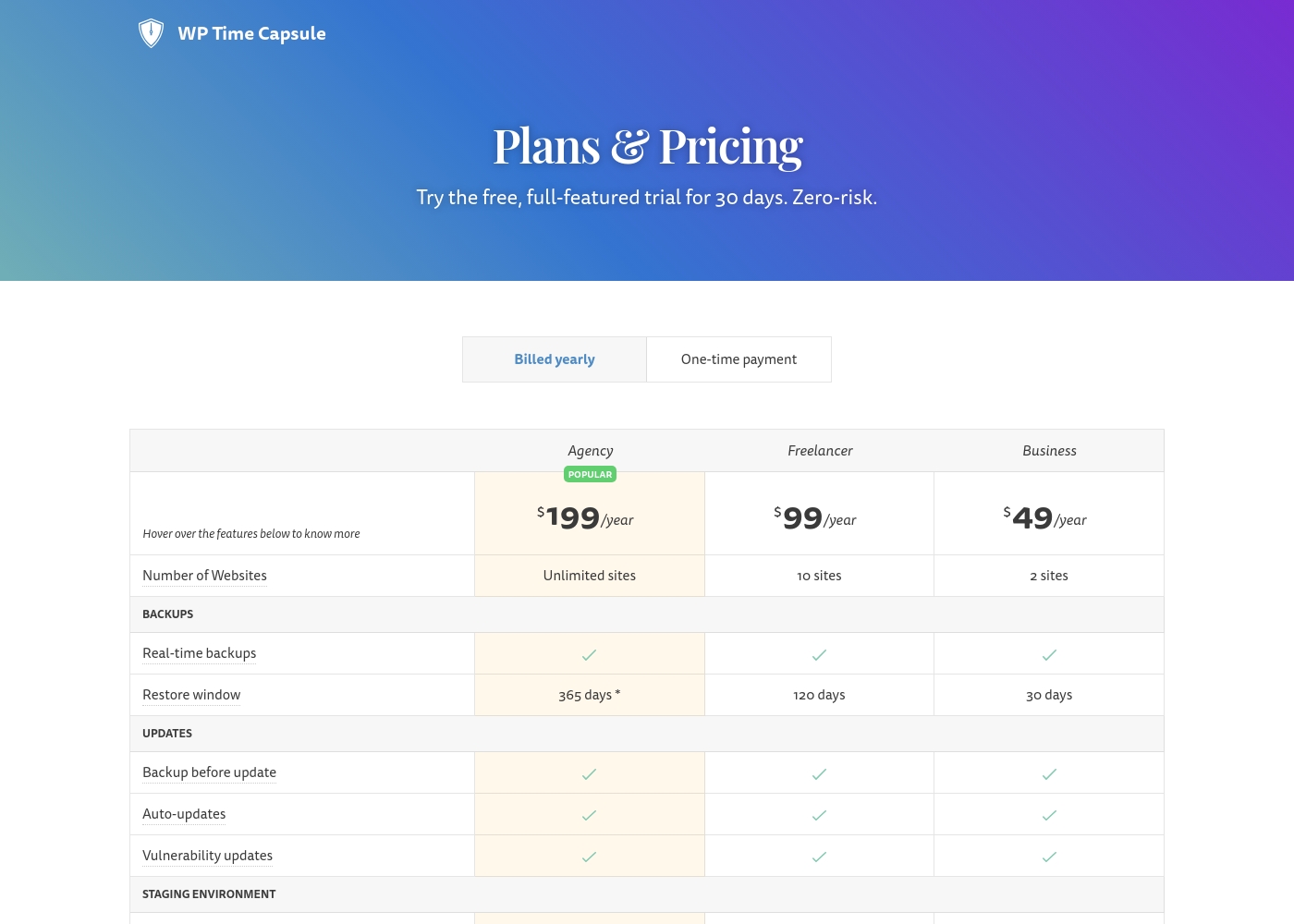
WP Time Capsule provides three subscription tiers billed annually, ranging from $49 for basic use up to $199 for unlimited sites. You also have the option to purchase any plan via a higher-priced, one-time payment instead of yearly renewal.

Plans & Pricing

Business

Yearly$49
2 websites; 30-day restore window
  • Real-time backups
  • Backup before update
  • Auto-updates
  • Vulnerability updates
  • One-click Staging
  • Test updates in Staging
  • Test restores in Staging
  • Move Staging to Live

Freelancer

Yearly$99
10 websites; 120-day restore window
  • Real-time backups
  • Backup before update
  • Auto-updates
  • Vulnerability updates
  • One-click Staging
  • Test updates in Staging
  • Test restores in Staging
  • Move Staging to Live
  • + 1 more features

Agency

Yearly$199
Unlimited websites; 365-day restore window (conditional on using Amazon S3, Wasabi, or Backblaze B2)
  • Real-time backups
  • Backup before update
  • Auto-updates
  • Vulnerability updates
  • One-click Staging
  • Test updates in Staging
  • Test restores in Staging
  • Move Staging to Live
  • + 1 more features

WP Time Capsule costs between $49 and $199 per year with three annual plans: Business at $49/year, Freelancer at $99/year, and Agency at $199/year.

These flexible subscription tiers are designed to scale smoothly based on how many WordPress websites you need to protect and manage.

Business

Price: $49/year (or $149 one-time payment) Websites Supported: 2 sites Best For: Solopreneurs or small businesses Refund Policy: Not explicitly stated (Free trial offered; no refunds after purchase) Other Features:

  • Real-time backups
  • 30-day restore window
  • Full staging environment support
  • Backup before update

This is a great starting point if you only manage one or two important websites. You get high-level features like staging and real-time backups, giving you peace of mind without a large investment.

Freelancer (Popular)

Price: $99/year (or $299 one-time payment) Websites Supported: 10 sites Best For: Freelancers and small agencies handling several client sites Refund Policy: Not explicitly stated (Free trial offered; no refunds after purchase) Other Features:

  • Real-time backups
  • 120-day restore window
  • Auto-updates and vulnerability notifications
  • Complete staging toolset

The Freelancer plan is the most popular option because it provides strong restore capabilities across ten separate sites. The four-month restore window is ideal when managing multiple clients who might need data recovery further back in time. ✨

Agency (Popular)

Price: $199/year (or $699 one-time payment) Websites Supported: Unlimited sites Best For: Large design agencies, hosting providers, or high-volume site managers Refund Policy: Not explicitly stated (Free trial offered; no refunds after purchase) Other Features:

  • Real-time backups
  • White-labelling capabilities
  • One-click staging and full update management
  • 365-day restore window (requires Amazon S3, Wasabi, or Backblaze B2 storage)

If you manage many websites, the Agency plan offers the most value with unlimited site installs. The key benefit here is the extended, full-year restore window, giving your team maximum historical recovery capability.

WP Time Capsule encourages users to take advantage of their free, full-featured trial offered for 30 days. You can test the platform with up to two websites during this risk-free period without needing a credit card. While the company does not offer refunds after subscription, you can cancel your plan at any time to avoid charges for subsequent billing periods.

User Reviews

No reviews yet.

Write a Review

Write a Review for WP Time Capsule
0/100 characters
0/2000 characters

Why use WP Time Capsule?

WP Time Capsule was built with simplicity and efficiency as its main focus. Many happy customers find this the easiest backup plugin interface available. It runs quietly in the background, so you can set it once and forget it. Your web host will appreciate how light and fast it is. There's no server strain from zipping huge files or dealing with multiple copies.

This solution saves both huge headaches and significant storage bills. You avoid multiple archived files of the same data. Only the incremental changes are backed up, keeping total space usage infinitesimal. Crucially, your data is truly yours. Files are saved in your own cloud app, like Google Drive, Dropbox, or Amazon S3, ensuring excellent privacy.

Protecting your site from danger is simple with WP Time Capsule. A quick restore is just a single click away, even after a hack, malware infection, or human error. For developers and agencies, this plugin offers major benefits:

  • One-Click Staging: Instantly set up a clone of your site to test updates and changes safely.
  • Safer Updates: Backup before updates are applied. If an update breaks the site, restore quickly.
  • Eagle-Eye Management: Manage backups of all your websites from a central dashboard easily.
  • White-Label Technology: Agencies can remove all mentions of 'WP Time Capsule' and provide their own integrated backup solution.

The integrated staging environment makes updating worry-free. You can test new ideas or WooCommerce updates with confidence before going live. If your website is critical, adopt this smart, affordable workflow today. 💡

Ready to transform your workflow with WP Time Capsule?

Frequently Asked Questions

What cloud storage services are supported for storing my backup data?

WP Time Capsule supports several major cloud apps for data storage. You can securely send your incremental backups to Google Drive, Dropbox, Amazon S3, or Backblaze B2. Your data truly remains under your control within your own cloud account.

Does WP Time Capsule offer a money-back guarantee or refunds after purchase?

No, the company does not offer refunds after a subscription is purchased. They provide a comprehensive 30-day free trial to test all features and confirm the product is a good fit before you commit financially.

How long can I restore my site from historical backup versions?

The available restore window depends on your plan level: 30 days for Business, 120 days for Freelancer, and 365 days for Agency. Note that the full 365-day window requires using Amazon S3, Wasabi, or Backblaze B2 for storage.

How does the pricing differ between annual subscriptions and one-time payments?

Annual subscriptions are much more affordable yearly but require recurring payments. One-time payment options are available for a significantly higher upfront cost, granting access without future renewal fees.

Is there an extra charge for using the integrated staging environment?

No, the one-click staging environment and all its related tools are included features in every paid plan. You can test updates and changes safely before pushing them live without additional fees.

What exactly is included in the 30-day free trial?

The trial offers full, zero-risk access to all features, including those in the Agency plan, for 30 days. You can install and test the plugin on up to two websites, and no credit card is required to begin the trial.

Can I extend the 30-day free trial if I need more time to decide?

Yes, if you need more time, you can contact the support team. They are often willing to extend your trial period by an additional week upon request.

How does the incremental backup method save on hosting storage bills?

Since the plugin only backs up small, incremental changes instead of the entire site every time, there are no large zip files to clog your server. This reduces server load and keeps total storage space usage minimal for long-term savings.

Can I hide the plugin name and branding for my clients?

Yes, both the Freelancer and Agency plans include White-labelling capabilities. This feature lets you remove all mentions of 'WP Time Capsule' and present your own integrated backup solution to clients.

If I cancel my yearly plan, will I be charged again?

You can cancel your plan at any time to stop future billing. WP Time Capsule will not charge you for any subsequent billing periods after you end your subscription.

Is WP Time Capsule suitable for high-volume e-commerce stores like WooCommerce?

Yes, it is highly suitable for e-commerce. It offers immediate, real-time backup of every new order, ensuring you never miss critical transactional data, even during a system failure.

What is the expected support response time or Service Level Agreement (SLA)?

Not explicitly stated on the official site. However, customer testimonials indicate that support, available via email at help@wptimecapsule.com, is responsive and quick to address issues.

Ready to try WP Time Capsule? Check out the official site or pricing.