
WP Rocket

WP Rocket review

WordPress caching that applies 80% of performance best practices the moment you activate it.

By Ciroapp Editorial Team · Updated Sep 16, 2026

Commission may apply at no extra cost

WP Rocket homepage screenshot

At a glance

Quick overview for WP Rocket: rating, pricing summary, key features, and highlights.
Vendor page checked Nov 23, 2026

Ciroapp score

4.0/ 5

WP Rocket bundles caching, minification, lazy loading, and database cleanup into one plugin that applies most best practices the second you activate it. There's no free version, CDN bandwidth costs extra, and aggressive options can clash with certain themes. Overall, it's a premium shortcut to real speed gains for owners who'd rather skip a stack of free plugins.

Pros

  • Applies roughly 80% of performance best practices automatically on activation, so gains appear without any configuration work.
  • Consolidates the work of three to five separate optimization plugins — caching, minification, lazy loading, database cleanup — into one supported product.
  • Setup is advertised at about three minutes — install, activate, and caching begins immediately with no technical knowledge required.

Cons

  • No free version or free trial listed — you pay for a license before you can evaluate the full product on your own site.
  • Offers less granular, server-level control than developer-oriented free tools like W3 Total Cache or LiteSpeed Cache, which can be a ceiling for advanced users.
  • Integrates with third-party CDNs but does not include CDN bandwidth, so that layer requires a separate subscription with a CDN provider.
Best for
  • Non-technical WordPress owners who want faster load times without learning cache rules or touching server settings
  • Bloggers, publishers, and affiliate marketers chasing better Core Web Vitals scores for SEO
  • WooCommerce store owners who need caching that safely excludes cart, checkout, and account pages
This section is a summary. Detailed sections about features, use cases, pricing, and reviews follow below.

What is WP Rocket?

WP Rocket is a premium caching and performance plugin built exclusively for WordPress, and it has become one of the most recommended speed tools in the ecosystem. Its core promise is unusual for the category: roughly 80% of performance best practices apply automatically the moment you activate it, with a setup time the vendor pegs at about three minutes. Instead of stitching together separate plugins for page caching, file minification, and lazy loading, WP Rocket bundles those optimizations into a single dashboard.

That makes it a practical option for site owners who want measurable speed gains without becoming performance engineers.

WP Rocket is a WordPress cache plugin that consolidates the optimizations typically spread across three to five separate plugins. Its feature set covers page caching and preloading, GZIP compression, browser caching, CSS and JavaScript minification, deferred and delayed JavaScript execution, lazy loading for images and iframes, database cleanup, and integration with third-party CDNs. Because it is a plugin rather than a hosted service, everything runs inside your own WordPress install with no external dependency beyond the license.

It is designed to work out of the box on shared hosting, managed WordPress hosts, and VPS setups alike.
Should you choose WP Rocket?

Quick buyer guidance before you compare plans or click through.

Choose it if

  • Non-technical WordPress owners who want faster load times without learning cache rules or touching server settings
  • Bloggers, publishers, and affiliate marketers chasing better Core Web Vitals scores for SEO
  • WooCommerce store owners who need caching that safely excludes cart, checkout, and account pages
  • Agencies and freelancers who want one dependable optimization plugin to deploy across many client sites
  • Membership and LMS sites that benefit from a separate cache for logged-in users

Skip it if

  • Hobby or early-stage sites with no budget, since credible free tools like LiteSpeed Cache and W3 Total Cache exist
  • Developers who want raw, server-level cache control and fine-grained tuning that WP Rocket intentionally abstracts away
  • Non-WordPress projects — the plugin is WordPress-only
  • Sites already served by aggressive host-level caching, where added gains may be small relative to the license cost

Next steps before buying

  1. 1Purchase a license on wp-rocket.me, create your account, and download the plugin ZIP file.
  2. 2In your WordPress dashboard, go to Plugins → Add New → Upload Plugin, install the ZIP, activate it, and paste your license key.
  3. 3Open the WP Rocket dashboard to confirm the cache is active — most optimizations are already enabled by default at this point.
  4. 4Benchmark your site with PageSpeed Insights or GTmetrix, then enable optional settings (minify, defer or delay JavaScript, lazy loading) one at a time, testing forms, menus, and checkout after each change.
  5. 5Use the Clear and Preload Cache button after publishing significant updates, and deactivate any remaining caching or minification plugins to prevent conflicts.

WP Rocket Key Features

✨ Page Caching with Automatic Preloading

WP Rocket's foundation is page caching, which converts dynamically generated WordPress pages into static HTML served in milliseconds instead of being rebuilt on every request. A built-in crawler preloads the cache from your sitemap, so pages are already 'warm' before real visitors arrive — a key reason speed-testing tools show improvements on the very first test. Sensible cache lifetimes apply on activation, so there is nothing to configure just to get started.

✨ CSS and JavaScript File Optimization

The plugin minifies and optionally combines stylesheets and scripts to cut file sizes and reduce HTTP requests. Deferred JavaScript execution moves scripts out of the render-blocking path, while the 'Delay JavaScript execution' feature holds non-critical third-party scripts such as analytics, chat widgets, and embeds until the visitor interacts with the page. These options deliver some of the biggest Core Web Vitals gains but should be tested incrementally on complex themes.

✨ Media Optimization and Lazy Loading

Images, iframes, and embedded videos load only as visitors scroll them into view, which substantially cuts initial page weight. Recent versions automatically exclude likely above-the-fold images from lazy loading so Largest Contentful Paint is not penalized. The plugin can also add missing width and height attributes to images, reducing layout shift on slow connections.

✨ Smart Cache Rules for Dynamic and Logged-In Sites

When an e-commerce plugin like WooCommerce is detected, cart, checkout, and account pages are automatically excluded from caching so orders and account actions keep working. A separate user cache option generates cached page versions for logged-in visitors, which speeds up membership and course sites without leaking one user's content to another. Multilingual sites get per-language caches so each translation stays distinct.

✨ CDN Integration and Core Server Optimizations

GZIP compression and browser caching headers are applied automatically to shrink payloads and let browsers reuse downloaded files. WP Rocket rewrites static asset URLs so you can plug in any third-party CDN, and it includes a dedicated Cloudflare integration tab. The CDN network itself is not included — you supply your own provider.

✨ Scheduled Database Cleanup

Post revisions, auto-drafts, trashed content, spam comments, and expired transients accumulate over time and slow database queries down. WP Rocket can clean these artifacts on a schedule so the database stays lean without manual phpMyAdmin work. This pairs with the caching layer to keep both the storage and delivery sides of the site fast.

Use Cases

💡 Content Blogs and Publisher Sites

Editorial sites live and die by load time: search rankings respond to Core Web Vitals and readers abandon slow pages. WP Rocket caches every article, lazy loads the images inside long posts, and defers ad or analytics scripts so the text readers came for renders first. Publishers with large archives benefit especially from automatic preloading, which keeps the whole site cached after each new article is published.

💡 WooCommerce Stores and Online Shops

Caching an online store is tricky because cart and checkout pages must never serve stale content. WP Rocket's automatic e-commerce detection excludes those dynamic pages while caching the product catalog, category pages, and static content that make up most of a shop's traffic. Store owners get near-instant catalog pages without breaking add-to-cart, tax, or shipping calculations.

💡 Non-Technical Small Business Websites

A local business site often has no developer on call, yet it still needs to load quickly to convert visitors from search and ads. WP Rocket is built for exactly this case: activation applies the majority of optimizations with no decisions required, and advanced options are clearly labeled and optional. The owner's only routine task is a one-click cache purge after content edits.

💡 Agencies and Freelancers Managing Client Sites

Agencies need a repeatable optimization step that works across wildly different client stacks. WP Rocket's default-first behavior means a short setup produces consistent results, and its compatibility with common themes, page builders, and multilingual plugins reduces support escalations. Because it replaces a multi-plugin speed stack, it also cuts long-term maintenance and update conflicts on managed sites.

💡 Membership Sites and Online Courses

Membership and LMS platforms serve much of their content to logged-in users, which plain page caching cannot help. With the User Cache feature enabled, each logged-in member gets their own cached page versions, so lessons and member content load quickly without one user's data appearing for another. Combined with delayed JavaScript and lazy loading, heavy course pages stay responsive.

WP Rocket pricing

Prices not verified yet — see the vendor page.

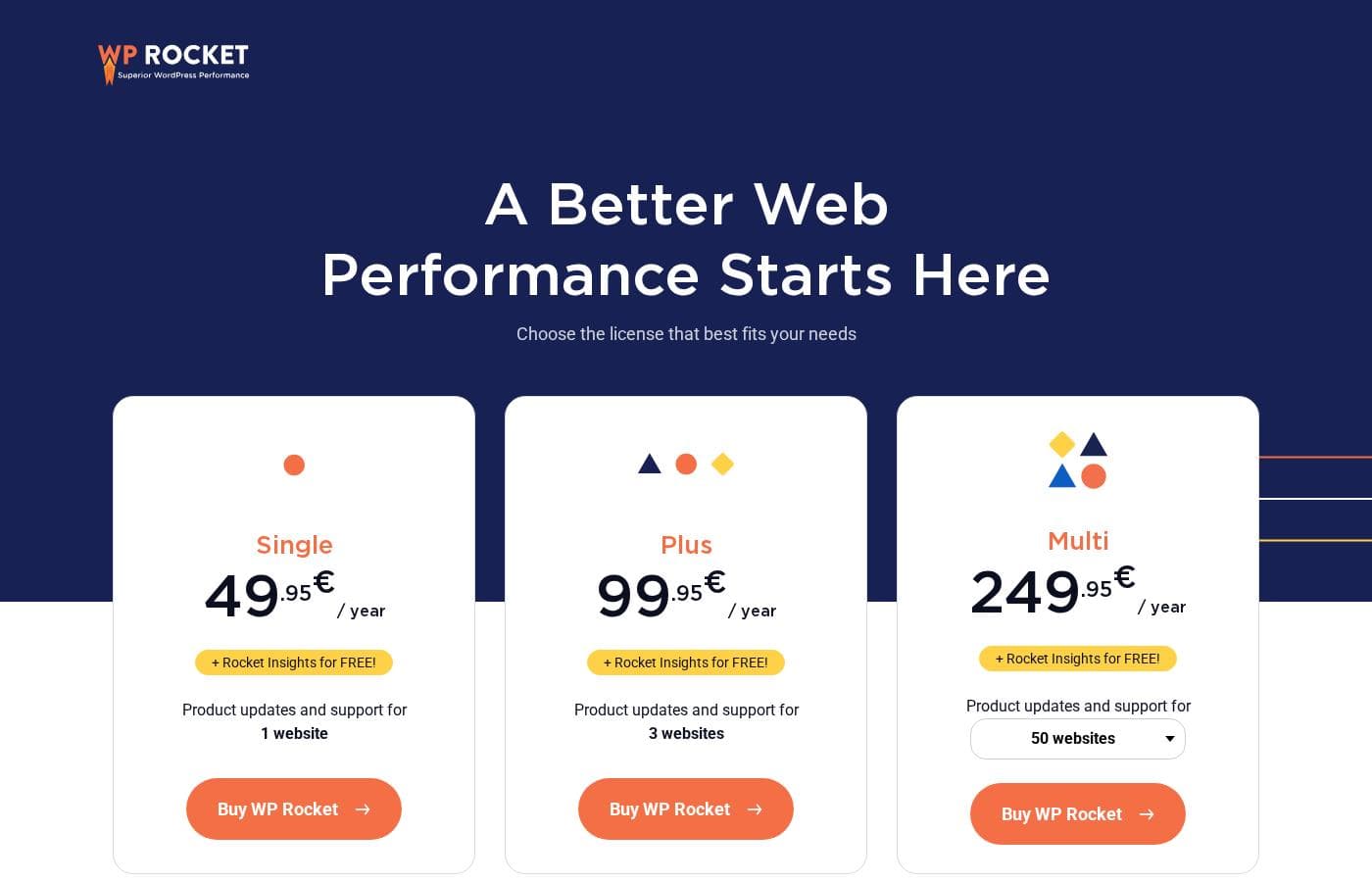
WP Rocket's pricing page

WP Rocket pricing page screenshotView pricing page screenshot

Price history

Tracking prices since Oct 10, 2026. No price change detected yet.

Pricing types: Free plan, Yearly subscription

Pricing notes

WP Rocket pricing: Billing options: Free plan, Yearly subscription

Email me when WP Rocket changes price

One email when we detect a price change on the vendor's pricing page. No newsletter, no deals. Unsubscribe in one click.

User Reviews

No reviews yet.

Write a Review

Write a Review for WP Rocket
0/100 characters
0/2000 characters

Why use WP Rocket?

Page speed is now a direct ranking input through Core Web Vitals, and slow load times measurably hurt conversions and pageviews. The catch is that most WordPress performance stacks require you to research, install, and correctly configure several plugins — a setup that is easy to get wrong and prone to conflicts.

WP Rocket removes most of that work by applying sensible defaults automatically and only exposing advanced options to those who want them. For owners without a performance specialist on hand, closing the gap between 'installed' and 'actually optimized' is the main reason to choose it over free alternatives.

WP Rocket alternatives

Other tools in the WordPress Cache plugin category

View all WordPress Cache plugin tools
FlyingPress

FlyingPress

WordPress Cache plugin3.8/5

FlyingPress is an easy-to-use speed optimization plugin built specifically for the WordPress environment. It serves as an all-in-one solution 💡. You won't need to juggle multiple plugins because FlyingPress handles everything required for optimization. The user interface guides you step-by-step, making speed management simple for both professional and novice WordPress users.

BerqWP

BerqWP

WordPress Cache plugin3.7/5

BerqWP is a WordPress plugin focused on improving website speed and performance. It handles common optimization tasks — page caching, asset delivery, and content delivery network integration — from a single dashboard, so site owners can address slow load times without configuring multiple separate tools.

WP Rocket FAQ

Do I need technical skills to use WP Rocket?

No. WP Rocket applies about 80% of performance best practices automatically the moment it is activated, which is why the vendor describes setup as roughly three minutes. Most site owners never touch the advanced settings; options like minification, lazy loading, and JavaScript deferral are there if you want to push optimization further.

Is WP Rocket compatible with WooCommerce and other e-commerce plugins?

Yes. When WP Rocket detects WooCommerce or a similar plugin, it automatically excludes cart, checkout, and account pages from the cache so dynamic actions like placing an order keep working, while product and category pages are still served from cache for speed.

Does WP Rocket include a CDN?

WP Rocket does not provide its own CDN network. Instead, it integrates with third-party CDNs, including a dedicated Cloudflare integration, so you can serve static assets from edge locations; the CDN itself is billed separately by whichever provider you choose.

Will WP Rocket conflict with my other optimization plugins?

It can if another plugin duplicates the same job, such as a second page-cache or minification plugin. Best practice is to keep WP Rocket as your single optimization layer and deactivate overlapping plugins before activating it, to avoid double-minifying files or stacking cache layers.

Ready to try WP Rocket? Check out the official site or pricing.

Are you WP Rocket? Claim this listing · Get the badge