WP Grid Builder

WP Grid Builder

The ultimate solution for lightning-fast, advanced content filtering and grid creation.

#1 dans WordPress Search Plugin
2 min read · Updated 10/5/2025
WP Grid Builder homepage screenshot

At a glance

Quick overview for WP Grid Builder: rating, pricing summary, key features, and highlights.

Ciroapp review

4.2
Advanced faceted grids and lightning-fast filtering.

We find WP Grid Builder is a technically superb solution for creating complex faceted grids and lightning-fast filters, backed by full compatibility with key WordPress developer tools like ACF. Overall, we recommend the plugin for its robust features and performance, but we urge caution regarding reported low support standards and severe potential data compliance issues.

Pros

  • Pro:Considered one of the most complete grid builder solutions available.
  • Pro:Lightning-fast front-end filtering using AJAX and a custom indexer.
  • Pro:Comprehensive asset library with over 20 unique filter facet types.
  • Pro:Integrated card builder offering drag & drop design control.

Cons

  • Con:Customer support responsiveness is reported as 'horrible.'
  • Con:Serious concerns raised about GDPR compliance and data rectification rights.
  • Con:Alleged issues regarding the locking of personal user data.
  • Con:No free plan or trial available before purchase.
Money-back guarantee
Yes — 14 days
Range: $49–$249/yearYearly subscription
This section is a summary. Detailed sections about features, use cases, pricing, and reviews follow below.

WP Grid Builder review, pricing, features, pros & cons

Building complex content queries and fast, interactive filtered displays in WordPress can be frustrating and slow. WP Grid Builder helps you display and filter your site content effortlessly and quickly ✨. It provides an intuitive admin interface for designing awesome faceted grids.

This sophisticated tool ensures your visitors enjoy lightning-fast filtering results and a smoother experience.

What is WP Grid Builder?

WP Grid Builder is a powerful WordPress plugin designed for displaying and filtering your content efficiently. It allows you to transform custom post types, user lists, or store products into stunning grid layouts. The system helps you easily query diverse elements, such as blog posts, portfolio items, or eCommerce products from WooCommerce and Easy Digital Downloads 🛍️.

It offers a modern approach for managing and presenting your vast WordPress data.

WP Grid Builder Key Features

💡 Lightning-Fast Performance and Smart Filtering

Speed is crucial for providing users with a great content experience. WP Grid Builder uses a smart filtering system that quickly shows only the relevant content. This ensures visitors do not waste time waiting for pages to reload.

This blazing-fast performance is powered by Ajax technology. It runs alongside a dedicated, custom indexer built specifically for the plugin. This foundation guarantees superior speed and a smooth, modern front-end experience for everyone.

✨ Flexible Content Querying from Diverse Sources

The plugin allows you to easily display content queried from multiple areas of your WordPress site. You can pull data from standard post types, taxonomy terms, or your list of site users. This is managed through an intuitive administrative interface.

It fully supports extensive integrations for specialized content needs. This includes filtering and displaying products from eCommerce platforms like WooCommerce and Easy Digital Downloads. You can also build resources, blogs, or portfolios using media from your Media Library.

✨ Advanced Card Builder and Styling Control

You gain complete creative control over how content appears within your grids using the powerful card builder. Start quickly by choosing from more than 20 included, ready-made cards. You can easily customize these to match your unique brand.

Alternatively, you can build entirely custom cards from scratch using the intuitive drag & drop interface. This feature lets you design sophisticated appearances precisely. The card builder also makes it simple to display various WordPress Custom Fields directly in your design.

✨ Seamless Custom Field Integration

WP Grid Builder ensures deep compatibility with key custom field plugins used by developers. This allows you to integrate complex field data directly into your cards and filters. You can select specific fields right from the builder interface.

Key supported integrations include:

✨ Dynamic Grid Layouts and Responsive Carousels

Showcase your material using several modern layout styles that fit your design requirements. You can choose between popular layout options like Masonry, Justified, or Metro. Each style helps you present your content in an organized and visually engaging way.

For improved user navigation, any of these grid types can be transformed. You can turn them into a responsive carousel structure that functions flawlessly on mobile devices. This ensures your content remains accessible and appealing across all screen sizes.

✨ Deep Filtering with Two Dozen Facet Types

Give your users powerful tools to filter content precisely and efficiently. The system offers over 20 unique facet types, with more enhancements planned for the future. You can use these to create complex search filters.

Users can refine content based on taxonomy terms, post standard post fields, or custom fields. Available facet options include Checkbox, Radio, Hierarchy, Date, Search, Sort, and Range controls. This vast library ensures precise search results every time.

Use Cases

🛍️ Boosting E-commerce Product Discovery 🛍️

A growing online store needs shoppers to find products quickly from a large inventory. Standard WordPress filters often slow down the site and only offer basic options. WP Grid Builder solves this by querying WooCommerce or EDD items efficiently.

Shoppers can use sophisticated filters like Range facets for price or Rating facets for customer reviews. This provides precise, lightning-fast filtering results. The smart system ensures only relevant products appear instantly, making the buying process much smoother.

💡 Designing a Custom Portfolio Display

A designer or developer wants a unique portfolio that showcases project details retrieved from custom fields.

Approach:

  1. Use the Card Builder to design a custom card structure.
  2. Integrate custom fields (ACF or Meta Box) to display unique project specifications on the card.
  3. Display the projects using the eye-catching Metro layout structure.

Expected outcome: A professional, branded gallery where every project card accurately displays necessary data without extra coding.

📄 Optimizing Content-Rich Archives

Managing a complex blog or resource section requires advanced organization beyond simple categories. Site visitors need ways to drill down quickly into years of content.

WP Grid Builder helps by allowing the use of multiple precise facet types simultaneously. You can combine Hierarchy facets (for nested categories) with Date facets to let users refine results by both topic and time. Using the Load More facet ensures smooth pagination and keeps the browsing experience fluid.

👥 Creating a User Directory or Team Listing

Sometimes, you need to query and display data about users instead of posts, like a company directory or a member list. WP Grid Builder supports direct querying of user data and taxonomy terms associated with users. This allows you to build a comprehensive, searchable directory.

Users can interact with a Checkbox facet to filter results by department or role. You can choose to display the user cards in a responsive Carousel layout on the homepage to save valuable space.

💡 Transforming the Media Library into a Filterable Gallery

A website utilizes many images and media files, and finding specific assets is difficult using the default WordPress tools. The builder lets you query media items from your Library to show off creative work.

Using the intuitive admin interface, you can create a Justified grid display. Implement a Select Facet to filter the media based on tags or custom terms. This turns the media archive into a highly usable resource for staff or clients.

Tip: Start with one of the 20+ included pre-made cards to accelerate the design of your media gallery.

⚙️ Implementing Flexible Third-Party Filtering

Developers sometimes need a robust filtering engine for third-party lists or custom tables, separate from standard WordPress display methods. WP Grid Builder offers a smart, developer-friendly system built with Ajax and a custom indexer.

This architecture lets developers hook into the facet and indexer functions. It allows you to use the powerful filtering tools to refine content not displayed in a traditional grid or card, integrating smoothly with complex, specialized environments.

Pricing Overview for WP Grid Builder

Pricing range
$49–$249/year
Pricing types
Yearly subscription
Money-back guarantee
Yes — 14 days

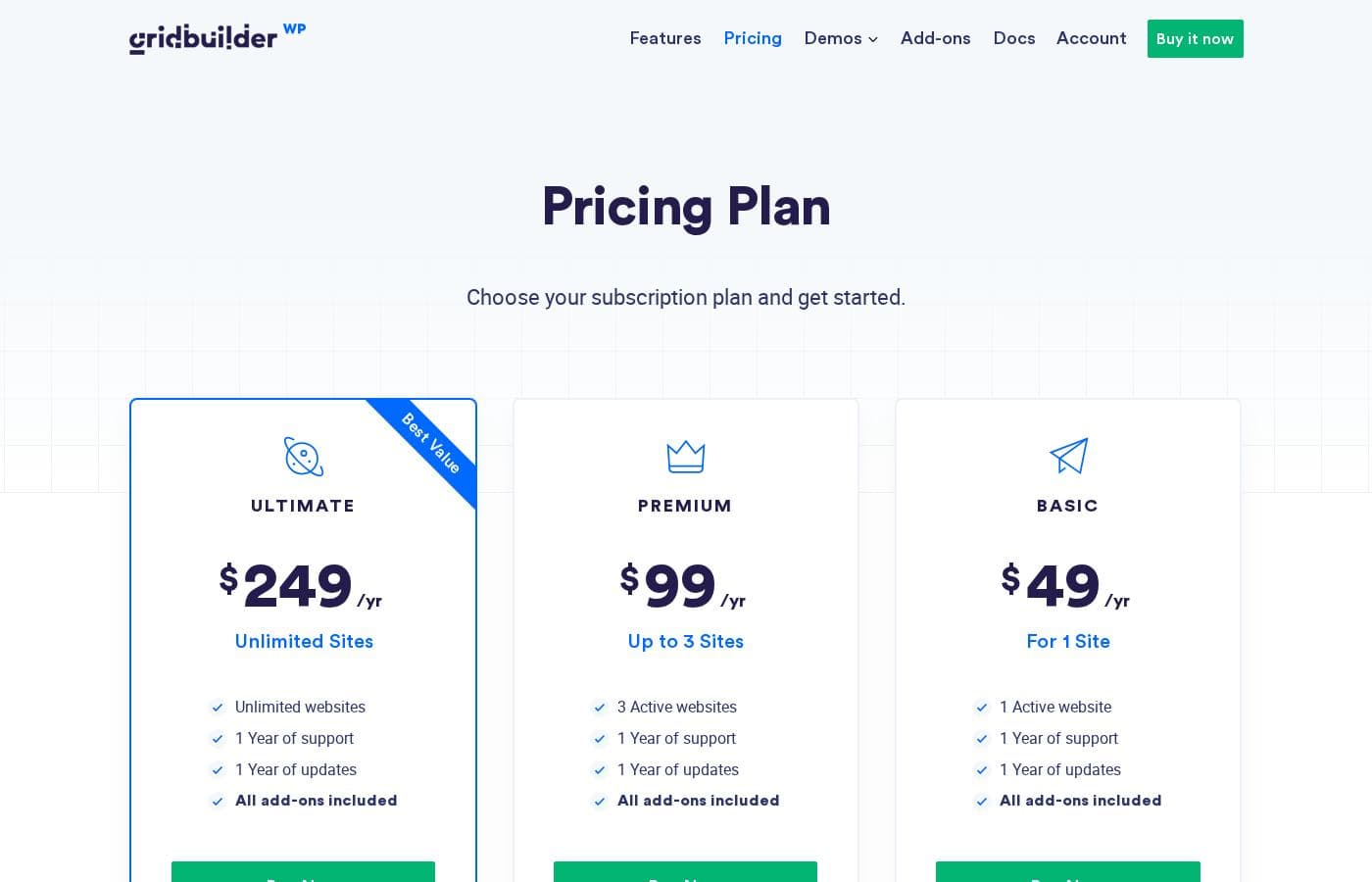
WP Grid Builder offers three straightforward annual plans based on the number of active websites you need. All subscriptions are billed yearly until canceled, starting at $49/year for a single site and rising to $249/year for unlimited development.

Plans & Pricing

For 1 Site

Yearly$49
1 website activation
  • 1 Active website
  • 1 Year of support
  • 1 Year of updates
  • All add-ons included

Up to 3 Sites

Yearly$99
3 website activations
  • 3 Active websites
  • 1 Year of support
  • 1 Year of updates
  • All add-ons included

Unlimited Sites

Yearly$249
Unlimited website activations
  • Unlimited websites
  • 1 Year of support
  • 1 Year of updates
  • All add-ons included

WP Grid Builder costs between $49 and $249 per year with three plans: For 1 Site at $49/yr, Up to 3 Sites at $99/yr, and Unlimited Sites at $249/yr.

These plans are designed to accommodate users from single site owners to large agencies. All memberships are billed annually in US dollars until you decide to cancel.

For 1 Site

Price: $49/yr Websites Supported: 1 Active website Best For: Not explicitly stated Refund Policy: 14-day money-back Other Features:

  • 1 Year of support
  • 1 Year of updates
  • All add-ons included

This entry-level plan is perfect if you only need the plugin for a single personal project or a dedicated client site. It's affordable, and you still get a full year of support and updates. This ensures you can build sophisticated grids without breaking the bank. 💰

Up to 3 Sites

Price: $99/yr Websites Supported: 3 Active websites Best For: Not explicitly stated Refund Policy: 14-day money-back Other Features:

  • 1 Year of support
  • 1 Year of updates
  • All add-ons included

Choosing this mid-tier option gives you plenty of flexibility for managing several websites concurrently. This is a great choice if you manage a small portfolio of client sites or operate two or three content properties yourself. You get the same essential features as the single-site plan, just with expanded usage limits.

Unlimited Sites

Price: $249/yr Websites Supported: Unlimited websites Best For: Not explicitly stated Refund Policy: 14-day money-back Other Features:

  • 1 Year of support
  • 1 Year of updates
  • All add-ons included

The Unlimited Sites plan is explicitly labeled as the "Best Value" by WP Grid Builder. If you are an agency, a prolific developer, or manage a large number of WordPress installations, this plan offers the greatest freedom. You get unlimited activations across all your projects, along with the standard support and add-on package.

Since there is no free option available, WP Grid Builder ensures confidence in your purchase with a 14 Days Money Back Guarantee. If you are unhappy for any reason, you can request a full refund within 14 days of purchase. Remember that all plans are billed yearly, and you can upgrade your license to a higher utilization tier whenever you need.

User Reviews

WP Grid Builder currently has very limited external feedback, derived primarily from Trustpilot users. While the platform shows a low average score (3.3 stars), users universally praise the software itself, calling it one of the most complete grid builder solutions available for WordPress.

This suggests high marks for technical features, accuracy, and ease of creating complex content layouts. However, the product praise is strongly offset by severe operational complaints 😔.

The detailed external feedback sharply criticizes customer service, describing support responsiveness as “horrible.” A major, critical issue reported involves data privacy compliance, with allegations that the company locked personal data and ignored user rights to rectification based on GDPR. Potential buyers should weigh the plugin’s excellent technical performance and rich feature set against these serious, reported issues concerning legal compliance and support infrastructure.

What users say elsewhere

N. P.
· Trustpilot
5.0 / 5

The tool itself is fantastic. It is probably the most complete grid builder solution you can find for WordPress today. It excels at handling complex layouts and advanced filtering options seamlessly.

Alex D.
· Trustpilot
1.0 / 5

While the plugin performs well, the support is horrible. We experienced major difficulties when trying to manage our personal data. They seem to ignore basic GDPR rights regarding rectification.

No reviews yet.

Write a Review

Write a Review for WP Grid Builder
0/100 characters
0/2000 characters

Why use WP Grid Builder?

If you need exceptional performance combined with deep customization, WP Grid Builder is an excellent solution. Experts describe it as both user- and developer-friendly, offering real flexibility. It provides amazing administrative user experience and is well integrated with the core functionality of WordPress.

Why Choose WP Grid Builder?

  • Lightning-Fast Filtering: The smart filtering system instantly shows relevant content to users. It uses Ajax combined with a dedicated custom indexer to ensure a blazing fast front-end experience 💡.
  • Create Complex Search Filters: You can access over 20 unique facet types, including Checkbox, Ranges, Ratings, and Hierarchies. This extensive library lets your users refine search results precisely and efficiently.
  • Build Your Own Look: Design sophisticated appearances using the powerful card builder. You can start with 20+ ready-made cards or create your own from scratch using the intuitive drag & drop interface.
  • Customize Content Presentation: Show off your material using various layouts, including Masonry, Justified, or Metro. Each layout type can also be transformed into a mobile-responsive carousel structure.
  • Query Any WordPress Data: Display content easily from post types, taxonomy terms, or users with an intuitive admin interface. It also fully supports key custom field plugins like ACF, Meta Box, and Pods.

Ready to transform your workflow with WP Grid Builder?

Frequently Asked Questions

If I start with the 1-site plan, can I upgrade to a higher plan later easily?

Absolutely, you can upgrade your license to a higher utilization tier at any time. You will only need to pay the difference in price between your current plan and the new one.

What is the policy for using this plugin on staging or local development sites?

You can use the plugin on your staging environments without consuming an activation count. The system automatically ignores development TLDs like .dev, .local, and those containing *.staging. or *.test..

Does WP Grid Builder integrate with popular page builders like Elementor and Oxygen?

Yes, the product offers specific integrations for both Elementor and Oxygen plugins. You can also use shortcodes within any other popular page builder to render your grids and facets.

What kind of support is included and what does it cover?

All plans include one full year of dedicated support through a one-to-one ticket system. It’s important to note that the support team provides technical help but does not offer customization services.

Is the licensing based on the number of users or strictly per website installation?

The licensing structure is strictly based on the quantity of active websites where the plugin is installed. Whether you have 1 user or 100, the limit is based on the number of sites (1, 3, or unlimited).

What happens if I decide not to renew my annual license subscription?

Your existing WP Grid Builder functionality will continue to work normally on your site. However, you will immediately lose access to direct support and all future feature updates and security patches.

How does licensing work if I operate a WordPress multisite network?

For users running a multisite, you must purchase a license that accommodates your needs. One activation is specifically required per sub-site within the network.

Does the plugin work with custom fields created by other major field plugins?

Yes, it offers robust compatibility with major field solutions for displaying content in your cards. It supports Advanced Custom Fields (ACF), Meta Box, and Pods.

Are all feature add-ons included in every license tier?

Yes, regardless of whether you purchase the 1-site plan or the Unlimited plan, all available add-ons are included with your license.

Do I need coding skills to build and design grids, cards, and facets?

No coding skills are required to use the plugin effectively. Everything can be set up using the intuitive and powerful drag-and-drop admin interface.

Are there any minimum technical requirements for software stability?

WP Grid Builder requires WordPress 6.0 and PHP 7.0 at minimum to run. They strongly recommend using PHP 8.x for better performance and enhanced security.

How does the 14-day money-back guarantee handle refunds?

The guarantee offers a 100% money-back offer if you are unhappy with your purchase. You must request the full refund within 14 days of the original purchase date.

Is there a free trial or freemium version I can test out before purchasing?

The official site does not explicitly offer a free trial or a permanently free version. They rely on the 14-day money-back guarantee for customers to test the product risk-free.

Ready to try WP Grid Builder? Check out the official site or pricing.