Wordtune

Wordtune

Write. Rewrite. Repeat.

#1 dans Writing assistant
2 min read · Updated 10/4/2025
Wordtune homepage screenshot

At a glance

Quick overview for Wordtune: rating, pricing summary, key features, and highlights.

Ciroapp review

4.3
Superior rewriting with usage friction.

We find Wordtune delivers superior AI rewriting capabilities, consistently generating clear and professional text that saves users substantial time and effort. Overall, the tool excels in its core function, but we note recurrent user frustration regarding the transparency and ease of subscription management.

Pros

  • Pro:Rewrites are high-quality, clear, and sound professional.
  • Pro:Improves communication effectiveness for non-native speakers.
  • Pro:Includes robust summarizing capabilities for various media.
  • Pro:Praised for saving significant time and simplifying workflow.

Cons

  • Con:Users report significant friction when attempting to cancel subscriptions.
  • Con:Instances of double billing and unauthorized charges have been reported.
  • Con:Some long-term users dislike recent updates to the user interface.
Free trial
Yes — 3 days
Range: $0–$9.99/monthFree plan, Free trial, Monthly subscription, Yearly subscription
This section is a summary. Detailed sections about features, use cases, pricing, and reviews follow below.

Wordtune review, pricing, features, pros & cons

Do you struggle to find the right words or worry that your writing doesn't sound entirely authentic? Getting stuck or facing writer's block can be frustrating. Wordtune helps you break through those barriers.

It provides contextual suggestions and ensures your grammar is spot-on before you hit send. ✨

What is Wordtune?

Wordtune is an AI-powered reading and writing assistant. It serves as a full-suite paraphrasing tool designed to aid you through every step of the creation process. This tool is built to support students, professionals, and writers seeking clear and efficient communication.

đź’ˇ It can help you sound like a native English speaker and elevates your text quality instantly. You can use this helpful assistant anywhere you work, whether that's on your desktop, mobile device, or within your favorite apps.

Wordtune Key Features

✨ Contextual Rewriting and Authentic Voice

Wordtune provides contextual suggestions to help you express your thoughts accurately. It offers a custom list of rewrites tailored to your writing style. This ensures the output genuinely compliments your unique voice and subject matter.

By focusing on context, the tool helps you avoid common pitfalls. You choose the best suggestion, making sure your communication sounds authentic. It’s like having multiple friends available to suggest phrasing without hurting any feelings.

✨ Instant Tone and Style Control

Easily keep your messaging on point by controlling the tone. With a single click, you can switch between formal and casual writing styles. This feature lets you quickly adjust your text to fit the situation.

Whether you need professional communication or informal emails, Wordtune makes the adjustment simple. This flexibility means you always use the right language for your audience and purpose.

💡 Bypassing Writer’s Block

Never get stuck drafting content again. Wordtune is designed to seamlessly continue your text wherever you leave off. The AI picks up your thoughts and carries the momentum forward.

When you need depth or clarity, the tool offers guided actions to strengthen your message. This assistant helps transform incomplete ideas into fully formed paragraphs, ensuring a smooth writing workflow.

✨ Essential Proofreading and Fluency

Enjoy advanced AI proofreading before you hit the send button. Wordtune is skilled at spotting and correcting errors. It makes sure spelling, grammar, and overall phrasing are spot-on.

Beyond corrections, it works to enhance your language. The tool incorporates vocabulary enhancements and fluency improvements. This helps elevate your text quality and ensures maximum clarity.

✨ Advanced Reading and Research Assistance

Wordtune is also a powerful reading and summarizing assistant. It can simplify your research workflow instantly. You can get quick overviews of large texts without reading the whole thing.

This function summarizes documents, articles, and webpages efficiently. It even extends summarizing capabilities to YouTube videos. This feature saves time and allows you to absorb information much faster.

✨ Smart Translate for Native Speakers

Take your English communication to the next level with Smart Translate. This feature ensures you sound like a native English speaker with just one click. It utilizes advanced AI capabilities to perfect translation.

It can translate text into English from up to 10 supported languages, including Spanish, German, and Mandarin. Additionally, use the Smart Synonym generator to further supercharge your vocabulary and discover new ways to express yourself.

✨ AI Fact-Checking and Credibility

You can trust the information generated by the AI assistant. Wordtune is built to check facts across multiple sources. It verifies at least five sources before determining if a fact is credible enough to use.

This focus on accuracy makes it ideal for specialized writing, such as academic assignments. The tool also provides citations and sources for the information it generates. This helps you avoid misinformation and makes citing easier for essay writing.

Use Cases

✍️ Polishing Critical Professional Emails

You need to send an urgent email to a client, but your draft sounds too relaxed. Wordtune lets you instantly switch the tone from friendly to professional with a single click. It then uses advanced AI to ensure your phrasing is precise and your grammar is flawless before you hit send. This helps you maintain a professional image and communicate clearly under pressure.

Expected outcome: Your messaging is on point, reflecting the appropriate gravitas for the subject matter.

🧠 Overcoming Creative or Writer’s Block

Running into a wall mid-sentence can interrupt your entire workflow. Wordtune is designed to seamlessly pick up where you stopped writing. You simply use the 'Continue writing' feature and select the best path forward.

Use this simple flow when drafting:

  1. Start writing your paragraph and stop when inspiration fades.
  2. Leverage the AI to suggest the next few sentences automatically.
  3. Decide to either 'Elaborate on your answer' or 'Propose an alternate viewpoint.'

📚 Efficient Research and Information Synthesis

You are pressed for time but need to consume information from lengthy documents or videos quickly. Wordtune functions as a reading assistant, offering unique summarizing capabilities for articles, webpages, and even YouTube videos. This feature allows you to focus only on the core arguments and key findings.

Expected outcome: You grasp the critical points of complex content faster than manual reviewing allows.

🎓 Enhancing Academic Integrity and Clarity

Integrating research sources into your paper requires careful paraphrasing to avoid plagiarism. Wordtune helps students rewrite source material while keeping the authentic meaning and tone. Additionally, if the AI generates related content, it checks at least five sources before determining if a fact is credible enough to use. This provides reliable support for your academic writing.

Tip: Use the lengthening or shortening tools to effortlessly meet specific word count requirements in assignments.

🌎 Communicating as a Native English Speaker

Problem: You need to accurately translate text from languages like Spanish, Mandarin, or German into sophisticated English. Simple translation tools often produce mechanical or unnatural phrases. Approach: Utilize Smart Translate, which handles translations from up to 10 supported languages directly into native-sounding English.

Outcome: Your foreign communication sounds natural and fluent, improving rapport with English-speaking collaborators.

✨ Refining Content for Maximum Impact

After drafting marketing copy, you might find certain sentences lack punch or clarity. Wordtune allows you to highlight weak phrasing and apply tools like 'Emphasis' or 'Clarify your point.' You can also use the Smart Synonym generator to discover stronger, less common vocabulary options. These actions work together to instantly elevate your text quality and fluency.

Pricing Overview for Wordtune

Pricing range
$0–$9.99/month
Pricing types
Free plan, Free trial, Monthly subscription, Yearly subscription

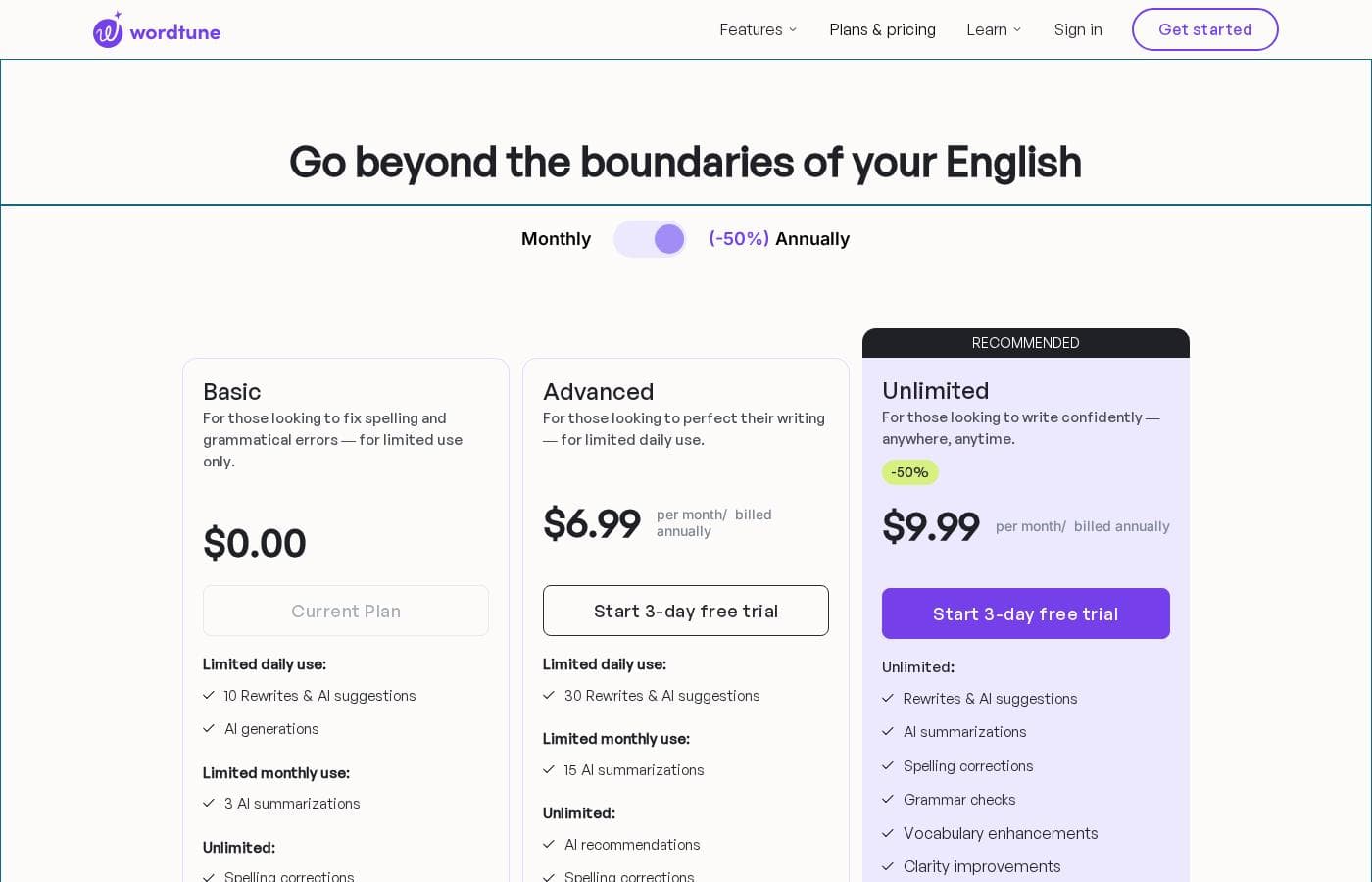
Wordtune offers three subscription tiers: Basic (Free), Advanced, and Unlimited. Paid plans start at $4.89 per month when billed annually, giving access to advanced AI enhancements and summaries.

Plans & Pricing

Basic

Monthly$0.00
YearlyFree
10 Rewrites & AI suggestions per day, 3 AI Summaries per month
  • Spelling corrections
  • Grammar checks

Advanced

Monthly$6.99
Yearly$4.89
30 Rewrites & AI suggestions per day, 15 AI Summaries per month
  • Spelling corrections
  • Grammar checks
  • AI recommendations
  • Vocabulary enhancements
  • Fluency improvements

Unlimited

Monthly$9.99
Yearly$6.99
No limits (Unlimited usage)
  • Unlimited Rewrites & AI suggestions
  • Unlimited AI Summaries
  • Unlimited Spelling corrections
  • Unlimited Grammar checks
  • AI recommendations
  • Vocabulary enhancements
  • Fluency improvements

Wordtune costs between $0 and $9.99 per month with three plans: Basic at $0, Advanced starting at $4.89/month (billed annually), and Unlimited starting at $6.99/month (billed annually).

Let's look closely at what each subscription level offers.

Basic

Price: $0.00 Websites Supported: Not explicitly stated Best For: Fixing spelling and grammatical errors—for limited use only. Refund Policy: Not applicable (Free plan) Other Features:

  • 10 daily rewrites
  • 3 monthly AI summaries
  • Unlimited spelling corrections
  • Unlimited grammar checks

This free option is perfect if you only need occasional help polishing very short texts. It includes essential grammar and spelling checks, making it great for students or light users getting started with AI writing tools. You get the basics you need to start improving your output.

Advanced

Price: $4.89 per month / billed annually (or $6.99 monthly) Websites Supported: Not explicitly stated Best For: Perfecting writing for limited daily use. Refund Policy: We do not offer refunds Other Features:

  • 30 daily rewrites
  • 15 monthly AI summaries
  • Unlimited spelling and grammar checks
  • AI recommendations
  • Vocabulary enhancements and fluency improvements

The Advanced plan offers a great balance of powerful features and cost for those who write regularly but aren't producing content constantly. You get expanded daily usage and AI tools to elevate your language accuracy and sentence structure. Try it out risk-free with the 3-day free trial! ✍️

Unlimited (Recommended)

Price: $6.99 per month / billed annually (or $9.99 monthly) Websites Supported: Not explicitly stated Best For: Writing confidently—anywhere, anytime. Refund Policy: We do not offer refunds Other Features:

  • Unlimited daily rewrites
  • Unlimited AI summaries
  • Unlimited spelling and grammar checks
  • AI recommendations, vocabulary, and fluency enhancements

This is the choice for professionals and heavy writers who need continuous access to Wordtune's best features. Enjoy the freedom of unlimited daily usage for rewriting and summarizing, ensuring you never hit a usage wall in your creative workflow. The annual option saves you 50% compared to monthly.

If you are unsure which plan is right for you, both Advanced and Unlimited include a helpful 3-day free trial. While Wordtune does not offer refunds, you can easily cancel your subscription before the next billing cycle begins or before your trial period ends. Students, educators, and qualifying non-profits can also receive a generous 30% discount on any paid plan.

User Reviews

Wordtune enjoys strong favor from its user base across both Trustpilot and Capterra, maintaining an overall 4.1 rating based on hundreds of reviews. Users overwhelmingly praise the software's core functionality: its ability to generate clear, concise, and professional rewrites that sound natural.

Many report significant time savings and improved confidence in writing, especially non-native English speakers. The tool is frequently cited as superior to similar programs due to its intuitive design and effective suggestions.

However, feedback concerning customer service and reliability is mixed. While numerous users celebrate the exceptional, proactive help received from individual support agents (like Ela or Niki) who resolve complex billing issues, a significant counterpoint exists regarding subscription management.

Several frustrated consumers highlight major difficulties with cancellation processes, including reports of ignored emails, double billing, and subscriptions being hard to stop. Despite these critical friction points, the product's effectiveness and generally quick support response times for technical issues keep the overall sentiment highly positive.

✨

What users say elsewhere

Maria S.
· Trustpilot
5.0 / 5

As someone who is not a native English speaker, Wordtune has been a great help for me. It corrects my grammar and provides much better sentence ideas. I feel more confident writing all my emails and reports for work and school.

Alex D.
· Trustpilot
5.0 / 5

I’ve used WordTune for a few years now, and it has helped me create highly professional-looking emails. The list of suggested, alternate ways to rewrite my phrases has been amazing. It truly makes rewriting stuff way faster.

No reviews yet.

Write a Review

Write a Review for Wordtune
0/100 characters
0/2000 characters

Why use Wordtune?

Why choose Wordtune for your daily writing needs? It is designed to be a one-stop-shop for all your communication requirements, going beyond simple grammar checks.

Here's how Wordtune transforms your workflow:

  • âś… Maintain Your Authentic Voice: Wordtune offers contextual suggestions that compliment your unique writing style, specific tone, and subject matter.
  • ✨ Bypass the Block: Let the AI pick up where you left off. It can seamlessly continue your text, ensuring you never run into writer’s block again.
  • ✍️ Control the Tone: Easily switch your messaging with a click, allowing you to go formal or keep it casual as the situation demands.
  • 🌎 Translate Naturally: Utilize Smart Translate to turn text into native-sounding English from up to 10 supported languages.
  • đź’ˇ Ensure Accuracy: When generating content, Wordtune is built to check at least five sources before determining a fact is credible enough to use.
  • 📚 Simplify Research: Beyond writing help, the tool offers unique summarizing capabilities for documents, articles, webpages, and even YouTube videos.

Ready to transform your workflow with Wordtune?

Frequently Asked Questions

If I purchase a subscription, can I receive a refund if I change my mind?

No, Wordtune explicitly states that it does not offer refunds on purchased subscriptions. You must proactively cancel your service before the next billing cycle starts to avoid incurring future charges.

How exactly does the 3-day free trial work, and will I be charged immediately?

The free trial lasts for three days and requires you to enter payment information when you sign up. You will only be charged automatically if you do not cancel your subscription before the end of that three-day period.

What payment methods can I use to pay for my subscription?

Wordtune accepts standard forms of payment, including all major debit and credit cards. For convenience, you can also use digital wallet services such as PayPal, Apple Pay, and Google Pay.

What are the core usage differences between the Advanced and Unlimited plans?

The Advanced plan limits you to 30 daily rewrites and suggestions, plus 15 monthly AI summaries. The Unlimited plan provides unlimited daily usage for both rewrites and summaries, which is ideal for heavy users.

Does Wordtune support languages other than English?

Wordtune only generates and writes text in English. However, its Smart Translate tool can convert text into native-sounding English from up to 10 source languages, including Mandarin, French, and Russian.

Where can I use Wordtune within my existing computer workflow?

You can use Wordtune anywhere you work, whether you're on a mobile device or desktop. The service is available across your favorite apps, and there is a highly-rated Chrome extension for seamless integration.

How do I contact the customer support team if I have an issue?

You can reach the Wordtune support team directly by emailing `help@wordtune.com`. They also offer contact through a chatbot located in the lower right-hand corner of the Help Center.

Are there discounts available for students or non-profit organizations?

Yes, Wordtune offers a 30% discount on both monthly and annual plans for students, educators, and non-profits/NGOs. You simply need to contact support and provide a valid academic email address to apply the discount.

Do you offer specific accounts or features for business teams?

The paid tiers offer features tailored for teams, such as centralized billing and Business support. The Unlimited plan specifically lists SAML SSO integration, which is critical for larger organizational security.

What is the process for canceling my paid subscription?

You can easily cancel your subscription through your account page on the website. Look for the Manage Plan option and ensure you complete the cancellation before the next scheduled billing date.

How does Wordtune ensure the information it generates is accurate?

Wordtune is designed to be fact-based and reliable. When the AI generates information or text, it verifies the data by checking at least five separate sources for credibility.

Who is the Basic (Free) plan best suited for?

The Basic plan is best for people who only need occasional writing help. It offers unlimited spelling and grammar checks, but the features are limited to just 10 daily rewrites and 3 monthly AI summaries.

Ready to try Wordtune? Check out the official site or pricing.