WhatConverts

WhatConverts review

Lead tracking that shows which marketing actually brings in customers.

WhatConverts costs from $30/mo · 4 plans · prices checked Oct 13, 2026

By Ciroapp Editorial Team · Updated Sep 16, 2026

Commission may apply at no extra cost

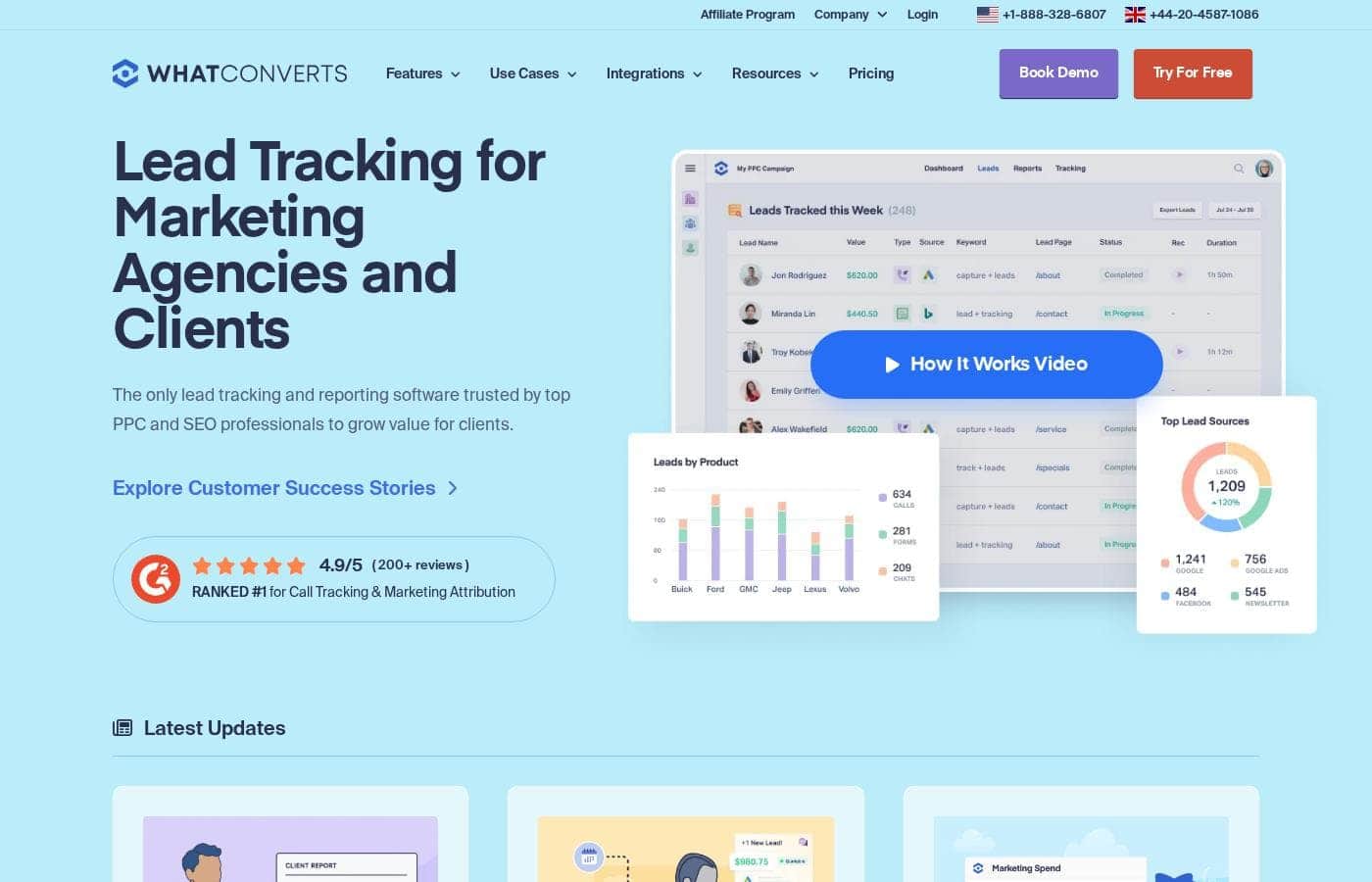
WhatConverts homepage screenshot

At a glance

Quick overview for WhatConverts: rating, pricing summary, key features, and highlights.
Pricing verified Oct 13, 2026

Ciroapp score

4.1/ 5

WhatConverts pulls calls, forms, chats, and e-commerce sales into one dashboard and ties each lead to the campaign that produced it. The entry plan is affordable, but advanced attribution and agency features cost real money. Overall, it's a solid pick for marketers and agencies that need provable lead data.

Pros

  • Pros:Captures calls, forms, chats, and e-commerce sales in one dashboard, with marketing attribution attached to every lead so nothing needs stitching together by hand
  • Pros:Campaign and keyword reporting traces each lead back to the exact PPC campaign and keyword that produced it — the proof agencies and clients argue over
  • Pros:One-click lead qualification and disqualification keeps junk leads out of reports, and lead value assignment reveals which sources deliver the best ROI

Cons

  • Cons:The entry-level Call Tracking plan ($30/mo) covers calls and texts only — form, chat, and transaction tracking require at least the Plus plan ($60/mo)
  • Cons:Advanced attribution sits behind the top tier — multi-click attribution, customer journey tracking, and Lead Intelligence are Elite-only ($160/mo for businesses, $1,250/mo for agencies)
  • Cons:Usage-based costs can creep up beyond the included credits — extra local numbers run $2.50–$3.50 each, minutes 4¢–6.5¢, and each tracked form, chat, or transaction costs 10¢
Best for
  • Marketing agencies that need to prove lead results to clients
  • PPC and SEO professionals tracking leads back to campaigns and keywords
  • Small businesses and franchises wanting calls, forms, and chats in one dashboard
Free trial
Yes — 14 days
This section is a summary. Detailed sections about features, use cases, pricing, and reviews follow below.

What is WhatConverts?

Spending on ads but can't prove which campaigns bring in customers? WhatConverts tracks every call, form, and chat back to its source, so you see real lead data in one dashboard. You can qualify leads with a click, send reports clients understand, and connect over 1,000 tools you already use.

WhatConverts is lead tracking and reporting software built for marketing agencies, marketers, franchises, and business owners. It captures leads from calls, web forms, chats, and e-commerce sales, then ties each one back to the campaign, keyword, or channel that produced it. With plans for single businesses up to large agencies, it aims to replace guesswork with proof of which marketing delivers qualified leads and revenue.

Should you choose WhatConverts?

Quick buyer guidance before you compare plans or click through.

Choose it if

  • You run paid campaigns and want leads traced back to specific ads and keywords
  • You handle multiple lead channels — phone, web forms, and chat — and want them unified
  • You're an agency managing many client accounts, since agency plans include unlimited accounts
  • You need integrations with tools like Google Ads, Pipedrive, or AgencyAnalytics
  • You're in a regulated field and want HIPAA-compliant tracking, available on Pro plans and up

Skip it if

  • Budget-conscious solo operators — agency plans start at $500/month, which is steep if you manage only a few accounts
  • Buyers who only need basic call tracking; the $30 entry plan covers calls and texts, so form, chat, and attribution features require higher tiers
  • Teams that need advanced attribution, since multi-click tracking and customer journey data sit on the Elite plan ($160/month for businesses)
  • Anyone expecting zero setup work — you'll add tracking code, connect forms, and assign tracking numbers, which takes some site access
  • Buyers relying on niche tools who should verify their exact stack appears in the integrations directory first

Next steps before buying

  1. 1Review current pricing tiers on the WhatConverts pricing page and match the channels you need tracked — calls only, or calls plus forms, chat, and attribution — to the right plan.
  2. 2Compare business plans ($30–$160/month, one account) against agency plans ($500–$1,250/month, unlimited accounts) to see which fits your account count.
  3. 3Confirm your key tools — ad platforms, CRM, forms, and chat software — appear in the 1,000+ integration directory before you commit.
  4. 4Check whether you need HIPAA compliance or scheduled reports, since those features start on the Pro tier.
  5. 5Use the 14-day free trial to test setup on one site or client, and read the G2 and Capterra reviews linked from the site — or schedule a demo — if you're still deciding.

Ease of use

Judging from the site's onboarding guidance, setup follows four guided steps: create an account, add the tracking script to your site, select the web forms to track, then match tracking numbers to marketing sources. A 10-minute demo video, a help center, an API, and phone support in the US and UK are offered. Customer quotes on the site repeatedly mention easy setup and responsive support. Marketers comfortable adding code to a website should manage it; others may prefer the guided demo route.

WhatConverts Key Features

📞 Track calls, forms, chats, and sales in one place

Every lead lands in one dashboard. WhatConverts captures phone calls, web forms, chats, and e-commerce sales, then attaches marketing attribution to each one. Calls get their own tracking numbers through dynamic number insertion, and recordings include transcripts and location data. It's ideal when leads arrive from more than one channel.

✨ Keep your lead list clean and useful

Not every lead deserves a spot in your reports. Qualify or disqualify any lead with a single click, so your numbers reflect real opportunities. Search and filter by name, number, or email, and assign lead values to reveal which marketing delivers the best ROI.

When you're ready, export leads straight into your CRM.

📊 Reports clients and bosses actually understand

Marketing reports show which channels and keywords deliver the most leads. The report builder creates custom data sets, and scheduled reports go out daily, weekly, or monthly on their own. Real-time reporting shares fresh lead data with your sales team.

Reports can show:

  • Channel and keyword lead volume
  • Qualified leads versus junk leads
  • Lead value and ROI by source

✨ Attribution that shows the full journey

Attribution reporting ties each lead back to the PPC campaign and keyword that produced it. On the top tier, you also get multi-click attribution, page-view tracking, and Lead Intelligence rules that qualify leads automatically. It's the full-funnel proof data-driven marketers ask for.

✨ Plays well with your existing stack

WhatConverts connects with over 1,000 tools, including Google Ads, Bing Ads, Facebook Ads, Pipedrive, Calendly, and AgencyAnalytics. An API is available too, so you can send and receive lead data with third-party software. Setup takes four guided steps, from adding tracking code to matching tracking numbers to sources.

Use Cases

📊 Agencies: Show Clients the Receipts

When a client asks what their budget earned, show them. Every call, form, and chat lands in one dashboard with its source attached. Build custom reports and schedule them daily, weekly, or monthly.

Expected outcome: Client-ready proof of which campaigns drove real leads.

Tip: Agency plans include unlimited accounts and optional white label branding.

🎯 PPC and SEO Marketers: Trace Leads to Keywords

Trace leads back to the PPC campaign and keyword that earned them. See which keywords produce qualified leads, not just clicks. Disqualify junk with one click so reports stay honest.

Expected outcome: Clear answers on which ad spend delivers real opportunities.

Tip: Multi-click attribution and customer journey data live on the Elite plan.

📍 Franchises: One Platform, Every Location

Track marketing for every franchise location from one platform. See which campaigns bring calls, forms, and chats to each spot, then repeat what works across the system.

Expected outcome: One clear view of marketing performance across all locations.

📞 Call-Heavy Businesses: Prove What Makes the Phone Ring

Dentists, lawyers, and home service companies live on phone leads. Capture each call with its marketing source, record it, and tell new callers from existing clients.

Expected outcome: Proof of which ads and mailers bring in customers.

Tip: Pro plans add HIPAA-compliant tracking and call routing for regulated fields.

WhatConverts pricing

From$30/mo

  • From the vendor's pricing page, checked Oct 13, 2026
  • 4 plans

Prices checked on Oct 13, 2026 from WhatConverts's pricing page

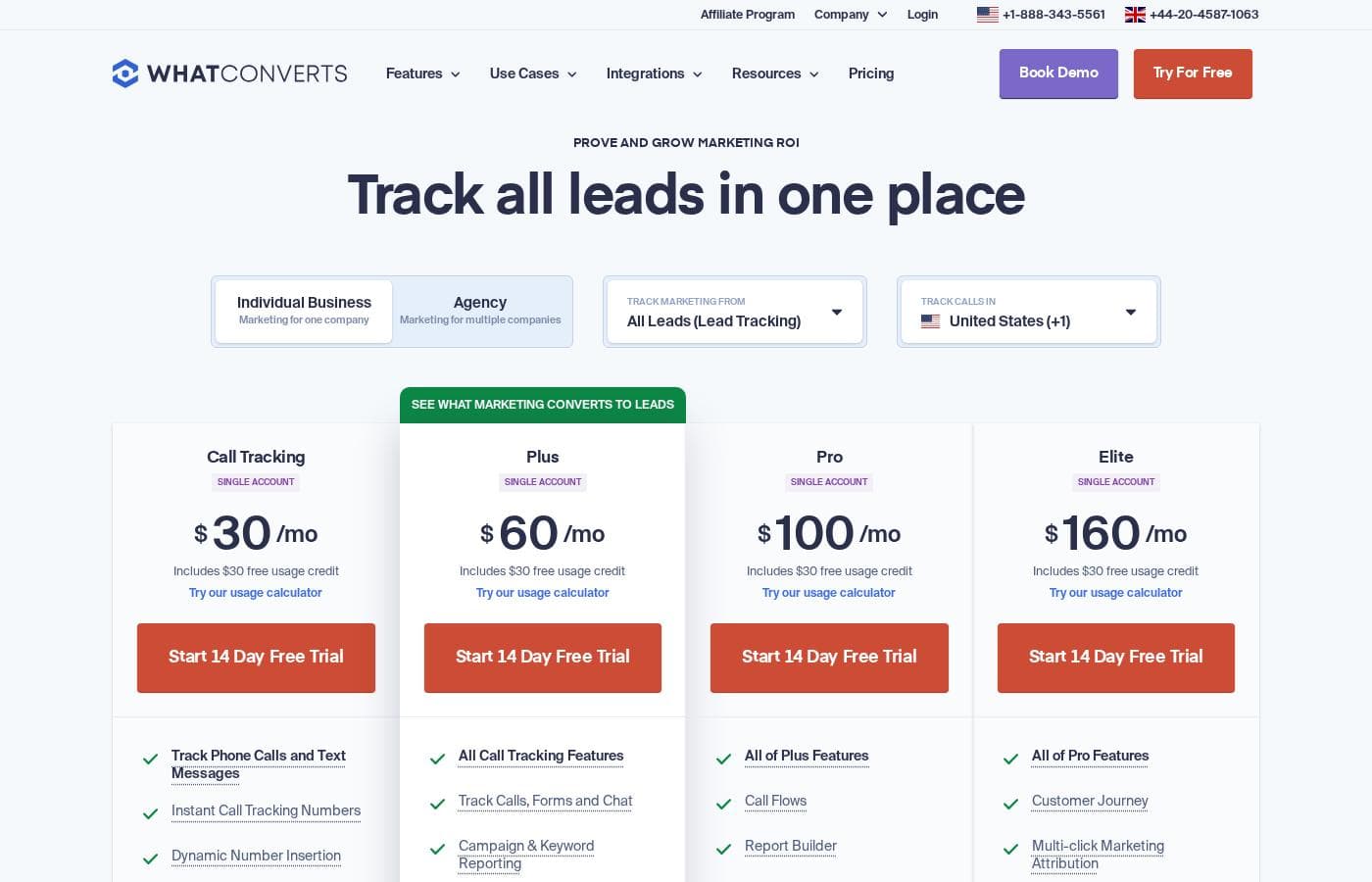
WhatConverts pricing page screenshotView pricing page screenshot
PlanBilled monthlyBilled annuallyIncludes
Call Tracking
$30/mo
—
Plus
$60/mo
—
Pro
$100/mo
—
Elite
$160/mo
—

Price history

Tracking prices since Oct 1, 2026. No price change detected yet.

Pricing types: Free trial, Monthly subscription, Usage-based pricing

Pricing notes

WhatConverts offers seven monthly subscription plans ranging from $30 to $1,250 per month, with single-account plans starting at $30/month and agency plans with unlimited accounts starting at $500/month. Every plan includes a free usage credit and a 14-day free trial.

WhatConverts costs between $30 and $1,250 per month with 7 plans: Call Tracking at $30/mo, Plus at $60/mo, Pro at $100/mo, Elite at $160/mo, Plus for Agencies at $500/mo, Pro for Agencies at $800/mo, and Elite for Agencies at $1,250/mo.

All plans are billed monthly and include a free usage credit, so extra charges only appear when your usage goes beyond what's included.

Call Tracking (Single Account)

Price: $30/mo Best For: Individual businesses focused on call tracking Other Features:

  • $30 free usage credit included
  • Track phone calls and text messages
  • Instant call tracking numbers and dynamic number insertion
  • Call recording, transcripts, and location data
  • API access

This is the simplest way to see which marketing drives phone leads. It covers one account and up to 148 tracked call leads. Form, chat, and transaction tracking aren't included at this tier.

Plus (Single Account)

Price: $60/mo Best For: Businesses that want calls, forms, and chat in one report Other Features:

  • $30 free usage credit included
  • Everything in Call Tracking
  • Tracks calls, forms, and chat (up to 300)
  • Campaign and keyword reporting
  • Bing, Google Ads & Analytics integrations

Plus gives you the full lead picture, not just calls. It ties every lead back to the campaign and keyword that earned it. That makes stakeholder reporting much easier.

Pro (Single Account)

Price: $100/mo Best For: Teams needing custom reports, call routing, and HIPAA compliance Other Features:

  • $30 free usage credit included
  • Everything in Plus
  • Call flows for voicemail, IVR, and geo-routing
  • Custom report builder and scheduled reports
  • HIPAA-compliant tracking

Pro suits regulated industries like healthcare, plus any team that sends recurring reports. Call routing sends callers to the right department automatically.

Elite (Single Account)

Price: $160/mo Best For: Marketers who want deep attribution data Other Features:

  • $30 free usage credit included
  • Everything in Pro
  • Customer journey tracking with page views
  • Multi-click marketing attribution
  • Lead Intelligence rules that qualify leads automatically

Elite shows every touchpoint a visitor makes before converting. It's built for marketers who need to prove full-funnel impact.

Plus (Agency)

Price: $500/mo Best For: Agencies tracking leads for multiple client businesses Other Features:

  • $250 free usage credit included
  • Unlimited accounts
  • Everything in single-account Plus, plus API access
  • Up to 1,908 call leads and 2,500 forms, chats, and transactions
  • White label branding for +$50/month

This is the agency starting point. You can track as many businesses as you need from one dashboard, and white labeling puts your brand on the dashboard and emails.

Pro (Agency)

Price: $800/mo Best For: Agencies with reporting-heavy or regulated clients Other Features:

  • $300 free usage credit included
  • Unlimited accounts
  • Call flows, report builder, and scheduled reports
  • HIPAA compliance
  • Up to 2,325 call leads and 3,000 forms, chats, and transactions

Pro fits agencies whose clients expect polished, scheduled reports or whose accounts include healthcare work. The larger usage credit also helps offset higher lead volumes.

Elite (Agency)

Price: $1,250/mo Best For: Data-driven agencies proving full-funnel ROI at scale Other Features:

  • $400 free usage credit included
  • Unlimited accounts
  • Customer journey and multi-click attribution
  • Lead Intelligence
  • Up to 3,158 call leads and 4,000 forms, chats, and transactions

Elite is the top tier, designed for agencies whose clients want proof of every marketing touchpoint.

Every plan comes with a 14-day free trial, and you can cancel anytime. There's no free-forever plan, and no money-back guarantee appears on the pricing page. Since costs rise with usage (extra local numbers are $2.50 each and minutes run 4.5¢ on individual plans), it's worth checking your monthly lead volume before you pick a tier.
Cost calculator

Estimate what WhatConverts costs for your team.

Billing
Per month
$30
Per year
$360

Call Tracking states no user limit: shown as one price for the whole account. Check the price for 5 users with the vendor. Estimate based on published list prices, before taxes, add-ons and discounts.

How to pay less for WhatConverts

  • Use the 14-day free trial before you pay.
Start free trial

Email me when WhatConverts changes price

One email when we detect a price change on the vendor's pricing page. No newsletter, no deals. Unsubscribe in one click.

User Reviews

No reviews yet.

Write a Review

Write a Review for WhatConverts
0/100 characters
0/2000 characters

Why use WhatConverts?

If you can't prove which marketing works, budget conversations get awkward fast. WhatConverts gives you the receipts — and makes them easy to share. Based on the company's site and published plans, here's what stands out:

  • Every lead lands in one place. Calls, forms, chats, and e-commerce sales are captured with marketing attribution attached, so there's no stitching data together by hand.
  • You can trace leads to the source. Reports link leads back to the PPC campaign and keyword that drove them — the kind of proof agencies and clients fight over.
  • Junk leads don't pollute your numbers. Qualify or disqualify leads with one click, so your reports reflect real opportunities.
  • Reporting gets easier. Custom report building and scheduled daily, weekly, or monthly reports mean stakeholders get updates without you chasing spreadsheets.
  • It fits your existing stack. The site advertises 1,000+ integrations, including Google Ads, Bing Ads, Facebook Ads, Pipedrive, Calendly, and AgencyAnalytics.
  • You can try before you buy. A 14-day free trial, a four-step setup guide, and support teams reachable by US and UK phone lines lower the risk of getting started.

WhatConverts alternatives

Other tools in the Lead Tracking category

View all Lead Tracking tools
Bread & Butter IO Inc.

Bread & Butter IO Inc.

Lead Tracking3.8/5

Bread & Butter is an AI-powered lead intelligence platform that helps you track and scale what converts into revenue. It sits between your analytics and your CRM — giving demand gen and revenue teams the intelligence to prime the pipeline, act on high-intent visitors, and hand off sales-ready leads without adding headcount.

WhatConverts FAQ

How much does WhatConverts cost?

WhatConverts's cheapest paid plan, Call Tracking, costs $30 per month. Paid plans range from $30 to $160 per month. Prices checked on Oct 13, 2026 from the vendor's pricing page.

Does WhatConverts have a free plan?

No. WhatConverts lists no free plan; the cheapest paid plan starts at $30 per month.

Does WhatConverts offer a free trial or a money-back guarantee?

WhatConverts offers a 14-day free trial.

Has WhatConverts's price changed recently?

No. We have not detected a price change since we started tracking on Oct 1, 2026.

How many users can access a WhatConverts account?

There's no user limit — every account supports unlimited users. User roles and permissions also let you control what each person can see, so teams and agencies can share access safely.

What security and compliance features does WhatConverts include?

Plans list security controls like two-factor authentication, password and session expiration, and domain or IP whitelisting. HIPAA-compliant call, form, and chat tracking starts on Pro, and GDPR-compliant tracking is also offered.

Which countries can I get call tracking numbers for?

WhatConverts offers tracking numbers in 40 countries, including the US, UK, Canada, Australia, Germany, France, Japan, Mexico, and Singapore. Check the pricing page for the complete list before you commit.

How do I get help from WhatConverts if I'm stuck?

Support is offered by email, phone, and chat, with phone lines in the US and UK. You'll also find a help center, a 10-minute demo video, and the option to schedule a live demo.

Ready to try WhatConverts? Check out the official site or pricing.

Are you WhatConverts? Claim this listing · Get the badge