WatermarkRemover.io

WatermarkRemover.io

AI-Powered Watermark Removal: Instant, Easy, and Free.

#1 dans Watermark Remover
1 min read · Updated 11/17/2025
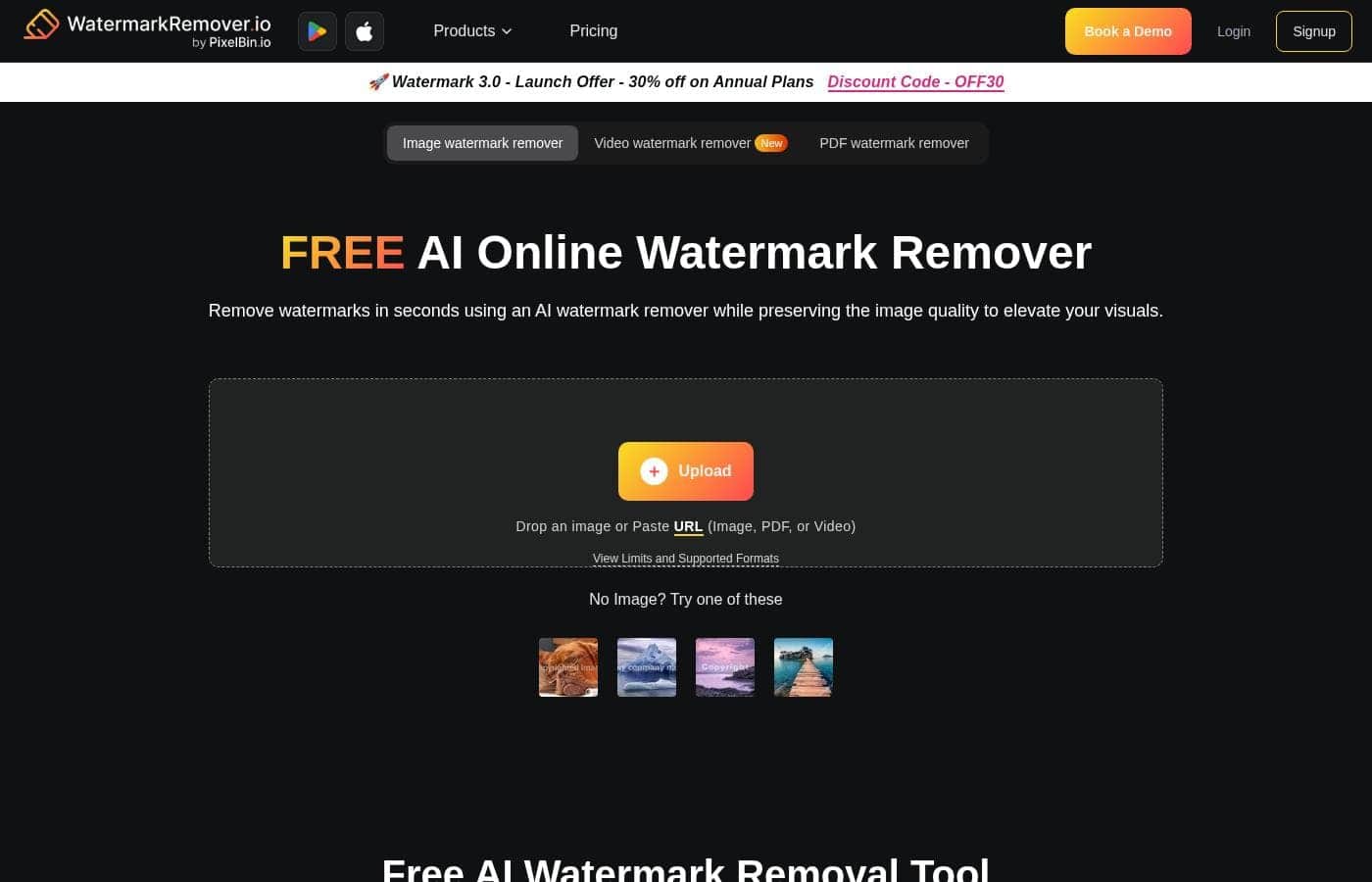
WatermarkRemover.io homepage screenshot

At a glance

Quick overview for WatermarkRemover.io: rating, pricing summary, key features, and highlights.

Ciroapp review

3.8
AI Magic for Quick Watermark Removal

We find WatermarkRemover.io exceptionally fast and easy to use for removing simple watermarks. The free version offers impressive results while maintaining image quality, making it ideal for testing. Overall, the tool excels at basic removal, but potential users should be aware of reported issues regarding paid bulk processing quality and the strict, non-refundable nature of purchases.

Pros

  • Pro:Instant AI processing speeds save significant time.
  • Pro:The service maintains original image quality and resolution.
  • Pro:Comprehensive free plan with monthly credits available.
  • Pro:Supports a wide variety of file formats including HEIC and PNG.

Cons

  • Con:Quality issues reported (blurred/deformed images) during paid bulk processing.
  • Con:Strict policy of no refunds due to high AI operational costs.
  • Con:Subscription plans involve monthly expiration of unused credits.
  • Con:Poor customer service reported when seeking resolution for faulty results.
Free trial
Yes
Range: $7.99–$139.99Free plan, Monthly subscription, Yearly subscription, One-time payment
This section is a summary. Detailed sections about features, use cases, pricing, and reviews follow below.

WatermarkRemover.io review, pricing, features, pros & cons

Do pesky watermarks distract from your visuals? It's frustrating when great photos are ruined by overlays. WatermarkRemover.io offers a simple fix.

This AI tool removes watermarks in seconds, preserving the original image quality. You get high-quality content instantly, elevating your brand presence. ✨

What is WatermarkRemover.io?

WatermarkRemover.io is designed to make image restoration effortless. It's an AI watermark remover tool that handles overlays, text, or logos in digital photos. You can easily drag and drop your image or browse local files.

The platform supports multiple image formats, including JPG, JPEG, PNG, WEBP, and HEIC. The AI takes over automatically, processing the image immediately. People love this tool because they can remove watermarks online for free.

💡

WatermarkRemover.io Key Features

✨ AI-Powered Precision and High Quality

Achieve professional visuals instantly by restoring clarity to your images. WatermarkRemover.io uses sophisticated AI technology for unparalleled results. This tool automatically removes various overlays, including text, logos, or distracting images.

The core focus is preserving the original image quality above all else. This process ensures your photos look exactly like the watermark was never there. The effectiveness of the AI allows it to handle complex watermarks with ease.

✨ Effortless Upload and Instant Processing

Skip tedious manual editing and get your content back in seconds. The process is designed to be extremely simple and quick for users. You can upload your files easily by dragging and dropping them onto the platform.

Browsing local files is also an option for immediate selection. Once the image is uploaded, the AI takes over immediately. The processing step removes the watermark in a matter of seconds, saving you hours of effort.

✨ Versatile Format Compatibility

Whatever image file you are working with, WatermarkRemover.io has you covered. The platform supports a wide array of digital image formats. You don't have to worry about converting popular files before removal.

Supported formats include JPG, JPEG, PNG, WEBP, and HEIC. Just upload your file, and the platform will handle the rest automatically. This ensures a smooth workflow regardless of your source file type.

✨ Live Preview for Perfect Outcomes

You maintain control and can ensure every detail is perfect before saving the image. Use the helpful Live Preview feature to check your results immediately. A split-screen view shows your original photo right next to the enhanced version.

This lets you confirm that the AI processing meets your high expectations. You can verify that all details look impeccable before clicking the download button to save your image.

✅ Works Everywhere Accessibility

Enhance your photos whenever and wherever the need arises. This tool works everywhere, meaning true portability for your workflow. You can use WatermarkRemover.io seamlessly on your mobile device, computer, or laptop.

This accessibility ensures you can quickly enhance visuals without being tied to a specific location or specialized software. You can even process images directly on the website for free.

Use Cases

⏱️ Saving Time in Large-Batch Workflows

If you are editing images regularly or handling large volumes, tedious manual removal drains your team's time. Instead of spending hours cloning out logos, you can use the AI tool for bulk processing. Just upload your collection of photos and let the system run automatically.

This speed has been called a genuine time-saver by users, preserving hours of effort. Commercial plans are designed to accommodate these higher volumes. The AI ensures every image comes out clean and ready for immediate use.

✅ Ensuring Visual Perfection Before Download

You want confidence that the watermark has been entirely removed without any damage to the background details. After upload, the AI processes your image in seconds, delivering the result immediately. You don't have to guess the outcome.

Problem: You suspect a tricky edge of the watermark might remain. Approach: Use the Live Preview feature before saving the image. Outcome: The split-screen view lets you instantly check the original next to the enhanced version. You confirm all details are perfect before committing to the download.

📱 Supporting Various File Types and Devices

Your workflow involves assets from multiple sources, meaning you often deal with unusual file formats like HEIC or WebP. Traditional editors might reject these types, creating a frustrating bottleneck. WatermarkRemover.io is built to handle this versatility.

It supports JPG, PNG, WebP, and HEIC files effortlessly. Since the platform works on mobile, computer, or laptop, you can enhance photos whenever you need to. Just drag and drop your file, regardless of its type, and the platform handles the rest immediately.

✨ Instantly Elevating Brand Content

When pushing time-sensitive marketing materials, you need high-quality visual content immediately. A distracting watermark on a key asset will quickly diminish your professional brand presence. The AI tool delivers instant, professional results.

It removes text, logos, or overlays automatically. Because the AI preserves the original image quality, your finished visuals look like the watermark was never there. This results in clean, compelling content that helps elevate your brand immediately.

💡 Non-Committal Editing for Infrequent Users

You only need to edit a small handful of photos once in a while for a personal or sporadic project. Committing to a yearly subscription does not make sense for your low-volume needs. You can choose a Pay-as-you-go credit pack instead.

This structure lets you purchase exactly 50 or 1000 credits only when you need them. These credits remain valid for an entire year. You secure instant, high-quality editing power without the pressure of recurring payments.

⚙️ Handling Complex and Stubborn Overlays

Some watermarks are complex, involving semi-transparency or complicated patterns that blend into the image. Manual removal of these elements can introduce noticeable artifacts or blurriness. Users report that the AI handles even the trickiest removals with ease.

It ensures you don't lose definition in the background. The effectiveness of the AI means the clarity in the final images often exceeds expectations, unlike slow software solutions.

Pricing Overview for WatermarkRemover.io

Pricing range
$7.99–$139.99
Pricing types
Free plan, Monthly subscription, Yearly subscription, One-time payment

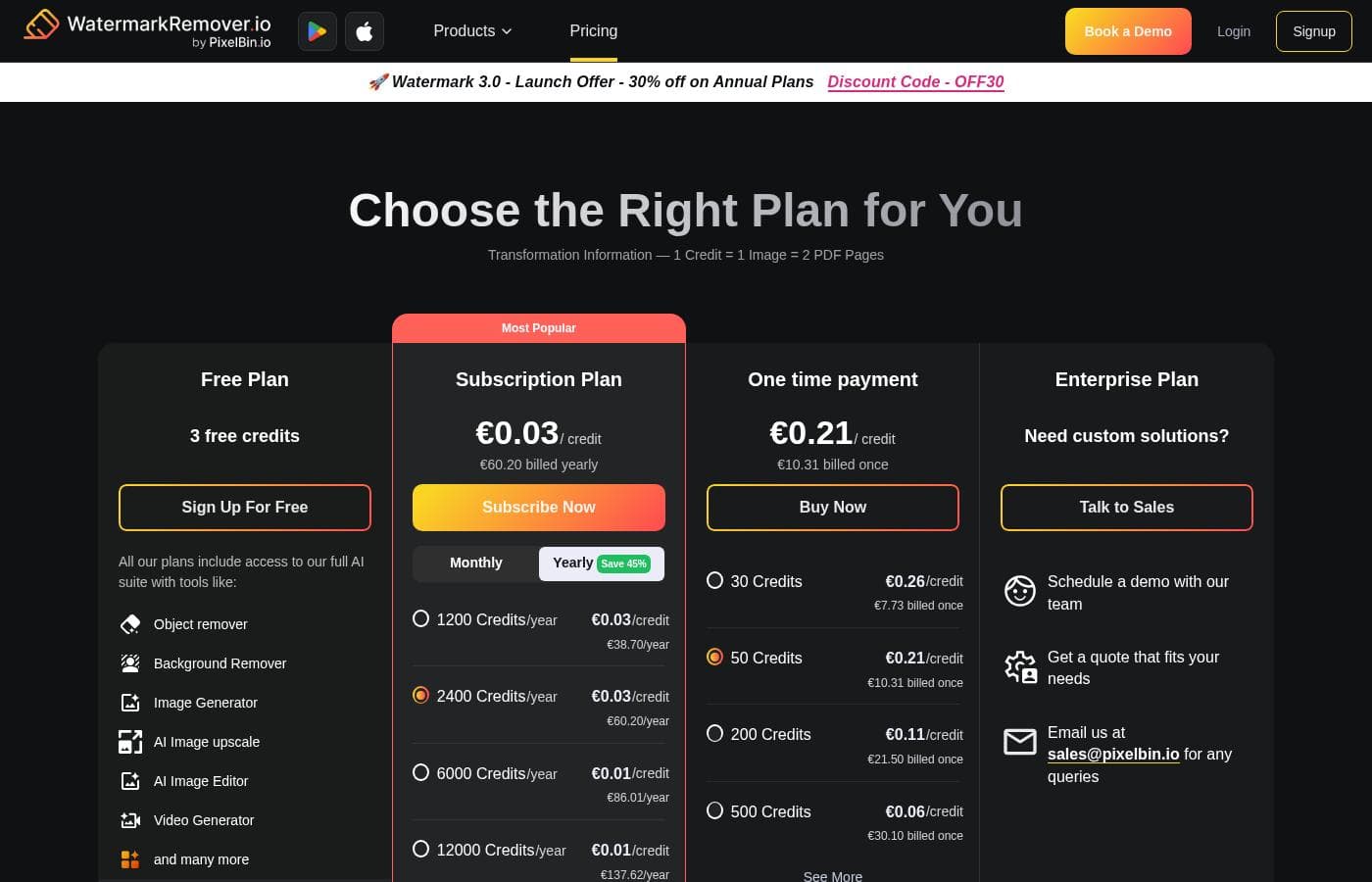
WatermarkRemover.io offers flexibility with a permanent Free Plan, one-time Pay-as-you-go credit bundles, or discounted annual subscription packages. Subscriptions scale based on the volume of credits you need yearly, with options starting at $44.99.

Plans & Pricing

Free Plan

Monthly$0
Yearly$0
3 credits/month limit
  • 3 free credits monthly
  • 3 free downloads monthly
  • Try the platform

Subscription Plan (2400 Credits/year)

MonthlyNot explicitly stated
Yearly$69.99
Unused credits disappear at the end of each month
  • 2400 Credits per year
  • $0.03/credit cost
  • Billed yearly
  • Cancel anytime

One time payment (50 Credits)

Contact for pricing
$7.99 billed once; Credits valid for 1 year
  • 50 Credits purchased once
  • $0.16/credit cost
  • Buy credits when needed

Enterprise Plan

Contact for pricing
Talk to Sales for pricing
  • Custom solutions
  • Schedule a demo
  • Get a custom quote

WatermarkRemover.io offers four pricing structures: a Free Plan, Yearly Subscription plans ranging from $44.99 to $139.99, One-time Credit packs from $7.99 to $84.99, and an Enterprise option for custom needs.

WatermarkRemover.io uses a credit system where editing an image spends one credit. Here are the specific plan details:

Free Plan

Price: $0 Websites Supported: Not explicitly stated Best For: Trying the platform Refund Policy: Not explicitly stated Other Features:

  • 3 free credits
  • 3 free downloads
  • Credits and downloads available every month

This is a great starting place if you want to test the tool's effectiveness before spending any money. You receive a small monthly bundle of credits and downloads to make sure the AI tool meets your needs. 🤩

Subscription Plan (Yearly)

Price: Starts at $44.99/year (up to $139.99/year) Websites Supported: Not explicitly stated Best For: Editing images regularly or in large batches Refund Policy: No refunds due to the high cost of AI; explore the free plan first. Other Features:

  • Four volume tiers (1200 to 12000 credits/year)
  • Billed yearly (auto-renews yearly)
  • Cancel anytime
  • Implied saving of 45% compared to Monthly billing

Subscription plans are ideal for users who rely on bulk processing or edit images frequently. While you pay annually, these packages offer substantial savings and provide enough credits to handle high-volume workflows consistently.

One time payment

Price: $7.99 (50 Credits) to $84.99 (1000 Credits), billed once Websites Supported: Not explicitly stated Best For: Only needing to edit a few images once in a while (Pay-as-you-go) Refund Policy: Non-refundable Other Features:

  • Credits are valid for 1 year from purchase
  • Four volume tiers available (50, 200, 500, 1,000 credits)

If your usage is unpredictable or rare, a one-time credit purchase is perfect. You buy exactly what you need only when you need it, and your credits remain active for an entire year.

Enterprise Plan

Price: Custom Quote Websites Supported: Not explicitly stated Best For: Transforming images at scale Refund Policy: Not explicitly stated Other Features:

  • Schedule a demo with the team
  • Get a personalized quote that fits your specific needs
  • Book a 1:1 session with experts

Large organizations or those with complex custom requirements should investigate the Enterprise plan. You can speak directly with the team to design a powerful, tailored solution for large-scale image transformations.

WatermarkRemover.io provides a comprehensive free plan with 3 credits and 3 downloads monthly, letting you try the service completely risk-free. This is important because due to the high cost of running the AI models, both the one-time credit purchases and the subscription plans are explicitly stated to be non-refundable.

User Reviews

User feedback for WatermarkRemover.io is generally positive, focusing heavily on its value in the free usage tier. Users frequently commend the tool’s exceptional speed and accuracy, noting it 'works perfectly fine' and keeps the original image resolution intact.

People appreciate that the AI removes watermarks nicely and saves significant time, making it a valuable resource for casual users. However, one significant negative review suggests serious concerns regarding the reliability of paid services and poor customer support responsiveness.

After purchasing credits and uploading images in bulk, the user reported pictures came back "blurred and deformed." They also experienced over two weeks of back-and-forth communication before being refused a refund or credit restoration, despite the poor results. This suggests that while the platform excels in its foundational function for free users, reliability for large, paid batches and customer support response times need close attention.

Users should approach paid bulk processing with caution. 👍

What users say elsewhere

Ryan S.
· Trustpilot
5.0 / 5

This is a wonderful, fast website. It works perfectly fine during free use, and I totally recommend testing it out.

Megan K.
· Trustpilot
5.0 / 5

The tool removed the watermark nicely for free. It successfully kept the image resolution high, which is a great benefit.

No reviews yet.

Write a Review

Write a Review for WatermarkRemover.io
0/100 characters
0/2000 characters

Why use WatermarkRemover.io?

If you need quick, high-quality visual content, WatermarkRemover.io is the fastest route. It eliminates the frustration of tedious manual editing. Why wait for slow software when you can get professional results instantly? Speed and quality preservation are its top priorities.

  • Instant AI Processing: The platform processes your image automatically, removing the watermark in seconds. This speed has been called a genuine time-saver, saving hours of effort.
  • Ensured Quality: The AI ensures you preserve the original image quality. Users report that the results are impressive, making photos look like the watermark was never there.
  • See Results First: Use the Live Preview feature before saving the image. A split-screen view shows your original next to the enhanced version so you can check that all details are perfect.
  • Accessibility and Versatility: You can process images online for free, supporting various formats like HEIC and PNG. The tool can handle complex watermarks with ease.
  • Use It Anywhere: WatermarkRemover.io works everywhere. Use it whenever you need to enhance photos, whether you are on a mobile device, a computer, or a laptop. ✅

Ready to transform your workflow with WatermarkRemover.io?

Frequently Asked Questions

How exactly does the credit system work across different plans?

Credits are like tokens you use for processing images. Generally, one credit covers one image edit or transformation, such as removing a watermark. Different services might consume varying amounts of credits.

If I am on a yearly subscription, do unused credits carry over to the next month?

No, unused credits disappear at the end of each monthly period allocated by your annual plan. For example, if your plan gives you 100 credits monthly and you only use 70, the remaining 30 will expire. You should choose a plan that closely matches your expected monthly usage.

How long are Pay-as-you-go credits valid for after purchase?

One-time Pay-as-you-go credits are valid for a full year (12 months) from the original purchase date. This makes them ideal if you only need infrequent image editing.

Can I receive a refund if I am unhappy with the results from the paid service?

No, both subscription and one-time purchases are explicitly non-refundable. This is due to the high operating costs associated with running the AI models. They strongly encourage testing the free plan first.

How do I cancel or downgrade my yearly subscription plan?

You can change your plan or cancel your yearly subscription at any time. To make these changes, you must contact their team directly at support@pixelbin.io.

Does WatermarkRemover.io offer integration options for bulk processing, such as an API?

While the platform supports uploading and transforming images in bulk, especially on commercial plans, specific API documentation is not listed. The Enterprise plan offers custom solutions for transforming images at scale.

What happens if I need more credits than my paid plan provides mid-month?

If you exhaust your monthly credit quota, you can buy more credits immediately. Alternatively, you always have the option to upgrade to a larger subscription plan whenever you need to.

Is there a way to quickly try the tool without creating an account first?

Yes, you can upload and process up to two images daily without needing to sign up for an account. If you sign up for the free plan, you receive 3 credits and 3 downloads monthly.

What types of payment methods are accepted for purchases?

They accept all major credit and debit cards for payment processing. If you have specific payment questions, you should contact support@pixelbin.io.

Is there a specific policy regarding the commercial use of watermark-free images?

Yes, the site provides a strict guideline regarding usage ethics. You must not use watermark-free images for commercial purposes, especially without the explicit consent of the original owner.

What company is responsible for the billing and customer support?

WatermarkRemover.io is affiliated with Pixelbin. If you have questions about billing, cancellations, or support, you should contact them at support@pixelbin.io or sales@pixelbin.io for enterprise needs.

Are there specialized plans for large enterprises or custom business needs?

Yes, they offer an Enterprise Plan for users needing custom solutions and image transformation at scale. You can schedule a demo and get a personalized quote by contacting sales@pixelbin.io.

Ready to try WatermarkRemover.io? Check out the official site or pricing.