VisualCV

VisualCV

Create a professional, job-ready resume in minutes with the trusted online CV builder.

#1 dans Resume Builder
3 min read · Updated 10/3/2025
VisualCV homepage screenshot

At a glance

Quick overview for VisualCV: rating, pricing summary, key features, and highlights.

Ciroapp review

4.1
Top design and support, difficult pricing.

We found VisualCV excels at producing clean, modern resumes using professional templates and an intuitive editor backed by responsive customer support. While the Pro plan offers excellent features like analytics and unlimited downloads, we urge new users to be mindful of the compulsory quarterly billing structure and stringent free plan limitations. Overall, it's a solid tool for active job seekers who intend to commit to the Pro subscription.

Pros

  • Pro:Highly user-friendly and intuitive resume building interface.
  • Pro:Templates produce clean, modern, and professional designs.
  • Pro:Customer service is highly responsive and supportive.
  • Pro:Mobile app allows for convenient edits on the go.

Cons

  • Con:Recent changes implemented restrictive watermarks on free downloads.
  • Con:Perceived high subscription cost compared to competitive alternatives.
  • Con:Quarterly billing structure led to unexpected renewal charges for some users.
  • Con:Difficulty locating cancellation or downgrade options on the website.
Money-back guarantee
Yes — 30 days
Range: $0–$16/monthFree plan, Monthly subscription
This section is a summary. Detailed sections about features, use cases, pricing, and reviews follow below.

VisualCV review, pricing, features, pros & cons

It’s frustrating when your application gets lost in the “CV black hole.” You spend time crafting a document, but you never know if recruiters see it. VisualCV helps you turn that around. This platform gives you the tools to create a job-ready resume quickly and even offers analytics so you can track your results.

What is VisualCV?

VisualCV is an online CV and professional resume maker designed to simplify and enhance your job search. It is the #1 resume builder, trusted by more than four million people looking to land their dream job. They offer streamlined templates perfect for any field, whether you're in tech, management, or marketing.

You can confidently take the next step in your career using their powerful editor. You can import an existing resume or craft a new one from scratch within minutes. ✅

VisualCV Key Features

✍️ Intelligent Creation and Streamlined Editing

Stop struggling with blank pages thanks to the cutting-edge, free AI Resume Builder. This tool uses AI technology to revolutionize the creation process, providing quick content customization. It ensures your application features thoughtfully defined text, helping you stand out to busy recruiters.

You can begin by importing an existing resume or crafting a new one from scratch in minutes. The intuitive online CV maker allows you to quickly add content, select templates, and customize fonts effortlessly. No download is needed to access this powerful editor.

✨ Track Employer Engagement with Built-in Analytics

You won't feel lost in the mysterious hiring process anymore. VisualCV includes advanced tracking that shows you exactly when your document has been viewed or downloaded. Knowing this information helps you follow up more effectively and keep track of active applications.

This essential intelligence helps maximize your job search strategy. It prevents your application from being lost in the 'CV black hole' by providing crucial visibility.

✨ Professional, Industry-Ready Templates

Access professional templates designed to highlight your career journey, regardless of your field. Whether you work in Tech, Engineering, Management, or Marketing, the platform offers the right design for you. The structured templates are easy to use and help produce an elegant, creative resume.

You can test-drive all available templates before creating or finalizing your first resume. This ensures you find the perfect layout to match your professional brand.

✨ Manage and Personalize Multiple Documents

Customizing your application for every job is critical for success in a competitive market. VisualCV makes this process simple by letting you easily manage several different versions within the platform. You can personalize each individual document for specific job applications.

This powerful feature ensures you confidently apply to target roles with the right professional messaging every single time.

📤 Seamless Export and Instant Sharing

Easily share your final document using the delivery format that employers prefer. You can export a clean, pixel-perfect PDF resume, ideal for submitting through careers pages and job boards. PDF is widely accepted as the preferred CV format for most organizations.

Alternatively, share your CV instantly using a convenient link. This flexible option works well when sending the link via email or publishing it on social media.

✨ Security Focused on Privacy and Feedback

The platform takes your security and data privacy seriously, offering three specific CV privacy options. Your personal information will not be shared with anyone unless you explicitly ask the platform to do so. This ensures your data stays safe while you are searching for your next role.

Finding the right feedback is also simple. You can send your CV to friends for input or access a free CV review from platform partners.

Use Cases

✨ Performing a Digital Makeover on an Existing Resume

Starting from scratch feels daunting when you already have years of experience documented. You may have an old resume locked in a messy word processor file, and formatting struggles slow you down. VisualCV bypasses this frustration.

You can import your existing document directly into the editor and skip the tedious layout work. Choose from numerous professional templates to instantly transform your basic text into an elegant, job-ready document.

✂️ Tailoring Applications for Specific Job Roles

In today's market, using a single generic CV is usually ineffective. You need to highlight different skills when applying for a technical role versus a management position. VisualCV allows you to efficiently manage multiple versions of your document.

You can easily clone your master CV baseline and personalize each copy rapidly. This ensures every application is specifically geared toward that particular hiring manager’s needs.

🤖 Leveraging AI to Overcome Writer's Block

It is hard to craft compelling, professional language that makes your application stand out. If you struggle with describing your accomplishments effectively, the free AI Resume Builder is your solution.

  1. Access the AI Builder when starting or editing your document.
  2. Input your basic outline or job experiences.
  3. Let the cutting-edge technology suggest thoughtful, clear content.

Expected outcome: You overcome content hurdles and create a highly customized CV faster.

📈 Eliminating the 'CV Black Hole' Uncertainty

It’s frustrating when you submit a CV online and hear nothing back for weeks. You spend time wondering if the recruiter ever viewed your qualifications. VisualCV offers advanced CV analytics to tackle this problem directly.

This essential tracking tool shows you exactly when an employer views or downloads your résumé. Knowing this timing helps you follow up strategically and avoid wasting time on applications that went unseen.

🔒 Securely Gathering Feedback Before Submission

Refining your CV usually means getting valuable input from mentors or friends before you submit it to a company. You need an easy way to share the draft without compromising your privacy or running into formatting issues. Simply share your finished CV using the convenient link option via email or social media. This makes getting feedback effortless while three specific privacy options ensure your data stays secure.

Tip: Use the flexible sharing options to get a free CV review from partners and confidently finalize your document.

📧 Immediate Application Through Flexible Export

Once your document is perfect, sending it to potential employers is quick and simple. Most employers prefer PDFs because the formatting remains consistent. You can export a pixel-perfect PDF resume that prevents layout errors.

If the application requires a fast submission, you can also instantly share your CV using a clean, professional web link.

Pricing Overview for VisualCV

Pricing range
$0–$16/month
Pricing types
Free plan, Monthly subscription
Money-back guarantee
Yes — 30 days

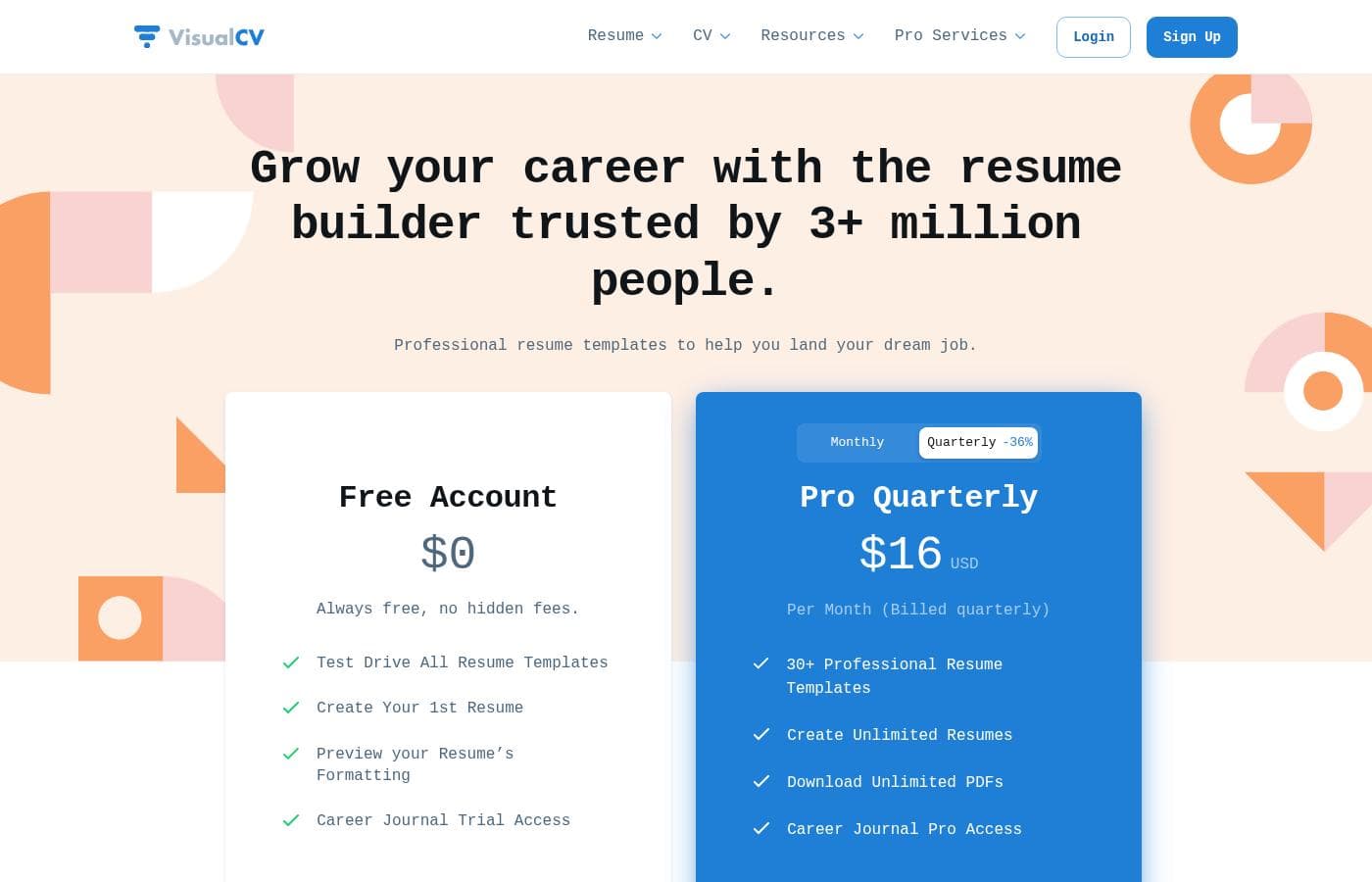
VisualCV offers a permanent Free Account option alongside a paid Pro Quarterly subscription starting at $16 per month. The Pro Quarterly plan is billed every three months and unlocks unlimited features like PDF downloads and premium templates.

Plans & Pricing

Free Account

Monthly0
Limited to 1st Resume creation
  • Always free, no hidden fees
  • Test Drive All Resume Templates
  • Create Your 1st Resume
  • Preview your Resume's Formatting
  • Career Journal Trial Access

Pro Quarterly

Monthly16
Billed quarterly
  • 30+ Professional Resume Templates
  • Create Unlimited Resumes
  • Download Unlimited PDFs
  • Career Journal Pro Access

VisualCV costs between $0 and $16 per month with two primary plans: Free Account at $0 and Pro Quarterly at $16 per month (billed quarterly).

Here are the details of the available options to help you choose the right fit for your job search.

Free Account

Price: $0 Websites Supported: Not explicitly stated (limited to creating the first resume) Best For: Job seekers testing the platform or creating a single resume Refund Policy: Not Applicable (It's free) Other Features:

  • Test Drive All Resume Templates
  • Create Your 1st Resume
  • Preview your Resume's Formatting
  • Career Journal Trial Access

This plan is perfect if you are new to VisualCV or just want to create one professional resume quickly. You can explore all the template designs and check out the formatting before deciding if you need more features. It's completely free.

Pro Quarterly

Price: $16 USD per month (Billed quarterly) Websites Supported: Not explicitly stated (includes creating unlimited resumes) Best For: Active job seekers needing varied, customizable documents and tracking features Refund Policy: 30-day money-back guarantee Other Features:

  • 30+ Professional Resume Templates
  • Create Unlimited Resumes
  • Download Unlimited PDFs
  • Career Journal Pro Access

Opt for Pro Quarterly if you are serious about customizing your job applications. This plan gives you access to the full suite of templates and the ability to download as many versions as you need. Unlimited PDFs are essential for targeting different roles while managing multiple versions of your CV. Start standing out today! ✨

VisualCV offers a robust Free Account so you can start right away without financial commitment. If you choose a paid plan, you have peace of mind with a full 30-day money-back guarantee if you are not satisfied. Remember, you can also cancel your subscription anytime, ensuring you only pay for the service when you need it.

User Reviews

Customer feedback for VisualCV is notably mixed, reflecting a positive product experience alongside frustration over recent pricing model changes. Users consistently praise the platform's ease of use, noting that the builder is "intuitive" and "highly user-friendly," producing professional and visually striking resumes quickly.

Many long-term users, some dating back to 2017, laud the excellent results and the responsiveness of customer service, which is frequently described as "amazing." The specialized mobile app capability for quick edits is also seen as a reliable feature. However, recent adjustments have severely impacted user trust and value perception.

A recurring complaint emphasizes the addition of restrictive watermarks to free downloads, effectively locking users out of their previously created CVs unless they pay the Pro subscription which many deem "exorbitant" or "unacceptable" compared to older pricing. While the templates are great, the perceived value decreases sharply when users struggle with cancellation processes or feel they are paying excessive quarterly fees for dormant accounts.

It's a fantastic tool, but you should commit to the paid plan immediately or be prepared for the limitations of the free tier. 💸

What users say elsewhere

Alex V.
· Trustpilot
5.0 / 5

I have been using VisualCV since 2017, and I'm very satisfied; I can recommend it highly. The app also works well and is very practical for making changes on the go while preparing for job interviews.

Jane W.
· Trustpilot
5.0 / 5

Amazing customer service and platform! I've used this whenever applying for new positions and find it highly user-friendly. The customer service responds immediately to any inquiries.

No reviews yet.

Write a Review

Write a Review for VisualCV
0/100 characters
0/2000 characters

Why use VisualCV?

Stop worrying about complicated formatting and tedious customization. VisualCV combines professional design with powerful features to maximize your application success. This platform makes building an elegant CV simple and highly effective. 💡

  • Hassle-Free AI Creation: Use the cutting-edge, free AI Resume Builder for no-hassle creation and speedy content customization. It helps ensure your application stands out thoughtfully defined text.
  • Manage Multiple Applications: Customization is essential in today's market. Easily manage different versions of your VisualCV, personalizing each one for specific job applications.
  • Track Employer Engagement: Use advanced CV analytics to see exactly when an employer views or downloads your CV. This essential tracking tool helps you follow up smarter and avoid the mysterious hiring process.
  • Flexible Sharing Options: Once finished, export a pixel-perfect PDF resume, the preferred file format for most employers. You can also share your CV instantly using a convenient link via email or social media.
  • Support and Privacy Control: Your privacy is essential, and the platform offers three specific CV privacy options to keep your data safe. You can also get valuable feedback through a free CV review from partners or friends.

Ready to transform your workflow with VisualCV?

Frequently Asked Questions

What is the total cost for the VisualCV Pro Quarterly plan?

The Pro Quarterly plan is priced at the equivalent of $16 USD per month. You are billed for the full three months at once. Therefore, the total charge per billing cycle is $48.

What specifically limits the Free Account compared to the Pro Quarterly plan?

The permanent Free Account option strictly limits you to creating only your first resume. The Pro Quarterly plan unlocks the ability to create unlimited resumes and download unlimited pixel-perfect PDFs suitable for job applications.

How do I cancel my VisualCV subscription, and will I be locked into a contract?

You can cancel your VisualCV account at any time without penalty. VisualCV states they will never lock you into a contract, regardless of whether you choose the monthly or quarterly payment option.

If I subscribe to Pro, is there a money-back guarantee?

Yes, VisualCV offers a 30-day money-back guarantee for all paid plans. If you are not satisfied for any reason, you can email them for a full refund within those first 30 days.

Does VisualCV offer a traditional free trial for the Pro features?

VisualCV does not offer a traditional free trial for the Pro plan. Instead, you can use the permanent Free Account to test all the resume templates and preview your formatting.

Does the AI Resume Builder cost extra to use?

No, VisualCV provides the cutting-edge AI Resume Builder for free. You can use it to help create content and quickly customize your resume text.

How does VisualCV handle my personal resume data and privacy?

Your privacy is important to VisualCV, and they commit to never sharing your personal information with third parties. The platform offers three specific CV privacy options, and you always retain full control to delete all your account data.

Can I use an existing resume to start instead of building one from scratch?

Yes, the CV maker gives you two options when you start building your document. You can easily import an existing resume or choose to craft a completely new document from scratch within the tool.

What are the support hours, and how quickly will they respond to my questions?

VisualCV maintains full-time support staff working from 9 AM to 5 PM PDT. They aim to answer all user inquiries and questions within one business day.

Who is the Pro Quarterly plan best suited for?

The Pro Quarterly plan is recommended for active job seekers. It is ideal if you often need to create and manage multiple, customized resumes for different target roles.

Does VisualCV support other languages besides English?

Yes, VisualCV appears to support a range of languages for global users. These include Spanish, German, French, Chinese, Russian, Portuguese, Turkish, and Arabic.

Does VisualCV integrate with third-party applicant tracking systems (ATS) or other tools?

Not explicitly stated on the official site. You should check their support or API documentation for details regarding external integration capabilities.

Ready to try VisualCV? Check out the official site or pricing.