TestDriver.ai

TestDriver.ai review

Autonomous AI agents that test your software like a human tester — clicking, typing, and verifying every flow. Built for teams that want real end-to-end coverage without maintaining brittle test scripts.

By Ciroapp Editorial Team · Updated Oct 31, 2026

Commission may apply at no extra cost

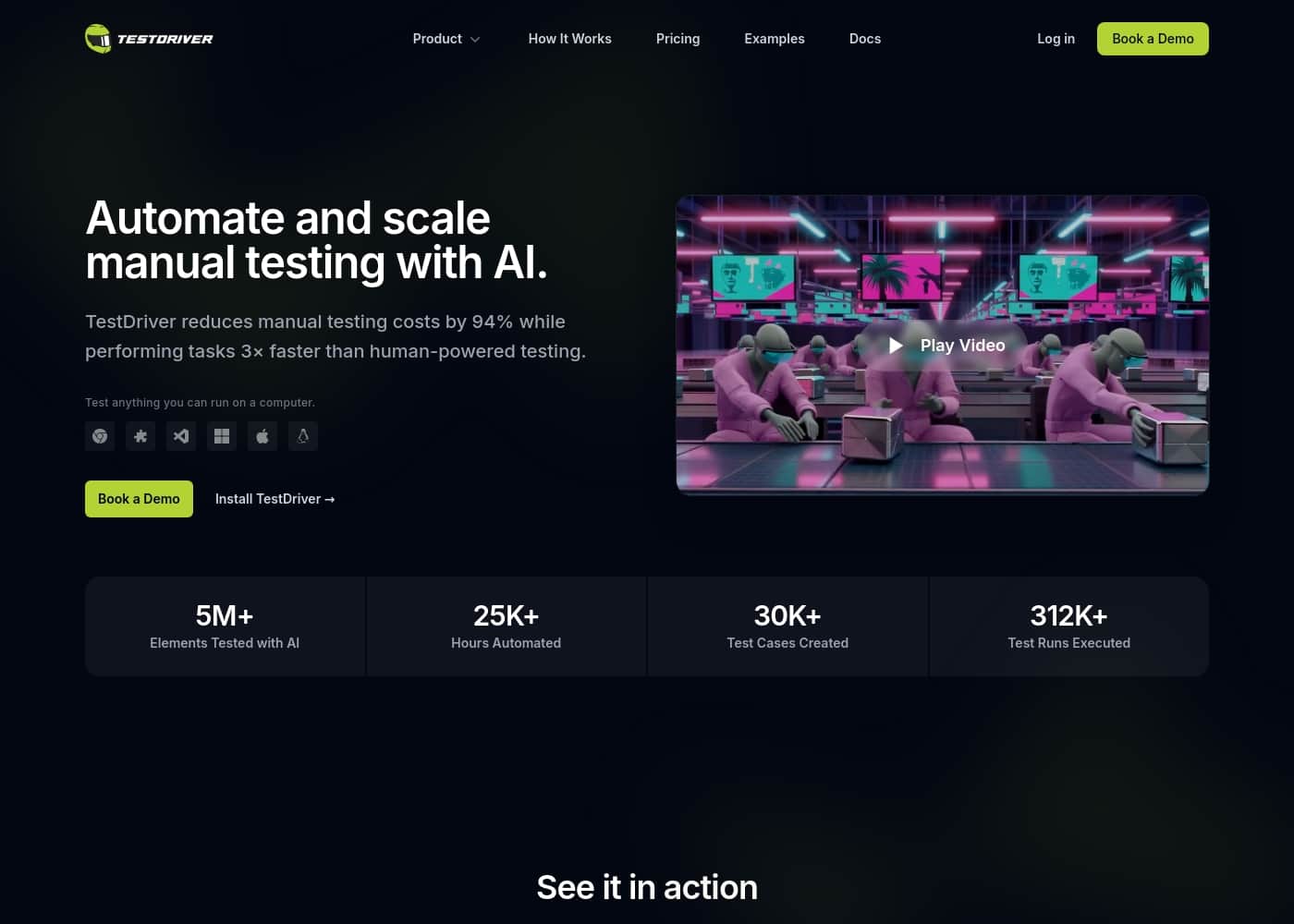
TestDriver.ai homepage screenshot

At a glance

Quick overview for TestDriver.ai: rating, pricing summary, key features, and highlights.
Vendor page checked Oct 31, 2026

Ciroapp score

4.0/ 5

TestDriver.ai turns plain-English descriptions into end-to-end tests that AI agents run on a virtual desktop, with GitHub runs and screenshot evidence built in. Costs can climb with usage, and third-party reviews are scarce. Overall, it's a solid choice for teams that want real coverage without maintaining brittle scripts.

Pros

  • Tests are authored in plain English, so developers, PMs, and manual QA staff can write and review scenarios without learning Selenium or Playwright.
  • The agent operates a real virtual desktop using computer vision, catching rendering and layout issues that DOM-based automation tools typically miss.
  • Self-healing execution means UI redesigns and moved buttons don't break the suite, cutting the maintenance burden that plagues scripted automation.

Cons

  • Costs can climb at scale — the range extends to $600/month, and usage-based billing makes monthly spend less predictable for large test suites.
  • Vision-driven agents are slower per step than compiled browser automation, which matters for teams running hundreds of long end-to-end tests.
  • Third-party review coverage is thin (no established G2, Capterra, or Trustpilot presence), so real-world reliability is hard to benchmark before buying.
Best for
  • Early-stage startups with no dedicated QA hire that need regression coverage on every release.
  • GitHub-based engineering teams that want smoke tests running automatically on pull requests.
  • Manual QA teams spending days on repetitive pre-release click-throughs that could be delegated to agents.
This section is a summary. Detailed sections about features, use cases, pricing, and reviews follow below.

What is TestDriver.ai?

TestDriver.ai is an AI-powered testing platform that aims to replace repetitive manual QA with autonomous software agents. Instead of writing brittle automation scripts, teams describe what they want tested in plain English, and an AI agent operates a virtual desktop — clicking, typing, and verifying results the way a human tester would. The company claims this approach cuts manual testing costs by 94% while completing tasks 3× faster than human-powered testing, with runs that can trigger automatically on GitHub pull requests.

TestDriver.ai is a cloud-based, AI-driven end-to-end testing tool for web and desktop applications. Rather than inspecting the DOM, its agents use computer vision to control a real mouse and keyboard inside a virtual machine, so tests exercise the product exactly as an end user would. Tests are authored in natural language, executed on demand or through GitHub and CI integration, and returned with screenshots and step-by-step reports.
Should you choose TestDriver.ai?

Quick buyer guidance before you compare plans or click through.

Choose it if

  • Early-stage startups with no dedicated QA hire that need regression coverage on every release.
  • GitHub-based engineering teams that want smoke tests running automatically on pull requests.
  • Manual QA teams spending days on repetitive pre-release click-throughs that could be delegated to agents.
  • Teams shipping desktop or Electron applications that browser-only automation tools cannot cover.

Skip it if

  • Teams with mature, well-maintained Playwright or Selenium suites they have no reason to migrate.
  • Organizations needing predictable flat monthly costs at very high test volumes, since usage-based billing can fluctuate.
  • Air-gapped or strictly on-premise environments, because tests execute on TestDriver's cloud virtual desktops.
  • Projects whose testing needs are mostly unit- or API-level, where a UI-driven agent adds little value.

Next steps before buying

  1. 1Create a free account at testdriver.ai and connect your GitHub account.
  2. 2Install the TestDriver app on the repository containing the app you want tested.
  3. 3Write your first test by describing a critical flow in plain English — for example, sign up, log out, and log back in.
  4. 4Trigger a run and review the step-by-step screenshots to confirm the agent behaves as expected.
  5. 5Add the test to your pull-request checks, then move to a paid tier as your test volume grows.

TestDriver.ai Key Features

✨ Natural-Language Test Authoring

Tests are written as plain-English descriptions of user flows rather than code. Anyone on the team — developers, PMs, or manual QA staff — can define a scenario such as signing up, upgrading a plan, and verifying the invoice appears, and TestDriver turns it into an executable test. This removes the Selenium/Playwright learning curve and keeps test logic readable during review.

✨ Vision-Driven Agent Execution

Instead of querying the DOM, TestDriver's AI agent sees the screen and operates a real mouse and keyboard inside a cloud virtual desktop. Because it interacts with the interface the way a person does, it can surface rendering problems, broken layouts, and unexpected pop-ups that DOM-based tools often overlook.

✨ Self-Healing Tests

Since the agent navigates by understanding the interface rather than following brittle selectors, tests keep working when buttons move, labels change, or designs are refreshed. This directly reduces the maintenance burden that causes most traditional automation suites to decay over time.

✨ GitHub and CI Integration

TestDriver connects to repositories through GitHub, letting teams trigger test runs on pull requests and commits. Results — including screenshots and step logs — land directly in the development workflow, so regressions are flagged before code merges rather than after release.

✨ Web and Desktop Application Support

Because the agent works on a full virtual desktop rather than a headless browser, it can test not only websites and web apps but also desktop applications such as Electron builds — a coverage gap left by most browser-only automation frameworks.

✨ Visual Evidence and Reporting

Every run produces screenshots and step logs showing exactly what the agent saw and did. When a test fails, teams can pinpoint the moment things went wrong without reproducing the issue locally, which shortens debugging cycles considerably.

Use Cases

💡 Pull-Request Regression Checks

Engineering teams can wire TestDriver into GitHub so that core user journeys — login, signup, checkout — are exercised on every pull request. Broken flows get caught at review time, before they ever reach staging or production.

💡 Offloading Manual Regression Passes

QA teams that spend days clicking through the same flows before each release can hand those repetitive passes to TestDriver's agents, freeing human testers to focus on exploratory testing, edge cases, and usability work.

💡 Desktop and Electron App Testing

Teams shipping desktop applications can use the agent's virtual-desktop environment to verify native windows, menus, and install workflows — scenarios that browser-only tools such as Selenium cannot reach.

💡 QA Coverage for Teams Without QA Engineers

Early-stage startups without a dedicated QA hire can describe critical flows in plain English and let TestDriver run them after every change, giving small engineering teams a safety net without adding headcount.

💡 Pre-Release Verification of Critical Flows

Before a major release, teams can run a full suite of payment, authentication, and onboarding journeys to confirm nothing regressed, with screenshot evidence for each step attached to the final report.

TestDriver.ai pricing

Pricing changed on Oct 31, 2026.

Prices not verified yet — see the vendor page.

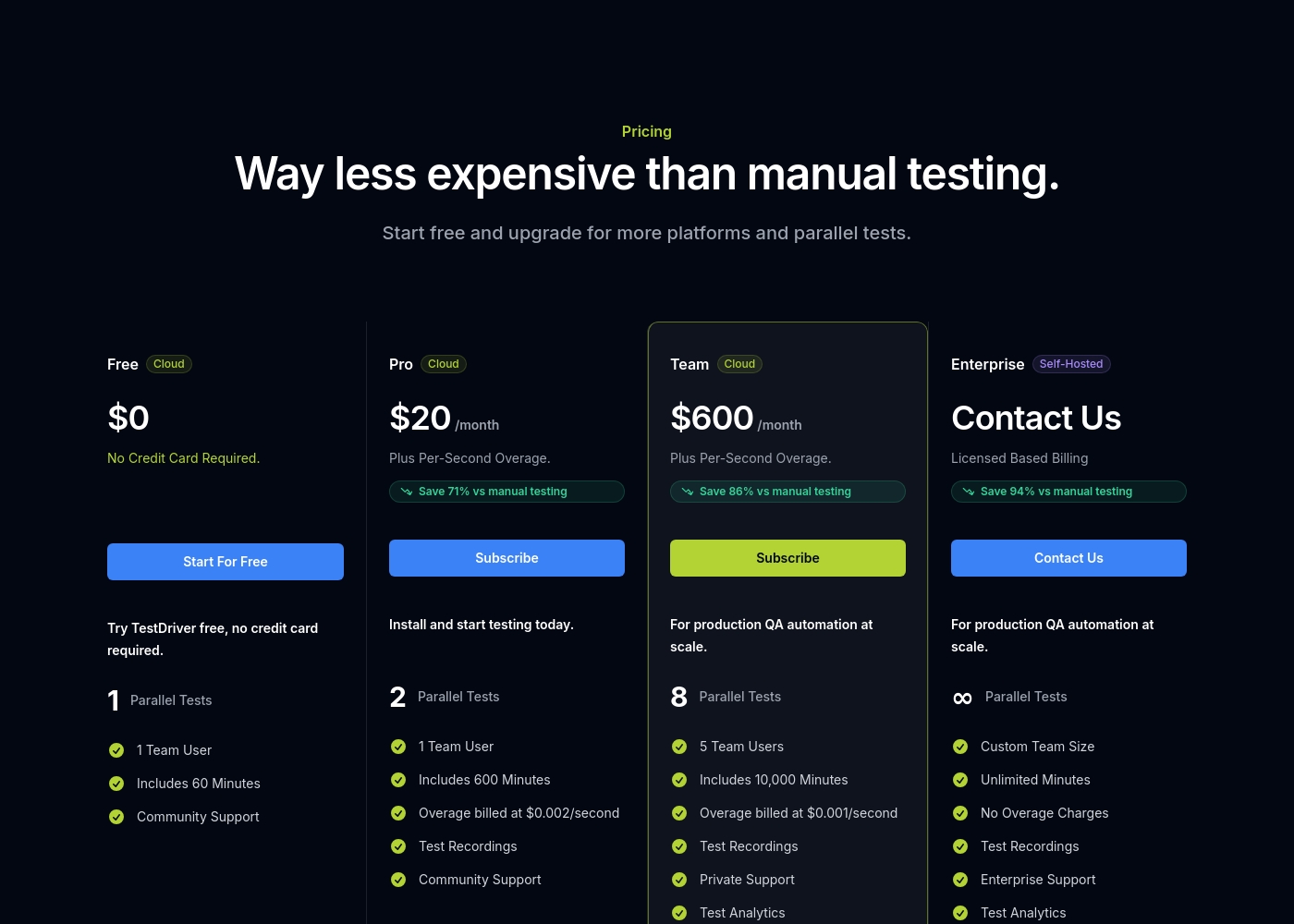
TestDriver.ai's pricing page

TestDriver.ai pricing page screenshotView pricing page screenshot

Price history

  1. Oct 2026Pro $20 → $24

Pricing types: Free plan, Monthly subscription, Usage-based pricing

Email me when TestDriver.ai changes price

One email when we detect a price change on the vendor's pricing page. No newsletter, no deals. Unsubscribe in one click.

What's new

  1. price change
    TestDriver.ai pricing updated

    Pro: $20/mo → $24/mo (+20%)

User Reviews

No reviews yet.

Write a Review

Write a Review for TestDriver.ai
0/100 characters
0/2000 characters

Why use TestDriver.ai?

Manual regression testing is slow, expensive, and hard to scale, while traditional automation frameworks demand ongoing engineering time to build and maintain. TestDriver.ai attacks both problems: agents execute tests roughly 3× faster than a person can, and because they navigate the UI visually rather than through hardcoded selectors, they are far less likely to break when the interface changes.

The free plan and usage-based pricing also let teams start with no upfront commitment and pay in line with actual test volume.

TestDriver.ai FAQ

What is TestDriver.ai?

TestDriver.ai is an AI-powered end-to-end testing platform. You describe user flows in plain English, and an AI agent executes them on a cloud virtual desktop — clicking, typing, and verifying the UI like a human tester — then returns screenshots and a step-by-step report. It integrates with GitHub so tests can run automatically on pull requests and commits.

How much does TestDriver.ai cost?

TestDriver.ai offers a free plan to get started, along with monthly subscription and usage-based billing options. Paid plans range up to $600/month, so teams can begin at no cost and scale spending in line with how much they actually test. Check the official pricing page for current plan details and included limits.

Do I need to know how to code to use TestDriver.ai?

No. Tests are written as natural-language descriptions of what should happen in the app, which means non-engineers such as product managers and manual QA testers can author and maintain them. Developers can still wire runs into GitHub and CI pipelines for full automation.

Can TestDriver.ai fully replace human QA testers?

It replaces the repetitive, scripted side of QA — regression passes over the same flows every release — with the company claiming a 94% reduction in manual testing costs. Human testers remain valuable for exploratory testing, usability judgment, and edge cases that aren't easily expressed as a scripted flow.

What kinds of applications can TestDriver.ai test?

Because the agent works on a full virtual desktop rather than a headless browser, TestDriver.ai can test both web applications and desktop software such as Electron apps. This makes it suitable for teams whose products span browser-based and native experiences.

Ready to try TestDriver.ai? Check out the official site or pricing.

Are you TestDriver.ai? Claim this listing · Get the badge