Spot

Spot

Remote work doesn't have to feel remote.

#1 dans Virtual Office
2 min read · Updated 10/4/2025
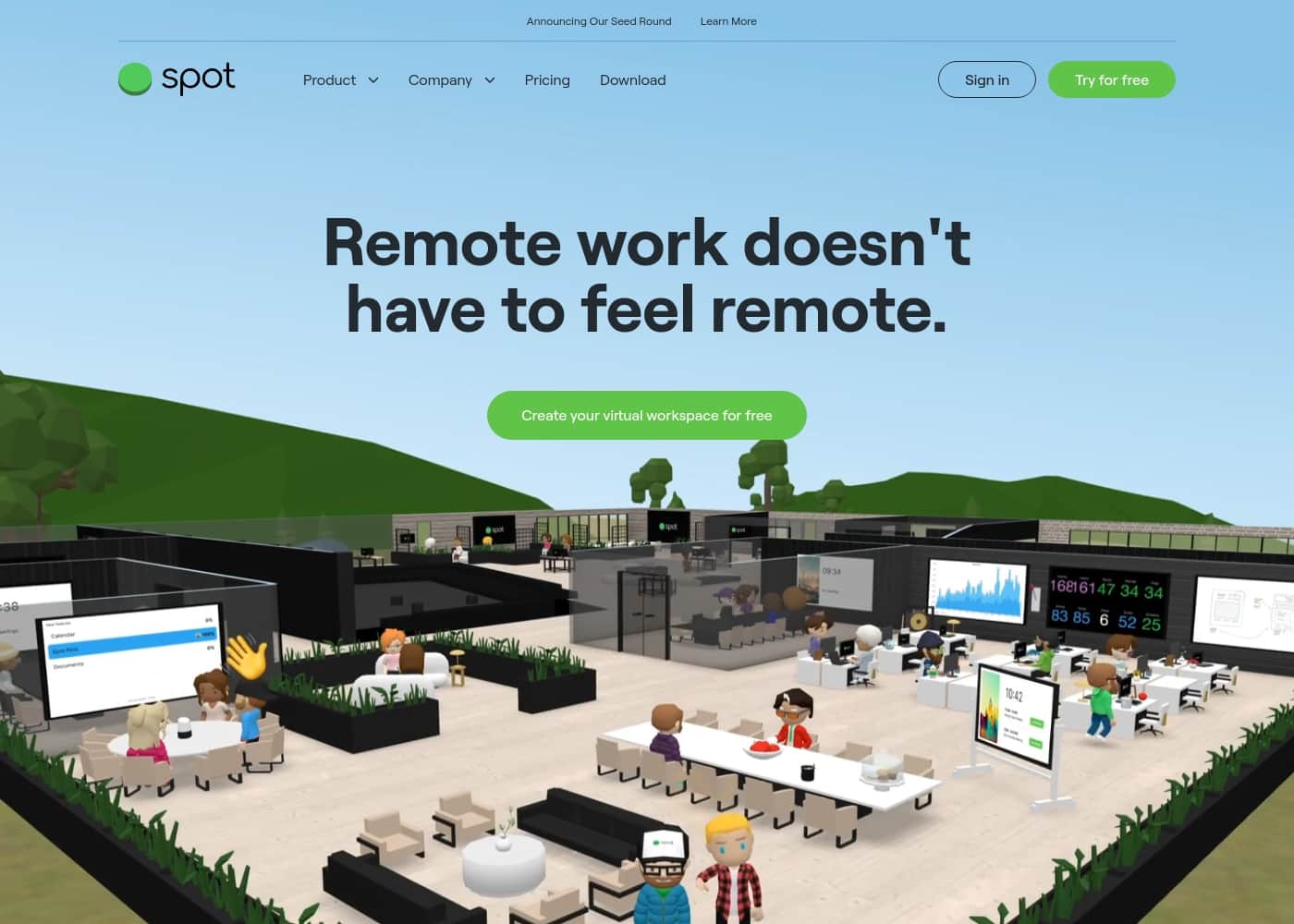
Spot homepage screenshot

At a glance

Quick overview for Spot: rating, pricing summary, key features, and highlights.

Ciroapp review

1.8
Brand Confusion Meets High Risk

We find Spot’s advertised virtual office features, such as spontaneous walk-up meetings, whiteboards, and a permanent free tier, appealing for remote teams. However, the product shares its name with a widely reviewed satellite tracker that has earned an extremely poor reputation for being unreliable and having opaque billing practices. Overall, we cannot recommend this product until the brand resolves the deeply concerning feedback regarding reliability and customer support associated with the common name.

Pros

  • Pro:Permanent free workspace allows teams to try features without commitment.
  • Pro:Advertised features support spontaneous interaction and quick sync-ups.
  • Pro:Collaboration tools include simultaneous screen sharing and whiteboards.
  • Pro:Voice and video communications are secured using TLS encryption.

Cons

  • Con:High risk of brand confusion with a widely criticized satellite tracking product.
  • Con:External reviews cite severe unreliability and message transmission failures.
  • Con:Customer support is repeatedly described as scam-like, rude, and unresponsive.
  • Con:Billing practices are reported as confusing, opaque, and predatory with hidden fees.
Free trial
Yes
Range: FreeFree plan
This section is a summary. Detailed sections about features, use cases, pricing, and reviews follow below.

Spot review, pricing, features, pros & cons

Are your remote teams struggling with feeling disconnected? Traditional tools often reduce your talented staff to mere "green dots" and create culture chasms. Spot addresses this frustration by providing a virtual workspace that brings back spontaneous interactions.

Teams can walk up to colleagues' desks and start talking quickly, just like in a physical office. This allows for less scheduled meetings and more quick catch-ups, enabling frictionless communication. ✨

What is Spot?

Spot is a customizable online workspace built specifically for the new era of remote working. It offers all the essential features of systems like Slack and Zoom, plus the social feel of being in an office.

Here, you are not just managing chats and video calls; you are creating shared spaces designed to spark conversation and team spirit. This solution helps modern teams of any size foster innovation and feel like a close-knit group again, not a collection of individual dots. 💡

Spot Key Features

✨ Spontaneous Collaboration is Back

Your team can boost spontaneous conversation and dramatically cut down on scheduled meetings. Need a quick chat with a co-worker? You simply walk over to their desk and start talking right away.

This fluid interaction ensures you get quick sync-ups instead of lengthy, formal calls. It brings back that frictionless communication you enjoyed in the physical office.

✨ Frictionless Meeting Navigation

Say goodbye to link sharing and calendar confusion. You navigate directly to instant meetings and calls just like you would in a real office building. There is no need to ask, “Can somebody send me the link?” Just head to the required meeting room and take a virtual seat.

This seamless system means your team will never miss a meeting again.

💡 Enhanced Collaborative Tools

Work smarter and collaborate effortlessly right inside your virtual workspace. Spot enhances screensharing capabilities to simplify remote group work. You can work alongside colleagues using simultaneous screensharing for rapid project completion. The platform includes essential tools like whiteboards for on-the-spot brainstorming sessions.

Spot makes screensharing better by allowing you to:

  • Share your screen instantly.
  • Upload PDFs for group review.
  • Work from a shared web browser.

✨ See Your Team's Digital Presence

Always know who is available and stay current on what they are doing. You can quickly see what’s happening across the virtual office at a glance. Just take a peek around the space to see who is present and who is working.

This visibility helps you figure out exactly who to approach for a quick chat. You can also clearly see who is set to DND (Do Not Disturb).

✨ Bringing Back the Good Vibes

Spot helps you bring back the community spirit and celebrate team success virtually. You can stream your favorite playlists directly from your computer to the shared office space. It is easy to gather everyone around the latest funny cat video, making shared jokes a core part of your company culture.

These features help create zones designed to encourage casual conversation and team-building.

✨ Flexible and Controlled Meetings

The virtual office lets you choose the right meeting format for any conversation. You can select a meeting mode that works best, whether it's traditional video call tiles or a virtual, private gathering. Use Presenter Mode if you need to control who is speaking during large group calls.

This comprehensive control adapts to your specific needs.

🔒 Enterprise Security and Access

Spot helps you stay safe with robust, enterprise-level roles and permissions. You can easily grant access to spaces, rooms, and channels using this system. This role-based feature supports teams of any size by allowing fine-tuned user access controls. If required, you can also utilize Single Sign-On functionality.

For privacy, your voice and video communications are secured using TLS encryption. Spot guarantees that your private conversations are never stored on their servers. You can lock rooms for extra security when holding sensitive HR meetings or performance reviews.

Use Cases

💡 Bypassing the Scheduled Meeting Link

Need a quick answer from a co-worker on a current project? You usually don't want to schedule a long call just for one minute of conversation. Spot helps eliminate these unnecessary scheduled events.

Just glance at the virtual office map to see if your colleague is available at their desk. You navigate your avatar over to their desk and start talking instantly. This immediate, frictionless interaction dramatically saves time and boosts productivity.

🔒 Handling Confidential Reviews Securely

Privacy is essential for sensitive conversations like HR meetings or performance reviews. Standard remote tools don't always offer easy, robust security controls. In Spot, managers can guide employees into a designated private room.

They simply use the lock feature to secure the room instantly. All voice and video communications are secured using TLS encryption and are never stored on Spot’s servers. This ensures sensitive discussions stay entirely private.

🎉 Bringing Back the Office Fun and Vibes

Remote work shouldn't mean missing out on team fun and camaraderie. When the team lands a big client, they head straight to the virtual celebration zone. Everyone can use high-fives and emotes to cheer for the achievement.

You can even stream a shared playlist or gather everyone around a funny cat video. This creates shared experiences and boosts team spirit, making everyone feel like a close-knit group again.

🤝 Designing Together in Real-Time

When tackling complex projects, collaboration must be effortless. Instead of confusing handoffs, teams can work in shared spaces designed for innovation and collaboration. They can use simultaneous screensharing; one person shares their screen while another uploads a PDF reference. Ideas are captured immediately using the built-in whiteboards. This setup helps everyone work smarter and keeps the creative momentum going.

Tip: Use Presenter Mode if you need one person to control the screen flow and ensure everyone focuses on the main speaker.

👀 Instant Team Status and Visibility

Knowing who is available right now is vital for project speed and efficiency. Checking individual chat statuses can be slow and disruptive. A project lead can find information instantly by glancing across the virtual office.

They immediately see who is currently in a meeting, who has DND active, and who is open for a quick sync-up. This visibility helps managers approach the right person at the right moment without interruptions.

🚪 Joining Meetings Without the Link Hassle

Are you tired of asking, 'Can somebody send me the link?' Spot removes the calendar confusion and broken link issues common in external video tools. Teams simply navigate their avatar directly to their virtual meeting room. They instantly join the call just by taking a seat in the room—no links, ID numbers, or waiting for permission needed.

It feels just like walking into a conference room in a physical office.

Pricing Overview for Spot

Pricing range
Free
Pricing types
Free plan

Spot offers a permanent free workspace, allowing teams to try out their virtual office features without any financial commitment. Details regarding potential paid subscription tiers for larger organizations are not explicitly provided on the website.

Plans & Pricing

Free Workspace

Monthly$0
  • Less scheduled meetings, more quick sync-ups
  • Navigate yourself to instant meeting and calls
  • Whiteboards and enhanced screensharing
  • Work collaboratively with simultaneous screensharing
  • Set up shared spaces designed for collaboration
  • Get conversation flowing with workplace polls
  • Jam out together as a team (music streaming)

Spot offers a Free plan, but costs for any paid subscriptions or advanced tiers are not explicitly stated.

Ready to see how Spot can transform your remote team dynamic? You can start building your team's virtual office immediately. Review the details below for the plan we know is available.

Free Workspace

Price: $0/month Websites Supported: Not explicitly stated Best For: Individuals or teams starting remote collaboration Refund Policy: Not explicitly stated Other Features:

  • Walk-up desk syncs and quick sync-ups
  • Navigateable office environment for instant calls
  • Work collaboratively using simultaneous screensharing and whiteboards
  • Shared music streaming
  • Celebrate with high-fives and emotes

If you are evaluating virtual office solutions, the Free Workspace is an excellent place to start. It allows your team to experience features like spontaneous interaction and customized office vibes without committed costs. This option is perfect for small teams testing how Spot fits their new remote culture. 🚀

Spot clearly emphasizes providing immediate access by offering a free workspace that teams can create and try immediately. While the website encourages users to start for free, specific details regarding potential paid tiers, enterprise-level features, or exact subscription costs for larger teams are not explicitly provided here. If you need robust features like Single Sign-On or fine-tuned user access controls, you may need to contact Spot's sales team directly to inquire about a custom paid plan.

User Reviews

External feedback for the product named SPOT is overwhelmingly negative, reflecting a 1.4-star TrustScore from 136 reviews. It is critical to note that these reviews describe a satellite communication and GPS tracking device, not the advertised Spot virtual office software.

Users repeatedly cite UNRELIABLE SERVICES, often reporting that ‘OK’ check-in messages fail to transmit, which poses a severe risk in the backcountry. Recurring complaints also target customer service, which users describe as being “run like a bad scam,” involving extensive waits and non-responsive support.

Billing practices are frequently called “shady” and “a rip-off,” featuring hidden fees, confusing charges (like the “flex charge”), and an impossibly difficult process for cancellation. Customers report feeling trapped, with charges continuing even after services are canceled.

We strongly advise potential users to be aware of the severe reliability and ethical concerns associated with this shared brand name. ❌

What users say elsewhere

Alex D.
· Trustpilot
1.0 / 5

I used the SPOT Gen 3 extensively in northern Norway. Despite being in the primary coverage area and setting the device in clear view of the sky, under 10% of my ‘OK’ messages resulted in a successful delivery. The system is critically unreliable and frankly useless for safety.

Sam K.
· Trustpilot
1.0 / 5

Regardless of the platform’s performance, customer service behaves like a scam. I sat on hold for hours and was constantly transferred, eventually finding they misused an expired credit card. It took extensive effort just to process a cancellation.

No reviews yet.

Write a Review

Write a Review for Spot
0/100 characters
0/2000 characters

Why use Spot?

Why navigate calendar confusion and meeting mixups when you can easily self-navigate to instant calls? Spot helps teams be more productive and brings back those good vibes you used to enjoy in person. Teams report remarkable outcomes after switching to the platform:

  • Boost Spontaneous Interaction. Just walk over to a co-worker’s desk to start talking, dramatically reducing the need for constant scheduled meetings.
  • 💡 Collaborate Effortlessly. Use whiteboards and simultaneous screensharing to work smarter. You can share your screen, upload PDFs, or work from a shared web browser.
  • 🎉 Bring Back the Good Vibes. Celebrate big wins with high-fives, decorate your virtual office for holidays, or gather everyone around a funny cat video. You can even jam out together by streaming shared playlists.
  • 🔒 Stay Secure and Private. Your voice and video communications are secured using TLS encryption and are never stored on Spot’s servers. You can lock rooms for extra privacy, perfect for HR meetings.
  • 📈 See Real Results. Teams report feeling 94% more connected with colleagues and noting a 98% increase in productivity per employee per day.

If your team is seeking a productivity tool that truly adapts and improves team spirit, Spot is for you. Join over 20,000 teams who have found this solution to be a game changer for connectivity. Create your space for free today! 🚀

Ready to transform your workflow with Spot?

Frequently Asked Questions

Is the free workspace a limited-time trial, or can my team use it permanently?

Spot offers a permanent Free Workspace that your team can use indefinitely. This generous plan includes core communication tools like walk-up syncs, whiteboards, and augmented screensharing at no cost.

How is my team's voice and video data kept secure and private in Spot?

All your voice and video communications are secured using industry-standard TLS encryption. Spot specifically states that this communication data is never stored on our servers, ensuring your privacy remains intact.

Can we use Spot for sensitive internal discussions, such as private HR meetings?

Yes, Spot provides features designed for high-security conversations. You have the ability to lock specific virtual rooms for extra security and privacy, perfect for handling sensitive discussions or performance reviews.

Does the platform support Single Sign-On (SSO) for larger organizations?

Spot mentions supporting Single Sign-On (SSO) capabilities. Features like SSO, fine-tuned user access controls, and robust role-based permissions are advertised but likely reserved for paid or custom enterprise plans.

Are there any user limits or feature quotas on the permanent free plan?

The details for the permanent Free Workspace do not explicitly state any usage limits or maximum number of users for this tier. If you have specific requirements for very large team scaling, you should contact Spot directly.

What is the pricing model, per-user or per-usage, for paid enterprise tiers?

The official site only provides documentation for the free tier. The specific pricing structure for potential paid plans, like whether it is based on per-seat licensing or usage volume, is not explicitly stated.

What kind of guaranteed customer support is included with the service?

Details regarding available customer support channels, such as email or phone support, or any guaranteed response times (SLA) for technical issues are not explicitly mentioned on the official site.

Does Spot integrate with other productivity tools like Slack or Google Calendar?

Specific information concerning integrations with popular third-party productivity tools is not explicitly stated on the official site. The product primarily highlights its internal collaboration features like whiteboards and shared screensharing.

What are the rules regarding refunds or cancellation if we decide to subscribe to a paid plan?

Policies regarding subscription cancellations or financial refunds are not explicitly stated on the official site. It is advisable to discuss these terms directly with the sales team before committing to any paid agreement.

Who is Spot best suited for, based on its primary features?

Spot is best suited for fully remote teams that want to replicate the spontaneous interactions of a physical office. It targets teams frustrated with scheduled video calls and seeking a stronger sense of connection and team spirit.

Are specific onboarding or migration services provided when adopting Spot?

Information regarding dedicated technical onboarding support, data migration services, or white-glove implementation assistance is not explicitly stated on the official site.

Ready to try Spot? Check out the official site or pricing.