Seatti

Seatti review

Book desks, rooms, and parking in Microsoft Teams—and see how your office space is really used.

Seatti costs from €1/mo · 8 plans · prices checked Oct 13, 2026

By Ciroapp Editorial Team · Updated Sep 9, 2026

Commission may apply at no extra cost

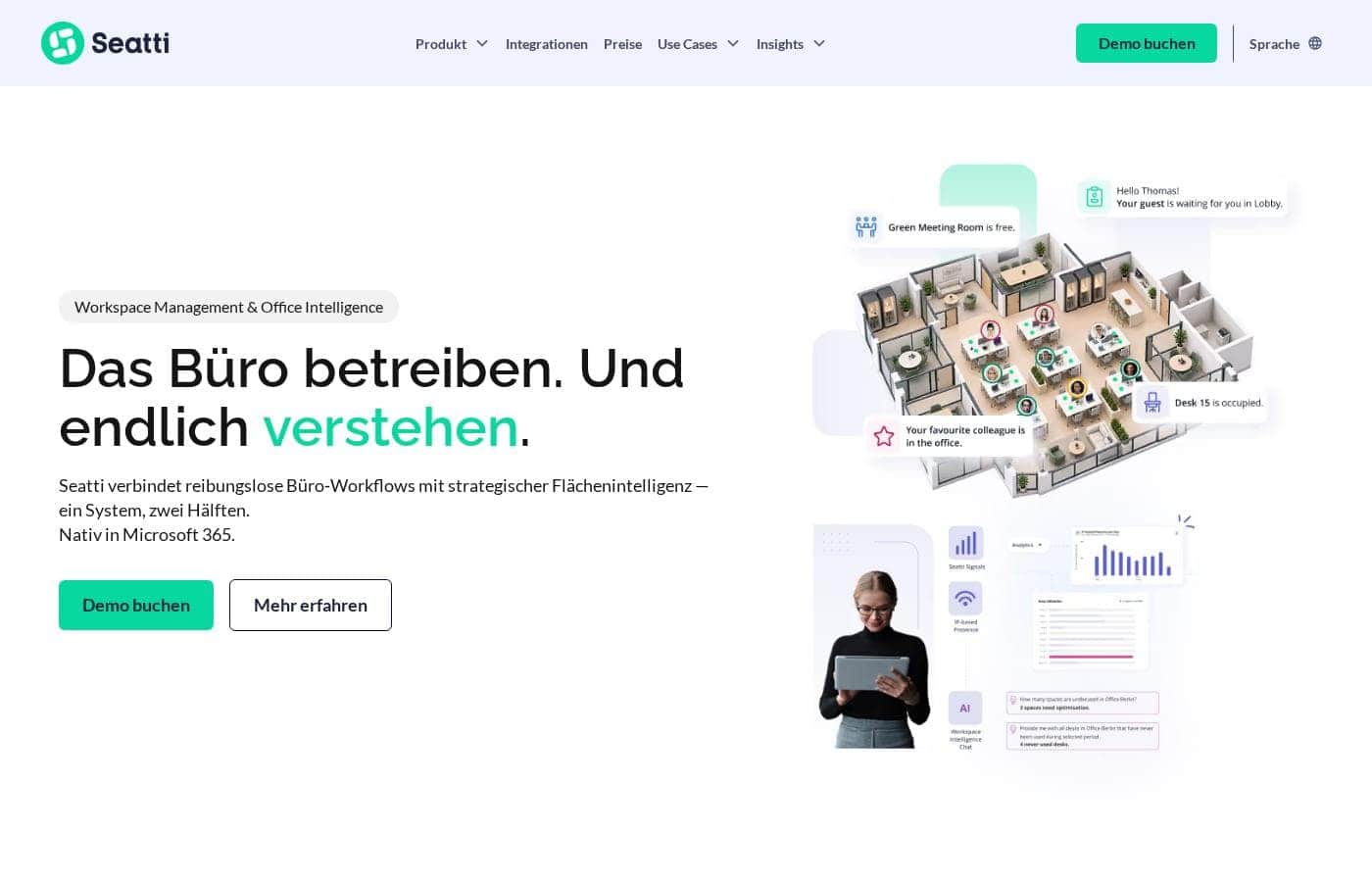
Seatti homepage screenshot

At a glance

Quick overview for Seatti: rating, pricing summary, key features, and highlights.
Pricing verified Oct 13, 2026

Ciroapp score

4.1/ 5

Seatti bundles desk, room, parking, and visitor bookings inside Microsoft Teams and Outlook, then adds sensor-free utilization data for layout and lease decisions. Setup, training, and support cost nothing extra, and GDPR readiness comes standard — but it's Microsoft-only, billed annually, and analytics require a second module. Overall, it's a solid pick for Microsoft 365 organizations that want booking and space insights in one place.

Pros

  • Pros:Booking happens natively inside Microsoft Teams and Outlook with Entra ID sign-in, so staff don't have to learn a separate tool — users, permissions, and attendance sync automatically.
  • Pros:Office Intelligence measures real desk-level presence sensor-free using IP-based detection, giving facility and real estate teams utilization data without buying or installing hardware.
  • Pros:Desks, meeting rooms, parking spots, and visitor check-in are managed in one platform instead of spreadsheets, calls, and email chains, with configurable booking rules for admins.

Cons

  • Cons:Seatti is built exclusively around the Microsoft ecosystem (Teams, Outlook, Entra ID), so organizations not running Microsoft 365 can't use it.
  • Cons:Enterprise pricing, the Office OS bundle, and the Visitor Management add-on require a custom quote through a booked demo — there's no self-serve pricing or published seat minimums.
  • Cons:Billing is annual with no monthly-only option published, which reduces flexibility for companies wanting to test commitment level before a year-long contract.
Best for
  • Companies with hybrid work models already running on Microsoft 365
  • Facility teams coordinating desks, rooms, parking, and visitors in one place
  • Real estate and workplace leaders who need utilization data before lease or layout decisions
Free trial
Yes
This section is a summary. Detailed sections about features, use cases, pricing, and reviews follow below.

What is Seatti?

Hybrid work has made offices tricky. Desks sit empty while teams complain they can't find each other, and nobody knows how much space you actually need. Seatti tackles both problems in one platform: it runs everyday bookings inside Microsoft Teams and shows how your space is really used—no sensors required.

Seatti is a workplace platform for companies with hybrid work. It bundles desk, room, and parking bookings plus visitor management into one system that lives inside Microsoft 365. Its Office Intelligence side measures desk-level presence without hardware, giving facility, IT, HR, and real estate teams data for space decisions.

Brands like Osram, Sartorius, and Flixbus use it; the site cites 65,000+ users.

Should you choose Seatti?

Quick buyer guidance before you compare plans or click through.

Choose it if

  • Organizations that want desk booking directly inside Microsoft Teams and Outlook
  • Businesses replacing Excel sheets, email chains, and word-of-mouth coordination
  • Teams that want desk-level presence data without buying sensors or hardware
  • Companies with strict GDPR requirements—the vendor emphasizes its privacy concept and ISO 27001 certification
  • Enterprises rolling out desk sharing across campuses and international offices, as Sartorius describes

Skip it if

  • Teams not on Microsoft 365—the product is built natively around Teams, Outlook, and Entra ID
  • Buyers who need transparent, self-serve pricing—no prices appear on the site, and the path runs through a booked demo
  • Small teams that only want simple desk booking and don't need analytics, parking, or visitor modules
  • Companies needing detailed public documentation on integrations like SAP—connections are shown, but specifics aren't published, so verify them in the demo

Next steps before buying

  1. 1Book the live demo on the site—pricing isn't published, so you'll need a custom quote.
  2. 2Confirm your Microsoft 365 setup (Teams, Outlook, Entra ID) and ask about SAP or HR system connections if you need them.
  3. 3Review the vendor's security, GDPR, and Trust Center pages if data protection drives your decision.
  4. 4Prepare demo questions: rollout timeline, admin effort, and how presence and utilization data is captured and reported.
  5. 5Shortlist one or two alternatives and compare quotes on price per user and analytics depth before signing.

Ease of use

The end-user experience looks light: booking happens inside Teams, so there's no new tool to learn. Testimonials repeatedly mention intuitive use and fast rollout—Sartorius says staff and the works council were quickly convinced, and IKB says it moved to desk sharing in no time. The site doesn't publish implementation details, but a Schmitz Cargobull manager credits easy implementation and quick communication from the vendor's team.

Seatti Key Features

✨ Run the whole office day from one system

Instead of coordinating through spreadsheets and email chains, Seatti bundles your everyday office processes into one platform. Desks, rooms, parking spots, and visitors are all handled in the same place, with clear rules instead of ad-hoc asks. That makes office days planable for staff and admins alike.

✨ Book it all inside Microsoft Teams

Bookings happen directly in Microsoft Teams and Outlook, and staff sign in with Entra ID. There's no separate app to learn, so rollout stays light. What you can book:

  • Desks and meeting rooms
  • Parking spots
  • Visitor visits

📊 Understand your space—no sensors needed

Office Intelligence measures real presence at desk level without any hardware. It combines IP-based presence detection, Seatti Signals, and AI utilization analysis to show how your areas are actually used. Facility and real estate teams get a reliable basis for layout, rent, and consolidation decisions.

✨ Bring people back, voluntarily

Social Nudging gives colleagues transparency about who's in the office and when, which strengthens collaboration across hybrid teams. Lunch Roulette adds an easy way to connect people over lunch. HR teams use these features to make office days attractive rather than mandatory.

✨ Administration and analytics built in

The administration module keeps settings and governance in one place, while workplace analytics turns booking and presence data into clear reports. Larger organizations can add sub-organizations, zone management, and custom integrations to fit complex, multi-location structures.

Use Cases

👥 Hybrid teams who keep missing each other

Your people book desks in Teams, see who's in the office, and pick days when teammates are around. Social Nudging gently encourages office time. Expected outcome: fewer empty desks and more spontaneous teamwork.

📋 Facility teams replacing spreadsheets

Desks, rooms, parking, and visitors live in one system instead of spreadsheets and email chains. Admins set clear rules; staff just book in Teams. Expected outcome: less coordination chaos.

Tip: You can add modules anytime, so start small.

📊 Space decisions backed by real data

Office Intelligence measures desk-level presence without sensors or hardware. You see how space is really used before signing a lease or changing a layout. Expected outcome: decisions based on facts, not gut feeling.

🔐 IT rolling out inside the Microsoft stack

Seatti runs natively in Microsoft 365, with sign-in through Entra ID. There's no separate app to manage, and GDPR compliance plus ISO 27001 certification are built in. Expected outcome: a fast rollout with minimal IT effort.

Seatti pricing

From€1/mo

  • 8 plans

Prices checked on Oct 13, 2026 from Seatti's pricing page

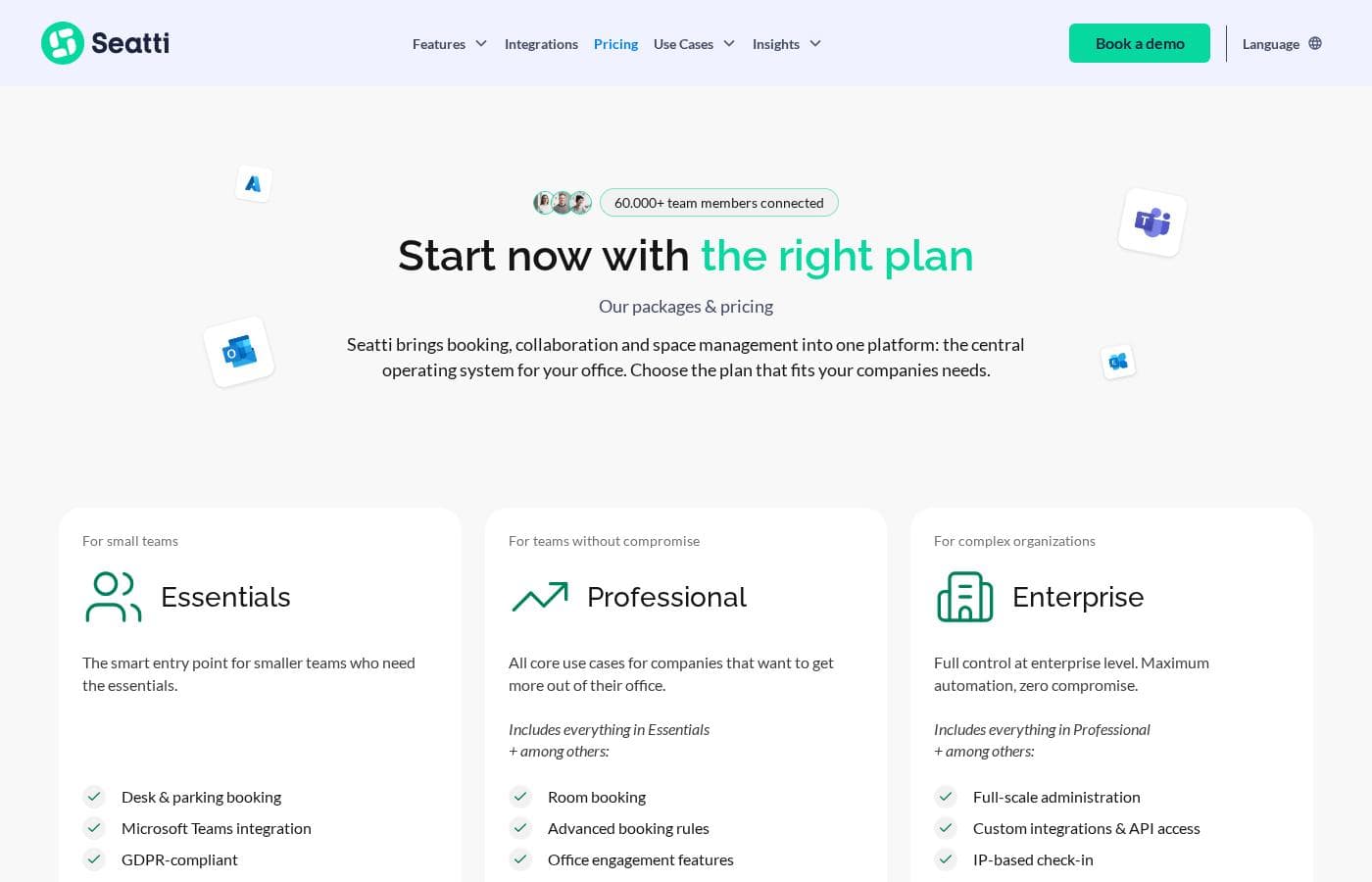
Seatti pricing page screenshotView pricing page screenshot
PlanBilled monthlyBilled annuallyIncludes
Workspace Essentials
per user
€1.90/mo
—
Desk sharing and attendance at a glance, Microsoft Teams integration, GDPR-compliant.
Workspace Pro
per user
€2.90/mo
—
Everything in Workspace Essentials plus room booking, advanced booking rules, Outlook integration and compliance roles.
Workspace Enterprise
See vendor page
See vendor page
Individual pricing; multi-tenant administration, guest access, custom integrations and API access.
Intelligence Essentials
per user
€1/mo
—
IP-based attendance (also for non-Seatti users) and AI analytics for demand and lease decisions.
Intelligence Pro
per user
€2/mo
—
Everything in Intelligence Essentials plus Seatti Signals utilization per area and desk for redistribution decisions.
Intelligence Enterprise
See vendor page
See vendor page
Individual pricing; bring your own data (access systems, sensors, HR) and comprehensive usage analysis.
Office OS Bundle
See vendor page
See vendor page
Workspace Management plus Office Intelligence in one contract;
Add-on: Visitor Management
See vendor page
See vendor page
Digital guest invitations, check-in and GDPR-compliant visitor management; no visible price.

Price history

Tracking prices since Sep 9, 2026. No price change detected yet.

Pricing types: Free trial, Yearly subscription, Per seat pricing

Pricing notes

Seatti prices per active user per month, billed annually, with two modules: Workspace Management (from 1,90 € user/month) and Office Intelligence (from 1,00 € user/month). Enterprise tiers are individually priced, and a bundle discount applies when combining both modules.

Seatti costs between €1.90 and €2.90 per user/month with three plans: Essentials from €1.90 per user/month, a second tier from €2.90 per user/month, and custom pricing for complex organizations. All plans are billed annually.

Here's a closer look at what each tier includes.

Essentials

Price: from €1.90 per user/month, billed annually Best For: small teams Other Features:

  • GDPR compliance and works council readiness at no extra cost, in every plan
  • Native Microsoft 365 integration — Teams, Outlook, and Entra ID/SSO
  • No implementation costs: setup, onboarding, floor plan creation, training, and support are included
  • Upgrade or add add-ons at any time

Essentials is the friendly entry point, and it's built for small teams starting out with desk booking in a hybrid setup. Because Seatti runs inside Microsoft Teams and Outlook, your team won't have to learn a brand-new tool. GDPR compliance comes standard too, so you won't pay extra to keep your works council on side.

For teams without compromise

Price: from €2.90 per user/month, billed annually Best For: companies that want more capability than the entry plan Other Features:

  • Same annual, per-user billing model as Essentials
  • Add-ons available for meeting rooms, parking, visitor management, and analytics
  • No one-off implementation fees

This tier suits growing companies that need more than basic desk booking. If you want room to configure Seatti around your office rules, the extra euro per user buys that flexibility. Smaller teams that only need simple desk booking can happily stay on Essentials.

For complex organizations

Price: Individual — custom quote per user/month Best For: large or multi-location companies with complex needs Other Features:

  • Custom pricing shaped around your structure
  • Enterprise-focused add-ons such as sub-organizations, zone management, and custom integrations
  • In special cases, billing can be based on existing resources instead of users

Big organizations with several locations or strict governance requirements should talk to Seatti directly. You'll get a quote built around your setup rather than a fixed price. This is also the right path if you need custom integrations with your existing IT landscape.

A few things worth knowing before you decide. Seatti bills annually because it's built for long-term partnerships, so there's no monthly-only option published. Pricing is typically based on active users. There are no implementation costs — technical setup, onboarding, floor plan creation, admin and end-user training, and ongoing support are all part of the deal. You can switch plans or add add-ons at any time, and Seatti actively helps with the transition.

Can you try it first? Yes. The site invites you to test Seatti for free, and trial details are worked out on a short call with the team. No published money-back guarantee or fixed trial length appears on the page. That's exactly why it's worth confirming trial terms, included features, and any seat minimums during your demo call.
Cost calculator

Estimate what Seatti costs for your team.

Billing
Per month
€9.50
Per year
€114

Workspace Essentials is priced per user: price × 5 seats. Estimate based on published list prices, before taxes, add-ons and discounts.

How to pay less for Seatti

  • A free trial is available: test it before you pay.
  • Some plans are priced per user: only pay for seats people actually use.
Start free trial

Email me when Seatti changes price

One email when we detect a price change on the vendor's pricing page. No newsletter, no deals. Unsubscribe in one click.

User Reviews

No reviews yet.

Write a Review

Write a Review for Seatti
0/100 characters
0/2000 characters

Why use Seatti?

Most desk booking tools stop at bookings. Seatti pairs everyday office operations with real usage data, so you're not just running your office—you're finally understanding it. Here's what that means for you, based on what the vendor publishes:

  • No new habits for staff: Bookings happen inside Microsoft Teams and Outlook, with sign-in through Entra ID. There's no separate app to learn.
  • One system instead of scattered coordination: Desks, rooms, parking spots, and visitors are handled in one place rather than through spreadsheets, calls, and email chains.
  • Utilization data without hardware: Seatti measures real desk-level presence sensor-free, which the vendor positions as a reliable basis for layout, rent, and consolidation decisions.
  • Real space savings potential: Customer IKB reports it switched to desk sharing with Seatti and cut its office space by a third.
  • Compliance-friendly setup: The vendor highlights GDPR-compliant data handling and ISO 27001 certification; Goetzpartners' IT lead cites the privacy concept as a deciding factor.
  • Proven at scale: Named customers include Osram, Sartorius, Flixbus, Sixt, Sanofi, and DB Schenker, with 65,000+ users cited on the site.

Seatti alternatives

Other tools in the Workplace management platform category

View all Workplace management platform tools

Seatti FAQ

How much does Seatti cost?

Seatti's cheapest paid plan, Intelligence Essentials, costs €1 per month. Paid plans range from €1 to €2.90 per month. Prices checked on Oct 13, 2026 from the vendor's pricing page.

Does Seatti offer a free trial or a money-back guarantee?

Seatti offers a free trial.

Has Seatti's price changed recently?

No. We have not detected a price change since we started tracking on Sep 9, 2026.

Can we try Seatti before buying?

Yes, you can test Seatti for free. Trial length and included features are sorted out on a short call, so confirm those details when you book your demo.

How quickly can we get Seatti up and running?

Most companies are live within 1–2 weeks. Users and permissions sync automatically via Microsoft Entra ID, and technical setup, floor plans, and training are all included at no cost.

Does Seatti connect to systems beyond Microsoft 365?

Seatti integrates deeply with Microsoft Teams, Outlook, Exchange, and Entra ID. Connections to HR and workplace systems plus custom integrations are available. Ask about specific tools like SAP during your demo.

Ready to try Seatti? Check out the official site or pricing.

Are you Seatti? Claim this listing · Get the badge