Paymattic

Paymattic review

Payments and donations for WordPress in one plugin, with zero platform fees.

By Ciroapp Editorial Team · Updated Sep 17, 2026

Commission may apply at no extra cost

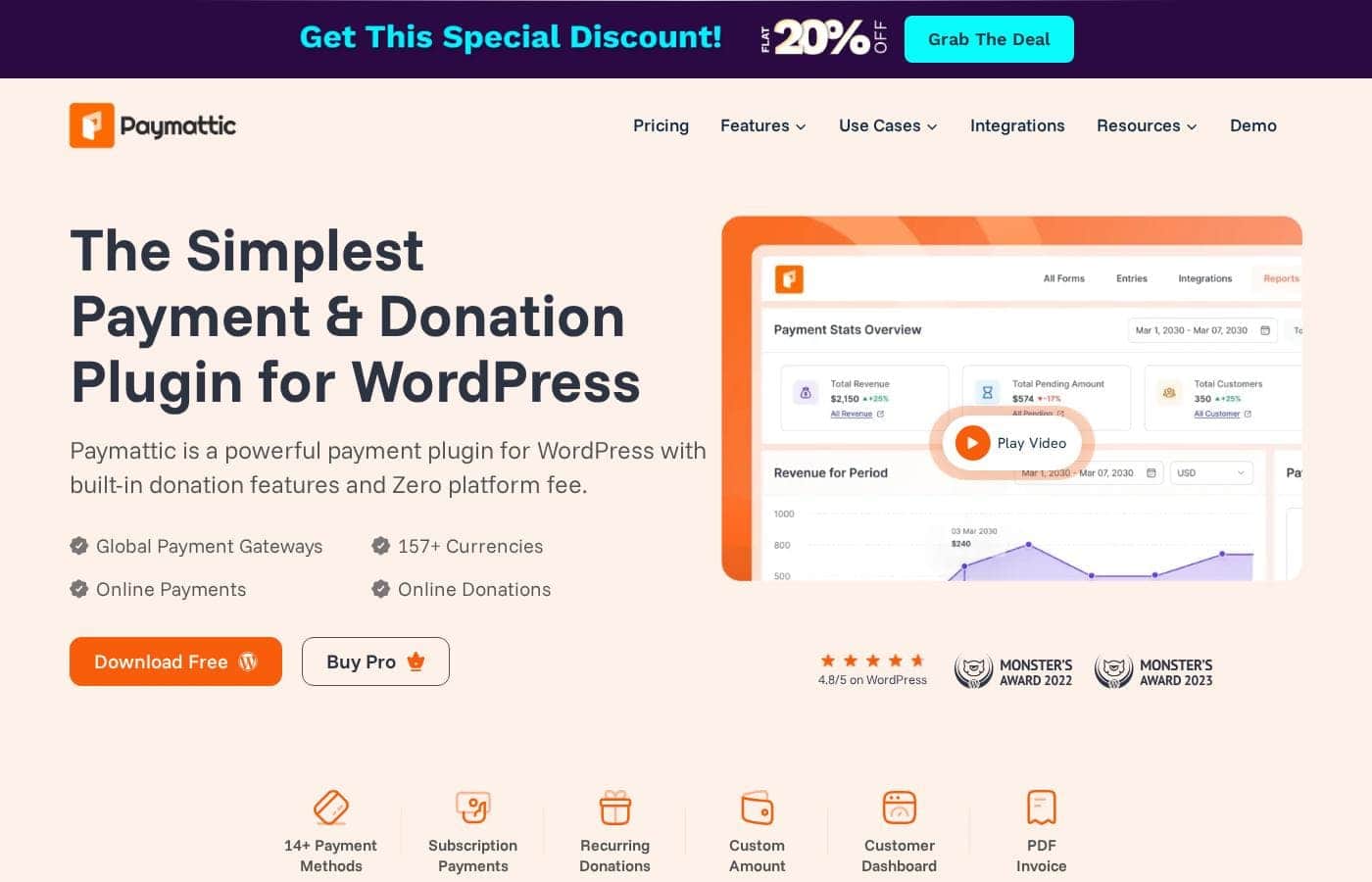
Paymattic homepage screenshot

At a glance

Quick overview for Paymattic: rating, pricing summary, key features, and highlights.
Vendor page checked Oct 12, 2026

Ciroapp score

4.1/ 5

Paymattic packs payments, donations, and subscriptions into one WordPress plugin, and every plan includes all features with no platform cut. It won't run a full store, and there's no published money-back guarantee. Overall, it's a smart pick for WordPress site owners who want simple, global payment forms without add-on costs.

Pros

  • Pros:Zero platform transaction fees — Paymattic takes no cut of payments or donations, so you only pay your gateway's standard processing fees
  • Pros:All features ship in every plan — coupons, PDF invoices, customer and donor dashboards, subscriptions, and analytics come standard with no paid add-ons
  • Pros:Broad global reach with 14+ payment methods (Stripe, PayPal, Square, Razorpay, Paystack) supporting 157+ currencies across 195+ countries, plus a custom gateway builder for niche providers

Cons

  • Cons:There is no published money-back guarantee on the pricing page or homepage, so refund flexibility is uncertain before you buy
  • Cons:First-year discounted annual pricing ($95–$287) renews at regular rates ($119–$359), which can surprise budget planners who miss the fine print
  • Cons:Support quality is uneven — while 24/7 ticket support is advertised, one user reported a week of back-and-forth before a fix shipped
Best for
  • Small businesses taking payments, subscriptions, or memberships through WordPress
  • Nonprofits running one-time and recurring donation campaigns
  • Course sellers using LMS tools like Tutor LMS, LearnDash, or Lifter LMS
This section is a summary. Detailed sections about features, use cases, pricing, and reviews follow below.

What is Paymattic?

Collecting payments or donations on WordPress usually means juggling plugins, add-ons, and per-transaction fees. Paymattic simplifies this with one lightweight plugin, zero platform fees, and support for 157+ currencies. You can build forms without code, publish them with a shortcode, and start free with Stripe and offline payments included.

Paymattic is a WordPress plugin that handles payments, subscriptions, memberships, and donations without code. It's built for small businesses, nonprofits, course sellers, and membership sites that want simple checkout forms inside WordPress. The free version covers essentials like Stripe and offline payments, while Pro adds the full feature set across three license tiers.

A live demo and a 4.8/5 WordPress rating back up the vendor's claims.

Should you choose Paymattic?

Quick buyer guidance before you compare plans or click through.

Choose it if

  • WordPress site owners who want payments and donations handled by one plugin
  • Global sellers who need 157+ currencies across 195+ countries
  • Buyers wary of platform transaction fees on every sale
  • Non-technical users who prefer templates, drag-and-drop editing, and shortcode publishing
  • Agencies and freelancers who need 20-site or unlimited-site licenses

Skip it if

  • Projects outside WordPress; Paymattic only works on WordPress sites
  • Full online stores; homepage reviews position it for payment forms, not complete storefronts
  • Buyers expecting a published money-back guarantee; none appears on the reviewed page
  • Cost planners who should note first-year discounts (e.g., $95/yr) list back to $119/yr unless they choose a lifetime plan
  • Teams needing niche gateways beyond the listed options, unless they're willing to build a custom gateway

Next steps before buying

  1. 1Explore the live demo at demo.paymattic.com to preview forms and workflows before installing anything
  2. 2Install the free plugin first; it includes Stripe and offline payments with no platform fee
  3. 3Check the payment gateways page to confirm your gateway is supported and understand that gateways charge their own fees
  4. 4Compare annual and lifetime pricing side by side, and verify current discount terms at checkout
  5. 5Review the integrations list to confirm your LMS, CRM, or email tools connect before upgrading to Pro

Ease of use

Signals point to an easy start: a three-step setup (install, customize a template, publish via shortcode), drag-and-drop builders, pre-built templates, and a live demo to preview first. The vendor advertises 24/7 human support. Homepage reviews describe setup as a breeze, though one user reported a week of back-and-forth before a fix shipped.

Paymattic Key Features

✨ Build Payment Forms Without Code

You don't need a developer to take payments. Paymattic's drag-and-drop builder lets you create, edit, and customize forms visually. Pick a pre-built template, tweak it if you want, and hit publish.

Then place your form anywhere with a shortcode. That's the whole setup: install, customize, publish.

✨ Sell Products, Courses, and Subscriptions

Handle sales right inside WordPress. Choose from numerous payment fields and offer one-time or recurring billing. Subscriptions support multiple pricing plans, trial days, signup fees, and your preferred billing intervals.

You can also: - Generate PDF invoices for transactions - Create coupons with dates, discount types, and minimum purchase amounts - Arrange products with multiple layout templates

❤️ Fundraising Tools That Go Beyond a Form

Running a fundraiser? Paymattic covers one-time and recurring donations with custom amounts and flexible intervals. Set a campaign goal, and the donation thermometer updates your progress bar automatically.

Donors get their own dashboard to view history and manage recurring gifts, while leaderboards showcase top supporters to inspire more giving.

🌍 Accept Money From Anywhere

Paymattic connects to 14+ payment methods, including Stripe, PayPal, Square, Razorpay, and Paystack. Together they support 157+ currencies across 195+ countries, so customers pay the way they know. The plugin takes no cut — you only cover your gateway's own fees.

Need a niche provider? Build your own custom gateway.

✨ Connect Your Tools and Track Results

Paymattic syncs real-time data with 14 integrations, including Zapier, Google Sheets, FluentCRM, Mailchimp, Slack, and LMS platforms like Tutor LMS and LearnDash. Connect your everyday apps to automate records and follow-ups. Built-in analytics then help you audit transactions, spot top donors and customers, and find your best-performing forms.

Use Cases

🎗️ Nonprofits Running Fundraisers

You're raising money for a cause. Build a donation form in minutes, accept one-time and recurring gifts worldwide, and show progress toward your goal. Donors get a dashboard to manage their own giving.

Expected outcome: Steady, self-serve donations with no platform fee taking a cut.

🛍️ Small Businesses Selling Without a Store

You sell services or simple products, not a full store. Create a payment form, add coupons, and generate PDF invoices. Customers see receipts and manage subscriptions in their dashboard.

Tip: Start free with Stripe — it's included.

🎓 Course Sellers Enrolling Students

You teach online. Connect Paymattic to Tutor LMS, LearnDash, or Lifter LMS, then sell course access through a simple form. Students pay and get enrolled without you touching code.

Expected outcome: Hands-off enrollments tied straight to payment.

👥 Membership Sites Managing Members

You run a paid community or club. Set up subscriptions with trial days and signup fees, assign specific member roles, and let members manage renewals from their own dashboard. Expected outcome: Fewer manual renewals and happier members.

Paymattic pricing

Prices not verified yet — see the vendor page.

Paymattic's pricing page

Paymattic pricing page screenshotView pricing page screenshot

Price history

Tracking prices since Oct 9, 2026. No price change detected yet.

Pricing range: $95–$287/year (annual); $279–$719 one-time (lifetime)

Pricing types: Free plan, Yearly subscription, One-time payment, Lifetime deal

Pricing notes

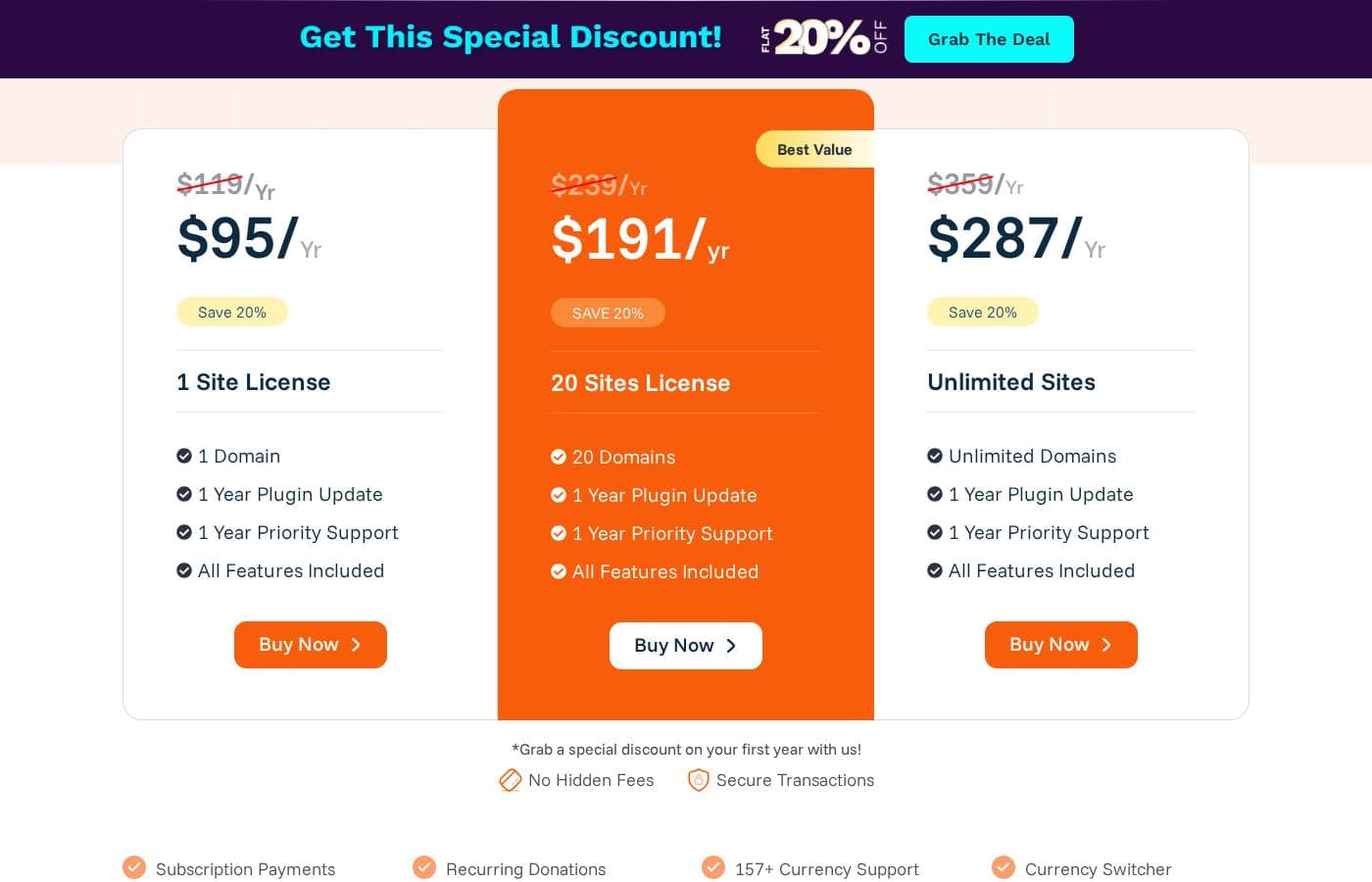
Paymattic offers a free plugin plus three annual Pro plans: Personal at $95/year (1 site), Agency at $191/year (20 sites), and Unlimited at $287/year (unlimited sites). One-time lifetime licenses are also available, currently 20% off, ranging from $279 to $719.

Paymattic costs between $95 and $287 per year with three annual Pro plans: Personal at $95/year, Agency at $191/year, and Unlimited at $287/year. One-time lifetime licenses also run from $279 to $719.

Here's a quick walkthrough of every license, so you can match one to your setup.

Personal (Annual)

Price: $95/year for the first year (20% off the regular $119) Websites Supported: 1 domain Best For: Individuals running a single WordPress site Other Features:

  • 1 year of plugin updates
  • 1 year of priority support
  • All Pro features included

This entry-level Pro license suits solo site owners, freelancers, and small nonprofits. Every feature is unlocked from day one, so nothing gets held behind add-ons. If one site covers your needs, this is the cheapest way into Pro.

Agency (Annual)

Price: $191/year for the first year (20% off the regular $239) Websites Supported: 20 domains Best For: Small agencies and freelancers managing client sites Other Features:

  • 1 year of plugin updates
  • 1 year of priority support
  • All Pro features included
  • Labeled "Best Value" on the pricing page

Paymattic tags this tier Best Value, and the math backs it up. At roughly $16 per site per year, it comfortably covers a full client roster. If you expect to add sites soon, start here rather than Personal.

Unlimited (Annual)

Price: $287/year for the first year (20% off the regular $359) Websites Supported: Unlimited domains Best For: Businesses and larger agencies with many sites Other Features:

  • 1 year of plugin updates
  • 1 year of priority support
  • All Pro features included

This tier makes sense once 20 domains no longer cut it. Past that point, it costs less per site than Agency. Running only a couple of sites? You'd be overpaying here.

Personal (Lifetime)

Price: $279 one-time (20% off the regular $349) Websites Supported: 1 domain Best For: Single-site owners who want zero renewals Other Features:

  • Unlimited plugin updates
  • Unlimited priority support
  • All Pro features included

Pay once, and updates plus support never expire. That's a strong deal if you plan to stick with Paymattic for years. Just remember the license still covers one domain.

Agency (Lifetime)

Price: $479 one-time (20% off the regular $599) Websites Supported: 20 domains Best For: Agencies building long-term client relationships Other Features:

  • Unlimited plugin updates
  • Unlimited priority support
  • All Pro features included
  • Labeled "Best Value" among lifetime options

This is the sweet spot for agencies with a multi-year horizon. You cover 20 client sites forever without an annual bill showing up. The longer you stay, the more you save versus yearly renewals.

Unlimited (Lifetime)

Price: $719 one-time (20% off the regular $899), or eight monthly payments of $96 Websites Supported: Unlimited domains Best For: Larger businesses that want no recurring costs Other Features:

  • Unlimited plugin updates
  • Unlimited priority support
  • All Pro features included

The installment plan spreads the cost over eight months, softening the upfront hit. It's the priciest option, so it only pays off with many sites or long-term use. Smaller teams should stick with annual billing or a lower lifetime tier.

Worth knowing before you buy: the prices above reflect a 20% promotional discount, so annual plans renew at the regular $119, $239, and $359 rates afterward. Every paid license includes all features, and Paymattic charges no transaction fees — though your payment gateway may apply its own. Not ready to commit? There's a free plan 🎉 that includes the Stripe gateway and offline payments. Since refund terms aren't listed on the pricing page, confirm the money-back policy before you check out.
Email me when Paymattic changes price

One email when we detect a price change on the vendor's pricing page. No newsletter, no deals. Unsubscribe in one click.

User Reviews

No reviews yet.

Write a Review

Write a Review for Paymattic
0/100 characters
0/2000 characters

Why use Paymattic?

Most payment plugins nickel-and-dime you with transaction cuts and paid add-ons. Paymattic flips that model: every feature ships in every plan, and the plugin itself takes no cut of your money. Based on the vendor's materials and on-site user reviews, here's what stands out:

  • Zero platform fees. Paymattic charges nothing per transaction. You only cover whatever your payment gateway normally charges.
  • One plan, all features. Coupons, PDF invoices, customer and donor dashboards, subscriptions, and analytics come standard. There are no add-ons to buy.
  • Truly global payments. 14+ payment methods across 157+ currencies and 195+ countries, including Stripe, PayPal, Square, Razorpay, and Paystack.
  • Live in three steps. Install the plugin, customize a pre-built template with drag-and-drop, then publish with a shortcode. No code needed.
  • Real fundraising tools. Recurring donations, goal progress bars, donor dashboards, and leaderboards give nonprofits more than a basic form.
  • Start free, upgrade later. The free plugin includes Stripe and offline payments, so you can test it on a live site before spending anything.

Paymattic alternatives

Other tools in the Wordpress Donation Plugin category

View all Wordpress Donation Plugin tools

Paymattic FAQ

Which apps and LMS platforms does Paymattic integrate with?

Paymattic connects with 14 tools, including Zapier, Google Sheets, Mailchimp, ActiveCampaign, FluentCRM, Slack, Telegram, Twilio, and webhooks. Course sellers can plug into Tutor LMS, LearnDash, and Lifter LMS. Developers can also build a custom payment gateway.

Does Paymattic charge per seat, per usage, or per site?

Licensing is per-domain: Personal covers 1 site, Agency covers 20, and Unlimited covers unlimited sites. Every plan includes all features with no add-ons. Paymattic takes no cut of transactions; your payment gateway may charge its own fees.

How fast can you expect help from Paymattic's support team?

Support agents are available 24/7 through the ticket portal, and free and Pro users can both submit requests. Paid plans add priority support. One reviewer reported a week of back-and-forth before a fix shipped, so complex issues can take time.

What happens if Paymattic isn't right for you — can you get a refund?

No money-back guarantee appears on Paymattic's pricing or homepage. Since discounted annual plans renew at regular rates ($119–$359), check the terms and conditions before checkout if refund flexibility matters to you.

Ready to try Paymattic? Check out the official site or pricing.

Are you Paymattic? Claim this listing · Get the badge