Otter.ai

Otter.ai

The essential AI Meeting Agent for smarter work.

#1 dans Transcription
1 min read · Updated 10/5/2025
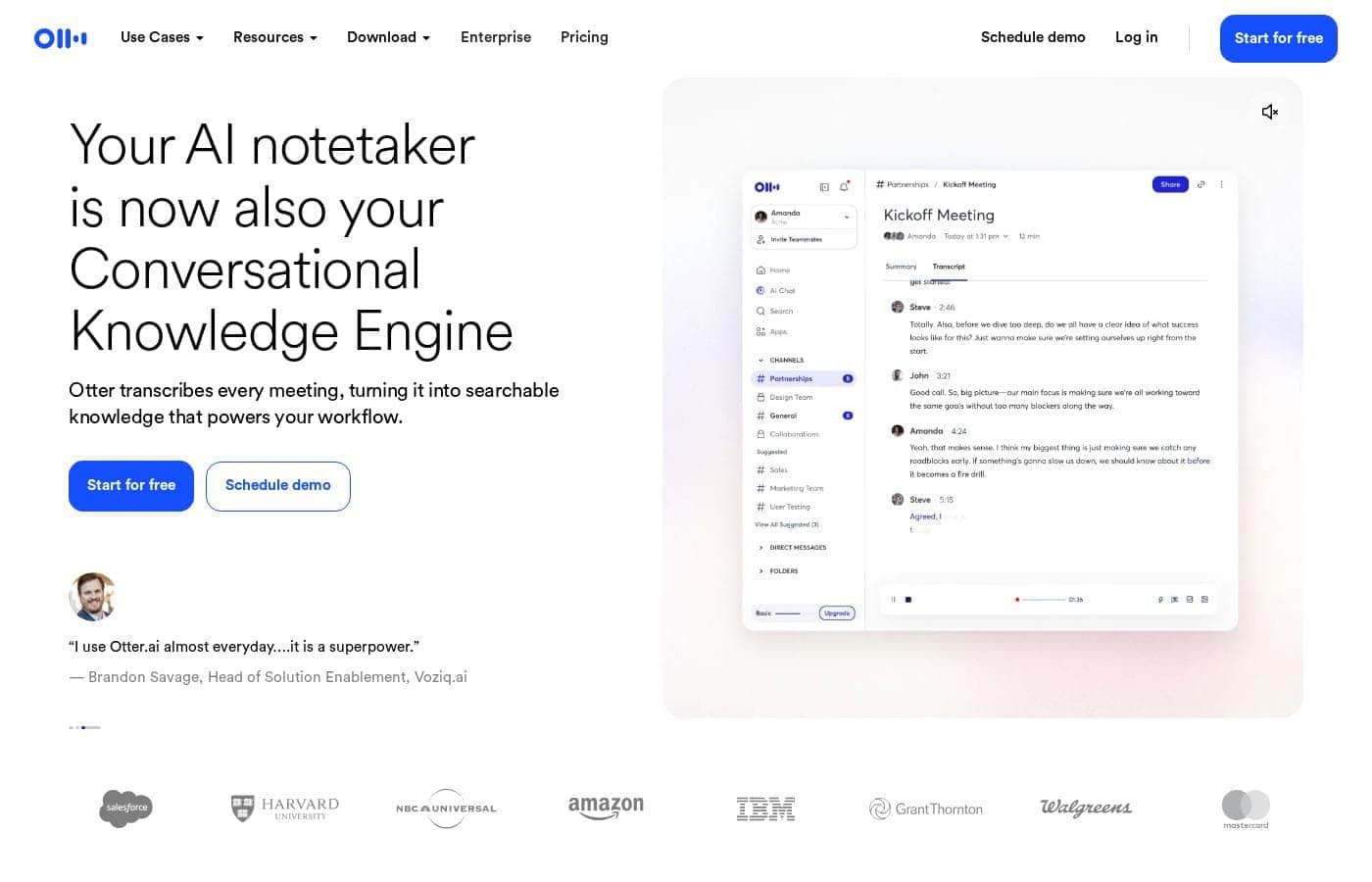
Otter.ai homepage screenshot

At a glance

Quick overview for Otter.ai: rating, pricing summary, key features, and highlights.

Ciroapp review

4.3
Essential AI agent for high-accuracy meetings.

We find Otter.ai is an exceptionally powerful AI meeting agent that consistently delivers high accuracy and valuable insights. Overall, it significantly boosts efficiency by automating note-taking and integrating advanced summary tools, making it an essential tool for high-volume meeting environments despite documented concerns regarding customer support responsiveness.

Pros

  • Pro:High transcription accuracy, often reported up to 95%.
  • Pro:Saves significant time by automating note-taking and summaries (4+ hours weekly).
  • Pro:Powerful AI features for context, summaries, action items, and follow-ups.
  • Pro:Seamless integration with popular meeting platforms (Zoom, Google Meet).

Cons

  • Con:Users report difficulties contacting and receiving timely customer support.
  • Con:Recurring issues reported with subscription management, billing, or unauthorized charges.
  • Con:Minor transcription errors may occur with specific lingo or capitalization.
Free trial
Yes — 7 days
Range: $8.33–$19.99/user/month (billed annually)Free plan, Free trial, Monthly subscription, Yearly subscription, Per seat pricing
This section is a summary. Detailed sections about features, use cases, pricing, and reviews follow below.

Otter.ai review, pricing, features, pros & cons

Are you tired of missing important details or spending hours reviewing meeting recordings? 😩 Otter.ai solves this by acting as your dedicated AI Meeting Agent. It delivers live transcripts and automated summaries so you can meet smarter, not harder.

What is Otter.ai?

Otter.ai is the leading AI Meeting Agent designed to listen and capture crucial conversational details. It's built for individuals, small teams, and large enterprises looking to maximize efficiency. It operates like a tireless executive assistant, tracking necessary takeaways and handling follow-ups automatically.

This system provides insights you can use immediately, pulling out important information so you don't have to sift through full transcripts. You can even activate the voice-prompted AI Chat—just say, "Hey Otter" to get answers about past conversations. ✨

Otter.ai Key Features

✨ Your Dedicated AI Meeting Agent

Stop trying to multitask and take mental notes during important calls. Otter acts as your dedicated AI Meeting Agent, ensuring you capture everything crucial. You can either send the agent to a meeting on your behalf or bring it along to participate directly.

This system operates like a tireless executive assistant, ready to capture all the facts. It listens closely, tracks necessary takeaways, and even handles follow-ups automatically. This dramatically increases efficiency so you can focus only on the conversation at hand.

✨ High-Fidelity Transcription and Live Capture

Get highly accurate transcripts delivered in real-time as your meeting unfolds. This ensures that you never miss a vital detail, even in fast-paced discussions. Users report an impressive accuracy rate of up to 95%, guaranteeing a reliable record of your conversation.

Otter provides live transcription and clarifies who is speaking through speaker identification. You can trust the system to capture the integrity of the discussion. It integrates seamlessly with popular conference platforms to ensure fidelity across all your meetings.

Platform compatibility includes:

  • Zoom
  • Microsoft Teams
  • Google Meet

💡 Instant Summarization and Key Insights 💡

Quickly grasp the core information from any meeting, regardless of its duration. Otter helps you save hours you might have spent sifting through full transcripts. The system turns conversations into usable knowledge quickly, enabling you to get back time in your week.

Otter’s AI automatically condenses long discussions into short, easy-to-read summaries. The system is designed to pull out only the important information. This means you instantly get the 'gist' of the meeting without reading every single line of text.

✨ Dynamic AI Chat and Conversational Q&A

Turn your library of meeting records into an interactive knowledge source with the voice-prompted AI Chat. You can instantly get answers and insights directly from your past conversations. Just say, "Hey Otter" to activate the feature and begin your queries.

Use the AI Chat anytime to extract specific key information or ask about details from any past conversation. The system can immediately generate necessary plans or even draft follow-up emails based on the content of the meeting. This helps keeps projects moving forward efficiently and reduces manual work.

✨ Effortless Action Item Management

Move quickly from discussion to execution by transforming conversational intent into confirmed tasks. Otter automatically captures and identifies action items during your conversations. These tasks can even be assigned directly from the conversation.

Keep your projects humming by sending key takeaways and action items seamlessly into your workflow tools. When connected to applications like Asana, your meeting notes are automatically translated into simple tasks with deadlines. This keeps your team aligned and ensures nothing falls through the cracks.

✨ Specialized AI Agents for Workflows

Otter offers custom AI agents designed specifically to streamline professional workflows across different roles. These agents handle specialized tasks, ensuring that the meeting data captured is maximized for your specific field. This allows teams to benefit from tailored automation and deeper insights.

For instance, the Sales Agent automates follow-ups and captures notes, integrating efficiently with your CRM systems like Salesforce and HubSpot. The Recruiting Agent can extract candidate insights during interviews and sync notes directly to platforms like Greenhouse via Zapier. Other specialized agents include the Education Agent, Media Agent, and SDR Agent.

Use Cases

🚀 Boosting Team Productivity and Follow-Up

Daily status meetings often consume valuable time just for documentation. Instead of manually typing notes, your AI Meeting Agent provides a live, highly accurate transcript in real time. It automatically condenses long discussions into short, easy-to-read summaries right after the call ends.

This immediate output helps teams work faster. Users report saving over four hours weekly by automating the transcription and summary process. You can instantly share the summary and key takeaways on platforms like Slack, ensuring everyone stays on the same page easily.

✅ Managing Project Accountability

It’s easy for tasks to get lost between discussion and assignment. Otter ensures project continuity by automatically capturing commitments as they are spoken. It identifies who owns what when discussions conclude.

These critical takeaways and action items then sync seamlessly to your external project management tools. Connecting Otter to tools like Asana or Jira keeps projects humming and prevents action items from falling through the cracks.

💰 Generating Sales Insights and CRM Updates

The AI Sales Agent automates necessary follow-ups and drives core efficiency. It ensures every detail from a discovery call or presentation is captured reliably. The agent uses custom AI to pull vital information immediately.

It can automatically log transcripts and insights directly into your CRM, such as Salesforce or HubSpot. This means your sales team always has the latest customer interaction data without wasting time on manual data entry.

🧠 Quickly Retrieving Past Decisions

You don't need to sift through hours of recordings just to find one piece of information. The voice-prompted AI Chat makes fact retrieval effortless. Simply activate it by saying, "Hey Otter."

Step Flow: Information Retrieval

  1. Use the AI Chat feature within the platform.
  2. Ask a natural language question about any past conversation (e.g., "What was the budget for Q4?").
  3. Otter instantly draws on past context and generates the answer.

Tip: Use this feature to generate first drafts of plans or necessary follow-up emails right away from the meeting content.

🤝 Streamlining Recruiting Workflows

Recruiting needs real-time accuracy to capture interview details and candidate specifics. The AI Recruiting Agent helps extract critical candidate insights immediately. It also ensures you can draft personalized, data-backed follow-up communications fast.

By leveraging Zapier integration, all interview notes can be synced directly into systems like Greenhouse. This dramatically reduces administrative load and centralizes candidate information efficiently.

📚 Automating Lecture and Media Content Capture

For educational settings, the AI Education Agent automates note-taking when connected to your calendar. This provides students with comprehensive, searchable lecture notes without distraction. For content creators, the AI Media Agent captures fledging thoughts effectively.

Problem → Approach → Outcome

  • Problem: Ideas are difficult to organize and reference quickly.
  • Approach: Capture thoughts using the Media Agent to generate transcripts.
  • Outcome: Effortlessly organize thoughts into structured outlines. You can extract quotes and key insights, making the first draft creation process much faster.

Pricing Overview for Otter.ai

Pricing range
$8.33–$19.99/user/month (billed annually)
Pricing types
Free plan, Free trial, Monthly subscription, Yearly subscription, Per seat pricing

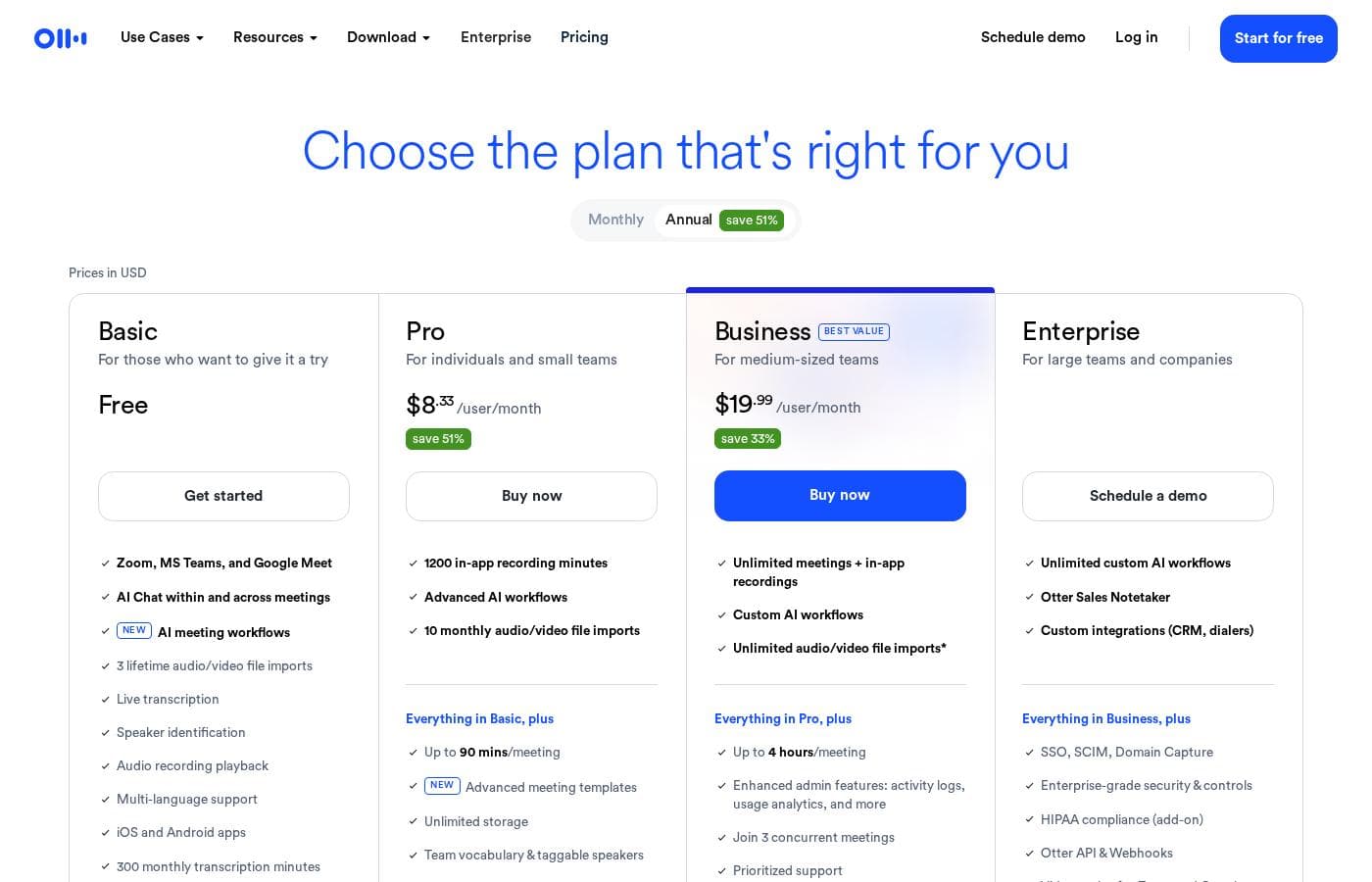
Otter.ai offers plans structured around users and annual billing, ranging from a Basic free tier up to Enterprise solutions. Paid plans start at $8.33 per user monthly (when billed annually) and include flexible usage limits and advanced AI features.

Plans & Pricing

Basic

MonthlyFree
YearlyFree
300 monthly transcription minutes, 3 lifetime audio/video file imports
  • Live transcription
  • Speaker identification
  • Multi-language support
  • iOS and Android apps
  • AI Chat within and across meetings
  • AI meeting workflows

Pro

Monthly$16.99/user/month
Yearly$8.33/user/month
1200 transcription minutes, Up to 90 mins/meeting, 10 monthly audio/video file imports
  • Everything in Basic, plus
  • Unlimited storage
  • Advanced meeting templates
  • Team vocabulary & taggable speakers
  • Advanced search, export & playback
  • Zapier integration

Business

Monthly$30/user/month
Yearly$19.99/user/month
Up to 4 hours/meeting, 6000 import minutes, Unlimited meetings + in-app recordings (Requires 7-day free trial)
  • Everything in Pro, plus
  • Enhanced admin features: activity logs, usage analytics
  • Join 3 concurrent meetings
  • Prioritized support
  • Custom AI workflows

Enterprise

MonthlyNot explicitly stated
YearlyNot explicitly stated
Unlimited custom AI workflows
  • Everything in Business, plus
  • Single Sign-On (SSO)
  • Enterprise-grade security & controls
  • Domain capture
  • HIPAA compliance
  • Dedicated Customer Success Manager
  • Otter Sales Agent

Otter.ai costs between $8.33 and $19.99 per user/month (billed annually) with four plans: Basic (Free), Pro ($8.33), Business ($19.99), and Enterprise (Custom).

Review the specific features and capabilities of each tier below to find the best fit for your team.

Basic (Free)

Price: Free Websites Supported: Not explicitly stated Best For: Those who want to give it a try Refund Policy: Not explicitly stated Other Features:

  • AI Chat within and across meetings
  • Live transcription and speaker identification
  • Multi-language support
  • Use with Zoom, MS Teams, and Google Meet

This free plan is perfect for individuals just starting out with AI transcription. It allows you to test the core features and AI meeting workflows without commitment. However, your monthly transcription time is limited to 300 minutes.

Pro

Price: $8.33/user/month (billed annually) or $16.99/user/month (billed monthly) Websites Supported: Not explicitly stated Best For: Individuals and small teams Refund Policy: Not explicitly stated Other Features:

  • Unlimited storage
  • Advanced meeting templates
  • Team vocabulary and taggable speakers
  • Zapier integration

The Pro plan elevates your usage with much higher transcription limits and more functionality per meeting. If you need secure, unlimited storage and advanced search options, this plan is a great fit for your small team. Teams using Zapier will appreciate the new integration capability.

Business

Price: $19.99/user/month (billed annually) or $30/user/month (billed monthly) Websites Supported: Not explicitly stated Best For: Large teams Refund Policy: Not explicitly stated Other Features:

  • Join 3 concurrent meetings
  • Enhanced admin features (activity logs, usage analytics)
  • Prioritized support
  • Unlimited meetings and in-app recordings

This is the popular option for organizations needing serious scale and admin control. You get longer meeting times, up to four hours, and significantly more import minutes. If your team has high-volume usage and requires oversight, the Business plan is Otter's best value.

Enterprise

Price: Not explicitly stated (Schedule a demo) Websites Supported: Not explicitly stated Best For: Companies Refund Policy: Not explicitly stated Other Features:

  • Single Sign-On (SSO)
  • HIPAA compliance and Enterprise-grade security
  • Dedicated Customer Success Manager
  • Otter Sales Agent and custom integrations (CRM, dialers)

The Enterprise plan is designed for large companies with complex security and operational needs. It offers advanced compliance features like HIPAA and dedicated support resources. Contact the sales team to set up a customized solution tailored to your specific corporate requirements.

Otter.ai makes it easy to get started right away with the Basic Free plan. If you are considering the Business tier, you can try it first with the 7-day free trial. Students and teachers using an .edu email address can also receive a 20% discount on Pro plans.

User Reviews

Otter.ai enjoys a strong reputation among users, particularly for its efficiency and accurate transcription capabilities across various platforms like Zoom and Google Meet. Many reviewers call it a "lifesaver," noting that its ability to convert audio, even complicated discussions with multiple accents, into text is impressive 🏆.

Users consistently highlight the significant time savings, often reporting they shave hours off their weekly note-taking load. The integrated AI features—including automated summaries, key bullet points, and action item tracking—are considered game-changing for professionals and students alike, allowing them to focus fully on the conversation.

However, the feedback is not entirely seamless. A primary concern reported by several users centers on customer service; finding support can be difficult, and there are mixed reports regarding staff responsiveness.

Additionally, a few users encountered frustrating issues related to subscription management and unauthorized recurring payments. Despite these service friction points, the core product functionality is heavily praised for reliability and productivity gains.

What users say elsewhere

D. Klein
· Trustpilot
5.0 / 5

Otter is a game changer for mental health professionals. Before, I hand wrote notes instead of focusing on the patient. Now, I can totally concentrate on the person without distraction, knowing Otter is capturing everything.

K. Adams
· Trustpilot
5.0 / 5

I absolutely love the Otter App! It’s been a game-changer for group video meetings across multiple offices. I no longer worry about missing any details, as Otter provides the transcript and key bullet points instantly.

No reviews yet.

Write a Review

Write a Review for Otter.ai
0/100 characters
0/2000 characters

Why use Otter.ai?

Stop taking manual notes and start getting hours back in your week. Users report saving over four hours weekly by automating transcription and summaries. This dramatic efficiency gain helps teams work faster and focus on productive outcomes.

Here’s how Otter enhances your workflow:

  • Get highly accurate transcripts fast. Users report up to 95% accuracy, ensuring you capture every detail reliably.
  • Automatically condense long discussions into short, easy-to-read summaries, so you always get the gist immediately. 💡
  • Use AI Chat any time to generate plans or draft necessary follow-up emails right away from the meeting content.
  • Keep projects running smoothly by automatically capturing and assigning action items directly from your conversations.
  • Connect Otter seamlessly into your existing tools like Zoom, Slack, Google Meet, and Asana for integrated project management and collaboration.

Ready to transform your workflow with Otter.ai?

Otter.ai Alternatives

Other tools in the Transcription category

Frequently Asked Questions

If I buy a paid plan, is the pricing per user or based on total team usage?

Otter uses a per-user, per-month pricing model for the Pro and Business plans. While you pay per seat, each user receives their own set of specific transcription minute and file import limits.

Is there a free trial available for the paid plans?

Yes, a 7-day free trial is specifically available for the full Business tier. The Basic plan is also free forever, allowing you to test core features before committing to a paid subscription.

What are the key integrations available with Otter.ai?

Otter integrates with major platforms like Zoom, MS Teams, and Google Meet on all plans. Pro users gain Zapier integration, while Enterprise clients can receive custom integrations for systems like CRM and dialers, including HubSpot and Salesforce.

What are the main usage limits on the Pro plan?

The Pro plan provides users with 1200 transcription minutes each month. Individual meetings are capped at 90 minutes, and you can import 10 audio or video files monthly.

How many minutes can I import on the Business plan?

The Business plan offers a large capacity of 6000 import minutes for pre-recorded audio or video files. Meetings recorded directly within the app are unlimited and can last up to four hours each.

What security compliance standards does Otter meet?

Enterprise plans offer advanced compliance features, including HIPAA and Single Sign-On (SSO). The service uses TLS and AES-256 encryption to protect your data in transit and at rest.

Does Otter support languages besides English?

Yes, Otter offers multi-language support starting with the Basic plan. Transcription capabilities are specifically listed for English, French, and Spanish.

How do I cancel my subscription or request a refund?

Refund and explicit cancellation policies are not fully stated on the official site. You should review the detailed Terms of Service or contact the billing support team directly for specific instructions on managing your subscription.

What types of customer support are included with the paid plans?

The Pro and Business plans include email support access. Business clients receive Prioritized Support, and Enterprise users get a Dedicated Customer Success Manager for tailored assistance.

What are the limitations of the free Basic plan?

The Basic plan limits users to 300 transcription minutes per month. Furthermore, you may only use the import feature for three total audio or video files over the lifetime of your free account.

Can I attend multiple meetings at once using Otter?

Yes, if you subscribe to the Business plan, you have the capability to join three concurrent meetings. This allows you to track multiple conversations happening simultaneously.

Is there a discount for students or educators?

Yes, Otter provides a 20% discount on both monthly and annual Pro plans. This discounted rate is available to students and teachers using a valid .edu email address.

Which plan is best for small teams needing reliable, frequent transcription?

The Pro plan is best for small teams, providing unlimited storage and crucial features like advanced search. It includes Team Vocabulary support to ensure high accuracy for company-specific jargon and names.

Are there tools to help migrate existing transcripts or audio files?

Yes, Otter supports the syncing of audio/video files from Dropbox. You can also automatically sync cloud recordings from Zoom, depending on your plan’s monthly import limits.

Ready to try Otter.ai? Check out the official site or pricing.