OpenPhone

OpenPhone

Smart calling and messaging solutions for small businesses.

#1 dans Business Phone System
1 min read · Updated 10/4/2025
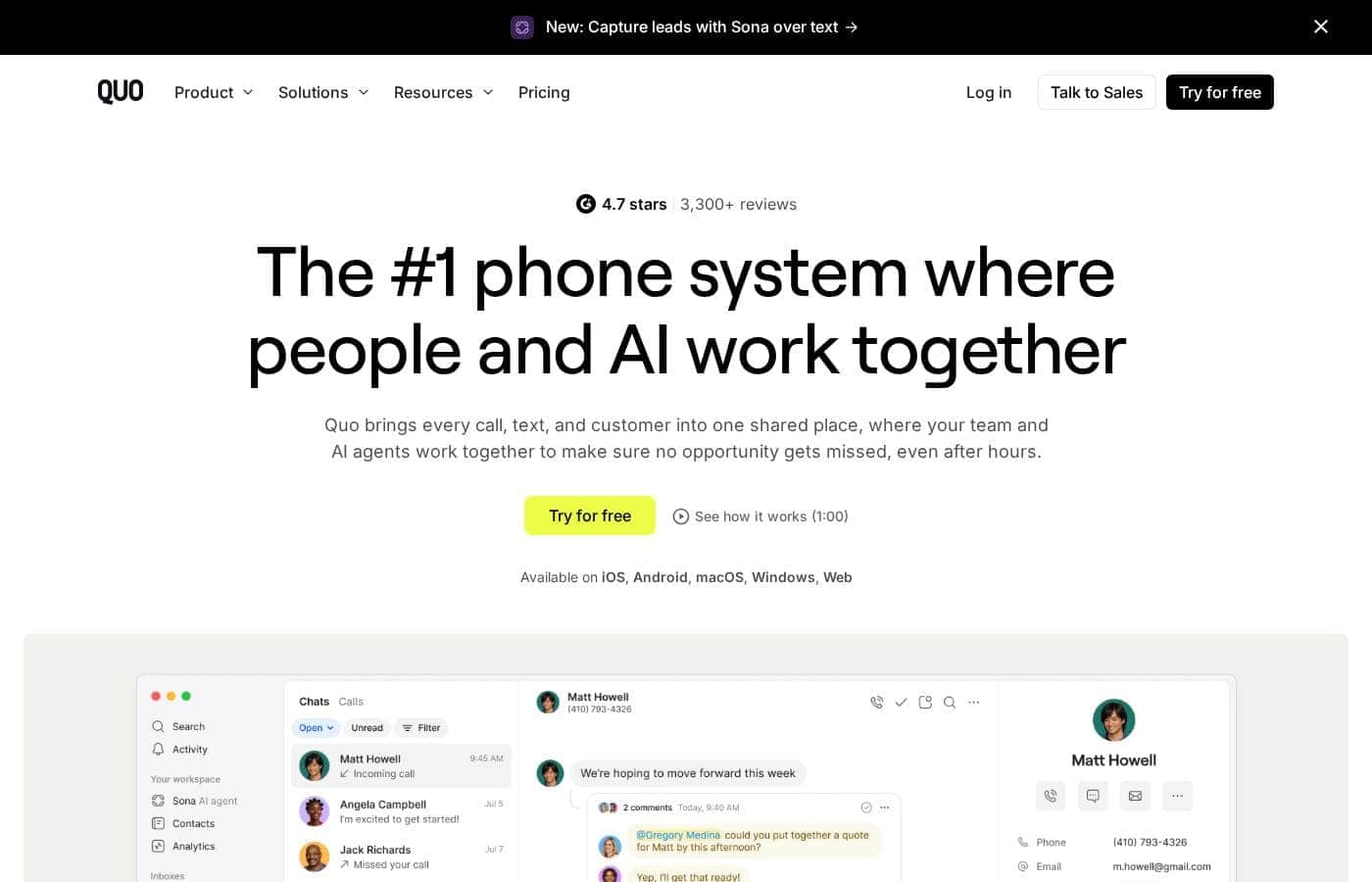
OpenPhone homepage screenshot

At a glance

Quick overview for OpenPhone: rating, pricing summary, key features, and highlights.

Ciroapp review

4.3
Reliable VoIP built for scaling teams.

We found OpenPhone provides a highly reliable, feature-rich phone service focused on supporting small teams through AI automation and robust call handling. Overall, this service delivers exceptional value and responsive customer support, making it a strong contender in the modern communication market.

Pros

  • Pro:High reliability and outstanding call/text quality across all devices.
  • Pro:Exceptional and responsive customer support, often praised for quick issue resolution.
  • Pro:Advanced features included, such as AI call summaries and voicemail transcripts.
  • Pro:Easily separates professional and personal numbers using mobile, web, or desktop apps.

Cons

  • Con:The required A2P text messaging registration can be a difficult, time-consuming process.
  • Con:Initial navigation and setup can be complex for new users without specific guidance.
  • Con:The rebrand to Quo caused significant confusion among some existing, long-term customers.
Free trial
Yes — 7 days
Range: $15–$47/monthFree trial, Monthly subscription, Yearly subscription, Per seat pricing, Usage-based pricing
This section is a summary. Detailed sections about features, use cases, pricing, and reviews follow below.

OpenPhone review, pricing, features, pros & cons

Struggling with basic communication tools that lack professional automation? OpenPhone is specifically designed to solve that problem. It brings powerful AI features and comprehensive call routing to your business communication stack.

You get enhanced call capabilities and dedicated support for all your messaging needs. ✨

What is OpenPhone?

OpenPhone is a modern communication platform built specifically for small businesses. It offers essential services like how to get a virtual phone number or a second phone number on one device. You can easily secure a Canada phone number or leverage their best SMS messaging services.

It’s an effective communication solution focused on offering better options than existing alternatives. 💡

OpenPhone Key Features

📞 Smart Call Flow and Routing

Give your callers a professional experience every time they dial your number. You can utilize the Auto attendant or AI receptionist to manage inbound calls seamlessly. Use the advanced Call flow builder and Call routing capabilities to direct contacts perfectly. This system ensures crucial calls always reach the right person quickly and reliably.

OpenPhone also supports flexible handling options during the call. Features like Group calling and Call transfers guide conversations to completion. You can even set Custom ring orders, ensuring your team answers according to a specific priority matrix. For periods of low availability, you also have reliable Call forwarding.

✨ AI-Powered Intelligence

OpenPhone turns conversations into actionable data automatically using powerful AI features. Immediately after a communication ends, you receive AI call summaries and transcripts for all calls. This makes follow-up and documentation extremely simple for your team.

The sophisticated Sona AI agent is also available to handle specific tasks and interactions. Businesses on higher plans benefit from features like AI call tags and a Full activity log. These tools categorize data, helping you track performance and measure effectiveness efficiently.

✨ Flexible Numbers and Sharing

Easily secure the exact phone numbers your business needs to establish a clear presence. OpenPhone provides options for getting a virtual phone number or a second phone number on one device. This covers local numbers, toll-free numbers, and even dedicated Canada phone numbers.

Every user receives one new or ported number upon setup. Crucially, the platform features Shared phone numbers and inboxes. This lets your entire team access the same conversation history. It keeps everyone aligned and ensures no client message gets missed.

💬 Advanced Team Messaging

Keep external and internal communication organized and perfectly timed. The platform supports dedicated Team messaging to streamline internal collaboration. You get unlimited calling and messaging within the US and Canada included with your plan.

Enhance your client engagement with powerful SMS tools. You can send Scheduled text messages ahead of important appointments. Additionally, you can utilize automated text replies when you or your team are unavailable. This maintains communication and keeps your customer service responsive, even outside business hours.

✨ Integration and Reporting

OpenPhone is designed to fit seamlessly into your existing technology stack. You can integrate advanced workflows using the Quo API, Zapier, or native connectors. These integrations enhance your operational efficiency immediately.

Available connectors include tools like Hubspot, Salesforce, and Gong. Businesses also gain access to robust administrative controls, including granular permission settings. Detailed Call performance reporting helps you monitor efficiency and ensure optimal client interactions.

Use Cases

📞 Establishing Immediate Professionalism

When you start a new business, you may use your personal mobile number for clients. This blurs boundaries and makes you look less professional. OpenPhone solves this problem quickly.

You can secure a dedicated business number, including a US, Canadian, or toll-free option. This virtual line works right on your existing phone or computer. You can set up after-hours notification muting so work calls stay within work hours. The system automatically transcribes voicemails, meaning you never miss important details. This transition helps you look established right from day one.

⚙️ Automating Complex Call Routing

Your growing business needs incoming calls routed expertly but cannot afford a large reception staff. The Call flow builder lets you direct customers instantly.

First, implement an AI receptionist or an Auto attendant to answer every call immediately. Next, use detailed Call routing to send calls to the right department or team member. You can configure custom ring orders so multiple people try to answer before a call goes to voicemail. This guarantees callers reach the correct person quickly and efficiently.

👥 Managing Team Communication with Shared Numbers

When multiple agents handle customer support or sales, conversations often get lost or duplicated. OpenPhone uses shared phone numbers and team messaging to fix this.

Multiple team members can share access to a single inbox and phone number. When a client calls or texts, anyone on the team can reply and see the full history. You can communicate internally right next to the customer conversation using team messaging. This prevents dropped customer threads and ensures seamless support.

🤖 Streamlining Sales Workflows Using AI

Your sales team needs fast, accurate logging of every client interaction for follow-up. Manually summarizing long calls takes valuable time away from selling.

OpenPhone automatically generates AI call summaries and transcripts for all calls. This provides a quick reference for context and next steps. For advanced efficiency, the Scale plan offers AI call tags and immediate integration with CRM systems like Salesforce. High-level integrations and detailed activity logs make reporting and follow-up much easier.

💬 Sending Targeted, Scheduled Messages

Following up with leads or sending appointment reminders requires timely, precise communication. Sending messages outside of business hours guarantees they are seen first thing in the morning.

  1. Use the platform to draft necessary follow-up messages or reminders.
  2. Utilize the scheduled text messages feature to select the perfect delivery time.
  3. Implement automated text replies for when the team is unavailable.
  4. Expected outcome: Customers receive important information at optimal times, boosting response rates.

Pricing Overview for OpenPhone

Pricing range
$15–$47/month
Pricing types
Free trial, Monthly subscription, Yearly subscription, Per seat pricing, Usage-based pricing

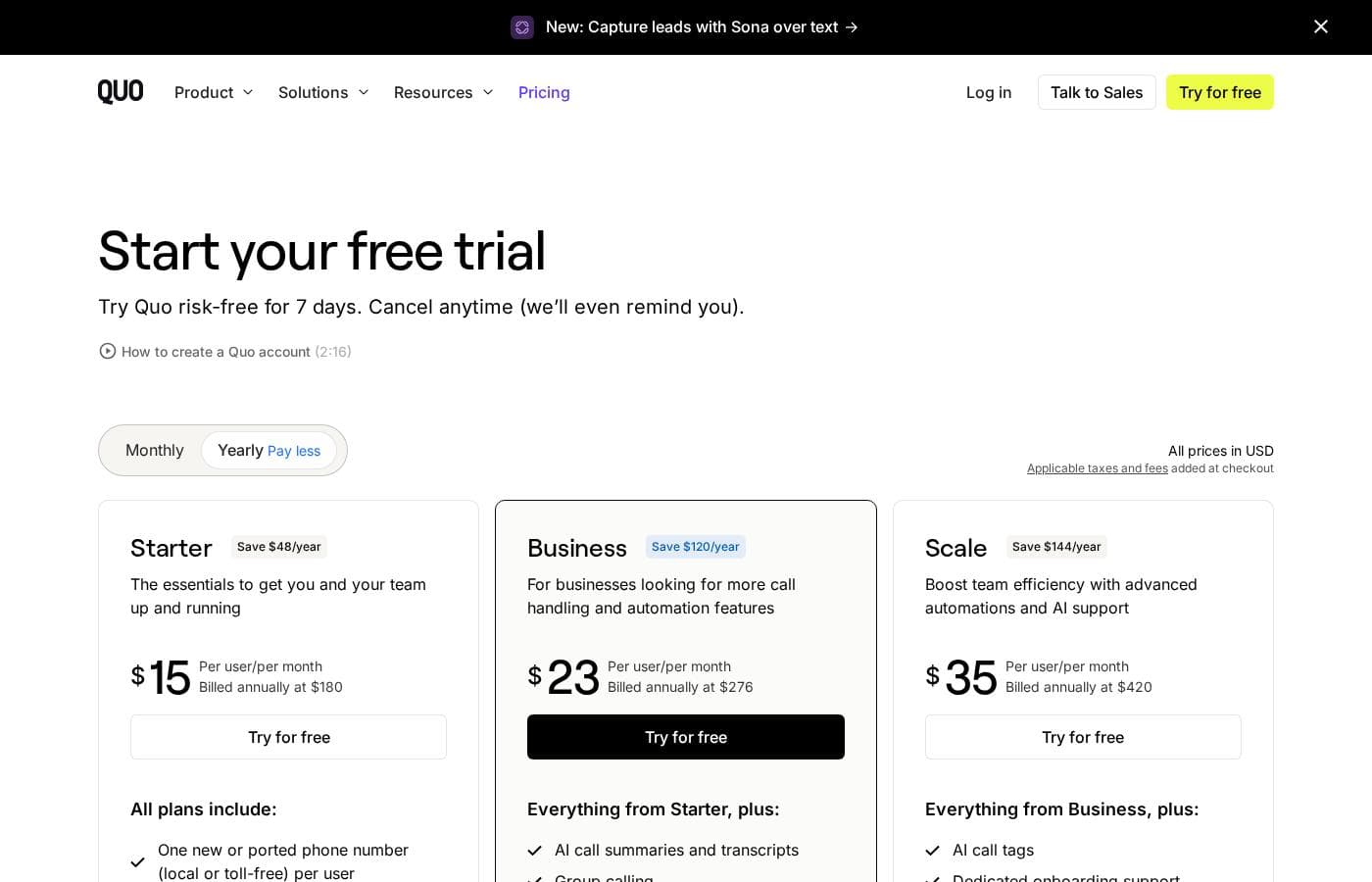
OpenPhone (now Quo) pricing is structured per user, per month, and offers significant savings when billed annually. Plans start at $15 per user per month when committing annually, moving up to $35/user/month for the most feature-rich plan.

Plans & Pricing

Starter

Monthly$19
Yearly$15
Billed annually at $180
  • One new or ported phone number (local or toll-free) per user
  • Calling and messaging to US and Canadian numbers
  • Voicemail transcripts
  • Shared phone numbers and inboxes
  • Team messaging
  • After-hours notification muting

Business

Monthly$33
Yearly$23
Billed annually at $276
  • Everything from Starter, plus:
  • AI call summaries and transcripts (all calls)
  • Group calling
  • Custom ring orders
  • Call transfers
  • Automated text replies and scheduled messaging
  • Hubspot integration

Scale

Monthly$47
Yearly$35
Billed annually at $420
  • Everything from Business, plus:
  • AI call tags
  • Dedicated onboarding support
  • Priority live chat and email ticket support
  • Salesforce and Gong integration
  • Full activity log and admin permission controls

OpenPhone costs between $15 and $35 per user per month (billed annually) with 3 plans: Starter at $15/user/month, Business at $23/user/month, and Scale at $35/user/month.

All pricing is shown per user, per month, based on annual billing. Choosing to pay yearly results in substantial savings compared to the month-to-month rates.

Starter

Price: $15 per user per month (Billed annually at $180; $19 monthly) Websites Supported: Not explicitly stated Best For: The essentials to get you and your team up and running Refund Policy: Not explicitly stated Other Features:

  • One new or ported phone number (local or toll-free) per user
  • Calling and messaging to US and Canadian numbers
  • Voicemail transcripts
  • Shared phone numbers and team messaging
  • Contact notes and after-hours notification muting

This tier provides the fundamental tools needed to establish a professional business line. If you're a small team or new business needing reliable calling, texting, and clear voicemail transcription, Starter is a great fit to get started quickly.

Business

Price: $23 per user per month (Billed annually at $276; $33 monthly) Websites Supported: Not explicitly stated Best For: Businesses looking for more call handling and automation features Refund Policy: Not explicitly stated Other Features:

  • AI call summaries and transcripts (for all calls, including those not handled by Sona)
  • Group calling and custom ring orders
  • Call transfers and auto-replies
  • Scheduled text messages
  • Hubspot integration and API/Zapier access

The Business plan is perfect for growing teams who need enhanced call management and sophisticated customer communication workflows. The added AI summarizing and integrated features help streamline your daily operations and ensure more efficient handling of client interactions.

Scale

Price: $35 per user per month (Billed annually at $420; $47 monthly) Websites Supported: Not explicitly stated Best For: Boosting team efficiency with advanced automations and AI support Refund Policy: Not explicitly stated Other Features:

  • AI call tags and full activity logs
  • Dedicated onboarding support
  • Priority live chat and email ticket support
  • Salesforce and Gong integrations
  • Full administrative permission controls and call performance reporting

Choose the Scale plan if your business relies on deep CRM integration and requires the highest level of support and detailed reporting. This tier is designed to enable advanced automation with features like AI call tagging and offers dedicated resources for high-efficiency operation.

OpenPhone makes it easy to try the service risk-free with a 7-day free trial offered across all plans, and you can cancel anytime. While the subscriptions cover US and Canadian calling/messaging, note that international calling, personalized Sona AI usage, and automated messages via API or Zapier are billed separately using credits.

User Reviews

OpenPhone (now Quo) receives widespread praise for offering a highly reliable and efficient communication platform, particularly beneficial for small businesses. Users frequently cite the exceptional customer support as a key differentiator, noting staff are responsive, professional, and dedicated to resolving technical issues quickly.

The application is celebrated as a "game-changer" due to its usability, strong reception quality, and valuable features like voicemail transcription, recorded conversations, and automatic call summaries. Many reviewers feel OpenPhone presents strong overall value, often outperforming competitors on features for the price point.

The platform successfully separates business and personal communication, offering flexible use on mobile, web, and desktop apps. While the features themselves are powerful, a few new users mentioned the interface can be difficult to navigate initially.

Furthermore, the mandatory A2P SMS registration process can be a hassle, sometimes taking weeks to complete. Despite these minor setup frictions, user sentiment remains strongly positive regarding ongoing reliability and timely support.

👍

What users say elsewhere

Sara K.
· Trustpilot
5.0 / 5

This platform is intuitive and reliable, making managing calls and texts much easier. Their customer support is fantastic—always responsive, helpful, and highly attentive. It’s exactly what my business needed.

Alex M.
· Trustpilot
5.0 / 5

Reliable, high-quality performance across devices is a huge relief. I don't worry about dropped calls anymore, and OpenPhone’s pricing is very reasonable too. It clearly outperforms my previous systems.

No reviews yet.

Write a Review

Write a Review for OpenPhone
0/100 characters
0/2000 characters

Why use OpenPhone?

Why choose this communication platform? It offers powerful features designed to make your business look and operate professionally from day one. You'll gain immediate access to advanced calling technology and flexible configurations.

  • Automate Professionalism: You can utilize an AI receptionist or configure a full Auto attendant to manage incoming calls seamlessly.
  • Structured Communication: Build the perfect customer experience using the Call flow builder and advanced Call routing capabilities.
  • Access Diverse Numbers: Easily secure specialized numbers, including a dedicated Canada phone number and essential toll-free number service providers.
  • Future-Proof Tools: Benefit from sophisticated tools like AI call tags and the Sona AI agent, keeping your operations smart and efficient.
  • Resource Focused: Find tutorials, customer stories, and webinars readily available to help you master all features. Start exploring the capabilities today! ✨

Ready to transform your workflow with OpenPhone?

Frequently Asked Questions

How do the monthly and annual billing options differ in price?

Paying annually provides significant savings compared to monthly rates. For example, the Business plan costs $23 per user monthly when billed annually, but this rate increases to $33 per user if you choose month-to-month billing.

How many days is the free trial, and is there a money-back guarantee?

The service offers a 7-day free trial on all plans so you can try it risk-free. If you need a refund policy or money-back guarantee, this is not explicitly stated on the official site.

What is the cost structure for using the Sona AI calling features?

Sona's features are usage-based and require credits, where one call equals 100 credits. There are five credit tiers available, ranging from a free tier (1,000 credits) up to the largest paid tier ($199/month for 60,000 credits).

Which software integrations are available with the different OpenPhone plans?

The Business plan includes Hubspot integration and access to the Quo API/Zapier for advanced automation. If you choose the Scale plan, you also get native integrations for Salesforce and Gong.

Can I transfer my current business phone number to OpenPhone?

Yes, their team can help you transfer (port) your existing phone number into the service for free. They work to ensure you should experience no service disruptions during the porting process.

Does my subscription cover international calling or messaging?

Calling and messaging to US and Canadian numbers are included in your standard plan. Calls and messages to virtually any other country are billed separately using credits at a per-minute or per-message rate.

How do I cancel my subscription, and what protection is there for my data?

You can easily cancel your subscription through the Quo app in just a few clicks. Your subscription remains fully active until the end of the current billing cycle. After cancellation, all your numbers and workspace data are saved for 60 days.

Do I need to pay extra fees to register for high-volume text messaging deliverability?

Yes, to ensure high message deliverability on major US carriers, you must register with The Campaign Registry (TCR). This requires a one-time $19.50 application fee plus subsequent monthly fees based on your business use case.

How are phone numbers assigned to users?

Every user added to your workspace receives one new or ported local or toll-free phone number. You can purchase additional phone numbers if needed for locations, groups, or specific teams.

Can I use my OpenPhone number for two-factor authentication (2FA)?

It is recommended that you use your personal phone number for services requiring 2FA registration or verification. Many services do not allow virtual phone numbers to be used for this purpose.

What specialized support comes with the Scale plan?

The Scale plan includes dedicated onboarding support to help you get started smoothly. You also receive priority live chat and email ticket support for faster assistance.

What technology is used for the service, and what devices are supported?

Quo uses your internet connection (Wi-Fi or data) to manage calls and messages across the globe. You can use the app on mobile (iOS and Android), desktop, or through a web browser.

What kind of data security and logging is provided?

The company verifies systems and processes used to manage data securely. The Scale plan offers enhanced security with full activity logs and granular administrative permission controls.

Are there additional fees for advanced automation outside of the core subscription?

Yes, automated messages sent via API or Zapier are not included in the standard monthly fee. They are considered usage-based and billed separately using credits.

Ready to try OpenPhone? Check out the official site or pricing.