Ninja Forms

Ninja Forms review

Ninja Forms gives WordPress users a genuinely free drag-and-drop form builder with conditional logic and unlimited submissions. Paid extensions from $3 per year add payments, marketing integrations, and multi-step workflows when a site outgrows the basics.

By Ciroapp Editorial Team · Updated Sep 16, 2026

Commission may apply at no extra cost

Ninja Forms homepage screenshot

At a glance

Quick overview for Ninja Forms: rating, pricing summary, key features, and highlights.
Vendor page checked Oct 12, 2026

Ciroapp score

4.2/ 5

Ninja Forms pairs a genuinely free core — unlimited forms, conditional logic, and entries stored in your own database — with paid extensions for payments, CRM sync, and multi-step flows. Costs stack up when a site needs several add-ons, and free users rely on forums rather than priority support. Overall, it's a dependable, budget-friendly pick for WordPress form building.

Pros

  • Pros:The core plugin is free with no cap on forms or submissions, so contact forms cost nothing even as site traffic grows.
  • Pros:Conditional logic for showing and hiding fields is included in the free version — a capability several competing plugins reserve for paid tiers.
  • Pros:Extensions are sold individually starting at $3/year, so you can buy exactly the capability you need instead of a large bundle.

Cons

  • Cons:Payments, multi-step forms, and most marketing/CRM integrations require paid extensions, so costs stack up when a site needs several at once.
  • Cons:Extension licenses must be renewed annually to keep receiving updates and support; a lapsed license leaves the add-on installed but unpatched.
  • Cons:Free-version users are limited to documentation and community forums rather than priority support.
Best for
  • Small businesses and bloggers who want unlimited contact forms at no cost, with no per-entry fees as volume grows
  • Freelance WordPress developers and agencies building customized, code-extended forms across multiple client sites
  • Nonprofits and creators collecting donations or simple payments through Stripe or PayPal add-ons
This section is a summary. Detailed sections about features, use cases, pricing, and reviews follow below.

What is Ninja Forms?

Ninja Forms is one of the most widely installed form plugins in the WordPress ecosystem, with more than 50,000,000 downloads recorded. The core plugin is free and covers everything from basic contact forms upward, while a marketplace of extensions adds payments, CRM connections, and multi-step flows. This review covers what the plugin does well, where it falls short, and which types of WordPress users should consider it.

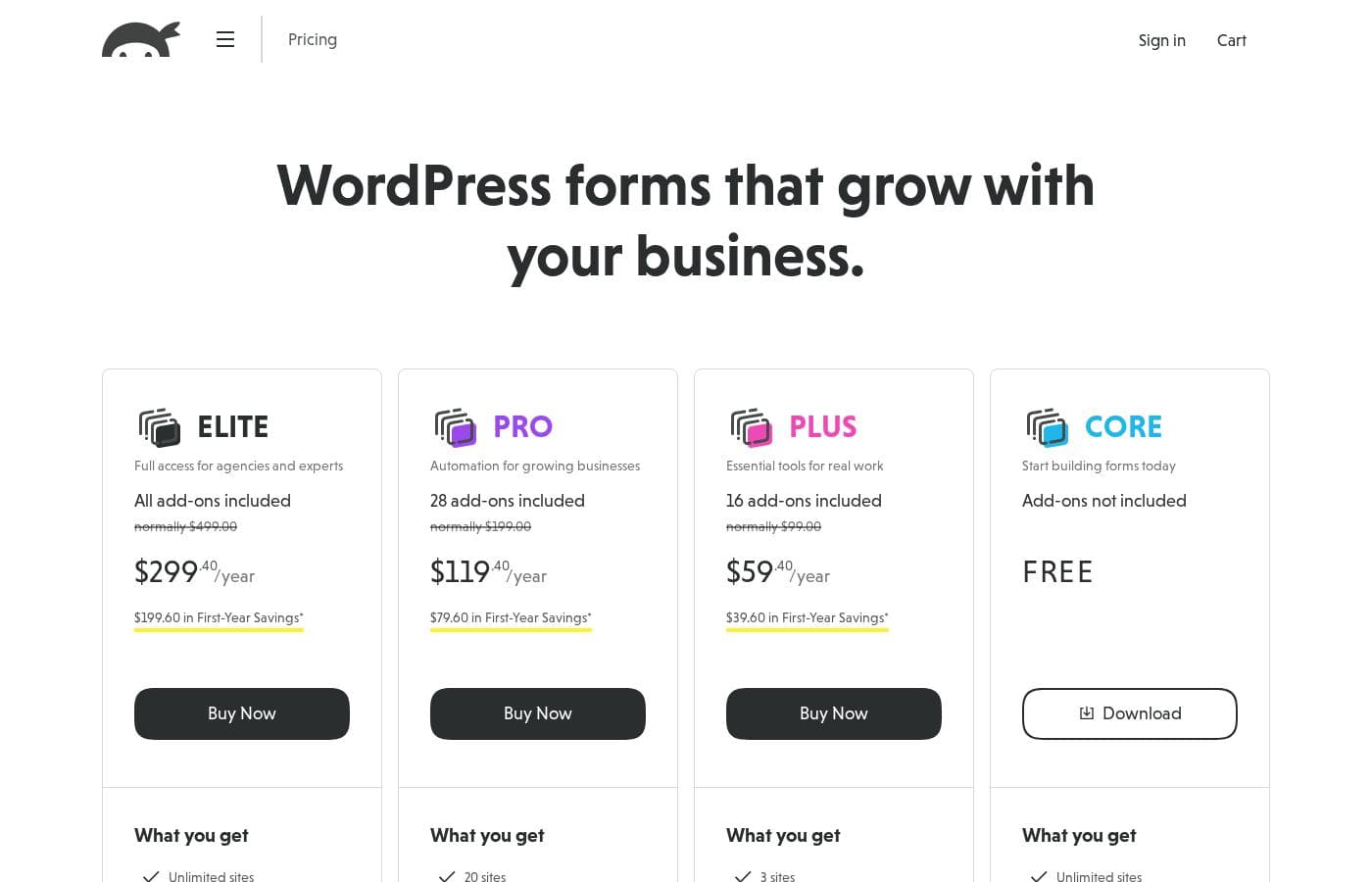
Ninja Forms is a WordPress plugin for building forms through a drag-and-drop interface directly in the admin dashboard. The free core handles field creation, submissions, and email notifications, while paid extensions add features like payment collection via Stripe and PayPal, integrations with services such as Mailchimp and Salesforce, and multi-step form flows. Pricing runs from $3 per year for individual add-ons up to $499 per year for the top-tier plan, with a free plan available alongside monthly and yearly billing options.
Should you choose Ninja Forms?

Quick buyer guidance before you compare plans or click through.

Choose it if

  • Small businesses and bloggers who want unlimited contact forms at no cost, with no per-entry fees as volume grows
  • Freelance WordPress developers and agencies building customized, code-extended forms across multiple client sites
  • Nonprofits and creators collecting donations or simple payments through Stripe or PayPal add-ons
  • Marketing teams that need form data flowing automatically into Mailchimp, Salesforce, Slack, or Zapier

Skip it if

  • Buyers who want payments, multi-step flows, and every integration bundled into one upfront purchase — Ninja Forms prices these as separate extensions
  • Non-technical site owners who expect polished, brand-matched form styling out of the box without touching CSS
  • Users who require guaranteed priority support while staying on the free plan

Next steps before buying

  1. 1Install the free plugin from your WordPress dashboard under Plugins → Add New by searching for 'Ninja Forms', then activate it.
  2. 2Create your first form via Ninja Forms → Add New, starting from a template or a blank drag-and-drop canvas, and embed it on a page using the Ninja Forms block or shortcode.
  3. 3Set up email notifications and confirm Honeypot anti-spam is enabled, then submit a test entry and review it under the Submissions screen.
  4. 4Visit ninjaforms.com/pricing to add individual extensions from $3/year when you need payments, marketing integrations, or multi-step forms.

Ninja Forms Key Features

✨ Drag-and-Drop Form Builder

Forms are assembled by dragging fields onto a canvas inside the WordPress admin, with a starter-template option for common layouts like contact and registration forms. The core field library covers text, email, dropdowns, checkboxes, dates, and file uploads, and each field exposes configurable labels, placeholders, and validation. New forms can be embedded anywhere using the Ninja Forms block or a shortcode.

✨ Conditional Logic Included in the Free Core

Unlike several competing plugins that reserve conditional behavior for paid tiers, Ninja Forms lets free users show or hide fields, change required states, and trigger actions based on earlier answers. This makes it possible to build adaptive forms — such as quoting or intake forms that branch by user type — without buying anything.

✨ Submission Management Inside WordPress

Every entry is stored in your own WordPress database, viewable from the admin area and exportable as CSV for reporting or import into other tools. Admin notifications fire on new submissions, and autoresponder emails can confirm receipt to the person who filled out the form. Keeping data on your own server simplifies compliance conversations compared with form tools that host responses externally.

✨ Payments Through Extensions

Stripe and PayPal add-ons turn forms into donation pages, order forms, or paid registration flows without a separate e-commerce plugin. Because payment capability is purchased per extension rather than bundled, a nonprofit that only needs a donation form can add that single piece instead of paying for a full commerce stack.

✨ Marketing, CRM, and Automation Integrations

Extensions connect submissions to Mailchimp, Salesforce, Slack, and Zapier, plus generic webhooks for custom pipelines. This lets form data flow automatically into email lists, CRM records, or any external system, which is usually the point at which a site moves from a free contact form to a paid extension.

✨ Developer Extensibility

The plugin exposes WordPress hooks and filters throughout, supports custom field templates that can be reused across projects, and uses merge tags for dynamic values in notifications and confirmations. For agencies and freelancers, this means a single form system can be shaped to fit very different client requirements in code.

Use Cases

💡 Business Contact and Inquiry Forms

The most common deployment: a free contact form with validation, anti-spam, and admin notifications, embedded on a contact page via the Ninja Forms block or shortcode. Because the core plugin never caps forms or submissions, a business can add separate forms per department or service without cost creeping up.

💡 Lead Generation with Email List Handoff

A signup or gated-content form feeding directly into Mailchimp means new leads land on the marketing list without manual exports. Conditional logic can tailor follow-up questions by audience segment, and Zapier or webhook extensions route the same data into additional tools when campaigns grow.

💡 Donation and Simple Payment Collection

Nonprofits and creators can use the Stripe or PayPal extensions to collect donations or payments directly through a form, without running a full shopping cart. Entry records in WordPress give a built-in log of transactions alongside the submitted details.

💡 Applications and Registrations with Branching Fields

Job applications, event registrations, and grant intake forms often need different questions for different respondent types. Conditional logic in the free core handles the branching, while file-upload fields accept resumes or supporting documents in the same submission.

💡 Client Form Development for Agencies

Freelancers and agencies building for clients benefit from hooks, filters, and reusable custom field templates that let one form system adapt to many different briefs. Purchasing only the specific extensions a client project requires keeps project costs predictable.

Ninja Forms pricing

Prices not verified yet — see the vendor page.

Ninja Forms's pricing page

Ninja Forms pricing page screenshotView pricing page screenshot

Price history

Tracking prices since Oct 1, 2026. No price change detected yet.

Pricing range: See vendor pricing

Pricing types: Free plan, Monthly subscription, Yearly subscription

Pricing notes

Plans from $3/year

Ninja Forms pricing: Plans from $3/year Plans range: $3–$499/year Billing options: Free plan, Monthly subscription, Yearly subscription

Email me when Ninja Forms changes price

One email when we detect a price change on the vendor's pricing page. No newsletter, no deals. Unsubscribe in one click.

User Reviews

No reviews yet.

Write a Review

Write a Review for Ninja Forms
0/100 characters
0/2000 characters

Why use Ninja Forms?

Forms are how WordPress sites collect leads, orders, applications, and feedback, so the builder you choose shapes both budget and data ownership. Ninja Forms keeps the essentials free — unlimited forms and submissions, conditional logic, and email notifications — with responses stored in your own WordPress database rather than a third-party service.

For developers, extensive hooks, filters, and custom field templates make it practical to extend far beyond what the settings screen offers. And with a decade-plus install base behind it, the codebase has been battle-tested across a wide range of hosts, themes, and WordPress versions.

Ninja Forms alternatives

Other tools in the WordPress Form Builder category

View all WordPress Form Builder tools
WPForms

WPForms

WordPress Form Builder4.2/5

WPForms is the ultimate drag & drop WordPress form builder. It’s designed to allow anyone to create professional online forms without needing extensive development skills. This plugin serves millions of professionals across every industry, including eCommerce, non-profits, and educational institutions. Whether you need a simple contact form or a powerful payment portal, WPForms offers the flexibility you need. It even provides over 2,000 pre-built templates to get you started quickly.

Gravity Forms

Gravity Forms

WordPress Form Builder4.2/5

Gravity Forms is the complete WordPress form management plugin you'll ever need. It's designed to help you move beyond simple contact forms and start using your captured data for good. The platform provides an intuitive visual editor, making form creation easy and fast. You can quickly build powerful custom forms from scratch or kickstart your flow using helpful pre-built contact, payment, or survey templates. This solution is trusted by thousands of web professionals and big brands alike.

Fluent Forms

Fluent Forms

WordPress Form Builder4.1/5

Fluent Forms is a professional WordPress plugin designed to help you create any kind of form swiftly. It powers over 600,000 businesses globally, focusing strongly on speed and functionality. Using the simple Drag & Drop Visual Builder, you can choose from 60+ input fields and numerous pre-built templates. Whether you need a simple contact form or an advanced quiz, Fluent Forms makes it easy for anyone, even without coding knowledge, to publish beautiful, responsive forms.

Formidable Forms

Formidable Forms

WordPress Form Builder4/5

Formidable Forms is the essential builder for professional WordPress websites. You can use this tool whether you are building your first site or developing dozens of sites yearly. It’s designed to help you succeed at any scale, handling simple contact forms or complex multi-page forms and calculations. Formidable Forms is far more than a simple form plugin; it’s an integrated application builder that lets you easily transform collected data into powerful content.

Ninja Forms FAQ

Is Ninja Forms actually free?

Yes. The core plugin is free to install from the WordPress plugin directory and includes the drag-and-drop builder, conditional logic, unlimited forms and submissions, email notifications, and Honeypot spam protection. Paid extensions from $3/year add capabilities such as Stripe and PayPal payments, Mailchimp and Salesforce sync, and multi-step flows. The pricing page also lists a free plan alongside monthly and yearly subscription options.

What happens to my forms if I stop renewing an add-on?

Existing forms keep working because the extension code stays installed on your site. However, you stop receiving updates and support for that extension, which over time can create compatibility and security risks as WordPress core changes. Renewing the license restores access to updates and priority support.

Can agencies and developers use Ninja Forms on client sites?

Yes. Ninja Forms is explicitly positioned for professional developers doing client work, and its hooks, filters, and custom field templates are designed for code-level customization. Plans scale up to $499/year for larger needs, so verify which license tier covers the number of sites you manage before purchasing.

Does the free version include spam protection?

The core plugin ships with Honeypot spam protection, which blocks most automated submissions without confronting users with a CAPTCHA. If you need stronger filtering, Google reCAPTCHA support can be added on top of the built-in protection.

Ready to try Ninja Forms? Check out the official site or pricing.

Are you Ninja Forms? Claim this listing · Get the badge