
Miro

Miro review

The AI-powered visual workspace where distributed teams brainstorm, plan, and build together on one infinite canvas.

Miro costs from $8/mo · 3 plans · Free plan available · prices checked Oct 12, 2026

By Ciroapp Editorial Team · Updated Sep 17, 2026

Commission may apply at no extra cost

Miro homepage screenshot

At a glance

Quick overview for Miro: rating, pricing summary, key features, and highlights.
Pricing verified Oct 12, 2026

Ciroapp score

4.3/ 5

Miro pairs a genuinely flexible infinite canvas with strong facilitation tools, AI cleanup, and a deep template library, which explains its status as a default for remote workshops and planning. Boards can sprawl without governance, and per-seat costs climb fast as teams grow. Overall, it's the safest pick for teams that collaborate visually every week.

Pros

  • Pros:The infinite canvas handles everything from a five-minute brainstorm to a multi-team program board without hitting space or structure limits
  • Pros:AI features actively reduce busywork by clustering sticky notes, generating ideas, and summarizing large boards after sessions
  • Pros:Facilitation tooling — timers, voting, templates, presentation mode — makes remote workshops genuinely runnable, not just possible

Cons

  • Cons:Large, long-lived boards can become slow and disorganized without deliberate structure and board hygiene, which teams often learn the hard way
  • Cons:Per-seat pricing means costs scale quickly for organizations that want every collaborator licensed, and the free tier limits the number of editable boards
  • Cons:It overlaps with cheaper or already-owned tools (diagramming apps, whiteboard features in video call software), so some teams pay twice for capabilities they barely use
Best for
  • Product and design teams that run discovery workshops, story mapping, and roadmap planning across multiple locations
  • Agile and engineering teams that want retrospectives, sprint planning, and architecture diagrams in one shared visual space
  • Facilitators, consultants, and agencies who run client workshops and need voting, timers, and professional templates
This section is a summary. Detailed sections about features, use cases, pricing, and reviews follow below.

What is Miro?

Miro positions itself as the Innovation Workspace: a shared, AI-assisted canvas where product, engineering, design, and marketing teams can think visually together in real time. Instead of scattering ideas across documents, chat threads, and slide decks, teams work on a single infinite board that scales from a quick sticky-note session to a full product roadmap. With more than 100 million users across 250,000 companies, it has become one of the default tools for remote and hybrid collaboration.

Miro is a cloud-based visual collaboration platform built around an infinite canvas. Users can add sticky notes, shapes, connectors, images, documents, and data widgets, then structure them into diagrams, flowcharts, customer journey maps, retrospectives, wireframes, and project plans. AI features help generate, cluster, and summarize content on the board, and integrations connect Miro to the tools teams already use.

Boards can be shared with view or edit permissions, making them usable for everything from a two-person huddle to a company-wide workshop.
Should you choose Miro?

Quick buyer guidance before you compare plans or click through.

Choose it if

  • Product and design teams that run discovery workshops, story mapping, and roadmap planning across multiple locations
  • Agile and engineering teams that want retrospectives, sprint planning, and architecture diagrams in one shared visual space
  • Facilitators, consultants, and agencies who run client workshops and need voting, timers, and professional templates
  • Hybrid or remote organizations replacing physical whiteboards with a permanent, searchable collaboration canvas

Skip it if

  • Solo users who only need occasional simple diagrams — a lightweight diagramming tool will be cheaper and faster
  • Teams that primarily work in structured documents and have no appetite for maintaining shared boards, since unmanaged Miro boards tend to sprawl
  • Organizations that need strict, audit-grade documentation workflows; Miro is a thinking and planning surface, not a system of record

Next steps before buying

  1. 1Create a free Miro account and start from a template — a retrospective, user story map, or brainstorming board — to learn the canvas with a real task instead of a blank page
  2. 2Invite two or three teammates to a shared board and run one actual meeting in it (a retro or planning session) to test whether the team adopts it
  3. 3Set basic board conventions early: naming, archiving finished boards, and one owner per board, so the workspace stays navigable as usage grows
  4. 4When the free plan limits block you, compare the paid tiers on per-seat cost against the number of frequent editors, and confirm which integrations your team needs before upgrading

Miro Key Features

✨ Infinite Canvas

The core of Miro is a limitless board where teams can zoom from a single sticky note out to an entire project landscape. Content types include sticky notes, shapes, text, images, videos, documents, spreadsheets, and embedded links, so a board can hold everything from a quick sketch to a full project brief without switching tools.

✨ AI Assistance

Miro's AI features work directly on the canvas: generating ideas and images, clustering related sticky notes, summarizing large boards into shortlists, and turning rough content into structured diagrams or documents. This reduces the cleanup work that typically follows a brainstorming session.

✨ Templates and Facilitation Tools

Miro ships with a large library of ready-made templates for retrospectives, user story mapping, journey mapping, SWOT analysis, and more. Facilitation features such as timers, voting, sticky-note capture modes, and attention management help workshop leaders keep large groups productive instead of talking over each other.

✨ Diagramming and Mapping

Beyond sticky notes, Miro supports structured diagramming with shape libraries, smart connectors, flowcharts, UML-style notation, and data flow diagrams. Engineers, architects, and process owners can document systems and workflows on the same canvas where the team brainstorms.

✨ Collaboration and Integrations

Boards support real-time multi-user editing, cursors, comments, and async participation. Miro integrates with common workplace tools — including video conferencing for embedded Miro boards in calls — and boards can be shared via link with granular view/edit permissions, which matters for guests and stakeholders who don't have a license.

Use Cases

💡 Product Discovery and Roadmapping

Product teams use Miro for user story mapping, prioritization exercises, and roadmap planning. Research findings, personas, and feature ideas can live on one board, so the jump from customer insight to a prioritized backlog happens in a shared visual context rather than across disconnected documents.

💡 Workshops and Team Rituals

Retrospectives, kickoffs, design sprints, and planning sessions run well on Miro because facilitators get timers, voting, and structured templates while participants contribute simultaneously on the canvas. Distributed teams get parity with the in-room whiteboard experience, and every session leaves behind a permanent, searchable artifact.

💡 System Design and Process Mapping

Engineering and operations teams diagram architecture, data flows, and business processes on Miro. Because diagrams sit next to brainstorming content and requirements, technical documentation and the discussion that produced it stay connected instead of drifting apart.

💡 Marketing and Strategy Planning

Marketing teams map customer journeys, plan campaigns, and run brand or positioning exercises on the canvas. The visual format makes it easy to bring stakeholders from different functions into the same planning session and leave with an agreed picture rather than competing slide decks.

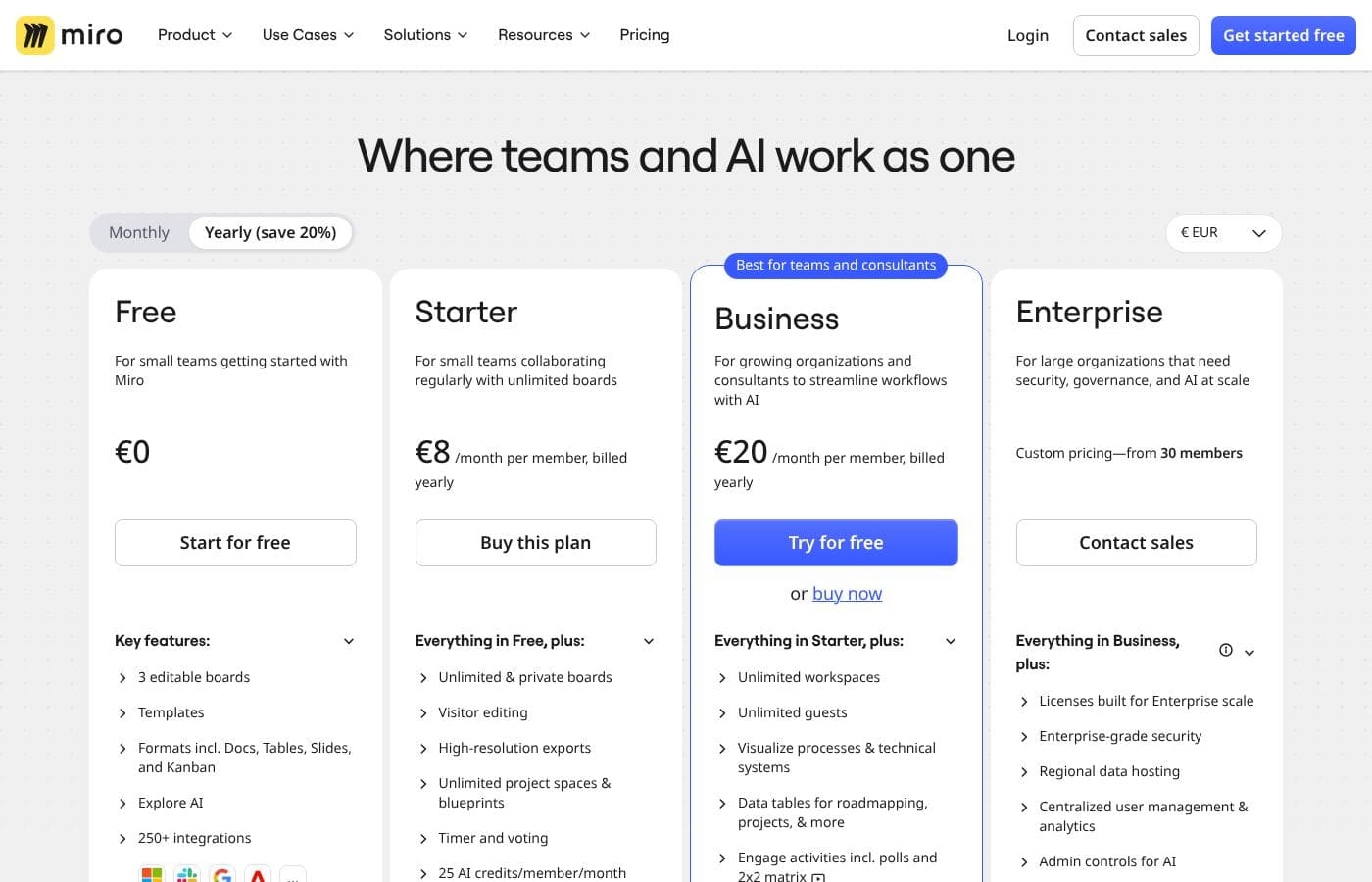
Miro pricing

From$8/mo

  • From the vendor's pricing page, checked Oct 12, 2026
  • 3 plans
  • Free plan available

Prices checked on Oct 12, 2026 from Miro's pricing page

Miro pricing page screenshotView pricing page screenshot
PlanBilled monthlyBilled annuallyIncludes
Starter
per user
$8/mo
—
per user
Business
per user
$20/mo
—
per user
Enterprise Guard
Free
—

Price history

Tracking prices since Oct 1, 2026. No price change detected yet.

Pricing types: Free plan, Monthly subscription, Yearly subscription, Per seat pricing, Usage-based pricing

Pricing notes

Miro pricing: Plans from $0/month Billing options: Free plan, Monthly subscription, Yearly subscription, Per seat pricing, Usage-based pricing

Cost calculator

Estimate what Miro costs for your team.

Billing
Per month
$40
Per year
$480

Starter is priced per user: price × 5 seats. Estimate based on published list prices, before taxes, add-ons and discounts.

How to pay less for Miro

  • Start on the free plan and upgrade only when you hit its limits.
  • Some plans are priced per user: only pay for seats people actually use.
Visit Miro

Email me when Miro changes price

One email when we detect a price change on the vendor's pricing page. No newsletter, no deals. Unsubscribe in one click.

User Reviews

No reviews yet.

Write a Review

Write a Review for Miro
0/100 characters
0/2000 characters

Why use Miro?

Most collaboration tools capture the outcome of thinking, but not the thinking itself. Miro keeps the messy, nonlinear middle stage — brainstorming, clustering, diagramming, debating — visible and shared, so decisions can be traced back to the reasoning behind them.

For distributed teams, this removes the reliance on physical whiteboards and photo snapshots, and the AI assistance reduces the manual effort of organizing and summarizing large boards. The result is faster alignment across functions that would otherwise work from different mental models.

Miro alternatives

Other tools in the Visual Collaboration category

View all Visual Collaboration tools
xTiles

xTiles

Visual Collaboration3.5/5

xTiles is a visual productivity workspace for notes, tasks, and projects that helps people organize their work on a flexible drag-and-drop canvas rather than in rigid folders and documents. It’s especially loved by visual thinkers, including many neurodivergent users, and our AI Daily Brief and automations bring updates from connected tools into one clear, actionable view each day.

Flowith

Flowith

Mind Mapping4/5

Flowith (#3 of the Month on Product Hunt) is redefining AI creativity. With over 1M global users and more than 20M+ agent requests, Flowith empowers multi-threaded creation beyond chat. Trusted by top tech leaders like MIT Tech Review.

Miro FAQ

How much does Miro cost?

Miro's cheapest paid plan, Starter, costs $8 per month. Paid plans range from $8 to $20 per month. Prices checked on Oct 12, 2026 from the vendor's pricing page.

Does Miro have a free plan?

Yes. Miro has a free plan (Enterprise Guard); paid plans start at $8 per month.

Has Miro's price changed recently?

No. We have not detected a price change since we started tracking on Oct 1, 2026.

What can I actually use Miro for beyond brainstorming?

Miro is used for structured work, not just sticky notes: user story mapping and product roadmaps, system architecture and flowchart diagrams, customer journey maps, retrospectives and workshops, project plans, and strategy documents. The template library covers most common frameworks, and diagrams sit alongside the brainstorming content that produced them, so the board becomes a lasting artifact rather than a scratchpad.

Can people without a paid Miro account collaborate on my boards?

Yes. Boards can be shared via link with view or edit permissions, so guests, clients, and occasional collaborators can participate without a license. This is one of Miro's practical advantages for workshops and stakeholder reviews: you don't need to buy a seat for everyone who looks at a board, though frequent editors will need paid accounts.

Ready to try Miro? Check out the official site or pricing.

Are you Miro? Claim this listing · Get the badge