MeetGeek

MeetGeek

Your Personalized AI Meeting Companion

#1 dans Meeting Management
2 min read · Updated 10/4/2025
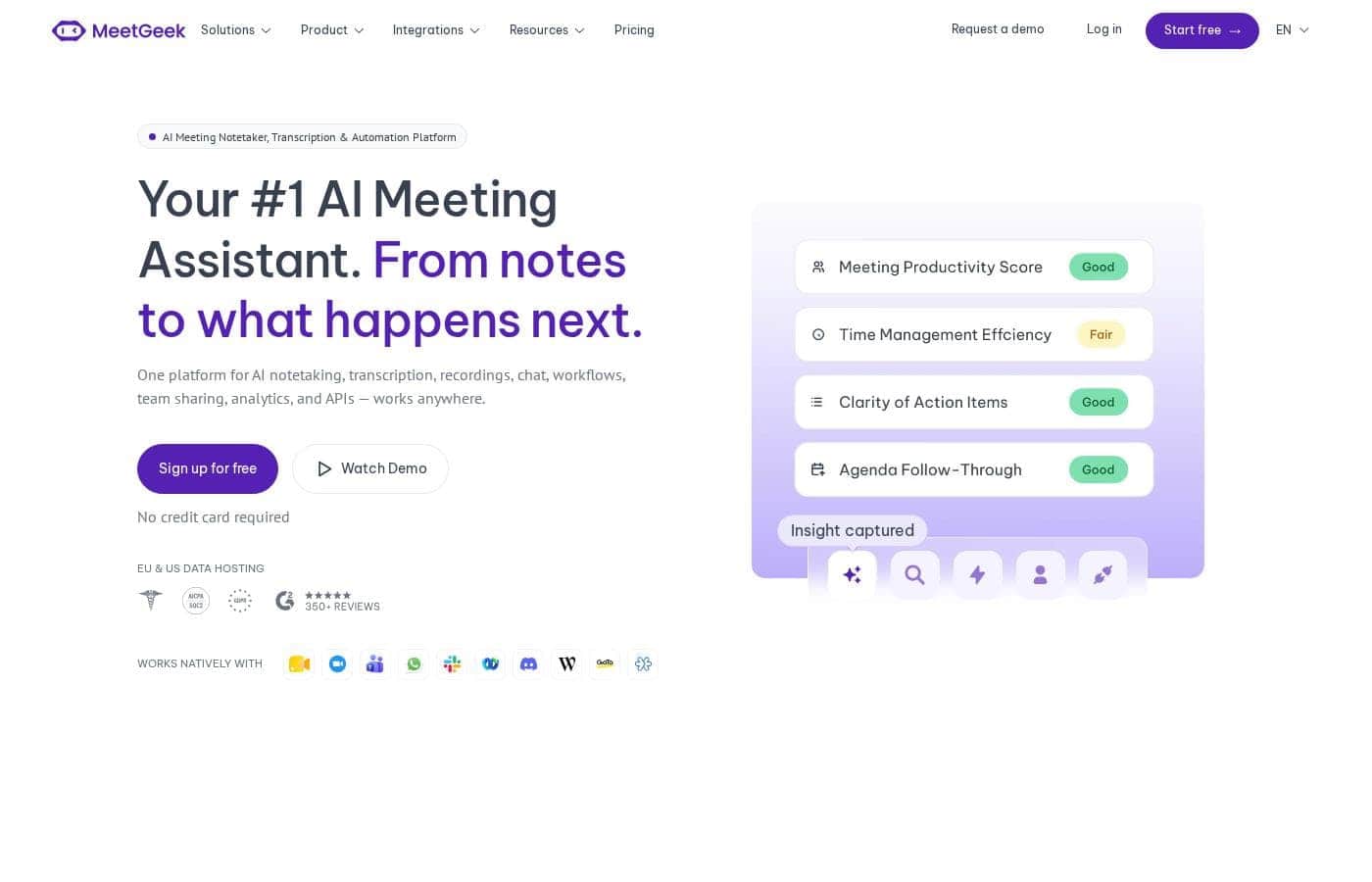
MeetGeek homepage screenshot

At a glance

Quick overview for MeetGeek: rating, pricing summary, key features, and highlights.

Ciroapp review

4.3
AI-Powered Notes with Enterprise Security.

We found MeetGeek to be a highly competitive AI meeting assistant, focused on enterprise reliability and deep integration across existing workflows. Its comprehensive security certifications and support for over 50 languages stand out significantly. Overall, this is an excellent choice for scaling teams that require reliable, secure, and context-aware meeting intelligence.

Pros

  • Pro:Access to a generous, permanently Free BASIC plan.
  • Pro:Provides "scarily accurate" context-aware AI summary generation.
  • Pro:Supports over 50 languages for transcription service and summaries.
  • Pro:Features enterprise-grade security and compliance (SOC 2, GDPR, CCPA).

Cons

  • Con:Per-user pricing structure can become costly for very large teams.
  • Con:The Free plan includes tight limits (3 hours transcription, 3 months storage).
  • Con:Lower paid tiers have usage caps with overage charges of $0.50 per extra hour.
  • Con:A money-back guarantee is not explicitly offered or detailed.
Free trial
Yes — 14 days
Range: $0–$59/per user/monthFree plan, Free trial, Monthly subscription, Yearly subscription, Per seat pricing, Usage-based pricing
This section is a summary. Detailed sections about features, use cases, pricing, and reviews follow below.

MeetGeek review, pricing, features, pros & cons

Do you feel like essential meeting insights get lost as soon as the call ends? Tired of juggling notes while trying to listen? MeetGeek solves these core hassles.

This AI companion automatically captures every detail, turning meetings from a necessary evil into rewarding experiences. Now, you can easily share action items and insights with your whole team. ✨

What is MeetGeek?

MeetGeek is an advanced AI Note Taker and Meeting Assistant. It acts as your personalized companion, designed to automatically record, transcribe, and summarize conversations. It works across almost all major platforms, including Zoom, Google Meet, and MS Teams.

You can even use the Chrome Recorder tool to capture calls with or without an accompanying bot. MeetGeek helps connect critical meeting insights across various departments, ensuring everyone stays aligned. Teams worldwide trust this tool to manage knowledge and boost productivity.

💡

MeetGeek Key Features

🌐 Universal Meeting Capture and Accessibility 🌐

Never miss a word, regardless of where your meeting takes place. MeetGeek acts as your AI companion to capture every detail. It supports meetings across almost all major platforms, including Zoom, Google Meet, and MS Teams.

You can even capture conversations from Webex, Discord, and WhatsApp, supporting both online and offline meetings. We facilitate understanding by capturing and summarizing conversations in over 50 different languages.

Want to capture a meeting when a bot isn't needed? Use the Chrome Recorder tool to record calls directly from your browser. This tool is convenient because it requires no invites and allows you to pause and resume recording whenever necessary.

✨ Smart, Context-Aware AI Summaries

Stop sifting through hundreds of lines of notes after a call. MeetGeek uses advanced AI to generate summaries that are exceptionally accurate. The AI automatically detects the meeting’s purpose, such as an interview, sales call, or team meeting.

Based on the detected call type, the system applies the perfect summary template for you. This provides highly relevant, context-aware notes and actionable insights. The summaries capture vital details, including specific action items, customer objections, and feature requests.

For full control, you can customize or create your own templates to ensure the summaries always fit your specific reporting needs. You also gain access to an integrated AI Chat feature to interact with your meeting content.

✨ Seamless Workflow Integration

Connect your critical meeting content with every tool your team already uses. MeetGeek ensures that meeting content is automatically synced to eliminate information silos. It turns scattered data into shared knowledge, making sure insights flow directly into your existing operational workflows.

This simple connectivity ensures everyone stays aligned across various departments, from Marketing to Sales. MeetGeek works with documents, calendars, chat, and CRMs. It even integrates with over 10,000 apps via powerful connectors like Zapier, Make, and n8n, ensuring maximum flexibility.

Integration points include:

✨ Deep Collaboration and Team Coaching

MeetGeek is built specifically for teams to share key moments and create a central hub of shared knowledge. This helps align your staff and boost productivity without demanding extra meetings. You can leverage features like 'Team spaces' and specific meeting insights categorized by team or call type.

Detailed transcripts, past meeting trends, and aggregated insights provide powerful coaching data. For sales teams, this aids in reviewing call records and increasing revenue per representative. HR teams can use these insights to coach interviewers effectively and reduce hiring decision time by 40%.

✨ Enterprise-Grade Security and Compliance

Protecting your sensitive meeting data is our highest priority. MeetGeek offers enterprise-level security for every user. We offer full compliance and give you complete control over what meeting content is saved and shared.

We protect your data using robust 256-bit AES and 256-bit SSL/TLS encryption. Your sensitive information is protected through thorough compliance procedures. MeetGeek is certified for SOC 2 Type II, GDPR, and CCPA standards. Furthermore, we offer flexible data hosting options in the EU and US.

Use Cases

📈 Coaching and Enabling the Sales Team

A sales manager needs to scale training quickly without sacrificing time spent selling. MeetGeek automatically captures every sales call, creating detailed transcripts and summaries. The tool provides insights into past trends and specific conversational triggers. This capability helps the manager coach the team effectively.

They access concrete call records to provide timely feedback. This structured coaching is statistically proven to increase revenue per representative by up to 35%. It also helps reduce new member onboarding time significantly, cutting it by 50%.

🤝 Streamlining HR Candidate Interviews

Recruiters need to assess competence and focus on non-verbal cues during high-stakes interviews. MeetGeek handles all the note-taking automatically. It captures and summarizes the conversation, freeing the recruiter to focus fully on the candidate.

The AI highlights key moments for review. This quick, objective sharing of important facts with hiring managers helps reduce the overall decision time by 40%. You can also use the archived conversations to coach interviewers on asking better questions over time.

Tip: Focus on the flow of the conversation; the AI will catch the specifics and action items for you.

📢 Boosting Executive Productivity and Breaking Silos

C-Level executives often track crucial information discussed across various departmental meetings. MeetGeek ensures seamless information sharing for all company decisions and customer needs. It helps break down the knowledge silos that slow organizations down.

By automatically sharing summaries and key insights after every call, everyone stays closely aligned. Teams using this tool see an average 30% boost in productivity. This result comes from eliminating unnecessary follow-up meetings and freeing up employee time for essential tasks.

🧡 Proactive Customer Success and Retention

Customer Success teams must quickly understand customer needs and pain points to boost adoption. Detailed call transcripts offer deeper insights into the customer experience. MeetGeek helps create a centralized, searchable repository of all customer interactions and feedback.

This centralized hub streamlines onboarding for new clients. Furthermore, the CS team can set up automated alerts for key milestones. This ensures proactive issue resolution, improving customer satisfaction and driving long-term loyalty.

📝 Generating Accurate, Context-Aware Summaries

You spend too much energy formatting notes immediately following a call. MeetGeek uses AI to eliminate this hassle. It automatically detects the purpose of the call—such as a sales demo or an onboarding session—and applies the perfect summary template.

Approach: The AI delivers 'scarily accurate' notes, capturing action items, feature requests, and objections. If you prefer a different format, you can easily customize or create your own templates to meet specific team needs. This ensures your actionable insights are ready immediately.

🌎 Capturing Global and Offline Meetings

Your conversations happen across many platforms, and sometimes in many languages. MeetGeek works with all major platforms like Zoom, MS Teams, and Google Meet. You can even use the Chrome Recorder tool to capture calls on Webex or WhatsApp, with or without a bot present.

The tool can capture and summarize conversations in over 50 different languages. It ensures your global team has a clear, shared understanding of outcomes, regardless of where or how the conversation took place.

⚙️ Integrating Meeting Data into Workflow Tools

Information should flow where your team already works, not sit in another silo. MeetGeek seamlessly connects meeting content with your existing tech stack. This includes CRMs like HubSpot, document repos like Notion, and chat tools like Slack.

The system automatically syncs key highlights and takeaways wherever needed. This automation eliminates manual data entry. It ensures accurate, fresh meeting data is available through your preferred tools, including over 10,000 apps via Zapier and Make.

Pricing Overview for MeetGeek

Pricing range
$0–$59/per user/month
Pricing types
Free plan, Free trial, Monthly subscription, Yearly subscription, Per seat pricing, Usage-based pricing

MeetGeek offers a flexible, per-user pricing structure designed for individuals and teams, ranging from a Free Basic plan up to the customizable Enterprise level. Paid plans start at $15 per user per month, scaling based on the volume of transcription hours required.

Plans & Pricing

BASIC

MonthlyFree
YearlyFree
3 hours transcription limit; $0.5 per extra hour not applicable since user must 'Sign Up'
  • 3 hours of transcription / mo
  • 3 months transcript storage
  • 1 month audio storage
  • Automated meeting transcription
  • Unlimited AI meeting summaries
  • Auto language detection
  • Integrations
  • Global search
  • + 2 more features

PRO

Monthly$15
YearlyNot explicitly stated (Save up to 26%)
20 hours of transcription / mo; 1 year transcript storage; 6 months video storage; $0.5 per extra hour
  • HD video recording
  • Meeting templates
  • Automated workflows
  • Zapier & Make integrations
  • Download assets
  • User management
  • Flexible sharing options

BUSINESS

Monthly$29
YearlyNot explicitly stated (Save up to 26%)
100 hours of transcription / mo; Unlimited transcript storage; 12 months video storage; $0.5 per extra hour
  • Team spaces
  • Meeting insights by team & call type
  • Comments
  • Custom dictionary
  • Custom Notetaker name
  • Private meetings by default
  • Dedicated account manager

ENTERPRISE

Monthly$59
YearlyNot explicitly stated (Save up to 26%)
Unlimited transcription and transcript storage; Custom video storage; $0.5 per extra hour
  • Branded emails
  • Organization-wide settings
  • Custom data retention
  • Custom speech models
  • Onboarding session
  • Private data storage

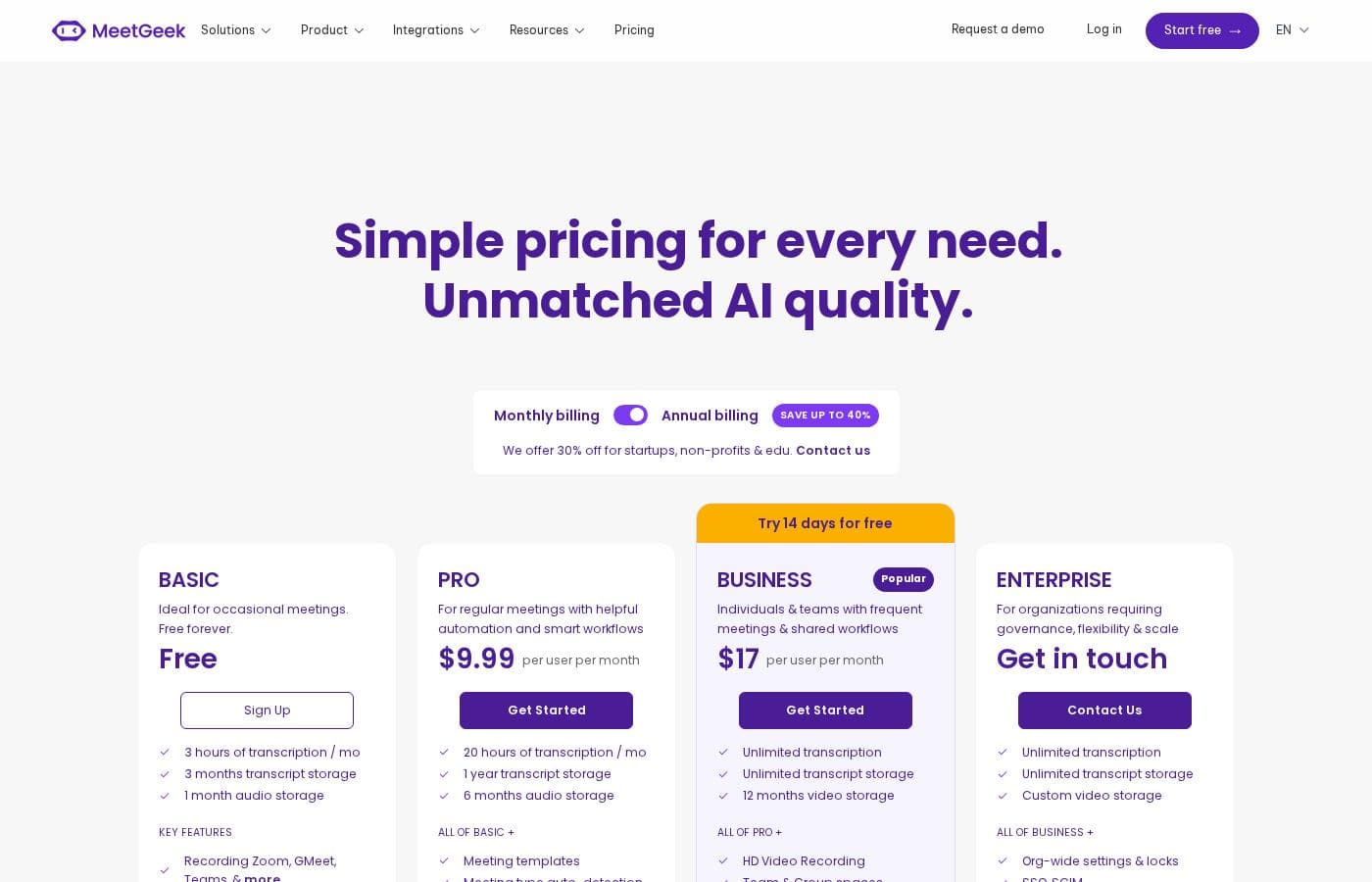
MeetGeek costs between Free and $59 per user per month with four plans: BASIC at Free, PRO at $15, BUSINESS at $29, and ENTERPRISE at $59.

Review the plans below to see which combination of features and usage best fits your needs, whether you are an individual professional or a large organization. You can try the popular BUSINESS plan free for 14 days.

BASIC

Price: Free Websites Supported: Not explicitly stated Best For: Individuals looking to improve meeting management Refund Policy: Not explicitly stated Other Features:

  • 3 hours of transcription per month
  • 3 months transcript storage
  • Automated meeting transcription
  • Unlimited AI meeting summaries
  • AI Chat and Integrations

This plan is perfect if you are just starting out or need basic automation for your personal meetings. It gives you core AI features and transcription ability at no cost.

PRO

Price: $15 per user per month Websites Supported: Not explicitly stated Best For: Professionals seeking meeting automation and personalization Refund Policy: Not explicitly stated Other Features:

  • 20 hours of transcription per month
  • 1 year transcript storage; 6 months video storage
  • HD video recording and meeting templates
  • Automated workflows and Zapier & Make integrations
  • User management and flexible sharing options

The PRO plan is ideal for professional users who lead meetings often and need higher usage limits and integration flexibility. If you record and manage meeting assets frequently, this plan offers significant storage improvements.

BUSINESS

Price: $29 per user per month Websites Supported: Not explicitly stated Best For: Gaining deeper meeting insights and collaboration (Popular Plan) Refund Policy: Not explicitly stated Other Features:

  • 100 hours of transcription per month
  • Unlimited transcript storage; 12 months video storage
  • Dedicated account manager and Team spaces
  • Custom dictionary and custom Notetaker name
  • Private meetings by default and meeting insights by team

Choose the BUSINESS plan if your team needs advanced collaboration tools and high usage capacity. This tier is excellent for maximizing team productivity and gaining sophisticated insights from aggregated meeting data.

ENTERPRISE

Price: $59 per user per month Websites Supported: Not explicitly stated Best For: Advanced retention and customization for organizations Refund Policy: Not explicitly stated Other Features:

  • Unlimited transcription and transcript storage
  • Custom video storage and private data storage
  • Organization-wide settings and branded emails
  • Onboarding session and custom speech models
  • Dedicated account manager and Organization-wide settings

The ENTERPRISE plan is designed for large organizations requiring maximum control, security, and customization. If you need powerful administrative features, tailored retention policies, and dedicated support, contact the sales team to set up this extensive plan.

MeetGeek helps you get started easily with the Free BASIC plan. Paid plans are billed per user monthly, but you can save significantly by choosing annual billing. Be sure to try the 14-day free trial available for the BUSINESS plan before committing.

User Reviews

We were unable to synthesize specific user sentiment from external platforms as no Trustpilot or Capterra review snippets were provided from the available sources. However, based on the platform's stated capabilities, MeetGeek targets professional users seeking a highly secure and automated solution.

MeetGeek claims its AI assistant delivers "scarily accurate" meeting summaries, which is a key value proposition for its users. The service strongly emphasizes enterprise compliance (SOC 2 Type II, GDPR), suggesting reliability and data security are major focuses.

For teams, the ability to integrate seamlessly with tools like HubSpot, Slack, and Notion is highlighted as critical for eliminating information silos. Furthermore, the platform supports transcription and summary creation in over 50 languages, presenting significant utility for international teams.

The availability of dedicated support and scalable usage limits across various paid tiers indicates a robust offering for both small businesses and large organizations looking for professional meeting intelligence tools. 📝

No reviews yet.

Write a Review

Write a Review for MeetGeek
0/100 characters
0/2000 characters

Why use MeetGeek?

Stop worrying about note-taking and start focusing on your conversation. MeetGeek ensures that every vital piece of information is captured and easily accessible. Choose this platform for reliable results and seamless collaboration:

  • Get 'scarily accurate' notes: The AI automatically detects the call type, such as sales or onboarding, and applies a perfect summary template. This provides you with context-aware and actionable insights.
  • Eliminate information silos: Connect meeting content with all your existing tools including HubSpot, Slack, Asana, and Notion. MeetGeek automatically syncs key highlights to wherever your team currently gets work done.
  • Access global understanding: Capture and summarize conversations in over 50 different languages, supporting both online and offline meetings.
  • Ensure enterprise-grade security: Your sensitive data is protected with 256-bit encryption and thorough compliance measures, including SOC 2 Type II, GDPR, and CCPA certification.
  • Facilitate effective coaching: Utilize detailed transcripts, past trends, and insights to effectively coach your team. This capability helps reduce new member onboarding time and can increase revenue per representative. ✅

Ready to transform your workflow with MeetGeek?

Frequently Asked Questions

What is the cost if I exceed my monthly transcription hours?

If you are on a paid plan (PRO, BUSINESS, or ENTERPRISE), transcription overages cost $0.50 per extra hour. The free BASIC plan does not allow this immediate overage; users requiring more than 3 hours must upgrade to a paid tier.

Does MeetGeek train its AI models using my private meeting data?

No, your data is kept secure and private. Documentation indicates that MeetGeek does not use your data for training its Large Language Models. This is part of their commitment to high security standards.

What security compliance certifications does MeetGeek maintain?

MeetGeek uses 256-bit AES and TLS encryption to protect your conversations. They maintain enterprise security compliance, including SOC 2 Type II, GDPR, and CCPA certifications.

How long are my video recordings and transcripts stored?

Storage capacity depends on your plan level. PRO stores transcripts for one year and video for six months. The popular BUSINESS plan offers unlimited transcript storage and stores video for 12 months.

How can I try the advanced features before committing to a subscription?

You can sign up for the free BASIC plan to test core AI features and transcription. Alternatively, MeetGeek offers a complimentary 14-day free trial specifically for the popular BUSINESS plan features.

What languages are supported for transcription and summarization?

The platform supports impressive multilingual capabilities for global teams. MeetGeek can correctly transcribe and summarize conversations in over 100 different languages.

Are there discounts available for schools or non-profit organizations?

Yes, MeetGeek offers a special 30% off discount for startups, non-profits, and educational institutions. To access this specialized pricing, you need to contact their sales team directly.

What is the maximum duration for a single meeting recording?

The recording limit varies by plan tier. BASIC and PRO plans allow meetings up to 2 hours. The BUSINESS plan extends to 3 hours, and the ENTERPRISE plan supports up to 4 hours.

How are integrations handled beyond connecting to my calendar and CRM?

The PRO plan includes automated workflows and integrations with Zapier and Make. This allows you to connect MeetGeek content with over 7,000 external applications and tools.

Does MeetGeek offer a money-back guarantee or define a refund policy?

Not explicitly stated on the official site. While a 14-day free trial is available, the public pricing information does not detail a standard money-back guarantee or specific refund terms.

Which plan provides the best value for a scaling organization focused on collaboration?

The BUSINESS plan is recommended as the 'Popular' choice for scaling collaboration. It includes Team spaces, advanced meeting insights, and a dedicated account manager, supporting up to 100 transcription hours monthly.

How much can I save if I choose an annual subscription?

Customers who commit to annual billing rather than monthly billing can save a significant amount. Choosing the annual option allows you to receive a discount of up to 26% off the total price.

What kind of support is included with the paid tiers?

All paid plans include chat and email customer support. The BUSINESS and ENTERPRISE tiers upgrade this by granting you a dedicated account manager for personalized oversight.

Can I select where my data is hosted for security purposes?

Yes, MeetGeek provides flexibility for data residency. They offer compliant EU and US data hosting options to meet organizational security requirements.

Ready to try MeetGeek? Check out the official site or pricing.